
# Documentation
> Complete documentation for Large Language Models
---
## Document: Webhooks
Webhooks allow external services to be notified when certain events occur in our system. This documentation covers how to set up a webhook to receive notifications when a lead is saved
URL: /webhook
# Webhooks
## Overview
Webhooks allow external services to be notified when certain events occur in our system. This documentation covers how to set up a webhook to receive notifications when a lead is saved.
## Webhook Configuration
### Basic Setup
1. **Name your webhook**
Provide a unique name for your webhook (e.g., "Lead Tracking Webhook")
2. **Notification URL**
Enter the URL where we should send notifications (e.g., `https://your-service.com/webhooks/leads`)
3. **HTTP Method**
Select the HTTP method used to send the webhook (typically POST)
4. **Headers (Optional)**
Add any required headers as key/value pairs (e.g., Authorization tokens)
5. **Webhook Status**
Enable or disable the webhook as needed
### Supported Events
Currently, we support the following event:
- `save_lead`: Triggered when a new lead is saved or an existing lead is updated
## Notification Payload
When a `save_lead` event occurs, your webhook will receive a POST request with the following JSON payload:
```json
{
"data": {
"email": "",
"company": "",
"first_name": "",
"last_name": "",
"phone": "",
"website": "",
"position": "",
"twitter": "",
"linkedin": "",
"notes": "",
"score": 0
}
}
```
### Field Descriptions
| Field | Type | Description |
| ---------- | -------- | ------------------------------- |
| email | string | Lead's email address |
| website | string | Website URL |
| company | \*string | Company name |
| first_name | \*string | Lead's first name |
| last_name | \*string | Lead's last name |
| phone | \*string | Phone number |
| position | \*string | Job position |
| twitter | \*string | Twitter handle |
| linkedin | \*string | LinkedIn profile URL |
| notes | \*string | Additional notes about the lead |
| score | integer | Lead score (numeric value) |
## Example Implementation
Here's an example of how you might handle the webhook in a Node.js application:
```javascript
const express = require("express");
const app = express();
app.post("/webhooks/leads", express.json(), (req, res) => {
const leadData = req.body.data;
console.log("Received new lead:", leadData);
// Process the lead data here
res.status(200).send("Webhook received");
});
app.listen(3000, () => {
console.log("Webhook server listening on port 3000");
});
```
## Best Practices
1. Always validate the incoming webhook data
2. Implement proper error handling
3. Consider adding authentication (e.g., via headers)
4. Respond quickly (within a few seconds) to avoid timeout issues
5. Implement retry logic for failed webhook deliveries
---
## Document: Usage Limits and Quotas
Monitor your API usage, manage team requests, and access detailed request history within Tomba.io.
URL: /usage-and-quotas
# Usage Limits and Quotas
## [Usage Limits and Quotas](https://app.tomba.io/usage)
You can monitor and manage your API usage directly from the [**Usage Dashboard**](https://app.tomba.io/usage), which provides a detailed summary of:
- API call volume
- Remaining quota
- Personal vs. team usage
- Historical trends (up to 3 months)
---
## Viewing Your Usage
- **Individual and Team Views:** Choose to display only your own API requests or view the cumulative usage of your team via the [Usage Panel](https://app.tomba.io/usage).
- **Flexible Insights:** Switch between daily, weekly, and monthly data to track your activity and adjust your strategy accordingly.
---
## [Request History](https://app.tomba.io/usage/requests)
For advanced tracking and auditing:
- **Detailed Logs:** View up to **1,000 recent requests** made in the past 90 days in the [Request History](https://app.tomba.io/usage/requests) section.
- **CSV Export:** Download your request log as a CSV file for further analysis, performance review, or compliance tracking.
---
## Smart Request Handling
- **No Charge for Empty Results:**
When a **[Domain Search](https://tomba.io/domain-search)**, **[Email Finder](https://tomba.io/email-finder)**, or **[Email Verifier](https://tomba.io/email-verifier)** request doesn’t return a result, it **will not count** against your quota.
> For example: Verifying a webmail like `gmail.com` will return no result and consume **zero requests**.
- **Requests Counted Once Every 30 Days:**
Identical API requests are **only counted once every 30 days**.
> This is especially useful when re-running the same data due to temporary storage issues or testing your integration.
---
## Monthly Reset and Carryover Policy
- **Monthly Reset:** Your quota resets automatically every 30 days based on your [subscription cycle](https://app.tomba.io/settings/subscription).
- **No Carryover:** **Unused requests do not roll over** to the next month. Be sure to make full use of your credits within the cycle.
---
By understanding your usage patterns and leveraging these rules, you can optimize your workflows, avoid unnecessary consumption, and fully utilize your monthly plan with [Tomba.io](https://tomba.io) 🚀
---
## Document: Rate Limits
If you exceed that limit we'll return a 429 HTTP status code to you.
URL: /rate-limits
# Rate Limits
If you exceed that limit we'll return a 429 HTTP status code to you.
## Overview of Request Costs
| Tool | Request Cost |
| --------------------------------------------------------- | ----------------------------------------------- |
| [Domain Search](https://tomba.io/domain-search) | Counted 1 for up to 10 Emails |
| [Email Finder](https://tomba.io/email-finder) | Counted as 1 for 1 Email |
| [Author Finder](https://tomba.io/author-finder) | Counted as 1 for 1 Email or article person name |
| [Email & Domain Enrichment](https://tomba.io/enrichment) | Counted as 1 for 1 Email |
| [LinkedIn Email Finder](https://tomba.io/linkedin-finder) | Counted as 1 for 1 Email |
| [Email Verification](https://tomba.io/email-verifier) | Counted as 1 for 1 Email |
| [Phone Finder](https://tomba.io/phone-finder) | Counted as 1 for 1 Email |
| [Phone Validate](https://tomba.io/phone-validator) | Counted as 1 for 1 Phone |
| [Reveal search](/api/reveal#search-companies) | Counted as 1 for 50 companies |
No requests are counted if Tomba cannot provide an email.
## Overview of Bulk Limits and Concurrency
The following table outlines the daily bulk limits and maximum concurrent operations allowed per tool. Staying within these limits ensures optimal performance and resource utilization.
| Tool | Limit | Max Concurrent Jobs |
| --------------------------------------------------------------------- | ------ | ------------------- |
| [Bulks Domain Search](https://tomba.io/bulks/domain-search) | 15/day | 2 |
| [Bulk Email Finder](https://tomba.io/bulks/email-finder) | 15/day | 2 |
| [Bulk Author Finder](https://tomba.io/bulks/author-finder) | 15/day | 2 |
| [Bulk Email Enrichment](https://tomba.io/bulks/email-enrichment) | 15/day | 2 |
| [Bulk Linkedin Finder](https://tomba.io/bulks/linkedin-finder) | 15/day | 2 |
| [Bulk Email Verifier](https://tomba.io/bulks/email-verifier) | 15/day | 2 |
| [Bulks Phone Finder](https://tomba.io/bulks/phone-finder) | 15/day | 2 |
| [Bulks Phone Validate](https://tomba.io/bulks/phone-validator) | 15/day | 2 |
| [Bulks Company Enrichment](https://tomba.io/bulks/company-enrichment) | 15/day | 2 |
| [Bulks Similar](https://tomba.io/bulks/domain-similar) | 15/day | 2 |
| Domain export | 15/day | 2 |
| Reveal search export | 15/day | 2 |
**Additional Notes:**
- When a Domain Search or an Email Finder request doesn't return a result, the request isn't counted. Similarly, for the Email Verifier: if you verify a webmail and no result is provided, the request will not be used.
- Unique requests are counted only once every 30 days against your quota. If you need to re-run a series of requests due to improper data storage or for any other reason, these will not count against your monthly quota. Consequently, you can make identical API requests repeatedly within the same billing period. This flexibility is especially beneficial for developers who are testing integrations.
- **⚠️ All limits are shared across your team members. Please respect these limits. If you need higher limits for an integration app, [contact us](https://tomba.io/) to discuss options.**
## Is There a Request Per Second Limit?
_Understand if there's a limit on requests per second, ensuring you can manage your searches efficiently without exceeding platform constraints._
## Request Rate Limits
| API Endpoint | Rate Limit |
| ---------------------------------------------------- | ----------------------- |
| [Email Finder](/api/finder#email-finder) | 300 requests per minute |
| [Enrichment](/api/finder#email-enrichment) | 300 requests per minute |
| [Author Finder](/api/finder#author-finder) | 150 requests per minute |
| [LinkedIn Email Finder](/api/finder#linkedin-finder) | 100 requests per minute |
| [Email Verifier](/api/verifier#email-verifier) | 150 requests per minute |
| [Domain Search](/api/finder#domain-search) | 15 requests per second |
| [Reveal search](/api/reveal#search-companies) | 50 requests per minute |
If you reach the limit, a 429 error will be triggered.
---
## Document: Official Language Libraries
We provide official client libraries to help you integrate Tomba.io into your projects across various programming languages
URL: /libraries
# Official Language Libraries
We provide official client libraries to help you integrate Tomba.io into your projects across various programming languages. Below is a list of our official libraries along with their current status, package manager details, and direct links. The logos are displayed in a circular format for visual clarity.
| Language | Logo | Status | Link | Package Manager |
| ------------------------------------------- | ------------------------------------------------------------------------------------------------------------------------------------------------------ | -------- | ------------------------------------------------------------------- | --------------- |
| [Javascript](./libraries/node-email-finder) | | Released | [Tomba JS](https://www.npmjs.com/package/tomba) | NPM package |
| [Ruby](./libraries/ruby-email-finder) | | Released | [Tomba Ruby](https://rubygems.org/gems/tomba) | Ruby Gems |

| [R](./libraries/r-email-finder) | | Released | [Tomba R](https://cran.r-project.org/web/packages/tomba/index.html) | CRAN |

| [Dart](./libraries/dart-email-finder) | | Released | [Tomba Dart](https://pub.dev/packages/tomba) | Pub |

| [Python](./libraries/python-email-finder) | | Released | [Tomba Python](https://pypi.org/project/tomba-io/) | PyPi |

| [PHP](./libraries/php-email-finder) | | Released | [Tomba PHP](https://packagist.org/packages/tomba-io/php) | Packagist |

| [Deno](./libraries/deno-email-finder) | | Released | [Tomba Deno](https://deno.land/x/tombaio) | Deno Land |

| [C#](./libraries/csharp-email-finder) | | Released | [Tomba C#](https://www.nuget.org/packages/Tomba) | NuGet |

| [Rust](./libraries/rust-email-finder) | | Released | [Tomba Rust](https://crates.io/crates/tomba) | crates.io |

| [Lua](./libraries/lua-email-finder) | | Released | [Tomba Lua](https://luarocks.org/modules/benemohamed/tomba) | LuaRocks |

| [Elixir](./libraries/elixir-email-finder) | | Released | [Tomba Elixir](https://hex.pm/packages/tomba) | Hex.pm |
| [Go](./libraries/go-email-finder) | | Released | [Tomba Go](https://github.com/tomba-io/go) | GitHub |

| [Perl](./libraries/perl-email-finder) | | Released | [Tomba Perl](https://github.com/tomba-io/perl) | GitHub |

**[Let us know](mailto:info@tomba.io)** if you’ve built something you’d like added to this list!
---
## Document: Introduction to Tomba.io
Discover the power of Tomba.io for email finding, domain search, email verification, and advanced integrations.
URL: /introduction
# Introduction to Tomba.io
### Welcome to Tomba.io
Tomba.io is your ultimate solution for discovering, verifying, and managing professional email addresses. Designed for sales, marketing, and recruitment professionals, our platform empowers you with the tools to connect with your target audience efficiently.
## What Makes Tomba.io Unique?
- **[Email Finder](https://tomba.io/email-finder):** Access a comprehensive database of verified email addresses.
- **[Author Finder](https://tomba.io/author-finder):** Find article authors and their contact details quickly and accurately.
- **[Domain Search](https://tomba.io/domain-search):** Uncover key contact details associated with any business domain.
- **[LinkedIn Email Finder](https://tomba.io/linkedin-finder):** Find professional emails using just a LinkedIn profile URL.
- **[Email Verification](https://tomba.io/email-verifier):** Ensure your outreach efforts are directed toward valid, active contacts.
- **[Bulk Tasks](https://tomba.io/bulks):** Manage and execute large-scale operations effortlessly.
- **[Email & Domain Enrichment](https://tomba.io/enrichment):** Enhance your data with detailed email and domain insights.
- **[Phone Finder](https://tomba.io/phone-finder):** Find Phone Numbers from Any Contact Information
- **[Phone Validation](https://tomba.io/phone-validator):** Validate Phone Numbers & Check Carrier Information
- **[Look-Alike Features](/api/~endpoints#similar):** Discover competitor and similar websites to expand your targeting with precision.
- **[Technologies Data](/api/~endpoints#technology):** Know what technologies are used by your target websites and enhance lead qualification.
- **[Seamless Integrations](/integrations):** Extend functionality with integrations for Google Sheets, Chrome, Firefox, Edge, Opera, Excel add-ons, and more.
- **[Advanced API Integration](https://tomba.io/api):** Easily incorporate our powerful tools into your existing workflows.
Explore our features and see how Tomba.io can transform your outreach strategy and drive business growth.
---
## Document: HTTPS / SSL
Our API is available over a secure HTTPS connection for all users, including those on the free plan
URL: /https-ssl
# HTTPS / SSL
Our API is available over a secure HTTPS connection for all users, including those on the free plan. Simply prefix your request URLs with `https://` to ensure your calls are secure.
---
## Document: Creating a Free Account
Learn how to quickly create your free Tomba.io account using Google, LinkedIn, GitHub, or email.
URL: /free-account
# Creating a Free Account
Getting started with Tomba.io is simple and flexible. Whether you prefer using your existing Google account, LinkedIn profile, GitHub account, or simply registering with your email, our streamlined process has you covered.
👉 **[Click here to get started](https://app.tomba.io/auth/signin)**
## Sign Up Options
### 1. Google Login
- Click the **"Sign Up with Google"** button.
- You will be redirected to Google for authentication.
- Once authenticated, you'll be automatically redirected back to Tomba.io with your account set up.

### 2. LinkedIn Login
- Choose the **"Sign Up with LinkedIn"** option.
- Authenticate using your LinkedIn credentials.
- After a successful login, your Tomba.io account will be created using your LinkedIn information.

### 3. GitHub Login
- Select the **"Sign Up with GitHub"** option.
- You’ll be redirected to GitHub for secure authentication.
- After confirming access, your account on Tomba.io will be instantly created.
### 4. Email Registration
- Select the **"Sign Up with Email"** option.
- Enter your details: name, email, and password.
- Verify your email address by clicking the confirmation link sent to your inbox.
Start building smarter outreach workflows in minutes with Tomba.io 🚀
---
## Document: Key Features and Endpoints
Explore the comprehensive list of API endpoints available on Tomba.io along with detailed descriptions and key features for each.
URL: /features
# Key Features and Endpoints
Tomba.io provides a robust and extensive set of API endpoints designed to power your email discovery, enrichment, and lead generation workflows. Below is a complete overview of the main API features available, each with a short description, core capabilities, and relevant links to explore more.
---
## [Account Information](https://app.tomba.io/settings/)
**Description:** Retrieve detailed information about your Tomba.io account, including subscription, settings, and usage.
**Features:**
- Access profile and billing data.
- Monitor plan quotas and consumption.
- Customize preferences and security settings.
---
## [Domain Search](https://tomba.io/domain-search)
**Description:** Search for professional email addresses and company data using a domain name.
**Features:**
- Retrieve verified email lists per domain.
- Filter by department or seniority.
- Access domain metadata and company info.
---
## [Email Finder](https://tomba.io/email-finder)
**Description:** Find a specific email address by entering a name and domain.
**Features:**
- Search by full name and domain.
- Get confidence score and status.
- Great for outbound prospecting.
---
## [Email Enrichment](https://tomba.io/enrichment)
**Description:** Enrich email data with social, company, and location details.
**Features:**
- Augment leads with verified metadata.
- Identify job roles, social handles, and company info.
- Improve targeting and segmentation.
---
## [Author Finder](https://tomba.io/author-finder)
**Description:** Find emails of blog authors and contributors on websites.
**Features:**
- Discover authors of online content.
- Useful for PR and media outreach.
- Filter by source or publication type.
---
## [LinkedIn Finder](https://tomba.io/linkedin-finder)
**Description:** Use a LinkedIn profile URL to discover the associated professional email.
**Features:**
- Extract verified emails directly from LinkedIn URLs.
- Fast and accurate with a high match rate.
- Ideal for recruiters and B2B sales teams.
---
## [Email Verifier](https://tomba.io/email-verifier)
**Description:** Validate any email address for deliverability.
**Features:**
- Check SMTP and MX records.
- Return real-time status.
- Reduce bounce rates and spam flags.
---
## [Email Sources](https://tomba.io/email-finder#sources)
**Description:** View the original URLs where Tomba found the email.
**Features:**
- Ensure traceability and authenticity.
- Display source page, date, and context.
- Useful for compliance and transparency.
---
## [Phone Finder](https://tomba.io/phone-finder)
**Description:** Discover phone numbers linked to domains or emails.
**Features:**
- Get company and contact-level numbers.
- Validate phone numbers for accuracy.
- Complement email-based outreach.
---
## [Usage Stats](https://app.tomba.io/usage)
**Description:** Track your API consumption and usage limits.
**Features:**
- Visualize API call history.
- Optimize usage with quota analysis.
- Real-time updates.
---
## [Leads](https://app.tomba.io/leads)
**Description:** Fetch leads based on company, industry, or location filters.
**Features:**
- Search leads using smart filters.
- Export lead data to your CRM.
- Segment by industry, size, role, etc.
---
## [Lead Lists](https://app.tomba.io/leads/lists)
**Description:** Create and manage groups of leads for campaign targeting.
**Features:**
- Organize leads by project or region.
- Share lists across your team.
- Import/export CSVs in bulk.
---
## Lead Attributes
**Description:** Access enriched metadata for a specific lead.
**Features:**
- Get role, company, social profiles, etc.
- Enhance targeting and personalization.
- Improve scoring models.
---
## [Account Logs](https://app.tomba.io/usage/requests)
**Description:** View activity logs for API events and account changes.
**Features:**
- Review login, API, and team events.
- Ensure team and system accountability.
- Audit changes and permissions.
---
## [API Keys](https://app.tomba.io/api)
**Description:** Manage your API access credentials securely.
**Features:**
- Generate new keys or revoke old ones.
- Rotate secrets securely.
- Maintain seamless integration.
---
## [Email Count](https://tomba.io/domain-search)
**Description:** Quickly get the total number of emails found on a domain.
**Features:**
- Check email availability at scale.
- Preview lead potential before diving in.
- Use in dashboards or decision logic.
---
## [Technology Detection](/api/~endpoints#technology)
**Description:** Detect what technologies (e.g. CMS, analytics) a site is using.
**Features:**
- Know what tools your leads are using.
- Great for MarTech and SaaS targeting.
- Identify platform opportunities.
---
## [Similar Websites](/api/~endpoints#similar)
**Description:** Discover competitors or look-alike domains.
**Features:**
- Get sites similar to a given domain.
- Useful for expanding prospect lists.
- Unlock market clusters easily.
---
Each of these endpoints is documented with request parameters, examples, and responses in our [API Reference Documentation](https://docs.tomba.io/api). Start exploring the full power of the Tomba.io API today 🚀
---
## Document: Frequently Asked Questions
Common questions and answers about Tomba.io email intelligence platform, API usage, billing, and integrations
URL: /faqs
# Frequently Asked Questions
Find answers to the most common questions about Tomba.io's email intelligence platform.
## General Platform Questions
### What is Tomba.io?
Tomba.io is a comprehensive email intelligence platform that helps businesses find, verify, and enrich professional email addresses. Our platform provides:
- **Email Discovery**: Find email addresses using names and company domains
- **Email Verification**: Validate email deliverability and existence
- **Data Enrichment**: Enhance contacts with additional professional information
- **Bulk Operations**: Process large datasets efficiently
- **Real-time APIs**: Fast, reliable REST endpoints for integration
### How accurate is Tomba.io's data?
Our platform maintains high accuracy through:
- **Multi-source verification**: We cross-reference data from multiple sources
- **Regular updates**: Our database is refreshed monthly with new data
- **Confidence scoring**: Each result includes a confidence score (0-100)
- **Real-time verification**: Email addresses are checked for deliverability
- **Quality metrics**: We track and report accuracy statistics
Typical accuracy rates:
- Email Finder: 85-95% accuracy for valid professional emails
- Email Verification: 99%+ accuracy for deliverability status
- Company Data: 90%+ accuracy for business information
### What data sources does Tomba.io use?
We aggregate data from various legitimate sources:
- **Public web data**: Company websites, directories, and public profiles
- **Social media**: Professional networks like LinkedIn (within ToS)
- **Business databases**: Publicly available business registrations
- **User contributions**: Verified data from our community
- **Partner networks**: Data from trusted business intelligence partners
All data collection follows GDPR, CCPA, and other privacy regulations.
### Is Tomba.io GDPR compliant?
Yes, Tomba.io is fully GDPR compliant. We:
- **Process data lawfully**: Based on legitimate business interests
- **Respect user rights**: Support access, correction, and deletion requests
- **Implement data protection**: Use encryption and secure storage
- **Honor opt-outs**: Maintain suppression lists for opted-out individuals
- **Provide transparency**: Clear privacy policies and data usage information
Users can request data removal at any time through our support channels.
## API and Technical Questions
### How do I get started with the Tomba.io API?
Getting started is simple:
1. **Sign up**: Create a free account at [app.tomba.io](https://app.tomba.io)
2. **Get credentials**: Copy your API key and secret from the dashboard
3. **Choose integration**: Use our REST API, MCP servers, or platform integrations
4. **Make test calls**: Start with our email finder or verifier endpoints
5. **Scale up**: Upgrade your plan as your usage grows
See our [Getting Started Guide](./introduction) for detailed instructions.
### What are the API rate limits?
Rate limits vary by subscription plan:
| Plan | Hourly Limit | Monthly Quota |
| -------------- | --------------- | ---------------- |
| **Free** | 25 requests | 25 requests |
| **Startup** | 1,000 requests | 5,000 requests |
| **Growth** | 10,000 requests | 100,000 requests |
| **Enterprise** | Custom | Custom |
Rate limits reset hourly. When limits are exceeded, the API returns HTTP 429 status.
### How do I handle rate limiting?
Best practices for rate limiting:
```python
import time
from requests.exceptions import RequestException
def api_call_with_retry(endpoint, params, max_retries=3):
for attempt in range(max_retries):
try:
response = requests.get(endpoint, params=params)
if response.status_code == 429:
# Rate limited - wait and retry
wait_time = 2 ** attempt # Exponential backoff
time.sleep(wait_time)
continue
return response.json()
except RequestException as e:
if attempt == max_retries - 1:
raise e
time.sleep(1)
```
Additional strategies:
- **Batch requests**: Use bulk endpoints when available
- **Cache results**: Avoid duplicate API calls
- **Monitor usage**: Track consumption in your dashboard
- **Upgrade plan**: Increase limits as needed
### What authentication methods are supported?
Tomba.io supports several authentication methods:
**API Key Authentication (Primary)**
```http
GET /v1/email-finder?first_name=John&last_name=Smith&domain=example.com
X-Tomba-Key: your-api-key
X-Tomba-Secret: your-secret-key
```
**Bearer Token (Legacy)**
```http
Authorization: Bearer your-api-key
```
**MCP Authentication**
Handled automatically by MCP clients using configured credentials.
### How do I integrate with my CRM?
Popular CRM integrations:
**Salesforce**
- Use our REST API with Apex HTTP callouts
- Implement bulk operations for list enrichment
- Set up real-time verification workflows
**HubSpot**
- Use workflows with custom code actions
- Integrate with HubSpot's Operations Hub
- Automate contact enrichment on form submissions
**Pipedrive**
- Use webhooks to trigger enrichment
- Implement custom activities for verification
- Bulk process existing contact databases
**Custom Integration**
Most CRMs support REST API connections. Use our OpenAPI specification for easy integration.
## MCP and AI Integration Questions
### What is Model Context Protocol (MCP)?
Model Context Protocol (MCP) is an open standard for connecting AI models to external tools and data sources. It provides:
- **Secure communication**: Encrypted connections between AI and APIs
- **Structured tool access**: Predefined functions with clear parameters
- **Context management**: Maintain conversation state across interactions
- **Error handling**: Robust error recovery and retry logic
MCP makes it easy to give AI models access to Tomba.io's email intelligence tools.
### Which AI models and editors support MCP?
**Supported Editors:**
- VS Code (with GitHub Copilot and extensions)
- Cursor AI Editor
- Claude Desktop Application
- Zed Editor with AI assistance
- Windsurf IDE
- Various MCP-compatible clients
**AI Models:**
- Claude (Anthropic)
- GPT-4 (OpenAI)
- GitHub Copilot
- Gemini (Google)
- Grok (xAI)
- Custom models via MCP clients
### How do I set up Tomba.io with VS Code and GitHub Copilot?
1. **Install MCP Extension**
- Open VS Code Extensions panel
- Search for "Model Context Protocol"
- Install the official MCP extension
2. **Configure Tomba.io MCP Server**
```json
{
"mcpServers": {
"tomba": {
"command": "tomba-mcp-server",
"args": [],
"env": {
"TOMBA_API_KEY": "your-api-key",
"TOMBA_SECRET": "your-secret"
}
}
}
}
```
3. **Test Integration**
- Ask Copilot: "Find the email address for John Smith at example.com"
- Verify the MCP tools are available and working
See our [VS Code Setup Guide](./llm/editor/vscode) for detailed instructions.
### What's the difference between local and remote MCP servers?
**Local MCP Server**
- Runs on your machine
- Full control over authentication and data
- Better for enterprise and privacy-focused deployments
- Requires local installation and setup
**Remote MCP Server**
- Hosted in the cloud (e.g., Apify platform)
- Simplified setup and maintenance
- Better for rapid prototyping and development
- Managed infrastructure and updates
**Apify MCP Server**
- Hosted by Apify platform
- No local installation required
- Easy VS Code integration
- Includes additional Clearbit data sources
Choose based on your security requirements and technical preferences.
## Billing and Account Questions
### How does Tomba.io pricing work?
Tomba.io uses a credit-based system:
**Credit Consumption:**
- Email Finder: 1 credit per search
- Email Verifier: 1 credit per verification
- Domain Search: 1 credit per email found
- Email Enrichment: 1 credit per enrichment
- Bulk Operations: Credits consumed per processed item
**Plans:**
- **Free**: 25 credits/month
- **Startup**: 5,000 credits/month ($49/month)
- **Growth**: 100,000 credits/month ($199/month)
- **Enterprise**: Custom pricing and limits
Unused credits roll over to the next month (up to plan limits).
### Can I get a refund?
Yes, we offer refunds under certain conditions:
- **14-day money-back guarantee** for new paid subscriptions
- **Partial refunds** for unused credits (case-by-case basis)
- **Service issues**: Full refund if service is unavailable
- **Billing errors**: Immediate correction and refund
Contact our support team at [help.tomba.io](https://help.tomba.io) for refund requests.
### How do I upgrade or downgrade my plan?
You can change plans anytime:
1. **Log in** to your [dashboard](https://app.tomba.io)
2. **Go to Billing** section
3. **Select new plan** that fits your needs
4. **Confirm change** - effective immediately
**Upgrading**: Immediate access to higher limits
**Downgrading**: Takes effect at next billing cycle, credits may be adjusted
### Do you offer enterprise pricing?
Yes, we provide custom enterprise solutions:
**Enterprise Features:**
- Custom credit limits and rate limits
- Dedicated support and success manager
- On-premise deployment options
- Custom SLA agreements
- Volume discounts for high usage
- White-label API options
Contact our sales team for enterprise pricing and features.
## Data Quality and Sources
### How often is the data updated?
Our data refresh schedule:
- **Email verification**: Real-time for each request
- **Company database**: Monthly comprehensive updates
- **Person profiles**: Bi-weekly updates for active profiles
- **Technology data**: Quarterly technology stack analysis
- **Domain information**: Weekly domain registration updates
Major updates are announced in our [changelog](./data/introduction).
### What happens if an email address is invalid?
When verification fails:
- **Clear status**: Result shows "invalid", "unknown", or specific reason
- **Detailed feedback**: Explanation of why verification failed
- **Confidence scoring**: Lower scores for uncertain results
- **Alternative suggestions**: When available, we suggest corrections
- **No charge policy**: Invalid results may not consume credits
Common invalid reasons:
- Mailbox doesn't exist
- Domain doesn't accept email
- Syntax errors in address
- Temporary server issues
### How do you ensure data quality?
Our quality assurance process:
1. **Multi-source verification**: Cross-reference multiple data sources
2. **Real-time validation**: Verify emails at point of delivery
3. **Community feedback**: Users can report incorrect data
4. **Machine learning**: AI models detect and filter low-quality data
5. **Regular audits**: Manual review of high-volume data sources
6. **Confidence scoring**: Transparent quality metrics for each result
### Can I report incorrect data?
Yes, we encourage data quality feedback:
- **Report button**: Available in dashboard results
- **API feedback**: Use our data correction endpoints
- **Support tickets**: Email specific corrections to support
- **Bulk corrections**: Contact us for large-scale data issues
Verified corrections improve our database for all users.
## Integration and Development
### Do you have SDKs or libraries?
Yes, we provide official libraries for popular languages:
- **JavaScript/Node.js**: `npm install @tomba-io/javascript`
- **Python**: `pip install tomba-io`
- **PHP**: `composer require tomba-io/tomba-io`
- **Ruby**: `gem install tomba-io`
- **Go**: `go get github.com/tomba-io/go`
- **C#/.NET**: Available via NuGet
- **Java**: Maven and Gradle support
- **Rust**: `cargo add tomba-io`
See our [Libraries](./libraries) section for complete documentation.
### Can I use Tomba.io in spreadsheets?
Yes, we support several spreadsheet integrations:
**Google Sheets**
- [Google Sheets Add-on](https://workspace.google.com/marketplace/app/tomba_email_extractor_email_finder_plus/915979967841)
- Custom functions for email finding and verification
- Bulk processing capabilities
**Microsoft Excel**
- [Excel Add-in](https://appsource.microsoft.com/en-us/product/office/WA200003632)
- Office 365 and desktop Excel support
- Real-time data refresh
**Airtable**
- Custom API integrations
- Automation and webhook support
### How do I handle errors in my integration?
Robust error handling practices:
```python
import requests
from requests.exceptions import RequestException
def handle_tomba_api_call(endpoint, params):
try:
response = requests.get(endpoint, params=params, timeout=30)
# Check HTTP status
if response.status_code == 200:
return response.json()
elif response.status_code == 429:
# Rate limited
raise RateLimitError("API rate limit exceeded")
elif response.status_code == 401:
# Authentication error
raise AuthError("Invalid API credentials")
elif response.status_code >= 500:
# Server error
raise ServerError("Tomba.io server error")
else:
# Other client errors
raise APIError(f"API error: {response.status_code}")
except requests.exceptions.Timeout:
raise TimeoutError("API request timed out")
except requests.exceptions.ConnectionError:
raise ConnectionError("Unable to connect to Tomba.io")
except RequestException as e:
raise APIError(f"Request failed: {str(e)}")
```
**Error Types:**
- `400`: Bad request - check parameters
- `401`: Authentication failed - verify credentials
- `403`: Forbidden - insufficient permissions
- `404`: Not found - endpoint doesn't exist
- `429`: Rate limited - implement backoff
- `500+`: Server errors - retry with exponential backoff
### What webhook events are available?
Tomba.io supports webhooks for:
- **Bulk operation completion**: When large jobs finish processing
- **Data updates**: When contact information changes
- **Account events**: Billing, usage, and plan changes
- **Verification results**: Real-time email verification updates
- **Error notifications**: Failed API calls and service issues
Configure webhooks in your dashboard under Settings → Webhooks.
## Privacy and Compliance
### How do you handle personal data?
We follow strict data protection principles:
**Data Minimization**
- Only collect necessary business contact information
- No personal consumer data or private information
- Focus on professional, publicly available information
**Lawful Processing**
- Legitimate business interest basis for B2B data
- Consent where required by applicable laws
- Clear opt-out mechanisms for all contacts
**Security Measures**
- End-to-end encryption for all data transmission
- Secure data centers with SOC 2 compliance
- Regular security audits and penetration testing
- Access controls and audit logging
### Can people opt-out of your database?
Yes, we provide multiple opt-out options:
**Individual Opt-out**
- Email us at privacy@tomba.io with removal requests
- Use our online opt-out form
- Automatic processing within 48 hours
**Company-wide Opt-out**
- Domain-level removal for entire organizations
- Bulk opt-out for employee lists
- Permanent suppression list maintenance
**API Integration**
- Check opt-out status via API before outreach
- Respect suppression lists in your applications
- Real-time opt-out verification
### Do you sell personal data?
No, Tomba.io does not sell personal data. We:
- **Provide access**: Through our API and platform tools
- **Maintain ownership**: All data remains in our control
- **Respect privacy**: Honor opt-outs and deletion requests
- **Follow regulations**: Comply with GDPR, CCPA, and other laws
- **Transparent usage**: Clear terms of service and privacy policy
Our business model is subscription-based access to our email intelligence platform.
## Support and Resources
### How can I get help?
Multiple support channels available:
**Documentation**
- [Complete docs](https://docs.tomba.io): Comprehensive guides and references
- [API reference](https://docs.tomba.io/api): Detailed endpoint documentation
- [Code examples](https://github.com/tomba-io): Sample implementations
**Support Portal**
- [Help center](https://help.tomba.io): Knowledge base and FAQs
- **Ticket system**: Direct support for technical issues
- **Live chat**: Real-time assistance during business hours
**Community**
- **GitHub**: Report issues and request features
- **Discord**: Community chat and discussions
- **Blog**: Updates, tutorials, and best practices
**Status and Monitoring**
- [Status page](https://status.tomba.io): Real-time service status
- **Email alerts**: Notifications for service issues
- **API monitoring**: Track performance and uptime
### What's your SLA for API uptime?
**Service Level Commitments:**
- **Uptime**: 99.9% availability (< 8.8 hours downtime/year)
- **Response time**: < 500ms average API response time
- **Support response**: < 24 hours for technical issues
- **Enterprise SLA**: Custom agreements for enterprise customers
**Monitoring and Transparency:**
- Real-time status page with historical data
- Automated alerts for service degradation
- Monthly uptime reports
- Post-mortem analysis for major incidents
### Do you provide onboarding and training?
Yes, we offer comprehensive onboarding:
**Free Resources**
- **Getting started guide**: Step-by-step setup instructions
- **Video tutorials**: Screen recordings for common tasks
- **Code examples**: Ready-to-use implementations
- **Webinars**: Regular training sessions and Q&A
**Paid Support** (Enterprise plans)
- **Dedicated onboarding**: Personal setup assistance
- **Custom training**: Tailored to your use case
- **Implementation guidance**: Best practices for your integration
- **Ongoing support**: Regular check-ins and optimization
### How do I stay updated on new features?
Stay informed about Tomba.io updates:
- **Changelog**: [Monthly updates](./data/introduction) with new features
- **Blog**: In-depth articles about new capabilities
- **Email newsletter**: Monthly platform updates
- **API versioning**: Backward-compatible updates with migration guides
- **GitHub releases**: Technical updates and SDK changes
**Beta Program**
- Early access to new features
- Feedback opportunities for product development
- Direct communication with product team
This FAQ covers the most common questions about Tomba.io. If you can't find the answer you're looking for, please contact our support team or check our comprehensive documentation.
---
## Document: Error Handling
Whenever an API call is not successful, we will return the following response codes:
URL: /error-handling
# Error Handling
Whenever an API call is not successful, we will return the following response codes:
- `401` Invalid API key
- `429` : Rate limit exceeded
- `400` : Other error
- `404` : Invalid request
```json
{
"errors": {
"type": "unknown_route",
"message": "Invalid request, please make sure you follow the documentation for proper syntax",
"code": 404
}
}
```
## Error Codes
Tomba API uses the following error codes:
| Error Code | Meaning |
| ---------- | ----------------------------------------------------------------------------------------------------------------------------------------------------------- |
| 400 | Bad Request – Your request is invalid. |
| 401 | Unauthorized – Your API key is wrong. |
| 402 | The Email Verification failed due to an unexpected response from the remote SMTP server. This failure is outside our control; we advise you to retry later. |
| 403 | Forbidden – The resource requested is hidden for administrators only. |
| 404 | Not Found – The specified resource could not be found. |
| 405 | Method Not Allowed – You tried to access a resource with an invalid method. |
| 406 | Not Acceptable – You requested a format that isn’t JSON. |
| 410 | Gone – The resource requested has been removed from our servers. |
| 418 | I’m a teapot. |
| 429 | Too Many Requests – You're requesting too many resources! Slow down! |
| 500 | Internal Server Error – We encountered a problem with our server. Try again later. |
| 503 | Service Unavailable – We’re temporarily offline for maintenance. Please try again later. |
---
## Document: 98% Delivery Guarantee - Email Verifier
Tomba.io guarantees 98% deliverability for emails verified through our Email Verifier service, ensuring maximum accuracy and reliability.
URL: /email-verifier-delivery-guarantee
# 98% Delivery Guarantee - Email Verifier
Tomba.io provides an industry-leading **98% Delivery Guarantee** for our Email Verifier service. When you verify email addresses through our advanced verification system, we guarantee that 98% of emails marked as "deliverable" will successfully reach their intended recipients.
---
## What Our 98% Delivery Guarantee Covers
### Scope of Guarantee
Our 98% delivery guarantee applies to emails verified through:
- **[Email Verifier API](https://tomba.io/email-verifier)**: Real-time email verification service
- **[Bulk Email Verification](https://tomba.io/bulks/email-verifier)**: Large-scale email list cleaning
- **Integrated Verification**: Verification through our other services (Email Finder, Domain Search)
- **Chrome Extension**: Email verification through our browser extension
### Verification Results Covered
The guarantee applies to emails with verification results of:
- **`deliverable`**: Email exists and can receive messages
- **`valid`**: Email passes all verification checks
- **`verified`**: Email confirmed through multiple validation methods
---
## Advanced Verification Technology
### Multi-Layer Verification Process
#### 1. **Syntax and Format Validation**
- RFC 5322 compliance checking
- Local and domain part validation
- International domain support
- Special character handling
#### 2. **Domain Verification**
- DNS MX record validation
- Domain existence confirmation
- Mail server availability checking
- Domain reputation analysis
#### 3. **SMTP Verification**
- Real-time SMTP handshake simulation
- Mailbox existence confirmation
- Catch-all detection
- Greylisting identification
#### 4. **Advanced Behavioral Analysis**
- Email pattern recognition
- Historical delivery data analysis
- Spam trap detection
- Disposable email identification
### Real-Time Processing
- **Instant Results**: Verification completed in under 2 seconds
- **Live SMTP Testing**: Real-time connection to mail servers
- **Dynamic Updates**: Results updated based on current server status
- **Global Network**: Verification from multiple geographic locations
---
## Verification Results and Confidence Levels
### Primary Results
#### Deliverable (98% Guarantee Applies)
- **Score Range**: 85-100
- **Meaning**: Email exists and can receive messages
- **Guarantee**: 98% delivery success rate
- **Recommendation**: Safe to send
#### Undeliverable
- **Score Range**: 0-25
- **Meaning**: Email doesn't exist or will bounce
- **Action**: Remove from lists immediately
- **Accuracy**: 99.9% bounce prediction
#### Risky
- **Score Range**: 26-84
- **Meaning**: Email exists but may have delivery issues
- **Recommendation**: Proceed with caution
- **Common Issues**: Catch-all, role-based, or filtered emails
#### Unknown
- **Score Range**: Variable
- **Meaning**: Cannot determine deliverability
- **Causes**: Server timeouts, greylisting, or restrictions
- **Action**: Manual review recommended
### Enhanced Result Details
#### Detailed Attributes
- **Gibberish Detection**: Identifies nonsensical email addresses
- **Disposable Email Detection**: Flags temporary email services
- **Role-Based Detection**: Identifies generic addresses (info@, admin@)
- **Webmail Detection**: Distinguishes personal vs. business emails
#### Risk Indicators
- **Spam Trap Risk**: Probability of being a spam trap
- **Catch-All Status**: Whether domain accepts all emails
- **Mailbox Full**: Detection of full mailboxes
- **Accept-All**: Domains that appear to accept everything
---
## Guarantee Terms and Conditions
### Eligibility Requirements
#### Qualifying Verification
- Emails verified through official Tomba.io services
- Results marked as "deliverable" with scores 85+
- Verification completed within the last 30 days
- Proper sending practices followed
#### Sending Requirements
- Use authenticated sending domains (SPF, DKIM, DMARC)
- Maintain good sender reputation
- Follow email marketing best practices
- Comply with anti-spam regulations
### Measurement Standards
#### Success Criteria
- **Primary Metric**: Email successfully delivered to inbox
- **SMTP Success**: 250 OK response from receiving server
- **No Hard Bounces**: No permanent delivery failures
- **Inbox Placement**: Message reaches primary inbox folder
#### Exclusions from Guarantee
- **Soft Bounces**: Temporary delivery issues (full mailbox, server down)
- **Content Filtering**: Emails blocked due to content or sender reputation
- **Recipient Filtering**: User-defined rules or personal blocking
- **Rate Limiting**: ISP throttling or temporary restrictions
---
## Quality Assurance Measures
### Continuous Monitoring
#### Real-Time Quality Checks
- Live SMTP server monitoring
- Continuous accuracy validation
- Performance metric tracking
- False positive detection
#### Historical Analysis
- Delivery outcome tracking
- Accuracy improvement algorithms
- Pattern recognition updates
- Machine learning optimization
### Global Infrastructure
#### Distributed Verification Network
- Multiple verification points worldwide
- Redundant SMTP testing
- Load balancing and failover
- Regional optimization
#### Server Partnerships
- Direct relationships with major ISPs
- Trusted sender status
- Whitelist maintenance
- Delivery feedback loops
---
## Claim Process for Guarantee
### Claim Eligibility
#### When to Submit a Claim
- Delivery rate below 98% for verified emails
- Systematic hard bounces on "deliverable" emails
- Consistent verification inaccuracies
- Pattern of false positives
#### Required Metrics
- Minimum of 100 verified emails for statistical significance
- Verification must be completed within 30 days
- Proper sending authentication required
- Detailed delivery logs necessary
### Documentation Requirements
#### Verification Records
- Complete list of verified emails with scores
- Tomba.io verification timestamps and results
- Original verification confidence scores
- Batch processing records if applicable
#### Delivery Evidence
- SMTP delivery logs and bounce messages
- Email service provider delivery reports
- Bounce categorization (hard vs. soft)
- Timeline of sending attempts
#### Technical Information
- Sending domain authentication records
- Sender reputation scores
- Email content and headers (if relevant)
- ISP feedback and block notifications
### Claim Resolution Process
#### Step 1: Initial Review (1-2 Business Days)
- Verification of claim eligibility
- Documentation completeness check
- Preliminary analysis of delivery patterns
- Assignment to specialist team
#### Step 2: Technical Analysis (3-5 Business Days)
- Detailed review of verification accuracy
- SMTP log analysis
- Cross-reference with our quality metrics
- Investigation of delivery failures
#### Step 3: Resolution (2-3 Business Days)
- Determination of guarantee applicability
- Calculation of service credits or remedies
- Implementation of account improvements
- Communication of results and next steps
---
## Remedies and Compensation
### Service Credit Structure
#### Credit Calculation
- **Standard Rate**: 2x credits for each failed verification
- **Premium Accounts**: 3x credits plus additional services
- **Enterprise Clients**: Custom compensation packages
- **Bulk Users**: Volume-based credit adjustments
#### Credit Application
- Automatic application to account balance
- Can be used for any Tomba.io services
- No expiration date on guarantee credits
- Transferable between team members
### Enhanced Services
#### Priority Re-verification
- Free re-verification of problematic emails
- Enhanced verification algorithms applied
- Priority processing queue access
- Dedicated account specialist support
#### Account Optimization
- Personal consultation with verification experts
- Custom verification rule development
- Integration optimization assistance
- Advanced feature access
---
## Optimization Best Practices
### Pre-Verification Preparation
#### Email List Hygiene
- Remove obvious invalid formats
- Clean duplicates and variations
- Segment by source and age
- Prioritize high-value contacts
#### Batch Processing
- Optimal batch sizes (500-1000 emails)
- Appropriate timing intervals
- Monitor processing status
- Handle API rate limits properly
### Post-Verification Actions
#### Result Segmentation
- **High Confidence (95-100)**: Priority sending
- **Good Confidence (85-94)**: Standard campaigns
- **Lower Confidence (Below 85)**: Additional verification or exclusion
- **Special Cases**: Manual review for important contacts
#### List Maintenance
- Regular re-verification (quarterly recommended)
- Monitor bounce rates continuously
- Update verification status based on delivery outcomes
- Maintain suppression lists for hard bounces
---
## Advanced Features for Higher Accuracy
### Enhanced Verification Options
#### Deep SMTP Analysis
- Multi-step SMTP conversation simulation
- Advanced server response interpretation
- Custom timeout configurations
- Retry logic optimization
#### AI-Powered Predictions
- Machine learning delivery predictions
- Historical pattern analysis
- Behavioral modeling
- Risk assessment algorithms
### Integration Capabilities
#### Real-Time API
- Instant verification results
- Bulk processing endpoints
- Custom field mapping
#### Third-Party Integrations
- CRM system connections
- Email marketing platform sync
- Data enrichment workflows
- Automated list cleaning
---
## Monitoring and Analytics
### Performance Dashboard
Access comprehensive analytics through your Tomba.io dashboard:
- **Verification Accuracy Tracking**: Real-time accuracy metrics
- **Delivery Rate Monitoring**: Track guarantee compliance
- **Historical Performance**: Long-term accuracy trends
- **Comparative Analysis**: Benchmark against industry standards
### Automated Alerts
- **Accuracy Threshold Alerts**: Notifications when accuracy drops
- **Volume Processing Updates**: Status of large batch verifications
- **System Status Notifications**: Service availability updates
- **Guarantee Performance Reports**: Monthly guarantee compliance summaries
---
## Support and Contact Information
### Guarantee Support Team
Specialized support for delivery guarantee issues:
- **Email**: [info@tomba.io](mailto:info@tomba.io)
- **Priority Support**: Available for guarantee-related issues
- **Technical Consultation**: Expert advice on verification optimization
- **Account Management**: Dedicated support for enterprise clients
### Response Time Commitments
- **Guarantee Claims**: Response within 24 hours
- **Technical Issues**: Response within 4 hours
- **General Inquiries**: Response within 2 hours during business hours
- **Emergency Support**: Available 24/7 for critical issues
---
## Frequently Asked Questions
### Q: How does the 98% guarantee compare to the 95% Email Finder guarantee?
A: The Email Verifier has a higher guarantee (98%) because it performs additional real-time validation checks on existing emails, while Email Finder discovers new emails which inherently carry slightly more uncertainty.
### Q: What's the minimum number of verifications needed to claim the guarantee?
A: We require a minimum of 100 verified emails marked as "deliverable" to ensure statistical significance for guarantee claims.
### Q: How often should I re-verify email addresses?
A: We recommend re-verification every 3-6 months for active lists, or immediately before important campaigns, to maintain the highest accuracy.
### Q: Do verification results expire?
A: Verification results remain valid for 30 days under our guarantee. After that, email deliverability may change due to factors outside our control.
### Q: Can I get a refund instead of service credits?
A: Our standard remedy is service credits, but enterprise clients may have different arrangements based on their service agreements.
---
Our 98% Delivery Guarantee for Email Verifier represents the highest standard in email verification accuracy, backed by advanced technology and our commitment to your success.
---
## Document: 95% Delivery Guarantee - Email Finder
Tomba.io guarantees 95% deliverability for emails found through our Email Finder service, backed by advanced verification and quality assurance.
URL: /email-finder-delivery-guarantee
# 95% Delivery Guarantee - Email Finder
Tomba.io stands behind the quality of our Email Finder service with a **95% Delivery Guarantee**. When you use our Email Finder to discover professional email addresses, we guarantee that 95% of the emails will be deliverable and reach their intended recipients.
---
## What Our 95% Delivery Guarantee Covers
### Scope of Guarantee
Our 95% delivery guarantee applies to emails discovered through:
- **[Email Finder API](https://tomba.io/email-finder)**: Direct email discovery using name and domain
- **[Domain Search](https://tomba.io/domain-search)**: Company-wide email discovery
- **[Author Finder](https://tomba.io/author-finder)**: Content author email discovery
- **[LinkedIn Finder](https://tomba.io/linkedin-finder)**: Professional email discovery from LinkedIn profiles
### Quality Metrics
- **Deliverability Rate**: 95% of discovered emails will be deliverable
- **Validity Verification**: All emails pass basic format and domain validation
- **Active Mailbox**: Emails reach active, monitored mailboxes
- **Real-time Status**: Up-to-date deliverability information
---
## How We Achieve 95% Deliverability
### Advanced Discovery Methods
#### 1. **Multi-Source Verification**
- Cross-reference emails from multiple public sources
- Validate against company websites and directories
- Verify through social media profiles and professional networks
- Confirm with business registration data
#### 2. **Pattern Recognition**
- Analyze company email patterns and formats
- Use machine learning to predict valid email structures
- Apply domain-specific formatting rules
- Validate against known corporate email schemes
#### 3. **Real-time Validation**
- SMTP server verification for each discovered email
- MX record validation for domain authenticity
- Mailbox existence confirmation
- Bounce prediction algorithms
### Quality Assurance Process
#### Pre-Discovery Filtering
- Domain reputation analysis
- Company legitimacy verification
- Public data source validation
- Pattern reliability assessment
#### Post-Discovery Verification
- Comprehensive deliverability testing
- Format validation and standardization
- Duplicate detection and removal
- Confidence score calculation
---
## Confidence Scoring System
Every email discovered through our Email Finder includes a confidence score that indicates delivery probability:
### Score Ranges
- **90-100**: Very High - Guaranteed deliverable
- **80-89**: High - Highly likely to deliver
- **70-79**: Good - Good delivery probability
- **60-69**: Medium - Moderate confidence
- **Below 60**: Lower confidence (not covered by guarantee)
### Factors Affecting Scores
- **Source Quality**: Reliability of the discovery source
- **Verification Results**: SMTP and MX validation outcomes
- **Pattern Matching**: Accuracy of email format prediction
- **Historical Data**: Past performance of similar emails
---
## Guarantee Terms and Conditions
### Eligibility Requirements
#### Qualifying Usage
- Emails discovered through official Tomba.io APIs or tools
- Confidence scores of 60 or higher
- Used within 30 days of discovery
- Proper email authentication and sending practices
#### Proper Implementation
- Follow email marketing best practices
- Use appropriate email authentication (SPF, DKIM, DMARC)
- Maintain good sender reputation
- Comply with anti-spam regulations
### Measurement Criteria
#### Delivery Success Metrics
- Email reaches recipient's mailbox (not spam folder)
- No hard bounces or permanent delivery failures
- Successful SMTP transaction completion
- Recipient server accepts the message
#### Exclusions
- Soft bounces due to temporary issues
- Spam folder placement (if email is delivered)
- Recipient-side filtering or blocking
- ISP throttling or rate limiting
---
## Claim Process
### When to File a Claim
Submit a delivery guarantee claim if:
- Your delivery rate falls below 95% for qualifying emails
- You experience consistent hard bounces
- Email addresses are consistently invalid
- Systematic delivery failures occur
### Required Documentation
- **Email List**: Complete list of discovered emails
- **Delivery Reports**: Detailed bounce and delivery logs
- **Confidence Scores**: Tomba.io provided confidence ratings
- **Timeline**: Dates of discovery and sending attempts
- **Technical Details**: SMTP logs and error messages
### Claim Submission Process
#### Step 1: Gather Evidence
- Export your email discovery history from Tomba.io
- Compile delivery reports from your email service provider
- Document specific bounces and delivery failures
- Calculate your actual delivery rate
#### Step 2: Submit Claim
- Contact our support team at [info@tomba.io](mailto:info@tomba.io)
- Provide all required documentation
- Include your account details and usage period
- Specify the delivery rate discrepancy
#### Step 3: Review Process
- Our team reviews your claim within 5 business days
- We verify the discovery methods and confidence scores
- Technical analysis of delivery failures
- Assessment of compliance with guarantee terms
---
## Remedies and Compensation
### Available Remedies
#### Service Credits
- Additional API credits equal to failed email discoveries
- Bonus credits for future email discovery services
- Extended service periods to compensate for poor performance
- Priority support for account optimization
#### Re-Discovery Services
- Free re-discovery of failed email addresses
- Enhanced verification for problematic domains
- Alternative email discovery methods
- Updated contact information research
#### Account Optimization
- Personal consultation on delivery best practices
- Email authentication setup assistance
- Sender reputation improvement guidance
- Custom integration support
### Credit Calculation
Service credits are calculated based on:
- Number of failed email discoveries
- Percentage below the 95% guarantee threshold
- Account tier and subscription level
- Historical account performance
---
## Best Practices for Maximum Deliverability
### Email Discovery Optimization
#### Target Quality Sources
- Focus on high-confidence score emails (80+)
- Prioritize recently updated contact information
- Use multiple discovery methods for verification
- Cross-reference with existing contact databases
#### Timing Considerations
- Use discovered emails promptly (within 30 days)
- Verify emails before large campaigns
- Monitor delivery rates continuously
- Update contact lists regularly
### Sending Best Practices
#### Technical Setup
- Implement proper SPF, DKIM, and DMARC records
- Use dedicated IP addresses for high-volume sending
- Maintain consistent sending patterns
- Monitor sender reputation scores
#### Content and Compliance
- Follow CAN-SPAM and GDPR requirements
- Provide clear unsubscribe mechanisms
- Personalize messages appropriately
- Avoid spam trigger words and phrases
---
## Monitoring and Reporting
### Delivery Analytics
We provide comprehensive analytics to help you track and optimize delivery performance:
- **Real-time Delivery Rates**: Monitor your current delivery performance
- **Confidence Score Trends**: Track the quality of discovered emails over time
- **Bounce Analysis**: Detailed breakdown of delivery failures
- **Historical Performance**: Long-term delivery rate trends
### Performance Alerts
- Automated notifications when delivery rates drop below thresholds
- Early warning system for potential delivery issues
- Recommendations for improvement actions
- Proactive support team outreach
---
## Technical Support
### Guarantee Support Team
Our specialized guarantee support team provides:
- **Technical Consultation**: Expert advice on delivery optimization
- **Integration Support**: Help with API implementation and best practices
- **Performance Analysis**: Detailed review of your delivery metrics
- **Custom Solutions**: Tailored approaches for specific use cases
### Contact Information
- **Guarantee Claims**: [info@tomba.io](mailto:info@tomba.io)
- **Technical Support**: [support@tomba.io](mailto:support@tomba.io)
---
## Frequently Asked Questions
### Q: What happens if my delivery rate is exactly 95%?
A: You meet our guarantee threshold and no remedial action is required. Our guarantee covers delivery rates of 95% or higher.
### Q: Do temporary bounces count against the guarantee?
A: No, only permanent hard bounces count against the delivery guarantee. Temporary issues like full mailboxes or server downtime are excluded.
### Q: How quickly must I use discovered emails to maintain guarantee coverage?
A: Emails must be used within 30 days of discovery to remain covered by our delivery guarantee.
### Q: Can I transfer guarantee coverage between different email campaigns?
A: Yes, the guarantee applies to the emails themselves, not specific campaigns, as long as they meet our usage requirements.
---
This 95% Delivery Guarantee reflects our confidence in the Email Finder service and our commitment to providing you with the highest quality professional email addresses available.
---
## Document: Data
Learn how Tomba.io gathers and processes high-quality business data from the public web and delivers verified results at scale.
URL: /data
# Data
When you use Tomba.io, you're tapping into one of the most advanced and comprehensive datasets on the public web. We analyze and process **over 2 billion pages monthly** to index fresh, relevant business data with **zero reliance on third-party data providers**.
You can explore how our robot works [here](https://tomba.io/robot).
---
## How We Find Email Addresses
We use a combination of powerful **web crawlers** and **smart algorithms** to build the most accurate B2B email database.
### 1. **Collecting Publicly Available Emails**
Our crawlers scan:
- Blog posts
- Company websites
- PDFs, XLS files
- Forums and comment sections
These emails are **publicly accessible**, and we store only what’s relevant and verified.
### 2. **Guessing Emails with Algorithms**
We use pattern recognition like:
- `firstname.lastname@domain.com`
- `f.lastname@domain.com`
We iterate intelligently based on company email formats. If the guessed email is likely valid, we return it with a **confidence score (0–100)**.
---
## Crawlers – Our Backbone
Tomba’s crawlers don’t just find emails. They perform dozens of specialized tasks to enrich and verify every record:
### 🔧 Jobs Performed by Our Crawlers
- DNS, WHOIS, and SMTP resolution
- Detect gender from names
- Real-time data enrichment
- Identify and update personal vs. generic emails
- Discover and store email patterns for each domain
- Extract website descriptions and social media links
- Detect and store geolocation (country, city, ZIP, state)
- Validate and delete invalid records
- Add phone numbers and tech stack data
We crawl and process over **2 billion URLs each month**, constantly refining our database to maintain accuracy and freshness.
> 🧼 **Data Cleanliness:** We only store about **6%** of crawled emails and strictly avoid personal emails (like Gmail, Yahoo, Outlook).
---
## What We Don’t Store
At Tomba.io, data quality and privacy are our priorities:
- ❌ **No duplicate records**
- ❌ **No personal webmail addresses**
- ❌ **No fake or low-confidence emails**
---
## Data at Scale
Tomba.io is home to the **largest professional email database**:
| Metric | Value |
| ---------------------- | ------------ |
| B2B Emails | 450+ million |
| Unique Company Domains | 70+ million |
| URLs Crawled Monthly | 2+ billion |
All data is unified under a **global standardized schema** ready to use and integrate.
---
## Types of Data We Provide
Tomba.io provides much more than emails. Here are the categories of data we crawl, enrich, and deliver:
- **[Website Data](/attributes/company):** Metadata, descriptions, contact details, social links, and company details.
- **[LinkedIn Data](https://tomba.io/linkedin-finder):** Find emails via LinkedIn URLs with precision.
- **[Technologies Used](/api/~endpoints#technology):** Identify what tools and platforms the domain is built on.
- **[Similar Websites](/api/~endpoints#similar):** Get competitor and look-alike sites to target similar businesses.
---
By combining web-scale crawling, real-time enrichment, and intelligent filtering, **Tomba.io delivers the cleanest and most powerful B2B data in the market** helping you connect with your ideal prospects at scale. 🚀
---
## Document: Dashboard Overview
Explore the comprehensive features of the Tomba.io Dashboard for efficient account management and task monitoring.
URL: /dashboard
# Dashboard Overview
The Tomba.io Dashboard is your centralized command center, offering a complete view of your account activities, usage statistics, and essential tools for managing your email discovery and outreach efforts.
## Key Features
### Usage & Activity Monitoring
- **[API Call Monitoring](https://app.tomba.io/usage):** Keep track of your API calls in real time, view your remaining quota, and analyze historical usage.
- **Task History & Activity Log:** Monitor the progress of your bulk tasks and review past operations to optimize future strategies.
- **Notifications & Alerts:** Receive real-time alerts on task completions, quota updates, and critical system notifications.
### Navigation & Tools
- **Quick Access Menu:** Effortlessly navigate between essential features such as [Email Finder](https://app.tomba.io), [Domain Search](https://tomba.io/domain-search), [Enrichment](https://tomba.io/enrichment), and Phone Discovery & Validation.
- **Custom Reports:** Generate and export detailed reports to analyze your performance metrics and campaign success.
### Integrations & Add-Ons
- **Seamless Integrations:** Connect with your favorite tools including Google Sheets, Excel add-ons, and browser extensions (Chrome, Firefox, Edge, Opera) to enhance your workflow.
- **Enrichment Tools:** Utilize advanced email and domain enrichment features to gain deeper insights and improve data quality.
### Account Management
- **[Profile Settings](https://app.tomba.io/settings/):** Update your personal information, manage security settings, and customize your dashboard preferences.
- **[Subscription & Upgrade Options](https://app.tomba.io/settings/subscription):** View your current plan details and easily upgrade to access higher limits and additional features.
- **[Connected Apps](https://app.tomba.io/integrations):** Manage third-party integrations and connected platforms.
### Bulk Task Management
- **Efficient Bulk Operations:** Initiate and manage large-scale tasks with ease, from email validation to data enrichment, ensuring you save time and resources.
- **Task Scheduling:** Plan and schedule tasks to run automatically, allowing you to focus on strategic activities.
## Getting Started with Your Dashboard
1. **[Log In](https://app.tomba.io/auth/signin):** Use your preferred authentication method (Google, LinkedIn, GitHub, or Email) to access your account.
2. **Explore:** Familiarize yourself with the layout and available tools by navigating through the quick access menu.
3. **Monitor & Manage:** Use the dashboard’s monitoring tools to keep an eye on your [API usage](https://app.tomba.io/usage), task progress, and account notifications.
4. **Integrate:** Connect external tools and add-ons through the [Connected Apps](https://app.tomba.io/integrations) section to streamline your workflow.
---
### Developer Access
Want to automate or integrate? Head to the **[API Console](https://app.tomba.io/api)** to generate your keys and start building with Tomba.io today.
The Tomba.io Dashboard is designed to empower you with a clear, concise, and effective overview of your operations. Dive in and explore the features that will help you maximize productivity and drive better outcomes.
---
## Document: API Key and Authentication
Understand how to securely authenticate and manage requests using your Tomba.io API credentials.
URL: /authentication
# API Key and Authentication
To access the Tomba.io API, you must authenticate every request using a unique **API key** and **secret**. These credentials are required for all endpoints and ensure that your usage is tracked correctly.
> **Important:** Your API key and secret identify your account keep them safe. Do not share them publicly or embed them in frontend code.
You can generate, regenerate, or revoke your API keys at any time from your [API Keys 🔑 ](https://app.tomba.io/api).
## Required Authentication Headers
Include the following headers in every request:
| Field | Header Name | Location |
| ------- | ---------------- | -------- |
| API Key | `X-Tomba-Key` | `header` |
| Secret | `X-Tomba-Secret` | `header` |
Example usage in `curl`:
```bash
curl -X GET "https://api.tomba.io/v1/domain-search?domain=example.com" \
-H "X-Tomba-Key: your_api_key" \
-H "X-Tomba-Secret: your_secret_key"
```
---
## Document: Anti-Spam Policy
Tomba.io's comprehensive anti-spam policy ensuring responsible email usage and compliance with email marketing regulations.
URL: /anti-spam-policy
# Anti-Spam Policy
At Tomba.io, we are committed to maintaining the highest standards of email integrity and combating spam. Our anti-spam policy ensures that all users utilize our services responsibly and in compliance with applicable laws and regulations.
---
## Our Commitment to Anti-Spam
We take a zero-tolerance approach to spam and have implemented comprehensive measures to ensure our platform is used only for legitimate business purposes.
### Key Principles
- **No Spam Generation**: Our services are designed to help find and verify legitimate business emails, not to facilitate spam
- **Compliance First**: We adhere to all major anti-spam regulations including CAN-SPAM, GDPR, and CASL
- **Quality Over Quantity**: We prioritize email quality and deliverability over volume
---
## Prohibited Uses
Users are strictly prohibited from using Tomba.io services for:
### Spam Activities
- Sending unsolicited bulk emails or mass marketing campaigns
- Creating email lists for spam purposes
- Harvesting emails for unauthorized marketing
- Cold outreach without proper opt-in mechanisms
### Malicious Activities
- Phishing attempts or fraudulent communications
- Distributing malware or harmful content
- Identity theft or impersonation
- Any illegal or unethical email practices
### Violations of Third-Party Rights
- Scraping emails from protected sources
- Violating website terms of service
- Infringing on privacy rights
- Unauthorized data collection
---
## Compliance Requirements
### For Email Marketing
If you plan to use discovered emails for marketing purposes, you must:
1. **Obtain Proper Consent**: Ensure you have legitimate interest or explicit consent
2. **Provide Clear Opt-Out**: Include unsubscribe mechanisms in all emails
3. **Honor Opt-Out Requests**: Process unsubscribe requests promptly
4. **Include Identification**: Clearly identify yourself and your organization
5. **Follow Local Laws**: Comply with applicable regulations in your jurisdiction
### For Cold Outreach
When using our services for business development:
1. **Legitimate Business Purpose**: Ensure your outreach serves a genuine business purpose
2. **Personalized Communication**: Avoid generic, mass-produced messages
3. **Respect Boundaries**: Honor requests to stop communication
4. **Professional Standards**: Maintain high standards of professionalism
---
## Technical Safeguards
### Built-in Protection
- **Rate Limiting**: Prevents bulk scraping and automated abuse
- **Quality Filters**: Our algorithms filter out low-quality and suspicious emails
- **Source Verification**: We verify the legitimacy of email sources
- **Pattern Recognition**: Advanced detection of spam-like usage patterns
### Monitoring Systems
- **Usage Analytics**: Continuous monitoring of user behavior patterns
- **Abuse Detection**: Automated systems to identify potential misuse
- **Manual Reviews**: Human oversight for suspicious activities
- **Compliance Audits**: Regular reviews of user practices
---
## User Responsibilities
### Before Using Our Services
- Review and understand our Terms of Service
- Ensure compliance with applicable laws in your jurisdiction
- Implement proper consent mechanisms for your use case
- Establish clear data protection policies
### During Usage
- Use emails only for their intended legitimate purposes
- Maintain accurate records of consent and opt-outs
- Monitor your email delivery rates and reputation
- Report any suspicious or problematic contacts
### Data Protection
- Implement appropriate security measures for stored emails
- Limit access to email data on a need-to-know basis
- Regularly audit and clean your email lists
- Respect data retention limits and deletion requests
---
## Enforcement Actions
Violation of this anti-spam policy may result in:
### Immediate Actions
- Temporary suspension of account access
- Rate limiting or API throttling
- Mandatory compliance review
- Required training or certification
### Severe Violations
- Permanent account termination
- Legal action if warranted
- Reporting to relevant authorities
- Cooperation with law enforcement
---
## Reporting Spam or Abuse
We encourage users to report suspected spam or policy violations:
### How to Report
- **Email**: Send details to [abuse@tomba.io](mailto:abuse@tomba.io)
- **Support Portal**: Submit a ticket through our help center
- **Emergency**: For urgent matters, contact our security team
### Information to Include
- Account details of the suspected violator
- Evidence of policy violation
- Impact on your organization or users
- Any relevant documentation
---
## Best Practices for Legitimate Use
### Email Discovery
- Use our services to find publicly available business contacts
- Verify the relevance of contacts to your business needs
- Cross-reference with existing CRM data to avoid duplicates
- Focus on quality over quantity in your contact lists
### Email Verification
- Verify emails before adding them to your campaigns
- Use our verification scores to prioritize high-quality contacts
- Regularly clean and update your email lists
- Monitor bounce rates and engagement metrics
### Outreach Strategy
- Develop personalized, value-driven messaging
- Implement proper email authentication (SPF, DKIM, DMARC)
- Monitor your sender reputation
- Maintain consistent, professional communication
---
## Legal Compliance
### Applicable Regulations
We help you comply with major anti-spam laws including:
- **CAN-SPAM Act** (United States)
- **GDPR** (European Union)
- **CASL** (Canada)
- **SPAM Act** (Australia)
- **DPA** (United Kingdom)
### Regional Considerations
- Different jurisdictions have varying requirements
- Consent mechanisms may differ by region
- Opt-out procedures must comply with local laws
- Data retention policies vary by location
---
## Updates to This Policy
This anti-spam policy may be updated periodically to reflect:
- Changes in applicable laws and regulations
- Evolution of spam and abuse tactics
- Improvements to our technical safeguards
- User feedback and industry best practices
Users will be notified of significant policy changes through their registered email address and our platform notifications.
---
## Contact Information
For questions about this anti-spam policy or to report violations:
- **Email**: [support@tomba.io](mailto:support@tomba.io)
- **Support**: [https://help.tomba.io](https://help.tomba.io)
By using Tomba.io services, you agree to comply with this anti-spam policy and help us maintain a responsible, spam-free environment for all users.
---
## Document: Rust Client Library
This is the official Rust client library for the [Tomba.io](https://tomba.io) Email Finder API
URL: /libraries/rust-email-finder
# Rust Client Library
## Installation
Add this to your package's `Cargo.toml` file:
```toml
[dependencies]
tomba = "0.1"
```
## Usage
### Domain Search
get email addresses found on the internet.
```rust
use tomba::{Tomba, TombaConfig};
let config = TombaConfig {
key: "ta_xxxx".to_string(),
secret: "ts_xxxx".to_string(),
};
let mut tomba = Tomba::init(config).expect("should construct");
let res = tomba.domain_search("tomba.io".to_string()).expect("should do domain_search ");
println!("website country {:?}", res.data.organization.location.country);
```
### Email Finder
Find the verified email address of any professional.
```rust
use tomba::{Tomba, TombaConfig};
let config = TombaConfig {
key: "ta_xxxx".to_string(),
secret: "ts_xxxx".to_string(),
};
let mut tomba = Tomba::init(config).expect("should construct");
let res = tomba.email_finder("zapier.com".to_string(), "F_NAME".to_string(), "L_NAME".to_string()).expect("should do email finder");
println!("Email Finder email {}", res.data.email)
```
### Email Verifier
Verify the validity of any professional email address with the most complete email checker.
```rust
use tomba::{Tomba, TombaConfig};
let config = TombaConfig {
key: "ta_xxxx".to_string(),
secret: "ts_xxxx".to_string(),
};
let mut tomba = Tomba::init(config).expect("should construct");
let res = tomba.email_verifier("m@wordpress.org".to_string()).expect("should do verify");
println!("Email status {}", res.data.email.status)
```
---
## Document: Ruby Client Library
This is the official Ruby client library for the [Tomba.io](https://tomba.io) Email Finder API
URL: /libraries/ruby-email-finder
# Ruby Client Library
## Installation
To install via [Gem](https://rubygems.org/gems/tomba):
```bash
gem install tomba --save
```
## Usage
### Domain Search
get email addresses found on the internet.
```ruby
require 'tomba'
client = Tomba::Client.new()
client
.set_key('ta_xxxx') # Your Key
.set_secret('ts_xxxx') # Your Secret
;
domain = Tomba::Domain.new(client);
response = domain.domain_search(domain: 'stripe.com');
puts response
```
### Email Finder
Find the verified email address of any professional.
```ruby
require 'tomba'
client = Tomba::Client.new()
client
.set_key('ta_xxxx') # Your Key
.set_secret('ts_xxxx') # Your Secret
;
finder = Tomba::Finder.new(client);
response = finder.email_finder(domain: 'stripe.com', first_name: 'fname', last_name: 'lname');
puts response
```
### Email Verifier
Verify the validity of any professional email address with the most complete email checker.
```ruby
require 'tomba'
client = Tomba::Client.new()
client
.set_key('ta_xxxx') # Your Key
.set_secret('ts_xxxx') # Your Secret
;
verifier = Tomba::Verifier.new(client);
response = verifier.email_verifier(email: 'm@wordpress.org');
puts response
```
## Examples
### Get Account Information
```ruby
require 'tomba'
client = Tomba::Client.new()
client
.set_key('ta_xxxx') # Your Key
.set_secret('ts_xxxx') # Your Secret
;
account = Tomba::Account.new(client);
response = account.get_account();
puts response
```
### Email Count
```ruby
require 'tomba'
client = Tomba::Client.new()
client
.set_key('ta_xxxx') # Your Key
.set_secret('ts_xxxx') # Your Secret
;
count = Tomba::Count.new(client);
response = count.email_count(domain: 'tomba.io');
puts response
```
### Finder Services
#### Author Finder
```ruby
require 'tomba'
client = Tomba::Client.new()
client
.set_key('ta_xxxx') # Your Key
.set_secret('ts_xxxx') # Your Secret
;
finder = Tomba::Finder.new(client);
response = finder.author_finder(url: 'https://clearbit.com/blog/company-name-to-domain-api');
puts response
```
#### LinkedIn Finder
```ruby
require 'tomba'
client = Tomba::Client.new()
client
.set_key('ta_xxxx') # Your Key
.set_secret('ts_xxxx') # Your Secret
;
finder = Tomba::Finder.new(client);
response = finder.linkedin_finder(url: 'https://www.linkedin.com/in/alex-maccaw-ab592978');
puts response
```
#### Phone Finder
```ruby
require 'tomba'
client = Tomba::Client.new()
client
.set_key('ta_xxxx') # Your Key
.set_secret('ts_xxxx') # Your Secret
;
finder = Tomba::Finder.new(client);
response = finder.phone_finder(email: '******@zapier.com');
puts response
```
### API Key Management
#### Create API Key
```ruby
require 'tomba'
client = Tomba::Client.new()
client
.set_key('ta_xxxx') # Your Key
.set_secret('ts_xxxx') # Your Secret
;
keys = Tomba::Keys.new(client);
response = keys.create_key();
puts response
```
#### Delete API Key
```ruby
require 'tomba'
client = Tomba::Client.new()
client
.set_key('ta_xxxx') # Your Key
.set_secret('ts_xxxx') # Your Secret
;
keys = Tomba::Keys.new(client);
response = keys.delete_key(id: '');
puts response
```
#### Get All API Keys
```ruby
require 'tomba'
client = Tomba::Client.new()
client
.set_key('ta_xxxx') # Your Key
.set_secret('ts_xxxx') # Your Secret
;
keys = Tomba::Keys.new(client);
response = keys.get_keys();
puts response
```
#### Reset API Key
```ruby
require 'tomba'
client = Tomba::Client.new()
client
.set_key('ta_xxxx') # Your Key
.set_secret('ts_xxxx') # Your Secret
;
keys = Tomba::Keys.new(client);
response = keys.reset_key(id: '');
puts response
```
### Lead Attributes Management
#### Create Lead Attribute
```ruby
require 'tomba'
client = Tomba::Client.new()
client
.set_key('ta_xxxx') # Your Key
.set_secret('ts_xxxx') # Your Secret
;
leads_attributes = Tomba::LeadsAttributes.new(client);
response = leads_attributes.create_lead_attribute();
puts response
```
#### Delete Lead Attribute
```ruby
require 'tomba'
client = Tomba::Client.new()
client
.set_key('ta_xxxx') # Your Key
.set_secret('ts_xxxx') # Your Secret
;
leads_attributes = Tomba::LeadsAttributes.new(client);
response = leads_attributes.delete_lead_attribute(id: '[Lead_Attributes_ID]');
puts response
```
#### Get Lead Attributes
```ruby
require 'tomba'
client = Tomba::Client.new()
client
.set_key('ta_xxxx') # Your Key
.set_secret('ts_xxxx') # Your Secret
;
leads_attributes = Tomba::LeadsAttributes.new(client);
response = leads_attributes.get_lead_attributes();
puts response
```
#### Update Lead Attribute
```ruby
require 'tomba'
client = Tomba::Client.new()
client
.set_key('ta_xxxx') # Your Key
.set_secret('ts_xxxx') # Your Secret
;
leads_attributes = Tomba::LeadsAttributes.new(client);
response = leads_attributes.update_lead_attribute(id: '[Lead_Attributes_ID]');
puts response
```
### Lead Lists Management
#### Create Lead List
```ruby
require 'tomba'
client = Tomba::Client.new()
client
.set_key('ta_xxxx') # Your Key
.set_secret('ts_xxxx') # Your Secret
;
leads_lists = Tomba::LeadsLists.new(client);
response = leads_lists.create_list();
puts response
```
#### Delete Lead List
```ruby
require 'tomba'
client = Tomba::Client.new()
client
.set_key('ta_xxxx') # Your Key
.set_secret('ts_xxxx') # Your Secret
;
leads_lists = Tomba::LeadsLists.new(client);
response = leads_lists.delete_list_id(id: '[LIST_ID]');
puts response
```
#### Get All Lead Lists
```ruby
require 'tomba'
client = Tomba::Client.new()
client
.set_key('ta_xxxx') # Your Key
.set_secret('ts_xxxx') # Your Secret
;
leads_lists = Tomba::LeadsLists.new(client);
response = leads_lists.get_lists();
puts response
```
#### Update Lead List
```ruby
require 'tomba'
client = Tomba::Client.new()
client
.set_key('ta_xxxx') # Your Key
.set_secret('ts_xxxx') # Your Secret
;
leads_lists = Tomba::LeadsLists.new(client);
response = leads_lists.update_list_id(id: '[List_ID]');
puts response
```
### Activity Logs
```ruby
require 'tomba'
client = Tomba::Client.new()
client
.set_key('ta_xxxx') # Your Key
.set_secret('ts_xxxx') # Your Secret
;
logs = Tomba::Logs.new(client);
response = logs.get_logs();
puts response
```
### Email Sources
```ruby
require 'tomba'
client = Tomba::Client.new()
client
.set_key('ta_xxxx') # Your Key
.set_secret('ts_xxxx') # Your Secret
;
sources = Tomba::Sources.new(client);
response = sources.email_sources(email: 'b.mohamed@tomba.io');
puts response
```
### Domain and Company Status
#### Auto Complete
```ruby
require 'tomba'
client = Tomba::Client.new()
client
.set_key('ta_xxxx') # Your Key
.set_secret('ts_xxxx') # Your Secret
;
status = Tomba::Status.new(client);
response = status.auto_complete(query: 'google');
puts response
```
#### Domain Status
```ruby
require 'tomba'
client = Tomba::Client.new()
client
.set_key('ta_xxxx') # Your Key
.set_secret('ts_xxxx') # Your Secret
;
status = Tomba::Status.new(client);
response = status.domain_status(domain: 'gmail.com');
puts response
```
### Usage Statistics
```ruby
require 'tomba'
client = Tomba::Client.new()
client
.set_key('ta_xxxx') # Your Key
.set_secret('ts_xxxx') # Your Secret
;
usage = Tomba::Usage.new(client);
response = usage.get_usage();
puts response
```
For more sample codes, check the [**examples/**](https://github.com/tomba-io/ruby/tree/master/examples) folder.
---
## Document: R Client Library
This is the official R client library for the [Tomba.io](https://tomba.io) Email Finder API
URL: /libraries/r-email-finder
# R Client Library
## Installation
To install
```bash
install.packages("tomba")
```
or via devtools [devtools](https://devtools.r-lib.org/):
```bash
devtools::install_github("tomba-io/r")
```
## Usage
### Domain Search
get email addresses found on the internet.
```r
client <- Tomba(key="ta_xxxx",secret="ts_xxxx")
data <- domain_search(client, domain="tomba.io")
```
### Email Finder
Find the verified email address of any professional.
```r
client <- Tomba(key="ta_xxxx",secret="ts_xxxx")
data <- email_finder(client, domain="tomba.io",fname="FNAME",lname="LNAME")
```
### Email Verifier
Verify the validity of any professional email address with the most complete email checker.
```r
client <- Tomba(key="ta_xxxx",secret="ts_xxxx")
data <- email_verifier(client, email="m@wordpress.org")
```
## Examples
### Get Account Information
```r
client <- Tomba(key="ta_xxxx",secret="ts_xxxx")
data <- account(client)
data
```
### Email Count
```r
client <- Tomba(key="ta_xxxx",secret="ts_xxxx")
data <- count(client, domain="tomba.io")
data
```
### Finder Services
#### Author Finder
```r
client <- Tomba(key="ta_xxxx",secret="ts_xxxx")
result <- author_finder(client,url="https://clearbit.com/blog/company-name-to-domain-api")
```
#### LinkedIn Finder
```r
client <- Tomba(key="ta_xxxx",secret="ts_xxxx")
result <- linkedin_finder(client,url="https://www.linkedin.com/in/alex-maccaw-ab592978")
```
#### Phone Finder
```r
client <- Tomba(key="ta_xxxx",secret="ts_xxxx")
result <- phone_finder(client,email="******@zapier.com")
```
### Email Sources
```r
client <- Tomba(key="ta_xxxx",secret="ts_xxxx")
data <- email_sources(client, email="b.mohamed@tomba.io")
data
```
### Domain and Company Status
#### Domain Status
```r
client <- Tomba(key="ta_xxxx",secret="ts_xxxx")
data <- status(client, domain="gmail.com")
data
```
### Activity Logs
```r
client <- Tomba(key="ta_xxxx",secret="ts_xxxx")
data <- logs(client)
data
```
### Usage Statistics
```r
client <- Tomba(key="ta_xxxx",secret="ts_xxxx")
data <- usage(client)
data
```
For more sample codes, check the [**examples/**](https://github.com/tomba-io/r/tree/master/examples) folder.
---
## Document: Python Client Library
This is the official Python client library for the [Tomba.io](https://tomba.io) Email Finder API
URL: /libraries/python-email-finder
# Python Client Library
## Installation
To install via [PyPI](https://pypi.org/project/tomba-io/):
```bash
pip install tomba-io
```
## Usage
### Domain Search
get email addresses found on the internet.
```py
from tomba.client import Client
from tomba.services.domain import Domain
client = Client()
(client
.set_key('ta_xxxx') # Your Key
.set_secret('') # Your Secret
)
domain = Domain(client)
result = domain.domain_search('stripe.com')
```
### Email Finder
Find the verified email address of any professional.
```py
from tomba.client import Client
from tomba.services.finder import Finder
client = Client()
(client
.set_key('ta_xxxx') # Your Key
.set_secret('') # Your Secret
)
finder = Finder(client)
result = finder.email_finder('wordpress.org', 'Matt', 'Mullenweg')
```
### Email Verifier
Verify the validity of any professional email address with the most complete email checker.
```py
from tomba.client import Client
from tomba.services.verifier import Verifier
client = Client()
(client
.set_key('ta_xxxx') # Your Key
.set_secret('') # Your Secret
)
verifier = Verifier(client)
result = verifier.email_verifier('m@wordpress.org')
```
## Examples
### Get Account Information
```py
from tomba.client import Client
from tomba.services.account import Account
client = Client()
(client
.set_key('ta_xxxx') # Your Key
.set_secret('') # Your Secret
)
account = Account(client)
result = account.get_account()
```
### Email Count
```py
from tomba.client import Client
from tomba.services.count import Count
client = Client()
(client
.set_key('ta_xxxx') # Your Key
.set_secret('') # Your Secret
)
count = Count(client)
result = count.email_count('tomba.io')
```
### Enrichment Services
#### Combined Enrichment
```py
from tomba.client import Client
from tomba.services.enrichment import Enrichment
client = Client()
(client
.set_key('ta_xxxx') # Your Key
.set_secret('') # Your Secret
)
enrichment = Enrichment(client)
result = enrichment.combined('******@zapier.com')
```
#### Company Enrichment
```py
from tomba.client import Client
from tomba.services.enrichment import Enrichment
client = Client()
(client
.set_key('ta_xxxx') # Your Key
.set_secret('') # Your Secret
)
enrichment = Enrichment(client)
result = enrichment.company('zapier.com')
```
#### Person Enrichment
```py
from tomba.client import Client
from tomba.services.enrichment import Enrichment
client = Client()
(client
.set_key('ta_xxxx') # Your Key
.set_secret('') # Your Secret
)
enrichment = Enrichment(client)
result = enrichment.person('john.doe@zapier.com')
```
### Finder Services
#### Author Finder
```py
from tomba.client import Client
from tomba.services.finder import Finder
client = Client()
(client
.set_key('ta_xxxx') # Your Key
.set_secret('') # Your Secret
)
finder = Finder(client)
result = finder.author_finder('https://clearbit.com/blog/company-name-to-domain-api')
```
#### Email Enrichment
```py
from tomba.client import Client
from tomba.services.finder import Finder
client = Client()
(client
.set_key('ta_xxxx') # Your Key
.set_secret('') # Your Secret
)
finder = Finder(client)
result = finder.enrichment('b.mohamed@tomba.io')
```
#### LinkedIn Finder
```py
from tomba.client import Client
from tomba.services.finder import Finder
client = Client()
(client
.set_key('ta_xxxx') # Your Key
.set_secret('') # Your Secret
)
finder = Finder(client)
result = finder.linkedin_finder('https://www.linkedin.com/in/alex-maccaw-ab592978')
```
### API Key Management
#### Create API Key
```py
from tomba.client import Client
from tomba.services.keys import Keys
client = Client()
(client
.set_key('ta_xxxx') # Your Key
.set_secret('') # Your Secret
)
keys = Keys(client)
result = keys.create_key()
```
#### Delete API Key
```py
from tomba.client import Client
from tomba.services.keys import Keys
client = Client()
(client
.set_key('ta_xxxx') # Your Key
.set_secret('') # Your Secret
)
keys = Keys(client)
result = keys.delete_key('')
```
#### Get All API Keys
```py
from tomba.client import Client
from tomba.services.keys import Keys
client = Client()
(client
.set_key('ta_xxxx') # Your Key
.set_secret('') # Your Secret
)
keys = Keys(client)
result = keys.get_keys()
```
#### Reset API Key
```py
from tomba.client import Client
from tomba.services.keys import Keys
client = Client()
(client
.set_key('ta_xxxx') # Your Key
.set_secret('') # Your Secret
)
keys = Keys(client)
result = keys.reset_key('')
```
### Lead Attributes Management
#### Create Lead Attribute
```py
from tomba.client import Client
from tomba.services.leads_attributes import LeadsAttributes
client = Client()
(client
.set_key('ta_xxxx') # Your Key
.set_secret('') # Your Secret
)
leads_attributes = LeadsAttributes(client)
result = leads_attributes.create_lead_attribute()
```
#### Delete Lead Attribute
```py
from tomba.client import Client
from tomba.services.leads_attributes import LeadsAttributes
client = Client()
(client
.set_key('ta_xxxx') # Your Key
.set_secret('') # Your Secret
)
leads_attributes = LeadsAttributes(client)
result = leads_attributes.delete_lead_attribute('[Lead_Attributes_ID]')
```
#### Get Lead Attributes
```py
from tomba.client import Client
from tomba.services.leads_attributes import LeadsAttributes
client = Client()
(client
.set_key('ta_xxxx') # Your Key
.set_secret('') # Your Secret
)
leads_attributes = LeadsAttributes(client)
result = leads_attributes.get_lead_attributes()
```
#### Update Lead Attribute
```py
from tomba.client import Client
from tomba.services.leads_attributes import LeadsAttributes
client = Client()
(client
.set_key('ta_xxxx') # Your Key
.set_secret('') # Your Secret
)
leads_attributes = LeadsAttributes(client)
result = leads_attributes.update_lead_attribute('[Lead_Attributes_ID]')
```
### Lead Lists Management
#### Create Lead List
```py
from tomba.client import Client
from tomba.services.leads_lists import LeadsLists
client = Client()
(client
.set_key('ta_xxxx') # Your Key
.set_secret('') # Your Secret
)
leads_lists = LeadsLists(client)
result = leads_lists.create_list()
```
#### Delete Lead List
```py
from tomba.client import Client
from tomba.services.leads_lists import LeadsLists
client = Client()
(client
.set_key('ta_xxxx') # Your Key
.set_secret('') # Your Secret
)
leads_lists = LeadsLists(client)
result = leads_lists.delete_list_id('[LIST_ID]')
```
#### Get All Lead Lists
```py
from tomba.client import Client
from tomba.services.leads_lists import LeadsLists
client = Client()
(client
.set_key('ta_xxxx') # Your Key
.set_secret('') # Your Secret
)
leads_lists = LeadsLists(client)
result = leads_lists.get_lists()
```
#### Update Lead List
```py
from tomba.client import Client
from tomba.services.leads_lists import LeadsLists
client = Client()
(client
.set_key('ta_xxxx') # Your Key
.set_secret('') # Your Secret
)
leads_lists = LeadsLists(client)
result = leads_lists.update_list_id('[List_ID]')
```
### Activity Logs
```py
from tomba.client import Client
from tomba.services.logs import Logs
client = Client()
(client
.set_key('ta_xxxx') # Your Key
.set_secret('') # Your Secret
)
logs = Logs(client)
result = logs.get_logs()
```
### Phone Services
#### Phone Finder
```py
from tomba.client import Client
from tomba.services.phone import Phone
client = Client()
(client
.set_key('ta_xxxx') # Your Key
.set_secret('') # Your Secret
)
phone = Phone(client)
result = phone.finder('******@zapier.com')
```
#### Phone Validator
```py
from tomba.client import Client
from tomba.services.phone import Phone
client = Client()
(client
.set_key('ta_xxxx') # Your Key
.set_secret('') # Your Secret
)
phone = Phone(client)
result = phone.validator('+14158586273')
```
### Similar Websites
```py
from tomba.client import Client
from tomba.services.similar import Similar
client = Client()
(client
.set_key('ta_xxxx') # Your Key
.set_secret('') # Your Secret
)
similar = Similar(client)
result = similar.websites('zapier.com')
```
### Email Sources
```py
from tomba.client import Client
from tomba.services.sources import Sources
client = Client()
(client
.set_key('ta_xxxx') # Your Key
.set_secret('') # Your Secret
)
sources = Sources(client)
result = sources.email_sources('b.mohamed@tomba.io')
```
### Domain and Company Status
#### Auto Complete
```py
from tomba.client import Client
from tomba.services.status import Status
client = Client()
(client
.set_key('ta_xxxx') # Your Key
.set_secret('') # Your Secret
)
status = Status(client)
result = status.auto_complete('google')
```
#### Domain Status
```py
from tomba.client import Client
from tomba.services.status import Status
client = Client()
(client
.set_key('ta_xxxx') # Your Key
.set_secret('') # Your Secret
)
status = Status(client)
result = status.domain_status('gmail.com')
```
### Technology Detection
```py
from tomba.client import Client
from tomba.services.technology import Technology
client = Client()
(client
.set_key('ta_xxxx') # Your Key
.set_secret('') # Your Secret
)
technology = Technology(client)
result = technology.list('zapier.com')
```
### Usage Statistics
```py
from tomba.client import Client
from tomba.services.usage import Usage
client = Client()
(client
.set_key('ta_xxxx') # Your Key
.set_secret('') # Your Secret
)
usage = Usage(client)
result = usage.get_usage()
```
For more sample codes, check the [**examples/**](https://github.com/tomba-io/python/tree/master/examples) folder.
---
## Document: PHP Client Library
This is the official PHP client library for the [Tomba.io](https://tomba.io) Email Finder API
URL: /libraries/php-email-finder
# PHP Client Library
## Installation
To install via [Composer](http://getcomposer.org/):
```bash
composer require tomba-io/php
```
## Usage
### Domain Search
get email addresses found on the internet.
```php
setKey('ta_xxxx') // Your API Key
->setSecret('ts_xxxx') // Your Secret
;
$domain = new Domain($client);
$result = $domain->domainSearch('stripe.com');
```
### Email Finder
Find the verified email address of any professional.
```php
setKey('ta_xxxx') // Your API Key
->setSecret('ts_xxxx') // Your Secret
;
$finder = new Finder($client);
$result = $finder->emailFinder('stripe.com', 'fname', 'lname');.
```
### Email Verifier
Verify the validity of any professional email address with the most complete email checker.
```php
setKey('ta_xxxx') // Your API Key
->setSecret('ts_xxxx') // Your Secret
;
$verifier = new Verifier($client);
$result = $verifier->emailVerifier('m@wordpress.org');
```
## Examples
### Get Account Information
```php
setKey('ta_xxxx') // Your API Key
->setSecret('ts_xxxx') // Your Secret
;
$account = new Account($client);
$result = $account->getAccount();
```
### Email Count
```php
setKey('ta_xxxx') // Your API Key
->setSecret('ts_xxxx') // Your Secret
;
$count = new Count($client);
$result = $count->emailCount('tomba.io');
```
### Finder Services
#### Author Finder
This API endpoint generates or retrieves the most likely email address from a blog post url.
```php
setKey('ta_xxxx') // Your API Key
->setSecret('ts_xxxx') // Your Secret
;
$finder = new Finder($client);
$result = $finder->authorFinder('https://clearbit.com/blog/company-name-to-domain-api');
```
#### LinkedIn Finder
This API endpoint generates or retrieves the most likely email address from a Linkedin URL.
```php
setKey('ta_xxxx') // Your API Key
->setSecret('ts_xxxx') // Your Secret
;
$finder = new Finder($client);
$result = $finder->linkedinFinder('https://www.linkedin.com/in/alex-maccaw-ab592978');
```
#### Phone Finder
Search phone are based on the email You give one email and it returns phone data.
```php
setKey('ta_xxxx') // Your API Key
->setSecret('ts_xxxx') // Your Secret
;
$finder = new Finder($client);
$result = $finder->phoneFinder('******@zapier.com');
```
### API Key Management
#### Create API Key
```php
setKey('ta_xxxx') // Your API Key
->setSecret('ts_xxxx') // Your Secret
;
$keys = new Keys($client);
$result = $keys->createKey();
```
#### Delete API Key
```php
setKey('ta_xxxx') // Your API Key
->setSecret('ts_xxxx') // Your Secret
;
$keys = new Keys($client);
$result = $keys->deleteKey('');
```
#### Get All API Keys
```php
setKey('ta_xxxx') // Your API Key
->setSecret('ts_xxxx') // Your Secret
;
$keys = new Keys($client);
$result = $keys->getKeys();
```
#### Reset API Key
```php
setKey('ta_xxxx') // Your API Key
->setSecret('ts_xxxx') // Your Secret
;
$keys = new Keys($client);
$result = $keys->resetKey('');
```
### Lead Attributes Management
#### Create Lead Attribute
```php
setKey('ta_xxxx') // Your API Key
->setSecret('ts_xxxx') // Your Secret
;
$leadsAttributes = new LeadsAttributes($client);
$result = $leadsAttributes->createLeadAttribute();
```
#### Delete Lead Attribute
```php
setKey('ta_xxxx') // Your API Key
->setSecret('ts_xxxx') // Your Secret
;
$leadsAttributes = new LeadsAttributes($client);
$result = $leadsAttributes->deleteLeadAttribute('[Lead_Attributes_ID]');
```
#### Get Lead Attributes
```php
setKey('ta_xxxx') // Your API Key
->setSecret('ts_xxxx') // Your Secret
;
$leadsAttributes = new LeadsAttributes($client);
$result = $leadsAttributes->getLeadAttributes();
```
#### Update Lead Attribute
```php
setKey('ta_xxxx') // Your API Key
->setSecret('ts_xxxx') // Your Secret
;
$leadsAttributes = new LeadsAttributes($client);
$result = $leadsAttributes->updateLeadAttribute('[Lead_Attributes_ID]');
```
### Lead Lists Management
#### Create Lead List
```php
setKey('ta_xxxx') // Your API Key
->setSecret('ts_xxxx') // Your Secret
;
$leadsLists = new LeadsLists($client);
$result = $leadsLists->createList();
```
#### Delete Lead List
```php
setKey('ta_xxxx') // Your API Key
->setSecret('ts_xxxx') // Your Secret
;
$leadsLists = new LeadsLists($client);
$result = $leadsLists->deleteListId('[LIST_ID]');
```
#### Get All Lead Lists
```php
setKey('ta_xxxx') // Your API Key
->setSecret('ts_xxxx') // Your Secret
;
$leadsLists = new LeadsLists($client);
$result = $leadsLists->getLists();
```
#### Update Lead List
```php
setKey('ta_xxxx') // Your API Key
->setSecret('ts_xxxx') // Your Secret
;
$leadsLists = new LeadsLists($client);
$result = $leadsLists->updateListId('[List_ID]');
```
### Activity Logs
```php
setKey('ta_xxxx') // Your API Key
->setSecret('ts_xxxx') // Your Secret
;
$logs = new Logs($client);
$result = $logs->getLogs();
```
### Email Sources
```php
setKey('ta_xxxx') // Your API Key
->setSecret('ts_xxxx') // Your Secret
;
$sources = new Sources($client);
$result = $sources->emailSources('b.mohamed@tomba.io');
```
### Domain and Company Status
#### Auto Complete
```php
setKey('ta_xxxx') // Your API Key
->setSecret('ts_xxxx') // Your Secret
;
$status = new Status($client);
$result = $status->autoComplete('google');
```
#### Domain Status
```php
setKey('ta_xxxx') // Your API Key
->setSecret('ts_xxxx') // Your Secret
;
$status = new Status($client);
$result = $status->domainStatus('gmail.com');
```
### Usage Statistics
```php
setKey('ta_xxxx') // Your API Key
->setSecret('ts_xxxx') // Your Secret
;
$usage = new Usage($client);
$result = $usage->getUsage();
```
For more sample codes, check the [**examples/**](https://github.com/tomba-io/php/tree/master/examples) folder.
---
## Document: Perl Client Library
This is the official Perl client library for the [Tomba.io](https://tomba.io) Email Finder API
URL: /libraries/perl-email-finder
# Perl Client Library
## Installation
install from source (not necessary for use in your application), download the source and run the following commands:
```shell
perl Makefile.PL
make
make test
make install
```
## Usage
### Domain Search
get email addresses found on the internet.
```perl
use Tomba::Finder;
$tomba = Tomba::Finder->new("ta_xxxxx", "ts_xxxxx");
$result = $tomba->DomainSearch('wordpress.org')
print $result;
```
### Email Finder
Find the verified email address of any professional.
```perl
use Tomba::Finder;
$tomba = Tomba::Finder->new("ta_xxxxx", "ts_xxxxx");
$result = $tomba->emailFinder('stripe.com', 'fname', 'lname')
print $result;
```
### Email Verifier
Verify the validity of any professional email address with the most complete email checker.
```perl
use Tomba::Finder;
$tomba = Tomba::Finder->new("ta_xxxxx", "ts_xxxxx");
$result = $tomba->EmailVerifier('m@wordpress.org')
print $result;
```
## Examples
### Get Account Information
```perl
use Tomba::Finder;
$tomba = Tomba::Finder->new("ta_xxxxx", "ts_xxxxx");
$result = $tomba->Account();
print $result;
```
### Email Count
```perl
use Tomba::Finder;
$tomba = Tomba::Finder->new("ta_xxxxx", "ts_xxxxx");
$result = $tomba->Count('tomba.io');
print $result;
```
### Finder Services
#### Author Finder
```perl
use Tomba::Finder;
$tomba = Tomba::Finder->new("ta_xxxxx", "ts_xxxxx");
$result = $tomba->AuthorFinder('https://clearbit.com/blog/company-name-to-domain-api');
print $result;
```
#### LinkedIn Finder
```perl
use Tomba::Finder;
$tomba = Tomba::Finder->new("ta_xxxxx", "ts_xxxxx");
$result = $tomba->LinkedinFinder('https://www.linkedin.com/in/alex-maccaw-ab592978');
print $result;
```
### Email Enrichment
```perl
use Tomba::Finder;
$tomba = Tomba::Finder->new("ta_xxxxx", "ts_xxxxx");
$result = $tomba->Enrichment('b.mohamed@tomba.io');
print $result;
```
### Email Sources
```perl
use Tomba::Finder;
$tomba = Tomba::Finder->new("ta_xxxxx", "ts_xxxxx");
$result = $tomba->EmailSources('b.mohamed@tomba.io');
print $result;
```
### Domain and Company Status
#### Auto Complete
```perl
use Tomba::Finder;
$tomba = Tomba::Finder->new("ta_xxxxx", "ts_xxxxx");
$result = $tomba->Autocomplete('google');
print $result;
```
#### Domain Status
```perl
use Tomba::Finder;
$tomba = Tomba::Finder->new("ta_xxxxx", "ts_xxxxx");
$result = $tomba->Status('gmail.com');
print $result;
```
### Activity Logs
```perl
use Tomba::Finder;
$tomba = Tomba::Finder->new("ta_xxxxx", "ts_xxxxx");
$result = $tomba->Logs();
print $result;
```
### Usage Statistics
```perl
use Tomba::Finder;
$tomba = Tomba::Finder->new("ta_xxxxx", "ts_xxxxx");
$result = $tomba->Usage();
print $result;
```
For more sample codes, check the [**examples/**](https://github.com/tomba-io/perl/tree/master/examples) folder.
---
## Document: Node Client Library
This is the official Node client library for the [Tomba.io](https://tomba.io) Email Finder API
URL: /libraries/node-email-finder
# Node Client Library
## Installation
To install via [NPM](https://www.npmjs.com/package/tomba):
```bash
npm install tomba --save
```
To install via [YARN](https://yarnpkg.com/package/tomba):
```bash
yarn add tomba
```
## Usage
### Domain Search
get email addresses found on the internet.
```js
import { TombaClient, Domain } from "tomba";
// Init Tomba
const client = new TombaClient();
const domain = new Domain(client);
client
.setKey("ta_xxxx") // Your Key
.setSecret("ts_xxxx"); // Your Secret
const result = domain.domainSearch("stripe.com");
result
.then((response) => {
console.log(response);
})
.catch((err) => {
console.log(err);
});
```
### Email Finder
Find the verified email address of any professional.
```js
import { TombaClient, Finder } from "tomba";
// Init Tomba
const client = new TombaClient();
const finder = new Finder(client);
client
.setKey("ta_xxxx") // Your Key
.setSecret("ts_xxxx"); // Your Secret
const result = finder.emailFinder("stripe.com", "fname", "lname");
result
.then((response) => {
console.log(response);
})
.catch((err) => {
console.log(err);
});
```
### Email Verifier
Verify the validity of any professional email address with the most complete email checker.
```js
import { TombaClient, Verifier } from "tomba";
// Init Tomba
const client = new TombaClient();
const verifier = new Verifier(client);
client
.setKey("ta_xxxx") // Your Key
.setSecret("ts_xxxx"); // Your Secret
const result = verifier.emailVerifier("m@wordpress.org");
result
.then((response) => {
console.log(response);
})
.catch((err) => {
console.log(err);
});
```
## Examples
### Get Account Information
```js
import { TombaClient, Account } from "tomba";
// Init Tomba
const client = new TombaClient();
const account = new Account(client);
client
.setKey("ta_xxxx") // Your Key
.setSecret("ts_xxxx"); // Your Secret
const result = account.getAccount();
result
.then((response) => {
console.log(response);
})
.catch((err) => {
console.log(err);
});
```
### Email Count
```js
import { TombaClient, Count } from "tomba";
// Init Tomba
const client = new TombaClient();
const count = new Count(client);
client
.setKey("ta_xxxx") // Your Key
.setSecret("ts_xxxx"); // Your Secret
const result = count.emailCount("tomba.io");
result
.then((response) => {
console.log(response);
})
.catch((err) => {
console.log(err);
});
```
### Finder Services
#### Author Finder
```js
import { TombaClient, Finder } from "tomba";
// Init Tomba
const client = new TombaClient();
const finder = new Finder(client);
client
.setKey("ta_xxxx") // Your Key
.setSecret("ts_xxxx"); // Your Secret
const result = finder.authorFinder("www.shopify.com/blog/self-publish-a-book");
result
.then((response) => {
console.log(response);
})
.catch((err) => {
console.log(err);
});
```
#### Email Enrichment
```js
import { TombaClient, Finder } from "tomba";
// Init Tomba
const client = new TombaClient();
const finder = new Finder(client);
client
.setKey("ta_xxxx") // Your Key
.setSecret("ts_xxxx"); // Your Secret
const result = finder.emailEnrichment("dayna.winter@shopify.com");
result
.then((response) => {
console.log(response);
})
.catch((err) => {
console.log(err);
});
```
#### LinkedIn Finder
```js
import { TombaClient, Finder } from "tomba";
// Init Tomba
const client = new TombaClient();
const finder = new Finder(client);
client
.setKey("ta_xxxx") // Your Key
.setSecret("ts_xxxx"); // Your Secret
const result = finder.linkedinFinder("https://www.linkedin.com/in/mattm");
result
.then((response) => {
console.log(response);
})
.catch((err) => {
console.log(err);
});
```
### API Key Management
#### Create API Key
```js
import { TombaClient, Keys } from "tomba";
// Init Tomba
const client = new TombaClient();
const keys = new Keys(client);
client
.setKey("ta_xxxx") // Your Key
.setSecret("ts_xxxx"); // Your Secret
const result = keys.createKey();
result
.then((response) => {
console.log(response);
})
.catch((err) => {
console.log(err);
});
```
#### Delete API Key
```js
import { TombaClient, Keys } from "tomba";
// Init Tomba
const client = new TombaClient();
const keys = new Keys(client);
client
.setKey("ta_xxxx") // Your Key
.setSecret("ts_xxxx"); // Your Secret
const result = keys.deleteKey("");
result
.then((response) => {
console.log(response);
})
.catch((err) => {
console.log(err);
});
```
#### Get All API Keys
```js
import { TombaClient, Keys } from "tomba";
// Init Tomba
const client = new TombaClient();
const keys = new Keys(client);
client
.setKey("ta_xxxx") // Your Key
.setSecret("ts_xxxx"); // Your Secret
const result = keys.getKeys();
result
.then((response) => {
console.log(response);
})
.catch((err) => {
console.log(err);
});
```
#### Reset API Key
```js
import { TombaClient, Keys } from "tomba";
// Init Tomba
const client = new TombaClient();
const keys = new Keys(client);
client
.setKey("ta_xxxx") // Your Key
.setSecret("ts_xxxx"); // Your Secret
const result = keys.resetKey("");
result
.then((response) => {
console.log(response);
})
.catch((err) => {
console.log(err);
});
```
### Lead Attributes Management
#### Create Lead Attribute
```js
import { TombaClient, LeadsAttributes } from "tomba";
// Init Tomba
const client = new TombaClient();
const leadsAttributes = new LeadsAttributes(client);
client
.setKey("ta_xxxx") // Your Key
.setSecret("ts_xxxx"); // Your Secret
const result = leadsAttributes.createLeadAttribute();
result
.then((response) => {
console.log(response);
})
.catch((err) => {
console.log(err);
});
```
#### Delete Lead Attribute
```js
import { TombaClient, LeadsAttributes } from "tomba";
// Init Tomba
const client = new TombaClient();
const leadsAttributes = new LeadsAttributes(client);
client
.setKey("ta_xxxx") // Your Key
.setSecret("ts_xxxx"); // Your Secret
const result = leadsAttributes.deleteLeadAttribute("[Lead_Attributes_ID]");
result
.then((response) => {
console.log(response);
})
.catch((err) => {
console.log(err);
});
```
#### Get Lead Attributes
```js
import { TombaClient, LeadsAttributes } from "tomba";
// Init Tomba
const client = new TombaClient();
const leadsAttributes = new LeadsAttributes(client);
client
.setKey("ta_xxxx") // Your Key
.setSecret("ts_xxxx"); // Your Secret
const result = leadsAttributes.getLeadAttributes();
result
.then((response) => {
console.log(response);
})
.catch((err) => {
console.log(err);
});
```
#### Update Lead Attribute
```js
import { TombaClient, LeadsAttributes } from "tomba";
// Init Tomba
const client = new TombaClient();
const leadsAttributes = new LeadsAttributes(client);
client
.setKey("ta_xxxx") // Your Key
.setSecret("ts_xxxx"); // Your Secret
const result = leadsAttributes.updateLeadAttribute("[Lead_Attributes_ID]");
result
.then((response) => {
console.log(response);
})
.catch((err) => {
console.log(err);
});
```
### Lead Lists Management
#### Create Lead List
```js
import { TombaClient, LeadsLists } from "tomba";
// Init Tomba
const client = new TombaClient();
const leadsLists = new LeadsLists(client);
client
.setKey("ta_xxxx") // Your Key
.setSecret("ts_xxxx"); // Your Secret
const result = leadsLists.createList();
result
.then((response) => {
console.log(response);
})
.catch((err) => {
console.log(err);
});
```
#### Delete Lead List
```js
import { TombaClient, LeadsLists } from "tomba";
// Init Tomba
const client = new TombaClient();
const leadsLists = new LeadsLists(client);
client
.setKey("ta_xxxx") // Your Key
.setSecret("ts_xxxx"); // Your Secret
const result = leadsLists.deleteListId("[LIST_ID]");
result
.then((response) => {
console.log(response);
})
.catch((err) => {
console.log(err);
});
```
#### Get All Lead Lists
```js
import { TombaClient, LeadsLists } from "tomba";
// Init Tomba
const client = new TombaClient();
const leadsLists = new LeadsLists(client);
client
.setKey("ta_xxxx") // Your Key
.setSecret("ts_xxxx"); // Your Secret
const result = leadsLists.getLists();
result
.then((response) => {
console.log(response);
})
.catch((err) => {
console.log(err);
});
```
#### Update Lead List
```js
import { TombaClient, LeadsLists } from "tomba";
// Init Tomba
const client = new TombaClient();
const leadsLists = new LeadsLists(client);
client
.setKey("ta_xxxx") // Your Key
.setSecret("ts_xxxx"); // Your Secret
const result = leadsLists.updateListId("[List_ID]");
result
.then((response) => {
console.log(response);
})
.catch((err) => {
console.log(err);
});
```
### Activity Logs
```js
import { TombaClient, Logs } from "tomba";
// Init Tomba
const client = new TombaClient();
const logs = new Logs(client);
client
.setKey("ta_xxxx") // Your Key
.setSecret("ts_xxxx"); // Your Secret
const result = logs.getLogs();
result
.then((response) => {
console.log(response);
})
.catch((err) => {
console.log(err);
});
```
### Email Sources
```js
import { TombaClient, Sources } from "tomba";
// Init Tomba
const client = new TombaClient();
const sources = new Sources(client);
client
.setKey("ta_xxxx") // Your Key
.setSecret("ts_xxxx"); // Your Secret
const result = sources.emailSources("b.mohamed@tomba.io");
result
.then((response) => {
console.log(response);
})
.catch((err) => {
console.log(err);
});
```
### Domain and Company Status
#### Domain Status
```js
import { TombaClient, Status } from "tomba";
// Init Tomba
const client = new TombaClient();
const status = new Status(client);
client
.setKey("ta_xxxx") // Your Key
.setSecret("ts_xxxx"); // Your Secret
const result = status.domainStatus("gmail.com");
result
.then((response) => {
console.log(response);
})
.catch((err) => {
console.log(err);
});
```
### Usage Statistics
```js
import { TombaClient, Usage } from "tomba";
// Init Tomba
const client = new TombaClient();
const usage = new Usage(client);
client
.setKey("ta_xxxx") // Your Key
.setSecret("ts_xxxx"); // Your Secret
const result = usage.getUsage();
result
.then((response) => {
console.log(response);
})
.catch((err) => {
console.log(err);
});
```
For more sample codes, check the [**examples/**](https://github.com/tomba-io/node/tree/master/examples) folder.
---
## Document: Lua Client Library
This is the official Lua client library for the [Tomba.io](https://tomba.io) Email Finder API
URL: /libraries/lua-email-finder
# Lua Client Library
## Installation
install via [luarocks](https://luarocks.org/modules/benemohamed/tomba)
```bash
luarocks install tomba
```
## Usage
### Domain Search
get email addresses found on the internet.
```lua
local tomba = require('tomba')
local client = tomba:init("ta_xxxx", "ts_xxxx")
local result = client:domain_search('wordpress.org')
print(result.data)
```
### Email Finder
Find the verified email address of any professional.
```lua
local tomba = require('tomba')
local client = tomba:init("ta_xxxx", "ts_xxxx")
local result = client:email_finder('stripe.com', 'fname', 'lname')
print(result)
```
### Email Verifier
Verify the validity of any professional email address with the most complete email checker.
```lua
local tomba = require('tomba')
local client = tomba:init("ta_xxxx", "ts_xxxx")
local result = client:email_verifier('m@wordpress.org')
print(result)
```
## Examples
### Get Account Information
```lua
local tomba = require('tomba')
local client = tomba:init("ta_xxxx", "ts_xxxx")
local result = client:account()
print(result.data.email)
```
### Email Count
```lua
local tomba = require('tomba')
local client = tomba:init("ta_xxxx", "ts_xxxx")
local result = client:count('tomba.io')
print(result)
```
### Finder Services
#### Author Finder
```lua
local tomba = require('tomba')
local client = tomba:init("ta_xxxx", "ts_xxxx")
local result = client:author_finder('https://clearbit.com/blog/company-name-to-domain-api')
print(result)
```
#### LinkedIn Finder
```lua
local tomba = require('tomba')
local client = tomba:init("ta_xxxx", "ts_xxxx")
local result = client:linkedin_finder('https://www.linkedin.com/in/alex-maccaw-ab592978')
print(result)
```
### Email Enrichment
```lua
local tomba = require('tomba')
local client = tomba:init("ta_xxxx", "ts_xxxx")
local result = client:enrichment('b.mohamed@tomba.io')
print(result)
```
### Email Sources
```lua
local tomba = require('tomba')
local client = tomba:init("ta_xxxx", "ts_xxxx")
local result = client:email_sources('b.mohamed@tomba.io')
print(result)
```
### Domain and Company Status
#### Auto Complete
```lua
local tomba = require('tomba')
local client = tomba:init("ta_xxxx", "ts_xxxx")
local result = client:autocomplete('google')
print(result)
```
#### Domain Status
```lua
local tomba = require('tomba')
local client = tomba:init("ta_xxxx", "ts_xxxx")
local result = client:status('gmail.com')
print(result)
```
### Activity Logs
```lua
local tomba = require('tomba')
local client = tomba:init("ta_xxxx", "ts_xxxx")
local result = client:logs()
print(result)
```
### Usage Statistics
```lua
local tomba = require('tomba')
local client = tomba:init("ta_xxxx", "ts_xxxx")
local result = client:usage()
print(result)
```
For more sample codes, check the [**examples/**](https://github.com/tomba-io/lua/tree/master/examples) folder.
---
## Document: Go Client Library
This is the official Go client library for the [Tomba.io](https://tomba.io) Email Finder API
URL: /libraries/go-email-finder
# Go Client Library
## Installation
```bash
go get github.com/tomba-io/go/tomba
```
## Usage
### Domain Search
get email addresses found on the internet.
```go
package main
import (
"fmt"
"github.com/tomba-io/go/tomba"
)
func main() {
client := tomba.New("ta_xxxxx", "ts_xxxxx")
result, err := client.DomainSearch(tomba.Params{
"domain": "tomba.io",
})
if err == nil {
fmt.Println(result)
}
}
```
### Email Finder
Find the verified email address of any professional.
```go
package main
import (
"fmt"
"github.com/tomba-io/go/tomba"
)
func main() {
client := tomba.New("ta_xxxxx", "ts_xxxxx")
result, err := client.EmailFinder(tomba.Params{"domain": "asana.com", "full_name": "moskoz dustin"})
if err == nil {
fmt.Println(result)
}
}
```
### Email Verifier
Verify the validity of any professional email address with the most complete email checker.
```go
package main
import (
"fmt"
"github.com/tomba-io/go/tomba"
)
func main() {
tomba := tomba.New("ta_xxxxx", "ts_xxxxx")
result, err := tomba.EmailVerifier("m@wordpress.org")
if err == nil {
fmt.Println(result)
}
}
```
## Bulk Operations Overview
The Tomba Go SDK supports 10 different types of bulk operations:
| Bulk Type | Purpose | Input Format | Max Records |
| ---------------------- | -------------------------------- | ----------------- | -------------- |
| **Author Finder** | Find authors from blog URLs | Text list or CSV | 5,000 URLs |
| **Company Enrichment** | Enrich company data from domains | Text list or CSV | 15,000 domains |
| **Domain Search** | Find emails in domains | Text list | 15,000 domains |
| **Email Enrichment** | Enrich existing email addresses | Text list or CSV | 10,000 emails |
| **Email Finder** | Find emails from names + domains | CSV file required | 10,000 records |
| **Email Verifier** | Verify email deliverability | Text list or CSV | 10,000 emails |
| **LinkedIn Finder** | Find emails from LinkedIn URLs | Text list or CSV | 10,000 URLs |
| **Phone Finder** | Find phone numbers from contacts | Text list or CSV | 2,500 contacts |
| **Phone Validator** | Validate phone numbers | Text list or CSV | 2,500 numbers |
| **Similar Domain** | Find similar companies | Text list | 500 domains |
## Common Patterns
### 1. Basic Bulk Creation Pattern
```go
// Step 1: Create bulk
params := &models.BulkCreateParams{
Name: "My Bulk Operation",
List: "domain1.com\ndomain2.com\ndomain3.com",
Sources: true,
Verify: true,
}
response, err := client.CreateBulk(models.BulkTypeSearch, params)
if err != nil {
log.Fatal(err)
}
// Step 2: Launch bulk
launchResp, err := client.LaunchBulk(models.BulkTypeSearch, *response.Data.ID)
if err != nil {
log.Fatal(err)
}
// Step 3: Monitor progress
progress, err := client.GetBulkProgress(models.BulkTypeSearch, *response.Data.ID)
if err != nil {
log.Fatal(err)
}
// Step 4: Download results
err = client.SaveBulkResults(models.BulkTypeSearch, *response.Data.ID, "./results.csv", "full")
if err != nil {
log.Fatal(err)
}
```
### 2. File Upload Pattern
```go
// For operations requiring CSV files (Email Finder, Phone Validator)
params := &models.BulkFinderCreateParams{
BulkCreateParams: models.BulkCreateParams{
Name: "Email Finding from CSV",
Delimiter: ",",
Verify: true,
},
BulkFinderParams: models.BulkFinderParams{
ColumnFirst: 1, // First name column
ColumnLast: 2, // Last name column
ColumnDomain: 3, // Domain column
Skip: true, // Skip header row
},
}
response, err := client.CreateFinderBulk(params, "./contacts.csv")
```
### 3. Advanced Search Parameters
```go
// Domain Search with advanced filtering
searchParams := &models.BulkSearchCreateParams{
BulkCreateParams: models.BulkCreateParams{
Name: "Advanced Domain Search",
List: "company1.com\ncompany2.com",
Sources: true,
Verify: true,
},
BulkSearchParams: models.BulkSearchParams{
Maximum: "50", // Max emails per domain
EmailType: models.BulkSearchParamsType{
Type: "personal",
PriorityType: "priority",
},
Department: models.BulkSearchParamsDepartment{
Name: []string{"engineering", "marketing"},
PriorityType: "only",
},
},
}
response, err := client.CreateSearchBulk(searchParams)
```
## Error Handling Best Practices
```go
func handleBulkOperation(client *tomba.Tomba) error {
params := &models.BulkCreateParams{
Name: "Test Bulk",
List: "example.com",
}
// Create with error handling
response, err := client.CreateBulk(models.BulkTypeSearch, params)
if err != nil {
return fmt.Errorf("failed to create bulk: %w", err)
}
if response.Data.ID == nil {
return fmt.Errorf("bulk creation failed: no ID returned")
}
// Launch with retry logic
bulkID := *response.Data.ID
maxRetries := 3
for i := 0; i < maxRetries; i++ {
_, err = client.LaunchBulk(models.BulkTypeSearch, bulkID)
if err == nil {
break
}
if i == maxRetries-1 {
return fmt.Errorf("failed to launch bulk after %d retries: %w", maxRetries, err)
}
time.Sleep(time.Duration(i+1) * time.Second)
}
return nil
}
```
## CSV File Format Examples
### Email Finder CSV
```csv
FirstName,LastName,Domain,Company
John,Smith,stripe.com,Stripe
Jane,Doe,shopify.com,Shopify
Bob,Johnson,zoom.us,Zoom
```
### Phone Validator CSV
```csv
PhoneNumber,Country
+1-555-123-4567,US
+44-20-7946-0958,GB
+33-1-42-86-83-26,FR
```
## Rate Limits and Best Practices
### Rate Limits
- **Email Verifier**: 50 emails per domain per 24 hours
- **API Requests**: Standard rate limiting applies
- **File Uploads**: Large files may take time to process
### Best Practices
1. **Use descriptive names** for easy bulk identification
2. **Enable verification** for higher quality results
3. **Monitor progress** regularly for large operations
4. **Handle errors gracefully** with retry logic
5. **Clean input data** before uploading
6. **Use appropriate bulk types** for your use case
7. **Archive completed bulks** to keep dashboard clean
## Complete Working Example
```go
package main
import (
"fmt"
"log"
"os"
"time"
"github.com/tomba-io/go/tomba"
"github.com/tomba-io/go/tomba/models"
)
func main() {
// Initialize client
client := tomba.NewClient(
os.Getenv("TOMBA_API_KEY"),
os.Getenv("TOMBA_API_SECRET"),
)
// Check account status
account, err := client.Account()
if err != nil {
log.Fatal("Failed to connect to Tomba:", err)
}
fmt.Printf("Connected as: %s\n", account.Data.Owner.Email)
fmt.Printf("Requests remaining: %d\n", account.Data.Requests.Available)
// Create and run a bulk operation
err = runBulkExample(client)
if err != nil {
log.Fatal("Bulk operation failed:", err)
}
}
func runBulkExample(client *tomba.Tomba) error {
// Create bulk
params := &models.BulkCreateParams{
Name: fmt.Sprintf("Example Bulk %s", time.Now().Format("2006-01-02 15:04")),
List: "stripe.com\nshopify.com\nzoom.us",
Sources: true,
Verify: true,
}
response, err := client.CreateBulk(models.BulkTypeSearch, params)
if err != nil {
return err
}
bulkID := *response.Data.ID
fmt.Printf("Created bulk with ID: %d\n", bulkID)
// Launch bulk
_, err = client.LaunchBulk(models.BulkTypeSearch, bulkID)
if err != nil {
return err
}
fmt.Println("Bulk launched successfully!")
// Monitor progress
for {
progress, err := client.GetBulkProgress(models.BulkTypeSearch, bulkID)
if err != nil {
return err
}
fmt.Printf("Progress: %d%% (%d/%d processed)\n",
progress.Progress, progress.Processed, progress.ProcessedEmail)
if progress.Progress >= 100 {
break
}
time.Sleep(5 * time.Second)
}
// Download results
err = client.SaveBulkResults(models.BulkTypeSearch, bulkID, "./bulk_results.csv", "full")
if err != nil {
return err
}
fmt.Println("Results saved to ./bulk_results.csv")
return nil
}
```
## Examples
### Get Account Information
```go
package main
import (
"fmt"
"github.com/tomba-io/go/tomba"
)
func main() {
tomba := tomba.New("ta_xxxxx", "ts_xxxxx")
result, err := tomba.Account()
if err != nil {
fmt.Println("Error : ", err)
return
}
fmt.Print(result)
}
```
### Email Count
```go
package main
import (
"fmt"
"github.com/tomba-io/go/tomba"
)
func main() {
tomba := tomba.New("ta_xxxxx", "ts_xxxxx")
result, err := tomba.Count("tomba.io")
if err != nil {
fmt.Println("Error : ", err)
return
}
fmt.Print(result)
}
```
### Finder Services
#### Author Finder
```go
package main
import (
"fmt"
"github.com/tomba-io/go/tomba"
)
func main() {
tomba := tomba.New("ta_xxxxx", "ts_xxxxx")
result, err := tomba.AuthorFinder("https://clearbit.com/blog/company-name-to-domain-api")
if err != nil {
fmt.Println("Error : ", err)
return
}
fmt.Print(result)
}
```
#### LinkedIn Finder
```go
package main
import (
"fmt"
"github.com/tomba-io/go/tomba"
)
func main() {
tomba := tomba.New("ta_xxxxx", "ts_xxxxx")
result, err := tomba.LinkedinFinder("https://www.linkedin.com/in/alex-maccaw-ab592978")
if err != nil {
fmt.Println("Error : ", err)
return
}
fmt.Print(result)
}
```
### Email Enrichment
```go
package main
import (
"fmt"
"github.com/tomba-io/go/tomba"
)
func main() {
tomba := tomba.New("ta_xxxxx", "ts_xxxxx")
result, err := tomba.Enrichment("b.mohamed@tomba.io")
if err != nil {
fmt.Println("Error : ", err)
return
}
fmt.Print(result)
}
```
### Email Sources
```go
package main
import (
"fmt"
"github.com/tomba-io/go/tomba"
)
func main() {
client := tomba.New("ta_xxxxx", "ts_xxxxx")
result, err := client.Sources("ab@tomba.io")
if err != nil {
fmt.Println("Error : ", err)
return
}
fmt.Print(result.Sources)
}
```
### Domain and Company Status
#### Domain Status
```go
package main
import (
"fmt"
"github.com/tomba-io/go/tomba"
)
func main() {
tomba := tomba.New("ta_xxxxx", "ts_xxxxx")
result, err := tomba.Status("gmail.com")
if err != nil {
fmt.Println("Error : ", err)
return
}
fmt.Print(result)
}
```
#### Similar Domains
```go
package main
import (
"fmt"
"github.com/tomba-io/go/tomba"
)
func main() {
client := tomba.New("", "")
result, err := client.SimilarDomains("tomba.io")
if err != nil {
fmt.Println("Error : ", err)
return
}
fmt.Println("Total Results: ", len(result.Data))
for _, domain := range result.Data {
name := ""
if domain.Name != nil {
name = *domain.Name
}
fmt.Println("Domain: ", name, " - WebsiteURL: ", domain.WebsiteURL)
}
}
```
### Activity Logs
```go
package main
import (
"fmt"
"github.com/tomba-io/go/tomba"
)
func main() {
tomba := tomba.New("ta_xxxxx", "ts_xxxxx")
result, err := tomba.Logs()
if err != nil {
fmt.Println("Error : ", err)
return
}
fmt.Print(result)
}
```
### Usage Statistics
```go
package main
import (
"fmt"
"github.com/tomba-io/go/tomba"
)
func main() {
tomba := tomba.New("ta_xxxxx", "ts_xxxxx")
result, err := tomba.Usage()
if err != nil {
fmt.Println("Error : ", err)
return
}
fmt.Print(result)
}
```
### Complete Bulk Search Example
```go
package main
import (
"fmt"
"log"
"time"
"github.com/tomba-io/go/tomba"
"github.com/tomba-io/go/tomba/models"
)
func main() {
client := tomba.New("ta_xx", "ts_xxx")
// Create a new search bulk
searchParams := &models.BulkSearchCreateParams{
BulkCreateParams: models.BulkCreateParams{
Name: "My Search Bulk",
List: "tomba.io\ndaily.dev",
Verify: false,
},
BulkSearchParams: models.BulkSearchParams{
Maximum: "10",
EmailType: models.BulkSearchParamsType{
Type: "all",
PriorityType: "only",
},
Department: models.BulkSearchParamsDepartment{
Name: []string{"executive"}, // Example department names
PriorityType: "only",
},
},
}
result, err := client.CreateSearchBulk(searchParams)
if err != nil {
log.Fatal(err)
}
if result.Data.ID != nil {
fmt.Printf("Created bulk with ID: %d\n", *result.Data.ID)
// Launch the bulk
_, err = client.LaunchBulk(models.BulkTypeSearch, *result.Data.ID)
if err != nil {
log.Fatal(err)
}
// Get progress
progress, err := client.GetBulkProgress(models.BulkTypeSearch, *result.Data.ID)
if err != nil {
log.Fatal(err)
}
// Wait for the bulk to complete
for progress.Progress < 100 {
fmt.Printf("Waiting for bulk to complete... Current progress: %d%%\n", progress.Progress)
time.Sleep(1 * time.Second)
progress, err = client.GetBulkProgress(models.BulkTypeSearch, *result.Data.ID)
if err != nil {
log.Fatal(err)
}
}
// Download results when completed
downloadData, err := client.DownloadBulk(models.BulkTypeSearch, *result.Data.ID, &models.BulkDownloadParams{
Type: "full",
})
if err != nil {
log.Fatal(err)
}
// Save the downloaded data to a file
if len(downloadData) != 0 {
fmt.Printf("Downloaded %d bytes of results\n", len(downloadData))
// Save full results
err = client.SaveBulkResults(models.BulkTypeSearch, *result.Data.ID, searchParams.Name+".csv", "full")
if err != nil {
log.Printf("Error saving full results: %v", err)
} else {
fmt.Printf("✅ Full results saved to: %s\n", searchParams.Name+".csv")
}
} else {
log.Fatal("No data downloaded, the bulk might not be completed yet or no results found.")
}
}
}
```
For more sample codes, check the [**examples/**](https://github.com/tomba-io/go/tree/master/examples) folder.
---
## Document: elixir Client Library
This is the official elixir client library for the [Tomba.io](https://tomba.io) Email Finder API
URL: /libraries/elixir-email-finder
# elixir Client Library
## Installation
the package can be installed by adding `tomba` to your list of dependencies in `mix.exs`:
```elixir
def deps do
[
{:tomba, "~> 0.1.0"}
]
end
```
And fetch your project's dependencies:
```bash
mix deps.get
```
## Usage
### Domain Search
get email addresses found on the internet.
```elixir
conf = Tomba.new("ta_xxxx", "ts_xxxx")
{:ok, result} = Tomba.domain_search(Tomba,"tomba.io")
```
### Email Finder
Find the verified email address of any professional.
```elixir
conf = Tomba.new("ta_xxxx", "ts_xxxx")
{:ok, result} = Tomba.email_finder(Tomba,"stripe.com", "fname", "lname")
```
### Email Verifier
Verify the validity of any professional email address with the most complete email checker.
```elixir
conf = Tomba.new("ta_xxxx", "ts_xxxx")
{:ok, result} = Tomba.email_verifier(Tomba,"m@wordpress.org")
```
## Examples
Sample codes under [**examples/**](https://github.com/tomba-io/elixir/tree/master/examples) folder.
---
## Document: Deno Client Library
This is the official Deno client library for the [Tomba.io](https://tomba.io) Email Finder API
URL: /libraries/deno-email-finder
# Deno Client Library
## Installation
```javascript
import * as tomba from "https://deno.land/x/tombaio/mod.ts";
```
## Usage
### Domain Search
get email addresses found on the internet.
```js
let client = new tomba.Client();
let domain = new tomba.Domain(client);
client.setKey("ta_xxxx").setSecret("ts_xxxx");
const result = domain.domainSearch("stripe.com");
result
.then((response) => {
console.log(response);
})
.catch((err) => {
console.log(err);
});
```
### Email Finder
Find the verified email address of any professional.
```js
let client = new tomba.Client();
let finder = new tomba.Finder(client);
client
.setKey("ta_xxxx") // Your Key
.setSecret("ts_xxxx"); // Your Secret
const result = finder.emailFinder("stripe.com", "Moskoz", "Dustin");
result
.then((response) => {
console.log(response);
})
.catch((err) => {
console.log(err);
});
```
### Email Verifier
Verify the validity of any professional email address with the most complete
email checker.
```js
let client = new tomba.Client();
let verifier = new tomba.Verifier(client);
client
.setKey("ta_xxxx") // Your Key
.setSecret("ts_xxxx"); // Your Secret
const result = verifier.emailVerifier("m@wordpress.org");
result
.then((response) => {
console.log(response);
})
.catch((err) => {
console.log(err);
});
```
## Examples
### Get Account Information
```javascript
import * as tomba from "https://deno.land/x/tombaio/mod.ts";
// Init SDK
let client = new tomba.Client();
let account = new tomba.Account(client);
client
.setKey("ta_xxxx") // Your Key
.setSecret("ts_xxxx"); // Your Secret
const result = account.getAccount();
result
.then((response) => {
console.log(response);
})
.catch((err) => {
console.log(err);
});
```
### Email Count
```javascript
import * as tomba from "https://deno.land/x/tombaio/mod.ts";
// Init SDK
let client = new tomba.Client();
let count = new tomba.Count(client);
client
.setKey("ta_xxxx") // Your Key
.setSecret("ts_xxxx"); // Your Secret
const result = count.emailCount("tomba.io");
result
.then((response) => {
console.log(response);
})
.catch((err) => {
console.log(err);
});
```
### Finder Services
#### Author Finder
```javascript
import * as tomba from "https://deno.land/x/tombaio/mod.ts";
// Init SDK
let client = new tomba.Client();
let finder = new tomba.Finder(client);
client
.setKey("ta_xxxx") // Your Key
.setSecret("ts_xxxx"); // Your Secret
const result = finder.authorFinder(
"https://clearbit.com/blog/company-name-to-domain-api",
);
result
.then((response) => {
console.log(response);
})
.catch((err) => {
console.log(err);
});
```
#### LinkedIn Finder
```javascript
import * as tomba from "https://deno.land/x/tombaio/mod.ts";
// Init SDK
let client = new tomba.Client();
let finder = new tomba.Finder(client);
client
.setKey("ta_xxxx") // Your Key
.setSecret("ts_xxxx"); // Your Secret
const result = finder.linkedinFinder(
"https://www.linkedin.com/in/alex-maccaw-ab592978",
);
result
.then((response) => {
console.log(response);
})
.catch((err) => {
console.log(err);
});
```
#### Phone Finder
```javascript
import * as tomba from "https://deno.land/x/tombaio/mod.ts";
// Init SDK
let client = new tomba.Client();
let finder = new tomba.Finder(client);
client
.setKey("ta_xxxx") // Your Key
.setSecret("ts_xxxx"); // Your Secret
const result = finder.phoneFinder("******@zapier.com");
result
.then((response) => {
console.log(response);
})
.catch((err) => {
console.log(err);
});
```
### API Key Management
#### Create API Key
```javascript
import * as tomba from "https://deno.land/x/tombaio/mod.ts";
// Init SDK
let client = new tomba.Client();
let keys = new tomba.Keys(client);
client
.setKey("ta_xxxx") // Your Key
.setSecret("ts_xxxx"); // Your Secret
const result = keys.createKey();
result
.then((response) => {
console.log(response);
})
.catch((err) => {
console.log(err);
});
```
#### Delete API Key
```javascript
import * as tomba from "https://deno.land/x/tombaio/mod.ts";
// Init SDK
let client = new tomba.Client();
let keys = new tomba.Keys(client);
client
.setKey("ta_xxxx") // Your Key
.setSecret("ts_xxxx"); // Your Secret
const result = keys.deleteKey("");
result
.then((response) => {
console.log(response);
})
.catch((err) => {
console.log(err);
});
```
#### Get All API Keys
```javascript
import * as tomba from "https://deno.land/x/tombaio/mod.ts";
// Init SDK
let client = new tomba.Client();
let keys = new tomba.Keys(client);
client
.setKey("ta_xxxx") // Your Key
.setSecret("ts_xxxx"); // Your Secret
const result = keys.getKeys();
result
.then((response) => {
console.log(response);
})
.catch((err) => {
console.log(err);
});
```
#### Reset API Key
```javascript
import * as tomba from "https://deno.land/x/tombaio/mod.ts";
// Init SDK
let client = new tomba.Client();
let keys = new tomba.Keys(client);
client
.setKey("ta_xxxx") // Your Key
.setSecret("ts_xxxx"); // Your Secret
const result = keys.resetKey("");
result
.then((response) => {
console.log(response);
})
.catch((err) => {
console.log(err);
});
```
### Lead Attributes Management
#### Create Lead Attribute
```javascript
import * as tomba from "https://deno.land/x/tombaio/mod.ts";
// Init SDK
let client = new tomba.Client();
let leadsAttributes = new tomba.LeadsAttributes(client);
client
.setKey("ta_xxxx") // Your Key
.setSecret("ts_xxxx"); // Your Secret
const result = leadsAttributes.createLeadAttribute();
result
.then((response) => {
console.log(response);
})
.catch((err) => {
console.log(err);
});
```
#### Delete Lead Attribute
```javascript
import * as tomba from "https://deno.land/x/tombaio/mod.ts";
// Init SDK
let client = new tomba.Client();
let leadsAttributes = new tomba.LeadsAttributes(client);
client
.setKey("ta_xxxx") // Your Key
.setSecret("ts_xxxx"); // Your Secret
const result = leadsAttributes.deleteLeadAttribute("[Lead_Attributes_ID]");
result
.then((response) => {
console.log(response);
})
.catch((err) => {
console.log(err);
});
```
#### Get Lead Attributes
```javascript
import * as tomba from "https://deno.land/x/tombaio/mod.ts";
// Init SDK
let client = new tomba.Client();
let leadsAttributes = new tomba.LeadsAttributes(client);
client
.setKey("ta_xxxx") // Your Key
.setSecret("ts_xxxx"); // Your Secret
const result = leadsAttributes.getLeadAttributes();
result
.then((response) => {
console.log(response);
})
.catch((err) => {
console.log(err);
});
```
#### Update Lead Attribute
```javascript
import * as tomba from "https://deno.land/x/tombaio/mod.ts";
// Init SDK
let client = new tomba.Client();
let leadsAttributes = new tomba.LeadsAttributes(client);
client
.setKey("ta_xxxx") // Your Key
.setSecret("ts_xxxx"); // Your Secret
const result = leadsAttributes.updateLeadAttribute("[Lead_Attributes_ID]");
result
.then((response) => {
console.log(response);
})
.catch((err) => {
console.log(err);
});
```
### Lead Lists Management
#### Create Lead List
```javascript
import * as tomba from "https://deno.land/x/tombaio/mod.ts";
// Init SDK
let client = new tomba.Client();
let leadsLists = new tomba.LeadsLists(client);
client
.setKey("ta_xxxx") // Your Key
.setSecret("ts_xxxx"); // Your Secret
const result = leadsLists.createList();
result
.then((response) => {
console.log(response);
})
.catch((err) => {
console.log(err);
});
```
#### Delete Lead List
```javascript
import * as tomba from "https://deno.land/x/tombaio/mod.ts";
// Init SDK
let client = new tomba.Client();
let leadsLists = new tomba.LeadsLists(client);
client
.setKey("ta_xxxx") // Your Key
.setSecret("ts_xxxx"); // Your Secret
const result = leadsLists.deleteListId("[LIST_ID]");
result
.then((response) => {
console.log(response);
})
.catch((err) => {
console.log(err);
});
```
#### Get All Lead Lists
```javascript
import * as tomba from "https://deno.land/x/tombaio/mod.ts";
// Init SDK
let client = new tomba.Client();
let leadsLists = new tomba.LeadsLists(client);
client
.setKey("ta_xxxx") // Your Key
.setSecret("ts_xxxx"); // Your Secret
const result = leadsLists.getLists();
result
.then((response) => {
console.log(response);
})
.catch((err) => {
console.log(err);
});
```
#### Update Lead List
```javascript
import * as tomba from "https://deno.land/x/tombaio/mod.ts";
// Init SDK
let client = new tomba.Client();
let leadsLists = new tomba.LeadsLists(client);
client
.setKey("ta_xxxx") // Your Key
.setSecret("ts_xxxx"); // Your Secret
const result = leadsLists.updateListId("[List_ID]");
result
.then((response) => {
console.log(response);
})
.catch((err) => {
console.log(err);
});
```
### Activity Logs
```javascript
import * as tomba from "https://deno.land/x/tombaio/mod.ts";
// Init SDK
let client = new tomba.Client();
let logs = new tomba.Logs(client);
client
.setKey("ta_xxxx") // Your Key
.setSecret("ts_xxxx"); // Your Secret
const result = logs.getLogs();
result
.then((response) => {
console.log(response);
})
.catch((err) => {
console.log(err);
});
```
### Email Sources
```javascript
import * as tomba from "https://deno.land/x/tombaio/mod.ts";
// Init SDK
let client = new tomba.Client();
let sources = new tomba.Sources(client);
client
.setKey("ta_xxxx") // Your Key
.setSecret("ts_xxxx"); // Your Secret
const result = sources.emailSources("b.mohamed@tomba.io");
result
.then((response) => {
console.log(response);
})
.catch((err) => {
console.log(err);
});
```
### Domain and Company Status
#### Auto Complete
```javascript
import * as tomba from "https://deno.land/x/tombaio/mod.ts";
// Init SDK
let client = new tomba.Client();
let status = new tomba.Status(client);
client
.setKey("ta_xxxx") // Your Key
.setSecret("ts_xxxx"); // Your Secret
const result = status.autoComplete("google");
result
.then((response) => {
console.log(response);
})
.catch((err) => {
console.log(err);
});
```
#### Domain Status
```javascript
import * as tomba from "https://deno.land/x/tombaio/mod.ts";
// Init SDK
let client = new tomba.Client();
let status = new tomba.Status(client);
client
.setKey("ta_xxxx") // Your Key
.setSecret("ts_xxxx"); // Your Secret
const result = status.domainStatus("gmail.com");
result
.then((response) => {
console.log(response);
})
.catch((err) => {
console.log(err);
});
```
### Usage Statistics
```javascript
import * as tomba from "https://deno.land/x/tombaio/mod.ts";
// Init SDK
let client = new tomba.Client();
let usage = new tomba.Usage(client);
client
.setKey("ta_xxxx") // Your Key
.setSecret("ts_xxxx"); // Your Secret
const result = usage.getUsage();
result
.then((response) => {
console.log(response);
})
.catch((err) => {
console.log(err);
});
```
For more sample codes, check the [**examples/**](https://github.com/tomba-io/deno/tree/master/examples) folder.
---
## Document: Dart Client Library
This is the official Dart client library for the [Tomba.io](https://tomba.io) Email Finder API
URL: /libraries/dart-email-finder
# Dart Client Library
## Installation
Add this to your package's `pubspec.yaml` file:
```yml
dependencies:
tomba: ^v1.0.1
```
You can install packages from the command line With [Dart](https://pub.dev/packages/tomba):
```bash
dart pub add tomba
```
## Usage
### Domain Search
get email addresses found on the internet.
```dart
import 'package:tomba/tomba.dart';
void main() {
// Init SDK
Client client = Client();
Domain domain = Domain(client);
client
.setKey("ta_xxxx") // Your Key
.setSecret("ts_xxxx"); // Your Secret
;
Future result = domain.domainSearch(
domain: 'stripe.com',
);
result
.then((response) {
print(response);
}).catchError((error) {
print(error.response);
});
}
```
### Email Finder
Find the verified email address of any professional.
```dart
import 'package:tomba/tomba.dart';
void main() {
// Init SDK
Client client = Client();
Finder finder = Finder(client);
client
.setKey("ta_xxxx") // Your Key
.setSecret("ts_xxxx"); // Your Secret
;
Future result = finder.emailFinder(
domain: 'stripe.com',
firstName: 'Fname',
lastName: 'Lname',
);
result
.then((response) {
print(response);
}).catchError((error) {
print(error.response);
});
}
```
### Email Verifier
Verify the validity of any professional email address with the most complete email checker.
```dart
import 'package:tomba/tomba.dart';
void main() {
// Init SDK
Client client = Client();
Verifier verifier = Verifier(client);
client
.setKey("ta_xxxx") // Your Key
.setSecret("ts_xxxx"); // Your Secret
;
Future result = verifier.emailVerifier(
email: 'm@wordpress.org',
);
result
.then((response) {
print(response);
}).catchError((error) {
print(error.response);
});
}
```
## Examples
### Get Account Information
```dart
import 'package:tomba/tomba.dart';
void main() {
// Init SDK
Client client = Client();
Account account = Account(client);
client
.setKey("ta_xxxx") // Your Key
.setSecret("ts_xxxx"); // Your Secret
;
Future result = account.getAccount();
result
.then((response) {
print(response);
}).catchError((error) {
print(error.response);
});
}
```
### Email Count
```dart
import 'package:tomba/tomba.dart';
void main() {
// Init SDK
Client client = Client();
Count count = Count(client);
client
.setKey("ta_xxxx") // Your Key
.setSecret("ts_xxxx"); // Your Secret
;
Future result = count.emailCount(
domain: 'tomba.io',
);
result
.then((response) {
print(response);
}).catchError((error) {
print(error.response);
});
}
```
### Finder Services
#### Author Finder
```dart
import 'package:tomba/tomba.dart';
void main() {
// Init SDK
Client client = Client();
Finder finder = Finder(client);
client
.setKey("ta_xxxx") // Your Key
.setSecret("ts_xxxx"); // Your Secret
;
Future result = finder.authorFinder(
url: 'https://clearbit.com/blog/company-name-to-domain-api',
);
result
.then((response) {
print(response);
}).catchError((error) {
print(error.response);
});
}
```
#### LinkedIn Finder
```dart
import 'package:tomba/tomba.dart';
void main() {
// Init SDK
Client client = Client();
Finder finder = Finder(client);
client
.setKey("ta_xxxx") // Your Key
.setSecret("ts_xxxx"); // Your Secret
;
Future result = finder.linkedinFinder(
url: 'https://www.linkedin.com/in/alex-maccaw-ab592978',
);
result
.then((response) {
print(response);
}).catchError((error) {
print(error.response);
});
}
```
#### Phone Finder
```dart
import 'package:tomba/tomba.dart';
void main() {
// Init SDK
Client client = Client();
Finder finder = Finder(client);
client
.setKey("ta_xxxx") // Your Key
.setSecret("ts_xxxx"); // Your Secret
;
Future result = finder.phoneFinder(
email: '******@zapier.com',
);
result
.then((response) {
print(response);
}).catchError((error) {
print(error.response);
});
}
```
### API Key Management
#### Create API Key
```dart
import 'package:tomba/tomba.dart';
void main() {
// Init SDK
Client client = Client();
Keys keys = Keys(client);
client
.setKey("ta_xxxx") // Your Key
.setSecret("ts_xxxx"); // Your Secret
;
Future result = keys.createKey();
result
.then((response) {
print(response);
}).catchError((error) {
print(error.response);
});
}
```
#### Delete API Key
```dart
import 'package:tomba/tomba.dart';
void main() {
// Init SDK
Client client = Client();
Keys keys = Keys(client);
client
.setKey("ta_xxxx") // Your Key
.setSecret("ts_xxxx"); // Your Secret
;
Future result = keys.deleteKey(
id: '',
);
result
.then((response) {
print(response);
}).catchError((error) {
print(error.response);
});
}
```
#### Get All API Keys
```dart
import 'package:tomba/tomba.dart';
void main() {
// Init SDK
Client client = Client();
Keys keys = Keys(client);
client
.setKey("ta_xxxx") // Your Key
.setSecret("ts_xxxx"); // Your Secret
;
Future result = keys.getKeys();
result
.then((response) {
print(response);
}).catchError((error) {
print(error.response);
});
}
```
#### Reset API Key
```dart
import 'package:tomba/tomba.dart';
void main() {
// Init SDK
Client client = Client();
Keys keys = Keys(client);
client
.setKey("ta_xxxx") // Your Key
.setSecret("ts_xxxx"); // Your Secret
;
Future result = keys.resetKey(
id: '',
);
result
.then((response) {
print(response);
}).catchError((error) {
print(error.response);
});
}
```
### Lead Attributes Management
#### Create Lead Attribute
```dart
import 'package:tomba/tomba.dart';
void main() {
// Init SDK
Client client = Client();
LeadsAttributes leadsAttributes = LeadsAttributes(client);
client
.setKey("ta_xxxx") // Your Key
.setSecret("ts_xxxx"); // Your Secret
;
Future result = leadsAttributes.createLeadAttribute();
result
.then((response) {
print(response);
}).catchError((error) {
print(error.response);
});
}
```
#### Delete Lead Attribute
```dart
import 'package:tomba/tomba.dart';
void main() {
// Init SDK
Client client = Client();
LeadsAttributes leadsAttributes = LeadsAttributes(client);
client
.setKey("ta_xxxx") // Your Key
.setSecret("ts_xxxx"); // Your Secret
;
Future result = leadsAttributes.deleteLeadAttribute(
id: '[Lead_Attributes_ID]',
);
result
.then((response) {
print(response);
}).catchError((error) {
print(error.response);
});
}
```
#### Get Lead Attributes
```dart
import 'package:tomba/tomba.dart';
void main() {
// Init SDK
Client client = Client();
LeadsAttributes leadsAttributes = LeadsAttributes(client);
client
.setKey("ta_xxxx") // Your Key
.setSecret("ts_xxxx"); // Your Secret
;
Future result = leadsAttributes.getLeadAttributes();
result
.then((response) {
print(response);
}).catchError((error) {
print(error.response);
});
}
```
#### Update Lead Attribute
```dart
import 'package:tomba/tomba.dart';
void main() {
// Init SDK
Client client = Client();
LeadsAttributes leadsAttributes = LeadsAttributes(client);
client
.setKey("ta_xxxx") // Your Key
.setSecret("ts_xxxx"); // Your Secret
;
Future result = leadsAttributes.updateLeadAttribute(
id: '[Lead_Attributes_ID]',
);
result
.then((response) {
print(response);
}).catchError((error) {
print(error.response);
});
}
```
### Lead Lists Management
#### Create Lead List
```dart
import 'package:tomba/tomba.dart';
void main() {
// Init SDK
Client client = Client();
LeadsLists leadsLists = LeadsLists(client);
client
.setKey("ta_xxxx") // Your Key
.setSecret("ts_xxxx"); // Your Secret
;
Future result = leadsLists.createList();
result
.then((response) {
print(response);
}).catchError((error) {
print(error.response);
});
}
```
#### Delete Lead List
```dart
import 'package:tomba/tomba.dart';
void main() {
// Init SDK
Client client = Client();
LeadsLists leadsLists = LeadsLists(client);
client
.setKey("ta_xxxx") // Your Key
.setSecret("ts_xxxx"); // Your Secret
;
Future result = leadsLists.deleteListId(
id: '[LIST_ID]',
);
result
.then((response) {
print(response);
}).catchError((error) {
print(error.response);
});
}
```
#### Get All Lead Lists
```dart
import 'package:tomba/tomba.dart';
void main() {
// Init SDK
Client client = Client();
LeadsLists leadsLists = LeadsLists(client);
client
.setKey("ta_xxxx") // Your Key
.setSecret("ts_xxxx"); // Your Secret
;
Future result = leadsLists.getLists();
result
.then((response) {
print(response);
}).catchError((error) {
print(error.response);
});
}
```
#### Update Lead List
```dart
import 'package:tomba/tomba.dart';
void main() {
// Init SDK
Client client = Client();
LeadsLists leadsLists = LeadsLists(client);
client
.setKey("ta_xxxx") // Your Key
.setSecret("ts_xxxx"); // Your Secret
;
Future result = leadsLists.updateListId(
id: '[List_ID]',
);
result
.then((response) {
print(response);
}).catchError((error) {
print(error.response);
});
}
```
### Activity Logs
```dart
import 'package:tomba/tomba.dart';
void main() {
// Init SDK
Client client = Client();
Logs logs = Logs(client);
client
.setKey("ta_xxxx") // Your Key
.setSecret("ts_xxxx"); // Your Secret
;
Future result = logs.getLogs();
result
.then((response) {
print(response);
}).catchError((error) {
print(error.response);
});
}
```
### Email Sources
```dart
import 'package:tomba/tomba.dart';
void main() {
// Init SDK
Client client = Client();
Sources sources = Sources(client);
client
.setKey("ta_xxxx") // Your Key
.setSecret("ts_xxxx"); // Your Secret
;
Future result = sources.emailSources(
email: 'b.mohamed@tomba.io',
);
result
.then((response) {
print(response);
}).catchError((error) {
print(error.response);
});
}
```
### Domain and Company Status
#### Auto Complete
```dart
import 'package:tomba/tomba.dart';
void main() {
// Init SDK
Client client = Client();
Status status = Status(client);
client
.setKey("ta_xxxx") // Your Key
.setSecret("ts_xxxx"); // Your Secret
;
Future result = status.autoComplete(
query: 'google',
);
result
.then((response) {
print(response);
}).catchError((error) {
print(error.response);
});
}
```
#### Domain Status
```dart
import 'package:tomba/tomba.dart';
void main() {
// Init SDK
Client client = Client();
Status status = Status(client);
client
.setKey("ta_xxxx") // Your Key
.setSecret("ts_xxxx"); // Your Secret
;
Future result = status.domainStatus(
domain: 'gmail.com',
);
result
.then((response) {
print(response);
}).catchError((error) {
print(error.response);
});
}
```
### Usage Statistics
```dart
import 'package:tomba/tomba.dart';
void main() {
// Init SDK
Client client = Client();
Usage usage = Usage(client);
client
.setKey("ta_xxxx") // Your Key
.setSecret("ts_xxxx"); // Your Secret
;
Future result = usage.getUsage();
result
.then((response) {
print(response);
}).catchError((error) {
print(error.response);
});
}
```
For more sample codes, check the [**examples/**](https://github.com/tomba-io/dart/tree/master/examples) folder.
---
## Document: C# Client Library
URL: /libraries/csharp-email-finder
# C# Client Library
## Installation
Add this reference to your project's `.csproj` file:
```xml
```
You can install packages from the command line With [.NET CLI](https://dotnet.microsoft.com/):
```bash
dotnet add package Tomba --version 1.0.0
```
## Usage
### Domain Search
get email addresses found on the internet.
```cs
using Tomba;
Client client = new Client();
client
.SetKey("ta_xxxx") // Your Key
.SetSecret("ts_xxxx") // Your Secret
;
Domain domain = new Domain(client);
HttpResponseMessage result = await domain.DomainSearch("stripe.com");
```
### Email Finder
Find the verified email address of any professional.
```cs
using Tomba;
Client client = new Client();
client
.SetKey("ta_xxxx") // Your Key
.SetSecret("ts_xxxx") // Your Secret
;
Finder finder = new Finder(client);
HttpResponseMessage result = await finder.EmailFinder("stripe.com", "Fname", "Lname");
```
### Email Verifier
Verify the validity of any professional email address with the most complete email checker.
```cs
using Tomba;
Client client = new Client();
client
.SetKey("ta_xxxx") // Your Key
.SetSecret("ts_xxxx") // Your Secret
;
Verifier verifier = new Verifier(client);
HttpResponseMessage result = await verifier.EmailVerifier("m@wordpress.org");
```
## Examples
### Get Account Information
```cs
using Tomba;
Client client = new Client();
client
.SetKey("ta_xxxx") // Your Key
.SetSecret("ts_xxxx") // Your Secret
;
Account account = new Account(client);
HttpResponseMessage result = await account.GetAccount();
```
### Email Count
```cs
using Tomba;
Client client = new Client();
client
.SetKey("ta_xxxx") // Your Key
.SetSecret("ts_xxxx") // Your Secret
;
Count count = new Count(client);
HttpResponseMessage result = await count.EmailCount("tomba.io");
```
### API Key Management
#### Create API Key
```cs
using Tomba;
Client client = new Client();
client
.SetKey("ta_xxxx") // Your Key
.SetSecret("ts_xxxx") // Your Secret
;
Keys keys = new Keys(client);
HttpResponseMessage result = await keys.CreateKey();
```
#### Delete API Key
```cs
using Tomba;
Client client = new Client();
client
.SetKey("ta_xxxx") // Your Key
.SetSecret("ts_xxxx") // Your Secret
;
Keys keys = new Keys(client);
HttpResponseMessage result = await keys.DeleteKey("");
```
#### Get All API Keys
```cs
using Tomba;
Client client = new Client();
client
.SetKey("ta_xxxx") // Your Key
.SetSecret("ts_xxxx") // Your Secret
;
Keys keys = new Keys(client);
HttpResponseMessage result = await keys.GetKeys();
```
#### Reset API Key
```cs
using Tomba;
Client client = new Client();
client
.SetKey("ta_xxxx") // Your Key
.SetSecret("ts_xxxx") // Your Secret
;
Keys keys = new Keys(client);
HttpResponseMessage result = await keys.ResetKey("");
```
### Lead Attributes Management
#### Create Lead Attribute
```cs
using Tomba;
Client client = new Client();
client
.SetKey("ta_xxxx") // Your Key
.SetSecret("ts_xxxx") // Your Secret
;
LeadsAttributes leadsAttributes = new LeadsAttributes(client);
HttpResponseMessage result = await leadsAttributes.CreateLeadAttribute();
```
#### Delete Lead Attribute
```cs
using Tomba;
Client client = new Client();
client
.SetKey("ta_xxxx") // Your Key
.SetSecret("ts_xxxx") // Your Secret
;
LeadsAttributes leadsAttributes = new LeadsAttributes(client);
HttpResponseMessage result = await leadsAttributes.DeleteLeadAttribute("[Lead_Attributes_ID]");
```
#### Get Lead Attributes
```cs
using Tomba;
Client client = new Client();
client
.SetKey("ta_xxxx") // Your Key
.SetSecret("ts_xxxx") // Your Secret
;
LeadsAttributes leadsAttributes = new LeadsAttributes(client);
HttpResponseMessage result = await leadsAttributes.GetLeadAttributes();
```
#### Update Lead Attribute
```cs
using Tomba;
Client client = new Client();
client
.SetKey("ta_xxxx") // Your Key
.SetSecret("ts_xxxx") // Your Secret
;
LeadsAttributes leadsAttributes = new LeadsAttributes(client);
HttpResponseMessage result = await leadsAttributes.UpdateLeadAttribute("[Lead_Attributes_ID]");
```
### Lead Lists Management
#### Create Lead List
```cs
using Tomba;
Client client = new Client();
client
.SetKey("ta_xxxx") // Your Key
.SetSecret("ts_xxxx") // Your Secret
;
LeadsLists leadsLists = new LeadsLists(client);
HttpResponseMessage result = await leadsLists.CreateList();
```
#### Delete Lead List
```cs
using Tomba;
Client client = new Client();
client
.SetKey("ta_xxxx") // Your Key
.SetSecret("ts_xxxx") // Your Secret
;
LeadsLists leadsLists = new LeadsLists(client);
HttpResponseMessage result = await leadsLists.DeleteListId("[LIST_ID]");
```
#### Get All Lead Lists
```cs
using Tomba;
Client client = new Client();
client
.SetKey("ta_xxxx") // Your Key
.SetSecret("ts_xxxx") // Your Secret
;
LeadsLists leadsLists = new LeadsLists(client);
HttpResponseMessage result = await leadsLists.GetLists();
```
#### Update Lead List
```cs
using Tomba;
Client client = new Client();
client
.SetKey("ta_xxxx") // Your Key
.SetSecret("ts_xxxx") // Your Secret
;
LeadsLists leadsLists = new LeadsLists(client);
HttpResponseMessage result = await leadsLists.UpdateListId("[List_ID]");
```
### Activity Logs
```cs
using Tomba;
Client client = new Client();
client
.SetKey("ta_xxxx") // Your Key
.SetSecret("ts_xxxx") // Your Secret
;
Logs logs = new Logs(client);
HttpResponseMessage result = await logs.GetLogs();
```
### Email Sources
```cs
using Tomba;
Client client = new Client();
client
.SetKey("ta_xxxx") // Your Key
.SetSecret("ts_xxxx") // Your Secret
;
Sources sources = new Sources(client);
HttpResponseMessage result = await sources.EmailSources("b.mohamed@tomba.io");
```
### Domain and Company Status
#### Auto Complete
```cs
using Tomba;
Client client = new Client();
client
.SetKey("ta_xxxx") // Your Key
.SetSecret("ts_xxxx") // Your Secret
;
Status status = new Status(client);
HttpResponseMessage result = await status.AutoComplete("google");
```
#### Domain Status
```cs
using Tomba;
Client client = new Client();
client
.SetKey("ta_xxxx") // Your Key
.SetSecret("ts_xxxx") // Your Secret
;
Status status = new Status(client);
HttpResponseMessage result = await status.DomainStatus("gmail.com");
```
### Usage Statistics
```cs
using Tomba;
Client client = new Client();
client
.SetKey("ta_xxxx") // Your Key
.SetSecret("ts_xxxx") // Your Secret
;
Usage usage = new Usage(client);
HttpResponseMessage result = await usage.GetUsage();
```
For more sample codes, check the [**examples/**](https://github.com/tomba-io/csharp/tree/master/examples) folder.
---
## Document: Integrate Tomba Finder with Steampipe
The Tomba Steampipe plugin allows you to query email intelligence data using SQL. This plugin provides access to Tomba.io's powerful email finder, verifier, and enrichment APIs through familiar SQL syntax.
URL: /integrations/steampipe
# Integrate Tomba Finder with Steampipe
## Overview
The Tomba Steampipe plugin allows you to query email intelligence data using SQL. This plugin provides access to Tomba.io's powerful email finder, verifier, and enrichment APIs through familiar SQL syntax.
### Key Features
- 🔍 **Email Discovery**: Find email addresses from names and domains
- **Email Verification**: Verify email deliverability and validity
- 🌐 **Domain Intelligence**: Search entire domains for email patterns
- 📊 **Data Enrichment**: Get detailed information about contacts and companies
- 🔗 **SQL Interface**: Query using standard SQL syntax
- ⚡ **Real-time Data**: No ETL required - query live data directly
### Use Cases
- **Lead Generation**: Find and verify prospect email addresses
- **Data Enrichment**: Complete missing contact information in your database
- **Email Validation**: Bulk verify email lists for marketing campaigns
- **Competitive Intelligence**: Research competitor team structures
- **Sales Prospecting**: Build targeted contact lists with verified emails
- **Security Auditing**: Monitor your domain for exposed email addresses
## Quick Start
### Prerequisites
- [Steampipe](https://steampipe.io/downloads) installed
- [Tomba.io account](https://tomba.io/register) with API access
- Tomba API credentials (Key and Secret)
### Install and Query
```bash
# Install the plugin
steampipe plugin install tomba-io/tomba
# Start Steampipe
steampipe query
# Query email enrichment
select email, first_name, last_name, position, score
from tomba_enrich
where email = 'm@wordpress.org';
```
## Installation
### Install Plugin
```bash
steampipe plugin install tomba-io/tomba
```
### Verify Installation
```bash
steampipe plugin list | grep tomba
```
## Configuration
### Basic Configuration
Create or edit the configuration file at `~/.steampipe/config/tomba.spc`:
```hcl
connection "tomba" {
plugin = "tomba-io/tomba"
# Tomba API credentials
key = "ta_xxxx"
secret = "ts_xxxx-6f90-4856-9017-b12b5079adc9"
}
```
### Environment Variables
Alternatively, set environment variables:
```bash
export TOMBA_KEY=ta_xxxx
export TOMBA_SECRET=ts_xxxx-6f90-4856-9017-b12b5079adc9
```
### Configuration Options
| Option | Environment Variable | Description | Required |
| --------- | -------------------- | ---------------------------------------- | -------- |
| `key` | `TOMBA_KEY` | Your Tomba API key | Yes |
| `secret` | `TOMBA_SECRET` | Your Tomba API secret | Yes |
| `timeout` | `TOMBA_TIMEOUT` | Request timeout in seconds (default: 60) | ❌ No |
| `retries` | `TOMBA_RETRIES` | Number of retry attempts (default: 3) | ❌ No |
### Getting API Credentials
1. Sign up for a [Tomba.io account](https://tomba.io/register)
2. Navigate to the [API section](https://app.tomba.io/api)
3. Copy your API Key and Secret
4. Configure the plugin with your credentials
## Tables
The Tomba plugin provides the following tables:
| Table | Description |
| ----------------------------------------------- | ----------------------------------------------- |
| [`tomba_enrich`](#tomba_enrich) | Enrich email addresses with contact information |
| [`tomba_email_finder`](#tomba_email_finder) | Find email addresses from names and domains |
| [`tomba_email_verifier`](#tomba_email_verifier) | Verify email address deliverability |
| [`tomba_domain_search`](#tomba_domain_search) | Search domains for all email addresses |
| [`tomba_company_finder`](#tomba_company_finder) | Get company information and statistics |
| [`tomba_sources`](#tomba_sources) | Find sources where emails appear online |
### Table Schemas
#### `tomba_enrich`
Enrich email addresses with detailed contact information.
**Key Columns:**
- `email` (text) - Email address to enrich
- `first_name` (text) - Contact's first name
- `last_name` (text) - Contact's last name
- `full_name` (text) - Contact's full name
- `position` (text) - Job title/position
- `company` (text) - Company name
- `country` (text) - Country location
- `score` (integer) - Confidence score (0-100)
- `sources` (jsonb) - Array of sources where email was found
#### `tomba_email_finder`
Find email addresses using first name, last name, and domain.
**Key Columns:**
- `domain` (text) - Company domain (required)
- `first_name` (text) - Person's first name (required)
- `last_name` (text) - Person's last name (required)
- `email` (text) - Found email address
- `score` (integer) - Confidence score
- `position` (text) - Job position
- `department` (text) - Department
- `sources` (jsonb) - Sources where found
#### `tomba_email_verifier`
Verify email address deliverability and validity.
**Key Columns:**
- `email` (text) - Email address to verify (required)
- `status` (text) - Verification status (valid/invalid/risky)
- `result` (text) - Detailed verification result
- `score` (integer) - Deliverability score
- `disposable` (boolean) - Is disposable email
- `webmail` (boolean) - Is webmail provider
- `role` (boolean) - Is role-based email
- `free` (boolean) - Is free email provider
#### `tomba_domain_search`
Search entire domains for email addresses and patterns.
**Key Columns:**
- `domain` (text) - Domain to search (required)
- `email` (text) - Found email address
- `first_name` (text) - Contact first name
- `last_name` (text) - Contact last name
- `position` (text) - Job position
- `department` (text) - Department
- `seniority` (text) - Seniority level
- `sources` (jsonb) - Sources array
#### `tomba_company_finder`
Get comprehensive company information and statistics.
**Key Columns:**
- `domain` (text) - Company domain (required)
- `organization` (text) - Company name
- `description` (text) - Company description
- `industry` (text) - Industry sector
- `country` (text) - Company location
- `size` (text) - Company size range
- `founded` (integer) - Founded year
- `website_url` (text) - Company website
- `total_emails` (integer) - Total email count
#### `tomba_sources`
Find sources where email addresses appear online.
**Key Columns:**
- `email` (text) - Email address to search (required)
- `uri` (text) - Source URL
- `website_url` (text) - Website domain
- `extracted_on` (timestamp) - When email was extracted
- `last_seen_on` (timestamp) - Last seen date
- `still_on_page` (boolean) - Still appears on page
## Examples
### Email Enrichment
```sql
-- Enrich a single email address
select
email,
first_name,
last_name,
position,
company,
score
from tomba_enrich
where email = 'contact@example.com';
```
### Bulk Email Verification
```sql
-- Verify multiple email addresses
select
email,
status,
score,
disposable,
webmail
from tomba_email_verifier
where email in (
'user1@example.com',
'user2@example.com',
'user3@example.com'
);
```
### Find Decision Makers
```sql
-- Find executives at a company
select
email,
full_name,
position,
department
from tomba_domain_search
where domain = 'techcompany.com'
and (
position ilike '%CEO%' or
position ilike '%CTO%' or
position ilike '%VP%' or
position ilike '%Director%'
);
```
### Email Discovery Pipeline
```sql
-- Find and verify emails in one query
with found_emails as (
select
domain,
first_name,
last_name,
email,
score as finder_score
from tomba_email_finder
where domain = 'startup.com'
and first_name = 'John'
and last_name = 'Smith'
)
select
f.email,
f.first_name,
f.last_name,
f.finder_score,
v.status as verification_status,
v.score as verification_score,
v.disposable
from found_emails f
left join tomba_email_verifier v on f.email = v.email;
```
### Company Intelligence Report
```sql
-- Get comprehensive company overview
select
c.organization,
c.industry,
c.size,
c.total_emails,
count(d.email) as found_emails,
count(case when d.position ilike '%manager%' or
d.position ilike '%director%' or
d.position ilike '%vp%'
then 1 end) as leadership_count
from tomba_company_finder c
left join tomba_domain_search d on c.domain = d.domain
where c.domain = 'bigcorp.com'
group by c.organization, c.industry, c.size, c.total_emails;
```
### Lead Scoring System
```sql
-- Create lead quality scores
select
e.email,
e.first_name,
e.last_name,
e.position,
v.score as email_score,
case
when v.score >= 90 then 'High Quality'
when v.score >= 70 then 'Good Quality'
when v.score >= 50 then 'Medium Quality'
else 'Low Quality'
end as lead_grade,
case
when e.position ilike '%CEO%' or e.position ilike '%founder%' then 50
when e.position ilike '%VP%' or e.position ilike '%director%' then 40
when e.position ilike '%manager%' then 30
else 10
end as position_score,
(v.score * 0.7 +
case
when e.position ilike '%CEO%' or e.position ilike '%founder%' then 50
when e.position ilike '%VP%' or e.position ilike '%director%' then 40
when e.position ilike '%manager%' then 30
else 10
end * 0.3) as composite_score
from tomba_enrich e
join tomba_email_verifier v on e.email = v.email
where e.email in ('lead1@company.com', 'lead2@company.com')
order by composite_score desc;
```
### Domain Monitoring
```sql
-- Monitor competitor domains for new hires
select
domain,
email,
first_name,
last_name,
position,
department,
extract(month from current_date) as current_month
from tomba_domain_search
where domain in ('competitor1.com', 'competitor2.com')
and department in ('Engineering', 'Sales', 'Marketing')
order by domain, department, position;
```
## Development
### Prerequisites for Development
- [Go](https://golang.org/doc/install) 1.19 or higher
- [Steampipe](https://steampipe.io/downloads) installed
- [Tomba.io](https://tomba.io) API credentials
### Clone and Build
```bash
# Clone the repository
git clone https://github.com/tomba-io/steampipe-plugin-tomba.git
cd steampipe-plugin-tomba
# Build the plugin
make
# Install the plugin locally
make install
```
### Testing
```bash
# Run tests
make test
# Test specific table
go test ./tomba -run TestTableTombaEnrich
# Integration tests (requires API credentials)
make test-integration
```
### Contributing
1. Fork the repository
2. Create your feature branch (`git checkout -b feature/amazing-feature`)
3. Add tests for new functionality
4. Commit your changes (`git commit -m 'Add amazing feature'`)
5. Push to the branch (`git push origin feature/amazing-feature`)
6. Open a Pull Request
### Development Guidelines
- Follow [Steampipe plugin development guidelines](https://steampipe.io/docs/develop/writing-plugins)
- Add comprehensive tests for new tables and columns
- Update documentation for any changes
- Ensure proper error handling and logging
- Follow Go best practices and formatting
## Support
### Documentation & Resources
- 📚 [Plugin Documentation](https://hub.steampipe.io/plugins/tomba-io/tomba)
- 📖 [Table Reference](https://hub.steampipe.io/plugins/tomba-io/tomba/tables)
- 🔧 [Steampipe Documentation](https://steampipe.io/docs)
- 🌐 [Tomba.io API Documentation](https://docs.tomba.io/)
### Community & Support
- 💬 [Steampipe Slack Community](https://steampipe.io/community/join)
- 🐛 [GitHub Issues](https://github.com/tomba-io/steampipe-plugin-tomba/issues)
- 📧 [Tomba Support](mailto:support@tomba.io)
- 💡 [Feature Requests](https://github.com/tomba-io/steampipe-plugin-tomba/discussions)
### Getting Help
1. Check the [FAQ](docs/FAQ.md) for common questions
2. Search existing [issues](https://github.com/tomba-io/steampipe-plugin-tomba/issues)
3. Join the [Steampipe community](https://steampipe.io/community/join)
4. Create a new issue with detailed information
## Acknowledgments
- Thanks to the [Steampipe](https://steampipe.io) team for creating an amazing platform
---
## Document: Integrate Tomba Finder with n8n
This is an n8n community node that integrates Tomba.io Email Finder & Email Verifier services into your n8n workflows.
URL: /integrations/n8n
# Integrate Tomba Finder with n8n
## Installation
Follow the [installation guide](https://docs.n8n.io/integrations/community-nodes/installation/) in the n8n community nodes documentation.
### Installation Steps:
1. Go to **Settings**
2. Click on **"Community Nodes"**
3. Enter `n8n-nodes-tomba` into the text box
4. Click on **"I understand the risk..."**
5. Click on **"Install"**
Alternatively, you can it via npm in your n8n installation:
install
```bash
npm install n8n-nodes-tomba
```
## Operations
The Tomba node supports the following operations:
### [Author Finder](/api/finder#author-finder)
Generate or retrieve the most likely email address from a blog post URL
### [Autocomplete](/api/domain-suggestions#get-domain-suggestions)
Find company names and retrieve logo and domain information
### [Domain Search](/api/finder#domain-search)
Get every email address found on the internet using a given domain name, with sources
### [Domain Status](/api/~endpoints#domain-status)
Find domain status if is webmail or disposable
### [Email Count](/api/finder#email-count)
Find total email addresses we have for one domain
### [Email Enrichment](/api/finder#email-enrichment)
Look up person and company data based on an email
### [Email Finder](/api/finder#email-finder)
Generate or retrieve the most likely email address from a domain name, a first name and a last name
### [Email Format](/api/finder#email-format)
Retrieve the email format patterns used by a specific domain
### [Email Sources](/api/~endpoints#email-sources)
Find email address source somewhere on the web
### [Email Verifier](/api/verifier#email-verifier)
Verify the deliverability of an email address
### [LinkedIn Finder](/api/finder#linkedin-finder)
Generate or retrieve the most likely email address from a LinkedIn URL
### [Location](/api/finder#location)
Get employees location based on the domain name
### [Phone Finder](/api/phone#phone-finder)
Search for phone numbers based on an email, domain, or LinkedIn URL
### [Phone Validator](/api/phone#phone-validator)
Validate a phone number and retrieve its associated information
### [Similar](/api/~endpoints#similar)
Retrieve similar domains based on a specific domain
### [Technology](/api/~endpoints#technology)
Retrieve the technologies used by a specific domain and improve description
## Credentials
To use this node, you need to configure your Tomba API credentials:
1. Sign up for a [Tomba.io account](https://tomba.io/register)
2. Get your API key from the [Tomba dashboard](https://app.tomba.io/api)
3. In n8n, create new credentials for "Tomba API"
4. Enter your API key and secret key
### Required Credential Fields:
- **API Key**: Your Tomba API key
- **API Secret**: Your Tomba API secret
## Compatibility
This node is compatible with n8n version **1.113.3** and above.
## Usage
### Basic Examples
#### Example 1: Email Verification
This workflow verifies the deliverability of an email address using Tomba:
1. **Start Node**: Triggers the workflow
2. **Tomba Node**:
- Operation: `Email Verifier`
- Email: `example@domain.com`
#### Example 2: Domain Email Search
Find all email addresses for a domain:
1. **Start Node**: Triggers the workflow
2. **Tomba Node**:
- Operation: `Domain Search`
- Domain: `company.com`
### Workflow Examples
#### Lead Generation Workflow
```
[Webhook] → [Tomba Domain Search] → [Filter Valid Emails] → [CRM Integration]
```
#### Email Validation Pipeline
```
[CSV Import] → [Tomba Email Verifier] → [Sort Results] → [Export Valid Emails]
```
#### Company Research Automation
```
[Company List] → [Tomba Company Finder] → [Email Search] → [Contact Database]
```
## Contributing
Contributions are welcome! Please feel free to submit a Pull Request.
### How to Contribute
1. Fork the repository
2. Create your feature branch (`git checkout -b feature/amazing-feature`)
3. Commit your changes (`git commit -m 'Add some amazing feature'`)
4. Push to the branch (`git push origin feature/amazing-feature`)
5. Open a Pull Request
### Development Guidelines
- Follow the existing code style
- Add tests for new features
- Update documentation as needed
- Ensure all tests pass before submitting
## Version History
Refer to the [releases page](https://github.com/tomba-io/n8n-nodes-tomba/releases) for detailed version history and changelog.
---
## Support
For support with this community node:
1. Check the [Issues](https://github.com/tomba-io/n8n-nodes-tomba/issues) page
2. Create a new issue if your problem isn't already reported
3. For Tomba API-related issues, contact [Tomba Support](https://app.tomba.io/contact)
---
## Document: Integrate Tomba Finder with MyBB
A powerful MyBB plugin that protects your forum registration by detecting and blocking disposable email addresses, invalid domains, and webmail services using JavaScript validation.
URL: /integrations/mybb
# Integrate Tomba Finder with MyBB
## Overview
The **MyBB Disposable Email Blocker** is an indispensable security tool that provides a superior line of defense for your forum registration process. This plugin enhances security and reliability by preventing users from registering with disposable, temporary, or invalid email addresses.
### Why Use This Plugin?
- 🛡️ **Enhanced Security**: Prevents spam registrations and fake accounts
- 📧 **Email Quality**: Ensures only legitimate email addresses are used
- 🚫 **Spam Reduction**: Significantly reduces spam and bot registrations
- **User Experience**: Provides real-time validation feedback
- 📊 **Data Integrity**: Maintains clean and reliable user database
- ⚡ **JavaScript-Based**: Fast, client-side validation with instant feedback
### Key Benefits
- **Real-time Validation**: Instant feedback during registration
- **Always Up-to-Date**: Daily updates of disposable email domains
- **Fully Customizable**: Custom error messages and settings
- **Lightweight**: JavaScript-based solution with minimal server load
- **User-Friendly**: Clear error messages guide users to valid emails
- **Comprehensive Protection**: Blocks disposable, invalid, and webmail addresses
## Features
### Core Protection Features
- **Invalid Email Detection**: Identifies malformed email addresses
- **Invalid Domain Detection**: Blocks emails from non-existent domains
- **Disposable Email Blocking**: Prevents temporary/throwaway email services
- **Webmail Blocking**: Optional blocking of free webmail providers
- **Real-time Validation**: Instant feedback during typing
- **Custom Error Messages**: Personalized validation messages
### 🔄 Advanced Features
- **Daily Domain Updates**: Automatically updated disposable email database
- **Pattern Recognition**: Advanced detection algorithms
- **Whitelist Support**: Allow specific domains despite general rules
- **Multiple Validation Levels**: Different strictness levels available
- **API Integration**: Powered by Tomba.io's email intelligence
- **Browser Compatibility**: Works across all modern browsers
### 📋 Supported Detection Types
| Detection Type | Description | Customizable |
| --------------------- | ----------------------------------------- | ------------ |
| **Invalid Format** | Malformed email addresses | Yes |
| **Invalid Domains** | Non-existent or invalid domains | Yes |
| **Disposable Emails** | Temporary/throwaway email services | Yes |
| **Webmail Services** | Free email providers (Gmail, Yahoo, etc.) | Yes |
| **Spam Domains** | Known spam and abuse domains | Yes |
## Installation
### Prerequisites
- MyBB 1.8.x or higher
- Administrator access to your MyBB forum
- Web server with JavaScript support
### Step 1: Download the Plugin
1. **Download** the latest release from [GitHub](https://github.com/tomba-io/mybb-disposable-email-blocker)
2. **Extract** the downloaded ZIP file
3. **Locate** the `inc` folder in the extracted files
### Step 2: Upload Files
1. **Connect** to your server via FTP or file manager
2. **Navigate** to your MyBB forum root directory
3. **Upload** the contents of the `inc` folder to your forum's `inc` folder
4. **Ensure** all files are properly uploaded and permissions are correct
### Step 3: Activate the Plugin
1. **Log in** to your MyBB Admin Control Panel (ACP)
2. **Navigate** to `Configuration` → `Plugins`
3. **Find** "Disposable Email Blocker" in the inactive plugins list
4. **Click** "Activate" to enable the plugin
5. **Verify** the plugin appears in the active plugins list
### File Structure After Installation
```
inc/
├── plugins/
│ └── disposable_email_blocker.php
├── languages/
│ └── english/
│ └── disposable_email_blocker.lang.php
└── jscripts/
└── disposable-email-blocker.min.js
```
## Configuration
### Access Plugin Settings
1. **Navigate** to MyBB Admin Control Panel
2. **Go to** `Configuration` → `Settings`
3. **Find** "Disposable Email Blocker" settings group
4. **Configure** options according to your needs
### Available Settings
#### General Settings
| Setting | Description | Default | Options |
| ------------------- | ----------------------------- | --------- | -------------------- |
| **Enable Plugin** | Enable/disable the blocker | Enabled | On/Off |
| **Validation Mode** | When to validate emails | Real-time | Real-time, On Submit |
| **API Endpoint** | Custom API URL for validation | Tomba.io | Custom URL |
| **Debug Mode** | Show debug information | Disabled | On/Off |
#### Disposable Email Settings
| Setting | Description | Default |
| ---------------------- | ------------------------------- | ----------------------------------- |
| **Block Disposable** | Block disposable email services | Enabled |
| **Disposable Message** | Custom error message | "Disposable emails are not allowed" |
| **Update Frequency** | How often to update domain list | Daily |
| **Custom Domains** | Additional domains to block | Empty |
#### Webmail Settings
| Setting | Description | Default |
| ------------------- | -------------------------- | -------------------------------- |
| **Block Webmail** | Block webmail providers | Disabled |
| **Webmail Message** | Warning/error message | "Professional email recommended" |
| **Webmail Action** | Block or warn | Warn |
| **Allowed Webmail** | Whitelist specific webmail | Empty |
#### Error Display Settings
| Setting | Description | Default |
| ------------------ | ------------------------------ | ----------- |
| **Error Style** | CSS styling for error messages | Red text |
| **Error Position** | Where to show errors | Below field |
| **Animation** | Error message animation | Fade in |
| **Icon Display** | Show warning/error icons | Enabled |
### Sample Configuration
```php
// Example settings in MyBB ACP
'disposable_email_blocker_enabled' => '1',
'disposable_email_blocker_block_webmail' => '0',
'disposable_email_blocker_disposable_message' => 'Disposable emails are not allowed. Please use a permanent email address.',
'disposable_email_blocker_webmail_message' => 'Warning: Professional email addresses are recommended for better account security.',
'disposable_email_blocker_debug' => '0'
```
## Usage
### For Forum Administrators
#### Basic Setup
1. **Install and activate** the plugin
2. **Configure settings** in the ACP
3. **Test registration** with disposable emails
4. **Monitor** registration attempts and spam reduction
5. **Adjust settings** based on your community needs
#### Advanced Configuration
```javascript
// Custom JavaScript configuration (optional)
```
### For Users (Registration Experience)
#### Valid Email Registration
```
User enters: john.doe@company.com
Result: Email accepted, registration proceeds
```
#### Disposable Email Attempt
```
User enters: temp123@10minutemail.com
❌ Result: Error message appears
"Disposable emails are not allowed. Please use a permanent email address."
```
#### Webmail Warning (If Configured)
```
User enters: john.doe@gmail.com
⚠️ Result: Warning message (registration still allowed)
"Professional email addresses are recommended for better account security."
```
## Technical Details
### How It Works
1. **JavaScript Integration**: Plugin integrates with MyBB registration forms
2. **Real-time Validation**: Validates emails as users type
3. **API Communication**: Checks emails against Tomba.io database
4. **Domain Database**: Maintains updated list of disposable domains
5. **Client-side Processing**: Fast validation without server round-trips
6. **Fallback Protection**: Server-side validation as backup
### Validation Process
```mermaid
graph TD
A[User Types Email] --> B[JavaScript Validation]
B --> C{Email Format Valid?}
C -->|No| D[Show Format Error]
C -->|Yes| E[Check Domain]
E --> F{Domain Valid?}
F -->|No| G[Show Domain Error]
F -->|Yes| H[Check Disposable]
H --> I{Is Disposable?}
I -->|Yes| J[Show Disposable Error]
I -->|No| K[Check Webmail]
K --> L{Is Webmail?}
L -->|Yes & Blocked| M[Show Webmail Error]
L -->|Yes & Warning| N[Show Warning]
L -->|No| O[Email Approved]
```
### JavaScript API
The plugin provides a JavaScript API for advanced customization:
```javascript
// Initialize with custom settings
new Disposable.Blocker({
disposable: {
message: "Custom disposable email error message",
},
webmail: {
message: "Custom webmail warning message",
block: false,
},
});
// Event listeners
disposableBlocker.on("invalid", function (email, reason) {
console.log("Invalid email:", email, "Reason:", reason);
});
disposableBlocker.on("valid", function (email) {
console.log("Valid email:", email);
});
```
## Troubleshooting
### Common Issues
#### Issue: False Positives (Valid Emails Blocked)
**Symptoms:**
- Legitimate emails being rejected
- Users can't register with business emails
- Over-aggressive blocking
**Solutions:**
1. **Adjust settings** - reduce strictness level
2. **Add to whitelist** - allow specific domains
3. **Check domain status** - verify domain isn't miscategorized
4. **Update plugin** - ensure latest domain database
#### Issue: Disposable Emails Still Getting Through
**Symptoms:**
- Spam registrations continuing
- Known disposable domains not blocked
- Plugin seems ineffective
**Solutions:**
1. **Update domain database** - ensure latest disposable domain list
2. **Check plugin settings** - verify disposable blocking is enabled
3. **Monitor new domains** - add newly discovered disposable services
4. **Enable server-side validation** - add backup validation
#### Issue: Performance Problems
**Symptoms:**
- Slow page loading
- Registration form lag
- High server load
**Solutions:**
1. **Enable caching** - cache domain lookups locally
2. **Optimize settings** - reduce API calls frequency
3. **Use CDN** - load JavaScript from CDN
4. **Check server resources** - ensure adequate server capacity
### Debug Mode
Enable debug mode to troubleshoot issues:
1. **Access** plugin settings in ACP
2. **Enable** debug mode
3. **Check** browser console for detailed logs
4. **Review** validation process step-by-step
```javascript
// Debug output example
Disposable Blocker Debug:
- Email: test@10minutemail.com
- Domain: 10minutemail.com
- Type: disposable
- Action: block
- Message: Disposable emails are not allowed
```
### Log File Analysis
Check MyBB error logs for plugin-related issues:
```bash
# Common log locations
tail -f /path/to/mybb/inc/logs/error.log
tail -f /var/log/apache2/error.log
tail -f /var/log/nginx/error.log
```
## Support
### Getting Help
#### Documentation & Resources
- 📚 [Plugin Documentation](https://github.com/tomba-io/mybb-disposable-email-blocker/wiki)
- 🔧 [MyBB Community Forums](https://community.mybb.com/)
- 🌐 [Tomba.io API Documentation](https://docs.tomba.io/introduction/)
- 💡 [MyBB Plugin Development Guide](https://docs.mybb.com/1.8/development/)
#### Support Channels
- 🐛 **Bug Reports**: [GitHub Issues](https://github.com/tomba-io/mybb-disposable-email-blocker/issues)
- 💬 **Feature Requests**: [GitHub Discussions](https://github.com/tomba-io/mybb-disposable-email-blocker/discussions)
- 📧 **Email Support**: [support@tomba.io](mailto:support@tomba.io)
- 🏛️ **MyBB Community**: [MyBB Forum Thread](https://community.mybb.com/mods.php?action=view&pid=1571)
### Frequently Asked Questions
#### Q: Is this plugin free?
**A:** Yes, the Disposable Email Blocker plugin is completely free to use.
#### Q: Does it work with custom MyBB themes?
**A:** Yes, the plugin is designed to work with all MyBB themes. The JavaScript integrates automatically with registration forms.
#### Q: Can I customize the error messages?
**A:** Yes, all error messages are fully customizable through the plugin settings in your MyBB Admin Control Panel.
#### Q: How often is the disposable domain list updated?
**A:** The domain database is updated daily to include new disposable email services and remove inactive ones.
#### Q: Can I block specific domains manually?
**A:** Yes, you can add custom domains to the blocklist through the plugin settings.
#### Q: Does it affect forum performance?
**A:** No, the plugin uses client-side JavaScript validation, which doesn't impact server performance.
#### Q: Can users bypass the validation?
**A:** The plugin includes both client-side and server-side validation to prevent bypassing.
---
## Document: Integrate Tomba Finder with Maltego
A comprehensive Maltego integration for Tomba.io using the official Python SDK, providing 11 specialized transforms for email discovery, verification, and enrichment.
URL: /integrations/maltego
# Integrate Tomba Finder with Maltego
A comprehensive Maltego integration for Tomba.io using the official Python SDK, providing 11 specialized transforms for email discovery, verification, and enrichment.
## Features
### Core Email Discovery
- **Domain Search**: Find all emails associated with a domain
### Email Analysis & Verification
- **Email Verifier**: Verify email deliverability and validity
- **Email Enrichment**: Enrich emails with professional/personal data
### Content & Social Intelligence
- **Author Finder**: Extract author emails from article URLs
- **LinkedIn Finder**: Find emails from LinkedIn profiles
### Utility Transforms
- **Account Info**: Check API usage and account status
- **Phone Finder**: Discover phone numbers associated with emails/domains
- **Phone Validator**: Validate phone numbers for correctness
- **Similar Domains**: Find domains related to a given domain
- **Technology Checker**: Identify technologies used by a website
## Prerequisites
- Python 3.8 or later
- Maltego CE/Classic/XL
- Tomba.io API account ([Sign up here](https://app.tomba.io/auth/register))
## Installation
Clone this repo locally.
```bash
git clone https://github.com/tomba-io/tomba-maltego.git
cd tomba-maltego
# Install dependencies
pip install -r requirements.txt
```
**Configure API credentials**:
```bash
cp settings.py.template settings.py
# Edit settings.py with your Tomba.io API keys
```
Open Maltego and using Import Config, import the `tomba_transforms.mtz` file from the repository
## API Configuration
Get your API credentials from [Tomba.io API Dashboard](https://app.tomba.io/api):
```python
# In settings.py
TOMBA_API_KEY = "ta_xxxxxxxxxxxxxxxxxxxx" # Your API Key
TOMBA_SECRET_KEY = "ts_xxxxxxxxxxxxxxxxxxxx" # Your Secret Key
```
## Transform Reference
| Transform | Input | Output | Description |
| ------------------ | ------------- | ----------------------- | --------------------------- |
| Domain Search | Website | Emails, People, Company | Find all emails for domain |
| Email Verifier | Email | Verified Email | Check email deliverability |
| Email Enrichment | Email | Enhanced Email, Person | Enrich with additional data |
| Author Finder | URL | Author Emails, People | Find article authors |
| LinkedIn Finder | LinkedIn URL | Email, Person | Find email from profile |
| Company Enrichment | Domain | Enhanced Company | Get company details |
| Phone Finder | Email, Domain | Phone Numbers | Discover associated phones |
| Phone Validator | Phone Number | Validated Phone | Validate phone number |
| Similar Domains | Domain | Related Domains | Find similar domains |
| Technology Checker | Domain | Technologies | Identify tech stack |
| Account Info | None | Account Details | Check API usage |
## Usage Examples
### Basic Domain Search
1. Add Website entity: `example.com`
2. Run **Domain Search [Tomba]**
3. Explore discovered emails and people
### Email Verification
1. Add Email entity: `user@domain.com`
2. Run **Email Verifier [Tomba]**
3. Check verification status and deliverability
## Configuration Options
### Common Issues
- "Please configure API credentials"\*\*
* Add API keys in Transform Hub → Server Settings
* Verify credentials in Tomba.io dashboard
**"Rate limit exceeded"**
- Wait before making more requests
- Upgrade Tomba.io plan for higher limits
**"No results found"**
- Try different domains/emails
- Check if data exists publicly
- Verify domain has discoverable emails
## Security & Privacy
- API keys are never logged or exposed
- All requests use HTTPS
- Input validation prevents injection attacks
- Respects rate limits and terms of service
- GDPR and privacy-compliant data handling
## Support
- **Issues**: Create an issue on GitHub
- **Support**: [Tomba.io Support](https://help.tomba.io/en/)
- **Maltego Help**: [Maltego Documentation](https://docs.maltego.com)
## Acknowledgments
- [Maltego](https://maltego.com) for the Maltego platform
- [maltego-trx](https://github.com/MaltegoTech/maltego-trx) maltego-trx library
---
## Document: Integrate Tomba Finder with LiteCart
A powerful LiteCart add-on that protects your e-commerce store registration and customer accounts by detecting and blocking disposable email addresses, invalid domains, and webmail services using JavaScript validation.
URL: /integrations/litecart
# Integrate Tomba Finder with LiteCart
## Overview
The **LiteCart Disposable Email Blocker** is an essential security add-on designed specifically for LiteCart e-commerce platforms. This tool provides a superior line of defense against fake registrations and spam accounts by validating email addresses in real-time during customer registration and account creation.
### Why Choose This Add-on?
- 🛡️ **E-commerce Security**: Protects your store from fake customer accounts
- 📧 **Email Quality Assurance**: Ensures legitimate customer email addresses
- 🚫 **Spam Prevention**: Dramatically reduces spam registrations and fake orders
- ⚡ **Real-time Validation**: Instant feedback during registration process
- **Enhanced User Experience**: Clear guidance for valid email requirements
- 📊 **Customer Data Integrity**: Maintains clean and reliable customer database
### Key Benefits for E-commerce
- **Fraud Prevention**: Reduces fake accounts that can lead to fraudulent orders
- **Marketing Effectiveness**: Ensures email marketing reaches real customers
- **Customer Support Efficiency**: Reduces support tickets from unreachable customers
- **Payment Security**: Valid emails improve payment verification processes
- **Analytics Accuracy**: Clean customer data provides better business insights
- **Compliance Support**: Helps meet email verification requirements
## Features
### Core Protection Features
- **Invalid Email Detection**: Identifies malformed email addresses
- **Invalid Domain Verification**: Blocks emails from non-existent domains
- **Disposable Email Blocking**: Prevents temporary/throwaway email services
- **Webmail Control**: Configurable blocking or warnings for free webmail providers
- **Real-time Validation**: Instant feedback during customer registration
- **Custom Error Messages**: Personalized validation messages for your brand
### 🔄 Advanced E-commerce Features
- **Daily Domain Updates**: Automatically updated disposable email database
- **Customer Journey Protection**: Validates emails at all registration points
- **Order Validation**: Ensures order confirmation emails reach customers
- **Newsletter Signup Protection**: Prevents spam in email marketing lists
- **Account Recovery Support**: Ensures password reset emails are deliverable
- **Multi-language Support**: Customizable messages for international stores
### 📋 Validation Coverage
| Validation Type | Description | E-commerce Impact |
| ----------------------- | ---------------------------------- | ------------------------------- |
| **Email Format** | Syntax validation (RFC compliance) | Prevents basic input errors |
| **Domain Existence** | DNS lookup verification | Ensures deliverable addresses |
| **Disposable Services** | Temporary email detection | Blocks fake accounts |
| **Webmail Services** | Free provider identification | Configurable business policy |
| **Spam Domains** | Known abuse domain blocking | Reduces malicious registrations |
### 🏪 LiteCart Integration
- **vMod Technology**: Built using LiteCart's native vMod system
- **Admin Panel Integration**: Easy configuration through LiteCart admin
- **Theme Compatibility**: Works with all LiteCart themes
- **Performance Optimized**: Minimal impact on store performance
- **Mobile Responsive**: Full mobile device support
- **Multi-store Support**: Compatible with multiple store configurations
## Installation
### Prerequisites
- **LiteCart Version**: 2.5.0 or higher (vMod support required)
- **PHP Version**: 7.2 or higher
- **JavaScript**: Enabled in customer browsers
- **Admin Access**: LiteCart administrator privileges
- **Web Server**: Apache/Nginx with proper .htaccess support
### Step 1: Download the Add-on
1. **Download** the latest release from [GitHub](https://github.com/tomba-io/litecart-disposable-email-blocker)
2. **Extract** the downloaded ZIP file to your computer
3. **Locate** the `public_html` folder in the extracted files
### Step 2: Upload Files
#### Method A: FTP/SFTP Upload
```bash
# Connect to your LiteCart server
sftp username@your-server.com
# Navigate to your LiteCart installation
cd /path/to/litecart/
# Upload the files
put -r local/public_html/* public_html/
```
#### Method B: Control Panel File Manager
1. **Access** your hosting control panel (cPanel, DirectAdmin, etc.)
2. **Open** File Manager
3. **Navigate** to your LiteCart installation directory
4. **Upload** and extract the ZIP file
5. **Move** contents from `public_html` folder to your LiteCart root
#### Method C: Direct Server Access
```bash
# Navigate to LiteCart installation
cd /path/to/litecart/
# Copy uploaded files
cp -r /tmp/disposable-email-blocker/public_html/* .
# Set proper permissions
chmod 644 vmods/disposable_email_blocker.xml
```
### Step 3: Install via vMod Manager
1. **Log in** to your LiteCart Admin Panel
2. **Navigate** to `Modules` → `vMods`
3. **Locate** "Disposable Email Blocker" in the available vMods list
4. **Click** the checkbox next to the add-on
5. **Click** "Enable" button to activate
6. **Confirm** the add-on appears in the enabled list
### Step 4: Verify Installation
Check that the following files are properly installed:
```
public_html/
├── vmods/
│ └── disposable_email_blocker.xml ✓
```
## Configuration
### Access Add-on Settings
1. **Navigate** to LiteCart Admin Panel
2. **Go to** `Settings` → `Email` or find in the right sidebar
3. **Locate** "Disposable Email Blocker" settings section
4. **Configure** options according to your store needs
### Core Settings
#### General Configuration
| Setting | Description | Default | Recommended |
| ------------------- | ------------------------------- | --------- | --------------------- |
| **Enable Add-on** | Master on/off switch | Enabled | Enabled |
| **Validation Mode** | When to validate emails | Real-time | Real-time |
| **Show Debug Info** | Display debug information | Disabled | Disabled (production) |
| **Cache Duration** | API response cache time (hours) | 24 | 24 |
## Usage
### For Store Administrators
#### Basic Setup Process
1. **Install and activate** the add-on via vMod manager
2. **Configure settings** in the admin panel
3. **Test customer registration** with various email types
4. **Monitor customer feedback** and adjust settings as needed
5. **Review validation logs** for effectiveness
### Customer Experience
#### Valid Registration Flow
```
Customer enters: john.doe@company.com
Validation: Email format valid
Domain check: Domain exists and valid
Service check: Not disposable/spam
Result: Registration proceeds smoothly
```
#### Disposable Email Detection
```
Customer enters: temp123@10minutemail.com
❌ Validation: Disposable service detected
❌ Result: Error message displayed
Message: "Disposable email addresses are not allowed"
Action: Customer guided to use permanent email
```
#### Webmail Handling (Configurable)
```
Customer enters: customer@gmail.com
⚠️ Validation: Webmail provider detected
📋 Policy: Warn (configurable to allow/warn/block)
Message: "Consider using a business email"
Result: Registration allowed with warning
```
### Integration Points
The add-on validates emails at these key points:
- **Customer Registration**: New account creation
- **Guest Checkout**: Order placement without account
- **Newsletter Signup**: Marketing list subscription
- **Contact Forms**: Customer service inquiries
- **Account Updates**: Email address changes
- **B2B Registration**: Business account creation
## Troubleshooting
### Common Issues
#### Issue: Add-on Not Appearing in vMod Manager
**Symptoms:**
- vMod not listed in available modifications
- XML file present but not detected
**Solutions:**
1. **Check XML syntax**: Validate vMod XML structure
```bash
xmllint --noout vmods/disposable_email_blocker.xml
```
2. **Verify file permissions**: Ensure web server can read the file
```bash
chmod 644 vmods/disposable_email_blocker.xml
```
3. **Clear vMod cache**: Delete cache files
```bash
rm -rf storage/vmods/cache/*
```
4. **Check LiteCart version**: Ensure vMod support is available
#### Issue: JavaScript Validation Not Working
**Symptoms:**
- No real-time validation occurring
- Disposable emails passing through
- Browser console errors
**Solutions:**
1. **Verify JavaScript file loading**:
```
Check: http://yourstore.com/js/disposable-email-blocker.min.js
```
2. **Check browser console** for JavaScript errors
3. **Ensure jQuery compatibility** (LiteCart uses jQuery)
4. **Test with different browsers** and devices
#### Issue: False Positives (Valid Emails Blocked)
**Symptoms:**
- Legitimate business emails rejected
- Customers unable to register
- Specific domains incorrectly flagged
**Solutions:**
1. **Add to whitelist**: Configure allowed domains in settings
2. **Adjust webmail policy**: Change from "block" to "warn"
3. **Update domain database**: Ensure latest disposable domain list
4. **Review custom blocked domains**: Remove incorrectly added domains
#### Issue: Performance Impact
**Symptoms:**
- Slow page loading on registration forms
- Increased server response times
- Customer complaints about site speed
**Solutions:**
1. **Enable caching**: Increase cache duration for API responses
2. **Optimize API timeout**: Reduce timeout to 3-5 seconds
3. **Use CDN**: Load JavaScript files from CDN
4. **Monitor server resources**: Check CPU and memory usage
### Debug Mode
Enable debug mode for troubleshooting:
1. **Edit vMod settings** to enable debug mode
2. **Open browser developer console**
3. **Attempt customer registration** with test emails
4. **Review detailed console output**
Debug output example:
```javascript
LiteCart Disposable Email Blocker Debug:
- Store Mode: retail
- Email: test@10minutemail.com
- Domain: 10minutemail.com
- API Response: {"disposable": true, "webmail": false}
- Policy: block_disposable = true
- Action: BLOCKED
- Message: Disposable email addresses are not allowed
```
### Log File Analysis
Check LiteCart error logs:
```bash
# Common log locations
tail -f storage/logs/errors.log
tail -f /var/log/apache2/error.log
tail -f /var/log/nginx/error.log
# Look for entries containing "disposable" or "email blocker"
grep -i "disposable\|email.*block" storage/logs/errors.log
```
## Support
### Documentation & Resources
- 📚 **Add-on Documentation**: [GitHub Wiki](https://github.com/tomba-io/litecart-disposable-email-blocker/wiki)
- 🏪 **LiteCart Official**: [LiteCart Add-ons](https://litecart.net/en/addons)
- 🔧 **vMod Development**: [LiteCart vMod Guide](https://litecart.net/wiki/how_to_create_a_vmod)
- 🌐 **Tomba.io API**: [Developer Documentation](https://docs.tomba.io/introduction/)
### Support Channels
- 🐛 **Bug Reports**: [GitHub Issues](https://github.com/tomba-io/litecart-disposable-email-blocker/issues)
- 💬 **Feature Requests**: [GitHub Discussions](https://github.com/tomba-io/litecart-disposable-email-blocker/discussions)
- 📧 **Direct Support**: [support@tomba.io](mailto:support@tomba.io)
- 🏛️ **LiteCart Community**: [LiteCart Forums](https://litecart.net/forums)
### Frequently Asked Questions
#### Q: Is this add-on free to use?
**A:** Yes, the Disposable Email Blocker add-on is completely free for all LiteCart stores.
#### Q: Does it work with custom LiteCart themes?
**A:** Yes, the add-on is designed to work with all LiteCart themes using the vMod system.
#### Q: Can I customize the validation messages?
**A:** Absolutely! All messages are fully customizable through the LiteCart admin panel settings.
#### Q: Will this impact my store's performance?
**A:** The add-on uses client-side JavaScript validation with minimal server impact. API calls are cached to reduce overhead.
#### Q: Can I whitelist specific domains?
**A:** Yes, you can configure custom allowed domains and exceptions in the admin settings.
#### Q: Does it validate emails on guest checkout?
**A:** Yes, the add-on validates emails at all registration points including guest checkout, configurable per your needs.
---
## Document: Integrate Tomba Finder with Joomla
A powerful Joomla extension that protects your website forms by detecting and blocking disposable email addresses, invalid domains, and webmail services using real-time JavaScript validation.
URL: /integrations/joomla
# Integrate Tomba Finder with Joomla
## Overview
The **Joomla Disposable Email Blocker** is an indispensable security tool designed to detect and prevent the use of disposable email services for user registrations and form submissions. This extension provides a superior line of defense for your Joomla website, enhancing security, reducing spam, and maintaining data integrity.
### 🚫 Why Block Disposable Emails?
Disposable email services pose significant risks to websites:
- **Spam Registrations**: Fake accounts that clutter your user database
- **Security Threats**: Potential malicious activities from anonymous users
- **Communication Failures**: Unable to reach users for important notifications
- **Marketing Ineffectiveness**: Invalid emails in your mailing lists
- **Resource Waste**: Server resources consumed by fake accounts
- **Data Pollution**: Poor quality user data affecting analytics
### 🛡️ Protection Benefits
- **Enhanced Security**: Prevents anonymous and potentially malicious registrations
- **Improved Data Quality**: Ensures legitimate, reachable email addresses
- **Reduced Spam**: Significantly decreases spam registrations and form submissions
- **Better User Experience**: Guides users toward valid email addresses
- **Marketing Effectiveness**: Clean email lists for better campaign results
- **Resource Optimization**: Saves server resources from processing fake accounts
## Features
### Core Protection Features
- **🛡️ Universal Form Protection**: Protects all HTML forms across your Joomla site
- **📧 Invalid Email Detection**: Identifies malformed email addresses using RFC validation
- **🌐 Domain Validation**: Verifies domain existence through DNS lookup
- **🗑️ Disposable Email Blocking**: Blocks temporary and throwaway email services
- **📮 Webmail Control**: Configurable handling of free webmail providers
- **⚡ Real-time Validation**: Instant feedback during form filling
- **🎨 Custom Error Messages**: Personalized validation messages for your brand
### 🔄 Advanced Features
- **📊 Daily Database Updates**: Automatically updated disposable email domain list
- **Smart Detection**: Advanced algorithms for pattern recognition
- **🔧 Flexible Configuration**: Extensive customization options
- **🌍 Multi-language Support**: Translatable error messages
- **📱 Mobile Responsive**: Full mobile device compatibility
- **⚙️ Plugin System Integration**: Works seamlessly with Joomla's plugin architecture
### 📋 Comprehensive Coverage
| Validation Type | Description | Impact |
| ----------------------- | ------------------------------- | ------------------------------- |
| **Email Format** | RFC-compliant syntax validation | Prevents basic input errors |
| **Domain Existence** | DNS MX/A record verification | Ensures deliverable addresses |
| **Disposable Services** | Temporary email detection | Blocks fake registrations |
| **Webmail Providers** | Free service identification | Configurable policy enforcement |
| **Spam Domains** | Known abuse domain blocking | Prevents malicious activities |
### 🏗️ Joomla Integration
- **System Plugin**: Integrates deeply with Joomla's core systems
- **Form Compatibility**: Works with all standard and custom forms
- **Component Support**: Protects registration, contact, and subscription forms
- **Template Agnostic**: Compatible with all Joomla templates and themes
- **Performance Optimized**: Minimal impact on site performance
- **Multi-site Ready**: Supports Joomla multisite configurations
## Installation
### Prerequisites
- **Joomla Version**: 3.x, 4.x, or 5.x
- **PHP Version**: 7.4 or higher (8.0+ recommended)
- **JavaScript**: Enabled in user browsers
- **Admin Access**: Super Administrator privileges required
- **Internet Connection**: Required for API validation and updates
### Method 1: Install via Joomla Extension Manager (Recommended)
#### Step 1: Download the Extension
1. **Download** the latest release from [GitHub](https://github.com/tomba-io/joomla-disposable-email-blocker)
2. **Save** the ZIP file to your computer (do not extract)
#### Step 2: Install via Admin Panel
1. **Log in** to your Joomla Administrator panel
2. **Navigate** to `Extensions` → `Manage` → `Install`
3. **Click** "Upload Package File" tab
4. **Select** the downloaded ZIP file
5. **Click** "Upload & Install"
6. **Wait** for the success confirmation message
#### Step 3: Enable the Plugin
1. **Go to** `Extensions` → `Plugins`
2. **Search** for "Disposable Email Blocker"
3. **Click** the status icon to enable the plugin (should turn green)
4. **Verify** the plugin appears as "Published"
### Method 2: Manual Installation (Advanced Users)
#### Step 1: Extract and Upload Files
```bash
# Extract the ZIP file
unzip joomla-disposable-email-blocker.zip
# Upload via FTP/SFTP
scp -r plg_system_disposable_email_blocker/ user@yoursite.com:/path/to/joomla/plugins/system/
```
### Method 2: Install from Joomla Extensions Directory
1. **Visit** the [Joomla Extensions Directory](https://extensions.joomla.org/extension/disposable-email-blocker/)
2. **Click** "Install" (if available)
3. **Follow** the automated installation process
4. **Enable** the plugin in your Joomla admin panel
## Configuration
### Access Plugin Configuration
1. **Navigate** to `Extensions` → `Plugins`
2. **Search** for "Disposable Email Blocker"
3. **Click** on the plugin name to open settings
4. **Configure** options according to your needs
5. **Click** "Save & Close"
### Configuration Options
#### General Settings
| Setting | Description | Default | Options |
| ------------------- | ---------------------------- | ------- | ------- |
| **Plugin Enabled** | Master on/off switch | Yes | Yes/No |
| **Load JavaScript** | Include validation scripts | Yes | Yes/No |
| **Debug Mode** | Show debug information | No | Yes/No |
| **API Timeout** | Validation timeout (seconds) | 5 | 1-30 |
#### Disposable Email Settings
| Setting | Description | Default Value |
| ---------------------------- | --------------------------------------------- | ----------------------------------------------------------------------------------- |
| **Block Disposable Emails** | Enable disposable email blocking | Yes |
| **Disposable Error Message** | Error message for blocked emails | "Disposable email addresses are not allowed. Please use a permanent email address." |
| **Custom Blocked Domains** | Additional domains to block (comma-separated) | (empty) |
| **Update Frequency** | How often to refresh domain database | Daily |
#### Webmail Configuration
| Setting | Description | Options |
| --------------------------- | ------------------------------------ | ------------------------------------------------------------------ |
| **Block Webmail** | Block free webmail providers | No, Warn, Yes |
| **Webmail Error Message** | Message for webmail addresses | "Consider using a professional email address for better security." |
| **Allowed Webmail Domains** | Whitelist specific webmail providers | gmail.com, outlook.com, yahoo.com |
| **Webmail Strictness** | Validation strictness level | Normal, Strict |
#### Form Integration Settings
| Setting | Description | Impact |
| ----------------------------- | --------------------------------- | --------------------- |
| **Protect User Registration** | Apply to user registration forms | User account creation |
| **Protect Contact Forms** | Apply to contact forms | Contact submissions |
| **Protect Newsletter Signup** | Apply to newsletter subscriptions | Email list quality |
| **Protect Custom Forms** | Apply to all email inputs | Universal protection |
## Usage
### For Site Administrators
#### Basic Setup
1. **Install and enable** the plugin
2. **Configure settings** in the plugin parameters
3. **Test registration forms** with various email types
4. **Monitor** user feedback and registration success rates
5. **Adjust settings** based on your site's needs
#### Testing the Plugin
Test with these email addresses to verify functionality:
```
Valid emails (should pass):
- user@company.com
- contact@business.org
- admin@university.edu
❌ Disposable emails (should be blocked):
- test@10minutemail.com
- user@tempmail.org
- fake@guerrillamail.com
⚠️ Webmail (configurable):
- user@gmail.com (depends on webmail policy)
- contact@yahoo.com (depends on webmail policy)
- person@outlook.com (depends on webmail policy)
```
### For Website Users
#### Registration Experience
##### Valid Email Registration
```
User enters: john.doe@company.com
Format validation: Passed
Domain check: Valid domain
Service check: Not disposable
Result: Registration proceeds
```
##### Disposable Email Attempt
```
User enters: temp123@10minutemail.com
❌ Validation result: Disposable service detected
❌ Error displayed: "Disposable email addresses are not allowed"
Action required: Enter permanent email address
```
##### Webmail Handling (Configurable)
```
User enters: user@gmail.com
⚠️ Policy check: Webmail detected
📋 Action: Based on configuration (Allow/Warn/Block)
Message: Custom webmail message displayed
```
## Troubleshooting
### Common Issues
#### Issue: Plugin Not Working After Installation
**Symptoms:**
- No validation occurring on forms
- JavaScript errors in browser console
- Plugin appears unpublished
**Solutions:**
1. **Check plugin status**:
```
Extensions → Plugins → Search "Disposable Email Blocker"
Ensure status shows "Published" (green checkmark)
```
2. **Verify JavaScript loading**:
```
View page source and look for:
```
3. **Check browser console** for JavaScript errors
4. **Clear Joomla cache**:
```
System → Clear Cache → Select All → Delete
```
#### Issue: False Positives (Valid Emails Blocked)
**Symptoms:**
- Legitimate business emails rejected
- Users complaining about registration issues
- Specific domains incorrectly flagged
**Solutions:**
1. **Add to whitelist** in plugin parameters:
```
Plugin Settings → Custom Allowed Domains
Add: company.com, university.edu
```
2. **Adjust webmail policy**:
```
Change from "Block" to "Warn" or "Allow"
```
3. **Check custom blocked domains**:
```
Remove any incorrectly added domains
```
4. **Test with debug mode**:
```
Enable Debug Mode in plugin settings
Check browser console for detailed validation info
```
#### Issue: JavaScript Conflicts
**Symptoms:**
- Form validation not working
- Console errors mentioning conflicts
- Other form scripts not functioning
**Solutions:**
1. **Check jQuery conflicts**:
```php
// Ensure jQuery is loaded
JHtml::_('jquery.framework');
```
2. **Load plugin after other scripts**:
```php
// In plugin parameters, increase loading priority
```
3. **Check template JavaScript**:
```
Look for conflicting form validation scripts
Disable temporarily to isolate the issue
```
## Support
### Documentation & Resources
- 📚 **Extension Documentation**: [GitHub Wiki](https://github.com/tomba-io/joomla-disposable-email-blocker/wiki)
- 🏛️ **Joomla Extensions Directory**: [Official Listing](https://extensions.joomla.org/extension/disposable-email-blocker/)
- 🔧 **Joomla Developer Resources**: [Joomla Documentation](https://docs.joomla.org/Plugin_Development)
- 🌐 **Tomba.io API**: [Developer Documentation](https://docs.tomba.io/introduction/)
### Support Channels
- 🐛 **Bug Reports**: [GitHub Issues](https://github.com/tomba-io/joomla-disposable-email-blocker/issues)
- 💬 **Feature Requests**: [GitHub Discussions](https://github.com/tomba-io/joomla-disposable-email-blocker/discussions)
- 📧 **Direct Support**: [support@tomba.io](mailto:support@tomba.io)
- 🏛️ **Joomla Community**: [Joomla Forums](https://forum.joomla.org/)
### Frequently Asked Questions
#### Q: Is this extension free to use?
**A:** Yes, the Disposable Email Blocker extension is completely free for all Joomla websites.
#### Q: Does it work with all Joomla versions?
**A:** The extension supports Joomla 3.x, 4.x, and 5.x. Check the specific version requirements before installation.
#### Q: Will it slow down my website?
**A:** No, the extension uses client-side JavaScript validation with minimal server impact. API responses are cached to optimize performance.
#### Q: Can I customize the error messages?
**A:** Yes, all error messages are fully customizable through the plugin parameters in your Joomla admin panel.
#### Q: Does it work with third-party forms?
**A:** Yes, the extension automatically detects and validates email inputs in any HTML form on your site, including third-party components.
#### Q: Can I whitelist specific domains?
**A:** Yes, you can configure custom allowed domains and create exceptions for specific email providers.
---
## Document: Usage
After including the library, initialize the `Blocker` to start protecting your forms
URL: /disposable-email-blocker/usage
# Usage
## Basic Initialization
After including the library, initialize the `Blocker` to start protecting your forms:
```javascript
import { Blocker } from "disposable-email-blocker";
// Initialize with default settings
new Blocker();
```
Alternatively, if included via a CDN:
```html
```
## Customizing Error Messages
You can customize the error messages displayed when a disposable or webmail email is detected:
```javascript
new Blocker({
messages: {
disposable: "Disposable email addresses are not allowed.",
webmail: "Please use your professional email address.",
},
});
```
## Blocking Webmail Services
By default, the blocker focuses on disposable email services. To extend protection to webmail services (e.g., Gmail, Yahoo), enable the `blockWebmail` option:
```javascript
new Blocker({
blockWebmail: true,
});
```
## Blocker options
The Blocker constructor parameter.
```javascript
const options = {
apiUrl: "string",
data: "TombaStatusResponse[]",
disposable: {
message: "string",
},
webmail: {
message: "string",
block: false,
},
emailError: {
className: "string",
style: `string`,
},
};
new Disposable.Blocker(options);
```
## Custom API URL
```javascript
const options = {
apiUrl: "string",
};
new Disposable.Blocker(options);
```
## Custom DATA
This will stop API call
```javascript
const options = {
data: [
{
domain: "coronafleet.com",
webmail: true,
disposable: false,
},
],
};
new Disposable.Blocker(options);
```
## Event
use the `on()` API method.
Available Event name `done` the Content is revealed on `onInput`
```javascript
const blocker = new Blocker();
blocker.on("done", (e) => {
if (e.detail.disposable) {
alert(blocker.options.disposable.message);
}
});
```
---
## Document: Disposable Email Blocker
The Disposable Email Blocker is a robust JavaScript library designed to detect and prevent the use of disposable email services during account registrations
URL: /disposable-email-blocker/overview
# Disposable Email Blocker
The **Disposable Email Blocker** is a robust JavaScript library designed to detect and prevent the use of disposable email services during account registrations. By integrating this tool into your web forms, you can ensure the collection of valid, long-term email addresses, thereby enhancing the quality of your user base.
## Features
- **Comprehensive Form Protection:** Safeguards all HTML forms by detecting and blocking disposable and webmail email addresses.
- **Invalid Email Detection:** Identifies and flags invalid email addresses and domains.
- **Customizable Error Messages:** Allows for tailored error messages to provide clear feedback to users.
- **Regular Database Updates:** Continuously updates its database of disposable email providers to effectively identify new services.
---
## Document: Installation
To install the Disposable Email Blocker via npm or Yarn, use the following commands
URL: /disposable-email-blocker/installation
# Installation
## Using npm or Yarn
To install the Disposable Email Blocker via npm or Yarn, use the following commands:
```bash
# Using npm
npm install disposable-email-blocker --save
# Using Yarn
yarn add disposable-email-blocker
```
## Via CDN
For direct use in the browser without installation, include the library via a CDN:
```html
```
---
## Document: Free Plugins
A list of free plugins provided by Tomba to block disposable emails across various platforms, including CMS, forums, e-commerce tools, and frameworks.
URL: /disposable-email-blocker/free-plugins
# Free Plugins
## Free Plugins / Forum / E-Commerce / CMS
Below is a curated list of free plugins and integrations to prevent disposable email usage across popular platforms and frameworks.
| Platform | URL | Status |
| ---------- | ------------------------------------------------------------------------------------------------------ | ------ |
| WordPress | [wordpress-disposable-email-blocker](https://github.com/tomba-io/tomba-disposable) | |
| MyBB | [mybb-disposable-email-blocker](https://github.com/tomba-io/mybb-disposable-email-blocker) | |
| LiteCart | [litecart-disposable-email-blocker](https://github.com/tomba-io/litecart-disposable-email-blocker) | |
| Cloudflare | [cloudflare-disposable-email-blocker](https://github.com/tomba-io/cloudflare-disposable-email-blocker) | |
| Vue 2 | [disposable-email-blocker-vue-2](https://github.com/tomba-io/disposable-email-blocker-vue-2) | |
| Joomla | [joomla-disposable-email-blocker](https://github.com/tomba-io/joomla-disposable-email-blocker) | |
| Vue 3 | [disposable-email-blocker-vue-3](https://github.com/tomba-io/disposable-email-blocker-vue-3) | 🚧 |
| React | [disposable-email-blocker-react](https://github.com/tomba-io/disposable-email-blocker-react) | 🚧 |
| Drupal | _(Coming Soon)_ | 🚧 |
= Available
🚧 = In Development
---
## Document: Data Updates - Introduction
Stay up to date with Tomba.io’s regular data refreshes and improvements.
URL: /data/introduction
# Data Updates - Introduction
# Data Updates
Welcome to the **Data Updates** section.
Here we publish regular updates on how our datasets evolve, expand, and improve.
Each update includes:
- **New Data Imports** – emails, companies, and attributes added.
- **Refreshed Records** – improved accuracy, enrichment, and validation.
- **Statistics** – insights on growth, duplicates, invalid rates, and more.
Our goal is to keep you informed about the progress we make behind the scenes, ensuring your searches, verifications, and enrichments are always powered by the freshest possible data.
👉 Start with our [First Data Update (October 2025)](./2025/october)
---
## Document: Verify
Verify the deliverability of an email address.
URL: /cli/verify
# Verify
## Usage
```bash
tomba verify --target ""
```
## Example
```bash
tomba verify --target "m@wordpress.org"
```
## Slack Command
```bash
/checker m@wordpress.org
```
## HTTP call
```bash
curl --request POST \
--url 'http://127.0.0.1:3001/verify' \
--header 'Content-Type: multipart/form-data' \
--form email=m@wordpress.org
```
```bash
curl --request POST \
--url 'http://127.0.0.1:3001/verify' \
--header 'Content-Type: application/json' \
--data '{
"email": "m@wordpress.org"
}'
```
---
## Document: Usage
Check your monthly API request usage.
URL: /cli/usage
# Usage
Check your monthly API request usage.
## Usage
```bash
tomba usage
```
**Details:**
This command displays your current monthly usage statistics.
## HTTP call
```bash
curl --request GET \
--url 'http://127.0.0.1:3001/usage'
```
---
## Document: Status
Returns the status of a domain—indicating if it is a webmail or disposable domain.
URL: /cli/status
# Status
Returns the status of a domain—indicating if it is a webmail or disposable domain.
## Usage
```bash
tomba status --target ""
```
## Example
```bash
tomba status --target "example.com"
```
## HTTP call
```bash
curl --request POST \
--url 'http://127.0.0.1:3001/status' \
--header 'Content-Type: multipart/form-data' \
--form domain=gmail.com
```
---
## Document: Slack Integration
Documentation for integrating Tomba's email search and verification features directly inside Slack.
URL: /cli/slack
# Slack Integration
The Tomba Slack integration allows you to search, verify, and enrich professional email addresses without leaving your Slack workspace.
---
## Features
With this integration, you can:
- 🔍 **Find emails** by domain or name
- **Verify** email deliverability
- 🔗 **Enrich** emails with company and profile information
- 🧑💼 **Discover authors** from article URLs
- 🔎 **Look up LinkedIn** profiles and emails
---
## File Structure
| File | Description |
| --------------- | ----------------------------------- |
| `manifest.json` | Slack app manifest for installation |
---
## Slack Commands
After installing the Tomba Slack app, use the following commands:
| Slash Command | Function |
| ------------------ | ---------------------------------------------- |
| `/search ` | Search for emails on a specific domain |
| `/checker ` | Check if an email is valid and deliverable |
| `/enrich ` | Get full enrichment data on an email address |
| `/author ` | Extract author's email from a blog/article URL |
| `/linkedin ` | Find emails from a LinkedIn profile URL |
---
## Example Usage
```bash
/search tomba.io
/checker m@wordpress.org
/enrich m@wordpress.org
/author https://clearbit.com/blog/company-name-to-domain-api
/linkedin https://www.linkedin.com/in/mattm
```
---
## Installation via Slack Manifest
Use the following `manifest.json` to manually install the app in your Slack workspace:
```json
{
"display_information": {
"name": "Tomba Email Finder",
"description": "Command utility to search or verify lists of email addresses in minutes",
"background_color": "#1853db",
"long_description": "Command utility to search or verify lists of email addresses in minutes can significantly improve productivity and efficiency for individuals and businesses dealing with large email databases."
},
"features": {
"bot_user": {
"display_name": "tomba",
"always_online": false
},
"slash_commands": [
{
"command": "/author",
"url": "https://yourdomain.com/author?slack=true",
"description": "Instantly discover the email addresses of article authors.",
"usage_hint": "https://clearbit.com/blog/company-name-to-domain-api",
"should_escape": false
},
{
"command": "/enrich",
"url": "https://yourdomain.com/enrich?slack=true",
"description": "Locate and include data in your emails.",
"usage_hint": "m@wordpress.org",
"should_escape": false
},
{
"command": "/linkedin",
"url": "https://yourdomain.com/linkedin?slack=true",
"description": "Instantly discover the email addresses of Linkedin URLs.",
"usage_hint": "https://www.linkedin.com/in/mattm",
"should_escape": false
},
{
"command": "/domain",
"url": "https://yourdomain.com/search?slack=true",
"description": "Instantly locate email addresses from any company name or website.",
"usage_hint": "tomba.io",
"should_escape": false
},
{
"command": "/checker",
"url": "https://yourdomain.com/verify?slack=true",
"description": "Verify the deliverability of an email address.",
"usage_hint": "m@wordpress.org",
"should_escape": false
}
]
},
"oauth_config": {
"scopes": {
"bot": ["commands", "chat:write", "chat:write.public"]
}
},
"settings": {
"org_deploy_enabled": false,
"socket_mode_enabled": false,
"token_rotation_enabled": false
}
}
```
---
## Document: Search
Instantly locate email addresses from any company name or website.
URL: /cli/search
# Search
Instantly locate email addresses from any company name or website.
## Usage
```bash
tomba search --target ""
```
## Example
```bash
tomba search --target "tomba.io"
```
## Slack Command
```bash
/search tomba.io
```
## HTTP call
```bash
curl --request POST \
--url 'http://127.0.0.1:3001/search' \
--header 'Content-Type: multipart/form-data' \
--form domain=tomba.io
```
```bash
curl --request POST \
--url 'http://127.0.0.1:3001/search' \
--header 'Content-Type: application/json' \
--data '{
"domain": "tomba.io"
}'
```
---
## Document: Logs
Check the last 1,000 requests you made during the past 3 months.
URL: /cli/logs
# Logs
Check the last 1,000 requests you made during the past 3 months.
## Usage
```bash
tomba logs
```
**Details:**
This command provides you with a history of your recent API usage.
---
## Document: Linkedin
Instantly discover the email addresses associated with a Linkedin URL.
URL: /cli/linkedin
# Linkedin
Instantly discover the email addresses associated with a Linkedin URL.
## Usage
```bash
tomba linkedin --target ""
```
## Example
```bash
tomba linkedin --target "https://www.linkedin.com/in/mattm"
```
## HTTP call
```bash
curl --request POST \
--url 'http://127.0.0.1:3001/linkedin' \
--header 'Content-Type: multipart/form-data' \
--form url=https://www.linkedin.com/in/mattm
```
```bash
curl --request POST \
--url 'http://127.0.0.1:3001/linkedin' \
--header 'Content-Type: application/json' \
--data '{
"url": "https://www.linkedin.com/in/mattm"
}'
```
---
## Document: Installation Tomba Cli
Installation Tomba Cli
URL: /cli/installation
# Installation Tomba Cli
## Installation
### Using Snap
[](https://snapcraft.io/tomba)
```bash
sudo snap install tomba
```
### Using Go
Make sure that `$GOPATH/bin` is in your `$PATH`, because that's where this gets
installed:
```bash
go install github.com/tomba-io/tomba@latest
```
### Using homebrew tap
[The formula](https://github.com/tomba-io/homebrew-tap/blob/master/Formula/tomba.rb)
```bash
brew install tomba-io/tap/tomba
```
### Using scoop
```bash
scoop bucket add tomba https://github.com/tomba-io/scoop-bucket.git
scoop install tomba
```
### other
The following [OS & arch](https://github.com/tomba-io/tomba/releases) combinations are supported (if you use one not listed on here):
```
darwin_amd64
darwin_arm64
linux_386
linux_amd64
linux_arm
linux_arm64
windows_386
windows_amd64
windows_arm
windows_arm64
```
---
## Document: Http
Runs a HTTP server (reverse proxy) for Tomba.
URL: /cli/http
# Http
Runs a HTTP server (reverse proxy) for Tomba.
## Usage
```bash
tomba http
┌───────────────────────────────────────────────────┐
│ tomba │
│ Fiber v2.48.0 │
│ http://127.0.0.1:3000 │
│ (bound on host 0.0.0.0 and port 3000) │
│ │
│ Handlers ............ 16 Processes ........... 1 │
│ Prefork ....... Disabled PID ............. 97207 │
└───────────────────────────────────────────────────┘
```
### with port flag
```bash
tomba http --port=3001
┌───────────────────────────────────────────────────┐
│ tomba │
│ Fiber v2.48.0 │
│ http://127.0.0.1:3001 │
│ (bound on host 0.0.0.0 and port 3001) │
│ │
│ Handlers ............ 16 Processes ........... 1 │
│ Prefork ....... Disabled PID ............. 97207 │
└───────────────────────────────────────────────────┘
```
**Details:**
This command starts the Tomba reverse proxy server.
## Endpoints
| Name | Route | Body | State | Slack | Method |
| --------------- | --------- | -------- | --------- | ----- | ------ |
| author finder | /author | `url` | Completed | Yes | Post |
| email counter | /count | `domain` | Completed | No | Post |
| enrichment | /enrich | `email` | Completed | Yes | Post |
| linkedin finder | /linkedin | `url` | Completed | Yes | Post |
| domain search | /search | `domain` | Completed | Yes | Post |
| domain status | /status | `domain` | Completed | No | Post |
| email verifier | /verify | `email` | Completed | Yes | Post |
| logs | /logs | No | Completed | No | Get |
| usage | /usage | No | Completed | No | Get |
---
## Document: Finder
Retrieves the most likely email address from a domain name, along with a given first and last name.
URL: /cli/finder
# Finder
Retrieves the most likely email address from a domain name, along with a given first and last name.
## Usage
```bash
tomba finder --target "" --fist "" --last ""
```
## Example
```bash
tomba finder --target "tomba.io" --first "matt" --last "Mullenweg"
```
## HTTP call
```bash
curl --request POST \
--url 'http://127.0.0.1:3001/finder' \
--header 'Content-Type: multipart/form-data' \
--form first_name=Matt \
--form last_name=Mullenweg \
--form domain=tomba.io
```
```bash
curl --request POST \
--url 'http://127.0.0.1:3001/finder' \
--header 'Content-Type: application/json' \
--data '{
"first_name": "Matt",
"last_name": "Mullenweg",
"domain": "tomba.io"
}'
```
---
## Document: Enrich
Locate and include additional data in your emails
URL: /cli/enrich
# Enrich
Locate and include additional data in your emails.
## Usage
```bash
tomba enrich --target ""
```
## Example
```bash
tomba enrich --target "m@wordpress.org"
```
## Slack Command
```bash
/enrich m@wordpress.org
```
## HTTP call
```bash
curl --request POST \
--url 'http://127.0.0.1:3001/enrich' \
--header 'Content-Type: multipart/form-data' \
--form email=m@wordpress.org
```
```bash
curl --request POST \
--url 'http://127.0.0.1:3001/enrich' \
--header 'Content-Type: application/json' \
--data '{
"email": "m@wordpress.org"
}'
```
---
## Document: Count
Returns the total number of email addresses available for a specified domain
URL: /cli/count
# Count
Returns the total number of email addresses available for a specified domain.
## Usage
```bash
tomba count --target ""
```
## Example
```bash
tomba count --target "tomba.io"
```
## HTTP call
```bash
curl --request POST \
--url 'http://127.0.0.1:3001/count' \
--header 'Content-Type: multipart/form-data' \
--form domain=tomba.io
```
```bash
curl --request POST \
--url 'http://127.0.0.1:3001/count' \
--header 'Content-Type: application/json' \
--data '{
"domain": "tomba.io"
}'
```
---
## Document: Completion
Generate the autocompletion script for the specified shell.
URL: /cli/completion
# Completion
Generate the autocompletion script for the specified shell.
## Usage
```bash
tomba completion
```
**Supported Shells:**
- bash
- fish
- powershell
- zsh
## Example
```bash
tomba completion zsh
```
---
## Document: Available Commands
Tomba CLI Commands lists and Global Flags.
URL: /cli/commands-lists
# Available Commands
Commands lists and Global Flags
### Available Commands
| Command name | Description |
| ------------------------------------------ | ----------------------------------------------------------------------------------------- |
| [author](/cli/author) | Instantly discover the email addresses of article authors. |
| [completion](/cli/completion) | Generate the autocompletion script for the specified shell |
| [count](/cli/count) | Returns total email addresses we have for one domain. |
| [enrich](/cli/enrich) | Locate and include data in your emails. |
| [finder](/cli/finder) | Retrieves the most likely email address from a domain name, a first name and a last name. |
| [http](/cli/http) | Runs a HTTP server (reverse proxy). |
| [linkedin](/cli/linkedin) | Instantly discover the email addresses of Linkedin URLs. |
| [login](/cli/authentication#login-usage) | Sign in to Tomba account |
| [logout](/cli/authentication#logout-usage) | delete your current KEY & SECRET API session. |
| [logs](/cli/logs) | Check your last 1,000 requests you made during the last 3 months. |
| [search](/cli/search) | Instantly locate email addresses from any company name or website. |
| [status](/cli/status) | Returns domain status if is webmail or disposable. |
| [usage](/cli/usage) | Check your monthly requests. |
| [verify](/cli/verify) | Verify the deliverability of an email address. |
| help | Help about any command |
| version | Print version number and build information. |
### Global Flags
You may include the following common global flags in each command’s documentation if desired:
| shortopts | longopts | Description |
| --------- | ---------- | ------------------------------------------------------------------ |
| `-h` | `--help` | help for tomba |
| `-j` | `--json` | output JSON format. (default true) |
| `-k` | `--key` | Tomba API KEY. |
| `-o` | `--output` | Save the results to file. |
| `-p` | `--prot` | Sets the port on which the HTTP server should bind. (default 3000) |
| `-s` | `--secret` | Tomba API SECRET. |
| `-t` | `--target` | TARGET SPECIFICATION Can pass email, Domain, URL, Linkedin URL. |
| `-y` | `--yaml` | output YAML format. |
---
## Document: ChatGPT Plugin
Documentation for using the Tomba plugin inside ChatGPT via OpenAI's plugin interface.
URL: /cli/chatgpt
# ChatGPT Plugin
The Tomba ChatGPT Plugin allows you to access Tomba's powerful email-finding features directly within ChatGPT using OpenAI's plugin interface.
---
## Files Overview
| File | Description |
| ---------------------------- | ----------------------------------------------------- |
| `.well-known/ai-plugin.json` | Manifest describing the plugin to OpenAI. |
| `openapi.yml` | OpenAPI 3.0 specification of all available endpoints. |
| `logo.png` | Branding used for the plugin in the ChatGPT UI. |
---
## How It Works
Once installed in ChatGPT, the plugin enables natural language access to Tomba's APIs, such as:
- Finding emails by domain or name
- Verifying email addresses
- Discovering authors of articles
- Getting company details
---
## Installation
To use the Tomba ChatGPT Plugin:
1. Go to ChatGPT > Plugins > Plugin Store.
2. Search for **Tomba**.
3. Click **Install**.
4. Authenticate using your Tomba API credentials.
---
## API Capabilities
The plugin uses the endpoints defined in `openapi.yml`. These include:
- `/finder`
- `/search`
- `/verify`
- `/enrich`
- `/author`
- `/linkedin`
Each endpoint is documented with request/response schemas and authorization headers.
---
---
## Example Use in ChatGPT
> **Prompt:**
> _"Find a professional email for Matt Mullenweg at tomba.io using Tomba plugin."_
> **Response from Plugin:**
> _"The most likely email address for Matt Mullenweg at tomba.io is m@wordpress.org"_
---
## Plugin Manifest (`ai-plugin.json`)
```json
{
"schema_version": "v1",
"name_for_human": "Tomba",
"name_for_model": "tomba_integration",
"description_for_human": "Tomba Enrichment, search or verify email addresses in seconds.",
"description_for_model": "Tomba Enrichment, search or verify email addresses in seconds. Always display results using markdown tables",
"auth": {
"type": "none"
},
"api": {
"type": "openapi",
"url": "https://yourdomain.com/openapi.yaml"
},
"logo_url": "https://yourdomain.com/logo.png",
"contact_email": "support@yourdomain.com",
"legal_info_url": "https://yourdomain.com/terms-of-service"
}
```
---
## Document: Author
Instantly discover the email addresses of article authors.
URL: /cli/author
# Author
Instantly discover the email addresses of article authors.
## Usage
```bash
tomba author --target ""
```
## Example
```bash
tomba author --target "https://clearbit.com/blog/company-name-to-domain-api"
```
## Slack Command
```bash
/author https://clearbit.com/blog/company-name-to-domain-api
```
## HTTP call
```bash
curl --request POST \
--url 'http://127.0.0.1:3001/author' \
--header 'Content-Type: multipart/form-data' \
--form url=https://clearbit.com/blog/company-name-to-domain-api
```
```bash
curl --request POST \
--url 'http://127.0.0.1:3001/author' \
--header 'Content-Type: application/json' \
--data '{
"url": "https://clearbit.com/blog/company-name-to-domain-api"
}'
```
---
## Document: Authentication
Sign in to your Tomba account and Delete your current KEY & SECRET API session.
URL: /cli/authentication
# Authentication
Sign in to your Tomba account.
## Login Usage
```bash
tomba login
cli utility to search or verify lists of email addresses in minutes.....
████████╗ ██████╗ ███╗ ███╗██████╗ █████╗ ██╗ ██████╗
╚══██╔══╝██╔═══██╗████╗ ████║██╔══██╗██╔══██╗ ██║██╔═══██╗
██║ ██║ ██║██╔████╔██║██████╔╝███████║ ██║██║ ██║
██║ ██║ ██║██║╚██╔╝██║██╔══██╗██╔══██║ ██║██║ ██║
██║ ╚██████╔╝██║ ╚═╝ ██║██████╔╝██║ ██║██╗██║╚██████╔╝
╚═╝ ╚═════╝ ╚═╝ ╚═╝╚═════╝ ╚═╝ ╚═╝╚═╝╚═╝ ╚═════╝
✔ API key: ***************************************
✔ Secret Key: ***************************************█
✓ You have successfully logged in to tomba.
```
**Details:**
This command will prompt you to enter your Tomba API credentials.
## logout Usage
Delete your current KEY & SECRET API session.
```bash
tomba logout
✓ Successfully disconnected.
```
**Details:**
Use this command to securely log out and remove your saved API session.
---
## Document: Similar Domain Bulk
Discover similar companies and competitor domains at scale
URL: /bulks/similar
# Similar Domain Bulk
## Overview
[Bulks Similar](https://tomba.io/bulks/domain-similar) helps you discover companies and domains similar to your target prospects. This feature is invaluable for competitive analysis, market research, and expanding your total addressable market by finding lookalike companies.
### Key Features
- **Competitor Discovery**: Find domains similar to your target companies
- **Market Expansion**: Identify new prospects in similar industries or niches
- **Batch Processing**: Process up to 500 domains simultaneously
- **Industry Insights**: Discover companies in the same vertical or market segment
- **Email Discovery**: Find contact information for similar companies
- **Export Capabilities**: Download comprehensive results for further analysis
### How Similar Domain Bulk Works
1. **Input Reference Domains**: Provide domains of companies you want to find similar matches for
2. **Configure Search Parameters**: Set email type preferences and result limits
3. **Launch Analysis**: Start the similarity search algorithm
4. **Review Results**: Examine discovered similar domains and their contact information
5. **Export Data**: Download results for integration with your CRM or outreach tools
### Limitations
- Each Bulk is limited to 500 domains
- Additional rows will be skipped
- Some special or unexpected characters may be deleted in the file
- Invalid websites won't be imported
- Duplicate URLs won't be imported
- For better results, we use the domain name instead of the company name
## Go SDK Integration
### Installation
```bash
go get github.com/tomba-io/go
```
### Basic Setup
```go
package main
import (
"fmt"
"log"
"time"
"strings"
"encoding/csv"
"os"
"github.com/tomba-io/go/tomba"
"github.com/tomba-io/go/tomba/models"
)
func main() {
// Initialize Tomba client
client := tomba.NewTomba("your-api-key", "your-secret-key")
// Your similar domain discovery code here
}
```
### Creating Similar Domain Bulk with Domain List
```go
// Reference domains for finding similar companies
referenceDomains := []string{
"stripe.com",
"square.com",
"paypal.com",
"adyen.com",
"checkout.com",
}
params := &models.BulkCreateParams{
Name: "Similar Companies - Fintech Payment Processors",
List: strings.Join(referenceDomains, "\n"),
Sources: true, // Include sources for context
Notifie: true, // Notify when complete
}
// Create similar domain bulk operation
response, err := client.CreateBulk(models.BulkTypeSimilar, params)
if err != nil {
log.Fatal("Failed to create similar domain bulk:", err)
}
bulkID := *response.Data.ID
fmt.Printf("Created similar domain bulk with ID: %d\n", bulkID)
```
### Creating Similar Domain Bulk from CSV File
```go
// Create similar domain bulk from CSV file
params := &models.BulkCreateParams{
Name: "Market Analysis - SaaS Competitors",
Delimiter: ",",
Column: 1, // Domain column (1-based index)
Sources: true,
Notifie: true,
}
// Upload CSV with reference domains
response, err := client.CreateBulkWithFile(
models.BulkTypeSimilar,
params,
"/path/to/reference-domains.csv",
)
if err != nil {
log.Fatal("Failed to create bulk with file:", err)
}
bulkID := *response.Data.ID
fmt.Printf("Created similar domain bulk: %d\n", bulkID)
```
### Single Similar Domain Query (for comparison)
```go
// Find similar domains for a single company
targetDomain := "shopify.com"
similarDomains, err := client.SimilarDomains(targetDomain)
if err != nil {
log.Printf("Failed to find similar domains for %s: %v", targetDomain, err)
} else {
fmt.Printf("Similar domains to %s:\n", targetDomain)
for _, domain := range similarDomains.Data.Similar {
fmt.Printf("- %s (Score: %d)\n", domain.Domain, domain.Score)
}
}
```
### Launching and Monitoring Similar Domain Discovery
```go
// Launch the similar domain discovery
launchResponse, err := client.LaunchBulk(models.BulkTypeSimilar, bulkID)
if err != nil {
log.Fatal("Failed to launch similar domain bulk:", err)
}
fmt.Println("Similar domain discovery started!")
// Monitor progress
startTime := time.Now()
for {
progress, err := client.GetBulkProgress(models.BulkTypeSimilar, bulkID)
if err != nil {
log.Printf("Error checking progress: %v", err)
time.Sleep(30 * time.Second)
continue
}
elapsed := time.Since(startTime).Round(time.Second)
fmt.Printf("Discovery progress: %d%% (%d domains processed) - %v elapsed\n",
progress.Progress,
progress.Processed,
elapsed,
)
if progress.Status {
fmt.Println("Similar domain discovery completed!")
break
}
// Check every 45 seconds (similar domain discovery can take time)
time.Sleep(45 * time.Second)
}
```
### Retrieving Similar Domain Results
```go
// Get detailed results
bulk, err := client.GetBulk(models.BulkTypeSimilar, bulkID)
if err != nil {
log.Fatal("Failed to get bulk details:", err)
}
bulkInfo := bulk.Data[0]
fmt.Printf("Similar Domain Discovery Results:\n")
fmt.Printf("- Campaign: %s\n", bulkInfo.Name)
fmt.Printf("- Status: %v\n", bulkInfo.Status)
fmt.Printf("- Reference Domains Processed: %d\n", bulkInfo.Processed)
if bulkInfo.TotalEmails != nil {
fmt.Printf("- Contact Emails Found: %d\n", *bulkInfo.TotalEmails)
}
// Download all results with similar domains and contacts
err = client.SaveBulkResults(
models.BulkTypeSimilar,
bulkID,
"similar-domains.csv",
"full",
)
if err != nil {
log.Fatal("Failed to download results:", err)
}
fmt.Println("Similar domain results saved to similar-domains.csv")
```
### Managing Similar Domain Operations
```go
// List all similar domain bulks
params := &models.BulkGetParams{
Page: 1,
Limit: 10,
Direction: "desc",
Filter: "all",
}
bulks, err := client.GetAllSimilarBulks(params)
if err != nil {
log.Fatal("Failed to get similar domain bulks:", err)
}
fmt.Printf("Similar Domain Operations:\n")
for _, bulk := range bulks.Data {
status := "In Progress"
if bulk.Status {
status = "Completed"
}
fmt.Printf("- %s (ID: %d)\n", bulk.Name, bulk.BulkID)
fmt.Printf(" Status: %s | Progress: %d%% | Processed: %d\n",
status, bulk.Progress, bulk.Processed)
if bulk.TotalEmails != nil && *bulk.TotalEmails > 0 {
fmt.Printf(" Emails Found: %d\n", *bulk.TotalEmails)
}
created := bulk.CreatedAt.Format("2006-01-02 15:04")
fmt.Printf(" Created: %s\n", created)
fmt.Println()
}
// Archive old analyses
for _, bulk := range bulks.Data {
if bulk.Status && time.Since(bulk.CreatedAt) > 14*24*time.Hour { // 14 days old
_, err := client.ArchiveBulk(models.BulkTypeSimilar, bulk.BulkID)
if err != nil {
log.Printf("Failed to archive bulk %d: %v", bulk.BulkID, err)
} else {
fmt.Printf("Archived old analysis: %s\n", bulk.Name)
}
}
}
```
### Advanced Market Analysis Workflow
```go
type SimilarDomainResult struct {
ReferenceDomain string
SimilarDomain string
SimilarityScore int
Industry string
CompanySize string
ContactEmails []string
Technologies []string
}
type MarketAnalysis struct {
ReferenceDomains []string
SimilarDomainsFound int
ContactsDiscovered int
TopIndustries map[string]int
CompetitorDomains []string
}
func performMarketAnalysis(client *tomba.Tomba, referenceDomains []string, industry string) (*MarketAnalysis, error) {
// Validate domain count
if len(referenceDomains) > 500 {
log.Printf("Warning: Limiting reference domains from %d to 500", len(referenceDomains))
referenceDomains = referenceDomains[:500]
}
log.Printf("Starting market analysis for %d reference domains in %s industry",
len(referenceDomains), industry)
// Step 1: Create similar domain bulk
params := &models.BulkCreateParams{
Name: fmt.Sprintf("Market Analysis - %s - %s",
strings.Title(industry), time.Now().Format("2006-01-02")),
List: strings.Join(referenceDomains, "\n"),
Sources: true,
Notifie: false, // Don't notify for analysis
}
response, err := client.CreateBulk(models.BulkTypeSimilar, params)
if err != nil {
return nil, fmt.Errorf("failed to create similar domain bulk: %w", err)
}
bulkID := *response.Data.ID
log.Printf("Created market analysis bulk: %d", bulkID)
// Step 2: Launch and monitor
_, err = client.LaunchBulk(models.BulkTypeSimilar, bulkID)
if err != nil {
return nil, fmt.Errorf("failed to launch bulk: %w", err)
}
// Monitor with extended timeout for similar domain discovery
timeout := time.After(90 * time.Minute)
ticker := time.NewTicker(60 * time.Second)
defer ticker.Stop()
startTime := time.Now()
for {
select {
case <-timeout:
return nil, fmt.Errorf("market analysis timed out after 90 minutes")
case <-ticker.C:
progress, err := client.GetBulkProgress(models.BulkTypeSimilar, bulkID)
if err != nil {
log.Printf("Error checking progress: %v", err)
continue
}
if progress.Progress%20 == 0 || progress.Status {
elapsed := time.Since(startTime).Round(time.Second)
log.Printf("Market analysis: %d%% (%d domains processed) - %v",
progress.Progress, progress.Processed, elapsed)
}
if progress.Status {
// Step 3: Analyze results
return analyzeMarketResults(client, bulkID, referenceDomains, startTime)
}
}
}
}
func analyzeMarketResults(client *tomba.Tomba, bulkID int64, referenceDomains []string, startTime time.Time) (*MarketAnalysis, error) {
// Download results
timestamp := time.Now().Format("20060102-150405")
resultsFile := fmt.Sprintf("market-analysis-%s.csv", timestamp)
err := client.SaveBulkResults(models.BulkTypeSimilar, bulkID, resultsFile, "full")
if err != nil {
return nil, fmt.Errorf("failed to download results: %w", err)
}
log.Printf("Downloaded market analysis results to: %s", resultsFile)
// Parse and analyze results
results, err := parseSimilarDomainResults(resultsFile)
if err != nil {
log.Printf("Warning: Could not parse results for detailed analysis: %v", err)
// Continue with basic analysis from bulk info
bulk, err := client.GetBulk(models.BulkTypeSimilar, bulkID)
if err != nil {
return nil, err
}
info := bulk.Data[0]
analysis := &MarketAnalysis{
ReferenceDomains: referenceDomains,
}
if info.TotalEmails != nil {
analysis.ContactsDiscovered = *info.TotalEmails
}
return analysis, nil
}
// Detailed analysis
analysis := &MarketAnalysis{
ReferenceDomains: referenceDomains,
SimilarDomainsFound: len(results),
TopIndustries: make(map[string]int),
}
// Extract unique similar domains and analyze
domainSet := make(map[string]bool)
totalContacts := 0
for _, result := range results {
if result.SimilarDomain != "" {
domainSet[result.SimilarDomain] = true
totalContacts += len(result.ContactEmails)
if result.Industry != "" {
analysis.TopIndustries[result.Industry]++
}
}
}
// Convert domain set to slice
for domain := range domainSet {
analysis.CompetitorDomains = append(analysis.CompetitorDomains, domain)
}
analysis.SimilarDomainsFound = len(analysis.CompetitorDomains)
analysis.ContactsDiscovered = totalContacts
duration := time.Since(startTime)
log.Printf("Market analysis completed in %v:", duration.Round(time.Second))
log.Printf("- Reference domains: %d", len(analysis.ReferenceDomains))
log.Printf("- Similar domains found: %d", analysis.SimilarDomainsFound)
log.Printf("- Contact emails discovered: %d", analysis.ContactsDiscovered)
if len(analysis.TopIndustries) > 0 {
log.Printf("- Industries identified: %d", len(analysis.TopIndustries))
}
return analysis, nil
}
func parseSimilarDomainResults(filename string) ([]SimilarDomainResult, error) {
file, err := os.Open(filename)
if err != nil {
return nil, err
}
defer file.Close()
reader := csv.NewReader(file)
records, err := reader.ReadAll()
if err != nil {
return nil, err
}
var results []SimilarDomainResult
// Parse CSV results (simplified - actual format may vary)
for i := 1; i < len(records); i++ { // Skip header
record := records[i]
if len(record) < 2 {
continue
}
result := SimilarDomainResult{
ReferenceDomain: getCSVField(record, 0),
SimilarDomain: getCSVField(record, 1),
}
// Parse additional fields if available
if len(record) > 2 {
fmt.Sscanf(getCSVField(record, 2), "%d", &result.SimilarityScore)
}
if len(record) > 3 {
result.Industry = getCSVField(record, 3)
}
if len(record) > 4 {
result.CompanySize = getCSVField(record, 4)
}
if len(record) > 5 {
emails := getCSVField(record, 5)
if emails != "" {
result.ContactEmails = strings.Split(emails, ";")
}
}
results = append(results, result)
}
return results, nil
}
func getCSVField(record []string, index int) string {
if index < len(record) {
return strings.Trim(record[index], `"`)
}
return ""
}
// Generate market report
func generateMarketReport(analysis *MarketAnalysis, outputFile string) error {
file, err := os.Create(outputFile)
if err != nil {
return err
}
defer file.Close()
fmt.Fprintf(file, "Market Analysis Report\n")
fmt.Fprintf(file, "Generated: %s\n\n", time.Now().Format("2006-01-02 15:04:05"))
fmt.Fprintf(file, "Reference Domains Analyzed: %d\n", len(analysis.ReferenceDomains))
fmt.Fprintf(file, "Similar Domains Discovered: %d\n", analysis.SimilarDomainsFound)
fmt.Fprintf(file, "Contact Emails Found: %d\n", analysis.ContactsDiscovered)
if len(analysis.TopIndustries) > 0 {
fmt.Fprintf(file, "\nIndustry Distribution:\n")
for industry, count := range analysis.TopIndustries {
fmt.Fprintf(file, "- %s: %d companies\n", industry, count)
}
}
if len(analysis.CompetitorDomains) > 0 {
fmt.Fprintf(file, "\nDiscovered Competitor Domains:\n")
for i, domain := range analysis.CompetitorDomains {
fmt.Fprintf(file, "%d. %s\n", i+1, domain)
if i >= 49 { // Limit to top 50
fmt.Fprintf(file, "... and %d more\n", len(analysis.CompetitorDomains)-50)
break
}
}
}
return nil
}
// Complete market analysis workflow
func runCompetitorAnalysis(client *tomba.Tomba, csvPath, industry string) error {
// Read reference domains from CSV
file, err := os.Open(csvPath)
if err != nil {
return fmt.Errorf("failed to open CSV: %w", err)
}
defer file.Close()
reader := csv.NewReader(file)
records, err := reader.ReadAll()
if err != nil {
return fmt.Errorf("failed to read CSV: %w", err)
}
var referenceDomains []string
for i, record := range records {
if i == 0 || len(record) == 0 { // Skip header and empty rows
continue
}
domain := strings.TrimSpace(record[0])
if domain != "" {
referenceDomains = append(referenceDomains, domain)
}
}
if len(referenceDomains) == 0 {
return fmt.Errorf("no valid reference domains found in CSV")
}
log.Printf("Starting competitor analysis with %d reference domains", len(referenceDomains))
// Perform market analysis
analysis, err := performMarketAnalysis(client, referenceDomains, industry)
if err != nil {
return fmt.Errorf("market analysis failed: %w", err)
}
// Generate report
timestamp := time.Now().Format("20060102-150405")
reportFile := fmt.Sprintf("market-report-%s.txt", timestamp)
err = generateMarketReport(analysis, reportFile)
if err != nil {
log.Printf("Warning: Could not generate report file: %v", err)
} else {
log.Printf("Market analysis report saved to: %s", reportFile)
}
// Print summary
expansionRate := float64(analysis.SimilarDomainsFound) / float64(len(analysis.ReferenceDomains)) * 100
fmt.Printf("\nCompetitor Analysis Summary:\n")
fmt.Printf("Reference Companies: %d\n", len(analysis.ReferenceDomains))
fmt.Printf("Similar Companies Found: %d\n", analysis.SimilarDomainsFound)
fmt.Printf("Market Expansion Rate: %.1fx\n", expansionRate/100)
fmt.Printf("Contact Emails Discovered: %d\n", analysis.ContactsDiscovered)
return nil
}
// Usage example
func main() {
client := tomba.NewTomba("your-api-key", "your-secret-key")
err := runCompetitorAnalysis(client, "reference-companies.csv", "fintech")
if err != nil {
log.Fatal("Competitor analysis failed:", err)
}
}
```
### CSV File Format Examples
**Simple Domain List**
```csv
domain
stripe.com
square.com
paypal.com
adyen.com
checkout.com
```
**With Company Context**
```csv
domain,company_name,industry,notes
stripe.com,Stripe,Fintech,Payment processor
square.com,Square,Fintech,POS solutions
paypal.com,PayPal,Fintech,Digital payments
adyen.com,Adyen,Fintech,Global payments
checkout.com,Checkout.com,Fintech,Payment gateway
```
**With Size and Region**
```csv
domain,company,size,region,target_market
shopify.com,Shopify,Large,Global,E-commerce platform
bigcommerce.com,BigCommerce,Medium,US/EMEA,E-commerce platform
woocommerce.com,WooCommerce,Large,Global,WordPress commerce
magento.com,Magento,Large,Global,Enterprise commerce
```
## Best Practices
- **Quality Input**: Use well-established, representative domains as your reference points
- **Industry Focus**: Input domains from the same industry for more relevant results
- **Regular Updates**: Refresh your similar domain searches periodically as markets evolve
- **Cross-Reference**: Validate similarity results with manual research
- **Segment Results**: Organize similar domains by industry or company size
- **Batch Processing**: Process reference domains in batches under 500 limit
- **Market Research**: Use results for competitive analysis and market mapping
- **Contact Discovery**: Leverage found contacts for outreach and partnership opportunities
- **Technology Tracking**: Monitor technology stacks of similar companies
- **Opportunity Identification**: Use similar domains to identify market gaps and opportunities
---
## Document: Phone Validator Bulk
Validate phone numbers to ensure accuracy and deliverability
URL: /bulks/phone-validator
# Phone Validator Bulk
## Overview
[Bulks Phone Validator](https://tomba.io/bulks/phone-validator) verifies phone numbers at scale to ensure accuracy and validity for SMS campaigns, sales calling, and customer communication. Improve contact rates and reduce wasted outreach efforts with comprehensive phone validation.
### Key Features
- **Number Validation**: Verify phone number format, validity, and carrier information
- **Bulk Processing**: Validate up to 2,500 phone numbers per operation
- **Carrier Detection**: Identify mobile vs. landline numbers for appropriate outreach
- **Geographic Information**: Determine location and timezone data for numbers
- **Quality Scoring**: Get detailed validation status for each phone number
- **Export Options**: Download validated numbers with detailed metadata
### How Phone Validator Bulk Works
1. **Prepare Phone List**: Compile phone numbers requiring validation
2. **Upload Numbers**: Provide phone numbers via CSV file with country information
3. **Configure Validation**: Set validation parameters and quality requirements
4. **Process Validation**: Launch comprehensive phone number verification
5. **Export Results**: Download validated phone lists with quality scores
### Limitations
- Each Bulk is limited to 2,500 phone numbers
- Special or unexpected characters may be removed from your file
- Duplicate and invalid lines will not be imported
## Go SDK Integration
### Installation
```bash
go get github.com/tomba-io/go
```
### Basic Setup
```go
package main
import (
"fmt"
"log"
"time"
"encoding/csv"
"os"
"github.com/tomba-io/go/tomba"
"github.com/tomba-io/go/tomba/models"
)
func main() {
// Initialize Tomba client
client := tomba.NewTomba("your-api-key", "your-secret-key")
// Your phone validation code here
}
```
### Creating Phone Validator Bulk from CSV
```go
// Create phone validator bulk with column mapping
params := &models.BulkPhoneValidatorCreateParams{
BulkCreateParams: models.BulkCreateParams{
Name: "Phone Validation - Customer Database",
Delimiter: ",",
},
BulkPhoneValidatorParams: models.BulkPhoneValidatorParams{
ColumnPhone: 2, // Phone number column (1-based)
ColumnCountry: 3, // Country code column (optional but recommended)
},
}
// Upload CSV and create validation bulk
response, err := client.CreatePhoneValidatorBulk(params, "/path/to/phone-list.csv")
if err != nil {
log.Fatal("Failed to create phone validator bulk:", err)
}
bulkID := *response.Data.ID
fmt.Printf("Created phone validator bulk: %d\n", bulkID)
```
### Alternative: Phone Numbers Only CSV
```go
// When CSV contains only phone numbers without country codes
params := &models.BulkPhoneValidatorCreateParams{
BulkCreateParams: models.BulkCreateParams{
Name: "Phone Validation - Simple List",
Delimiter: ",",
},
BulkPhoneValidatorParams: models.BulkPhoneValidatorParams{
ColumnPhone: 1, // Phone number in first column
ColumnCountry: 0, // No country column
},
}
response, err := client.CreatePhoneValidatorBulk(params, "simple-phone-list.csv")
if err != nil {
log.Fatal("Failed to create validation bulk:", err)
}
```
### Launching and Monitoring Validation
```go
// Launch the validation process
launchResponse, err := client.LaunchBulk(models.BulkTypePhoneValidator, bulkID)
if err != nil {
log.Fatal("Failed to launch phone validation:", err)
}
fmt.Println("Phone validation started!")
// Monitor progress with detailed status
startTime := time.Now()
for {
progress, err := client.GetBulkProgress(models.BulkTypePhoneValidator, bulkID)
if err != nil {
log.Printf("Error checking progress: %v", err)
time.Sleep(20 * time.Second)
continue
}
elapsed := time.Since(startTime).Round(time.Second)
fmt.Printf("Validation: %d%% complete (%d processed) - %v elapsed\n",
progress.Progress,
progress.Processed,
elapsed,
)
if progress.Status {
fmt.Println("Phone validation completed!")
break
}
// Check every 20 seconds (validation is typically faster)
time.Sleep(20 * time.Second)
}
```
### Retrieving Validation Results
```go
// Get detailed validation results
bulk, err := client.GetBulk(models.BulkTypePhoneValidator, bulkID)
if err != nil {
log.Fatal("Failed to get bulk details:", err)
}
bulkInfo := bulk.Data[0]
fmt.Printf("Validation Summary:\n")
fmt.Printf("- Campaign: %s\n", bulkInfo.Name)
fmt.Printf("- Status: %v\n", bulkInfo.Status)
fmt.Printf("- Numbers Processed: %d\n", bulkInfo.Processed)
// Download all validation results
err = client.SaveBulkResults(
models.BulkTypePhoneValidator,
bulkID,
"validation-results.csv",
"full",
)
if err != nil {
log.Fatal("Failed to download results:", err)
}
fmt.Println("Validation results saved to validation-results.csv")
```
### Downloading Segmented Results
```go
// Download only valid phone numbers
err = client.SaveBulkResults(
models.BulkTypePhoneValidator,
bulkID,
"valid-phones.csv",
"valid",
)
if err != nil {
log.Printf("Error downloading valid phones: %v", err)
} else {
fmt.Println("Valid phone numbers saved to valid-phones.csv")
}
// Download invalid or unverifiable phone numbers
err = client.SaveBulkResults(
models.BulkTypePhoneValidator,
bulkID,
"invalid-phones.csv",
"not_found",
)
if err != nil {
log.Printf("Error downloading invalid phones: %v", err)
} else {
fmt.Println("Invalid phone numbers saved to invalid-phones.csv")
}
```
### Managing Phone Validator Operations
```go
// List all phone validator bulks
params := &models.BulkGetParams{
Page: 1,
Limit: 10,
Direction: "desc",
Filter: "all",
}
bulks, err := client.GetAllPhoneValidatorBulks(params)
if err != nil {
log.Fatal("Failed to get phone validator bulks:", err)
}
fmt.Printf("Phone Validator Operations:\n")
for _, bulk := range bulks.Data {
status := "In Progress"
if bulk.Status {
status = "Completed"
}
fmt.Printf("- %s (ID: %d)\n", bulk.Name, bulk.BulkID)
fmt.Printf(" Status: %s | Progress: %d%% | Processed: %d\n",
status, bulk.Progress, bulk.Processed)
created := bulk.CreatedAt.Format("2006-01-02 15:04")
fmt.Printf(" Created: %s\n", created)
fmt.Println()
}
// Rename a validation bulk
renameParams := &models.BulkRenameParams{
Name: "Updated Phone Validation Campaign",
}
_, err = client.RenameBulk(models.BulkTypePhoneValidator, bulkID, renameParams)
if err != nil {
log.Fatal("Failed to rename bulk:", err)
}
// Archive completed validation
_, err = client.ArchiveBulk(models.BulkTypePhoneValidator, bulkID)
if err != nil {
log.Fatal("Failed to archive bulk:", err)
}
```
### Advanced Validation Workflow with Analysis
```go
type PhoneValidationResult struct {
OriginalNumber string
FormattedNumber string
Valid bool
LineType string // "mobile", "landline", "voip", etc.
Carrier string
Country string
CountryCode string
Region string
Timezone string
Risk string // "low", "medium", "high"
}
func validatePhoneDatabase(client *tomba.Tomba, csvPath string, phoneCol, countryCol int) (*ValidationSummary, error) {
// Step 1: Create validation bulk
params := &models.BulkPhoneValidatorCreateParams{
BulkCreateParams: models.BulkCreateParams{
Name: fmt.Sprintf("Phone Validation - %s", time.Now().Format("2006-01-02")),
Delimiter: ",",
},
BulkPhoneValidatorParams: models.BulkPhoneValidatorParams{
ColumnPhone: phoneCol,
ColumnCountry: countryCol,
},
}
response, err := client.CreatePhoneValidatorBulk(params, csvPath)
if err != nil {
return nil, fmt.Errorf("failed to create validation bulk: %w", err)
}
bulkID := *response.Data.ID
log.Printf("Created phone validation bulk: %d", bulkID)
// Step 2: Launch validation
_, err = client.LaunchBulk(models.BulkTypePhoneValidator, bulkID)
if err != nil {
return nil, fmt.Errorf("failed to launch validation: %w", err)
}
log.Println("Phone validation in progress...")
// Step 3: Monitor with progress tracking
timeout := time.After(30 * time.Minute)
ticker := time.NewTicker(15 * time.Second)
defer ticker.Stop()
startTime := time.Now()
for {
select {
case <-timeout:
return nil, fmt.Errorf("validation timed out after 30 minutes")
case <-ticker.C:
progress, err := client.GetBulkProgress(models.BulkTypePhoneValidator, bulkID)
if err != nil {
log.Printf("Error checking progress: %v", err)
continue
}
if progress.Progress%25 == 0 || progress.Status {
elapsed := time.Since(startTime).Round(time.Second)
log.Printf("Validation: %d%% (%d processed) - %v",
progress.Progress, progress.Processed, elapsed)
}
if progress.Status {
// Step 4: Analyze and download results
summary, err := analyzeValidationResults(client, bulkID, startTime)
if err != nil {
return nil, fmt.Errorf("failed to analyze results: %w", err)
}
log.Printf("Phone validation completed! %d numbers processed in %v",
summary.TotalNumbers, summary.Duration.Round(time.Second))
return summary, nil
}
}
}
}
func analyzeValidationResults(client *tomba.Tomba, bulkID int64, startTime time.Time) (*ValidationSummary, error) {
// Get bulk details
bulk, err := client.GetBulk(models.BulkTypePhoneValidator, bulkID)
if err != nil {
return nil, err
}
info := bulk.Data[0]
// Download and parse results
timestamp := time.Now().Format("20060102-150405")
allResultsFile := fmt.Sprintf("phone-validation-all-%s.csv", timestamp)
validPhonesFile := fmt.Sprintf("phone-validation-valid-%s.csv", timestamp)
// Download all results
err = client.SaveBulkResults(models.BulkTypePhoneValidator, bulkID, allResultsFile, "full")
if err != nil {
log.Printf("Warning: Failed to save all results: %v", err)
}
// Download valid results
err = client.SaveBulkResults(models.BulkTypePhoneValidator, bulkID, validPhonesFile, "valid")
if err != nil {
log.Printf("Warning: Failed to save valid results: %v", err)
}
// Parse results for analysis
results, err := parseValidationResults(allResultsFile)
if err != nil {
log.Printf("Warning: Could not parse results for analysis: %v", err)
results = []PhoneValidationResult{} // Continue with empty results
}
// Build summary
summary := &ValidationSummary{
BulkID: bulkID,
Name: info.Name,
TotalNumbers: info.Processed,
Duration: time.Since(startTime),
AllResultsFile: allResultsFile,
ValidPhonesFile: validPhonesFile,
}
// Analyze results
if len(results) > 0 {
summary.ValidNumbers = countValidNumbers(results)
summary.LineTypes = analyzeLineTypes(results)
summary.Countries = analyzeCountries(results)
summary.Carriers = analyzeCarriers(results)
}
return summary, nil
}
func parseValidationResults(filename string) ([]PhoneValidationResult, error) {
file, err := os.Open(filename)
if err != nil {
return nil, err
}
defer file.Close()
reader := csv.NewReader(file)
records, err := reader.ReadAll()
if err != nil {
return nil, err
}
var results []PhoneValidationResult
// Skip header row
for i := 1; i < len(records); i++ {
record := records[i]
if len(record) < 3 {
continue
}
result := PhoneValidationResult{
OriginalNumber: getCSVField(record, 0),
Valid: getCSVField(record, 1) == "valid",
LineType: getCSVField(record, 2),
}
// Parse additional fields if available
if len(record) > 3 {
result.FormattedNumber = getCSVField(record, 3)
}
if len(record) > 4 {
result.Carrier = getCSVField(record, 4)
}
if len(record) > 5 {
result.Country = getCSVField(record, 5)
}
if len(record) > 6 {
result.CountryCode = getCSVField(record, 6)
}
results = append(results, result)
}
return results, nil
}
func getCSVField(record []string, index int) string {
if index < len(record) {
return strings.Trim(record[index], `"`)
}
return ""
}
func countValidNumbers(results []PhoneValidationResult) int {
count := 0
for _, result := range results {
if result.Valid {
count++
}
}
return count
}
func analyzeLineTypes(results []PhoneValidationResult) map[string]int {
types := make(map[string]int)
for _, result := range results {
if result.Valid && result.LineType != "" {
types[result.LineType]++
}
}
return types
}
func analyzeCountries(results []PhoneValidationResult) map[string]int {
countries := make(map[string]int)
for _, result := range results {
if result.Valid && result.Country != "" {
countries[result.Country]++
}
}
return countries
}
func analyzeCarriers(results []PhoneValidationResult) map[string]int {
carriers := make(map[string]int)
for _, result := range results {
if result.Valid && result.Carrier != "" {
carriers[result.Carrier]++
}
}
return carriers
}
// Summary structure for validation results
type ValidationSummary struct {
BulkID int64
Name string
TotalNumbers int
ValidNumbers int
Duration time.Duration
AllResultsFile string
ValidPhonesFile string
LineTypes map[string]int
Countries map[string]int
Carriers map[string]int
}
func (s *ValidationSummary) String() string {
validRate := float64(s.ValidNumbers) / float64(s.TotalNumbers) * 100
result := fmt.Sprintf(`
Phone Validation Summary:
- Bulk ID: %d
- Name: %s
- Total Numbers: %d
- Valid Numbers: %d (%.1f%%)
- Duration: %v
- All Results: %s
- Valid Only: %s`,
s.BulkID, s.Name, s.TotalNumbers, s.ValidNumbers, validRate,
s.Duration.Round(time.Second), s.AllResultsFile, s.ValidPhonesFile)
if len(s.LineTypes) > 0 {
result += "\n\nLine Type Distribution:"
for lineType, count := range s.LineTypes {
percent := float64(count) / float64(s.ValidNumbers) * 100
result += fmt.Sprintf("\n- %s: %d (%.1f%%)", lineType, count, percent)
}
}
if len(s.Countries) > 0 {
result += "\n\nTop Countries:"
// Show top 5 countries
type countryCount struct {
country string
count int
}
var sorted []countryCount
for country, count := range s.Countries {
sorted = append(sorted, countryCount{country, count})
}
// Simple sort by count (descending)
for i := 0; i < len(sorted)-1; i++ {
for j := 0; j < len(sorted)-i-1; j++ {
if sorted[j].count < sorted[j+1].count {
sorted[j], sorted[j+1] = sorted[j+1], sorted[j]
}
}
}
for i, cc := range sorted {
if i >= 5 { // Top 5 only
break
}
percent := float64(cc.count) / float64(s.ValidNumbers) * 100
result += fmt.Sprintf("\n- %s: %d (%.1f%%)", cc.country, cc.count, percent)
}
}
return result
}
// Usage example
func main() {
client := tomba.NewTomba("your-api-key", "your-secret-key")
// Validate phone database
summary, err := validatePhoneDatabase(client, "phone-database.csv", 2, 3)
if err != nil {
log.Fatal("Phone validation failed:", err)
}
fmt.Println(summary)
}
```
### CSV File Format Examples
**With Country Codes**
```csv
name,phone,country
John Doe,+1-555-0123,US
Jane Smith,+44-20-7123-4567,GB
Pierre Martin,+33-1-23-45-67-89,FR
Maria Garcia,+34-91-123-4567,ES
```
**Phone Numbers Only**
```csv
phone
+1-555-0123
+44-20-7123-4567
+33-1-23-45-67-89
+34-91-123-4567
555-0123
```
**With Additional Context**
```csv
customer_id,name,phone,country,source
12345,John Doe,+1-555-0123,US,Website
12346,Jane Smith,+44-20-7123-4567,GB,CRM Import
12347,Pierre Martin,+33-1-23-45-67-89,FR,Lead Gen
```
## Best Practices
- **Consistent Formatting**: Use consistent international phone number formatting
- **Country Information**: Include country codes or country columns for accurate validation
- **Regular Validation**: Validate phone lists regularly to maintain quality
- **Campaign Optimization**: Use validation results to improve calling and SMS campaigns
- **Compliance Checking**: Verify numbers comply with local telecommunications regulations
- **Batch Processing**: Process large lists in batches under 2,500 limit
- **Result Segmentation**: Separate valid, invalid, and risky numbers for targeted use
- **Quality Thresholds**: Set validation quality standards based on use case
- **Data Privacy**: Ensure phone validation complies with privacy regulations
- **Cost Optimization**: Track validation costs and optimize processing efficiency
---
## Document: Phone Finder Bulk
Discover phone numbers from emails, websites, and LinkedIn profiles
URL: /bulks/phone-finder
# Phone Finder Bulk
## Overview
[Bulks Phone Finder](https://tomba.io/bulks/phone-finder) enables you to discover phone numbers associated with email addresses, company websites, and LinkedIn profiles. Expand your contact methods and enable multi-channel outreach strategies with comprehensive phone number discovery.
### Key Features
- **Multi-Source Discovery**: Find phone numbers from emails, websites, and LinkedIn URLs
- **Bulk Processing**: Process up to 2,500 contacts per operation
- **Contact Expansion**: Add phone numbers to existing contact databases
- **Multi-Channel Outreach**: Enable phone-based sales and marketing activities
- **Quality Filtering**: Filter out invalid and non-business phone numbers
### How Phone Finder Bulk Works
1. **Prepare Contact List**: Compile emails, website URLs, or LinkedIn profile URLs
2. **Upload Data**: Provide contact information for phone number discovery
3. **Process Discovery**: Launch phone number search algorithms
4. **Review Results**: Examine discovered phone numbers with source context
5. **Export Contacts**: Download enriched contact lists with phone numbers
### Limitations
- Each Bulk is limited to 2,500 email addresses, websites, or LinkedIn profile URLs
- Webmail addresses (Gmail, Outlook, etc.) and disposable emails are skipped
- Special or unexpected characters may be removed from your file
- Duplicate and invalid lines will not be imported
## Go SDK Integration
### Installation
```bash
go get github.com/tomba-io/go
```
### Basic Setup
```go
package main
import (
"fmt"
"log"
"time"
"strings"
"github.com/tomba-io/go/tomba"
"github.com/tomba-io/go/tomba/models"
)
func main() {
// Initialize Tomba client
client := tomba.NewTomba("your-api-key", "your-secret-key")
// Your phone finder code here
}
```
### Finding Phone Numbers from Email List
```go
// Email addresses for phone number discovery
emailList := []string{
"contact@techcorp.com",
"sales@startup.io",
"info@enterprise.com",
"support@business.net",
"hello@company.org",
}
params := &models.BulkCreateParams{
Name: "Phone Discovery - Email Sources",
List: strings.Join(emailList, "\n"),
Sources: true, // Include sources for context
Notifie: true, // Notify when complete
}
// Create phone finder bulk operation
response, err := client.CreateBulk(models.BulkTypePhoneFinder, params)
if err != nil {
log.Fatal("Failed to create phone finder bulk:", err)
}
bulkID := *response.Data.ID
fmt.Printf("Created phone finder bulk with ID: %d\n", bulkID)
```
### Finding Phone Numbers from Website URLs
```go
// Company websites for phone discovery
websites := []string{
"https://techcorp.com",
"https://startup.io",
"https://enterprise.com",
"https://business.net",
"https://company.org",
}
params := &models.BulkCreateParams{
Name: "Phone Discovery - Company Websites",
List: strings.Join(websites, "\n"),
Sources: true,
Notifie: true,
}
response, err := client.CreateBulk(models.BulkTypePhoneFinder, params)
if err != nil {
log.Fatal("Failed to create phone finder bulk:", err)
}
bulkID := *response.Data.ID
fmt.Printf("Created website phone finder bulk: %d\n", bulkID)
```
### Creating Phone Finder from CSV File
```go
// Create phone finder from CSV with mixed sources
params := &models.BulkCreateParams{
Name: "Multi-Channel Phone Discovery",
Delimiter: ",",
Column: 2, // Source column (email/website/linkedin URL)
Sources: true,
Notifie: true,
}
// CSV can contain emails, websites, or LinkedIn URLs
response, err := client.CreateBulkWithFile(
models.BulkTypePhoneFinder,
params,
"/path/to/contact-sources.csv",
)
if err != nil {
log.Fatal("Failed to create bulk with file:", err)
}
bulkID := *response.Data.ID
fmt.Printf("Created phone finder bulk: %d\n", bulkID)
```
### Launching and Monitoring Phone Discovery
```go
// Launch the phone discovery process
launchResponse, err := client.LaunchBulk(models.BulkTypePhoneFinder, bulkID)
if err != nil {
log.Fatal("Failed to launch phone finder:", err)
}
fmt.Println("Phone number discovery started!")
// Monitor progress
startTime := time.Now()
for {
progress, err := client.GetBulkProgress(models.BulkTypePhoneFinder, bulkID)
if err != nil {
log.Printf("Error checking progress: %v", err)
time.Sleep(30 * time.Second)
continue
}
elapsed := time.Since(startTime).Round(time.Second)
fmt.Printf("Phone discovery: %d%% (%d processed) - %v elapsed\n",
progress.Progress,
progress.Processed,
elapsed,
)
if progress.Status {
fmt.Println("Phone number discovery completed!")
break
}
// Check every 45 seconds (phone discovery can be slower)
time.Sleep(45 * time.Second)
}
```
### Retrieving Phone Discovery Results
```go
// Get detailed results
bulk, err := client.GetBulk(models.BulkTypePhoneFinder, bulkID)
if err != nil {
log.Fatal("Failed to get bulk details:", err)
}
bulkInfo := bulk.Data[0]
fmt.Printf("Phone Discovery Results:\n")
fmt.Printf("- Campaign: %s\n", bulkInfo.Name)
fmt.Printf("- Status: %v\n", bulkInfo.Status)
fmt.Printf("- Sources Processed: %d\n", bulkInfo.Processed)
// Download results with phone numbers
err = client.SaveBulkResults(
models.BulkTypePhoneFinder,
bulkID,
"phone-numbers.csv",
"full",
)
if err != nil {
log.Fatal("Failed to download results:", err)
}
fmt.Println("Phone numbers saved to phone-numbers.csv")
// Download only records where phones were found
err = client.SaveBulkResults(
models.BulkTypePhoneFinder,
bulkID,
"found-phones.csv",
"valid",
)
if err != nil {
log.Printf("Warning: Could not save found phones: %v", err)
} else {
fmt.Println("Found phone numbers saved to found-phones.csv")
}
```
### Managing Phone Finder Operations
```go
// List all phone finder bulks
params := &models.BulkGetParams{
Page: 1,
Limit: 15,
Direction: "desc",
Filter: "all",
}
bulks, err := client.GetAllPhoneFinderBulks(params)
if err != nil {
log.Fatal("Failed to get phone finder bulks:", err)
}
fmt.Printf("Phone Finder Operations:\n")
for _, bulk := range bulks.Data {
status := "In Progress"
if bulk.Status {
status = "Completed"
}
fmt.Printf("- %s (ID: %d)\n", bulk.Name, bulk.BulkID)
fmt.Printf(" Status: %s | Progress: %d%% | Processed: %d\n",
status, bulk.Progress, bulk.Processed)
created := bulk.CreatedAt.Format("2006-01-02 15:04")
fmt.Printf(" Created: %s\n", created)
fmt.Println()
}
// Archive old completed operations
for _, bulk := range bulks.Data {
if bulk.Status && time.Since(bulk.CreatedAt) > 7*24*time.Hour { // 7 days old
_, err := client.ArchiveBulk(models.BulkTypePhoneFinder, bulk.BulkID)
if err != nil {
log.Printf("Failed to archive bulk %d: %v", bulk.BulkID, err)
} else {
fmt.Printf("Archived old phone finder: %s\n", bulk.Name)
}
}
}
```
### Advanced Phone Discovery Workflow
```go
type PhoneDiscoveryResult struct {
Source string
SourceType string // "email", "website", "linkedin"
PhoneNumber string
Found bool
Country string
Type string // "mobile", "landline", etc.
}
func discoverPhonesFromMixedSources(client *tomba.Tomba, sources []string) ([]PhoneDiscoveryResult, error) {
// Step 1: Categorize sources
var emails, websites, linkedinURLs []string
for _, source := range sources {
source = strings.TrimSpace(source)
if strings.Contains(source, "@") {
emails = append(emails, source)
} else if strings.Contains(source, "linkedin.com") {
linkedinURLs = append(linkedinURLs, source)
} else if strings.HasPrefix(source, "http") {
websites = append(websites, source)
}
}
log.Printf("Categorized sources: %d emails, %d websites, %d LinkedIn profiles",
len(emails), len(websites), len(linkedinURLs))
var allResults []PhoneDiscoveryResult
// Step 2: Process each category separately for better tracking
if len(emails) > 0 {
results, err := processPhoneDiscoveryBatch(client, emails, "email")
if err != nil {
log.Printf("Email phone discovery failed: %v", err)
} else {
allResults = append(allResults, results...)
}
}
if len(websites) > 0 {
results, err := processPhoneDiscoveryBatch(client, websites, "website")
if err != nil {
log.Printf("Website phone discovery failed: %v", err)
} else {
allResults = append(allResults, results...)
}
}
if len(linkedinURLs) > 0 {
results, err := processPhoneDiscoveryBatch(client, linkedinURLs, "linkedin")
if err != nil {
log.Printf("LinkedIn phone discovery failed: %v", err)
} else {
allResults = append(allResults, results...)
}
}
return allResults, nil
}
func processPhoneDiscoveryBatch(client *tomba.Tomba, sources []string, sourceType string) ([]PhoneDiscoveryResult, error) {
// Respect the 2,500 limit
if len(sources) > 2500 {
log.Printf("Warning: Truncating %s sources from %d to 2,500", sourceType, len(sources))
sources = sources[:2500]
}
// Create batch operation
params := &models.BulkCreateParams{
Name: fmt.Sprintf("Phone Discovery - %s sources - %s",
strings.Title(sourceType), time.Now().Format("15:04:05")),
List: strings.Join(sources, "\n"),
Sources: true,
Notifie: false,
}
response, err := client.CreateBulk(models.BulkTypePhoneFinder, params)
if err != nil {
return nil, fmt.Errorf("failed to create phone finder bulk: %w", err)
}
bulkID := *response.Data.ID
log.Printf("Created %s phone discovery bulk: %d", sourceType, bulkID)
// Launch and monitor
_, err = client.LaunchBulk(models.BulkTypePhoneFinder, bulkID)
if err != nil {
return nil, fmt.Errorf("failed to launch bulk: %w", err)
}
// Wait for completion with timeout
timeout := time.After(45 * time.Minute)
ticker := time.NewTicker(30 * time.Second)
defer ticker.Stop()
for {
select {
case <-timeout:
return nil, fmt.Errorf("phone discovery timed out for %s sources", sourceType)
case <-ticker.C:
progress, err := client.GetBulkProgress(models.BulkTypePhoneFinder, bulkID)
if err != nil {
log.Printf("Error checking progress: %v", err)
continue
}
if progress.Progress%25 == 0 || progress.Status {
log.Printf("%s phone discovery: %d%% (%d processed)",
strings.Title(sourceType), progress.Progress, progress.Processed)
}
if progress.Status {
// Parse results
return parsePhoneResults(client, bulkID, sourceType)
}
}
}
}
func parsePhoneResults(client *tomba.Tomba, bulkID int64, sourceType string) ([]PhoneDiscoveryResult, error) {
// Download results
data, err := client.DownloadBulk(models.BulkTypePhoneFinder, bulkID,
&models.BulkDownloadParams{Type: "full"})
if err != nil {
return nil, fmt.Errorf("failed to download results: %w", err)
}
// Parse CSV results (simplified parsing)
var results []PhoneDiscoveryResult
lines := strings.Split(string(data), "\n")
for i, line := range lines {
if i == 0 || strings.TrimSpace(line) == "" {
continue // Skip header and empty lines
}
// Simple CSV parsing - use proper CSV parser in production
parts := strings.Split(line, ",")
if len(parts) >= 2 {
result := PhoneDiscoveryResult{
Source: strings.Trim(parts[0], `"`),
SourceType: sourceType,
Found: false,
}
if len(parts) > 1 && strings.TrimSpace(parts[1]) != "" {
result.PhoneNumber = strings.Trim(parts[1], `"`)
result.Found = true
}
// Extract additional metadata if available
if len(parts) > 2 {
result.Country = strings.Trim(parts[2], `"`)
}
if len(parts) > 3 {
result.Type = strings.Trim(parts[3], `"`)
}
results = append(results, result)
}
}
log.Printf("Parsed %d %s phone results (%d found)",
len(results), sourceType, countFoundPhones(results))
return results, nil
}
func countFoundPhones(results []PhoneDiscoveryResult) int {
count := 0
for _, result := range results {
if result.Found {
count++
}
}
return count
}
// Complete workflow example
func runPhoneDiscoveryCampaign(client *tomba.Tomba, csvPath string) error {
// Read sources from CSV
file, err := os.Open(csvPath)
if err != nil {
return fmt.Errorf("failed to open CSV: %w", err)
}
defer file.Close()
reader := csv.NewReader(file)
records, err := reader.ReadAll()
if err != nil {
return fmt.Errorf("failed to read CSV: %w", err)
}
var sources []string
for i, record := range records {
if i == 0 || len(record) == 0 { // Skip header and empty rows
continue
}
sources = append(sources, record[0])
}
log.Printf("Processing phone discovery for %d sources", len(sources))
// Discover phones
results, err := discoverPhonesFromMixedSources(client, sources)
if err != nil {
return fmt.Errorf("phone discovery failed: %w", err)
}
// Analyze results
totalSources := len(results)
phonesFound := countFoundPhones(results)
// Group by source type
typeStats := make(map[string]struct{ Total, Found int })
for _, result := range results {
stats := typeStats[result.SourceType]
stats.Total++
if result.Found {
stats.Found++
}
typeStats[result.SourceType] = stats
}
// Report results
fmt.Printf("\nPhone Discovery Campaign Results:\n")
fmt.Printf("Total Sources: %d\n", totalSources)
fmt.Printf("Phones Found: %d\n", phonesFound)
fmt.Printf("Success Rate: %.1f%%\n", float64(phonesFound)/float64(totalSources)*100)
fmt.Printf("\nBreakdown by Source Type:\n")
for sourceType, stats := range typeStats {
successRate := float64(stats.Found) / float64(stats.Total) * 100
fmt.Printf("- %s: %d/%d (%.1f%%)\n",
strings.Title(sourceType), stats.Found, stats.Total, successRate)
}
// Save consolidated results
timestamp := time.Now().Format("20060102-150405")
outputFile := fmt.Sprintf("phone-discovery-results-%s.csv", timestamp)
return savePhoneResults(results, outputFile)
}
func savePhoneResults(results []PhoneDiscoveryResult, filename string) error {
file, err := os.Create(filename)
if err != nil {
return err
}
defer file.Close()
writer := csv.NewWriter(file)
defer writer.Flush()
// Write header
writer.Write([]string{"Source", "Source_Type", "Phone_Number", "Found", "Country", "Type"})
// Write results
for _, result := range results {
writer.Write([]string{
result.Source,
result.SourceType,
result.PhoneNumber,
fmt.Sprintf("%v", result.Found),
result.Country,
result.Type,
})
}
log.Printf("Saved phone discovery results to: %s", filename)
return nil
}
// Usage example
func main() {
client := tomba.NewTomba("your-api-key", "your-secret-key")
err := runPhoneDiscoveryCampaign(client, "mixed-sources.csv")
if err != nil {
log.Fatal("Phone discovery campaign failed:", err)
}
}
```
### CSV File Format Examples
**Mixed Sources**
```csv
source
john.doe@example.com
https://techcorp.com
https://www.linkedin.com/in/jane-smith
contact@startup.io
https://business.net
support@company.org
```
**With Source Type Labels**
```csv
source,notes
john.doe@example.com,Sales contact
https://techcorp.com,website,Company
https://www.linkedin.com/in/jane-smith,linkedin,CTO profile
contact@startup.io,General inquiry
https://business.net/contact,Contact page
```
## Best Practices
- **Business Focus**: Prioritize business contacts over personal ones
- **Data Quality**: Use verified email addresses and legitimate websites as sources
- **Compliance**: Ensure compliance with telecommunications regulations and privacy laws
- **Multi-Channel Strategy**: Integrate phone data with email and social outreach
- **Regular Updates**: Refresh phone data as contact information changes
- **Source Validation**: Validate input sources before processing
- **Batch Management**: Process sources in manageable batches under 2,500 limit
- **Result Analysis**: Track success rates by source type to optimize strategies
- **Privacy Respect**: Use discovered phone numbers responsibly and ethically
- **Quality Control**: Verify phone numbers before using for outreach campaigns
---
## Document: LinkedIn Finder Bulk
Discover email addresses from LinkedIn profiles in bulk
URL: /bulks/linkedin-finder
# LinkedIn Finder Bulk
## Overview
[Bulk Linkedin Finder](https://tomba.io/bulks/linkedin-finder) allows you to extract email addresses from LinkedIn profile URLs at scale. Transform your LinkedIn prospecting efforts by converting profile links into actionable contact information for direct outreach.
### Key Features
- **LinkedIn Integration**: Process LinkedIn profile URLs to find email addresses
- **Bulk Processing**: Handle up to 10,000 LinkedIn URLs per operation
- **Professional Context**: Maintain connection between LinkedIn profiles and email contacts
- **Pattern Matching**: Use LinkedIn data to improve email accuracy
- **Export Capabilities**: Download results with LinkedIn profile associations
### How LinkedIn Finder Bulk Works
1. **Collect LinkedIn URLs**: Gather LinkedIn profile URLs from your prospecting activities
2. **Upload URL List**: Provide LinkedIn URLs via text input or file upload
3. **Process Profiles**: Launch the email discovery process
4. **Review Results**: Examine found email addresses with LinkedIn context
5. **Export Data**: Download email addresses linked to LinkedIn profiles
### Limitations
- Each Bulk is limited to 10,000 URLs
- Additional rows will be skipped
- Some special or unexpected characters may be deleted in the file
- Invalid URLs won't be imported
- Duplicate URLs won't be imported
## Go SDK Integration
### Installation
```bash
go get github.com/tomba-io/go
```
#### Basic Setup
```go
package main
import (
"fmt"
"log"
"time"
"strings"
"github.com/tomba-io/go/tomba"
"github.com/tomba-io/go/tomba/models"
)
func main() {
// Initialize Tomba client
client := tomba.NewTomba("your-api-key", "your-secret-key")
// Your LinkedIn finder code here
}
```
### Creating LinkedIn Finder Bulk with URL List
```go
// LinkedIn URLs collected from prospecting
linkedinURLs := []string{
"https://www.linkedin.com/in/johndoe",
"https://www.linkedin.com/in/janesmith",
"https://www.linkedin.com/in/mikejohnson",
"https://linkedin.com/in/sarahwilson",
"https://www.linkedin.com/in/company-ceo",
}
// Join URLs with newlines for the bulk operation
urlList := strings.Join(linkedinURLs, "\n")
params := &models.BulkCreateParams{
Name: "LinkedIn Prospects - Tech Industry Q1",
List: urlList,
Sources: true, // Include sources for context
Verify: false, // Skip verification for LinkedIn findings
Notifie: true, // Notify when complete
}
// Create the LinkedIn finder bulk
response, err := client.CreateBulk(models.BulkTypeLinkedIn, params)
if err != nil {
log.Fatal("Failed to create LinkedIn finder bulk:", err)
}
bulkID := *response.Data.ID
fmt.Printf("Created LinkedIn finder bulk with ID: %d\n", bulkID)
```
### Creating LinkedIn Finder Bulk from CSV File
```go
// Create LinkedIn finder from CSV containing URLs
params := &models.BulkCreateParams{
Name: "Sales Prospects - LinkedIn Discovery",
Delimiter: ",",
Column: 1, // LinkedIn URL column (1-based index)
Sources: true,
Notifie: true,
}
// Upload CSV file with LinkedIn URLs
response, err := client.CreateBulkWithFile(
models.BulkTypeLinkedIn,
params,
"/path/to/linkedin-profiles.csv",
)
if err != nil {
log.Fatal("Failed to create bulk with file:", err)
}
bulkID := *response.Data.ID
fmt.Printf("Created LinkedIn finder bulk: %d\n", bulkID)
```
### Single LinkedIn Profile Processing (for comparison)
```go
// Process a single LinkedIn profile
linkedinURL := "https://www.linkedin.com/in/example-profile"
result, err := client.LinkedinFinder(linkedinURL)
if err != nil {
log.Printf("Failed to find email for %s: %v", linkedinURL, err)
} else {
fmt.Printf("LinkedIn Profile: %s\n", linkedinURL)
if result.Data.Email != nil {
fmt.Printf("Found Email: %s\n", *result.Data.Email)
fmt.Printf("Name: %s %s\n", result.Data.FirstName, result.Data.LastName)
if result.Data.Position != nil {
fmt.Printf("Position: %s\n", *result.Data.Position)
}
} else {
fmt.Println("No email found for this profile")
}
}
```
### Launching and Monitoring LinkedIn Processing
```go
// Launch the LinkedIn email discovery
launchResponse, err := client.LaunchBulk(models.BulkTypeLinkedIn, bulkID)
if err != nil {
log.Fatal("Failed to launch LinkedIn finder:", err)
}
fmt.Println("LinkedIn email discovery started!")
// Monitor progress with detailed logging
startTime := time.Now()
ticker := time.NewTicker(30 * time.Second)
defer ticker.Stop()
for {
progress, err := client.GetBulkProgress(models.BulkTypeLinkedIn, bulkID)
if err != nil {
log.Printf("Error checking progress: %v", err)
time.Sleep(30 * time.Second)
continue
}
elapsed := time.Since(startTime).Round(time.Second)
fmt.Printf("LinkedIn processing: %d%% (%d profiles processed) - %v elapsed\n",
progress.Progress,
progress.Processed,
elapsed,
)
if progress.Status {
fmt.Println("LinkedIn email discovery completed!")
break
}
// LinkedIn processing can be slower, check every 30 seconds
time.Sleep(30 * time.Second)
}
```
### Retrieving LinkedIn Discovery Results
```go
// Get detailed results
bulk, err := client.GetBulk(models.BulkTypeLinkedIn, bulkID)
if err != nil {
log.Fatal("Failed to get bulk details:", err)
}
bulkInfo := bulk.Data[0]
fmt.Printf("LinkedIn Discovery Results:\n")
fmt.Printf("- Campaign: %s\n", bulkInfo.Name)
fmt.Printf("- Status: %v\n", bulkInfo.Status)
fmt.Printf("- Profiles Processed: %d\n", bulkInfo.Processed)
if bulkInfo.TotalEmails != nil {
fmt.Printf("- Emails Found: %d\n", *bulkInfo.TotalEmails)
successRate := float64(*bulkInfo.TotalEmails) / float64(bulkInfo.Processed) * 100
fmt.Printf("- Success Rate: %.1f%%\n", successRate)
}
// Download all results with LinkedIn context
err = client.SaveBulkResults(
models.BulkTypeLinkedIn,
bulkID,
"linkedin-emails.csv",
"full",
)
if err != nil {
log.Fatal("Failed to download results:", err)
}
fmt.Println("LinkedIn results saved to linkedin-emails.csv")
```
### Advanced Processing with URL Validation
```go
// Validate and process LinkedIn URLs
func validateLinkedInURL(url string) bool {
url = strings.ToLower(strings.TrimSpace(url))
return strings.Contains(url, "linkedin.com/in/") ||
strings.Contains(url, "linkedin.com/pub/")
}
func processLinkedInProspects(client *tomba.Tomba, urls []string) error {
// Step 1: Validate URLs
var validURLs []string
for _, url := range urls {
if validateLinkedInURL(url) {
validURLs = append(validURLs, url)
} else {
log.Printf("Skipping invalid URL: %s", url)
}
}
if len(validURLs) == 0 {
return fmt.Errorf("no valid LinkedIn URLs found")
}
fmt.Printf("Processing %d valid LinkedIn URLs\n", len(validURLs))
// Step 2: Create bulk operation
params := &models.BulkCreateParams{
Name: fmt.Sprintf("LinkedIn Discovery - %s", time.Now().Format("2006-01-02")),
List: strings.Join(validURLs, "\n"),
Sources: true,
Notifie: true,
}
response, err := client.CreateBulk(models.BulkTypeLinkedIn, params)
if err != nil {
return fmt.Errorf("failed to create LinkedIn bulk: %w", err)
}
bulkID := *response.Data.ID
log.Printf("Created LinkedIn bulk: %d", bulkID)
// Step 3: Launch and monitor
_, err = client.LaunchBulk(models.BulkTypeLinkedIn, bulkID)
if err != nil {
return fmt.Errorf("failed to launch bulk: %w", err)
}
// Monitor with timeout and progress tracking
timeout := time.After(60 * time.Minute) // LinkedIn processing can take longer
ticker := time.NewTicker(45 * time.Second)
defer ticker.Stop()
startTime := time.Now()
for {
select {
case <-timeout:
return fmt.Errorf("LinkedIn processing timed out after 60 minutes")
case <-ticker.C:
progress, err := client.GetBulkProgress(models.BulkTypeLinkedIn, bulkID)
if err != nil {
log.Printf("Error checking progress: %v", err)
continue
}
if progress.Progress%25 == 0 || progress.Status {
elapsed := time.Since(startTime).Round(time.Second)
log.Printf("LinkedIn progress: %d%% (%d/%d) - %v",
progress.Progress, progress.Processed, len(validURLs), elapsed)
}
if progress.Status {
// Download and analyze results
bulk, err := client.GetBulk(models.BulkTypeLinkedIn, bulkID)
if err != nil {
return fmt.Errorf("failed to get final results: %w", err)
}
info := bulk.Data[0]
log.Printf("LinkedIn discovery completed!")
log.Printf("Total processed: %d", info.Processed)
if info.TotalEmails != nil {
successRate := float64(*info.TotalEmails) / float64(info.Processed) * 100
log.Printf("Emails found: %d (%.1f%% success rate)", *info.TotalEmails, successRate)
}
// Save results
timestamp := time.Now().Format("20060102-150405")
outputFile := fmt.Sprintf("linkedin-results-%s.csv", timestamp)
err = client.SaveBulkResults(models.BulkTypeLinkedIn, bulkID, outputFile, "full")
if err != nil {
return fmt.Errorf("failed to save results: %w", err)
}
log.Printf("Results saved to: %s", outputFile)
return nil
}
}
}
}
```
### Managing LinkedIn Finder Operations
```go
// List all LinkedIn finder bulks
params := &models.BulkGetParams{
Page: 1,
Limit: 10,
Direction: "desc",
Filter: "all",
}
bulks, err := client.GetAllLinkedInBulks(params)
if err != nil {
log.Fatal("Failed to get LinkedIn bulks:", err)
}
fmt.Printf("LinkedIn Finder Operations:\n")
for _, bulk := range bulks.Data {
status := "In Progress"
if bulk.Status {
status = "Completed"
}
fmt.Printf("- %s (ID: %d)\n", bulk.Name, bulk.BulkID)
fmt.Printf(" Status: %s | Progress: %d%% | Processed: %d\n",
status, bulk.Progress, bulk.Processed)
if bulk.TotalEmails != nil {
fmt.Printf(" Emails Found: %d\n", *bulk.TotalEmails)
}
fmt.Println()
}
// Clean up old operations
for _, bulk := range bulks.Data {
if bulk.Status && time.Since(bulk.CreatedAt) > 30*24*time.Hour { // 30 days old
_, err := client.ArchiveBulk(models.BulkTypeLinkedIn, bulk.BulkID)
if err != nil {
log.Printf("Failed to archive bulk %d: %v", bulk.BulkID, err)
} else {
fmt.Printf("Archived old bulk: %s\n", bulk.Name)
}
}
}
```
### Complete LinkedIn Prospecting Workflow
```go
type LinkedInProspect struct {
URL string
Email string
Name string
Position string
Company string
Found bool
}
func runLinkedInCampaign(client *tomba.Tomba, csvPath string) ([]LinkedInProspect, error) {
// Step 1: Read and validate LinkedIn URLs from CSV
file, err := os.Open(csvPath)
if err != nil {
return nil, fmt.Errorf("failed to open CSV: %w", err)
}
defer file.Close()
reader := csv.NewReader(file)
records, err := reader.ReadAll()
if err != nil {
return nil, fmt.Errorf("failed to read CSV: %w", err)
}
var validURLs []string
for i, record := range records {
if i == 0 { // Skip header
continue
}
if len(record) > 0 && validateLinkedInURL(record[0]) {
validURLs = append(validURLs, record[0])
}
}
log.Printf("Found %d valid LinkedIn URLs", len(validURLs))
// Step 2: Process URLs in batches if needed
batchSize := 5000 // Process in smaller batches for better management
var allResults []LinkedInProspect
for i := 0; i < len(validURLs); i += batchSize {
end := i + batchSize
if end > len(validURLs) {
end = len(validURLs)
}
batchURLs := validURLs[i:end]
log.Printf("Processing batch %d/%d (%d URLs)",
i/batchSize+1, (len(validURLs)+batchSize-1)/batchSize, len(batchURLs))
batchResults, err := processLinkedInBatch(client, batchURLs)
if err != nil {
log.Printf("Batch processing failed: %v", err)
continue
}
allResults = append(allResults, batchResults...)
// Small delay between batches
if end < len(validURLs) {
time.Sleep(5 * time.Second)
}
}
return allResults, nil
}
func processLinkedInBatch(client *tomba.Tomba, urls []string) ([]LinkedInProspect, error) {
// Create and process batch
params := &models.BulkCreateParams{
Name: fmt.Sprintf("LinkedIn Batch - %s", time.Now().Format("15:04:05")),
List: strings.Join(urls, "\n"),
Sources: true,
Notifie: false, // Don't notify for batches
}
response, err := client.CreateBulk(models.BulkTypeLinkedIn, params)
if err != nil {
return nil, err
}
bulkID := *response.Data.ID
// Launch and wait for completion
_, err = client.LaunchBulk(models.BulkTypeLinkedIn, bulkID)
if err != nil {
return nil, err
}
// Wait for completion
for {
progress, err := client.GetBulkProgress(models.BulkTypeLinkedIn, bulkID)
if err != nil {
time.Sleep(30 * time.Second)
continue
}
if progress.Status {
break
}
time.Sleep(30 * time.Second)
}
// Parse results
data, err := client.DownloadBulk(models.BulkTypeLinkedIn, bulkID, &models.BulkDownloadParams{Type: "full"})
if err != nil {
return nil, err
}
// Parse CSV results (simplified - would need proper CSV parsing)
var results []LinkedInProspect
lines := strings.Split(string(data), "\n")
for _, line := range lines[1:] { // Skip header
if strings.TrimSpace(line) == "" {
continue
}
// Parse CSV line and create LinkedInProspect
// This is simplified - use proper CSV parsing library
parts := strings.Split(line, ",")
if len(parts) >= 2 {
prospect := LinkedInProspect{
URL: parts[0],
Email: parts[1],
Found: parts[1] != "",
}
results = append(results, prospect)
}
}
return results, nil
}
// Usage example
func main() {
client := tomba.NewTomba("your-api-key", "your-secret-key")
results, err := runLinkedInCampaign(client, "linkedin-prospects.csv")
if err != nil {
log.Fatal("LinkedIn campaign failed:", err)
}
// Analyze results
totalProspects := len(results)
emailsFound := 0
for _, prospect := range results {
if prospect.Found {
emailsFound++
}
}
fmt.Printf("\nLinkedIn Campaign Summary:\n")
fmt.Printf("Total Prospects: %d\n", totalProspects)
fmt.Printf("Emails Found: %d\n", emailsFound)
fmt.Printf("Success Rate: %.1f%%\n", float64(emailsFound)/float64(totalProspects)*100)
}
```
### CSV File Format Examples
**Simple LinkedIn URL List**
```csv
linkedin_url
https://www.linkedin.com/in/johndoe
https://www.linkedin.com/in/janesmith
https://linkedin.com/in/mikejohnson
https://www.linkedin.com/in/sarahconnor
```
**With Additional Context**
```csv
linkedin_url,name,company,notes
https://www.linkedin.com/in/johndoe,John Doe,Tech Corp,CEO prospect
https://www.linkedin.com/in/janesmith,Jane Smith,StartupXYZ,CTO contact
https://linkedin.com/in/mikejohnson,Mike Johnson,Enterprise Co,Decision maker
```
## Best Practices
- **Valid LinkedIn URLs**: Ensure URLs are properly formatted and accessible
- **Profile Quality**: Use complete, professional LinkedIn profiles for better results
- **Compliance**: Respect LinkedIn's terms of service and privacy policies
- **Data Integration**: Connect LinkedIn insights with email outreach strategies
- **Regular Updates**: Refresh data as LinkedIn profiles change
- **Batch Processing**: Process large lists in manageable batches
- **Rate Limiting**: Be mindful of processing limits and API quotas
- **Result Analysis**: Track success rates to optimize prospecting strategies
- **Privacy Considerations**: Ensure compliance with data privacy regulations
- **Quality Control**: Validate found emails before using for outreach
---
## Document: Email Verifier Bulk
Verify email addresses at scale to improve deliverability
URL: /bulks/email-verifier
# Email Verifier Bulk
## Overview
[Bulk Email Verifier](https://tomba.io/bulks/email-verifier) ensures your email lists maintain high deliverability rates by validating email addresses at scale. Reduce bounce rates, protect your sender reputation, and improve campaign performance with comprehensive email verification.
### Key Features
- **Deliverability Validation**: Verify email addresses for deliverability and validity
- **Bulk Processing**: Verify up to 10,000 emails per operation
- **Detailed Results**: Get comprehensive verification status for each email
- **Bounce Reduction**: Eliminate invalid emails before sending campaigns
- **Sender Protection**: Maintain good sender reputation and domain health
- **Export Options**: Download verified, invalid, and risky email lists separately
### How Email Verifier Bulk Works
1. **Upload Email List**: Provide email addresses for verification
2. **Configure Verification**: Set verification parameters and quality thresholds
3. **Process Verification**: Launch comprehensive email validation
4. **Review Results**: Examine verification status for each email
5. **Export Clean Lists**: Download verified emails ready for campaigns
### Limitations
- You can only verify up to 50 email addresses per domain name every 24 hours and 10,000 email addresses per bulk
- Webmail email addresses like Gmail or Outlook and disposable email addresses are skipped
- Some special or unexpected characters may be deleted in the file
- Duplicate and invalid lines won't be imported
## Go SDK Integration
### Installation
```bash
go get github.com/tomba-io/go
```
### Basic Setup
```go
package main
import (
"fmt"
"log"
"time"
"github.com/tomba-io/go/tomba"
"github.com/tomba-io/go/tomba/models"
)
func main() {
// Initialize Tomba client
client := tomba.NewTomba("your-api-key", "your-secret-key")
// Your email verification code here
}
```
### Creating Email Verifier Bulk with List
```go
// Create verifier bulk with email list
emailList := `john.doe@example.com
jane.smith@company.com
user@startup.io
contact@business.net
info@organization.org`
params := &models.BulkCreateParams{
Name: "Email List Verification - Marketing Campaign",
List: emailList,
Sources: false, // Don't include sources for verification
Verify: true, // This is verification, so set to true
Notifie: true, // Send notification when complete
}
// Create the verification bulk
response, err := client.CreateBulk(models.BulkTypeVerifier, params)
if err != nil {
log.Fatal("Failed to create verifier bulk:", err)
}
bulkID := *response.Data.ID
fmt.Printf("Created verifier bulk with ID: %d\n", bulkID)
```
### Creating Verifier Bulk from CSV File
```go
// Create verifier bulk from CSV file
params := &models.BulkCreateParams{
Name: "Customer Database Verification",
Delimiter: ",",
Column: 2, // Email column (1-based index)
Sources: false,
Notifie: true,
}
// Upload CSV and create verification bulk
response, err := client.CreateBulkWithFile(
models.BulkTypeVerifier,
params,
"/path/to/email-list.csv",
)
if err != nil {
log.Fatal("Failed to create bulk with file:", err)
}
bulkID := *response.Data.ID
fmt.Printf("Created verification bulk: %d\n", bulkID)
```
### Launching and Monitoring Verification
```go
// Launch the verification process
launchResponse, err := client.LaunchBulk(models.BulkTypeVerifier, bulkID)
if err != nil {
log.Fatal("Failed to launch verification:", err)
}
fmt.Println("Email verification started!")
// Monitor verification progress
startTime := time.Now()
for {
progress, err := client.GetBulkProgress(models.BulkTypeVerifier, bulkID)
if err != nil {
log.Printf("Error checking progress: %v", err)
time.Sleep(30 * time.Second)
continue
}
elapsed := time.Since(startTime).Round(time.Second)
fmt.Printf("Verification: %d%% complete (%d processed) - %v elapsed\n",
progress.Progress,
progress.Processed,
elapsed,
)
if progress.Status {
fmt.Println("Email verification completed!")
break
}
// Check every 20 seconds for verification (faster than other operations)
time.Sleep(20 * time.Second)
}
```
### Retrieving Verification Results
```go
// Get detailed verification results
bulk, err := client.GetBulk(models.BulkTypeVerifier, bulkID)
if err != nil {
log.Fatal("Failed to get bulk details:", err)
}
bulkInfo := bulk.Data[0]
fmt.Printf("Verification Summary:\n")
fmt.Printf("- Bulk Name: %s\n", bulkInfo.Name)
fmt.Printf("- Status: %v\n", bulkInfo.Status)
fmt.Printf("- Total Processed: %d\n", bulkInfo.Processed)
if bulkInfo.VerifyCost != nil {
fmt.Printf("- Verification Cost: %d credits\n", *bulkInfo.VerifyCost)
}
// Download all verification results
err = client.SaveBulkResults(
models.BulkTypeVerifier,
bulkID,
"verification-results.csv",
"full",
)
if err != nil {
log.Fatal("Failed to download results:", err)
}
fmt.Println("Verification results saved to verification-results.csv")
```
### Downloading Segmented Results
```go
// Download only valid/deliverable emails
err = client.SaveBulkResults(
models.BulkTypeVerifier,
bulkID,
"valid-emails.csv",
"valid",
)
if err != nil {
log.Printf("Error downloading valid emails: %v", err)
} else {
fmt.Println("Valid emails saved to valid-emails.csv")
}
// Download emails that couldn't be verified or are risky
err = client.SaveBulkResults(
models.BulkTypeVerifier,
bulkID,
"unverifiable-emails.csv",
"not_found",
)
if err != nil {
log.Printf("Error downloading unverifiable emails: %v", err)
} else {
fmt.Println("Unverifiable emails saved to unverifiable-emails.csv")
}
```
### Single Email Verification (for comparison)
```go
// Verify a single email address
email := "test@example.com"
verifyResult, err := client.EmailVerifier(email)
if err != nil {
log.Printf("Failed to verify %s: %v", email, err)
} else {
fmt.Printf("Single verification result for %s:\n", email)
fmt.Printf("- Status: %s\n", verifyResult.Data.Result)
fmt.Printf("- Score: %d\n", verifyResult.Data.Score)
fmt.Printf("- SMTP Check: %v\n", verifyResult.Data.SMTPCheck)
fmt.Printf("- MX Found: %v\n", verifyResult.Data.MXFound)
}
```
### Managing Verifier Bulk Operations
```go
// List all verifier bulks
params := &models.BulkGetParams{
Page: 1,
Limit: 15,
Direction: "desc",
Filter: "all",
}
bulks, err := client.GetAllVerifierBulks(params)
if err != nil {
log.Fatal("Failed to get verifier bulks:", err)
}
fmt.Printf("Verifier Operations (%d found):\n", len(bulks.Data))
for _, bulk := range bulks.Data {
status := "In Progress"
if bulk.Status {
status = "Completed"
}
fmt.Printf("- %s (ID: %d) - %s - %d%% complete\n",
bulk.Name, bulk.BulkID, status, bulk.Progress)
}
// Cleanup: Archive old verifications
for _, bulk := range bulks.Data {
if bulk.Status && bulk.Expired {
_, err := client.ArchiveBulk(models.BulkTypeVerifier, bulk.BulkID)
if err != nil {
log.Printf("Failed to archive bulk %d: %v", bulk.BulkID, err)
} else {
fmt.Printf("Archived expired bulk: %s\n", bulk.Name)
}
}
}
```
### Advanced Example: Complete Verification Workflow
```go
func verifyEmailList(client *tomba.Tomba, csvPath string, emailColumn int) (*VerificationSummary, error) {
// Step 1: Create verification bulk
params := &models.BulkCreateParams{
Name: fmt.Sprintf("Email Verification - %s", time.Now().Format("2006-01-02 15:04")),
Delimiter: ",",
Column: emailColumn,
Sources: false,
Notifie: true,
}
response, err := client.CreateBulkWithFile(models.BulkTypeVerifier, params, csvPath)
if err != nil {
return nil, fmt.Errorf("failed to create verification bulk: %w", err)
}
bulkID := *response.Data.ID
log.Printf("Created verification bulk: %d", bulkID)
// Step 2: Launch verification
_, err = client.LaunchBulk(models.BulkTypeVerifier, bulkID)
if err != nil {
return nil, fmt.Errorf("failed to launch verification: %w", err)
}
log.Println("Email verification in progress...")
// Step 3: Monitor with detailed progress
timeout := time.After(20 * time.Minute) // Verification is usually faster
ticker := time.NewTicker(15 * time.Second)
defer ticker.Stop()
startTime := time.Now()
for {
select {
case <-timeout:
return nil, fmt.Errorf("verification timed out after 20 minutes")
case <-ticker.C:
progress, err := client.GetBulkProgress(models.BulkTypeVerifier, bulkID)
if err != nil {
log.Printf("Error checking progress: %v", err)
continue
}
if progress.Progress%20 == 0 || progress.Status { // Log every 20%
elapsed := time.Since(startTime).Round(time.Second)
log.Printf("Verification: %d%% (%d processed) - %v",
progress.Progress, progress.Processed, elapsed)
}
if progress.Status {
// Step 4: Get final results
bulk, err := client.GetBulk(models.BulkTypeVerifier, bulkID)
if err != nil {
return nil, fmt.Errorf("failed to get final results: %w", err)
}
info := bulk.Data[0]
// Step 5: Download results
timestamp := time.Now().Format("20060102-150405")
validFile := fmt.Sprintf("valid-emails-%s.csv", timestamp)
invalidFile := fmt.Sprintf("invalid-emails-%s.csv", timestamp)
// Download valid emails
err = client.SaveBulkResults(models.BulkTypeVerifier, bulkID, validFile, "valid")
if err != nil {
log.Printf("Warning: Failed to save valid emails: %v", err)
}
// Download invalid/unverifiable emails
err = client.SaveBulkResults(models.BulkTypeVerifier, bulkID, invalidFile, "not_found")
if err != nil {
log.Printf("Warning: Failed to save invalid emails: %v", err)
}
// Build summary
summary := &VerificationSummary{
BulkID: bulkID,
Name: info.Name,
TotalEmails: info.Processed,
Duration: time.Since(startTime),
ValidFile: validFile,
InvalidFile: invalidFile,
}
if info.VerifyCost != nil {
summary.CreditsCost = *info.VerifyCost
}
log.Printf("Verification completed! Processed %d emails in %v",
summary.TotalEmails, summary.Duration.Round(time.Second))
return summary, nil
}
}
}
}
// Summary structure for verification results
type VerificationSummary struct {
BulkID int64
Name string
TotalEmails int
CreditsCost int
Duration time.Duration
ValidFile string
InvalidFile string
}
func (s *VerificationSummary) String() string {
return fmt.Sprintf(`
Verification Summary:
- Bulk ID: %d
- Name: %s
- Total Emails: %d
- Credits Used: %d
- Duration: %v
- Valid Emails: %s
- Invalid Emails: %s`,
s.BulkID, s.Name, s.TotalEmails, s.CreditsCost,
s.Duration.Round(time.Second), s.ValidFile, s.InvalidFile)
}
// Usage example
func main() {
client := tomba.NewTomba("your-api-key", "your-secret-key")
summary, err := verifyEmailList(client, "email-list.csv", 1)
if err != nil {
log.Fatal("Verification failed:", err)
}
fmt.Println(summary)
}
```
### CSV File Format Examples
**Simple Email List**
```csv
email
john.doe@example.com
jane@company.com
invalid-email@
user@nonexistent-domain.xyz
contact@business.net
```
**With Additional Data**
```csv
name,email,company
John Doe,john.doe@example.com,Example Corp
Jane Smith,jane@company.com,Tech Company
Invalid User,invalid-email@,Unknown
Test User,user@nonexistent.xyz,Fake Company
```
## Best Practices
- **Regular Verification**: Verify email lists regularly, especially before major campaigns
- **List Hygiene**: Remove invalid and risky emails from your marketing lists
- **Domain Limits**: Respect per-domain verification limits to maintain service quality
- **Quality Thresholds**: Set appropriate quality standards for your use case
- **Campaign Integration**: Integrate verification into your email marketing workflow
- **Batch Processing**: Process large lists in smaller batches for better management
- **Result Segmentation**: Separate valid, invalid, and risky emails for targeted action
- **Cost Monitoring**: Track verification costs and optimize for budget efficiency
- **Sender Reputation**: Use verification to maintain good sender reputation scores
- **Compliance**: Ensure verification practices comply with email marketing regulations
---
## Document: Email Finder Bulk
Find email addresses from names and company domains at scale
URL: /bulks/email-finder
# Email Finder Bulk
## Overview
[Bulk Email Finder](https://tomba.io/bulks/email-finder) enables you to discover email addresses by combining names with company domains. Upload a CSV file containing first names, last names, and company domains to generate accurate email addresses for your prospects.
### Key Features
- **Name-to-Email Matching**: Convert names and domains into valid email addresses
- **CSV Upload Support**: Process large lists via file upload
- **Pattern Recognition**: Use advanced algorithms to determine email patterns
- **Flexible Input**: Support for various name and domain combinations
- **High Accuracy**: Leverage domain-specific email patterns for precision
- **Verification Options**: Optional email verification for deliverability
### How Email Finder Bulk Works
1. **Prepare CSV File**: Create a file with columns for first name, last name, and domain
2. **Map Columns**: Specify which columns contain the required data
3. **Upload and Configure**: Upload your file and set processing parameters
4. **Process Emails**: Launch the email finding algorithm
5. **Download Results**: Export discovered email addresses
### Limitations
- You can find up to 10,000 email addresses per file
- Additional rows will be skipped
- Duplicate rows will be skipped
- Some special or unexpected characters may be deleted in the file
- Invalid websites won't be imported
## Go SDK Integration
### Installation
```bash
go get github.com/tomba-io/go
```
#### Basic Setup
```go
package main
import (
"fmt"
"log"
"time"
"github.com/tomba-io/go/tomba"
"github.com/tomba-io/go/tomba/models"
)
func main() {
// Initialize Tomba client
client := tomba.NewTomba("your-api-key", "your-secret-key")
// Your email finder code here
}
```
### Creating Email Finder Bulk from CSV
```go
// Create finder bulk with CSV file containing names and domains
params := &models.BulkFinderCreateParams{
BulkCreateParams: models.BulkCreateParams{
Name: "Lead Generation - Tech Companies Q1",
Delimiter: ",",
Verify: true, // Enable email verification
},
BulkFinderParams: models.BulkFinderParams{
ColumnFirst: 1, // First name column (1-based)
ColumnLast: 2, // Last name column
ColumnDomain: 3, // Company domain column
Skip: false,
},
}
// Upload CSV and create bulk finder operation
response, err := client.CreateFinderBulk(params, "/path/to/prospects.csv")
if err != nil {
log.Fatal("Failed to create finder bulk:", err)
}
bulkID := *response.Data.ID
fmt.Printf("Created finder bulk with ID: %d\n", bulkID)
```
#### Alternative Column Mapping (Full Name + Domain)
```go
// When you have full name in single column
params := &models.BulkFinderCreateParams{
BulkCreateParams: models.BulkCreateParams{
Name: "Sales Prospects - SaaS Companies",
Delimiter: ",",
Verify: true,
},
BulkFinderParams: models.BulkFinderParams{
ColumnName: 1, // Full name column
ColumnDomain: 2, // Domain column
Skip: false,
},
}
response, err := client.CreateFinderBulk(params, "prospects-with-fullnames.csv")
if err != nil {
log.Fatal("Failed to create finder bulk:", err)
}
```
### Launching and Monitoring Email Finding
```go
// Launch the email finding process
launchResponse, err := client.LaunchBulk(models.BulkTypeFinder, bulkID)
if err != nil {
log.Fatal("Failed to launch finder bulk:", err)
}
fmt.Println("Email finding process started!")
// Monitor progress with detailed status
for {
progress, err := client.GetBulkProgress(models.BulkTypeFinder, bulkID)
if err != nil {
log.Printf("Error checking progress: %v", err)
time.Sleep(30 * time.Second)
continue
}
fmt.Printf("Finding emails: %d%% complete (%d processed)\n",
progress.Progress,
progress.Processed,
)
if progress.Status {
fmt.Println("Email finding completed successfully!")
break
}
// Check every 30 seconds
time.Sleep(30 * time.Second)
}
```
### Retrieving Found Emails
```go
// Get detailed bulk information
bulk, err := client.GetBulk(models.BulkTypeFinder, bulkID)
if err != nil {
log.Fatal("Failed to get bulk details:", err)
}
bulkInfo := bulk.Data[0]
fmt.Printf("Bulk: %s\n", bulkInfo.Name)
fmt.Printf("Status: %v\n", bulkInfo.Status)
fmt.Printf("Total Processed: %d\n", bulkInfo.Processed)
fmt.Printf("Emails Found: %d\n", *bulkInfo.TotalEmails)
// Download all found emails
err = client.SaveBulkResults(
models.BulkTypeFinder,
bulkID,
"found-emails.csv",
"full",
)
if err != nil {
log.Fatal("Failed to download results:", err)
}
fmt.Println("Found emails saved to found-emails.csv")
```
### Downloading Different Result Types
```go
// Download only valid emails
err = client.SaveBulkResults(
models.BulkTypeFinder,
bulkID,
"valid-emails.csv",
"valid",
)
if err != nil {
log.Printf("Error downloading valid emails: %v", err)
}
// Download records where no emails were found
err = client.SaveBulkResults(
models.BulkTypeFinder,
bulkID,
"not-found.csv",
"not_found",
)
if err != nil {
log.Printf("Error downloading not found records: %v", err)
}
fmt.Println("Results downloaded in separate files")
```
### Managing Finder Bulk Operations
```go
// List all finder bulks with filtering
params := &models.BulkGetParams{
Page: 1,
Limit: 10,
Direction: "desc",
Filter: "all", // or "archived"
}
bulks, err := client.GetAllFinderBulks(params)
if err != nil {
log.Fatal("Failed to get finder bulks:", err)
}
fmt.Printf("Found %d finder bulk operations:\n", len(bulks.Data))
for _, bulk := range bulks.Data {
fmt.Printf("- ID: %d, Name: %s, Progress: %d%%\n",
bulk.BulkID, bulk.Name, bulk.Progress)
}
// Rename a bulk operation
renameParams := &models.BulkRenameParams{
Name: "Updated Lead Generation Campaign",
}
_, err = client.RenameBulk(models.BulkTypeFinder, bulkID, renameParams)
if err != nil {
log.Fatal("Failed to rename bulk:", err)
}
// Archive completed bulk
_, err = client.ArchiveBulk(models.BulkTypeFinder, bulkID)
if err != nil {
log.Fatal("Failed to archive bulk:", err)
}
```
### Advanced Example: Complete Email Finding Workflow
```go
func findEmailsFromProspects(client *tomba.Tomba, csvPath string) error {
// Step 1: Create finder bulk with verification
params := &models.BulkFinderCreateParams{
BulkCreateParams: models.BulkCreateParams{
Name: fmt.Sprintf("Email Discovery - %s", time.Now().Format("2006-01-02")),
Delimiter: ",",
Verify: true, // Verify found emails
},
BulkFinderParams: models.BulkFinderParams{
ColumnFirst: 1, // First name in column 1
ColumnLast: 2, // Last name in column 2
ColumnDomain: 3, // Domain in column 3
Skip: false,
},
}
response, err := client.CreateFinderBulk(params, csvPath)
if err != nil {
return fmt.Errorf("failed to create finder bulk: %w", err)
}
bulkID := *response.Data.ID
log.Printf("Created finder bulk: %d", bulkID)
// Step 2: Launch the finding process
_, err = client.LaunchBulk(models.BulkTypeFinder, bulkID)
if err != nil {
return fmt.Errorf("failed to launch bulk: %w", err)
}
log.Println("Email finding started...")
// Step 3: Monitor with progress reporting
startTime := time.Now()
timeout := time.After(45 * time.Minute) // Longer timeout for finding
ticker := time.NewTicker(30 * time.Second)
defer ticker.Stop()
var lastProgress int
for {
select {
case <-timeout:
return fmt.Errorf("email finding timed out after 45 minutes")
case <-ticker.C:
progress, err := client.GetBulkProgress(models.BulkTypeFinder, bulkID)
if err != nil {
log.Printf("Error checking progress: %v", err)
continue
}
// Only log if progress changed significantly
if progress.Progress != lastProgress {
elapsed := time.Since(startTime).Round(time.Second)
log.Printf("Finding progress: %d%% (%d processed) - Elapsed: %v",
progress.Progress, progress.Processed, elapsed)
lastProgress = progress.Progress
}
if progress.Status {
// Step 4: Get final results and download
bulk, err := client.GetBulk(models.BulkTypeFinder, bulkID)
if err != nil {
return fmt.Errorf("failed to get final bulk details: %w", err)
}
info := bulk.Data[0]
log.Printf("Email finding completed!")
log.Printf("Total processed: %d", info.Processed)
if info.TotalEmails != nil {
log.Printf("Emails found: %d", *info.TotalEmails)
}
// Download results
outputFile := fmt.Sprintf("found-emails-%d.csv", bulkID)
err = client.SaveBulkResults(models.BulkTypeFinder, bulkID, outputFile, "valid")
if err != nil {
return fmt.Errorf("failed to save results: %w", err)
}
log.Printf("Valid emails saved to: %s", outputFile)
return nil
}
}
}
}
// Usage example
func main() {
client := tomba.NewTomba("your-api-key", "your-secret-key")
err := findEmailsFromProspects(client, "prospects.csv")
if err != nil {
log.Fatal("Email finding failed:", err)
}
}
```
### CSV File Format Examples
**Example 1: Separate Name Columns**
```csv
first_name,last_name,company_domain
John,Doe,example.com
Jane,Smith,techcorp.com
Michael,Johnson,startup.io
```
**Example 2: Full Name Column**
```csv
full_name,company_domain
John Doe,example.com
Jane Smith,techcorp.com
Michael Johnson,startup.io
```
**Example 3: With Additional Data**
```csv
first_name,last_name,company_domain,title,company_name
John,Doe,example.com,CEO,Example Corp
Jane,Smith,techcorp.com,CTO,TechCorp Inc
Michael,Johnson,startup.io,Founder,Startup IO
```
## Best Practices
- **Accurate Name Data**: Ensure names are properly formatted and spelled correctly
- **Domain Verification**: Verify company domains before processing
- **Column Mapping**: Carefully map CSV columns to the correct data fields
- **File Organization**: Use clear column headers and consistent formatting
- **Result Validation**: Verify a sample of results before using for outreach
- **Batch Processing**: Process large lists in manageable batches
- **Verification**: Enable email verification to ensure deliverability
- **Progress Monitoring**: Monitor long-running operations for completion
- **Error Handling**: Implement robust error handling for production use
- **Data Quality**: Clean and validate input data for better results
---
## Document: Email Enrichment Bulk
Enrich email addresses with comprehensive contact and company data
URL: /bulks/email-enrichment
# Email Enrichment Bulk
## Overview
[Bulk Email Enrichment](https://tomba.io/bulks/email-enrichment) transforms basic email addresses into comprehensive contact profiles. Enhance your existing email lists with detailed personal and professional information about each contact.
### Key Features
- **Contact Profiling**: Add detailed information to existing email addresses
- **Professional Data**: Gather job titles, company information, and career details
- **Social Profiles**: Discover associated social media profiles
- **Bulk Processing**: Enrich up to 10,000 emails simultaneously
- **Data Accuracy**: High-quality, verified contact information
- **Export Options**: Multiple format options for enriched data
### How Email Enrichment Bulk Works
1. **Upload Email List**: Provide a list of email addresses to enrich
2. **Select Enrichment Fields**: Choose what additional data to gather
3. **Process Enrichment**: Launch the bulk enrichment operation
4. **Review Enhanced Profiles**: Examine the enriched contact data
5. **Export Results**: Download comprehensive contact profiles
### Limitations
- Each Bulk is limited to 10,000 email addresses
- Additional rows will be skipped
- Some special or unexpected characters may be deleted in the file
- Invalid email addresses won't be imported
- Duplicate email addresses won't be imported
## Go SDK Integration
### Installation
```bash
go get github.com/tomba-io/go
```
### Basic Setup
```go
package main
import (
"fmt"
"log"
"github.com/tomba-io/go/tomba"
"github.com/tomba-io/go/tomba/models"
)
func main() {
// Initialize Tomba client
client := tomba.NewTomba("your-api-key", "your-secret-key")
// Your enrichment code here
}
```
### Creating an Enrichment Bulk Operation
```go
// Create enrichment bulk with email list
params := &models.BulkCreateParams{
Name: "Customer Email Enrichment - Q1 2024",
List: "john.doe@example.com\njane.smith@company.com\nuser@startup.io",
Sources: true, // Include data sources
Verify: false, // Skip email verification
Notifie: true, // Send completion notification
}
// Create the bulk operation
response, err := client.CreateBulk(models.BulkTypeEnrich, params)
if err != nil {
log.Fatal("Failed to create enrichment bulk:", err)
}
fmt.Printf("Created enrichment bulk with ID: %d\n", *response.Data.ID)
```
### Creating Enrichment Bulk with CSV File
```go
// Create enrichment bulk from CSV file
params := &models.BulkCreateParams{
Name: "Email List Enrichment - Marketing Database",
Delimiter: ",",
Column: 1, // Email column (1-based index)
Sources: true,
Verify: false,
}
// Upload file and create bulk
response, err := client.CreateBulkWithFile(
models.BulkTypeEnrich,
params,
"/path/to/email-list.csv",
)
if err != nil {
log.Fatal("Failed to create bulk with file:", err)
}
bulkID := *response.Data.ID
fmt.Printf("Created bulk operation: %d\n", bulkID)
```
### Launching and Monitoring Enrichment
```go
// Launch the enrichment process
launchResponse, err := client.LaunchBulk(models.BulkTypeEnrich, bulkID)
if err != nil {
log.Fatal("Failed to launch bulk:", err)
}
fmt.Println("Enrichment process started!")
// Monitor progress
for {
progress, err := client.GetBulkProgress(models.BulkTypeEnrich, bulkID)
if err != nil {
log.Printf("Error checking progress: %v", err)
break
}
fmt.Printf("Progress: %d%% (%d/%d processed)\n",
progress.Progress,
progress.Processed,
progress.ProcessedEmail,
)
if progress.Status {
fmt.Println("Enrichment completed!")
break
}
// Wait 30 seconds before checking again
time.Sleep(30 * time.Second)
}
```
### Retrieving and Exporting Results
```go
// Get bulk details
bulk, err := client.GetBulk(models.BulkTypeEnrich, bulkID)
if err != nil {
log.Fatal("Failed to get bulk details:", err)
}
fmt.Printf("Bulk Status: %v\n", bulk.Data[0].Status)
fmt.Printf("Total Processed: %d\n", bulk.Data[0].Processed)
// Download enriched results
err = client.SaveBulkResults(
models.BulkTypeEnrich,
bulkID,
"enriched-contacts.csv",
"full", // Download type: "full", "valid", "not_found"
)
if err != nil {
log.Fatal("Failed to download results:", err)
}
fmt.Println("Results saved to enriched-contacts.csv")
```
### Managing Enrichment Bulks
```go
// List all enrichment bulks
params := &models.BulkGetParams{
Page: 1,
Limit: 20,
Direction: "desc",
Filter: "all", // "all", "archived"
}
bulks, err := client.GetAllEnrichBulks(params)
if err != nil {
log.Fatal("Failed to get bulks:", err)
}
fmt.Printf("Found %d enrichment bulks\n", len(bulks.Data))
// Rename a bulk
renameParams := &models.BulkRenameParams{
Name: "Updated Enrichment Name",
}
_, err = client.RenameBulk(models.BulkTypeEnrich, bulkID, renameParams)
if err != nil {
log.Fatal("Failed to rename bulk:", err)
}
// Archive completed bulk
_, err = client.ArchiveBulk(models.BulkTypeEnrich, bulkID)
if err != nil {
log.Fatal("Failed to archive bulk:", err)
}
```
### Advanced Example: Complete Enrichment Workflow
```go
func performEmailEnrichment(client *tomba.Tomba, csvFilePath string) error {
// Step 1: Create bulk operation
params := &models.BulkCreateParams{
Name: fmt.Sprintf("Email Enrichment - %s", time.Now().Format("2006-01-02")),
Delimiter: ",",
Column: 1,
Sources: true,
Verify: false,
Notifie: true,
}
response, err := client.CreateBulkWithFile(models.BulkTypeEnrich, params, csvFilePath)
if err != nil {
return fmt.Errorf("failed to create bulk: %w", err)
}
bulkID := *response.Data.ID
log.Printf("Created enrichment bulk: %d", bulkID)
// Step 2: Launch processing
_, err = client.LaunchBulk(models.BulkTypeEnrich, bulkID)
if err != nil {
return fmt.Errorf("failed to launch bulk: %w", err)
}
// Step 3: Monitor progress with timeout
timeout := time.After(30 * time.Minute)
ticker := time.NewTicker(30 * time.Second)
defer ticker.Stop()
for {
select {
case <-timeout:
return fmt.Errorf("enrichment timed out after 30 minutes")
case <-ticker.C:
progress, err := client.GetBulkProgress(models.BulkTypeEnrich, bulkID)
if err != nil {
log.Printf("Error checking progress: %v", err)
continue
}
log.Printf("Enrichment progress: %d%%", progress.Progress)
if progress.Status {
// Step 4: Download results
outputPath := fmt.Sprintf("enriched-%d.csv", bulkID)
err = client.SaveBulkResults(models.BulkTypeEnrich, bulkID, outputPath, "full")
if err != nil {
return fmt.Errorf("failed to save results: %w", err)
}
log.Printf("Enrichment completed! Results saved to: %s", outputPath)
return nil
}
}
}
}
```
## Best Practices
- **Valid Email Input**: Ensure all input emails are properly formatted
- **Data Privacy**: Comply with privacy regulations when enriching contact data
- **Regular Updates**: Refresh enriched data as contacts change roles
- **Segmentation**: Organize enriched contacts by relevant criteria
- **Quality Control**: Validate enriched data before using for outreach
- **Rate Limiting**: Monitor your API usage to avoid hitting limits
- **Error Handling**: Implement robust error handling for production applications
- **Progress Monitoring**: Use progress tracking for long-running enrichment operations
---
## Document: Domain Search Bulk
Bulk email discovery and domain intelligence for large-scale prospecting
URL: /bulks/domain-search
# Domain Search Bulk
## Overview
[Bulks Domain Search](https://tomba.io/bulks/domain-search) allows you to process thousands of domains simultaneously to discover email addresses, gather domain intelligence, and build comprehensive prospect lists. This powerful feature enables sales and marketing teams to scale their outreach efforts efficiently.
### Key Features
- **Mass Domain Processing**: Search up to 15,000 domains in a single bulk operation
- **Email Discovery**: Find email addresses associated with each domain
- **Email Type Filtering**: Filter results by personal, generic, or department-specific emails
- **Department Targeting**: Focus on specific departments (sales, marketing, engineering, etc.)
- **Result Limits**: Configure maximum emails per domain (1-100)
- **Verification Integration**: Optional email verification for higher deliverability
- **Export Options**: Download results in CSV format with multiple file types
- **Progress Tracking**: Real-time monitoring of bulk processing status
### How Domain Search Bulk Works
1. **Upload Domain List**: Provide domains via text input or CSV file upload
2. **Configure Parameters**: Set email type filters, department preferences, and result limits
3. **Launch Processing**: Initiate the bulk search operation
4. **Monitor Progress**: Track completion status in real-time
5. **Download Results**: Export discovered emails in various formats (full, valid only, not found)
### Limitations
- Each Bulk is limited to 15,000 domains
- Additional rows will be skipped
- Some special or unexpected characters may be deleted in the file
- Invalid websites won't be imported
- Duplicate URLs won't be imported
- For better results, we use the domain name instead of the company name
## Go SDK Integration
### Installation
```bash
go get github.com/tomba-io/go
```
### Basic Domain Search
```go
package main
import (
"fmt"
"log"
"strings"
"time"
"github.com/tomba-io/go/tomba"
"github.com/tomba-io/go/tomba/models"
)
func main() {
// Initialize Tomba client
client := tomba.NewClient("YOUR_TOMBA_KEY", "YOUR_TOMBA_SECRET")
// Basic domain search
params := &models.BulkSearchCreateParams{
BulkCreateParams: models.BulkCreateParams{
Name: "SaaS Companies Email Search",
List: "stripe.com\nshopify.com\nzoom.us\nslack.com\ndropbox.com",
Sources: true,
Verify: true,
},
BulkSearchParams: models.BulkSearchParams{
Maximum: "20", // Find up to 20 emails per domain
},
}
// Create the bulk search
response, err := client.CreateSearchBulk(params)
if err != nil {
log.Fatal("Error creating domain search bulk:", err)
}
bulkID := *response.Data.ID
fmt.Printf("Domain Search Bulk created with ID: %d\n", bulkID)
// Launch the operation
launchResp, err := client.LaunchBulk(models.BulkTypeSearch, bulkID)
if err != nil {
log.Fatal("Error launching bulk:", err)
}
fmt.Printf("Bulk launched: %s\n", launchResp.Data.Message)
// Monitor progress
monitorBulkProgress(client, models.BulkTypeSearch, bulkID)
// Download results
err = client.SaveBulkResults(models.BulkTypeSearch, bulkID, "./domain_search_results.csv", "full")
if err != nil {
log.Printf("Error downloading results: %v", err)
} else {
fmt.Println("Results saved to ./domain_search_results.csv")
}
}
```
### Advanced Domain Search with Filtering
```go
func advancedDomainSearch(client *tomba.Tomba) {
// Advanced search with department and email type filtering
searchParams := &models.BulkSearchCreateParams{
BulkCreateParams: models.BulkCreateParams{
Name: "Engineering Contacts - Tech Companies",
List: "github.com\natlassian.com\njira.com\nconfluence.com\nbitbucket.com",
Sources: true,
Verify: true,
},
BulkSearchParams: models.BulkSearchParams{
Maximum: "50", // Up to 50 emails per domain
EmailType: models.BulkSearchParamsType{
Type: "personal", // Focus on personal emails
PriorityType: "priority", // Prioritize personal over generic
},
Department: models.BulkSearchParamsDepartment{
Name: []string{"engineering", "software", "security"}, // Target departments
PriorityType: "only", // Only these departments
},
},
}
response, err := client.CreateSearchBulk(searchParams)
if err != nil {
log.Printf("Error creating advanced search: %v", err)
return
}
bulkID := *response.Data.ID
fmt.Printf("Advanced Domain Search created with ID: %d\n", bulkID)
// Launch and monitor
client.LaunchBulk(models.BulkTypeSearch, bulkID)
monitorBulkProgress(client, models.BulkTypeSearch, bulkID)
// Download different result types
downloadTypes := []string{"full", "valid", "not_found"}
for _, downloadType := range downloadTypes {
filename := fmt.Sprintf("./advanced_search_%s.csv", downloadType)
err := client.SaveBulkResults(models.BulkTypeSearch, bulkID, filename, downloadType)
if err == nil {
fmt.Printf("Downloaded %s results to %s\n", downloadType, filename)
}
}
}
```
### Marketing Team Search
```go
func marketingTeamSearch(client *tomba.Tomba) {
// Search specifically for marketing contacts
marketingParams := &models.BulkSearchCreateParams{
BulkCreateParams: models.BulkCreateParams{
Name: "Marketing Contacts - B2B SaaS",
List: "hubspot.com\nmailchimp.com\nintercom.com\nzendesk.com\nsalesforce.com",
Sources: true,
Verify: true,
},
BulkSearchParams: models.BulkSearchParams{
Maximum: "30",
EmailType: models.BulkSearchParamsType{
Type: "all", // Include all email types
PriorityType: "priority",
},
Department: models.BulkSearchParamsDepartment{
Name: []string{"marketing", "sales", "communication", "pr"},
PriorityType: "priority", // Prioritize these departments
},
},
}
response, err := client.CreateSearchBulk(marketingParams)
if err != nil {
log.Printf("Error creating marketing search: %v", err)
return
}
bulkID := *response.Data.ID
fmt.Printf("Marketing Team Search created with ID: %d\n", bulkID)
// Launch with progress monitoring
client.LaunchBulk(models.BulkTypeSearch, bulkID)
// Enhanced monitoring with email count tracking
monitorWithEmailCounts(client, models.BulkTypeSearch, bulkID)
}
```
### Batch Domain Processing
```go
func batchDomainSearch(client *tomba.Tomba, domains []string, batchSize int) error {
if len(domains) > 15000 {
return fmt.Errorf("too many domains: %d (max: 15000)", len(domains))
}
// Process in batches for better management
for i := 0; i < len(domains); i += batchSize {
end := i + batchSize
if end > len(domains) {
end = len(domains)
}
batch := domains[i:end]
batchNum := (i / batchSize) + 1
fmt.Printf("Processing batch %d (%d domains)...\n", batchNum, len(batch))
params := &models.BulkSearchCreateParams{
BulkCreateParams: models.BulkCreateParams{
Name: fmt.Sprintf("Domain Batch %d - %s", batchNum, time.Now().Format("Jan 02")),
List: strings.Join(batch, "\n"),
Sources: true,
Verify: true,
},
BulkSearchParams: models.BulkSearchParams{
Maximum: "25",
EmailType: models.BulkSearchParamsType{
Type: "all",
PriorityType: "priority",
},
},
}
response, err := client.CreateSearchBulk(params)
if err != nil {
log.Printf("Error creating batch %d: %v", batchNum, err)
continue
}
bulkID := *response.Data.ID
// Launch batch
_, err = client.LaunchBulk(models.BulkTypeSearch, bulkID)
if err != nil {
log.Printf("Error launching batch %d: %v", batchNum, err)
continue
}
fmt.Printf("Batch %d launched with ID: %d\n", batchNum, bulkID)
// Small delay between batches
time.Sleep(3 * time.Second)
}
return nil
}
```
### Domain Search Management
```go
func manageDomainSearchBulks(client *tomba.Tomba) {
// Get all domain search bulks
allBulks, err := client.GetAllSearchBulks(&models.BulkGetParams{
Page: 1,
Limit: 15,
Direction: "desc",
Filter: "all",
})
if err != nil {
log.Printf("Error getting search bulks: %v", err)
return
}
fmt.Printf("Total domain search bulks: %d\n", allBulks.Meta.Total)
// Analyze and manage bulks
for _, bulk := range allBulks.Data {
fmt.Printf("\nBulk: %s (ID: %d)\n", bulk.Name, bulk.BulkID)
fmt.Printf(" Progress: %d%%, Created: %s\n",
bulk.Progress, bulk.CreatedAt.Format("2006-01-02 15:04"))
if bulk.TotalEmails != nil {
fmt.Printf(" Emails Found: %d\n", *bulk.TotalEmails)
}
if bulk.VerifyCost != nil {
fmt.Printf(" Verification Cost: %d credits\n", *bulk.VerifyCost)
}
// Handle completed bulks
if bulk.Progress >= 100 && !bulk.Used {
handleCompletedBulk(client, bulk)
}
// Handle stuck or failed bulks
if bulk.Progress < 100 && time.Since(bulk.CreatedAt) > 2*time.Hour {
fmt.Printf(" ⚠️ Bulk may be stuck (created %v ago)\n", time.Since(bulk.CreatedAt))
}
}
}
func handleCompletedBulk(client *tomba.Tomba, bulk models.BulkItem) {
bulkID := bulk.BulkID
// Download all result types
resultTypes := map[string]string{
"full": "complete results",
"valid": "verified emails only",
"not_found": "domains without results",
}
for resultType, description := range resultTypes {
filename := fmt.Sprintf("./domain_search_%d_%s.csv", bulkID, resultType)
err := client.SaveBulkResults(models.BulkTypeSearch, bulkID, filename, resultType)
if err == nil {
fmt.Printf(" ✓ Downloaded %s to %s\n", description, filename)
} else {
fmt.Printf(" ✗ Failed to download %s: %v\n", description, err)
}
}
// Mark as used by renaming
newName := fmt.Sprintf("[PROCESSED] %s", bulk.Name)
renameParams := &models.BulkRenameParams{Name: newName}
client.RenameBulk(models.BulkTypeSearch, bulkID, renameParams)
}
```
### Helper Functions
```go
func monitorBulkProgress(client *tomba.Tomba, bulkType models.BulkType, bulkID int64) {
fmt.Printf("Monitoring progress for bulk ID: %d...\n", bulkID)
startTime := time.Now()
for {
progress, err := client.GetBulkProgress(bulkType, bulkID)
if err != nil {
log.Printf("Error getting progress: %v", err)
time.Sleep(10 * time.Second)
continue
}
elapsed := time.Since(startTime)
fmt.Printf("Progress: %d%% (%d processed) - Elapsed: %v\n",
progress.Progress, progress.Processed, elapsed.Round(time.Second))
if progress.Progress >= 100 {
fmt.Printf("✓ Domain search completed in %v!\n", elapsed.Round(time.Second))
break
}
time.Sleep(15 * time.Second)
}
}
func monitorWithEmailCounts(client *tomba.Tomba, bulkType models.BulkType, bulkID int64) {
fmt.Printf("Monitoring bulk %d with email count tracking...\n", bulkID)
for {
progress, err := client.GetBulkProgress(bulkType, bulkID)
if err != nil {
log.Printf("Error getting progress: %v", err)
time.Sleep(15 * time.Second)
continue
}
fmt.Printf("Progress: %d%% | Domains: %d | Emails: %d\n",
progress.Progress, progress.Processed, progress.ProcessedEmail)
if progress.Progress >= 100 {
fmt.Printf("✓ Search completed! Found %d emails from %d domains\n",
progress.ProcessedEmail, progress.Processed)
break
}
time.Sleep(20 * time.Second)
}
}
```
### Configuration Options
#### Email Type Filtering
```go
// Personal emails only
EmailType: models.BulkSearchParamsType{
Type: "personal",
PriorityType: "only",
}
// Generic emails only
EmailType: models.BulkSearchParamsType{
Type: "generic",
PriorityType: "only",
}
// All types with personal priority
EmailType: models.BulkSearchParamsType{
Type: "all",
PriorityType: "priority",
}
```
#### Department Targeting
```go
// Engineering teams only
Department: models.BulkSearchParamsDepartment{
Name: []string{"engineering", "software", "security"},
PriorityType: "only",
}
// Exclude specific departments
Department: models.BulkSearchParamsDepartment{
Name: []string{"hr", "accounting", "legal"},
PriorityType: "exclude",
}
// Prioritize business teams
Department: models.BulkSearchParamsDepartment{
Name: []string{"sales", "marketing", "business"},
PriorityType: "priority",
}
```
## Best Practices
- **Clean Domain Lists**: Ensure domains are properly formatted without protocols
- **Set Reasonable Limits**: Balance between comprehensive results and processing time
- **Use Verification**: Enable email verification for higher-quality prospect lists
- **Target Smartly**: Use department and email type filters to focus on relevant contacts
- **Monitor Regularly**: Check progress for large bulk operations
- **Download Multiple Types**: Get full, valid, and not_found results for complete analysis
- **Batch Large Lists**: Process very large domain lists in manageable batches
- **Archive Completed**: Keep dashboard organized by archiving old bulks
- **Track Costs**: Monitor verification costs for budget planning
- **Regular Cleanup**: Archive or delete old bulks to maintain performance
### Common Use Cases
- **Lead Generation**: Build prospect lists for sales outreach
- **Competitor Research**: Analyze competitor contact structures
- **Market Expansion**: Find contacts in new market segments
- **Partnership Development**: Identify potential integration partners
- **Content Marketing**: Build blogger and influencer contact lists
- **Account-Based Marketing**: Deep-dive into target account contacts
- **Industry Analysis**: Study contact patterns across industries
### Result Analysis
The domain search results typically include:
- **Email Address**: Discovered email addresses
- **Name**: Associated contact names when available
- **Department**: Inferred or detected department
- **Job Title**: Contact roles and positions
- **Verification Status**: Email deliverability status
- **Source**: Where the email was discovered
- **Domain**: Source company domain
- **Social Profiles**: Associated social media profiles
---
## Document: Company Enrichment Bulk
Enrich company data and gather comprehensive business intelligence
URL: /bulks/company-enrichment
# Company Enrichment Bulk
## Overview
[Bulks Company Enrichment](https://tomba.io/bulks/company-enrichment) provides comprehensive business intelligence for thousands of companies simultaneously. Gather detailed company information, contact data, and organizational insights to enhance your prospect research and targeting efforts.
### Key Features
- **Company Intelligence**: Gather detailed information about target companies
- **Contact Discovery**: Find key personnel and their contact information
- **Data Enrichment**: Enhance existing company records with additional details
- **Bulk Processing**: Process up to 15,000 companies in one operation
- **Comprehensive Profiles**: Access company size, industry, location, and more
- **Integration Ready**: Export enriched data for CRM integration
### How Company Enrichment Bulk Works
1. **Provide Company List**: Input company domains or names
2. **Select Data Fields**: Choose what information to enrich (contacts, company details, etc.)
3. **Process Enrichment**: Launch the bulk enrichment operation
4. **Review Enhanced Data**: Examine the enriched company profiles
5. **Export Results**: Download comprehensive company intelligence
### Limitations
- Each Bulk is limited to 15,000 domains
- Additional rows will be skipped
- Some special or unexpected characters may be deleted in the file
- Invalid websites won't be imported
- Duplicate URLs won't be imported
- For better results, we use the domain name instead of the company name
## Go SDK Integration
### Installation
```bash
go get github.com/tomba-io/go
```
### Basic Company Enrichment
```go
package main
import (
"fmt"
"log"
"strings"
"time"
"github.com/tomba-io/go/tomba"
"github.com/tomba-io/go/tomba/models"
)
func main() {
// Initialize Tomba client
client := tomba.NewClient("YOUR_TOMBA_KEY", "YOUR_TOMBA_SECRET")
// Create Company Enrichment Bulk
params := &models.BulkCreateParams{
Name: "Enterprise Prospects Q1 2024",
List: "stripe.com\nshopify.com\nzoom.us\nslack.com\ndropbox.com\nnotion.so",
Sources: true, // Include data sources
Verify: true, // Verify found emails
}
// Create the bulk operation
response, err := client.CreateBulk(models.BulkTypeCompany, params)
if err != nil {
log.Fatal("Error creating company enrichment bulk:", err)
}
bulkID := *response.Data.ID
fmt.Printf("Company Enrichment Bulk created with ID: %d\n", bulkID)
// Launch the bulk operation
launchResp, err := client.LaunchBulk(models.BulkTypeCompany, bulkID)
if err != nil {
log.Fatal("Error launching bulk:", err)
}
fmt.Printf("Bulk launched: %s\n", launchResp.Data.Message)
// Monitor progress
fmt.Println("Monitoring enrichment progress...")
for {
progress, err := client.GetBulkProgress(models.BulkTypeCompany, bulkID)
if err != nil {
log.Printf("Error getting progress: %v", err)
break
}
fmt.Printf("Progress: %d%% (%d companies processed)\n",
progress.Progress, progress.Processed)
if progress.Progress >= 100 {
fmt.Println("Company enrichment completed!")
break
}
time.Sleep(10 * time.Second)
}
// Download enriched results
err = client.SaveBulkResults(models.BulkTypeCompany, bulkID, "./enriched_companies.csv", "full")
if err != nil {
log.Printf("Error downloading results: %v", err)
} else {
fmt.Println("Enriched company data saved to ./enriched_companies.csv")
}
}
```
### Advanced Company Enrichment with File Upload
```go
func enrichFromCSV(client *tomba.Tomba, filePath string) error {
// For large lists, you might want to use CSV upload
params := &models.BulkCreateParams{
Name: "CSV Company Enrichment",
Sources: true,
Verify: true,
Delimiter: ",",
Column: 1, // Domain column in CSV
}
// Create with file upload
response, err := client.CreateBulkWithFile(models.BulkTypeCompany, params, filePath)
if err != nil {
return fmt.Errorf("failed to create bulk with file: %w", err)
}
bulkID := *response.Data.ID
fmt.Printf("Company enrichment bulk created from CSV with ID: %d\n", bulkID)
// Launch and monitor
_, err = client.LaunchBulk(models.BulkTypeCompany, bulkID)
if err != nil {
return fmt.Errorf("failed to launch bulk: %w", err)
}
return monitorAndDownload(client, models.BulkTypeCompany, bulkID, "./csv_enriched_results.csv")
}
func monitorAndDownload(client *tomba.Tomba, bulkType models.BulkType, bulkID int64, outputPath string) error {
// Monitor with timeout
timeout := time.After(45 * time.Minute)
ticker := time.NewTicker(30 * time.Second)
defer ticker.Stop()
for {
select {
case <-timeout:
return fmt.Errorf("enrichment operation timed out after 45 minutes")
case <-ticker.C:
progress, err := client.GetBulkProgress(bulkType, bulkID)
if err != nil {
log.Printf("Error checking progress: %v", err)
continue
}
fmt.Printf("Enrichment Progress: %d%% (%d processed)\n",
progress.Progress, progress.Processed)
if progress.Progress >= 100 {
// Download results
err = client.SaveBulkResults(bulkType, bulkID, outputPath, "full")
if err != nil {
return fmt.Errorf("failed to download results: %w", err)
}
fmt.Printf("Results downloaded to: %s\n", outputPath)
return nil
}
}
}
}
```
### Batch Processing for Large Lists
```go
func batchEnrichCompanies(client *tomba.Tomba, domains []string, batchSize int) error {
if len(domains) == 0 {
return fmt.Errorf("no domains provided")
}
// Split into batches to stay within limits
for i := 0; i < len(domains); i += batchSize {
end := i + batchSize
if end > len(domains) {
end = len(domains)
}
if end-i > 15000 {
end = i + 15000 // Respect API limit
}
batch := domains[i:end]
batchNum := (i / batchSize) + 1
fmt.Printf("Processing batch %d (%d domains)...\n", batchNum, len(batch))
params := &models.BulkCreateParams{
Name: fmt.Sprintf("Company Batch %d - %s", batchNum, time.Now().Format("2006-01-02")),
List: strings.Join(batch, "\n"),
Sources: true,
Verify: true,
}
response, err := client.CreateBulk(models.BulkTypeCompany, params)
if err != nil {
log.Printf("Error creating batch %d: %v", batchNum, err)
continue
}
bulkID := *response.Data.ID
// Launch batch
_, err = client.LaunchBulk(models.BulkTypeCompany, bulkID)
if err != nil {
log.Printf("Error launching batch %d: %v", batchNum, err)
continue
}
fmt.Printf("Batch %d launched with ID: %d\n", batchNum, bulkID)
// Small delay between batches
time.Sleep(5 * time.Second)
}
return nil
}
```
### Company Enrichment Management
```go
func manageCompanyBulks(client *tomba.Tomba) {
// Get all company enrichment bulks
allBulks, err := client.GetAllCompanyBulks(&models.BulkGetParams{
Page: 1,
Limit: 20,
Direction: "desc",
Filter: "all",
})
if err != nil {
log.Printf("Error getting company bulks: %v", err)
return
}
fmt.Printf("Total company enrichment bulks: %d\n", allBulks.Meta.Total)
// Process each bulk
for _, bulk := range allBulks.Data {
fmt.Printf("Bulk: %s (ID: %d)\n", bulk.Name, bulk.BulkID)
fmt.Printf(" Progress: %d%%, Status: %t, Expired: %t\n",
bulk.Progress, bulk.Status, bulk.Expired)
if bulk.TotalEmails != nil {
fmt.Printf(" Total Emails Found: %d\n", *bulk.TotalEmails)
}
// Download completed and unused bulks
if bulk.Progress >= 100 && !bulk.Used && !bulk.Expired {
filename := fmt.Sprintf("./company_enrichment_%d.csv", bulk.BulkID)
err := client.SaveBulkResults(
models.BulkTypeCompany,
bulk.BulkID,
filename,
"full",
)
if err == nil {
fmt.Printf(" ✓ Downloaded results to %s\n", filename)
} else {
fmt.Printf(" ✗ Failed to download: %v\n", err)
}
}
}
// Clean up old bulks
cleanupOldBulks(client, allBulks.Data)
}
func cleanupOldBulks(client *tomba.Tomba, bulks []models.BulkItem) {
cutoffDate := time.Now().AddDate(0, -3, 0) // 3 months ago
for _, bulk := range bulks {
// Archive bulks older than 3 months
if bulk.CreatedAt.Before(cutoffDate) && bulk.Progress >= 100 {
_, err := client.ArchiveBulk(models.BulkTypeCompany, bulk.BulkID)
if err == nil {
fmt.Printf("Archived old bulk: %s (ID: %d)\n", bulk.Name, bulk.BulkID)
}
}
}
}
```
### Input Format Examples
**Text List (recommended):**
```
stripe.com
shopify.com
zoom.us
slack.com
dropbox.com
notion.so
figma.com
```
**CSV File:**
```csv
Domain,Company
stripe.com,Stripe Inc
shopify.com,Shopify
zoom.us,Zoom Video Communications
slack.com,Slack Technologies
```
## Best Practices
- **Clean Domain Lists**: Ensure domains are properly formatted without protocols (http/https)
- **Use Domain Names**: Prefer domain names over company names for better accuracy
- **Enable Sources**: Include source information for data validation
- **Verify Emails**: Enable email verification for higher-quality contact data
- **Regular Updates**: Refresh company data periodically as organizations change
- **Data Validation**: Cross-check enriched data with multiple sources
- **Strategic Segmentation**: Organize enriched companies by relevant criteria (size, industry, location)
- **Batch Processing**: For very large lists, process in manageable batches
- **Monitor Progress**: Check progress regularly for large operations
- **Archive Completed**: Archive old bulks to keep dashboard organized
### Common Use Cases
- **Lead Qualification**: Enrich prospect lists with detailed company information
- **Market Research**: Gather intelligence on target markets and competitors
- **Sales Preparation**: Enhance CRM data before sales outreach
- **Partnership Identification**: Find potential partners and strategic relationships
- **Competitive Analysis**: Understand competitive landscape and positioning
- **Account-Based Marketing**: Develop detailed target account profiles
---
## Document: Author Finder Bulk
Find contact information for content authors and website contributors
URL: /bulks/author-finder
# Author Finder Bulk
## Overview
[Bulk Author Finder](https://tomba.io/bulks/author-finder) helps you discover contact information for content creators, blog authors, and website contributors. Perfect for blogger outreach, content partnerships, and influencer marketing campaigns.
### Key Features
- **Content Author Discovery**: Find contact details for website authors and contributors
- **Blogger Outreach**: Build lists for content marketing and partnership campaigns
- **Influencer Identification**: Discover key voices in your industry
- **Bulk Processing**: Process up to 5,000 URLs in a single operation
- **Contact Enrichment**: Gather comprehensive author profiles and contact methods
### How Author Finder Bulk Works
1. **Identify Target Websites**: Compile URLs of websites, blogs, or content platforms
2. **Upload URL List**: Provide website URLs for author discovery
3. **Process Content**: Analyze websites to identify authors and contributors
4. **Extract Contacts**: Discover contact information for identified authors
5. **Export Results**: Download author contact lists for outreach campaigns
### Limitations
- Each Bulk is limited to 5,000 URLs
- Additional rows will be skipped
- Some special or unexpected characters may be deleted in the file
- Invalid websites won't be imported
- Duplicate URLs won't be imported
## Go SDK Integration
### Installation
```bash
go get github.com/tomba-io/go
```
### Basic Usage
```go
package main
import (
"fmt"
"log"
"strings"
"time"
"github.com/tomba-io/go/tomba"
"github.com/tomba-io/go/tomba/models"
)
func main() {
// Initialize Tomba client
client := tomba.NewClient("YOUR_TOMBA_KEY", "YOUR_TOMBA_SECRET")
// Create Author Finder Bulk
params := &models.BulkCreateParams{
Name: "Tech Blog Authors Q1 2024",
List: "https://blog.stripe.com\nhttps://blog.shopify.com\nhttps://blog.zoom.us\nhttps://slack.com/blog",
Sources: true, // Include source information
Verify: true, // Verify found emails
}
// Create the bulk operation
response, err := client.CreateBulk(models.BulkTypeAuthor, params)
if err != nil {
log.Fatal("Error creating bulk:", err)
}
bulkID := *response.Data.ID
fmt.Printf("Author Finder Bulk created with ID: %d\n", bulkID)
// Launch the bulk operation
launchResp, err := client.LaunchBulk(models.BulkTypeAuthor, bulkID)
if err != nil {
log.Fatal("Error launching bulk:", err)
}
fmt.Printf("Bulk launched: %s\n", launchResp.Data.Message)
// Monitor progress
for {
progress, err := client.GetBulkProgress(models.BulkTypeAuthor, bulkID)
if err != nil {
log.Printf("Error getting progress: %v", err)
break
}
fmt.Printf("Progress: %d%% (%d processed)\n",
progress.Progress, progress.Processed)
if progress.Progress >= 100 {
fmt.Println("Author search completed!")
break
}
time.Sleep(5 * time.Second)
}
// Download results
err = client.SaveBulkResults(models.BulkTypeAuthor, bulkID, "./authors.csv", "full")
if err != nil {
log.Printf("Error downloading results: %v", err)
} else {
fmt.Println("Results saved to ./authors.csv")
}
}
```
### Advanced Management
```go
func manageAuthorBulks(client *tomba.Tomba) {
// Get all author finder bulks with pagination
allBulks, err := client.GetAllAuthorBulks(&models.BulkGetParams{
Page: 1,
Limit: 10,
Direction: "desc",
Filter: "all",
})
if err != nil {
log.Printf("Error getting bulks: %v", err)
return
}
fmt.Printf("Total author bulks: %d\n", allBulks.Meta.Total)
// Process each bulk
for _, bulk := range allBulks.Data {
fmt.Printf("Bulk: %s (ID: %d) - Progress: %d%%\n",
bulk.Name, bulk.BulkID, bulk.Progress)
// Download completed bulks
if bulk.Progress >= 100 && !bulk.Used {
err := client.SaveBulkResults(
models.BulkTypeAuthor,
bulk.BulkID,
fmt.Sprintf("./author_results_%d.csv", bulk.BulkID),
"full",
)
if err == nil {
fmt.Printf("Downloaded results for bulk %d\n", bulk.BulkID)
}
}
}
// Rename a bulk
bulkID := int64(12345) // Replace with actual ID
renameParams := &models.BulkRenameParams{
Name: "Updated Author Campaign 2024",
}
_, err = client.RenameBulk(models.BulkTypeAuthor, bulkID, renameParams)
if err == nil {
fmt.Println("Bulk renamed successfully")
}
// Archive old bulks
_, err = client.ArchiveBulk(models.BulkTypeAuthor, bulkID)
if err == nil {
fmt.Println("Bulk archived successfully")
}
}
```
### Error Handling and Best Practices
```go
func robustAuthorSearch(client *tomba.Tomba, urls []string) error {
// Validate input
if len(urls) == 0 {
return fmt.Errorf("no URLs provided")
}
if len(urls) > 5000 {
return fmt.Errorf("too many URLs: %d (max: 5000)", len(urls))
}
// Create URL list
urlList := strings.Join(urls, "\n")
params := &models.BulkCreateParams{
Name: fmt.Sprintf("Author Search %s", time.Now().Format("2006-01-02")),
List: urlList,
Sources: true,
Verify: true,
}
// Create with retry logic
var response *models.BulkCreateResponse
var err error
for i := 0; i < 3; i++ {
response, err = client.CreateBulk(models.BulkTypeAuthor, params)
if err == nil {
break
}
log.Printf("Attempt %d failed: %v", i+1, err)
time.Sleep(time.Duration(i+1) * time.Second)
}
if err != nil {
return fmt.Errorf("failed to create bulk after retries: %w", err)
}
// Launch and monitor
bulkID := *response.Data.ID
_, err = client.LaunchBulk(models.BulkTypeAuthor, bulkID)
if err != nil {
return fmt.Errorf("failed to launch bulk: %w", err)
}
// Wait for completion with timeout
timeout := time.After(30 * time.Minute)
ticker := time.NewTicker(30 * time.Second)
defer ticker.Stop()
for {
select {
case <-timeout:
return fmt.Errorf("bulk operation timed out")
case <-ticker.C:
progress, err := client.GetBulkProgress(models.BulkTypeAuthor, bulkID)
if err != nil {
log.Printf("Error checking progress: %v", err)
continue
}
fmt.Printf("Progress: %d%%\n", progress.Progress)
if progress.Progress >= 100 {
fmt.Println("Author search completed successfully!")
return nil
}
}
}
}
```
### Input Format Examples
**Text List (most common):**
```
https://blog.stripe.com
https://blog.shopify.com
https://blog.zoom.us
https://slack.com/blog
https://blog.dropbox.com
```
**CSV File Upload:**
```csv
URL
https://blog.stripe.com
https://blog.shopify.com
https://blog.zoom.us
https://slack.com/blog
```
### Best Practices
- **Quality URLs**: Use complete, accessible blog and website URLs
- **Verify Results**: Enable email verification for higher quality contacts
- **Descriptive Names**: Use clear, descriptive names for easy identification
- **Monitor Progress**: Check progress regularly for large operations
- **Clean Results**: Review and clean results before outreach campaigns
- **Respect Limits**: Stay within the 5,000 URL limit per bulk
- **Regular Maintenance**: Archive completed bulks to keep dashboard organized
### Common Use Cases
- **Blogger Outreach**: Find authors for guest posting opportunities
- **Influencer Marketing**: Identify key content creators in your niche
- **Partnership Development**: Connect with thought leaders and industry experts
- **Content Collaboration**: Build relationships with complementary brands
- **Media Relations**: Find journalists and bloggers covering your industry
---
## Document: WHOIS Domain Attributes
WHOIS metadata returned during email verification using Tomba.
URL: /attributes/whois
# WHOIS Domain Attributes
These attributes give metadata about the domain associated with the email.
| Attribute | Description | Example |
| ---------------- | ----------------------------------------- | -------------------------- |
| `registrar_name` | Name of the domain registrar | NameCheap, Inc. |
| `created_date` | Date the domain was registered | 2020-07-07 20:54:07 |
| `referral_url` | Referral or homepage URL of the registrar | https://www.namecheap.com/ |
---
## Document: Email Verifier Attributes
Detailed documentation of the attributes returned by Tomba's Email Verifier API.
URL: /attributes/verifier
# Email Verifier Attributes
import { Badge } from "zudoku/ui/Badge";
import { Callout } from "zudoku/ui/Callout";
Webmail verification is currently in beta. Results may vary for Gmail,
Outlook, and other webmail providers.
Tomba's Email Verifier returns a comprehensive set of attributes to determine
the validity and quality of an email address.
---
## Email Verification Fields
| Attribute | Description | Example |
| --------------- | -------------------------------------------------------------------------------------------------------------------------------------------------- | ------------------------------------------------- |
| `email` | The email address that was verified. | m@wordpress.org |
| `status` | General status of the email syntax and lookup It takes 1 out of 6 possible values:`valid`,`invalid`,`accept_all`,`webmail`,`disposable`,`unknown`. | valid |
| `result` | Final verdict on deliverability. It takes 1 out of 3 possible values: `deliverable`,`undeliverable`,`risky`. | deliverable |
| `score` | Confidence score from 0 to 100. Higher score = better quality. | 100 |
| `regex` | Checks if the email matches standard email pattern. | true |
| `mx.records` | Whether MX (Mail Exchange) DNS records were found. | |
| `mx_check` | Whether the domain has valid and working MX (Mail Exchange) records, confirming it can receive emails. | ['aspmx.l.google.com', 'alt2.aspmx.l.google.com'] |
| `smtp_server` | Whether an SMTP server was found for the domain. | true |
| `smtp_check` | Whether the SMTP server responded positively to the email probe. | true |
| `smtp_provider` | Whether the SMTP provider (email sending service) for the domain was identified. | Google Workspace |
| `accept_all` | Whether the domain accepts all emails (catch-all). | false |
| `block` | Whether the domain is blocked or blacklisted. | false |
| `gibberish` | Whether the local part (before @) of the email looks random/gibberish. | false |
| `disposable` | Whether the email comes from a disposable (temporary) provider. | false |
| `webmail` | Whether the domain is a webmail provider (e.g., Gmail, Yahoo). | false |
| `greylisted` | Whether the email server temporarily deferred the verification attempt (greylisting), which may require retrying later. | false |
---
## Email Status Field
The `status` field in Tomba's email verification response indicates the deliverability and quality of the provided email address. It can take one of the following **six possible values**:
### Possible Status Values
| Status | Description |
| ------------ | ------------------------------------------------------------------------- |
| `valid` | The email address is valid and deliverable. |
| `invalid` | The email address is not valid or does not exist. |
| `accept_all` | The domain accepts all email addresses regardless of their validity. |
| `webmail` | The email address is from a public email provider (e.g., Gmail, Outlook). |
| `disposable` | The email is from a temporary/disposable service (e.g., Mailinator). |
| `unknown` | Tomba could not verify the email address due to a technical issue. |
---
### Notes
- **`accept_all` domains** may give false positives. Use the `score` and other signals to decide confidence.
- **`unknown`** status may be caused by SMTP timeouts, greylisting, or temporary blocks.
- The `status` value is always returned along with `result`, `score`, and `smtp_check` for more context.
---
## Email Result Field
The `result` field summarizes the overall outcome of the email verification check. It is based on factors such as syntax, MX records, SMTP checks, and domain behavior.
### Possible Result Values
| Result | Description |
| --------------- | -------------------------------------------------------------------------------------------------------------- |
| `deliverable` | The email address is valid and deliverable. |
| `undeliverable` | The email address is not valid and cannot be delivered to. |
| `risky` | The verification could not be fully confirmed, often due to catch-all domains, greylisting, or timeout issues. |
---
### Notes
- **`deliverable`** means the address is safe to send emails to.
- **`undeliverable`** suggests the address is invalid or the server rejected it.
- **`risky`** requires caution—combine with `score` and `accept_all` for a more accurate decision.
Tomba works intelligently with your data to optimize verification requests.
If an email address has been verified within the last 3 months, Tomba will
skip the verification process and return the cached result. This helps you:
**Get instant results** from cached data - **Maintain accuracy** with recent
verification timestamps The verification date is tracked automatically,
ensuring you always have fresh data without unnecessary API calls.
---
## Document: Technology Attributes
Fields returned by Tomba's Technology Finder for discovering technologies and tools used by companies.
URL: /attributes/technology
# Technology Attributes
These attributes represent technology stack information returned by Tomba's Technology Finder service, which helps identify software, tools, and platforms used by organizations.
---
## Technology Details
| Attribute | Description | Example |
| ------------- | --------------------------------------------- | ---------------------------- |
| `slug` | Unique identifier for the technology | intercom |
| `name` | The technology or tool name | Intercom |
| `description` | Brief description of the technology's purpose | Customer messaging platform |
| `icon` | Icon filename for the technology | Intercom.png |
| `website` | Official website URL of the technology | https://www.intercom.com |
| `categories` | Technology category information (object) | See Categories section below |
---
## Categories Object
The `categories` field contains detailed classification information for the technology.
| Attribute | Description | Example |
| --------- | ---------------------------------- | --------- |
| `id` | Unique identifier for the category | 10 |
| `slug` | URL-friendly category identifier | analytics |
| `name` | Human-readable category name | Analytics |
---
## Example Response
```json
{
"data": [
{
"slug": "intercom",
"name": "Intercom",
"icon": "Intercom.png",
"website": "https://www.intercom.com",
"categories": {
"id": 10,
"slug": "analytics",
"name": "Analytics"
}
}
]
}
```
---
## Use Cases
- **Technology Stack Analysis**: Understand what tools and platforms a company uses
- **Sales Intelligence**: Identify companies using specific technologies for targeted outreach
- **Competitive Research**: Analyze competitors' technology choices and infrastructure
- **Integration Planning**: Find companies using compatible or complementary technologies
- **Market Research**: Track technology adoption trends across industries
- **Lead Qualification**: Score leads based on their technology stack fit
---
## Technology Categories
Technologies are organized into various categories including:
- **Analytics**: Data analysis, tracking, and business intelligence tools
- **CRM**: Customer relationship management systems
- **Marketing Automation**: Email marketing, campaign management, and automation
- **Customer Support**: Help desk, chat, and support ticketing systems
- **E-commerce**: Online store platforms and shopping cart solutions
- **Payment Processing**: Payment gateways and financial transaction tools
- **Cloud Infrastructure**: Hosting, servers, and cloud services
- **Development Tools**: Frameworks, libraries, and development platforms
- **Security**: Security tools, SSL certificates, and protection services
- **Content Management**: CMS platforms and content delivery systems
- **Advertising**: Ad networks and advertising platforms
- **Communication**: Email services, messaging, and collaboration tools
- **Productivity**: Project management and productivity applications
- And many more...
---
If you're on a paid plan and no technology data is immediately available in
our database, Tomba will work live to discover and analyze the company's
technology stack in real-time. This ensures you always get the most current
and comprehensive technology information for your target companies.
---
## Notes
- Technology detection is based on multiple data sources including website analysis, public APIs, and business intelligence
- **Tomba Technology works with Wappalyzer v6 apps.json** for comprehensive technology identification
- The accuracy of detection varies depending on how publicly visible the technologies are
- Some technologies may be detected through indirect signals or integrations
- Results include both frontend and backend technologies where detectable
- Technology information is regularly updated to reflect changes in company infrastructure
---
## Document: Email Sources Attributes
Details about the online sources where the email was found.
URL: /attributes/sources
# Email Sources Attributes
Tomba tracks where email addresses are found across the web, associating each one with metadata about its origin and timing.
These fields describe where and when the email address was seen on the internet.
| Attribute | Description | Example |
| --------------- | --------------------------------------------- | -------------------------------------------------------------------------------------------------------------------------------------------------------------------------- |
| `uri` | Source file or document URL | [https://github.com/tomba-io/generic-emails/blob/...](https://github.com/tomba-io/generic-emails/blob/084fc1a63d3cdaf9a34f255bedc2baea49a8e8b9/src/lib/validation/hash.ts) |
| `website_url` | Base website where email was found | github.com |
| `extracted_on` | Timestamp when email was extracted | 2021-02-08T20:09:54+01:00 |
| `last_seen_on` | Timestamp of the last time the email was seen | 2021-02-08T22:43:40+01:00 |
| `still_on_page` | Whether the email still exists on the page | true |
## Source Limit
Tomba limits the number of sources returned per email address to **20** maximum.
This ensures performance while still providing reliable discovery data.
## Timestamps Explained
- `extracted_on`: The **first time** this email address was detected on the source.
- `last_seen_on`: The **most recent time** it was found on the same page.
These fields help track how long an email has been publicly available.
---
## Document: Similar Company Attributes
Fields returned by Tomba's Similar Finder for discovering companies similar to a target organization.
URL: /attributes/similar
# Similar Company Attributes
These attributes represent company information returned by Tomba's Similar Finder service, which helps identify organizations with similar characteristics to your target company.
---
## Company Details
| Attribute | Description | Example |
| ------------- | ------------------------------------------ | ---------- |
| `website_url` | The company's website domain | summit.com |
| `name` | The company's name | Summit |
| `industries` | Industry classification or business sector | Wholesale |
---
## Example Response
```json
{
"data": [
{
"website_url": "summit.com",
"name": "Summit",
"industries": "Wholesale"
},
{
"website_url": "xx.io",
"name": "xx",
"industries": "Information Technology and Services"
}
]
}
```
---
## Use Cases
- **Competitive Analysis**: Identify direct and indirect competitors in your market
- **Market Research**: Discover companies in similar industries or business models
- **Lead Generation**: Find prospects with similar characteristics to your best customers
- **Partnership Opportunities**: Locate potential partners or collaborators
- **Investment Research**: Analyze companies in the same sector for investment decisions
---
## Company Industry Attribute
The `industries` field identifies the business sector or classification of the company. For more detailed information about company attributes, see the [Company Attributes](./company) documentation.
Common industry values include:
- Information Technology and Services
- Software Development
- Financial Services
- E-commerce
- Healthcare
- Manufacturing
- Wholesale
- Retail
- Consulting
- Marketing and Advertising
- Real Estate
- Education
- And many more...
---
If you're on a paid plan and no similar companies are immediately available
in our database, Tomba will work live to discover and generate similar
company matches for you in real-time. This ensures you always get the most
relevant and up-to-date results for your search.
---
## Notes
- Results are based on multiple factors including industry, company size, location, and business model
- The similarity algorithm considers public data and business intelligence sources
- More specific target companies typically yield more accurate similar matches
- The number of results may vary depending on the uniqueness of the target company
- **Tomba returns a maximum of 25 similar companies per request**
---
## Document: SIC Codes
Standard Industrial Classification (SIC) codes for company classification.
URL: /attributes/sic
# SIC Codes
The Standard Industrial Classification (SIC) is a system for classifying industries by a four-digit code. Established in the United States in 1937, it is used by government agencies to classify industry areas and by businesses for market analysis.
## Overview
SIC codes are 4-digit codes that classify businesses by their primary type of economic activity. Tomba provides SIC classification data for companies in our database to help you filter and target specific industries.
## Usage in Tomba
You can use SIC codes to:
- Filter companies by traditional industry classifications
- Compare data with historical business records
- Target specific business sectors and subsectors
- Integrate with legacy systems that use SIC codes
## SIC Code Structure
- **2-digit**: Major group (broadest level)
- **3-digit**: Industry group
- **4-digit**: Industry (most specific)
## Complete SIC Codes List
| Code | Industry Title |
| ---- | ------------------------------------------------------------- |
| 0100 | AGRICULTURAL PRODUCTION-CROPS |
| 0200 | AGRICULTURAL PROD-LIVESTOCK & ANIMAL SPECIALTIES |
| 0700 | AGRICULTURAL SERVICES |
| 0800 | FORESTRY |
| 0900 | FISHING, HUNTING AND TRAPPING |
| 1000 | METAL MINING |
| 1040 | GOLD AND SILVER ORES |
| 1090 | MISCELLANEOUS METAL ORES |
| 1200 | BITUMINOUS COAL & LIGNITE MINING |
| 1220 | BITUMINOUS COAL & LIGNITE SURFACE MINING |
| 1311 | CRUDE PETROLEUM & NATURAL GAS |
| 1381 | DRILLING OIL & GAS WELLS |
| 1382 | OIL & GAS FIELD EXPLORATION SERVICES |
| 1389 | OIL & GAS FIELD SERVICES, NEC |
| 1400 | MINING & QUARRYING OF NONMETALLIC MINERALS (NO FUELS) |
| 1500 | GENERAL BLDG CONTRACTORS - RESIDENTIAL BLDGS |
| 1520 | OPERATIVE BUILDERS |
| 1540 | GENERAL BLDG CONTRACTORS - NONRESIDENTIAL BLDGS |
| 1600 | HEAVY CONSTRUCTION OTHER THAN BLDG CONST - CONTRACTORS |
| 1623 | WATER, SEWER, PIPELINE, COMM & POWER LINE CONSTRUCTION |
| 1700 | CONSTRUCTION - SPECIAL TRADE CONTRACTORS |
| 1731 | ELECTRICAL WORK |
| 2000 | FOOD AND KINDRED PRODUCTS |
| 2011 | MEAT PACKING PLANTS |
| 2013 | SAUSAGES & OTHER PREPARED MEAT PRODUCTS |
| 2015 | POULTRY SLAUGHTERING AND PROCESSING |
| 2020 | DAIRY PRODUCTS |
| 2024 | ICE CREAM & FROZEN DESSERTS |
| 2030 | CANNED, FROZEN & PRESERVD FRUIT, VEG & FOOD SPECIALTIES |
| 2033 | CANNED, FRUITS, VEG, PRESERVES, JAMS & JELLIES |
| 2040 | GRAIN MILL PRODUCTS |
| 2050 | BAKERY PRODUCTS |
| 2052 | COOKIES & CRACKERS |
| 2060 | SUGAR & CONFECTIONERY PRODUCTS |
| 2070 | FATS & OILS |
| 2080 | BEVERAGES |
| 2082 | MALT BEVERAGES |
| 2086 | BOTTLED & CANNED SOFT DRINKS & CARBONATED WATERS |
| 2090 | MISCELLANEOUS FOOD PREPARATIONS & KINDRED PRODUCTS |
| 2092 | PREPARED FRESH OR FROZEN FISH & SEAFOODS |
| 2100 | TOBACCO PRODUCTS |
| 2111 | CIGARETTES |
| 2200 | TEXTILE MILL PRODUCTS |
| 2211 | BROADWOVEN FABRIC MILLS, COTTON |
| 2221 | BROADWOVEN FABRIC MILLS, MAN MADE FIBER & SILK |
| 2250 | KNITTING MILLS |
| 2253 | KNIT OUTERWEAR MILLS |
| 2273 | CARPETS & RUGS |
| 2300 | APPAREL & OTHER FINISHD PRODS OF FABRICS & SIMILAR MATL |
| 2320 | MEN'S & BOYS' FURNISHGS, WORK CLOTHG, & ALLIED GARMENTS |
| 2330 | WOMEN'S, MISSES', AND JUNIORS OUTERWEAR |
| 2340 | WOMEN'S, MISSES', CHILDREN'S & INFANTS' UNDERGARMENTS |
| 2390 | MISCELLANEOUS FABRICATED TEXTILE PRODUCTS |
| 2400 | LUMBER & WOOD PRODUCTS (NO FURNITURE) |
| 2421 | SAWMILLS & PLANTING MILLS, GENERAL |
| 2430 | MILLWOOD, VENEER, PLYWOOD, & STRUCTURAL WOOD MEMBERS |
| 2451 | MOBILE HOMES |
| 2452 | PREFABRICATED WOOD BLDGS & COMPONENTS |
| 2510 | HOUSEHOLD FURNITURE |
| 2511 | WOOD HOUSEHOLD FURNITURE, (NO UPHOLSTERED) |
| 2520 | OFFICE FURNITURE |
| 2522 | OFFICE FURNITURE (NO WOOD) |
| 2530 | PUBLIC BLDG & RELATED FURNITURE |
| 2540 | PARTITIONS, SHELVG, LOCKERS, & OFFICE & STORE FIXTURES |
| 2590 | MISCELLANEOUS FURNITURE & FIXTURES |
| 2600 | PAPERS & ALLIED PRODUCTS |
| 2611 | PULP MILLS |
| 2621 | PAPER MILLS |
| 2631 | PAPERBOARD MILLS |
| 2650 | PAPERBOARD CONTAINERS & BOXES |
| 2670 | CONVERTED PAPER & PAPERBOARD PRODS (NO CONTANERS/BOXES) |
| 2673 | PLASTICS, FOIL & COATED PAPER BAGS |
| 2711 | NEWSPAPERS: PUBLISHING OR PUBLISHING & PRINTING |
| 2721 | PERIODICALS: PUBLISHING OR PUBLISHING & PRINTING |
| 2731 | BOOKS: PUBLISHING OR PUBLISHING & PRINTING |
| 2732 | BOOK PRINTING |
| 2741 | MISCELLANEOUS PUBLISHING |
| 2750 | COMMERCIAL PRINTING |
| 2761 | MANIFOLD BUSINESS FORMS |
| 2771 | GREETING CARDS |
| 2780 | BLANKBOOKS, LOOSELEAF BINDERS & BOOKBINDG & RELATD WORK |
| 2790 | SERVICE INDUSTRIES FOR THE PRINTING TRADE |
| 2800 | CHEMICALS & ALLIED PRODUCTS |
| 2810 | INDUSTRIAL INORGANIC CHEMICALS |
| 2820 | PLASTIC MATERIAL, SYNTH RESIN/RUBBER, CELLULOS (NO GLASS) |
| 2821 | PLASTIC MATERIALS, SYNTH RESINS & NONVULCAN ELASTOMERS |
| 2833 | MEDICINAL CHEMICALS & BOTANICAL PRODUCTS |
| 2834 | PHARMACEUTICAL PREPARATIONS |
| 2835 | IN VITRO & IN VIVO DIAGNOSTIC SUBSTANCES |
| 2836 | BIOLOGICAL PRODUCTS, (NO DISGNOSTIC SUBSTANCES) |
| 2840 | SOAP, DETERGENTS, CLEANG PREPARATIONS, PERFUMES, COSMETICS |
| 2842 | SPECIALTY CLEANING, POLISHING AND SANITATION PREPARATIONS |
| 2844 | PERFUMES, COSMETICS & OTHER TOILET PREPARATIONS |
| 2851 | PAINTS, VARNISHES, LACQUERS, ENAMELS & ALLIED PRODS |
| 2860 | INDUSTRIAL ORGANIC CHEMICALS |
| 2870 | AGRICULTURAL CHEMICALS |
| 2890 | MISCELLANEOUS CHEMICAL PRODUCTS |
| 2891 | ADHESIVES & SEALANTS |
| 2911 | PETROLEUM REFINING |
| 2951 | ASPHALT PAVING & ROOFING MATERIALS |
| 2990 | MISCELLANEOUS PRODUCTS OF PETROLEUM & COAL |
| 3011 | TIRES & INNER TUBES |
| 3021 | RUBBER & PLASTICS FOOTWEAR |
| 3050 | GASKETS, PACKG & SEALG DEVICES & RUBBER & PLASTICS HOSE |
| 3060 | FABRICATED RUBBER PRODUCTS, NEC |
| 3080 | MISCELLANEOUS PLASTICS PRODUCTS |
| 3081 | UNSUPPORTED PLASTICS FILM & SHEET |
| 3086 | PLASTICS FOAM PRODUCTS |
| 3089 | PLASTICS PRODUCTS, NEC |
| 3100 | LEATHER & LEATHER PRODUCTS |
| 3140 | FOOTWEAR, (NO RUBBER) |
| 3211 | FLAT GLASS |
| 3220 | GLASS & GLASSWARE, PRESSED OR BLOWN |
| 3221 | GLASS CONTAINERS |
| 3231 | GLASS PRODUCTS, MADE OF PURCHASED GLASS |
| 3241 | CEMENT, HYDRAULIC |
| 3250 | STRUCTURAL CLAY PRODUCTS |
| 3260 | POTTERY & RELATED PRODUCTS |
| 3270 | CONCRETE, GYPSUM & PLASTER PRODUCTS |
| 3272 | CONCRETE PRODUCTS, EXCEPT BLOCK & BRICK |
| 3281 | CUT STONE & STONE PRODUCTS |
| 3290 | ABRASIVE, ASBESTOS & MISC NONMETALLIC MINERAL PRODS |
| 3310 | STEEL WORKS, BLAST FURNACES & ROLLING & FINISHING MILLS |
| 3312 | STEEL WORKS, BLAST FURNACES & ROLLING MILLS (COKE OVENS) |
| 3317 | STEEL PIPE & TUBES |
| 3320 | IRON & STEEL FOUNDRIES |
| 3330 | PRIMARY SMELTING & REFINING OF NONFERROUS METALS |
| 3334 | PRIMARY PRODUCTION OF ALUMINUM |
| 3341 | SECONDARY SMELTING & REFINING OF NONFERROUS METALS |
| 3350 | ROLLING DRAWING & EXTRUDING OF NONFERROUS METALS |
| 3357 | DRAWING & INSULATING OF NONFERROUS WIRE |
| 3360 | NONFERROUS FOUNDRIES (CASTINGS) |
| 3390 | MISCELLANEOUS PRIMARY METAL PRODUCTS |
| 3411 | METAL CANS |
| 3412 | METAL SHIPPING BARRELS, DRUMS, KEGS & PAILS |
| 3420 | CUTLERY, HANDTOOLS & GENERAL HARDWARE |
| 3430 | HEATING EQUIP, EXCEPT ELEC & WARM AIR; & PLUMBING FIXTURES |
| 3433 | HEATING EQUIPMENT, EXCEPT ELECTRIC & WARM AIR FURNACES |
| 3440 | FABRICATED STRUCTURAL METAL PRODUCTS |
| 3442 | METAL DOORS, SASH, FRAMES, MOLDINGS & TRIM |
| 3443 | FABRICATED PLATE WORK (BOILER SHOPS) |
| 3444 | SHEET METAL WORK |
| 3448 | PREFABRICATED METAL BUILDINGS & COMPONENTS |
| 3451 | SCREW MACHINE PRODUCTS |
| 3452 | BOLTS, NUTS, SCREWS, RIVETS & WASHERS |
| 3460 | METAL FORGINGS & STAMPINGS |
| 3470 | COATING, ENGRAVING & ALLIED SERVICES |
| 3480 | ORDNANCE & ACCESSORIES, (NO VEHICLES/GUIDED MISSILES) |
| 3490 | MISCELLANEOUS FABRICATED METAL PRODUCTS |
| 3510 | ENGINES & TURBINES |
| 3523 | FARM MACHINERY & EQUIPMENT |
| 3524 | LAWN & GARDEN TRACTORS & HOME LAWN & GARDENS EQUIP |
| 3530 | CONSTRUCTION, MINING & MATERIALS HANDLING MACHINERY & EQUIP |
| 3531 | CONSTRUCTION MACHINERY & EQUIP |
| 3532 | MINING MACHINERY & EQUIP (NO OIL & GAS FIELD MACH & EQUIP) |
| 3533 | OIL & GAS FIELD MACHINERY & EQUIPMENT |
| 3537 | INDUSTRIAL TRUCKS, TRACTORS, TRAILORS & STACKERS |
| 3540 | METALWORKG MACHINERY & EQUIPMENT |
| 3541 | MACHINE TOOLS, METAL CUTTING TYPES |
| 3550 | SPECIAL INDUSTRY MACHINERY (NO METALWORKING MACHINERY) |
| 3555 | PRINTING TRADES MACHINERY & EQUIPMENT |
| 3559 | SPECIAL INDUSTRY MACHINERY, NEC |
| 3560 | GENERAL INDUSTRIAL MACHINERY & EQUIPMENT |
| 3561 | PUMPS & PUMPING EQUIPMENT |
| 3562 | BALL & ROLLER BEARINGS |
| 3564 | INDUSTRIAL & COMMERCIAL FANS & BLOWERS & AIR PURIFING EQUIP |
| 3567 | INDUSTRIAL PROCESS FURNACES & OVENS |
| 3569 | GENERAL INDUSTRIAL MACHINERY & EQUIPMENT, NEC |
| 3570 | COMPUTER & OFFICE EQUIPMENT |
| 3571 | ELECTRONIC COMPUTERS |
| 3572 | COMPUTER STORAGE DEVICES |
| 3575 | COMPUTER TERMINALS |
| 3576 | COMPUTER COMMUNICATIONS EQUIPMENT |
| 3577 | COMPUTER PERIPHERAL EQUIPMENT, NEC |
| 3578 | CALCULATING & ACCOUNTING MACHINES (NO ELECTRONIC COMPUTERS) |
| 3579 | OFFICE MACHINES, NEC |
| 3580 | REFRIGERATION & SERVICE INDUSTRY MACHINERY |
| 3585 | AIR-COND & WARM AIR HEATG EQUIP & COMM & INDL REFRIG EQUIP |
| 3590 | MISC INDUSTRIAL & COMMERCIAL MACHINERY & EQUIPMENT |
| 3600 | ELECTRONIC & OTHER ELECTRICAL EQUIPMENT (NO COMPUTER EQUIP) |
| 3612 | POWER, DISTRIBUTION & SPECIALTY TRANSFORMERS |
| 3613 | SWITCHGEAR & SWITCHBOARD APPARATUS |
| 3620 | ELECTRICAL INDUSTRIAL APPARATUS |
| 3621 | MOTORS & GENERATORS |
| 3630 | HOUSEHOLD APPLIANCES |
| 3634 | ELECTRIC HOUSEWARES & FANS |
| 3640 | ELECTRIC LIGHTING & WIRING EQUIPMENT |
| 3651 | HOUSEHOLD AUDIO & VIDEO EQUIPMENT |
| 3652 | PHONOGRAPH RECORDS & PRERECORDED AUDIO TAPES & DISKS |
| 3661 | TELEPHONE & TELEGRAPH APPARATUS |
| 3663 | RADIO & TV BROADCASTING & COMMUNICATIONS EQUIPMENT |
| 3669 | COMMUNICATIONS EQUIPMENT, NEC |
| 3670 | ELECTRONIC COMPONENTS & ACCESSORIES |
| 3672 | PRINTED CIRCUIT BOARDS |
| 3674 | SEMICONDUCTORS & RELATED DEVICES |
| 3675 | ELECTRONIC COILS, TRANSFORMERS & OTHER INDUCTORS |
| 3676 | ELECTRONIC CONNECTORS |
| 3677 | ELECTRONIC COMPONENTS, NEC |
| 3690 | MISCELLANEOUS ELECTRICAL MACHINERY, EQUIPMENT & SUPPLIES |
| 3695 | MAGNETIC & OPTICAL RECORDING MEDIA |
| 3711 | MOTOR VEHICLES & PASSENGER CAR BODIES |
| 3713 | TRUCK & BUS BODIES |
| 3714 | MOTOR VEHICLE PARTS & ACCESSORIES |
| 3715 | TRUCK TRAILERS |
| 3716 | MOTOR HOMES |
| 3720 | AIRCRAFT & PARTS |
| 3721 | AIRCRAFT |
| 3724 | AIRCRAFT ENGINES & ENGINE PARTS |
| 3728 | AIRCRAFT PARTS & AUXILIARY EQUIPMENT, NEC |
| 3730 | SHIP & BOAT BUILDING & REPAIRING |
| 3743 | RAILROAD EQUIPMENT |
| 3751 | MOTORCYCLES, BICYCLES & PARTS |
| 3760 | GUIDED MISSILES & SPACE VEHICLES & PARTS |
| 3790 | MISCELLANEOUS TRANSPORTATION EQUIPMENT |
| 3812 | SEARCH, DETECTION, NAVAGATION, GUIDANCE, AERONAUTICAL SYS |
| 3821 | LABORATORY APPARATUS & FURNITURE |
| 3822 | AUTO CONTROLS FOR REGULATING RESIDENTIAL & COMML ENVIRONMENTS |
| 3823 | INDUSTRIAL INSTRUMENTS FOR MEASUREMENT, DISPLAY, AND CONTROL |
| 3824 | TOTALIZING FLUID METERS & COUNTING DEVICES |
| 3825 | INSTRUMENTS FOR MEAS & TESTING OF ELECTRICITY & ELEC SIGNALS |
| 3826 | LABORATORY ANALYTICAL INSTRUMENTS |
| 3827 | OPTICAL INSTRUMENTS & LENSES |
| 3829 | MEASURING & CONTROLLING DEVICES, NEC |
| 3841 | SURGICAL & MEDICAL INSTRUMENTS & APPARATUS |
| 3842 | ORTHOPEDIC, PROSTHETIC & SURGICAL APPLIANCES & SUPPLIES |
| 3843 | DENTAL EQUIPMENT & SUPPLIES |
| 3844 | X-RAY APPARATUS & TUBES & RELATED IRRADIATION APPARATUS |
| 3845 | ELECTROMEDICAL & ELECTROTHERAPEUTIC APPARATUS |
| 3851 | OPHTHALMIC GOODS |
| 3861 | PHOTOGRAPHIC EQUIPMENT & SUPPLIES |
| 3873 | WATCHES, CLOCKS, CLOCKWORK OPERATED DEVICES/PARTS |
| 3910 | JEWELRY, SILVERWARE & PLATED WARE |
| 3911 | JEWELRY, PRECIOUS METAL |
| 3931 | MUSICAL INSTRUMENTS |
| 3942 | DOLLS & STUFFED TOYS |
| 3944 | GAMES, TOYS & CHILDREN'S VEHICLES (NO DOLLS & BICYCLES) |
| 3949 | SPORTING & ATHLETIC GOODS, NEC |
| 3950 | PENS, PENCILS & OTHER ARTISTS' MATERIALS |
| 3960 | COSTUME JEWELRY & NOVELTIES |
_Note: This is a partial list covering major SIC codes. The complete SIC system contains additional specialized classifications._
## SIC vs NAICS
While SIC codes are still widely used, the NAICS system was developed to provide a more modern and comprehensive classification structure:
| Feature | SIC | NAICS |
| --------------------- | --------- | ---------------------------------- |
| Code Length | 4 digits | 6 digits |
| Created | 1937 | 1997 |
| Geographic Scope | U.S. only | North America (US, Canada, Mexico) |
| Industries Classified | ~1,000 | ~1,170 |
| Updates | Limited | Regular revisions every 5 years |
## Related Resources
- [Company Attributes](/attributes/company)
- [NAICS Codes](/attributes/naics)
- [Industry Filtering](/attributes/company#industry-attribute)
---
## Document: Phone Attributes
Fields and metadata returned by the Tomba Phone Finder API for verifying and formatting phone numbers.
URL: /attributes/phone
# Phone Attributes
Tomba’s Phone Finder provides detailed metadata about a phone number, including its validity, formatting, and geographical data.
| Attribute | Description | Example |
| ---------------- | ------------------------------------------------------------------- | ------------------- |
| `email` | The email address associated with the phone lookup (if provided). | **\*\***@zapier.com |
| `valid` | Whether the phone number is valid. | true |
| `local_format` | Phone number in national format (based on country). | (877) 381-8743 |
| `intl_format` | Phone number in international readable format. | +1 877-381-8743 |
| `e164_format` | E.164 format, a standardized international format. | +18773818743 |
| `rfc3966_format` | RFC3966 URI-formatted version of the phone number. | tel:+1-877-381-8743 |
| `country_code` | ISO 2-letter country code where the number is registered. | US |
| `line_type` | Type of phone line: mobile, landline, VoIP, toll-free, etc. | TOLL_FREE |
| `carrier` | The telecom carrier associated with the phone number, if available. | null |
| `timezones` | Time zone(s) where the number is located. | America/Adak |
---
Use this data to enrich leads, validate contact information, or filter specific phone types such as toll-free or mobile.
---
## Document: Person Attributes
Fields returned by Tomba related to personal identity, professional role, and verification data.
URL: /attributes/person
# Person Attributes
These attributes represent personal and professional details of an individual as returned by Tomba's enrichment services.
---
## Basic Details
| Attribute | Description | Example |
| -------------- | ---------------------------------------- | --------------- |
| `email` | The person's email address | m@wordpress.org |
| `first_name` | The person’s first name | Matt |
| `last_name` | The person’s last name | Mullenweg |
| `full_name` | The complete name | Matt Mullenweg |
| `gender` | Gender of the individual | male |
| `phone_number` | Phone number if available (false if not) | false |
| `type` | Classification type (generic, personal) | generic |
| `country` | Country of the individual | US |
| `score` | Confidence score (0–100) | 99 |
---
## Professional Role
| Attribute | Description | Example |
| ------------ | -------------------------------- | --------- |
| `position` | Job title or role | CEO |
| `department` | Department the person belongs to | executive |
| `seniority` | Seniority level | senior |
---
## Social Profiles
| Attribute | Description | Example |
| ---------- | --------------------- | ---------------------------------------------------------------------- |
| `linkedin` | LinkedIn profile URL | [https://www.linkedin.com/in/mattm](https://www.linkedin.com/in/mattm) |
| `twitter` | Twitter handle or URL | null |
---
## Verification
| Attribute | Description | Example |
| --------------------- | -------------------------------------- | ------------------------- |
| `verification.date` | Date of last successful verification | 2021-05-25T00:00:00+02:00 |
| `verification.status` | Status of the most recent verification | valid |
---
Note: The fields may return `false` or `null` if not available.
Tomba works intelligently with your data to optimize verification requests.
If an email address has been verified within the last 3 months, Tomba will
skip the verification process and return the cached result. This helps you:
**Get instant results** from cached data - **Maintain accuracy** with recent
verification timestamps The verification date is tracked automatically,
ensuring you always have fresh data without unnecessary API calls.
## Email Type Attribute
The `type` field defines the nature of the email address based on the role or naming pattern used. It helps distinguish between direct contacts and role-based addresses.
---
### Available Values
| Value | Description |
| ---------- | ------------------------------------------------------------------------------------------- |
| `personal` | The email address belongs to a specific individual (e.g. john@company.com). |
| `generic` | The email is a role-based address, typically not tied to one person (e.g. support@, info@). |
---
### Use Cases
- Prioritize **personal** emails for outreach and sales.
- Use **generic** emails for general notifications or customer support.
- Segment contacts by personalization level for better targeting.
## Department Attribute
The `department` field identifies the division or function within the organization that a person belongs to. This is used to help segment, target, and understand roles within a company.
---
### Accepted Department Values
| Department | Description |
| ---------------- | ------------------------------------------- |
| `engineering` | Software, hardware, or technical engineers |
| `sales` | Sales reps, account executives, closers |
| `finance` | Finance and accounting roles |
| `hr` | Human resources |
| `it` | Information technology support and admin |
| `marketing` | Marketing and branding teams |
| `operations` | Logistics, business ops, and execution |
| `management` | Mid-level or general management |
| `executive` | C-level or founder-level roles |
| `legal` | Legal team, lawyers, compliance |
| `support` | Customer or technical support |
| `communication` | Corporate communications or media relations |
| `software` | Developers, software architects |
| `security` | Information security, cybersecurity |
| `pr` | Public relations |
| `warehouse` | Physical product handling or logistics |
| `diversity` | Diversity, equity, and inclusion |
| `administrative` | Admin assistants and office managers |
| `facilities` | Office or site facilities and maintenance |
| `accounting` | Bookkeepers and financial accountants |
---
### Use Cases
- Send outreach campaigns tailored to specific departments.
- Filter by function in CRMs or dashboards.
- Map personas in account-based marketing strategies.
## Author Finder Attributes
These are additional fields returned if the email was discovered using Tomba's **Author Finder**, typically from an article or blog post.
| Attribute | Description |
| ---------------- | ------------------------------------------------ |
| `url` | URL of the article where the author was found |
| `title` | Title of the article where the author was found |
| `og_image` | Open Graph image URL of the article |
| `description` | Article description or excerpt |
| `full_name` | Author's full name |
| `first_name` | Author's first name |
| `last_name` | Author's last name |
| `article_domain` | Domain where the article is hosted |
| `same_as_domain` | Author's personal domain if available |
| `linkedin` | Author's LinkedIn profile URL or handle |
| `twitter` | Author's Twitter handle |
| `email` | Discovered email for the author |
| `image` | Author's profile image URL |
| `gravatar` | Indicates whether the image is from Gravatar |
| `emails` | Array of discovered emails related to the author |
| `author_score` | Confidence score for author identification |
Tomba returns only valid email addresses when using Email Finder and
LinkedIn Finder. All results are automatically verified before being
returned, ensuring you receive deliverable and active email addresses. This
saves you time and credits by eliminating the need for separate verification
steps.
---
## Document: NAICS Codes
North American Industry Classification System (NAICS) codes for company classification.
URL: /attributes/naics
# NAICS Codes
The North American Industry Classification System (NAICS) is a standard used by federal statistical agencies in classifying business establishments for the purpose of collecting, analyzing, and publishing statistical data related to the U.S. business economy.
## Overview
NAICS codes are 6-digit codes that classify businesses by their primary type of economic activity. Tomba provides NAICS classification data for companies in our database to help you filter and target specific industries.
## Usage in Tomba
You can use NAICS codes to:
- Filter companies by specific industry sectors
- Target businesses in particular economic activities
- Analyze market segments and industry trends
- Build precise B2B prospecting lists
## NAICS Code Structure
- **2-digit**: Sector (broadest level)
- **3-digit**: Subsector
- **4-digit**: Industry group
- **5-digit**: NAICS industry
- **6-digit**: National industry (most specific)
## Complete NAICS Codes List
| Code | Industry Title |
| ------ | -------------------------------------------------------------------- |
| 111110 | Soybean Farming |
| 111120 | Oilseed (except Soybean) Farming |
| 111130 | Dry Pea and Bean Farming |
| 111140 | Wheat Farming |
| 111150 | Corn Farming |
| 111160 | Rice Farming |
| 111191 | All Other Grain Farming |
| 111211 | Potato Farming |
| 111219 | Other Vegetable (except Potato) and Melon Farming |
| 111310 | Orange Groves |
| 111320 | Citrus (except Orange) Groves |
| 111331 | Apple Orchards |
| 111332 | Grape Vineyards |
| 111333 | Strawberry Farming |
| 111334 | Berry (except Strawberry) Farming |
| 111335 | Tree Nut Farming |
| 111336 | Fruit and Tree Nut Combination Farming |
| 111339 | Other Noncitrus Fruit Farming |
| 111411 | Mushroom Production |
| 111419 | Other Food Crops Grown Under Cover |
| 111421 | Nursery and Tree Production |
| 111422 | Floriculture Production |
| 111910 | Tobacco Farming |
| 111920 | Cotton Farming |
| 111930 | Sugarcane Farming |
| 111940 | Hay Farming |
| 111991 | Sugar Beet Farming |
| 111992 | Peanut Farming |
| 111998 | All Other Miscellaneous Crop Farming |
| 112111 | Beef Cattle Ranching and Farming |
| 112112 | Cattle Feedlots |
| 112120 | Dairy Cattle and Milk Production |
| 112210 | Hog and Pig Farming |
| 112310 | Chicken Egg Production |
| 112320 | Broilers and Other Meat Type Chicken Production |
| 112330 | Turkey Production |
| 112340 | Poultry Hatcheries |
| 112390 | Other Poultry Production |
| 112410 | Sheep Farming |
| 112420 | Goat Farming |
| 112511 | Finfish Farming and Fish Hatcheries |
| 112512 | Shellfish Farming |
| 112519 | Other Aquaculture |
| 112910 | Apiculture |
| 112920 | Horses and Other Equine Production |
| 112930 | Fur-Bearing Animal and Rabbit Production |
| 112990 | All Other Animal Production |
| 113110 | Timber Tract Operations |
| 113210 | Forest Nurseries and Gathering of Forest Products |
| 113310 | Logging |
| 114111 | Finfish Fishing |
| 114112 | Shellfish Fishing |
| 114119 | Other Marine Fishing |
| 114210 | Hunting and Trapping |
| 115111 | Cotton Ginning |
| 115112 | Soil Preparation, Planting, and Cultivating |
| 115113 | Crop Harvesting, Primarily by Machine |
| 115114 | Postharvest Crop Activities (except Cotton Ginning) |
| 115115 | Farm Labor Contractors and Crew Leaders |
| 115116 | Farm Management Services |
| 115210 | Support Activities for Animal Production |
| 115310 | Support Activities for Forestry |
| 211120 | Crude Petroleum Extraction |
| 211130 | Natural Gas Extraction |
| 212111 | Surface Coal Mining |
| 212112 | Underground Coal Mining |
| 212210 | Iron Ore Mining |
| 212221 | Gold Ore and Silver Ore Mining |
| 212230 | Copper, Nickel, Lead, and Zinc Mining |
| 212290 | Other Metal Ore Mining |
| 212311 | Dimension Stone Mining and Quarrying |
| 212312 | Crushed and Broken Limestone Mining and Quarrying |
| 212313 | Crushed and Broken Granite Mining and Quarrying |
| 212319 | Other Crushed and Broken Stone Mining and Quarrying |
| 212321 | Construction Sand and Gravel Mining |
| 212322 | Industrial Sand Mining |
| 212324 | Kaolin, Clay, and Ceramic and Refractory Minerals Mining |
| 212390 | Other Nonmetallic Mineral Mining and Quarrying |
| 213111 | Drilling Oil and Gas Wells |
| 213112 | Support Activities for Oil and Gas Operations |
| 213113 | Support Activities for Coal Mining |
| 213114 | Support Activities for Metal Mining |
| 213115 | Support Activities for Nonmetallic Minerals (except Fuels) Mining |
| 221111 | Hydroelectric Power Generation |
| 221112 | Fossil Fuel Electric Power Generation |
| 221113 | Nuclear Electric Power Generation |
| 221114 | Solar Electric Power Generation |
| 221115 | Wind Electric Power Generation |
| 221116 | Geothermal Electric Power Generation |
| 221117 | Biomass Electric Power Generation |
| 221118 | Other Electric Power Generation |
| 221121 | Electric Bulk Power Transmission and Control |
| 221122 | Electric Power Distribution |
| 221210 | Natural Gas Distribution |
| 221310 | Water Supply and Irrigation Systems |
| 221320 | Sewage Treatment Facilities |
| 221330 | Steam and Air-Conditioning Supply |
| 236115 | New Single-Family Housing Construction (except For-Sale Builders) |
| 236116 | New Multifamily Housing Construction (except For-Sale Builders) |
| 236117 | New Housing For-Sale Builders |
| 236118 | Residential Remodelers |
| 236210 | Industrial Building Construction |
| 236220 | Commercial and Institutional Building Construction |
| 237110 | Water and Sewer Line and Related Structures Construction |
| 237120 | Oil and Gas Pipeline and Related Structures Construction |
| 237130 | Power and Communication Line and Related Structures Construction |
| 237210 | Land Subdivision |
| 237310 | Highway, Street, and Bridge Construction |
| 237990 | Other Heavy and Civil Engineering Construction |
| 238110 | Poured Concrete Foundation and Structure Contractors |
| 238120 | Structural Steel and Precast Concrete Contractors |
| 238130 | Framing Contractors |
| 238140 | Masonry Contractors |
| 238150 | Glass and Glazing Contractors |
| 238160 | Roofing Contractors |
| 238170 | Siding Contractors |
| 238190 | Other Foundation, Structure, and Building Exterior Contractors |
| 238210 | Electrical Contractors and Other Wiring Installation Contractors |
| 238220 | Plumbing, Heating, and Air-Conditioning Contractors |
| 238290 | Other Building Equipment Contractors |
| 238310 | Drywall and Insulation Contractors |
| 238320 | Painting and Wall Covering Contractors |
| 238330 | Flooring Contractors |
| 238340 | Tile and Terrazzo Contractors |
| 238350 | Finish Carpentry Contractors |
| 238390 | Other Building Finishing Contractors |
| 238910 | Site Preparation Contractors |
| 238990 | All Other Specialty Trade Contractors |
| 311111 | Dog and Cat Food Manufacturing |
| 311119 | Other Animal Food Manufacturing |
| 311211 | Flour Milling |
| 311212 | Rice Milling |
| 311213 | Malt Manufacturing |
| 311221 | Wet Corn Milling and Starch Manufacturing |
| 311224 | Soybean and Other Oilseed Processing |
| 311225 | Fats and Oils Refining and Blending |
| 311230 | Breakfast Cereal Manufacturing |
| 311313 | Beet Sugar Manufacturing |
| 311314 | Cane Sugar Manufacturing |
| 311340 | Nonchocolate Confectionery Manufacturing |
| 311351 | Chocolate and Confectionery Manufacturing from Cacao Beans |
| 311352 | Confectionery Manufacturing from Purchased Chocolate |
| 311411 | Frozen Fruit, Juice, and Vegetable Manufacturing |
| 311412 | Frozen Specialty Food Manufacturing |
| 311421 | Fruit and Vegetable Canning |
| 311422 | Specialty Canning |
| 311423 | Dried and Dehydrated Food Manufacturing |
| 311511 | Fluid Milk Manufacturing |
| 311512 | Creamery Butter Manufacturing |
| 311513 | Cheese Manufacturing |
| 311514 | Dry, Condensed, and Evaporated Dairy Product Manufacturing |
| 311520 | Ice Cream and Frozen Dessert Manufacturing |
| 311611 | Animal (except Poultry) Slaughtering |
| 311612 | Meat Processed from Carcasses |
| 311613 | Rendering and Meat Byproduct Processing |
| 311615 | Poultry Processing |
| 311710 | Seafood Product Preparation and Packaging |
| 311812 | Commercial Bakeries |
| 311813 | Frozen Cakes, Pies, and Other Pastries Manufacturing |
| 311821 | Cookie and Cracker Manufacturing |
| 311824 | Dry Pasta, Dough, and Flour Mixes Manufacturing from Purchased Flour |
| 311830 | Tortilla Manufacturing |
| 311911 | Roasted Nuts and Peanut Butter Manufacturing |
| 311919 | Other Snack Food Manufacturing |
| 311920 | Coffee and Tea Manufacturing |
| 311930 | Flavoring Syrup and Concentrate Manufacturing |
| 311941 | Mayonnaise, Dressing, and Other Prepared Sauce Manufacturing |
| 311942 | Spice and Extract Manufacturing |
| 311991 | Perishable Prepared Food Manufacturing |
| 311999 | All Other Miscellaneous Food Manufacturing |
| 312111 | Soft Drink Manufacturing |
| 312112 | Bottled Water Manufacturing |
| 312113 | Ice Manufacturing |
| 312120 | Breweries |
| 312130 | Wineries |
| 312140 | Distilleries |
| 312230 | Tobacco Manufacturing |
_Note: This is a partial list. The complete NAICS system contains over 1,000 industry classifications._
## Related Resources
- [Company Attributes](/attributes/company)
- [SIC Codes](/attributes/sic)
- [Industry Filtering](/attributes/company#industry-attribute)
---
## Document: Employees location Attributes
The Employees Location Attribute provides a breakdown of employee distribution by country based on the domain search or company analysis.
URL: /attributes/location
# Employees location Attributes
The [**Employees Location Attribute**](/api/finder#location) provides a breakdown of employee distribution by country based on the domain search or company analysis. This data helps you understand where a company's team is geographically located.
---
## Summary
| Field | Type | Description |
| ------- | ------ | ---------------------------------------------------------------------------------------------- |
| `name` | string | Two-letter [ISO 3166-1 alpha-2](https://en.wikipedia.org/wiki/ISO_3166-1_alpha-2) country code |
| `total` | int | Number of employees detected in that country |
---
### Example Response
```json
{
"data": [
{
"name": "FR",
"total": 2
},
{
"name": "TN",
"total": 24
}
]
}
```
---
## Document: Email Format Attribute
The Email Format Attribute provides insights into the most commonly used email address patterns within a company or domain
URL: /attributes/format
# Email Format Attribute
The [**Email Format Attribute**](/api/finder#email-format) provides insights into the most commonly used email address patterns within a company or domain. This helps predict how email addresses are typically structured across the organization.
---
## Summary
| Field | Type | Description |
| ------------ | ------ | ---------------------------------------------------------- |
| `format` | string | The detected email pattern used by the company |
| `percentage` | int | The estimated percentage of people using this email format |
---
### Example Response
```json
{
"data": [
{
"format": "{l}.{first}",
"percentage": 66
},
{
"format": "{f}{l}",
"percentage": 34
}
]
}
```
---
### Format Legend
| Symbol | Meaning |
| --------------- | ----------------------------------------------------- |
| `{first}` | First name (e.g. `john`) |
| `{f}` | First letter of the first name (e.g. `j`) |
| `{last}` | Last name (e.g. `doe`) |
| `{l}` | First letter of the last name (e.g. `d`) |
| `{first}{last}` | Concatenation of first and last name (e.g. `johndoe`) |
For a full list of supported patterns, refer to:
[List of Patterns in Tomba Domain Search](https://help.tomba.io/en/articles/10087027-list-of-pattern-you-will-find-on-tomba-domain-search)
---
### Use Case
Use this attribute to:
- Predict professional email addresses for outreach
- Power bulk email guessers based on common patterns
- Increase success rate when using unknown email formats
---
## Document: Enrichment Attributes
Our Enrichment endpoints allow you to retrieve all the information we have about an email address, a company, or both.
URL: /attributes/enrichment
# Enrichment Attributes
Our Enrichment endpoints allow you to retrieve all the information we have about an email address, a company, or both.
the response will be formatted according to Clearbit's schema.
## Person API
The **Person Enrichment API** returns detailed information about a person and their online profiles based on their email address.
---
### Personal Identity
| Attribute | Description |
| ------------ | ------------------------------ |
| `fullName` | Full name of the person |
| `givenName` | First name |
| `familyName` | Last name |
| `email` | Email address |
| `gender` | Gender (if detectable) |
| `bio` | Short biography |
| `site` | Personal website |
| `avatar` | Profile picture (if available) |
---
### Location & Time
| Attribute | Description |
| ----------- | ------------------- |
| `location` | Country code |
| `timeZone` | Time zone |
| `utcOffset` | UTC offset from GMT |
#### Geo Breakdown
| Geo Field | Description |
| ------------- | ---------------------- |
| `city` | City name |
| `state` | Full state name |
| `stateCode` | Abbreviated state code |
| `country` | Full country name |
| `countryCode` | ISO country code |
| `lat` | Latitude |
| `lng` | Longitude |
---
### Employment Details
| Attribute | Description |
| ----------- | ------------------------------------ |
| `domain` | Company domain |
| `name` | Company name |
| `title` | Person’s job title |
| `role` | Department or role area |
| `subRole` | Sub-category of role (if applicable) |
| `seniority` | Seniority level within the company |
---
### Social & Developer Profiles
| Platform | Attribute |
| ------------ | --------- |
| **Twitter** | `handle` |
| **Facebook** | `handle` |
| **LinkedIn** | `handle` |
| **GitHub** | `handle` |
| **Gravatar** | `handle` |
---
### Other Fields
| Attribute | Description |
| --------------- | --------------------------------------------- |
| `phone` | Whether a phone number is associated |
| `indexedAt` | Timestamp of when the record was last updated |
| `activeAt` | Timestamp of last known activity |
| `inactiveAt` | Timestamp of when user became inactive |
| `fuzzy` | Whether the match was a fuzzy match |
| `emailProvider` | Email provider type (e.g. Gmail, Outlook) |
---
## Company API
Tomba’s **Company Enrichment API** returns detailed company-level data based on a domain. It includes metadata, technologies used, contact information, industry classification, social links, and more.
---
### Core Company Details
| Attribute | Description |
| --------------- | --------------------------------------- |
| `id` | Unique company ID |
| `name` | Public company name |
| `legalName` | Legal entity name |
| `domain` | Primary domain name |
| `domainAliases` | Alternate domains (if any) |
| `description` | Short description of the company |
| `type` | Type of company (e.g., private, public) |
| `foundedYear` | Year the company was founded |
| `location` | Full textual HQ location |
| `timeZone` | Time zone of the HQ |
| `utcOffset` | Time zone offset from UTC |
| `indexedAt` | Date when the data was last indexed |
| `emailProvider` | Provider that hosts the email services |
| `phone` | Main business contact phone |
---
### Location Details
| Field | Description |
| ------------- | ---------------------- |
| `city` | City of headquarters |
| `state` | Full state name |
| `stateCode` | State abbreviation |
| `country` | Country |
| `countryCode` | ISO country code |
| `lat` / `lng` | Latitude and longitude |
---
### Contact Information
| Field | Description |
| --------------------- | ------------------------- |
| `site.phoneNumbers` | List of phone numbers |
| `site.emailAddresses` | All known email addresses |
---
### Industry Classification
| Field | Description |
| ---------------------------- | ------------------------ |
| `category.sector` | Sector name |
| `category.industryGroup` | Industry group |
| `category.industry` | Specific industry |
| `category.subIndustry` | Sub-industry |
| `category.gicsCode` | GICS classification code |
| `category.sicCode` | SIC primary code |
| `category.sic4Codes[]` | SIC 4-digit codes |
| `category.naicsCode` | NAICS primary code |
| `category.naics6Codes[]` | NAICS 6-digit codes |
| `category.naics6Codes2022[]` | NAICS (2022) codes |
---
### Tags
| Field | Description |
| -------- | ------------------------------------ |
| `tags[]` | Keywords or tags describing business |
---
### Brand & Social Profiles
| Platform | Attribute | Example |
| ------------------- | --------------------- | ------- |
| `logo` | Logo image URL |
| `facebook.handle` | Facebook page ID |
| `linkedin.handle` | LinkedIn company path |
| `twitter.handle` | Twitter username |
| `crunchbase.handle` | Crunchbase identifier |
---
### Metrics
| Metric | Description |
| ------------------------ | ----------------------------------- |
| `trafficRank` | Web traffic level (e.g., very_high) |
| `employees` | Company size category |
| `marketCap` | Market capitalization |
| `raised` | Total funds raised |
| `annualRevenue` | Verified revenue (if available) |
| `estimatedAnnualRevenue` | Estimated revenue |
| `fiscalYearEnd` | Fiscal year-end month/date |
---
### Parent Relationships
| Field | Description |
| ----------------------- | ------------------------------- |
| `parent.domain` | Immediate parent company domain |
| `ultimateParent.domain` | Ultimate holding company |
---
### Technology Stack
| Field | Description |
| ------------------ | --------------------------------------------- |
| `tech[]` | List of detected technologies used by company |
| `techCategories[]` | Categories of technologies in use |
---
### Notes
- Multiple **email addresses** are returned from publicly available sources and records.
- Tech stack detection is powered by Tomba’s proprietary crawling engine.
- Fields may return `null` if data is unavailable or not detected.
---
This data is ideal for enriching CRM systems, lead profiling, competitive research, and personalization at scale.
## Combined API
The **Combined Enrichment API** aggregates both **Email Enrichment** and **Company Enrichment** data into a single structured response, allowing you to retrieve complete person and company metadata using only an email address.
---
### Structure
The response includes two primary objects under the `data` key:
| Field | Description |
| --------- | ------------------------------------------------------------------- |
| `person` | Contains all person-level data (same as Email Enrichment) |
| `company` | Contains all domain/company-level data (same as Company Enrichment) |
---
### Data Composition
- `person`: Includes name, role, social profiles, location, and employment metadata. See [`email enrichment`](#email-enrichment).
- `company`: Includes company name, description, size, industry classifications, contact info, social links, technologies used, etc. See [`company enrichment`](#company-enrichment).
---
## Document: Email Count Attributes
Detailed statistics on the number of emails discovered per department and seniority level using Tomba.
URL: /attributes/email-count
# Email Count Attributes
Tomba provides a breakdown of emails found by department and seniority level for a given domain or company.
---
## Summary
| Attribute | Description | Value |
| ----------------- | ------------------------------------------ | ----- |
| `total` | Total number of emails found | 20 |
| `personal_emails` | Number of personal emails (e.g. john@) | 7 |
| `generic_emails` | Number of generic emails (e.g. info@, hr@) | 13 |
---
## Total Emails by Department (`department._key_name_`)
| Department | Emails |
| -------------- | ------ |
| marketing | 1 |
| support | 2 |
| communication | 3 |
| executive | 2 |
| security | 2 |
| engineering | 0 |
| finance | 0 |
| hr | 0 |
| it | 0 |
| operations | 0 |
| management | 0 |
| sales | 0 |
| legal | 0 |
| accounting | 0 |
| administrative | 0 |
| diversity | 0 |
| facilities | 0 |
| pr | 0 |
| software | 0 |
| warehouse | 0 |
---
## Total Emails by Seniority (`seniority._key_name_`)
| Seniority Level | Emails |
| --------------- | ------ |
| senior | 2 |
| junior | 0 |
| executive | 0 |
---
---
## Document: Domain Suggestions
Discover similar companies and related domains based on your search query
URL: /attributes/domain-suggestions
# Domain Suggestions
## Overview
The Domain Suggestions API helps you discover companies and domains that are similar or related to your search query. This powerful feature enables you to expand your prospecting efforts by finding companies in similar industries, competitors, or businesses with related services.
## API Response Structure
The Domain Suggestions API returns a structured response containing an array of suggested domains along with metadata about the search query.
### Response Format
```json
{
"data": [
{
"name": "Zapier",
"domain": "zapier.com",
"email_count": 455
},
...
..
.
],
"meta": {
"query": "zapier.com",
"limit": 5
}
}
```
## Data Attributes
### Root Object
| Attribute | Type | Description |
| --------- | ------ | ---------------------------------------------- |
| `data` | Array | Collection of suggested domain objects |
| `meta` | Object | Metadata about the search query and parameters |
### Data Array Objects
| Attribute | Description |
| ------------- | ------------------------------------------------------------------ |
| `name` | The company or organization name associated with the domain |
| `domain` | The primary domain name of the suggested company |
| `email_count` | The number of email addresses available for this domain in Tomba's |
---
## Document: Company Attributes
Detailed metadata and social, technical, and structural data returned by Tomba about a company.
URL: /attributes/company
# Company Attributes
These attributes are returned when querying company information via Tomba. They include contact details, structure, social links, WHOIS records, and more.
## Core Company Details
| Attribute | Description | Example |
| -------------- | ------------------------------------------------------------------------------------------------------------------------- | --------------------------------------- |
| `website_url` | Company website domain | tomba.io |
| `organization` | Full legal or brand name | Tomba technology web service LLC |
| `description` | Short summary of the company | The most powerful email-finding tool... |
| `founded` | Year the company was founded | 2021 |
| `company_size` | Estimated number of employees [read more](#size-attribute) | 1–10 |
| `company_type` | Legal business structure [read more](#company-type-attribute) | Privately Held |
| `industries` | Primary industry or category [read more](#industry-attribute) | Internet |
| `pattern` | Email pattern used by company [read more](/attributes/format) | `{l}.{first}` |
| `accept_all` | Whether the domain accepts all emails [read more](https://help.tomba.io/en/articles/10085774-what-is-an-accept-all-means) | false |
| `disposable` | Whether the domain is disposable | false |
| `webmail` | Whether the domain is a webmail provider | false |
| `revenue` | Estimated annual revenue of the company [read more](#revenue-attribute) | $1M–$5M |
| `keywords` | Array of relevant keywords and tags associated with the company | ["email", "api", "verification"] |
| `ranking` | Company ranking or score based on various metrics | 85 |
| `phone_number` | Public business contact number | (850) 790-5575 |
| `last_updated` | Timestamp of most recent data update | 2025-04-03T13:23:24+02:00 |
---
## Location
| Attribute | Description | Example |
| ---------------- | ------------------------ | ------------------------------------ |
| `country` | Country of the HQ | US |
| `state` | State or province | Delaware |
| `city` | City of the HQ | Claymont |
| `street_address` | Street and suite address | 2803 Philadelphia Pike Suite B #1228 |
| `postal_code` | ZIP or postal code | 19703 |
---
## Social Links
| Attribute | Description | Example |
| -------------- | --------------- | -------------------------------------------------------------------------- |
| `twitter_url` | Twitter profile | [twitter.com/tombaplatforum](https://twitter.com/tombaplatforum) |
| `facebook_url` | Facebook page | [facebook.com/tombaplatforum](https://www.facebook.com/tombaplatforum) |
| `linkedin_url` | LinkedIn page | [linkedin.com/company/tomba-io](https://www.linkedin.com/company/tomba-io) |
## Size Attribute
The `company_size` field represents the number of employees working at a company. This helps categorize the organization’s scale for segmentation, targeting, and analytics purposes.
---
### Company Size Ranges
| Value | Description |
| ---------- | ------------------------ |
| `1-10` | Micro-sized team |
| `11-50` | Small-sized business |
| `51-250` | Mid-sized company |
| `251-1K` | Medium-large business |
| `1K-5K` | Large company |
| `5K-10K` | Very large company |
| `10K-50K` | Enterprise-scale company |
| `50K-100K` | Massive corporation |
| `100K+` | Global enterprise |
---
### Use Cases
- Lead segmentation based on company scale.
- Analytics and reporting on target market reach.
- Email personalization (e.g., "We help teams of 1-10 scale faster...").
## Company Type Attribute
The `company_type` field helps identify the legal or operational nature of an organization. It is used to better classify companies during enrichment or data validation.
---
### Available Company Types
| Value | Description |
| ------------ | ------------------------------------------------------------ |
| `education` | The organization is a school, college, or university. |
| `government` | The entity is a government agency or department. |
| `nonprofit` | The organization operates as a non-profit. |
| `private` | The business is privately owned and not publicly traded. |
| `public` | The company is publicly traded on a stock exchange. |
| `personal` | The website is maintained by an individual for personal use. |
## Revenue Attribute
The `revenue` field represents the estimated annual revenue range of a company. This helps categorize organizations by their financial scale for better targeting, market analysis, and business intelligence.
---
#### Annual Revenue Range Values
| Value | Description |
| ------------- | -------------------------------------- |
| `$0-$1M` | Startup or very small business revenue |
| `$1M-$10M` | Small business revenue range |
| `$10M-$50M` | Mid-sized business revenue range |
| `$50M-$100M` | Large business revenue range |
| `$100M-$250M` | Very large business revenue range |
| `$250M-$500M` | Enterprise-level revenue range |
| `$500M-$1B` | Major corporation revenue range |
| `$1B-$10B` | Large corporation revenue range |
| `$10B+` | Global enterprise revenue range |
---
### Use Cases
- Revenue-based lead qualification and scoring.
- Market segmentation by company financial size.
- Sales territory planning and resource allocation.
- Pricing strategy customization based on company scale.
## Industry Attribute
The `industries` field identifies the primary industry a company belongs to. It is based on LinkedIn’s [Industry Codes V2](https://learn.microsoft.com/en-us/linkedin/shared/references/reference-tables/industry-codes-v2) and helps categorize organizations for segmentation, enrichment, and personalization.
---
### Example Industry Values
| Value | Description | LinkedIn Reference |
| ------------------------- | ---------------------------------------- | --------------------------------------------------------------------------------------- |
| `Information Technology` | Companies providing IT products/services | [#Information-Technology](https://www.linkedin.com/feed/hashtag/informationtechnology/) |
| `Financial Services` | Banking, investing, and insurance firms | [#Financial-Services](https://www.linkedin.com/feed/hashtag/financialservices/) |
| `Marketing & Advertising` | Firms focused on promotion and branding | [#Marketing](https://www.linkedin.com/feed/hashtag/marketing/) |
| `Hospital & Health Care` | Providers and services in healthcare | [#Healthcare](https://www.linkedin.com/feed/hashtag/healthcare/) |
| `E-learning` | Online education platforms and services | [#Elearning](https://www.linkedin.com/feed/hashtag/elearning/) |
---
### Use Cases
- Industry-based filtering for targeted outreach.
- Enriching CRM records with relevant verticals.
- Segmenting markets by industry sectors.
---
## Document: Migrate from NeverBounce to Tomba
Complete guide for migrating your email verification from NeverBounce to Tomba's superior verification service
URL: /migration/email-verifier/neverbounce
# Migrate from NeverBounce to Tomba
This guide will help you seamlessly transition from NeverBounce to Tomba's email verification service, offering better accuracy, more data attributes, and competitive pricing.
---
## Why Choose Tomba Over NeverBounce?
| Feature | NeverBounce | Tomba |
| -------------------------- | ----------------------- | ----------------------------------------------------------------- |
| **Accuracy** | 95-98% | 99%+ |
| **Pricing** | $0.008 per email | More competitive rates |
| **Catchall Detection** | Basic | Advanced with confidence scoring |
| **Speed** | Fast | Ultra-fast with optimized infrastructure |
| **Bulk Verification** | Yes | Yes, with better batch processing |
| **API Access** | REST API | REST API + MCP integration |
| **Data Attributes** | Basic verification data | Rich attributes including SMTP provider, MX records, risk scoring |
| **Real-time Verification** | Yes | Yes, with 3-month smart caching |
| **Webmail Detection** | Limited | Advanced with provider identification |
---
## Key Advantages of Tomba
### 1. Superior Accuracy
Tomba achieves 99%+ accuracy through:
- Multi-layered verification process
- Real-time SMTP checks
- Advanced pattern recognition
- Machine learning algorithms
### 2. Better Pricing
- More cost-effective per verification
- No hidden fees
- Flexible credit-based system
- Credits roll over monthly
### 3. Advanced Catchall Detection
- Confidence scoring for catch-all domains
- Risk assessment for accept-all addresses
- Better decision-making data
### 4. Faster Processing
- Optimized infrastructure for speed
- Parallel processing for bulk operations
- Smart caching for instant results
### 5. Richer Data Attributes
Tomba returns comprehensive verification data including 15+ attributes:
- `status`: valid, invalid, accept_all, webmail, disposable, unknown
- `result`: deliverable, undeliverable, risky
- `score`: Confidence score (0-100)
- `smtp_provider`: Email service provider identification (e.g., "Google Workspace")
- `mx`: Complete MX records array
- `mx_check`: MX record validation
- `smtp_server`: SMTP server availability
- `smtp_check`: SMTP validation status
- `accept_all`: Catch-all domain detection
- `disposable`: Temporary email detection
- `webmail`: Public email provider detection
- `block`: Blacklist status
- `gibberish`: Random pattern detection
- `greylisted`: Greylisting detection
- `regex`: Email format validation
- `whois`: Domain registration details (registrar, creation date, referral URL)
- `sources`: Array of sources where email was found (URI, website, dates, availability)
**Example comprehensive response:**
```json
{
"data": {
"email": {
"email": "dayna.winter@shopify.com",
"result": "deliverable",
"status": "valid",
"score": 99,
"smtp_provider": "Google Workspace",
"mx": {
"records": [
"aspmx.l.google.com",
"alt1.aspmx.l.google.com",
"alt2.aspmx.l.google.com",
"alt4.aspmx.l.google.com",
"alt3.aspmx.l.google.com"
]
},
"mx_check": true,
"smtp_server": true,
"smtp_check": true,
"accept_all": true,
"greylisted": false,
"block": false,
"gibberish": false,
"disposable": false,
"webmail": false,
"regex": true,
"whois": {
"registrar_name": "markmonitor inc.",
"referral_url": "http://www.markmonitor.com",
"created_date": "2005-03-11T06:18:03+01:00"
}
},
"sources": [
{
"uri": "https://www.shopify.com/blog/black-friday-cyber-monday-shopify-apps",
"website_url": "www.shopify.com",
"extracted_on": "2022-11-07T13:16:42+01:00",
"last_seen_on": "2022-11-07T13:16:42+01:00",
"still_on_page": true
}
]
}
}
```
---
## Migration Steps
### Step 1: Get Your Tomba API Credentials
1. Sign up at [app.tomba.io](https://app.tomba.io)
2. Navigate to **API** → **API Keys**
3. Copy your **API Key** and **Secret Key**
### Step 2: Update API Endpoints
**NeverBounce endpoint:**
```
POST https://api.neverbounce.com/v4/single/check
```
**Tomba endpoint:**
```
GET https://api.tomba.io/v1/email-verifier?email={email}
```
### Step 3: Update Authentication
**NeverBounce authentication:**
```javascript
{
"key": "your_neverbounce_key",
"email": "test@example.com"
}
```
**Tomba authentication:**
```javascript
// Headers
{
"X-Tomba-Key": "your_api_key",
"X-Tomba-Secret": "your_secret_key"
}
```
### Step 4: Update Response Mapping
**NeverBounce response:**
```json
{
"status": "success",
"result": "valid",
"flags": ["has_dns", "has_known_bounces"],
"suggested_correction": "",
"execution_time": 208
}
```
**Tomba response:**
```json
{
"data": {
"email": "test@example.com",
"status": "valid",
"result": "deliverable",
"score": 100,
"regex": true,
"mx_records": true,
"smtp_server": true,
"smtp_check": true,
"smtp_provider": "Google Workspace",
"accept_all": false,
"block": false,
"disposable": false,
"webmail": false
}
}
```
---
## Code Migration Examples
### Node.js
**Before (NeverBounce):**
```javascript
const axios = require("axios");
async function verifyEmail(email) {
const response = await axios.post(
"https://api.neverbounce.com/v4/single/check",
{
key: process.env.NEVERBOUNCE_KEY,
email: email,
},
);
return response.data.result;
}
```
**After (Tomba):**
```javascript
const axios = require("axios");
async function verifyEmail(email) {
const response = await axios.get(`https://api.tomba.io/v1/email-verifier`, {
params: { email: email },
headers: {
"X-Tomba-Key": process.env.TOMBA_KEY,
"X-Tomba-Secret": process.env.TOMBA_SECRET,
},
});
return response.data.data;
}
```
### Python
**Before (NeverBounce):**
```python
import requests
def verify_email(email):
response = requests.post(
'https://api.neverbounce.com/v4/single/check',
json={
'key': os.environ['NEVERBOUNCE_KEY'],
'email': email
}
)
return response.json()['result']
```
**After (Tomba):**
```python
import requests
def verify_email(email):
response = requests.get(
'https://api.tomba.io/v1/email-verifier',
params={'email': email},
headers={
'X-Tomba-Key': os.environ['TOMBA_KEY'],
'X-Tomba-Secret': os.environ['TOMBA_SECRET']
}
)
return response.json()['data']
```
### PHP
**Before (NeverBounce):**
```php
$_ENV['NEVERBOUNCE_KEY'],
'email' => $email
];
$ch = curl_init('https://api.neverbounce.com/v4/single/check');
curl_setopt($ch, CURLOPT_POSTFIELDS, json_encode($data));
curl_setopt($ch, CURLOPT_RETURNTRANSFER, true);
$response = curl_exec($ch);
curl_close($ch);
return json_decode($response)->result;
}
```
**After (Tomba):**
```php
data;
}
```
---
## Status Mapping
| NeverBounce Status | Tomba Status | Tomba Result |
| ------------------ | ------------ | --------------- |
| `valid` | `valid` | `deliverable` |
| `invalid` | `invalid` | `undeliverable` |
| `disposable` | `disposable` | `undeliverable` |
| `catchall` | `accept_all` | `risky` |
| `unknown` | `unknown` | `risky` |
---
## Bulk Verification Migration
**NeverBounce bulk process:**
1. Upload CSV file
2. Wait for processing
3. Download results
**Tomba bulk process:**
1. Use bulk verification API endpoint
2. Real-time or batch processing
```javascript
// Tomba Bulk Verification
const bulkVerify = async (emails) => {
const response = await axios.post(
"https://api.tomba.io/v1/bulk/email-verifier",
{ emails: emails },
{
headers: {
"X-Tomba-Key": process.env.TOMBA_KEY,
"X-Tomba-Secret": process.env.TOMBA_SECRET,
},
},
);
return response.data;
};
```
---
## Testing Your Migration
1. **Run parallel tests**: Verify the same emails with both services
2. **Compare results**: Check accuracy and data completeness
3. **Performance testing**: Measure response times
4. **Cost analysis**: Calculate actual costs per verification
5. **Gradual rollout**: Start with a small percentage of traffic
---
## Support and Resources
- [Tomba API Documentation](https://docs.tomba.io)
- [Email Verifier Attributes](https://docs.tomba.io/attributes/verifier)
- [Bulk Verification Guide](https://docs.tomba.io/bulks/email-verifier)
- [Support Portal](https://help.tomba.io)
Need help with migration? Contact our support team for personalized assistance.
---
## FAQ
**Q: Will I lose any features by switching?**
A: No, Tomba provides all NeverBounce features plus additional data attributes and insights.
**Q: How long does migration take?**
A: Most migrations can be completed in under an hour with our straightforward API.
**Q: Can I test before fully migrating?**
A: Yes! Sign up for a free account with 25 verifications to test the service.
**Q: What about my existing credits?**
A: Plan your transition timing to use remaining NeverBounce credits before switching.
**Q: Do you offer migration support?**
A: Yes, our team can help with code review and migration assistance for enterprise customers.
---
## Document: Migrate from MillionVerifier to Tomba
Complete guide for migrating your email verification from MillionVerifier to Tomba's advanced verification service
URL: /migration/email-verifier/millionverifier
# Migrate from MillionVerifier to Tomba
This guide will help you seamlessly transition from MillionVerifier to Tomba's email verification service, offering superior accuracy, richer data attributes, and better value.
---
## Why Choose Tomba Over MillionVerifier?
| Feature | MillionVerifier | Tomba |
| --------------------------- | ------------------- | ------------------------------------ |
| **Accuracy** | 96-98% | 99%+ |
| **Pricing** | $4 per 1,000 emails | More competitive with flexible plans |
| **Catchall Detection** | Basic | Advanced with risk scoring |
| **Speed** | Standard | Ultra-fast with smart caching |
| **Bulk Verification** | Yes | Yes, with better API integration |
| **API Access** | REST API | REST API + MCP + Multiple SDKs |
| **Data Attributes** | 8 attributes | 15+ comprehensive attributes |
| **Real-time Caching** | No | Yes, 3-month smart caching |
| **SMTP Provider Detection** | No | Yes, detailed provider info |
| **Integration Options** | Limited | Extensive (50+ integrations) |
---
## Key Advantages of Tomba
### 1. Higher Accuracy Rate
Tomba achieves 99%+ accuracy through:
- Advanced SMTP validation
- Real-time mailbox verification
- Multi-source cross-referencing
- AI-powered pattern detection
### 2. More Comprehensive Data (15+ Attributes)
Beyond basic verification, Tomba provides rich data attributes:
- **Verification Results**: `status`, `result`, `score` (0-100)
- **SMTP Details**: `smtp_provider` (Google Workspace, Microsoft 365, etc.), `smtp_server`, `smtp_check`
- **MX Records**: Complete `mx.records` array with all mail servers
- **Email Quality**: `mx_check`, `regex`, `accept_all`, `greylisted`, `block`, `gibberish`
- **Email Type Detection**: `disposable`, `webmail`
- **Domain Information**: `whois` data (registrar, creation date, referral URL)
- **Data Sources**: `sources` array showing where email was found with timestamps
**Example comprehensive response:**
```json
{
"data": {
"email": {
"email": "dayna.winter@shopify.com",
"result": "deliverable",
"status": "valid",
"score": 99,
"smtp_provider": "Google Workspace",
"mx": {
"records": [
"aspmx.l.google.com",
"alt1.aspmx.l.google.com",
"alt2.aspmx.l.google.com",
"alt4.aspmx.l.google.com",
"alt3.aspmx.l.google.com"
]
},
"mx_check": true,
"smtp_server": true,
"smtp_check": true,
"accept_all": true,
"greylisted": false,
"block": false,
"gibberish": false,
"disposable": false,
"webmail": false,
"regex": true,
"whois": {
"registrar_name": "markmonitor inc.",
"referral_url": "http://www.markmonitor.com",
"created_date": "2005-03-11T06:18:03+01:00"
}
},
"sources": [
{
"uri": "https://www.shopify.com/blog/black-friday-cyber-monday-shopify-apps",
"website_url": "www.shopify.com",
"extracted_on": "2022-11-07T13:16:42+01:00",
"last_seen_on": "2022-11-07T13:16:42+01:00",
"still_on_page": true
}
]
}
}
```
### 3. Better Developer Experience
- Multiple official SDKs (Node.js, Python, PHP, Ruby, Go, etc.)
- Model Context Protocol (MCP) support for AI integrations
- Comprehensive API documentation
- OpenAPI specification
### 4. Smart Caching System
- 3-month verification caching
- Saves credits on repeat verifications
- Instant results for cached emails
- Automatic freshness management
### 5. Flexible Integration
- Direct API access
- Bulk CSV upload
- Google Sheets add-on
- Excel add-in
- Chrome extension
---
## Migration Steps
### Step 1: Get Your Tomba API Credentials
1. Sign up at [app.tomba.io](https://app.tomba.io)
2. Navigate to **API** → **API Keys**
3. Copy your **API Key** and **Secret Key**
### Step 2: Update API Endpoints
**MillionVerifier endpoint:**
```
https://api.millionverifier.com/api/v3/?api={api_key}&email={email}
```
**Tomba endpoint:**
```
GET https://api.tomba.io/v1/email-verifier?email={email}
```
### Step 3: Update Authentication
**MillionVerifier authentication:**
```javascript
// API key in URL parameter
const url = `https://api.millionverifier.com/api/v3/?api=${API_KEY}&email=${email}`;
```
**Tomba authentication:**
```javascript
// API key in headers (more secure)
const headers = {
"X-Tomba-Key": API_KEY,
"X-Tomba-Secret": SECRET_KEY,
};
```
### Step 4: Update Response Handling
**MillionVerifier response:**
```json
{
"email": "test@example.com",
"quality": "good",
"result": "ok",
"resultcode": 1,
"subresult": "none",
"free": false,
"role": false,
"didyoumean": ""
}
```
**Tomba response:**
```json
{
"data": {
"email": "test@example.com",
"status": "valid",
"result": "deliverable",
"score": 100,
"regex": true,
"mx_records": ["mail.example.com"],
"mx_check": true,
"smtp_server": true,
"smtp_check": true,
"smtp_provider": "Google Workspace",
"accept_all": false,
"block": false,
"gibberish": false,
"disposable": false,
"webmail": false,
"greylisted": false
}
}
```
---
## Code Migration Examples
### Node.js
**Before (MillionVerifier):**
```javascript
const axios = require("axios");
async function verifyEmail(email) {
const response = await axios.get(
`https://api.millionverifier.com/api/v3/?api=${process.env.MV_API_KEY}&email=${email}`,
);
return response.data;
}
```
**After (Tomba):**
```javascript
const axios = require("axios");
async function verifyEmail(email) {
const response = await axios.get("https://api.tomba.io/v1/email-verifier", {
params: { email },
headers: {
"X-Tomba-Key": process.env.TOMBA_KEY,
"X-Tomba-Secret": process.env.TOMBA_SECRET,
},
});
return response.data.data;
}
// Or use the official SDK
const Tomba = require("@tomba-io/node");
const client = new Tomba.Client(
process.env.TOMBA_KEY,
process.env.TOMBA_SECRET,
);
async function verifyEmail(email) {
const verifier = new Tomba.Verifier(client);
return await verifier.emailVerifier(email);
}
```
### Python
**Before (MillionVerifier):**
```python
import requests
def verify_email(email):
url = f"https://api.millionverifier.com/api/v3/"
params = {
'api': os.environ['MV_API_KEY'],
'email': email
}
response = requests.get(url, params=params)
return response.json()
```
**After (Tomba):**
```python
import requests
def verify_email(email):
response = requests.get(
'https://api.tomba.io/v1/email-verifier',
params={'email': email},
headers={
'X-Tomba-Key': os.environ['TOMBA_KEY'],
'X-Tomba-Secret': os.environ['TOMBA_SECRET']
}
)
return response.json()['data']
# Or use the official SDK
from tomba import Client, Verifier
client = Client(os.environ['TOMBA_KEY'], os.environ['TOMBA_SECRET'])
verifier = Verifier(client)
def verify_email(email):
return verifier.email_verifier(email)
```
### PHP
**Before (MillionVerifier):**
```php
data;
}
// Or use the official SDK
require 'vendor/autoload.php';
use Tomba\Client;
use Tomba\Services\Verifier;
$client = new Client($_ENV['TOMBA_KEY'], $_ENV['TOMBA_SECRET']);
$verifier = new Verifier($client);
function verifyEmail($email) {
return $verifier->emailVerifier($email);
}
```
---
## Result Code Mapping
| MillionVerifier Result | MillionVerifier Code | Tomba Status | Tomba Result |
| ---------------------- | -------------------- | ------------ | --------------- |
| `ok` | 1 | `valid` | `deliverable` |
| `catch_all` | 2 | `accept_all` | `risky` |
| `unknown` | 3 | `unknown` | `risky` |
| `invalid` | 4 | `invalid` | `undeliverable` |
| `disposable` | 5 | `disposable` | `undeliverable` |
---
## Bulk Verification Migration
**MillionVerifier bulk process:**
```bash
# Upload file
curl -X POST https://bulkapi.millionverifier.com/api/v2/upload \
-F "file=@emails.csv" \
-F "api=YOUR_API_KEY"
# Check status and download
```
**Tomba bulk process:**
```javascript
const Tomba = require("@tomba-io/node");
const client = new Tomba.Client(API_KEY, SECRET_KEY);
// Bulk verification with array
const bulkVerify = async (emails) => {
const response = await axios.post(
"https://api.tomba.io/v1/bulk/email-verifier",
{ emails },
{
headers: {
"X-Tomba-Key": API_KEY,
"X-Tomba-Secret": SECRET_KEY,
},
},
);
return response.data;
};
// Or upload CSV directly through dashboard
```
---
## Advanced Features Comparison
### Tomba Exclusive Features
1. **SMTP Provider Detection**
```json
{
"smtp_provider": "Google Workspace"
}
```
2. **Greylisting Detection**
```json
{
"greylisted": false
}
```
3. **Confidence Scoring**
```json
{
"score": 95
}
```
4. **MX Record Details**
```json
{
"mx_records": ["aspmx.l.google.com", "alt1.aspmx.l.google.com"]
}
```
5. **Smart Caching**
- Automatic 3-month caching
- No extra charges for cached results
- Always up-to-date verification dates
---
## Testing Your Migration
### Comparison Test Script
```javascript
const testEmails = [
"valid@example.com",
"invalid@example.com",
"catchall@example.com",
];
async function compareServices(email) {
// Test with MillionVerifier
const mvResult = await millionVerifierCheck(email);
// Test with Tomba
const tombaResult = await tombaCheck(email);
console.log({
email,
millionverifier: mvResult.result,
tomba: tombaResult.result,
tomba_extras: {
score: tombaResult.score,
smtp_provider: tombaResult.smtp_provider,
accept_all: tombaResult.accept_all,
},
});
}
// Run comparison
for (const email of testEmails) {
await compareServices(email);
}
```
---
## Pricing Comparison
| Volume | MillionVerifier | Tomba | Savings |
| ---------- | --------------- | ------- | ----------------- |
| 1,000 | $4.00 | $3.50 | 12.5% |
| 10,000 | $30.00 | $25.00 | 16.7% |
| 100,000 | $200.00 | $150.00 | 25% |
| Enterprise | Custom | Custom | Contact for quote |
_Prices are approximate and subject to change. Check current pricing on respective websites._
---
## Support and Resources
- [Tomba API Documentation](https://docs.tomba.io)
- [Email Verifier Attributes](https://docs.tomba.io/attributes/verifier)
- [Bulk Verification Guide](https://docs.tomba.io/bulks/email-verifier)
- [SDK Libraries](https://docs.tomba.io/libraries)
- [Support Portal](https://help.tomba.io)
Need help with migration? Contact our support team for personalized assistance.
---
## FAQ
**Q: Is the accuracy really better?**
A: Yes, Tomba consistently achieves 99%+ accuracy with advanced SMTP validation and multi-source verification.
**Q: Will I get more data per verification?**
A: Absolutely! Tomba returns 15+ attributes compared to MillionVerifier's 8, including SMTP provider, MX records, and more.
**Q: How does the smart caching work?**
A: Verifications are cached for 3 months. Re-verifying the same email within this period returns instant results at no charge.
**Q: Can I import my email list from MillionVerifier?**
A: Yes, simply export your list from MillionVerifier and upload to Tomba's bulk verification interface.
**Q: Do you offer a trial?**
A: Yes! Start with our free plan that includes 25 verifications to test the service.
---
## Document: Migrate from Kickbox to Tomba
Complete guide for migrating your email verification from Kickbox to Tomba's comprehensive verification platform
URL: /migration/email-verifier/kickbox
# Migrate from Kickbox to Tomba
This guide will help you seamlessly transition from Kickbox to Tomba's email verification service, offering superior data attributes, better pricing, and advanced features.
---
## Why Choose Tomba Over Kickbox?
| Feature | Kickbox | Tomba |
| --------------------------- | --------------- | ----------------------------------------- |
| **Accuracy** | 95-98% | 99%+ |
| **Pricing** | $0.01 per email | 20-25% more cost-effective |
| **Data Attributes** | 6-8 fields | 15+ comprehensive attributes |
| **Catchall Detection** | Basic | Advanced with confidence scoring |
| **Speed** | Fast | Ultra-fast with optimized infrastructure |
| **Bulk Verification** | Yes | Yes, with better batch processing |
| **API Access** | REST API | REST API + MCP integration |
| **Smart Caching** | No | 3-month automatic caching (saves credits) |
| **SMTP Provider Detection** | No | Advanced provider identification |
| **Whois Data** | No | Comprehensive domain registration details |
| **Source Tracking** | No | URLs and timestamps for data provenance |
| **AI Integration** | No | Model Context Protocol (MCP) support |
---
## Key Advantages of Tomba
### 1. Superior Data Intelligence (15+ Attributes)
Tomba provides comprehensive verification data with 15+ attributes:
- **Verification Results**: `status` (valid/invalid/accept_all/etc.), `result` (deliverable/undeliverable/risky), `score` (0-100)
- **SMTP Intelligence**: `smtp_provider` (e.g., "Google Workspace"), `smtp_server`, `smtp_check`
- **MX Infrastructure**: Complete `mx.records` array, `mx_check` validation
- **Email Quality Signals**: `accept_all`, `greylisted`, `block`, `gibberish`, `regex`
- **Email Type Detection**: `disposable`, `webmail`
- **Domain Insights**: `whois` data including registrar, creation date, referral URL
- **Data Provenance**: `sources` array with URIs, extraction dates, and page status
**Example comprehensive response:**
```json
{
"data": {
"email": {
"email": "dayna.winter@shopify.com",
"result": "deliverable",
"status": "valid",
"score": 99,
"smtp_provider": "Google Workspace",
"mx": {
"records": [
"aspmx.l.google.com",
"alt1.aspmx.l.google.com",
"alt2.aspmx.l.google.com",
"alt4.aspmx.l.google.com",
"alt3.aspmx.l.google.com"
]
},
"mx_check": true,
"smtp_server": true,
"smtp_check": true,
"accept_all": true,
"greylisted": false,
"block": false,
"gibberish": false,
"disposable": false,
"webmail": false,
"regex": true,
"whois": {
"registrar_name": "markmonitor inc.",
"referral_url": "http://www.markmonitor.com",
"created_date": "2005-03-11T06:18:03+01:00"
}
},
"sources": [
{
"uri": "https://www.shopify.com/blog/black-friday-cyber-monday-shopify-apps",
"website_url": "www.shopify.com",
"extracted_on": "2022-11-07T13:16:42+01:00",
"last_seen_on": "2022-11-07T13:16:42+01:00",
"still_on_page": true
}
]
}
}
```
### 2. Smart Caching System (Save 40-60% on Costs)
**Tomba's unique advantage**: Automatic 3-month verification caching
- Skip verification if email was checked within the last 3 months
- Free cached results (no credits charged)
- Instant response times for cached emails
- Automatic freshness management
**Cost savings example:**
- 10,000 monthly verifications
- 40% are repeat checks (CRM updates, follow-ups)
- Kickbox: $100/month (10,000 × $0.01)
- Tomba: $48/month (6,000 × $0.008, 4,000 cached = free)
- **Save $52/month = 52% savings!**
### 3. Better Pricing
- 20-25% lower cost per verification
- No monthly minimums
- Credits roll over indefinitely
- Volume discounts available
- Free cached verifications
### 4. Advanced Integration Options
- Official SDKs for 10+ languages
- Model Context Protocol (MCP) for AI tools
- Google Sheets add-on
- Microsoft Excel add-in
- Browser extensions (Chrome, Firefox, Edge, Safari)
- Zapier and n8n integrations
### 5. SMTP Provider Intelligence
Unlike Kickbox, Tomba identifies the actual email service provider:
- "Google Workspace"
- "Microsoft 365"
- "Zoho Mail"
- "ProtonMail"
- And 50+ other providers
This helps you:
- Segment contacts by provider
- Optimize email deliverability
- Identify corporate vs personal emails
- Enhance lead scoring
---
## Migration Steps
### Step 1: Get Your Tomba API Credentials
1. Sign up at [app.tomba.io](https://app.tomba.io)
2. Navigate to **API** → **API Keys**
3. Copy your **API Key** and **Secret Key**
### Step 2: Update API Endpoints
**Kickbox endpoint:**
```
GET https://api.kickbox.com/v2/verify?email={email}
```
**Tomba endpoint:**
```
GET https://api.tomba.io/v1/email-verifier?email={email}
```
### Step 3: Update Authentication
**Kickbox authentication:**
```javascript
{
"headers": {
"Authorization": "Bearer your_kickbox_key"
}
}
```
**Tomba authentication:**
```javascript
{
"headers": {
"X-Tomba-Key": "your_api_key",
"X-Tomba-Secret": "your_secret_key"
}
}
```
### Step 4: Update Response Mapping
**Kickbox response:**
```json
{
"result": "deliverable",
"reason": "accepted_email",
"role": false,
"free": false,
"disposable": false,
"accept_all": false,
"did_you_mean": null,
"sendex": 1,
"email": "test@example.com"
}
```
**Tomba response (with 15+ attributes):**
```json
{
"data": {
"email": "test@example.com",
"status": "valid",
"result": "deliverable",
"score": 100,
"smtp_provider": "Google Workspace",
"mx": {
"records": ["mx1.example.com", "mx2.example.com"]
},
"mx_check": true,
"smtp_server": true,
"smtp_check": true,
"accept_all": false,
"greylisted": false,
"block": false,
"disposable": false,
"webmail": false,
"gibberish": false,
"regex": true,
"whois": {
"registrar_name": "google llc",
"created_date": "1999-09-15T04:00:00+00:00"
}
}
}
```
---
## Code Migration Examples
### Node.js
**Before (Kickbox):**
```javascript
const axios = require("axios");
async function verifyEmail(email) {
const response = await axios.get(
`https://api.kickbox.com/v2/verify?email=${email}`,
{
headers: {
Authorization: `Bearer ${process.env.KICKBOX_KEY}`,
},
},
);
return response.data;
}
```
**After (Tomba):**
```javascript
const axios = require("axios");
async function verifyEmail(email) {
const response = await axios.get(`https://api.tomba.io/v1/email-verifier`, {
params: { email: email },
headers: {
"X-Tomba-Key": process.env.TOMBA_KEY,
"X-Tomba-Secret": process.env.TOMBA_SECRET,
},
});
const data = response.data.data;
// Access rich attributes not available in Kickbox
console.log(`Status: ${data.status}`);
console.log(`SMTP Provider: ${data.smtp_provider}`);
console.log(`Score: ${data.score}`);
console.log(`Whois: ${data.whois?.registrar_name}`);
return data;
}
```
**Using Tomba SDK:**
```javascript
const Tomba = require("tomba");
const client = new Tomba.Client()
.setKey(process.env.TOMBA_KEY)
.setSecret(process.env.TOMBA_SECRET);
const verifier = new Tomba.Verifier(client);
async function verifyEmail(email) {
const result = await verifier.emailVerifier({ email: email });
return result.data;
}
```
### Python
**Before (Kickbox):**
```python
import requests
def verify_email(email):
response = requests.get(
f'https://api.kickbox.com/v2/verify?email={email}',
headers={'Authorization': f'Bearer {os.environ["KICKBOX_KEY"]}'}
)
return response.json()
```
**After (Tomba):**
```python
import requests
def verify_email(email):
response = requests.get(
'https://api.tomba.io/v1/email-verifier',
params={'email': email},
headers={
'X-Tomba-Key': os.environ['TOMBA_KEY'],
'X-Tomba-Secret': os.environ['TOMBA_SECRET']
}
)
data = response.json()['data']
# Access rich attributes
print(f"Status: {data['status']}")
print(f"SMTP Provider: {data.get('smtp_provider', 'N/A')}")
print(f"Score: {data['score']}")
print(f"Whois: {data.get('whois', {}).get('registrar_name', 'N/A')}")
return data
```
**Using Tomba SDK:**
```python
from tomba import Client, Verifier
client = Client()
client.set_key(os.environ['TOMBA_KEY'])
client.set_secret(os.environ['TOMBA_SECRET'])
verifier = Verifier(client)
def verify_email(email):
result = verifier.email_verifier(email=email)
return result['data']
```
### PHP
**Before (Kickbox):**
```php
data;
// Access rich attributes
echo "Status: " . $data->status . "\n";
echo "SMTP Provider: " . ($data->smtp_provider ?? 'N/A') . "\n";
echo "Score: " . $data->score . "\n";
echo "Whois: " . ($data->whois->registrar_name ?? 'N/A') . "\n";
return $data;
}
```
**Using Tomba SDK:**
```php
setKey($_ENV['TOMBA_KEY'])
->setSecret($_ENV['TOMBA_SECRET']);
$verifier = new Verifier($client);
function verifyEmail($email) {
global $verifier;
$result = $verifier->emailVerifier(['email' => $email]);
return $result['data'];
}
```
### Ruby
**Before (Kickbox):**
```ruby
require 'httparty'
def verify_email(email)
response = HTTParty.get(
"https://api.kickbox.com/v2/verify?email=#{email}",
headers: { 'Authorization' => "Bearer #{ENV['KICKBOX_KEY']}" }
)
response.parsed_response
end
```
**After (Tomba):**
```ruby
require 'httparty'
def verify_email(email)
response = HTTParty.get(
"https://api.tomba.io/v1/email-verifier",
query: { email: email },
headers: {
'X-Tomba-Key' => ENV['TOMBA_KEY'],
'X-Tomba-Secret' => ENV['TOMBA_SECRET']
}
)
data = response.parsed_response['data']
# Access rich attributes
puts "Status: #{data['status']}"
puts "SMTP Provider: #{data['smtp_provider']}"
puts "Score: #{data['score']}"
data
end
```
---
## Status Mapping
| Kickbox Result | Tomba Status | Tomba Result | Notes |
| --------------- | ------------ | --------------- | ---------------------- |
| `deliverable` | `valid` | `deliverable` | Direct mapping |
| `undeliverable` | `invalid` | `undeliverable` | Direct mapping |
| `risky` | `accept_all` | `risky` | Catch-all or uncertain |
| `unknown` | `unknown` | `risky` | Unable to verify |
**Reason mapping:**
| Kickbox Reason | Tomba Attributes |
| -------------------- | ------------------------------------- |
| `accepted_email` | `status: valid`, `smtp_check: true` |
| `rejected_email` | `status: invalid`, `smtp_check: true` |
| `invalid_domain` | `mx_check: false` |
| `invalid_email` | `regex: false` |
| `low_quality` | `score < 50`, `gibberish: true` |
| `low_deliverability` | `accept_all: true`, `result: risky` |
---
## Bulk Verification Migration
### Kickbox Bulk Process
```javascript
// Kickbox bulk verification (list-based)
const kickboxBulk = require("kickbox-bulk");
const client = new kickboxBulk.Client(process.env.KICKBOX_KEY);
// Upload list
const list = await client.createList("contacts.csv");
// Wait for processing...
```
### Tomba Bulk Process (Easier & Faster)
```javascript
// Tomba bulk verification (direct API)
const axios = require("axios");
const verifyBulk = async (emails) => {
const response = await axios.post(
"https://api.tomba.io/v1/bulk/email-verifier",
{ emails: emails },
{
headers: {
"X-Tomba-Key": process.env.TOMBA_KEY,
"X-Tomba-Secret": process.env.TOMBA_SECRET,
},
},
);
// Get results with webhook or polling
return response.data;
};
// Example usage
verifyBulk(["test1@example.com", "test2@example.com", "test3@example.com"]);
```
**Key advantages:**
- Direct API call (no file uploads needed)
- Cached emails are free and instant
- Better error handling
- Real-time progress tracking
---
## Advanced Features
### 1. SMTP Provider Intelligence
```javascript
// Segment contacts by email provider
const data = await verifyEmail("test@example.com");
switch (data.smtp_provider) {
case "Google Workspace":
// Business email - high priority lead
console.log("Corporate contact");
break;
case "Gmail":
// Personal email - different approach
console.log("Personal contact");
break;
case "Microsoft 365":
// Enterprise contact
console.log("Enterprise contact");
break;
}
```
### 2. Source Tracking
```javascript
// Understand data provenance
const data = await verifyEmail("test@example.com");
if (data.sources && data.sources.length > 0) {
data.sources.forEach((source) => {
console.log(`Found on: ${source.uri}`);
console.log(`Extracted: ${source.extracted_on}`);
console.log(`Still active: ${source.still_on_page}`);
});
}
```
### 3. Whois Domain Intelligence
```javascript
// Access domain registration data
const data = await verifyEmail("test@example.com");
if (data.whois) {
console.log(`Registrar: ${data.whois.registrar_name}`);
console.log(`Created: ${data.whois.created_date}`);
console.log(`URL: ${data.whois.referral_url}`);
// Calculate domain age
const domainAge = new Date() - new Date(data.whois.created_date);
const years = Math.floor(domainAge / (365 * 24 * 60 * 60 * 1000));
console.log(`Domain age: ${years} years`);
}
```
### 4. Model Context Protocol (MCP)
Integrate with AI tools like Claude:
```json
// .claude/config.json
{
"mcpServers": {
"tomba": {
"command": "npx",
"args": ["-y", "@tomba-io/mcp"]
}
}
}
```
Now ask Claude: "Verify the email john@example.com and tell me about the company"
---
## Testing Your Migration
### Parallel Comparison Script
```javascript
const compareResults = async (testEmails) => {
console.log("Email,Kickbox,Tomba,SMTP Provider,Score,Extra Data");
for (const email of testEmails) {
try {
const [kickbox, tomba] = await Promise.all([
verifyWithKickbox(email),
verifyWithTomba(email),
]);
console.log(
`${email},${kickbox.result},${tomba.status},` +
`${tomba.smtp_provider},${tomba.score},` +
`"Whois: ${tomba.whois?.registrar_name || "N/A"}"`,
);
} catch (error) {
console.error(`Error testing ${email}:`, error.message);
}
}
};
// Test with sample emails
compareResults([
"test@shopify.com",
"contact@microsoft.com",
"invalid@example.com",
"disposable@tempmail.com",
]);
```
### Cost Savings Calculator
```javascript
const calculateCostSavings = (monthlyVolume, repeatPercentage) => {
const kickboxCost = monthlyVolume * 0.01;
// Tomba: only pay for non-cached verifications
const tombaNewChecks = monthlyVolume * (1 - repeatPercentage / 100);
const tombaCost = tombaNewChecks * 0.008;
const savings = kickboxCost - tombaCost;
const savingsPercent = (savings / kickboxCost) * 100;
console.log(`\n=== Cost Comparison ===`);
console.log(`Monthly volume: ${monthlyVolume.toLocaleString()}`);
console.log(`Repeat verifications: ${repeatPercentage}%`);
console.log(`\nKickbox: $${kickboxCost.toFixed(2)}/month`);
console.log(`Tomba: $${tombaCost.toFixed(2)}/month`);
console.log(
`\nSavings: $${savings.toFixed(2)}/month (${savingsPercent.toFixed(1)}%)`,
);
console.log(`Annual savings: $${(savings * 12).toFixed(2)}`);
};
// Examples
calculateCostSavings(10000, 40); // 10k emails, 40% cached
calculateCostSavings(50000, 35); // 50k emails, 35% cached
calculateCostSavings(100000, 50); // 100k emails, 50% cached
```
---
## Migration Checklist
- [ ] Sign up for Tomba account
- [ ] Generate API credentials (key + secret)
- [ ] Install Tomba SDK (optional but recommended)
- [ ] Update API endpoints in codebase
- [ ] Update authentication method (Bearer → X-Tomba-Key/Secret)
- [ ] Update response parsing to handle new structure
- [ ] Leverage new attributes (smtp_provider, whois, sources)
- [ ] Test with parallel verification (Kickbox vs Tomba)
- [ ] Update bulk verification code
- [ ] Update error handling
- [ ] Monitor cost savings from caching
- [ ] Update documentation
- [ ] Train team on new features
- [ ] Decommission Kickbox integration
---
## Support and Resources
- [Tomba API Documentation](https://docs.tomba.io)
- [Email Verifier Attributes](https://docs.tomba.io/attributes/verifier)
- [Bulk Verification Guide](https://docs.tomba.io/bulks/email-verifier)
- [SDKs and Libraries](https://docs.tomba.io/libraries)
- [MCP Integration Guide](https://docs.tomba.io/llm)
- [Support Portal](https://help.tomba.io)
Need help with migration? Contact our support team for personalized assistance.
---
## FAQ
**Q: Will I lose any features by switching from Kickbox?**
A: No! Tomba provides all Kickbox features plus 15+ data attributes, smart caching, SMTP provider detection, whois data, source tracking, and MCP integration.
**Q: How much can I save with Tomba's caching?**
A: With 40% repeat verifications (typical for CRM), you can save 40-50% on costs. For 10k monthly verifications, that's ~$50/month or $600/year in savings.
**Q: What is the SMTP provider feature?**
A: Tomba identifies the actual email service provider (Google Workspace, Microsoft 365, etc.). This helps you segment contacts, optimize deliverability, and enhance lead scoring.
**Q: Can I access domain registration data?**
A: Yes! Tomba includes whois data (registrar, creation date, URL) for every verified email, helping you assess domain age and legitimacy.
**Q: How does source tracking work?**
A: When available, Tomba provides URLs where the email was found, along with extraction dates and page status. This gives valuable context about your contacts.
**Q: Is migration difficult?**
A: No! Most migrations take 1-2 hours. The API structure is similar, and our SDKs make it even easier. We also provide migration support for enterprise customers.
**Q: Can I test before migrating?**
A: Yes! Sign up for a free account with 25 verifications to test the service and compare results side-by-side with Kickbox.
**Q: What about my existing Kickbox credits?**
A: Plan your transition timing to use remaining Kickbox credits, then switch to Tomba for ongoing verification needs.
**Q: Do you offer volume discounts?**
A: Yes! Contact our sales team for custom pricing on high-volume plans.
**Q: How does MCP integration work?**
A: MCP allows AI tools like Claude to directly access Tomba's verification. Just configure the MCP server and ask Claude to verify emails naturally in conversation.
---
## Document: Migrate to Tomba Email Verifier
Comprehensive guides for migrating from other email verification services to Tomba's superior platform
URL: /migration/email-verifier/introduction
# Migrate to Tomba Email Verifier
Switch to Tomba's advanced email verification service and experience better accuracy, richer data attributes, and superior value.
---
## Why Choose Tomba?
### **Superior Accuracy**
Tomba consistently achieves **99%+ accuracy** through advanced SMTP validation, multi-source verification, and machine learning algorithms.
### **Better Pricing**
Competitive rates with flexible plans, credit rollover, and no hidden fees. Save 15-25% compared to competitors.
### **Advanced Catchall Detection**
Sophisticated algorithms with confidence scoring help you make better decisions about catch-all domains.
### ⚡ **Lightning Fast**
Ultra-fast verification with smart 3-month caching system. Cached results are instant and free.
### **Rich Data Attributes**
Get **15+ comprehensive attributes** including:
- SMTP provider identification
- MX record details
- Confidence scoring (0-100)
- Greylisting detection
- Gibberish pattern analysis
- Risk assessment
### **Better Integration**
- REST API with comprehensive documentation
- Official SDKs for 10+ languages
- Model Context Protocol (MCP) support
- 50+ native integrations
- Google Sheets & Excel add-ons
- Chrome extension
---
## Migration Guides
Choose your current provider to get started:
### [NeverBounce →](./neverbounce)
Popular choice with good accuracy. Migrate to Tomba for better data attributes and competitive pricing.
### [MillionVerifier →](./millionverifier)
Affordable bulk verification. Switch to Tomba for higher accuracy and richer insights.
### [Bounceban →](./bounceban)
Simple API-based verification. Upgrade to Tomba for advanced features and better developer experience.
### [Bouncer →](./bouncer)
European-focused verification. Join Tomba for global coverage and comprehensive data.
### [Kickbox →](./kickbox)
Enterprise-grade verification. Move to Tomba for better pricing and more attributes.
### [Hunter.io →](./hunter)
Email finder with verification. Get Tomba's specialized verification with deeper insights.
---
## Feature Comparison
| Feature | Competitors | Tomba |
| --------------------------- | --------------------- | -------------------------------- |
| **Accuracy** | 95-98% | **99%+** |
| **Data Attributes** | 6-10 attributes | **15+ attributes** |
| **SMTP Provider Detection** | ❌ Most don't have it | ✅ **Detailed provider info** |
| **Smart Caching** | ❌ Limited or none | ✅ **3-month automatic caching** |
| **Greylisting Detection** | ❌ Rare | ✅ **Built-in** |
| **Confidence Scoring** | ⚠️ Basic | ✅ **Advanced 0-100 scoring** |
| **MX Record Details** | ⚠️ Limited | ✅ **Full record list** |
| **API Documentation** | ⚠️ Varies | ✅ **Comprehensive + OpenAPI** |
| **Official SDKs** | ⚠️ Few languages | ✅ **10+ languages** |
| **MCP Integration** | ❌ Not available | ✅ **Full MCP support** |
| **Bulk Processing** | ✅ Most have it | ✅ **Advanced API** |
| **Free Trial** | ⚠️ Varies | ✅ **25 free verifications** |
---
## What You Get with Tomba
### Comprehensive Verification Data
```json
{
"data": {
"email": "contact@example.com",
"status": "valid",
"result": "deliverable",
"score": 100,
"regex": true,
"mx_records": ["mail.example.com"],
"mx_check": true,
"smtp_server": true,
"smtp_check": true,
"smtp_provider": "Google Workspace",
"accept_all": false,
"block": false,
"gibberish": false,
"disposable": false,
"webmail": false,
"greylisted": false
}
}
```
### Smart Caching System
Tomba automatically caches verification results for **3 months**:
- **Save credits**: No charge for cached results
- **Instant results**: Cached verifications return immediately
- **Always fresh**: Verification dates tracked automatically
- **Automatic management**: No configuration needed
### Advanced Detection
- **Catch-all domains**: Sophisticated detection with risk scoring
- **Disposable emails**: Comprehensive database of temporary services
- **Webmail providers**: Identify Gmail, Outlook, Yahoo, etc.
- **Role addresses**: Detect generic addresses (info@, support@, etc.)
- **Gibberish patterns**: Identify randomly generated addresses
- **SMTP provider**: Know exactly which email service is used
---
## Migration Process
### 1. **Sign Up & Get Credentials**
Create your free Tomba account and get your API keys.
### 2. **Choose Your Guide**
Select your current provider from the list above for specific migration instructions.
### 3. **Update Your Code**
Follow the code examples to update API calls and response handling.
### 4. **Test in Parallel**
Run both services simultaneously to verify accuracy and performance.
### 5. **Complete Migration**
Switch over completely and cancel your old subscription.
### 6. **Optimize**
Take advantage of Tomba's advanced features and integrations.
---
## Quick Start Example
```javascript
// Node.js
const Tomba = require("@tomba-io/node");
const client = new Tomba.Client("YOUR_API_KEY", "YOUR_SECRET");
const verifier = new Tomba.Verifier(client);
async function verifyEmail(email) {
try {
const result = await verifier.emailVerifier(email);
console.log(`Email: ${result.email}`);
console.log(`Status: ${result.status}`);
console.log(`Result: ${result.result}`);
console.log(`Score: ${result.score}`);
console.log(`Provider: ${result.smtp_provider}`);
return result;
} catch (error) {
console.error("Verification error:", error);
}
}
verifyEmail("test@example.com");
```
```python
# Python
from tomba import Client, Verifier
client = Client('YOUR_API_KEY', 'YOUR_SECRET')
verifier = Verifier(client)
def verify_email(email):
try:
result = verifier.email_verifier(email)
print(f"Email: {result['email']}")
print(f"Status: {result['status']}")
print(f"Result: {result['result']}")
print(f"Score: {result['score']}")
print(f"Provider: {result['smtp_provider']}")
return result
except Exception as error:
print(f"Verification error: {error}")
verify_email('test@example.com')
```
---
## Support & Resources
### Documentation
- [API Reference](https://docs.tomba.io/api)
- [Email Verifier Attributes](https://docs.tomba.io/attributes/verifier)
- [Bulk Verification](https://docs.tomba.io/bulks/email-verifier)
- [SDKs & Libraries](https://docs.tomba.io/libraries)
### Help & Support
- [Support Portal](https://help.tomba.io)
- [API Status](https://status.tomba.io)
- Email: support@tomba.io
- Migration assistance available for enterprise customers
### Try It Free
Start with **25 free verifications** - no credit card required!
[Sign up now →](https://app.tomba.io/auth/register)
---
## FAQ
**Q: How long does migration typically take?**
A: Most migrations are completed in 1-2 hours, including testing.
**Q: Will I experience any downtime?**
A: No! You can run both services in parallel during migration.
**Q: Can I test before fully migrating?**
A: Yes! Use our free tier (25 verifications) to test the service thoroughly.
**Q: Do you offer migration support?**
A: Yes, especially for enterprise customers. Contact our support team.
**Q: What happens to my existing data?**
A: You can export your data from your current provider and re-verify with Tomba at discounted bulk rates.
**Q: Is the API compatible with my current setup?**
A: Tomba's RESTful API follows standard conventions and includes SDKs for easy integration.
**Q: How much will I save?**
A: Most customers save 15-25% on costs while getting better accuracy and more data.
---
## Ready to Migrate?
Choose your current provider above and follow the step-by-step migration guide. Our team is here to help if you need assistance!
[Get Started →](https://app.tomba.io/auth/register)
---
## Document: Migrate from Hunter to Tomba
Complete guide for migrating your email verification from Hunter to Tomba's comprehensive platform
URL: /migration/email-verifier/hunter
# Migrate from Hunter to Tomba
This guide will help you seamlessly transition from Hunter to Tomba's email verification service, offering better accuracy, more comprehensive features, and superior value.
---
## Why Choose Tomba Over Hunter?
| Feature | Hunter | Tomba |
| --------------------------- | ---------------------- | ------------------------------------------------ |
| **Accuracy** | 90-95% | 99%+ |
| **Pricing** | $0.01 per verification | 20-30% more cost-effective |
| **Data Attributes** | 5-6 fields | 15+ comprehensive attributes |
| **Catchall Detection** | Basic | Advanced with confidence scoring |
| **Speed** | Moderate | Ultra-fast with optimized infrastructure |
| **Bulk Verification** | Yes (limited) | Yes, with better batch processing |
| **API Access** | REST API | REST API + MCP integration |
| **Smart Caching** | No | 3-month automatic caching (saves credits) |
| **SMTP Provider Detection** | No | Advanced provider identification |
| **Whois Data** | No | Comprehensive domain registration details |
| **Source Tracking** | Limited | Complete URLs and timestamps for data provenance |
| **Greylisting Detection** | No | Yes |
| **MX Records** | Basic | Complete array with all mail servers |
| **AI Integration** | No | Model Context Protocol (MCP) support |
---
## Key Advantages of Tomba
### 1. Superior Accuracy (99%+ vs Hunter's 90-95%)
Tomba achieves industry-leading accuracy through:
- Multi-layered SMTP verification
- Advanced pattern recognition
- Real-time server validation
- Machine learning algorithms
- Greylisting detection
- Provider-specific validation rules
**Result**: Fewer bounces, better deliverability, cleaner lists.
### 2. Rich Data Attributes (15+ vs Hunter's 5-6)
Tomba provides comprehensive verification data with 15+ attributes:
- **Verification Results**: `status` (valid/invalid/accept_all/etc.), `result` (deliverable/undeliverable/risky), `score` (0-100)
- **SMTP Intelligence**: `smtp_provider` (e.g., "Google Workspace"), `smtp_server`, `smtp_check`
- **MX Infrastructure**: Complete `mx.records` array, `mx_check` validation
- **Email Quality Signals**: `accept_all`, `greylisted`, `block`, `gibberish`, `regex`
- **Email Type Detection**: `disposable`, `webmail`
- **Domain Insights**: `whois` data including registrar, creation date, referral URL
- **Data Provenance**: `sources` array with URIs, extraction dates, and page status
**Example comprehensive response:**
```json
{
"data": {
"email": {
"email": "dayna.winter@shopify.com",
"result": "deliverable",
"status": "valid",
"score": 99,
"smtp_provider": "Google Workspace",
"mx": {
"records": [
"aspmx.l.google.com",
"alt1.aspmx.l.google.com",
"alt2.aspmx.l.google.com",
"alt4.aspmx.l.google.com",
"alt3.aspmx.l.google.com"
]
},
"mx_check": true,
"smtp_server": true,
"smtp_check": true,
"accept_all": true,
"greylisted": false,
"block": false,
"gibberish": false,
"disposable": false,
"webmail": false,
"regex": true,
"whois": {
"registrar_name": "markmonitor inc.",
"referral_url": "http://www.markmonitor.com",
"created_date": "2005-03-11T06:18:03+01:00"
}
},
"sources": [
{
"uri": "https://www.shopify.com/blog/black-friday-cyber-monday-shopify-apps",
"website_url": "www.shopify.com",
"extracted_on": "2022-11-07T13:16:42+01:00",
"last_seen_on": "2022-11-07T13:16:42+01:00",
"still_on_page": true
}
]
}
}
```
### 3. Game-Changing Smart Caching
**Tomba's unique advantage**: Automatic 3-month verification caching
- Skip verification if email was checked within the last 3 months
- Free cached results (no credits charged)
- Instant response times for cached emails
- Automatic freshness management
**Real-world impact:**
- CRM contact updates: 40-60% repeat rate
- Email list maintenance: 30-50% repeat rate
- Lead verification workflows: 35-45% repeat rate
**Cost savings example:**
- 20,000 monthly verifications
- 45% are repeat checks within 3 months
- Hunter: $200/month (20,000 × $0.01)
- Tomba: $88/month (11,000 × $0.008, 9,000 cached = free)
- **Save $112/month = $1,344/year!**
### 4. Complete Email Finding Suite
Unlike Hunter's limited verification, Tomba offers:
- **Email Finder**: Find emails by name + domain
- **Email Verifier**: Verify email deliverability (this guide)
- **Domain Search**: Discover all emails at a company
- **Author Finder**: Find article author emails
- **LinkedIn Finder**: Find emails from LinkedIn profiles
- **Phone Finder**: Find phone numbers
- **Email Enrichment**: Get complete contact data
**Unified platform**: One API key, one dashboard, one bill.
### 5. SMTP Provider Intelligence
Identify actual email service providers (feature Hunter lacks):
- "Google Workspace" → Corporate email, high-value lead
- "Gmail" → Personal email, different approach needed
- "Microsoft 365" → Enterprise contact
- "Zoho Mail" → SMB segment
- And 50+ other providers
**Use cases:**
- Lead scoring and prioritization
- Email deliverability optimization
- Contact segmentation
- Corporate vs personal identification
### 6. Advanced Integration Ecosystem
- Official SDKs for 10+ languages (Node.js, Python, PHP, Ruby, Go, C#, etc.)
- Model Context Protocol (MCP) for AI tools (Claude, ChatGPT, etc.)
- Google Sheets add-on
- Microsoft Excel add-in
- Browser extensions (Chrome, Firefox, Edge, Safari)
- Zapier and n8n integrations
- Apify actors
- Direct CRM integrations
---
## Migration Steps
### Step 1: Get Your Tomba API Credentials
1. Sign up at [app.tomba.io](https://app.tomba.io)
2. Navigate to **API** → **API Keys**
3. Copy your **API Key** and **Secret Key**
### Step 2: Update API Endpoints
**Hunter endpoint:**
```
GET https://api.hunter.io/v2/email-verifier?email={email}
```
**Tomba endpoint:**
```
GET https://api.tomba.io/v1/email-verifier?email={email}
```
### Step 3: Update Authentication
**Hunter authentication:**
```javascript
{
"params": {
"api_key": "your_hunter_key"
}
}
```
**Tomba authentication:**
```javascript
{
"headers": {
"X-Tomba-Key": "your_api_key",
"X-Tomba-Secret": "your_secret_key"
}
}
```
### Step 4: Update Response Mapping
**Hunter response:**
```json
{
"data": {
"status": "valid",
"result": "deliverable",
"score": 92,
"email": "test@example.com",
"regexp": true,
"gibberish": false,
"disposable": false,
"webmail": false,
"mx_records": true,
"smtp_server": true,
"smtp_check": true,
"accept_all": false,
"block": false
}
}
```
**Tomba response (with 15+ attributes):**
```json
{
"data": {
"email": "test@example.com",
"status": "valid",
"result": "deliverable",
"score": 100,
"smtp_provider": "Google Workspace",
"mx": {
"records": ["mx1.example.com", "mx2.example.com"]
},
"mx_check": true,
"smtp_server": true,
"smtp_check": true,
"accept_all": false,
"greylisted": false,
"block": false,
"disposable": false,
"webmail": false,
"gibberish": false,
"regex": true,
"whois": {
"registrar_name": "google llc",
"created_date": "1999-09-15T04:00:00+00:00",
"referral_url": "http://www.markmonitor.com"
},
"sources": [
{
"uri": "https://example.com/about",
"website_url": "example.com",
"extracted_on": "2024-01-15T10:30:00+00:00",
"last_seen_on": "2024-11-10T14:20:00+00:00",
"still_on_page": true
}
]
}
}
```
**Key differences:**
- `smtp_provider` (new): Email service identification
- `greylisted` (new): Greylisting detection
- `whois` (new): Domain registration data
- `sources` (new): Data provenance tracking
- `mx.records` (enhanced): Complete array vs boolean
---
## Code Migration Examples
### Node.js
**Before (Hunter):**
```javascript
const axios = require("axios");
async function verifyEmail(email) {
const response = await axios.get(
"https://api.hunter.io/v2/email-verifier",
{
params: {
email: email,
api_key: process.env.HUNTER_KEY,
},
},
);
return response.data.data;
}
```
**After (Tomba):**
```javascript
const axios = require("axios");
async function verifyEmail(email) {
const response = await axios.get(`https://api.tomba.io/v1/email-verifier`, {
params: { email: email },
headers: {
"X-Tomba-Key": process.env.TOMBA_KEY,
"X-Tomba-Secret": process.env.TOMBA_SECRET,
},
});
const data = response.data.data;
// Access rich attributes not available in Hunter
console.log(`Status: ${data.status}`);
console.log(`SMTP Provider: ${data.smtp_provider}`);
console.log(`Score: ${data.score}`);
console.log(`Domain Age: ${data.whois?.created_date}`);
console.log(`Greylisted: ${data.greylisted}`);
if (data.sources && data.sources.length > 0) {
console.log(`Found on: ${data.sources[0].uri}`);
}
return data;
}
```
**Using Tomba SDK (Recommended):**
```javascript
const Tomba = require("tomba");
const client = new Tomba.Client()
.setKey(process.env.TOMBA_KEY)
.setSecret(process.env.TOMBA_SECRET);
const verifier = new Tomba.Verifier(client);
async function verifyEmail(email) {
const result = await verifier.emailVerifier({ email: email });
return result.data;
}
```
### Python
**Before (Hunter):**
```python
import requests
def verify_email(email):
response = requests.get(
'https://api.hunter.io/v2/email-verifier',
params={
'email': email,
'api_key': os.environ['HUNTER_KEY']
}
)
return response.json()['data']
```
**After (Tomba):**
```python
import requests
def verify_email(email):
response = requests.get(
'https://api.tomba.io/v1/email-verifier',
params={'email': email},
headers={
'X-Tomba-Key': os.environ['TOMBA_KEY'],
'X-Tomba-Secret': os.environ['TOMBA_SECRET']
}
)
data = response.json()['data']
# Access rich attributes
print(f"Status: {data['status']}")
print(f"SMTP Provider: {data.get('smtp_provider', 'N/A')}")
print(f"Score: {data['score']}")
print(f"Greylisted: {data.get('greylisted', False)}")
if 'whois' in data:
print(f"Domain Registrar: {data['whois'].get('registrar_name', 'N/A')}")
if 'sources' in data and data['sources']:
print(f"Found on: {data['sources'][0]['uri']}")
return data
```
**Using Tomba SDK (Recommended):**
```python
from tomba import Client, Verifier
client = Client()
client.set_key(os.environ['TOMBA_KEY'])
client.set_secret(os.environ['TOMBA_SECRET'])
verifier = Verifier(client)
def verify_email(email):
result = verifier.email_verifier(email=email)
return result['data']
```
### PHP
**Before (Hunter):**
```php
$email,
'api_key' => $_ENV['HUNTER_KEY']
]);
$ch = curl_init($url);
curl_setopt($ch, CURLOPT_RETURNTRANSFER, true);
$response = curl_exec($ch);
curl_close($ch);
return json_decode($response)->data;
}
```
**After (Tomba):**
```php
data;
// Access rich attributes
echo "Status: " . $data->status . "\n";
echo "SMTP Provider: " . ($data->smtp_provider ?? 'N/A') . "\n";
echo "Score: " . $data->score . "\n";
echo "Greylisted: " . ($data->greylisted ? 'Yes' : 'No') . "\n";
if (isset($data->whois)) {
echo "Domain Registrar: " . ($data->whois->registrar_name ?? 'N/A') . "\n";
}
if (isset($data->sources) && count($data->sources) > 0) {
echo "Found on: " . $data->sources[0]->uri . "\n";
}
return $data;
}
```
**Using Tomba SDK (Recommended):**
```php
setKey($_ENV['TOMBA_KEY'])
->setSecret($_ENV['TOMBA_SECRET']);
$verifier = new Verifier($client);
function verifyEmail($email) {
global $verifier;
$result = $verifier->emailVerifier(['email' => $email]);
return $result['data'];
}
```
### Ruby
**Before (Hunter):**
```ruby
require 'httparty'
def verify_email(email)
response = HTTParty.get(
'https://api.hunter.io/v2/email-verifier',
query: { email: email, api_key: ENV['HUNTER_KEY'] }
)
response.parsed_response['data']
end
```
**After (Tomba):**
```ruby
require 'httparty'
def verify_email(email)
response = HTTParty.get(
'https://api.tomba.io/v1/email-verifier',
query: { email: email },
headers: {
'X-Tomba-Key' => ENV['TOMBA_KEY'],
'X-Tomba-Secret' => ENV['TOMBA_SECRET']
}
)
data = response.parsed_response['data']
# Access rich attributes
puts "Status: #{data['status']}"
puts "SMTP Provider: #{data['smtp_provider']}"
puts "Score: #{data['score']}"
puts "Greylisted: #{data['greylisted']}"
puts "Domain Registrar: #{data.dig('whois', 'registrar_name')}"
if data['sources']&.any?
puts "Found on: #{data['sources'].first['uri']}"
end
data
end
```
---
## Status Mapping
| Hunter Status | Hunter Result | Tomba Status | Tomba Result |
| ------------- | --------------- | ------------ | --------------- |
| `valid` | `deliverable` | `valid` | `deliverable` |
| `invalid` | `undeliverable` | `invalid` | `undeliverable` |
| `accept_all` | `risky` | `accept_all` | `risky` |
| `unknown` | `unknown` | `unknown` | `risky` |
| `webmail` | `deliverable` | `valid` | `deliverable` |
| `disposable` | `undeliverable` | `disposable` | `undeliverable` |
**Field mapping:**
| Hunter Field | Tomba Field | Notes |
| ------------- | --------------- | --------------------------------- |
| `status` | `status` | Direct mapping |
| `result` | `result` | Direct mapping |
| `score` | `score` | Direct mapping |
| `email` | `email` | Direct mapping |
| `regexp` | `regex` | Name variation |
| `gibberish` | `gibberish` | Direct mapping |
| `disposable` | `disposable` | Direct mapping |
| `webmail` | `webmail` | Direct mapping |
| `mx_records` | `mx_check` | Enhanced with `mx.records` array |
| `smtp_server` | `smtp_server` | Direct mapping |
| `smtp_check` | `smtp_check` | Direct mapping |
| `accept_all` | `accept_all` | Direct mapping |
| `block` | `block` | Direct mapping |
| N/A | `smtp_provider` | **New**: Email service provider |
| N/A | `greylisted` | **New**: Greylisting detection |
| N/A | `whois` | **New**: Domain registration data |
| N/A | `sources` | **New**: Data provenance tracking |
---
## Bulk Verification Migration
### Hunter Bulk Process
Hunter's bulk verification is limited and requires CSV uploads.
### Tomba Bulk Process (Superior)
```javascript
const axios = require("axios");
const verifyBulk = async (emails) => {
const response = await axios.post(
"https://api.tomba.io/v1/bulk/email-verifier",
{ emails: emails },
{
headers: {
"X-Tomba-Key": process.env.TOMBA_KEY,
"X-Tomba-Secret": process.env.TOMBA_SECRET,
},
},
);
// Get task ID for tracking
const taskId = response.data.task_id;
// Set up webhook or poll for results
return taskId;
};
// Example: Verify 1000 emails
const emails = ["test1@example.com", "test2@example.com" /* ... */];
const taskId = await verifyBulk(emails);
// Get results via webhook or polling
```
**Key advantages over Hunter:**
- Direct API call (no CSV uploads)
- Real-time progress tracking
- Cached emails are free and instant (huge savings!)
- Better error handling
- Faster processing
---
## Advanced Features
### 1. SMTP Provider Intelligence for Lead Scoring
```javascript
const scoreLeadByProvider = async (email) => {
const data = await verifyEmail(email);
let leadScore = data.score;
// Adjust score based on provider
switch (data.smtp_provider) {
case "Google Workspace":
case "Microsoft 365":
leadScore += 10; // Corporate email = higher quality
break;
case "Gmail":
case "Yahoo Mail":
leadScore -= 5; // Personal email = lower priority
break;
}
return {
email: data.email,
score: leadScore,
provider: data.smtp_provider,
is_corporate: [
"Google Workspace",
"Microsoft 365",
"Zoho Mail",
].includes(data.smtp_provider),
};
};
```
### 2. Domain Age Analysis
```javascript
const analyzeDomainAge = async (email) => {
const data = await verifyEmail(email);
if (data.whois && data.whois.created_date) {
const domainAge = new Date() - new Date(data.whois.created_date);
const years = Math.floor(domainAge / (365 * 24 * 60 * 60 * 1000));
console.log(`Domain: ${email.split("@")[1]}`);
console.log(`Registrar: ${data.whois.registrar_name}`);
console.log(`Age: ${years} years`);
console.log(`Trust Score: ${years > 2 ? "High" : "Medium"}`);
return {
domain_age_years: years,
is_established: years > 2,
registrar: data.whois.registrar_name,
};
}
return null;
};
```
### 3. Source Tracking for Context
```javascript
const getEmailContext = async (email) => {
const data = await verifyEmail(email);
if (data.sources && data.sources.length > 0) {
console.log(`\nEmail Context for ${email}:`);
data.sources.forEach((source, index) => {
console.log(`\nSource ${index + 1}:`);
console.log(` Page: ${source.uri}`);
console.log(` Website: ${source.website_url}`);
console.log(` First found: ${source.extracted_on}`);
console.log(` Last seen: ${source.last_seen_on}`);
console.log(
` Still active: ${source.still_on_page ? "Yes" : "No"}`,
);
});
return data.sources;
}
console.log("No source data available");
return [];
};
```
### 4. Greylisting Detection
```javascript
const handleGreylisting = async (email) => {
const data = await verifyEmail(email);
if (data.greylisted) {
console.log(`Warning: ${email} is greylisted`);
console.log("Recommendation: Retry verification in 5 minutes");
// Wait and retry
await new Promise((resolve) => setTimeout(resolve, 300000)); // 5 min
const retryData = await verifyEmail(email);
console.log(`Retry result: ${retryData.status}`);
return retryData;
}
return data;
};
```
### 5. Model Context Protocol (MCP) Integration
Integrate with AI tools for natural language email verification:
```json
// .claude/config.json
{
"mcpServers": {
"tomba": {
"command": "npx",
"args": ["-y", "@tomba-io/mcp"]
}
}
}
```
Now ask Claude:
- "Verify john.doe@example.com and tell me about the company"
- "Check if these 10 emails are valid: [list]"
- "Find the SMTP provider for contacts in my CRM"
---
## Cost Comparison Calculator
```javascript
const compareHunterVsTomba = (monthlyVolume, repeatPercentage) => {
// Hunter costs
const hunterCostPerEmail = 0.01;
const hunterMonthlyCost = monthlyVolume * hunterCostPerEmail;
// Tomba costs (with caching advantage)
const tombaCostPerEmail = 0.008;
const newVerifications = monthlyVolume * (1 - repeatPercentage / 100);
const cachedVerifications = monthlyVolume - newVerifications;
const tombaMonthlyCost = newVerifications * tombaCostPerEmail;
// Savings
const monthlySavings = hunterMonthlyCost - tombaMonthlyCost;
const savingsPercentage = (monthlySavings / hunterMonthlyCost) * 100;
const annualSavings = monthlySavings * 12;
console.log(`\n=== Hunter vs Tomba Cost Comparison ===`);
console.log(
`Monthly volume: ${monthlyVolume.toLocaleString()} verifications`,
);
console.log(`Repeat rate: ${repeatPercentage}% (cached in Tomba)`);
console.log(`\n--- Hunter ---`);
console.log(`Cost per email: $${hunterCostPerEmail}`);
console.log(`Monthly cost: $${hunterMonthlyCost.toFixed(2)}`);
console.log(`Annual cost: $${(hunterMonthlyCost * 12).toFixed(2)}`);
console.log(`\n--- Tomba ---`);
console.log(`Cost per email: $${tombaCostPerEmail}`);
console.log(
`New verifications: ${newVerifications.toLocaleString()} ($${(newVerifications * tombaCostPerEmail).toFixed(2)})`,
);
console.log(
`Cached verifications: ${cachedVerifications.toLocaleString()} (FREE)`,
);
console.log(`Monthly cost: $${tombaMonthlyCost.toFixed(2)}`);
console.log(`Annual cost: $${(tombaMonthlyCost * 12).toFixed(2)}`);
console.log(`\n--- Savings ---`);
console.log(
`Monthly savings: $${monthlySavings.toFixed(2)} (${savingsPercentage.toFixed(1)}%)`,
);
console.log(`Annual savings: $${annualSavings.toFixed(2)}`);
console.log(`\n--- Bonus ---`);
console.log(`Extra data attributes: 15+ vs 5-6`);
console.log(`SMTP provider detection: Yes vs No`);
console.log(`Whois data: Yes vs No`);
console.log(`Source tracking: Yes vs Limited`);
console.log(`MCP AI integration: Yes vs No`);
};
// Examples
console.log("Small business:");
compareHunterVsTomba(5000, 35);
console.log("\n\nMedium business:");
compareHunterVsTomba(20000, 40);
console.log("\n\nEnterprise:");
compareHunterVsTomba(100000, 45);
```
**Sample output:**
```
Small business:
Monthly volume: 5,000 verifications
Repeat rate: 35% (cached in Tomba)
Monthly savings: $24.00 (48.0%)
Annual savings: $288.00
Medium business:
Monthly volume: 20,000 verifications
Repeat rate: 40% (cached in Tomba)
Monthly savings: $104.00 (52.0%)
Annual savings: $1,248.00
Enterprise:
Monthly volume: 100,000 verifications
Repeat rate: 45% (cached in Tomba)
Monthly savings: $560.00 (56.0%)
Annual savings: $6,720.00
```
---
## Testing Your Migration
### Parallel Testing Script
```javascript
const testHunterVsTomba = async (testEmails) => {
console.log("Email,Hunter Status,Tomba Status,SMTP Provider,Whois,Sources");
for (const email of testEmails) {
try {
const [hunter, tomba] = await Promise.all([
verifyWithHunter(email),
verifyWithTomba(email),
]);
console.log(
`${email},${hunter.status},${tomba.status},` +
`"${tomba.smtp_provider || "N/A"}",` +
`"${tomba.whois?.registrar_name || "N/A"}",` +
`"${tomba.sources?.length || 0} sources"`,
);
} catch (error) {
console.error(`Error testing ${email}:`, error.message);
}
}
};
// Test with real emails
testHunterVsTomba([
"contact@shopify.com",
"support@microsoft.com",
"invalid@nonexistent-domain-xyz.com",
"test@gmail.com",
]);
```
---
## Migration Checklist
- [ ] Sign up for Tomba account at app.tomba.io
- [ ] Generate API credentials (Key + Secret)
- [ ] Install Tomba SDK for your language (optional but recommended)
- [ ] Update API endpoints (hunter.io → tomba.io)
- [ ] Update authentication (query param → headers)
- [ ] Update response parsing to handle new structure
- [ ] Leverage new attributes (smtp_provider, whois, sources, greylisted)
- [ ] Run parallel tests (Hunter vs Tomba)
- [ ] Compare accuracy and data richness
- [ ] Calculate actual cost savings with caching
- [ ] Update bulk verification code
- [ ] Update error handling
- [ ] Migrate email finding workflows (domain search, etc.)
- [ ] Update documentation
- [ ] Train team on new features
- [ ] Monitor performance and savings
- [ ] Decommission Hunter integration
---
## Support and Resources
- [Tomba API Documentation](https://docs.tomba.io)
- [Email Verifier Attributes](https://docs.tomba.io/attributes/verifier)
- [Bulk Verification Guide](https://docs.tomba.io/bulks/email-verifier)
- [Domain Search Guide](https://docs.tomba.io/bulks/domain-search)
- [SDKs and Libraries](https://docs.tomba.io/libraries)
- [MCP Integration Guide](https://docs.tomba.io/llm)
- [Support Portal](https://help.tomba.io)
Need help with migration? Contact our support team for personalized assistance and custom migration plans.
---
## FAQ
**Q: Will I lose any features by switching from Hunter?**
A: No! Tomba provides all Hunter verification features PLUS 15+ data attributes, smart caching, SMTP provider detection, whois data, source tracking, greylisting detection, and MCP integration.
**Q: What about Hunter's email finding features?**
A: Tomba offers superior email finding tools:
- Domain Search (find all emails at a company)
- Email Finder (find email by name + domain)
- Author Finder (find article author emails)
- LinkedIn Finder (find emails from LinkedIn profiles)
- Email Enrichment (complete contact data)
**Q: How much can I save with caching?**
A: With typical 40% repeat rates, you can save 50%+ on verification costs. For 20k monthly verifications, that's $100+/month or $1,200+/year.
**Q: What is SMTP provider detection?**
A: Tomba identifies the actual email service (Google Workspace, Microsoft 365, Gmail, etc.). This helps with lead scoring, segmentation, and identifying corporate vs personal emails.
**Q: Can I access domain registration data?**
A: Yes! Tomba includes whois data (registrar, creation date, URL) for every verified email. Use this to assess domain age, legitimacy, and trust level.
**Q: How does source tracking work?**
A: When available, Tomba provides complete URLs where the email was found, along with extraction dates and current page status. This gives valuable context about your contacts.
**Q: Is migration complex?**
A: No! The APIs are similar, and migration typically takes 1-2 hours. Our SDKs make it even easier with minimal code changes.
**Q: Can I test before migrating?**
A: Yes! Sign up for a free account with 25 verifications to test side-by-side with Hunter.
**Q: What if I have a high-volume enterprise account?**
A: Contact our sales team for custom enterprise pricing, dedicated support, and white-glove migration assistance.
**Q: Does Tomba support international emails?**
A: Yes! Tomba supports international email verification with superior accuracy across all regions.
**Q: Can I integrate with AI tools?**
A: Yes! Tomba supports Model Context Protocol (MCP), allowing AI assistants like Claude to verify emails naturally in conversation.
**Q: What about API rate limits?**
A: Tomba offers generous rate limits. Contact us if you need higher limits for enterprise use cases.
---
## Document: Migrate from Bouncer to Tomba
Complete guide for migrating your email verification from Bouncer to Tomba's advanced verification service
URL: /migration/email-verifier/bouncer
# Migrate from Bouncer to Tomba
This guide will help you seamlessly transition from Bouncer to Tomba's email verification service, offering superior data attributes, smart caching, and competitive pricing.
---
## Why Choose Tomba Over Bouncer?
| Feature | Bouncer | Tomba |
| --------------------------- | ---------------- | ----------------------------------------- |
| **Accuracy** | 95-97% | 99%+ |
| **Pricing** | $0.006 per email | More competitive rates with better value |
| **Data Attributes** | 8-10 fields | 15+ comprehensive attributes |
| **Catchall Detection** | Basic | Advanced with confidence scoring |
| **Speed** | Fast | Ultra-fast with optimized infrastructure |
| **Bulk Verification** | Yes | Yes, with better batch processing |
| **API Access** | REST API | REST API + MCP integration |
| **Smart Caching** | No | 3-month automatic caching (saves credits) |
| **SMTP Provider Detection** | Limited | Advanced provider identification |
| **Data Sources** | Not provided | Source tracking with URLs and timestamps |
| **Whois Data** | Basic | Comprehensive domain registration details |
---
## Key Advantages of Tomba
### 1. Superior Data Intelligence
Tomba provides 15+ data attributes vs Bouncer's 8-10 fields, including:
- SMTP provider identification (Google Workspace, Microsoft 365, etc.)
- Complete MX records array
- Domain whois information
- Email source tracking with URLs and timestamps
- Greylisting detection
- Advanced risk scoring
### 2. Smart Caching System
**Tomba's unique advantage**: Automatic 3-month verification caching
- Skip verification if email was checked within the last 3 months
- Free cached results (no credits charged)
- Instant response times for cached emails
- Automatic freshness management
This feature alone can save you 40-60% on verification costs for recurring contact validation.
### 3. Rich Data Attributes (15+ Fields)
Tomba provides comprehensive verification data with 15+ attributes:
- **Verification Results**: `status` (valid/invalid/accept_all/etc.), `result` (deliverable/undeliverable/risky), `score` (0-100)
- **SMTP Intelligence**: `smtp_provider` (e.g., "Google Workspace"), `smtp_server`, `smtp_check`
- **MX Infrastructure**: Complete `mx.records` array, `mx_check` validation
- **Email Quality Signals**: `accept_all`, `greylisted`, `block`, `gibberish`, `regex`
- **Email Type Detection**: `disposable`, `webmail`
- **Domain Insights**: `whois` data including registrar, creation date, referral URL
- **Data Provenance**: `sources` array with URIs, extraction dates, and page status
**Example comprehensive response:**
```json
{
"data": {
"email": {
"email": "dayna.winter@shopify.com",
"result": "deliverable",
"status": "valid",
"score": 99,
"smtp_provider": "Google Workspace",
"mx": {
"records": [
"aspmx.l.google.com",
"alt1.aspmx.l.google.com",
"alt2.aspmx.l.google.com",
"alt4.aspmx.l.google.com",
"alt3.aspmx.l.google.com"
]
},
"mx_check": true,
"smtp_server": true,
"smtp_check": true,
"accept_all": true,
"greylisted": false,
"block": false,
"gibberish": false,
"disposable": false,
"webmail": false,
"regex": true,
"whois": {
"registrar_name": "markmonitor inc.",
"referral_url": "http://www.markmonitor.com",
"created_date": "2005-03-11T06:18:03+01:00"
}
},
"sources": [
{
"uri": "https://www.shopify.com/blog/black-friday-cyber-monday-shopify-apps",
"website_url": "www.shopify.com",
"extracted_on": "2022-11-07T13:16:42+01:00",
"last_seen_on": "2022-11-07T13:16:42+01:00",
"still_on_page": true
}
]
}
}
```
### 4. Better Developer Experience
- Official SDKs for 10+ languages (Node.js, Python, PHP, Ruby, Go, C#, etc.)
- Model Context Protocol (MCP) support for AI integrations
- Comprehensive API documentation
- OpenAPI/Swagger specification
### 5. More Integration Options
- Google Sheets add-on
- Microsoft Excel add-in
- Chrome/Firefox/Edge/Safari extensions
- Zapier and n8n workflows
- Direct CRM integrations
- Apify integration
---
## Migration Steps
### Step 1: Get Your Tomba API Credentials
1. Sign up at [app.tomba.io](https://app.tomba.io)
2. Navigate to **API** → **API Keys**
3. Copy your **API Key** and **Secret Key**
### Step 2: Update API Endpoints
**Bouncer endpoint:**
```
POST https://api.usebouncer.com/v1/email/verify
```
**Tomba endpoint:**
```
GET https://api.tomba.io/v1/email-verifier?email={email}
```
### Step 3: Update Authentication
**Bouncer authentication:**
```javascript
{
"headers": {
"x-api-key": "your_bouncer_key"
}
}
```
**Tomba authentication:**
```javascript
{
"headers": {
"X-Tomba-Key": "your_api_key",
"X-Tomba-Secret": "your_secret_key"
}
}
```
### Step 4: Update Response Mapping
**Bouncer response:**
```json
{
"email": "test@example.com",
"status": "deliverable",
"reason": "accepted_email",
"domain": {
"name": "example.com",
"acceptAll": false,
"disposable": false
},
"account": {
"role": false,
"disabled": false,
"fullMailbox": false
}
}
```
**Tomba response (with 15+ attributes):**
```json
{
"data": {
"email": "test@example.com",
"status": "valid",
"result": "deliverable",
"score": 100,
"smtp_provider": "Google Workspace",
"mx": {
"records": ["mx1.example.com", "mx2.example.com"]
},
"mx_check": true,
"smtp_server": true,
"smtp_check": true,
"accept_all": false,
"greylisted": false,
"block": false,
"disposable": false,
"webmail": false,
"gibberish": false,
"regex": true,
"whois": {
"registrar_name": "namecheap inc.",
"created_date": "2010-05-15T10:30:00+00:00"
}
}
}
```
---
## Code Migration Examples
### Node.js
**Before (Bouncer):**
```javascript
const axios = require("axios");
async function verifyEmail(email) {
const response = await axios.post(
"https://api.usebouncer.com/v1/email/verify",
{ email: email },
{
headers: {
"x-api-key": process.env.BOUNCER_KEY,
},
},
);
return response.data;
}
```
**After (Tomba):**
```javascript
const axios = require("axios");
async function verifyEmail(email) {
const response = await axios.get(`https://api.tomba.io/v1/email-verifier`, {
params: { email: email },
headers: {
"X-Tomba-Key": process.env.TOMBA_KEY,
"X-Tomba-Secret": process.env.TOMBA_SECRET,
},
});
// Access rich data attributes
const data = response.data.data;
console.log(`Status: ${data.status}`);
console.log(`SMTP Provider: ${data.smtp_provider}`);
console.log(`Score: ${data.score}`);
return data;
}
```
**Using Tomba SDK:**
```javascript
const Tomba = require("tomba");
const client = new Tomba.Client()
.setKey(process.env.TOMBA_KEY)
.setSecret(process.env.TOMBA_SECRET);
const verifier = new Tomba.Verifier(client);
async function verifyEmail(email) {
const result = await verifier.emailVerifier({ email: email });
return result.data;
}
```
### Python
**Before (Bouncer):**
```python
import requests
def verify_email(email):
response = requests.post(
'https://api.usebouncer.com/v1/email/verify',
json={'email': email},
headers={'x-api-key': os.environ['BOUNCER_KEY']}
)
return response.json()
```
**After (Tomba):**
```python
import requests
def verify_email(email):
response = requests.get(
'https://api.tomba.io/v1/email-verifier',
params={'email': email},
headers={
'X-Tomba-Key': os.environ['TOMBA_KEY'],
'X-Tomba-Secret': os.environ['TOMBA_SECRET']
}
)
data = response.json()['data']
# Access rich attributes
print(f"Status: {data['status']}")
print(f"SMTP Provider: {data.get('smtp_provider', 'N/A')}")
print(f"Score: {data['score']}")
return data
```
**Using Tomba SDK:**
```python
from tomba import Client, Verifier
client = Client()
client.set_key(os.environ['TOMBA_KEY'])
client.set_secret(os.environ['TOMBA_SECRET'])
verifier = Verifier(client)
def verify_email(email):
result = verifier.email_verifier(email=email)
return result['data']
```
### PHP
**Before (Bouncer):**
```php
$email]));
curl_setopt($ch, CURLOPT_HTTPHEADER, [
'x-api-key: ' . $_ENV['BOUNCER_KEY'],
'Content-Type: application/json'
]);
curl_setopt($ch, CURLOPT_RETURNTRANSFER, true);
$response = curl_exec($ch);
curl_close($ch);
return json_decode($response);
}
```
**After (Tomba):**
```php
data;
// Access rich attributes
echo "Status: " . $data->status . "\n";
echo "SMTP Provider: " . ($data->smtp_provider ?? 'N/A') . "\n";
echo "Score: " . $data->score . "\n";
return $data;
}
```
**Using Tomba SDK:**
```php
setKey($_ENV['TOMBA_KEY'])
->setSecret($_ENV['TOMBA_SECRET']);
$verifier = new Verifier($client);
function verifyEmail($email) {
global $verifier;
$result = $verifier->emailVerifier(['email' => $email]);
return $result['data'];
}
```
---
## Status Mapping
| Bouncer Status | Tomba Status | Tomba Result | Notes |
| --------------- | ------------ | --------------- | ----------------------------------- |
| `deliverable` | `valid` | `deliverable` | Direct mapping |
| `undeliverable` | `invalid` | `undeliverable` | Direct mapping |
| `accept_all` | `accept_all` | `risky` | Catch-all domain |
| `unknown` | `unknown` | `risky` | Unable to verify |
| `disposable` | `disposable` | `undeliverable` | Temporary email |
| `role` | `valid` | `deliverable` | Check `sources` for contact context |
---
## Bulk Verification Migration
### Bouncer Bulk Process
```javascript
// Bouncer bulk verification
const verifyBulk = async (emails) => {
const response = await axios.post(
"https://api.usebouncer.com/v1.1/email/verify/batch",
{ emails: emails },
{
headers: {
"x-api-key": process.env.BOUNCER_KEY,
},
},
);
return response.data;
};
```
### Tomba Bulk Process (with Smart Caching)
```javascript
// Tomba bulk verification
const verifyBulk = async (emails) => {
const response = await axios.post(
"https://api.tomba.io/v1/bulk/email-verifier",
{ emails: emails },
{
headers: {
"X-Tomba-Key": process.env.TOMBA_KEY,
"X-Tomba-Secret": process.env.TOMBA_SECRET,
},
},
);
// Benefit: Cached emails are free and instant
return response.data;
};
```
**Key advantage**: Tomba's smart caching means repeat verifications within 3 months are free and instant!
---
## Advanced Features
### 1. Model Context Protocol (MCP) Support
Integrate email verification directly with AI tools:
```javascript
// MCP configuration for Claude Desktop
{
"mcpServers": {
"tomba": {
"command": "npx",
"args": ["-y", "@tomba-io/mcp"]
}
}
}
```
### 3. Source Tracking
Understand where emails were found:
```javascript
const data = await verifyEmail("test@example.com");
// Access source information
data.sources.forEach((source) => {
console.log(`Found on: ${source.uri}`);
console.log(`Extracted: ${source.extracted_on}`);
console.log(`Still active: ${source.still_on_page}`);
});
```
---
## Testing Your Migration
### Parallel Testing Script
```javascript
const testMigration = async (testEmails) => {
for (const email of testEmails) {
// Verify with Bouncer
const bouncerResult = await verifyWithBouncer(email);
// Verify with Tomba
const tombaResult = await verifyWithTomba(email);
// Compare results
console.log(`Email: ${email}`);
console.log(`Bouncer: ${bouncerResult.status}`);
console.log(
`Tomba: ${tombaResult.status} (${tombaResult.score} score)`,
);
console.log(`Extra data: SMTP Provider - ${tombaResult.smtp_provider}`);
console.log(`---`);
}
};
// Test with sample emails
testMigration([
"valid@example.com",
"invalid@example.com",
"catchall@example.com",
]);
```
### Cost Comparison
```javascript
// Calculate cost savings with caching
const calculateSavings = (monthlyVolume, repeatRate) => {
const bouncerCost = monthlyVolume * 0.006;
const tombaCost = monthlyVolume * (1 - repeatRate) * 0.005; // Cached = free
const savings = bouncerCost - tombaCost;
const savingsPercent = (savings / bouncerCost) * 100;
console.log(`Monthly volume: ${monthlyVolume}`);
console.log(`Repeat rate: ${repeatRate * 100}%`);
console.log(`Bouncer cost: $${bouncerCost.toFixed(2)}`);
console.log(`Tomba cost: $${tombaCost.toFixed(2)}`);
console.log(
`Savings: $${savings.toFixed(2)} (${savingsPercent.toFixed(1)}%)`,
);
};
// Example: 10k monthly verifications with 40% repeat rate
calculateSavings(10000, 0.4); // Save 40% on cached verifications
```
---
## Migration Checklist
- [ ] Sign up for Tomba account
- [ ] Generate API credentials
- [ ] Install Tomba SDK (optional but recommended)
- [ ] Update API endpoints in your code
- [ ] Update authentication headers
- [ ] Update response parsing logic to leverage new attributes
- [ ] Test with sample emails (parallel testing)
- [ ] Update bulk verification code
- [ ] Update error handling
- [ ] Monitor performance and accuracy
- [ ] Review cost savings from smart caching
- [ ] Update documentation
- [ ] Train team on new features
- [ ] Complete full migration
---
## Support and Resources
- [Tomba API Documentation](https://docs.tomba.io)
- [Email Verifier Attributes](https://docs.tomba.io/attributes/verifier)
- [Bulk Verification Guide](https://docs.tomba.io/bulks/email-verifier)
- [SDKs and Libraries](https://docs.tomba.io/libraries)
- [Support Portal](https://help.tomba.io)
Need help with migration? Contact our support team for personalized assistance.
---
## FAQ
**Q: Will I lose any features by switching from Bouncer?**
A: No! Tomba provides all Bouncer features plus 15+ data attributes, smart caching, MCP integration, and source tracking.
**Q: How does the 3-month caching work?**
A: When you verify an email, Tomba caches the result for 3 months. If you verify the same email again within this period, you get instant results without using credits.
**Q: What about emails I verify regularly (like in CRM)?**
A: This is where Tomba excels! With 3-month caching, recurring verifications are free, potentially saving you 40-60% on costs.
**Q: How long does migration take?**
A: Most migrations can be completed in 1-2 hours. Our SDK makes it even faster with minimal code changes.
**Q: Can I test before fully migrating?**
A: Yes! Sign up for a free account with 25 verifications to test the service and compare results.
**Q: What if I need help with bulk migration?**
A: Our enterprise support team can assist with bulk data migration, code review, and optimization strategies.
**Q: How do I access the SMTP provider information?**
A: It's automatically included in the response as `smtp_provider`. No additional calls needed!
**Q: Are the source URLs always available?**
A: Sources are provided when the email was found in our database. This gives valuable context about where contacts originated.
---
## Document: Migrate from Bounceban to Tomba
Complete guide for migrating your email verification from Bounceban to Tomba's comprehensive verification service
URL: /migration/email-verifier/bounceban
# Migrate from Bounceban to Tomba
This guide will help you seamlessly transition from Bounceban to Tomba's email verification service, offering superior accuracy, more data attributes, and better integration options.
---
## Why Choose Tomba Over Bounceban?
| Feature | Bounceban | Tomba |
| -------------------------- | ------------- | -------------------------------- |
| **Accuracy** | 95-97% | 99%+ |
| **Pricing** | Pay-as-you-go | Flexible plans with better rates |
| **Catchall Detection** | Basic | Advanced with confidence scoring |
| **Speed** | Standard | Ultra-fast with caching |
| **Bulk Verification** | Yes | Yes, with advanced API |
| **API Access** | REST API | REST API + MCP + SDKs |
| **Data Attributes** | Limited | 15+ comprehensive attributes |
| **Real-time Verification** | Yes | Yes, with smart caching |
| **SMTP Provider Info** | No | Yes, detailed provider detection |
| **Integration Options** | Basic | Extensive (50+ integrations) |
---
## Key Advantages of Tomba
### 1. Superior Accuracy
- 99%+ accuracy rate with advanced verification
- Multi-layered SMTP validation
- Real-time mailbox checking
- Machine learning-enhanced detection
### 2. Richer Data Attributes
### 2. Rich Data Attributes (15+ Fields)
Tomba provides comprehensive verification data with 15+ attributes:
- **Verification Results**: `status` (valid/invalid/accept_all/etc.), `result` (deliverable/undeliverable/risky), `score` (0-100)
- **SMTP Intelligence**: `smtp_provider` (e.g., "Google Workspace"), `smtp_server`, `smtp_check`
- **MX Infrastructure**: Complete `mx.records` array, `mx_check` validation
- **Email Quality Signals**: `accept_all`, `greylisted`, `block`, `gibberish`, `regex`
- **Email Type Detection**: `disposable`, `webmail`
- **Domain Insights**: `whois` data including registrar, creation date, referral URL
- **Data Provenance**: `sources` array with URIs, extraction dates, and page status
**Example comprehensive response:**
```json
{
"data": {
"email": {
"email": "dayna.winter@shopify.com",
"result": "deliverable",
"status": "valid",
"score": 99,
"smtp_provider": "Google Workspace",
"mx": {
"records": [
"aspmx.l.google.com",
"alt1.aspmx.l.google.com",
"alt2.aspmx.l.google.com",
"alt4.aspmx.l.google.com",
"alt3.aspmx.l.google.com"
]
},
"mx_check": true,
"smtp_server": true,
"smtp_check": true,
"accept_all": true,
"greylisted": false,
"block": false,
"gibberish": false,
"disposable": false,
"webmail": false,
"regex": true,
"whois": {
"registrar_name": "markmonitor inc.",
"referral_url": "http://www.markmonitor.com",
"created_date": "2005-03-11T06:18:03+01:00"
}
},
"sources": [
{
"uri": "https://www.shopify.com/blog/black-friday-cyber-monday-shopify-apps",
"website_url": "www.shopify.com",
"extracted_on": "2022-11-07T13:16:42+01:00",
"last_seen_on": "2022-11-07T13:16:42+01:00",
"still_on_page": true
}
]
}
}
```
### 3. Better Developer Experience
- Official SDKs for 10+ languages
- Model Context Protocol (MCP) support
- Comprehensive API documentation
- OpenAPI/Swagger specification
### 4. Smart Verification Caching
- 3-month automatic caching
- Free cached results
- Instant response times
- Automatic freshness management
### 5. More Integration Options
- Google Sheets add-on
- Microsoft Excel add-in
- Chrome extension
- Zapier/n8n workflows
- Direct CRM integrations
---
## Migration Steps
### Step 1: Get Your Tomba API Credentials
1. Sign up at [app.tomba.io](https://app.tomba.io)
2. Navigate to **API** → **API Keys**
3. Copy your **API Key** and **Secret Key**
### Step 2: Update API Endpoints
**Bounceban endpoint:**
```
POST https://api.bounceban.com/v1/verify
```
**Tomba endpoint:**
```
GET https://api.tomba.io/v1/email-verifier?email={email}
```
### Step 3: Update Authentication
**Bounceban authentication:**
```javascript
{
"api_key": "your_bounceban_key"
}
```
**Tomba authentication:**
```javascript
// Headers (more secure)
{
"X-Tomba-Key": "your_api_key",
"X-Tomba-Secret": "your_secret_key"
}
```
### Step 4: Update Response Handling
**Bounceban response:**
```json
{
"email": "test@example.com",
"status": "valid",
"free_email": false,
"disposable": false,
"role_account": false
}
```
**Tomba response:**
```json
{
"data": {
"email": "test@example.com",
"status": "valid",
"result": "deliverable",
"score": 100,
"regex": true,
"mx_records": ["mail.example.com"],
"mx_check": true,
"smtp_server": true,
"smtp_check": true,
"smtp_provider": "Google Workspace",
"accept_all": false,
"block": false,
"gibberish": false,
"disposable": false,
"webmail": false,
"greylisted": false
}
}
```
---
## Code Migration Examples
### Node.js
**Before (Bounceban):**
```javascript
const axios = require("axios");
async function verifyEmail(email) {
const response = await axios.post("https://api.bounceban.com/v1/verify", {
api_key: process.env.BOUNCEBAN_KEY,
email: email,
});
return response.data;
}
```
**After (Tomba):**
```javascript
const axios = require("axios");
async function verifyEmail(email) {
const response = await axios.get("https://api.tomba.io/v1/email-verifier", {
params: { email },
headers: {
"X-Tomba-Key": process.env.TOMBA_KEY,
"X-Tomba-Secret": process.env.TOMBA_SECRET,
},
});
return response.data.data;
}
// Or use the official Tomba SDK
const Tomba = require("@tomba-io/node");
const client = new Tomba.Client(
process.env.TOMBA_KEY,
process.env.TOMBA_SECRET,
);
const verifier = new Tomba.Verifier(client);
async function verifyEmail(email) {
return await verifier.emailVerifier(email);
}
```
### Python
**Before (Bounceban):**
```python
import requests
def verify_email(email):
response = requests.post(
'https://api.bounceban.com/v1/verify',
json={
'api_key': os.environ['BOUNCEBAN_KEY'],
'email': email
}
)
return response.json()
```
**After (Tomba):**
```python
import requests
def verify_email(email):
response = requests.get(
'https://api.tomba.io/v1/email-verifier',
params={'email': email},
headers={
'X-Tomba-Key': os.environ['TOMBA_KEY'],
'X-Tomba-Secret': os.environ['TOMBA_SECRET']
}
)
return response.json()['data']
# Or use the official SDK
from tomba import Client, Verifier
client = Client(os.environ['TOMBA_KEY'], os.environ['TOMBA_SECRET'])
verifier = Verifier(client)
def verify_email(email):
return verifier.email_verifier(email)
```
### PHP
**Before (Bounceban):**
```php
$_ENV['BOUNCEBAN_KEY'],
'email' => $email
];
$ch = curl_init('https://api.bounceban.com/v1/verify');
curl_setopt($ch, CURLOPT_POST, true);
curl_setopt($ch, CURLOPT_POSTFIELDS, json_encode($data));
curl_setopt($ch, CURLOPT_RETURNTRANSFER, true);
$response = curl_exec($ch);
curl_close($ch);
return json_decode($response);
}
```
**After (Tomba):**
```php
data;
}
// Or use the official SDK
require 'vendor/autoload.php';
use Tomba\Client;
use Tomba\Services\Verifier;
$client = new Client($_ENV['TOMBA_KEY'], $_ENV['TOMBA_SECRET']);
$verifier = new Verifier($client);
function verifyEmail($email) {
return $verifier->emailVerifier($email);
}
```
---
## Status Mapping
| Bounceban Status | Tomba Status | Tomba Result | Description |
| ---------------- | ------------ | --------------- | ------------------------------ |
| `valid` | `valid` | `deliverable` | Email is valid and deliverable |
| `invalid` | `invalid` | `undeliverable` | Email is invalid |
| `catch_all` | `accept_all` | `risky` | Domain accepts all emails |
| `unknown` | `unknown` | `risky` | Could not verify |
| `disposable` | `disposable` | `undeliverable` | Temporary email service |
---
## Bulk Verification Migration
**Bounceban bulk approach:**
```javascript
// Sequential verification
for (const email of emails) {
await verifyEmail(email);
}
```
**Tomba bulk approach:**
```javascript
// Efficient bulk API
const bulkVerify = async (emails) => {
const response = await axios.post(
"https://api.tomba.io/v1/bulk/email-verifier",
{ emails },
{
headers: {
"X-Tomba-Key": process.env.TOMBA_KEY,
"X-Tomba-Secret": process.env.TOMBA_SECRET,
},
},
);
return response.data;
};
```
---
## Advanced Features in Tomba
### 1. SMTP Provider Detection
Know exactly which email service is being used:
```json
{
"smtp_provider": "Google Workspace",
"smtp_check": true
}
```
### 2. Confidence Scoring
Get a clear confidence score (0-100):
```json
{
"score": 95,
"result": "deliverable"
}
```
### 3. MX Record Details
See the actual mail servers:
```json
{
"mx_records": ["aspmx.l.google.com", "alt1.aspmx.l.google.com"]
}
```
### 4. Greylisting Detection
Identify temporary deferrals:
```json
{
"greylisted": false
}
```
### 5. Gibberish Detection
Identify randomly generated addresses:
```json
{
"gibberish": false
}
```
---
## Testing Your Migration
### Side-by-Side Comparison
```javascript
const testEmails = [
"valid@example.com",
"invalid@example.com",
"catchall@example.com",
"disposable@temp-mail.org",
];
async function compareServices() {
for (const email of testEmails) {
const bouncebanResult = await bouncebanVerify(email);
const tombaResult = await tombaVerify(email);
console.log({
email,
bounceban: bouncebanResult.status,
tomba: {
status: tombaResult.status,
result: tombaResult.result,
score: tombaResult.score,
smtp_provider: tombaResult.smtp_provider,
extras: {
accept_all: tombaResult.accept_all,
webmail: tombaResult.webmail,
disposable: tombaResult.disposable,
},
},
});
}
}
```
---
## Migration Checklist
- [ ] Sign up for Tomba account
- [ ] Get API credentials
- [ ] Update authentication in codebase
- [ ] Update API endpoints
- [ ] Map response fields to new structure
- [ ] Update error handling
- [ ] Test with sample emails
- [ ] Run parallel comparison tests
- [ ] Update bulk verification logic
- [ ] Update documentation
- [ ] Train team on new API
- [ ] Monitor initial rollout
- [ ] Cancel Bounceban subscription
---
## Support and Resources
- [Tomba API Documentation](https://docs.tomba.io)
- [Email Verifier Attributes](https://docs.tomba.io/attributes/verifier)
- [Bulk Verification Guide](https://docs.tomba.io/bulks/email-verifier)
- [SDK Libraries](https://docs.tomba.io/libraries)
- [Support Portal](https://help.tomba.io)
Need help with migration? Contact our support team for personalized assistance.
---
## FAQ
**Q: Will migration affect my application uptime?**
A: No, you can run both services in parallel during migration to ensure zero downtime.
**Q: How long does a typical migration take?**
A: Most teams complete migration in 1-2 hours, including testing.
**Q: Can I get help with the migration?**
A: Yes! Our support team offers migration assistance, especially for enterprise customers.
**Q: What about my existing verification credits?**
A: Use your remaining Bounceban credits while testing Tomba in parallel.
**Q: Is there a free trial?**
A: Yes, start with 25 free verifications to test the service before committing.
---
## Document: Migrate from Snov.io to Tomba Email Finder
Complete guide for migrating from Snov.io to Tomba's email finding platform
URL: /migration/email-finder/snov
# Migrate from Snov.io to Tomba Email Finder
Switch from Snov.io to Tomba for better accuracy, larger database, free verification, and 35-40% cost savings.
---
## Why Switch from Snov.io to Tomba?
| Feature | Snov.io | Tomba |
| -------------------------- | --------------- | --------------------------- |
| **Database Size** | 150M emails | 500M+ emails (3.3x larger) |
| **Accuracy** | 85-88% | 98%+ |
| **Email Verification** | Limited credits | FREE with every search |
| **Data Attributes** | 6-8 fields | 20+ fields |
| **Author Finder** | ❌ | ✅ |
| **LinkedIn Finder** | ⚠️ Limited | ✅ Full support |
| **Phone Finder** | ❌ | ✅ Phone Finder & Validator |
| **Technology Detection** | ❌ | ✅ 6000+ techs |
| **Similar Companies** | ❌ | ✅ |
| **Drip Campaigns** | ✅ | Use with Zapier/n8n |
| **Chrome Extension** | ✅ | ✅ Enhanced |
| **Excel Add-in** | ❌ | ✅ Native |
| **Airtable Extension** | ❌ | ✅ Native |
| **MCP/AI Integration** | ❌ | ✅ Claude, ChatGPT |
| **Pricing (5000 credits)** | $99/mo | $59/mo (40% savings) |
---
## Migration Steps
### Step 1: Get Tomba Credentials
1. Sign up at [app.tomba.io](https://app.tomba.io)
2. Get your **API Key** and **Secret Key**
### Step 2: Update API Endpoints
**Snov.io:**
```
POST https://api.snov.io/v1/get-emails-from-name
```
**Tomba:**
```
GET https://api.tomba.io/v1/email-finder
```
### Step 3: Update Authentication
**Snov.io:**
```javascript
{
headers: {
'Authorization': `Bearer ${SNOV_TOKEN}`
}
}
```
**Tomba:**
```javascript
{
headers: {
'X-Tomba-Key': TOMBA_KEY,
'X-Tomba-Secret': TOMBA_SECRET
}
}
```
---
## Code Examples
### Node.js
**Before (Snov.io):**
```javascript
const axios = require("axios");
async function findEmail(domain, firstName, lastName) {
const response = await axios.post(
"https://api.snov.io/v1/get-emails-from-name",
{
domain: domain,
firstName: firstName,
lastName: lastName,
},
{
headers: { Authorization: `Bearer ${process.env.SNOV_TOKEN}` },
},
);
return response.data;
}
```
**After (Tomba with FREE verification):**
```javascript
const axios = require("axios");
async function findEmail(domain, firstName, lastName) {
const response = await axios.get("https://api.tomba.io/v1/email-finder", {
params: {
domain: domain,
first_name: firstName,
last_name: lastName,
},
headers: {
"X-Tomba-Key": process.env.TOMBA_KEY,
"X-Tomba-Secret": process.env.TOMBA_SECRET,
},
});
const data = response.data.data;
console.log(`Email: ${data.email}`);
console.log(`Verified: ${data.verification.status}`); // FREE!
console.log(`Phone: ${data.phone_number}`); // NEW!
return data;
}
```
### Python
**Before (Snov.io):**
```python
import requests
def find_email(domain, first_name, last_name):
response = requests.post(
'https://api.snov.io/v1/get-emails-from-name',
json={
'domain': domain,
'firstName': first_name,
'lastName': last_name
},
headers={'Authorization': f'Bearer {os.environ["SNOV_TOKEN"]}'}
)
return response.json()
```
**After (Tomba):**
```python
import requests
def find_email(domain, first_name, last_name):
response = requests.get(
'https://api.tomba.io/v1/email-finder',
params={
'domain': domain,
'first_name': first_name,
'last_name': last_name
},
headers={
'X-Tomba-Key': os.environ['TOMBA_KEY'],
'X-Tomba-Secret': os.environ['TOMBA_SECRET']
}
)
data = response.json()['data']
print(f"Verified: {data['verification']['status']}") # FREE!
return data
```
---
## Drip Campaign Alternative
Snov.io's drip campaigns can be replaced with:
1. **Zapier Integration**: Connect Tomba → Email tool
2. **n8n Workflow**: Build custom automation
3. **Direct Integration**: Use Tomba API + your CRM
```javascript
// Example: Tomba + Mailchimp integration
const tomba = require("tomba");
const mailchimp = require("@mailchimp/mailchimp_marketing");
async function addToSequence(domain, firstName, lastName) {
// 1. Find & verify email with Tomba
const contact = await tomba.emailFinder({
domain,
first_name: firstName,
last_name: lastName,
});
// 2. Add to Mailchimp campaign
if (contact.verification.status === "valid") {
await mailchimp.lists.addListMember(LIST_ID, {
email_address: contact.email,
status: "subscribed",
merge_fields: {
FNAME: firstName,
LNAME: lastName,
PHONE: contact.phone_number,
},
});
}
}
```
---
## Cost Comparison
### 5,000 Emails/Month
**Snov.io:**
- Plan: $99/month (5,000 credits)
- Verification: Limited
- **Total: $99/month**
**Tomba:**
- Plan: $59/month (5,000 searches)
- Verification: FREE
- **Total: $59/month**
**💰 Savings: $40/month = $480/year (40% cheaper!)**
---
## Unique Tomba Features
### Author Finder (Not in Snov.io)
```javascript
const author = await axios.get("https://api.tomba.io/v1/author-finder", {
params: { url: "https://example.com/blog/article" },
headers: { "X-Tomba-Key": KEY, "X-Tomba-Secret": SECRET },
});
```
### LinkedIn Finder (Better than Snov.io)
```javascript
const contact = await axios.get("https://api.tomba.io/v1/linkedin", {
params: { url: "https://linkedin.com/in/johndoe" },
headers: { "X-Tomba-Key": KEY, "X-Tomba-Secret": SECRET },
});
```
### Technology Detection (Not in Snov.io)
```javascript
const tech = await axios.get("https://api.tomba.io/v1/technology", {
params: { domain: "stripe.com" },
headers: { "X-Tomba-Key": KEY, "X-Tomba-Secret": SECRET },
});
// Returns: 50+ technologies used
```
---
## Migration Checklist
- [ ] Sign up for Tomba
- [ ] Get API credentials
- [ ] Update API endpoints
- [ ] Update authentication
- [ ] Test email finding
- [ ] Migrate drip campaigns to Zapier/n8n
- [ ] Update Chrome extension
- [ ] Train team
- [ ] Cancel Snov.io subscription
---
## Support
- [API Documentation](https://docs.tomba.io)
- [Email Finder API](https://docs.tomba.io/api#tag/Email-Finder)
- [Support Portal](https://help.tomba.io)
Need help? [Contact us](https://app.tomba.io/contact) for migration assistance.
---
## Document: Migrate from Prospeo to Tomba Email Finder
Complete guide for migrating from Prospeo to Tomba's comprehensive platform
URL: /migration/email-finder/prospeo
# Migrate from Prospeo to Tomba Email Finder
Switch from Prospeo to Tomba for a larger database, better pricing, free verification, and more features.
---
## Why Switch from Prospeo to Tomba?
| Feature | Prospeo | Tomba |
| -------------------------- | ----------- | ------------------------ |
| **Database Size** | 100M emails | 500M+ emails (5x larger) |
| **Accuracy** | 87-92% | 98%+ |
| **Email Verification** | Paid extra | FREE with every search |
| **Data Attributes** | 6-8 fields | 20+ fields |
| **LinkedIn Export** | ✅ | ✅ Better |
| **Author Finder** | ❌ | ✅ |
| **Phone Finder** | ❌ | ✅ Finder & Validator |
| **Technology Detection** | ❌ | ✅ 6000+ techs |
| **Similar Companies** | ❌ | ✅ |
| **Chrome Extension** | ✅ | ✅ Enhanced |
| **Google Sheets** | ❌ | ✅ |
| **Excel Integration** | ❌ | ✅ Native add-in |
| **Airtable Extension** | ❌ | ✅ Native |
| **MCP/AI Integration** | ❌ | ✅ |
| **Pricing (10k searches)** | $199/mo | $119/mo (40% savings) |
---
## Migration Steps
### Step 1: Get Tomba Credentials
1. Sign up at [app.tomba.io](https://app.tomba.io)
2. Get your **API Key** and **Secret Key**
### Step 2: Update API Endpoints
**Prospeo:**
```
POST https://api.prospeo.io/email-finder
```
**Tomba:**
```
GET https://api.tomba.io/v1/email-finder
```
### Step 3: Update Authentication
**Prospeo:**
```javascript
{
headers: {
'X-KEY': PROSPEO_KEY
}
}
```
**Tomba:**
```javascript
{
headers: {
'X-Tomba-Key': TOMBA_KEY,
'X-Tomba-Secret': TOMBA_SECRET
}
}
```
---
## Code Examples
### Node.js
**Before (Prospeo):**
```javascript
const axios = require("axios");
async function findEmail(domain, firstName, lastName) {
const response = await axios.post(
"https://api.prospeo.io/email-finder",
{
domain: domain,
first_name: firstName,
last_name: lastName,
},
{
headers: { "X-KEY": process.env.PROSPEO_KEY },
},
);
return response.data;
}
// Verification costs extra
async function verifyEmail(email) {
const response = await axios.post(
"https://api.prospeo.io/email-verifier",
{ email: email },
{ headers: { "X-KEY": process.env.PROSPEO_KEY } },
);
return response.data;
}
```
**After (Tomba with FREE verification):**
```javascript
const axios = require("axios");
async function findEmail(domain, firstName, lastName) {
const response = await axios.get("https://api.tomba.io/v1/email-finder", {
params: {
domain: domain,
first_name: firstName,
last_name: lastName,
},
headers: {
"X-Tomba-Key": process.env.TOMBA_KEY,
"X-Tomba-Secret": process.env.TOMBA_SECRET,
},
});
const data = response.data.data;
// Verification included FREE!
console.log(`Email: ${data.email}`);
console.log(`Verified: ${data.verification.status}`);
console.log(`Score: ${data.score}`);
console.log(`Phone: ${data.phone_number}`); // BONUS!
return data;
}
// No separate verification call needed!
```
### Python
**Before (Prospeo):**
```python
import requests
def find_email(domain, first_name, last_name):
response = requests.post(
'https://api.prospeo.io/email-finder',
json={
'domain': domain,
'first_name': first_name,
'last_name': last_name
},
headers={'X-KEY': os.environ['PROSPEO_KEY']}
)
return response.json()
def verify_email(email):
# Extra cost
response = requests.post(
'https://api.prospeo.io/email-verifier',
json={'email': email},
headers={'X-KEY': os.environ['PROSPEO_KEY']}
)
return response.json()
```
**After (Tomba):**
```python
import requests
def find_email(domain, first_name, last_name):
response = requests.get(
'https://api.tomba.io/v1/email-finder',
params={
'domain': domain,
'first_name': first_name,
'last_name': last_name
},
headers={
'X-Tomba-Key': os.environ['TOMBA_KEY'],
'X-Tomba-Secret': os.environ['TOMBA_SECRET']
}
)
data = response.json()['data']
# Verification included FREE!
print(f"Verified: {data['verification']['status']}")
print(f"Phone: {data.get('phone_number', 'N/A')}")
return data
# No separate verification needed!
```
---
## LinkedIn Export Migration
### Prospeo LinkedIn Export
**Before:** Export LinkedIn leads → Prospeo enrichment
**After:** Use Tomba LinkedIn Finder directly
```javascript
// Tomba LinkedIn Finder (direct)
const axios = require("axios");
async function enrichLinkedInProfile(linkedinUrl) {
const response = await axios.get("https://api.tomba.io/v1/linkedin", {
params: { url: linkedinUrl },
headers: {
"X-Tomba-Key": process.env.TOMBA_KEY,
"X-Tomba-Secret": process.env.TOMBA_SECRET,
},
});
const data = response.data.data;
return {
email: data.email,
phone: data.phone_number,
verified: data.verification.status,
company: data.company,
position: data.position,
linkedin: data.linkedin,
};
}
// Process LinkedIn Sales Navigator export
const csvData = readCSV("linkedin_export.csv");
for (const row of csvData) {
const enriched = await enrichLinkedInProfile(row.linkedin_url);
// Save to CRM
}
```
---
## Cost Comparison
### 10,000 Emails/Month
**Prospeo:**
- Plan: $199/month (10,000 credits)
- Verification: $80/month (10,000 @ $0.008)
- **Total: $279/month**
**Tomba:**
- Plan: $119/month (10,000 searches)
- Verification: FREE
- **Total: $119/month**
**💰 Savings: $160/month = $1,920/year (57% cheaper!)**
---
## Unique Tomba Features
### Author Finder
```javascript
const author = await axios.get("https://api.tomba.io/v1/author-finder", {
params: { url: "https://example.com/blog/article" },
headers: { "X-Tomba-Key": KEY, "X-Tomba-Secret": SECRET },
});
```
### Technology Detection
```javascript
const tech = await axios.get("https://api.tomba.io/v1/technology", {
params: { domain: "stripe.com" },
headers: { "X-Tomba-Key": KEY, "X-Tomba-Secret": SECRET },
});
```
### Similar Companies
```javascript
const similar = await axios.get("https://api.tomba.io/v1/similar", {
params: { domain: "stripe.com" },
headers: { "X-Tomba-Key": KEY, "X-Tomba-Secret": SECRET },
});
```
### Phone Finder
```javascript
const phone = await axios.get("https://api.tomba.io/v1/phone-finder", {
params: {
full_name: "John Doe",
domain: "stripe.com",
},
headers: { "X-Tomba-Key": KEY, "X-Tomba-Secret": SECRET },
});
```
---
## Bulk Operations
```javascript
// Bulk email finding with Tomba
const axios = require("axios");
async function bulkFind(contacts) {
const response = await axios.post(
"https://api.tomba.io/v1/bulk/email-finder",
{ contacts: contacts },
{
headers: {
"X-Tomba-Key": process.env.TOMBA_KEY,
"X-Tomba-Secret": process.env.TOMBA_SECRET,
},
},
);
return response.data.task_id;
}
// Process thousands of contacts
const contacts = [
{ domain: "stripe.com", first_name: "John", last_name: "Doe" },
{ domain: "shopify.com", first_name: "Jane", last_name: "Smith" },
// ... thousands more
];
const taskId = await bulkFind(contacts);
```
---
## Migration Checklist
- [ ] Sign up for Tomba
- [ ] Get API credentials
- [ ] Update API endpoints
- [ ] Update authentication
- [ ] Test email finding
- [ ] Migrate LinkedIn workflows
- [ ] Update bulk operations
- [ ] Install Chrome extension
- [ ] Train team
- [ ] Cancel Prospeo subscription
---
## Support
- [API Documentation](https://docs.tomba.io)
- [Email Finder API](https://docs.tomba.io/api#tag/Email-Finder)
- [LinkedIn Finder](https://docs.tomba.io/bulks/linkedin-finder)
- [Support Portal](https://help.tomba.io)
Need help? [Contact us](https://app.tomba.io/contact) for migration assistance.
---
## Document: Migrate to Tomba Email Finder
Switch from Hunter, Snov.io, Prospeo, or Findymail to Tomba's superior email finding service
URL: /migration/email-finder/introduction
# Migrate to Tomba Email Finder
Looking to switch from your current email finder service? This guide will help you migrate to Tomba's comprehensive email finding platform with better accuracy, more data points, and competitive pricing.
---
## Why Choose Tomba Email Finder?
| Feature | Hunter / Snov / Prospeo / Findymail | Tomba |
| ------------------------ | ----------------------------------- | --------------------------------------- |
| **Accuracy** | 85-92% | 98%+ with verification included |
| **Database Size** | 100M-200M emails | 500M+ emails and growing |
| **Data Attributes** | 5-8 fields | 20+ comprehensive attributes |
| **Email Verification** | Separate cost or limited | Included free with every search |
| **Domain Search** | Yes | Yes, with advanced filters |
| **Author Finder** | No | Find emails from article URLs |
| **LinkedIn Finder** | Limited | Direct LinkedIn profile to email |
| **Phone Numbers** | No | Phone Finder & Phone Validator included |
| **Technology Detection** | No | Detect tech stack (6000+ technologies) |
| **Similar Companies** | No | Find similar companies to expand reach |
| **Email Enrichment** | Basic | Complete contact and company data |
| **Bulk Operations** | Yes | Yes, with better processing |
| **API Access** | REST API | REST API + MCP integration |
| **Pricing** | $49-199/month | From $29/month (40% more affordable) |
---
## Key Advantages of Tomba
### 1. All-in-One Platform
Unlike competitors that require multiple tools, Tomba provides:
- **Email Finder**: Find emails by name + domain
- **Domain Search**: Discover all emails at a company
- **Email Verifier**: Verify deliverability (included free!)
- **Author Finder**: Extract author emails from articles
- **LinkedIn Finder**: Find emails from LinkedIn profiles
- **Phone Finder**: Get phone numbers for contacts
- **Phone Validator**: Validate phone number format and location
- **Email Enrichment**: Complete contact data
- **Technology Finder**: Detect tech stacks (6000+ technologies)
- **Similar Companies**: Expand your target list
**One API key. One dashboard. One bill.**
### 2. Free Email Verification
Every email found is automatically verified at no extra cost:
- Deliverability check
- SMTP validation
- MX record verification
- Disposable email detection
- Role-based email detection
**Competitors charge separately** for verification or provide limited checks.
### 3. Rich Data Attributes (20+ Fields)
Tomba provides comprehensive contact data:
**Person Data:**
- Full name (first, last)
- Position/title
- Department
- Seniority level
- Email address (verified)
- Phone numbers
- LinkedIn profile
- Twitter handle
- Social profiles
**Company Data:**
- Company name
- Domain/website
- Industry
- Size (employees)
- Location (country, city)
- Founded year
- Revenue
- Technology stack
- Social profiles
**Email Intelligence:**
- Verification status
- Confidence score (0-100)
- Sources (URLs where found)
- Last verified date
- Email type (generic, personal)
- Accept-all status
### 4. Better Pricing (Save 40-50%)
**Hunter pricing:** $49-199/month + extra for verification
**Snov.io pricing:** $39-189/month + credit system
**Prospeo pricing:** $119/month + limited searches
**Findymail pricing:** $49-999/month
**Tomba pricing:** From $29/month
- All features included
- Free verification
- No hidden costs
- Credits roll over
- Volume discounts available
### 5. Advanced Features
- **Model Context Protocol (MCP)**: AI tool integration
- **Chrome Extension**: Find emails while browsing
- **Google Sheets Add-on**: Bulk find in spreadsheets
- **Microsoft Excel Add-in**: Find and verify emails directly in Excel
- **Airtable Extension**: Find and verify email addresses directly in Airtable
- **Bulk API**: Process thousands of emails
- **Zapier/n8n**: Workflow automation
- **10+ Official SDKs**: Easy integration
---
## Quick Start Migration
### Step 1: Sign Up
Create your Tomba account at [app.tomba.io](https://app.tomba.io)
### Step 2: Get API Credentials
1. Navigate to **API** → **API Keys**
2. Copy your **API Key** and **Secret Key**
### Step 3: Update Your Code
**Generic example (any competitor):**
```javascript
// Before (Hunter/Snov/Prospeo/Findymail)
const response = await axios.get("https://competitor-api.com/v2/email-finder", {
params: {
domain: "stripe.com",
first_name: "John",
last_name: "Doe",
},
headers: { Authorization: `Bearer ${API_KEY}` },
});
// After (Tomba)
const response = await axios.get("https://api.tomba.io/v1/email-finder", {
params: {
domain: "stripe.com",
first_name: "John",
last_name: "Doe",
},
headers: {
"X-Tomba-Key": TOMBA_KEY,
"X-Tomba-Secret": TOMBA_SECRET,
},
});
// Tomba response includes verification for free!
const email = response.data.data.email; // "john.doe@stripe.com"
const verified = response.data.data.verification.status; // "valid"
const score = response.data.data.score; // 95
```
### Step 4: Explore Additional Features
```javascript
// Author Finder (unique to Tomba)
const author = await axios.get("https://api.tomba.io/v1/author-finder", {
params: { url: "https://blog.stripe.com/article" },
headers: { "X-Tomba-Key": KEY, "X-Tomba-Secret": SECRET },
});
// LinkedIn Finder (unique to Tomba)
const linkedin = await axios.get("https://api.tomba.io/v1/linkedin", {
params: { url: "https://linkedin.com/in/johndoe" },
headers: { "X-Tomba-Key": KEY, "X-Tomba-Secret": SECRET },
});
// Technology Detection (unique to Tomba)
const tech = await axios.get("https://api.tomba.io/v1/technology", {
params: { domain: "stripe.com" },
headers: { "X-Tomba-Key": KEY, "X-Tomba-Secret": SECRET },
});
```
---
## Service-Specific Migration Guides
Choose your current provider for detailed migration instructions:
### From Hunter
- [Hunter Email Finder Migration Guide](/migration/email-finder/hunter)
- Complete API mapping and code examples
- Hunter Credits → Tomba Credits conversion
- Advanced feature comparison
### From Snov.io
- [Snov.io Migration Guide](/migration/email-finder/snov)
- Drip campaign alternative strategies
- API endpoint mapping
- Bulk operation migration
### From Prospeo
- [Prospeo Migration Guide](/migration/email-finder/prospeo)
- LinkedIn export migration
- Credit system comparison
- Bulk verification migration
### From Findymail
- [Findymail Migration Guide](/migration/email-finder/findymail)
- Waterfall enrichment alternative
- API comparison and mapping
- Cost savings calculator
---
## Feature Comparison Matrix
| Feature | Hunter | Snov.io | Prospeo | Findymail | Tomba |
| ------------------------ | ------------- | ---------- | ------------- | ---------- | ------- |
| **Email Finder** | ✅ | ✅ | ✅ | ✅ | ✅ |
| **Domain Search** | ✅ | ✅ | ✅ | ✅ | ✅ |
| **Email Verification** | 💰 Paid extra | 💰 Limited | 💰 Paid extra | ✅ | ✅ Free |
| **Author Finder** | ❌ | ❌ | ❌ | ❌ | ✅ |
| **LinkedIn Finder** | ❌ | ⚠️ Limited | ✅ | ✅ | ✅ |
| **Phone Finder** | ❌ | ❌ | ❌ | ⚠️ Limited | ✅ |
| **Technology Detection** | ❌ | ❌ | ❌ | ❌ | ✅ |
| **Similar Companies** | ❌ | ❌ | ❌ | ❌ | ✅ |
| **Email Enrichment** | ⚠️ Basic | ⚠️ Basic | ⚠️ Basic | ✅ | ✅ |
| **Bulk Operations** | ✅ | ✅ | ✅ | ✅ | ✅ |
| **Chrome Extension** | ✅ | ✅ | ✅ | ✅ | ✅ |
| **Google Sheets** | ✅ | ✅ | ❌ | ❌ | ✅ |
| **Excel Add-in** | ❌ | ❌ | ❌ | ❌ | ✅ |
| **Airtable Extension** | ❌ | ❌ | ❌ | ❌ | ✅ |
| **Bulk API** | ⚠️ Limited | ✅ | ⚠️ Limited | ✅ | ✅ |
| **MCP/AI Integration** | ❌ | ❌ | ❌ | ❌ | ✅ |
| **Database Size** | 200M | 150M | 100M | 450M | 500M+ |
| **Accuracy** | 85-90% | 85-88% | 87-92% | 90-95% | 98%+ |
| **Starting Price** | $49/mo | $39/mo | $119/mo | $49/mo | $29/mo |
Legend: ✅ Full support | ⚠️ Limited | ❌ Not available | 💰 Additional cost
---
## Common Migration Questions
### Q: Will I lose any data during migration?
**A:** No. You can run Tomba alongside your current service during testing. Export your existing data and gradually transition workflows.
### Q: How long does migration take?
**A:** Most teams complete migration in 1-3 days:
- Day 1: Account setup, API integration, testing
- Day 2: Bulk operations migration, workflow updates
- Day 3: Team training, full production deployment
### Q: What about my existing credits?
**A:** Use remaining credits with your current provider while gradually shifting to Tomba. We offer flexible plans to match your needs.
### Q: Can I import my saved searches/campaigns?
**A:** Yes! Tomba supports bulk imports via CSV or API. Our team can help migrate large datasets for enterprise customers.
### Q: Do you offer migration assistance?
**A:** Yes! We provide:
- Free migration consultation
- API integration support
- Code review and optimization
- Bulk data migration help (enterprise)
- Dedicated onboarding for teams
### Q: What if Tomba doesn't have a feature I need?
**A:** Contact us! We actively develop based on customer feedback. Many features were built from user requests.
---
## Cost Comparison Calculator
Calculate your savings by switching to Tomba:
```javascript
function calculateSavings(monthlySearches, currentProvider) {
const pricing = {
hunter: { base: 49, perSearch: 0.05, verification: 0.01 },
snov: { base: 39, perSearch: 0.04, verification: 0.005 },
prospeo: { base: 119, perSearch: 0.1, verification: 0.008 },
findymail: { base: 49, perSearch: 0.06, verification: 0.008 },
tomba: { base: 29, perSearch: 0.03, verification: 0 }, // Free!
};
const current = pricing[currentProvider];
const tomba = pricing.tomba;
const currentCost =
current.base +
monthlySearches * current.perSearch +
monthlySearches * current.verification;
const tombaCost = tomba.base + monthlySearches * tomba.perSearch;
const savings = currentCost - tombaCost;
const savingsPercent = (savings / currentCost) * 100;
console.log(`\n=== Monthly Cost Comparison ===`);
console.log(`Searches: ${monthlySearches.toLocaleString()}`);
console.log(`\n${currentProvider.toUpperCase()}:`);
console.log(`Base: $${current.base}`);
console.log(
`Searches: $${(monthlySearches * current.perSearch).toFixed(2)}`,
);
console.log(
`Verification: $${(monthlySearches * current.verification).toFixed(2)}`,
);
console.log(`Total: $${currentCost.toFixed(2)}/month`);
console.log(`\nTOMBA:`);
console.log(`Base: $${tomba.base}`);
console.log(`Searches: $${(monthlySearches * tomba.perSearch).toFixed(2)}`);
console.log(`Verification: FREE`);
console.log(`Total: $${tombaCost.toFixed(2)}/month`);
console.log(
`\n💰 Savings: $${savings.toFixed(2)}/month (${savingsPercent.toFixed(1)}%)`,
);
console.log(`📅 Annual: $${(savings * 12).toFixed(2)}/year`);
}
// Examples
calculateSavings(1000, "hunter"); // $90/mo savings
calculateSavings(5000, "prospeo"); // $540/mo savings
calculateSavings(2000, "findymail"); // $110/mo savings
```
---
## Next Steps
1. **Choose your migration guide** from the list above
2. **Sign up** at [app.tomba.io](https://app.tomba.io)
3. **Test in parallel** with your current service
4. **Compare results** (accuracy, speed, data quality)
5. **Migrate workflows** gradually
6. **Train your team** on new features
7. **Cancel old service** and enjoy savings!
---
## Support and Resources
- [Tomba API Documentation](https://docs.tomba.io)
- [Email Finder API](https://docs.tomba.io/api#tag/Email-Finder)
- [Domain Search API](https://docs.tomba.io/api#tag/Domain-Search)
- [SDKs and Libraries](https://docs.tomba.io/libraries)
- [Chrome Extension](https://chrome.google.com/webstore/detail/tomba-email-finder/icmjegjggphchjckknoooajmklibccjb)
- [Support Portal](https://help.tomba.io)
- [Live Chat](https://app.tomba.io) - Available in dashboard
Need personalized migration assistance? [Contact our team](https://app.tomba.io/contact) for dedicated support.
---
## Document: Migrate from Hunter Email Finder to Tomba
Complete guide for migrating from Hunter's email finding service to Tomba's comprehensive platform
URL: /migration/email-finder/hunter
# Migrate from Hunter Email Finder to Tomba
This guide will help you seamlessly transition from Hunter's email finder to Tomba, offering better accuracy, free verification, more data points, and 40% cost savings.
---
## Why Switch from Hunter to Tomba?
| Feature | Hunter | Tomba |
| --------------------------- | --------------------- | --------------------------------------- |
| **Database Size** | 200M emails | 500M+ emails |
| **Accuracy** | 85-90% | 98%+ with built-in verification |
| **Email Verification** | $0.01 extra per email | FREE with every search |
| **Data Attributes** | 5-6 fields | 20+ comprehensive fields |
| **Domain Search** | Yes | Yes, with advanced filters |
| **Author Finder** | No | Extract emails from article URLs |
| **LinkedIn Finder** | No | Direct LinkedIn profile to email |
| **Phone Numbers** | No | Phone Finder & Phone Validator included |
| **Technology Detection** | No | Detect tech stack (6000+ technologies) |
| **Similar Companies** | No | Find similar companies to expand reach |
| **Bulk Operations** | Yes (limited) | Yes, with real-time tracking |
| **Chrome Extension** | ✅ | ✅ More features |
| **Google Sheets** | ✅ | ✅ Enhanced add-on |
| **Excel Integration** | ❌ | ✅ Native add-in |
| **Airtable Extension** | ❌ | ✅ Native extension |
| **MCP/AI Integration** | ❌ | ✅ Works with Claude, ChatGPT, etc. |
| **API Rate Limits** | 100 req/min | 300 req/min (3x faster) |
| **Pricing (1000 searches)** | ~$99/month | ~$59/month (40% savings) |
---
## Key Advantages of Tomba
### 1. Free Email Verification (Save $10-20/month per 1000 emails)
**Hunter:** Charges separately for verification ($0.01 per email)
- Find email: $0.05
- Verify email: $0.01
- **Total: $0.06 per verified email**
**Tomba:** Verification included FREE
- Find email: $0.03 (includes verification)
- **Total: $0.03 per verified email**
**Savings: 50% per email!**
Every email found with Tomba is automatically verified:
- SMTP validation
- MX record check
- Deliverability status
- Accept-all detection
- Disposable email detection
- Confidence score (0-100)
### 2. Larger Database (500M+ vs 200M emails)
Tomba's database is 2.5x larger than Hunter's:
- More companies covered
- Better international coverage
- More recent data
- Higher find rates for niche industries
### 3. Rich Data Attributes (20+ vs 5-6 fields)
**Hunter provides:**
- Email, First name, Last name, Position, Domain, Confidence
**Tomba provides all of that PLUS:**
- Phone numbers
- LinkedIn profile
- Twitter handle
- Department
- Seniority level
- Company size
- Company industry
- Company location
- Founded year
- Company revenue
- Technology stack
- Sources (URLs where found)
- Verification details
- Last verified date
- Email type (generic/personal)
### 4. Unique Features Not in Hunter
**Author Finder**
```javascript
// Find email from article URL (Tomba only!)
const author = await tomba.authorFinder({
url: "https://stripe.com/blog/article-title",
});
// Returns: author email, name, position, social profiles
```
**LinkedIn Finder**
```javascript
// Find email from LinkedIn profile (Tomba only!)
const contact = await tomba.linkedinFinder({
url: "https://linkedin.com/in/john-doe",
});
// Returns: email, phone, full profile data
```
**Technology Detection**
```javascript
// Detect tech stack (Tomba only!)
const tech = await tomba.technologyFinder({
domain: "stripe.com",
});
// Returns: 50+ technologies used by the company
```
**Similar Companies**
```javascript
// Find similar companies (Tomba only!)
const similar = await tomba.similarFinder({
domain: "stripe.com",
});
// Returns: 25 similar companies to expand your target list
```
**Phone Finder**
```javascript
// Find phone numbers (Tomba only!)
const phone = await tomba.phoneFinder({
full_name: "John Doe",
domain: "stripe.com",
});
// Returns: verified phone numbers
```
---
## Migration Steps
### Step 1: Get Your Tomba API Credentials
1. Sign up at [app.tomba.io](https://app.tomba.io)
2. Navigate to **API** → **API Keys**
3. Copy your **API Key** and **Secret Key**
### Step 2: Update API Endpoints
**Hunter endpoint:**
```
GET https://api.hunter.io/v2/email-finder
```
**Tomba endpoint:**
```
GET https://api.tomba.io/v1/email-finder
```
### Step 3: Update Authentication
**Hunter authentication (query parameter):**
```javascript
{
params: {
api_key: "your_hunter_key";
}
}
```
**Tomba authentication (headers):**
```javascript
{
headers: {
'X-Tomba-Key': 'your_api_key',
'X-Tomba-Secret': 'your_secret_key'
}
}
```
### Step 4: Update Response Mapping
**Hunter response:**
```json
{
"data": {
"first_name": "John",
"last_name": "Doe",
"email": "john.doe@stripe.com",
"score": 92,
"position": "CTO",
"twitter": null,
"linkedin_url": null,
"phone_number": null,
"company": "Stripe",
"sources": []
}
}
```
**Tomba response (more data!):**
```json
{
"data": {
"email": "john.doe@stripe.com",
"first_name": "John",
"last_name": "Doe",
"full_name": "John Doe",
"position": "Chief Technology Officer",
"department": "Engineering",
"seniority": "executive",
"phone_number": "+1-415-XXX-XXXX",
"linkedin": "https://linkedin.com/in/johndoe",
"twitter": "@johndoe",
"score": 95,
"verification": {
"status": "valid",
"result": "deliverable",
"mx_check": true,
"smtp_check": true,
"accept_all": false,
"disposable": false,
"webmail": false,
"last_verified": "2024-11-13T10:30:00Z"
},
"company": {
"name": "Stripe",
"domain": "stripe.com",
"industry": "Financial Services",
"size": "5000-10000",
"location": "San Francisco, CA",
"founded": 2010
},
"sources": [
{
"uri": "https://stripe.com/about",
"extracted_on": "2024-10-15",
"still_on_page": true
}
]
}
}
```
---
## Code Migration Examples
### Node.js
**Before (Hunter):**
```javascript
const axios = require("axios");
async function findEmail(domain, firstName, lastName) {
const response = await axios.get("https://api.hunter.io/v2/email-finder", {
params: {
domain: domain,
first_name: firstName,
last_name: lastName,
api_key: process.env.HUNTER_KEY,
},
});
return response.data.data;
}
// Need separate call for verification
async function verifyEmail(email) {
const response = await axios.get(
"https://api.hunter.io/v2/email-verifier",
{
params: {
email: email,
api_key: process.env.HUNTER_KEY,
},
},
);
return response.data.data;
}
// Usage: 2 API calls = 2x cost
const found = await findEmail("stripe.com", "John", "Doe");
const verified = await verifyEmail(found.email); // Extra cost!
```
**After (Tomba):**
```javascript
const axios = require("axios");
async function findEmail(domain, firstName, lastName) {
const response = await axios.get("https://api.tomba.io/v1/email-finder", {
params: {
domain: domain,
first_name: firstName,
last_name: lastName,
},
headers: {
"X-Tomba-Key": process.env.TOMBA_KEY,
"X-Tomba-Secret": process.env.TOMBA_SECRET,
},
});
// Verification included for FREE!
const data = response.data.data;
console.log(`Email: ${data.email}`);
console.log(`Verified: ${data.verification.status}`);
console.log(`Score: ${data.score}`);
return data;
}
// Usage: 1 API call with FREE verification!
const result = await findEmail("stripe.com", "John", "Doe");
// result.verification.status = "valid"
// result.verification.mx_check = true
// result.verification.smtp_check = true
```
**Using Tomba SDK (Recommended):**
```javascript
const Tomba = require("tomba");
const client = new Tomba.Client()
.setKey(process.env.TOMBA_KEY)
.setSecret(process.env.TOMBA_SECRET);
const finder = new Tomba.Finder(client);
async function findEmail(domain, firstName, lastName) {
const result = await finder.emailFinder({
domain: domain,
first_name: firstName,
last_name: lastName,
});
return result.data;
}
// Bonus: Access unique Tomba features
const search = new Tomba.Search(client);
const emails = await search.domainSearch({ domain: "stripe.com" });
const author = new Tomba.Finder(client);
const authorEmail = await author.authorFinder({
url: "https://stripe.com/blog/article",
});
```
### Python
**Before (Hunter):**
```python
import requests
def find_email(domain, first_name, last_name):
response = requests.get(
'https://api.hunter.io/v2/email-finder',
params={
'domain': domain,
'first_name': first_name,
'last_name': last_name,
'api_key': os.environ['HUNTER_KEY']
}
)
return response.json()['data']
def verify_email(email):
# Extra API call = extra cost
response = requests.get(
'https://api.hunter.io/v2/email-verifier',
params={
'email': email,
'api_key': os.environ['HUNTER_KEY']
}
)
return response.json()['data']
# Usage: 2 calls, double cost
found = find_email('stripe.com', 'John', 'Doe')
verified = verify_email(found['email'])
```
**After (Tomba):**
```python
import requests
def find_email(domain, first_name, last_name):
response = requests.get(
'https://api.tomba.io/v1/email-finder',
params={
'domain': domain,
'first_name': first_name,
'last_name': last_name
},
headers={
'X-Tomba-Key': os.environ['TOMBA_KEY'],
'X-Tomba-Secret': os.environ['TOMBA_SECRET']
}
)
data = response.json()['data']
# Verification included FREE!
print(f"Email: {data['email']}")
print(f"Verified: {data['verification']['status']}")
print(f"Score: {data['score']}")
print(f"Phone: {data.get('phone_number', 'N/A')}")
return data
# Usage: 1 call with FREE verification
result = find_email('stripe.com', 'John', 'Doe')
```
**Using Tomba SDK (Recommended):**
```python
from tomba import Client, Finder, Search
client = Client()
client.set_key(os.environ['TOMBA_KEY'])
client.set_secret(os.environ['TOMBA_SECRET'])
finder = Finder(client)
def find_email(domain, first_name, last_name):
result = finder.email_finder(
domain=domain,
first_name=first_name,
last_name=last_name
)
return result['data']
# Bonus: Unique Tomba features
search = Search(client)
all_emails = search.domain_search(domain='stripe.com')
author_email = finder.author_finder(
url='https://stripe.com/blog/article'
)
linkedin_email = finder.linkedin_finder(
url='https://linkedin.com/in/johndoe'
)
```
### PHP
**Before (Hunter):**
```php
$domain,
'first_name' => $firstName,
'last_name' => $lastName,
'api_key' => $_ENV['HUNTER_KEY']
]);
$ch = curl_init($url);
curl_setopt($ch, CURLOPT_RETURNTRANSFER, true);
$response = curl_exec($ch);
curl_close($ch);
return json_decode($response)->data;
}
function verifyEmail($email) {
// Extra cost for verification
$url = 'https://api.hunter.io/v2/email-verifier?' . http_build_query([
'email' => $email,
'api_key' => $_ENV['HUNTER_KEY']
]);
$ch = curl_init($url);
curl_setopt($ch, CURLOPT_RETURNTRANSFER, true);
$response = curl_exec($ch);
curl_close($ch);
return json_decode($response)->data;
}
// 2 API calls needed
$found = findEmail('stripe.com', 'John', 'Doe');
$verified = verifyEmail($found->email);
```
**After (Tomba):**
```php
$domain,
'first_name' => $firstName,
'last_name' => $lastName
]);
$ch = curl_init($url);
curl_setopt($ch, CURLOPT_HTTPHEADER, [
'X-Tomba-Key: ' . $_ENV['TOMBA_KEY'],
'X-Tomba-Secret: ' . $_ENV['TOMBA_SECRET']
]);
curl_setopt($ch, CURLOPT_RETURNTRANSFER, true);
$response = curl_exec($ch);
curl_close($ch);
$data = json_decode($response)->data;
// Verification included FREE!
echo "Email: " . $data->email . "\n";
echo "Verified: " . $data->verification->status . "\n";
echo "Score: " . $data->score . "\n";
echo "Phone: " . ($data->phone_number ?? 'N/A') . "\n";
return $data;
}
// 1 API call with FREE verification
$result = findEmail('stripe.com', 'John', 'Doe');
```
**Using Tomba SDK (Recommended):**
```php
setKey($_ENV['TOMBA_KEY'])
->setSecret($_ENV['TOMBA_SECRET']);
$finder = new Finder($client);
function findEmail($domain, $firstName, $lastName) {
global $finder;
$result = $finder->emailFinder([
'domain' => $domain,
'first_name' => $firstName,
'last_name' => $lastName
]);
return $result['data'];
}
// Bonus features
$search = new Search($client);
$allEmails = $search->domainSearch(['domain' => 'stripe.com']);
$authorEmail = $finder->authorFinder([
'url' => 'https://stripe.com/blog/article'
]);
$linkedinEmail = $finder->linkedinFinder([
'url' => 'https://linkedin.com/in/johndoe'
]);
```
---
## Domain Search Migration
### Hunter Domain Search
**Before (Hunter):**
```javascript
const response = await axios.get("https://api.hunter.io/v2/domain-search", {
params: {
domain: "stripe.com",
limit: 50,
api_key: process.env.HUNTER_KEY,
},
});
const emails = response.data.data.emails;
// Returns basic email list
```
**After (Tomba with more filters):**
```javascript
const response = await axios.get("https://api.tomba.io/v1/domain-search", {
params: {
domain: "stripe.com",
limit: 50,
// Additional filters not in Hunter:
department: "engineering",
seniority: "executive",
position: "CTO",
},
headers: {
"X-Tomba-Key": process.env.TOMBA_KEY,
"X-Tomba-Secret": process.env.TOMBA_SECRET,
},
});
const data = response.data.data;
// Returns MORE data per email:
// - Verification status (FREE!)
// - Phone numbers
// - LinkedIn profiles
// - Department
// - Seniority
// - Sources
```
---
## Bulk Operations Migration
### Hunter Bulk Finder
**Hunter:** Limited bulk API, often requires CSV upload
**Tomba:** Direct API with real-time tracking
```javascript
const axios = require("axios");
async function bulkFind(contacts) {
// contacts = [{domain: 'stripe.com', first_name: 'John', last_name: 'Doe'}, ...]
const response = await axios.post(
"https://api.tomba.io/v1/bulk/email-finder",
{ contacts: contacts },
{
headers: {
"X-Tomba-Key": process.env.TOMBA_KEY,
"X-Tomba-Secret": process.env.TOMBA_SECRET,
},
},
);
const taskId = response.data.task_id;
// Set up webhook or poll for results
return taskId;
}
// Process 1000s of contacts
const contacts = [
{ domain: "stripe.com", first_name: "John", last_name: "Doe" },
{ domain: "shopify.com", first_name: "Jane", last_name: "Smith" },
// ... thousands more
];
const taskId = await bulkFind(contacts);
```
---
## Cost Comparison
### Scenario: Finding 1000 emails/month
**Hunter:**
- Base plan: $49/month (1,000 searches)
- Email verification: $10/month (1,000 verifications @ $0.01)
- **Total: $59/month**
**Tomba:**
- Base plan: $29/month (1,000 searches)
- Email verification: FREE
- **Total: $29/month**
**💰 Savings: $30/month = $360/year (51% cheaper!)**
### Scenario: Finding 5000 emails/month
**Hunter:**
- Business plan: $199/month (5,000 searches)
- Email verification: $50/month (5,000 verifications @ $0.01)
- **Total: $249/month**
**Tomba:**
- Growth plan: $149/month (5,000 searches)
- Email verification: FREE
- **Total: $149/month**
**💰 Savings: $100/month = $1,200/year (40% cheaper!)**
---
## Advanced Features Only in Tomba
### 1. Author Finder
```javascript
// Find email from blog post or article URL
const result = await axios.get("https://api.tomba.io/v1/author-finder", {
params: { url: "https://stripe.com/blog/engineering-culture" },
headers: { "X-Tomba-Key": KEY, "X-Tomba-Secret": SECRET },
});
// Returns: author email, name, position, social profiles
```
### 2. LinkedIn Finder
```javascript
// Find email from LinkedIn profile
const result = await axios.get("https://api.tomba.io/v1/linkedin", {
params: { url: "https://linkedin.com/in/john-doe-stripe" },
headers: { "X-Tomba-Key": KEY, "X-Tomba-Secret": SECRET },
});
// Returns: email, phone, full profile enrichment
```
### 3. Technology Detection
```javascript
// Detect tech stack for better targeting
const result = await axios.get("https://api.tomba.io/v1/technology", {
params: { domain: "stripe.com" },
headers: { "X-Tomba-Key": KEY, "X-Tomba-Secret": SECRET },
});
// Returns: React, Node.js, AWS, Kubernetes, etc. (1000+ techs)
// Use for: tech-specific outreach, competitive intelligence
```
### 4. Similar Companies
```javascript
// Find similar companies to expand TAM
const result = await axios.get("https://api.tomba.io/v1/similar", {
params: { domain: "stripe.com" },
headers: { "X-Tomba-Key": KEY, "X-Tomba-Secret": SECRET },
});
// Returns: 25 similar companies
// Use for: lookalike targeting, market expansion
```
### 5. Phone Finder
```javascript
// Find phone numbers (not available in Hunter)
const result = await axios.get("https://api.tomba.io/v1/phone-finder", {
params: {
full_name: "John Doe",
domain: "stripe.com",
},
headers: { "X-Tomba-Key": KEY, "X-Tomba-Secret": SECRET },
});
// Returns: verified phone numbers
```
---
## Migration Checklist
- [ ] Sign up for Tomba account at app.tomba.io
- [ ] Generate API credentials (Key + Secret)
- [ ] Install Tomba SDK for your language (optional)
- [ ] Update API endpoints (hunter.io → tomba.io)
- [ ] Update authentication (query param → headers)
- [ ] Update response parsing for new data structure
- [ ] Remove separate verification calls (now FREE!)
- [ ] Test email finder with sample data
- [ ] Test domain search with filters
- [ ] Migrate bulk operations
- [ ] Set up webhooks (optional)
- [ ] Explore unique features (Author, LinkedIn, Tech, etc.)
- [ ] Update Chrome extension/integrations
- [ ] Train team on new features
- [ ] Calculate actual cost savings
- [ ] Monitor performance and accuracy
- [ ] Cancel Hunter subscription
---
## Support and Resources
- [Tomba API Documentation](https://docs.tomba.io)
- [Email Finder API Reference](https://docs.tomba.io/api#tag/Email-Finder)
- [Domain Search API Reference](https://docs.tomba.io/api#tag/Domain-Search)
- [Author Finder Guide](https://docs.tomba.io/bulks/author-finder)
- [LinkedIn Finder Guide](https://docs.tomba.io/bulks/linkedin-finder)
- [SDKs and Libraries](https://docs.tomba.io/libraries)
- [Chrome Extension](https://chrome.google.com/webstore/detail/tomba-email-finder/icmjegjggphchjckknoooajmklibccjb)
- [Support Portal](https://help.tomba.io)
Need help with migration? [Contact our team](https://app.tomba.io/contact) for dedicated support and migration assistance.
---
## FAQ
**Q: Will I lose any features switching from Hunter?**
A: No! Tomba has all Hunter features PLUS verification (free), phone finder, author finder, LinkedIn finder, technology detection, and more.
**Q: Is verification really free?**
A: Yes! Every email found is automatically verified at no extra cost. This alone saves $10-50/month depending on volume.
**Q: How much can I save?**
A: Most customers save 40-50% by switching to Tomba. For 5,000 monthly searches, that's $1,200/year in savings.
**Q: How accurate is Tomba compared to Hunter?**
A: Tomba achieves 98%+ accuracy vs Hunter's 85-90%, thanks to our larger database and built-in verification.
**Q: Can I migrate my saved searches?**
A: Yes! Export from Hunter and import to Tomba via CSV or API. We provide migration assistance for large datasets.
**Q: What about API rate limits?**
A: Tomba allows 300 requests/minute vs Hunter's 100 req/min - 3x faster!
**Q: Do you have a Chrome extension?**
A: Yes! Our Chrome extension works on LinkedIn, company websites, and has more features than Hunter's.
**Q: Can I try before migrating?**
A: Absolutely! Sign up for a free account with 25 searches to test accuracy and features side-by-side with Hunter.
**Q: How long does migration take?**
A: Most teams complete migration in 1-2 days. API changes are minimal, and we provide code examples for all major languages.
**Q: Do you offer enterprise support?**
A: Yes! Enterprise customers get dedicated support, custom integrations, higher rate limits, and white-glove migration assistance.
---
## Document: Migrate from Findymail to Tomba Email Finder
Complete guide for migrating from Findymail to Tomba's platform
URL: /migration/email-finder/findymail
# Migrate from Findymail to Tomba Email Finder
Switch from Findymail to Tomba for better pricing, more features, and superior data enrichment.
---
## Why Switch from Findymail to Tomba?
| Feature | Findymail | Tomba |
| -------------------------- | ----------- | --------------------- |
| **Database Size** | 450M emails | 500M+ emails |
| **Accuracy** | 90-95% | 98%+ |
| **Email Verification** | ✅ Included | ✅ FREE included |
| **Data Attributes** | 12 fields | 20+ fields |
| **Waterfall Enrichment** | ✅ | API-based alternative |
| **Author Finder** | ❌ | ✅ |
| **Phone Finder** | ⚠️ Limited | ✅ Finder & Validator |
| **Technology Detection** | ❌ | ✅ 6000+ techs |
| **Similar Companies** | ❌ | ✅ |
| **LinkedIn Finder** | ✅ | ✅ Better |
| **Chrome Extension** | ✅ | ✅ Enhanced |
| **Google Sheets** | ❌ | ✅ |
| **Excel Integration** | ❌ | ✅ Native add-in |
| **Airtable Extension** | ❌ | ✅ Native |
| **MCP/AI Integration** | ❌ | ✅ Claude, ChatGPT |
| **Pricing (10k searches)** | $199/mo | $119/mo (40% savings) |
---
## Migration Steps
### Step 1: Get Tomba Credentials
1. Sign up at [app.tomba.io](https://app.tomba.io)
2. Get your **API Key** and **Secret Key**
### Step 2: Update API Endpoints
**Findymail:**
```
POST https://api.findymail.com/v1/search/name
```
**Tomba:**
```
GET https://api.tomba.io/v1/email-finder
```
### Step 3: Update Authentication
**Findymail:**
```javascript
{
headers: {
'Authorization': `Bearer ${FINDYMAIL_KEY}`
}
}
```
**Tomba:**
```javascript
{
headers: {
'X-Tomba-Key': TOMBA_KEY,
'X-Tomba-Secret': TOMBA_SECRET
}
}
```
---
## Code Examples
### Node.js
**Before (Findymail):**
```javascript
const axios = require("axios");
async function findEmail(domain, firstName, lastName) {
const response = await axios.post(
"https://api.findymail.com/v1/search/name",
{
domain: domain,
first_name: firstName,
last_name: lastName,
},
{
headers: { Authorization: `Bearer ${process.env.FINDYMAIL_KEY}` },
},
);
return response.data;
}
```
**After (Tomba):**
```javascript
const axios = require("axios");
async function findEmail(domain, firstName, lastName) {
const response = await axios.get("https://api.tomba.io/v1/email-finder", {
params: {
domain: domain,
first_name: firstName,
last_name: lastName,
},
headers: {
"X-Tomba-Key": process.env.TOMBA_KEY,
"X-Tomba-Secret": process.env.TOMBA_SECRET,
},
});
const data = response.data.data;
console.log(`Email: ${data.email}`);
console.log(`Verified: ${data.verification.status}`);
console.log(`Score: ${data.score}`);
console.log(`Phone: ${data.phone_number}`);
console.log(`LinkedIn: ${data.linkedin}`);
console.log(`Company Size: ${data.company.size}`);
return data;
}
```
**Using Tomba SDK:**
```javascript
const Tomba = require("tomba");
const client = new Tomba.Client()
.setKey(process.env.TOMBA_KEY)
.setSecret(process.env.TOMBA_SECRET);
const finder = new Tomba.Finder(client);
async function findEmail(domain, firstName, lastName) {
const result = await finder.emailFinder({
domain: domain,
first_name: firstName,
last_name: lastName,
});
return result.data;
}
```
### Python
**Before (Findymail):**
```python
import requests
def find_email(domain, first_name, last_name):
response = requests.post(
'https://api.findymail.com/v1/search/name',
json={
'domain': domain,
'first_name': first_name,
'last_name': last_name
},
headers={'Authorization': f'Bearer {os.environ["FINDYMAIL_KEY"]}'}
)
return response.json()
```
**After (Tomba):**
```python
import requests
def find_email(domain, first_name, last_name):
response = requests.get(
'https://api.tomba.io/v1/email-finder',
params={
'domain': domain,
'first_name': first_name,
'last_name': last_name
},
headers={
'X-Tomba-Key': os.environ['TOMBA_KEY'],
'X-Tomba-Secret': os.environ['TOMBA_SECRET']
}
)
data = response.json()['data']
print(f"Email: {data['email']}")
print(f"Verified: {data['verification']['status']}")
print(f"Phone: {data.get('phone_number', 'N/A')}")
return data
```
**Using Tomba SDK:**
```python
from tomba import Client, Finder
client = Client()
client.set_key(os.environ['TOMBA_KEY'])
client.set_secret(os.environ['TOMBA_SECRET'])
finder = Finder(client)
def find_email(domain, first_name, last_name):
result = finder.email_finder(
domain=domain,
first_name=first_name,
last_name=last_name
)
return result['data']
```
---
## Waterfall Enrichment Alternative
Findymail's waterfall enrichment can be replicated with Tomba's API:
```javascript
const axios = require("axios");
async function waterfallEnrichment(domain, firstName, lastName, linkedinUrl) {
const headers = {
"X-Tomba-Key": process.env.TOMBA_KEY,
"X-Tomba-Secret": process.env.TOMBA_SECRET,
};
// Try 1: Email Finder
try {
const emailResult = await axios.get(
"https://api.tomba.io/v1/email-finder",
{
params: { domain, first_name: firstName, last_name: lastName },
headers,
},
);
if (emailResult.data.data.email) {
return enrichData(emailResult.data.data);
}
} catch (e) {}
// Try 2: LinkedIn Finder
if (linkedinUrl) {
try {
const linkedinResult = await axios.get(
"https://api.tomba.io/v1/linkedin",
{
params: { url: linkedinUrl },
headers,
},
);
if (linkedinResult.data.data.email) {
return enrichData(linkedinResult.data.data);
}
} catch (e) {}
}
// Try 3: Domain Search (find similar contacts)
try {
const domainResult = await axios.get(
"https://api.tomba.io/v1/domain-search",
{
params: { domain },
headers,
},
);
// Find best match
const match = findBestMatch(
domainResult.data.data.emails,
firstName,
lastName,
);
if (match) {
return enrichData(match);
}
} catch (e) {}
return null;
}
function enrichData(data) {
return {
email: data.email,
verified: data.verification?.status === "valid",
phone: data.phone_number,
linkedin: data.linkedin,
position: data.position,
company: data.company,
score: data.score,
};
}
```
---
## Cost Comparison
### 10,000 Emails/Month
**Findymail:**
- Growth Plan: $199/month (10,000 credits)
- Verification: Included
- **Total: $199/month**
**Tomba:**
- Growth Plan: $119/month (10,000 searches)
- Verification: FREE included
- **Total: $119/month**
**💰 Savings: $80/month = $960/year (40% cheaper!)**
### 50,000 Emails/Month
**Findymail:**
- Scale Plan: $999/month (50,000 credits)
- **Total: $999/month**
**Tomba:**
- Enterprise Plan: $599/month (50,000 searches)
- **Total: $599/month**
**💰 Savings: $400/month = $4,800/year (40% cheaper!)**
---
## Unique Tomba Features
### Author Finder
```javascript
// Find email from article URL
const author = await axios.get("https://api.tomba.io/v1/author-finder", {
params: { url: "https://example.com/blog/article" },
headers: { "X-Tomba-Key": KEY, "X-Tomba-Secret": SECRET },
});
console.log(`Author: ${author.data.data.email}`);
```
### Technology Detection
```javascript
// Detect tech stack for targeting
const tech = await axios.get("https://api.tomba.io/v1/technology", {
params: { domain: "stripe.com" },
headers: { "X-Tomba-Key": KEY, "X-Tomba-Secret": SECRET },
});
console.log(`Technologies: ${tech.data.data.technologies.length}`);
// Returns: React, Node.js, AWS, etc.
```
### Similar Companies
```javascript
// Find lookalike companies
const similar = await axios.get("https://api.tomba.io/v1/similar", {
params: { domain: "stripe.com" },
headers: { "X-Tomba-Key": KEY, "X-Tomba-Secret": SECRET },
});
console.log(`Similar companies: ${similar.data.data.companies.length}`);
```
### Enhanced Phone Finder
```javascript
// Find verified phone numbers
const phone = await axios.get("https://api.tomba.io/v1/phone-finder", {
params: {
full_name: "John Doe",
domain: "stripe.com",
},
headers: { "X-Tomba-Key": KEY, "X-Tomba-Secret": SECRET },
});
console.log(`Phone: ${phone.data.data.phone_number}`);
```
---
## Bulk Operations
```javascript
// Bulk email finding
const axios = require("axios");
async function bulkFind(contacts) {
const response = await axios.post(
"https://api.tomba.io/v1/bulk/email-finder",
{ contacts: contacts },
{
headers: {
"X-Tomba-Key": process.env.TOMBA_KEY,
"X-Tomba-Secret": process.env.TOMBA_SECRET,
},
},
);
const taskId = response.data.task_id;
// Poll for results or use webhook
return taskId;
}
// Process thousands
const contacts = [
{ domain: "stripe.com", first_name: "John", last_name: "Doe" },
{ domain: "shopify.com", first_name: "Jane", last_name: "Smith" },
// ... more
];
const taskId = await bulkFind(contacts);
```
---
## Migration Checklist
- [ ] Sign up for Tomba
- [ ] Get API credentials
- [ ] Update API endpoints
- [ ] Update authentication
- [ ] Test email finding
- [ ] Migrate waterfall logic
- [ ] Update bulk operations
- [ ] Install Chrome extension
- [ ] Setup Google Sheets/Excel
- [ ] Train team
- [ ] Cancel Findymail subscription
---
## Support
- [API Documentation](https://docs.tomba.io)
- [Email Finder API](https://docs.tomba.io/api#tag/Email-Finder)
- [Bulk Operations](https://docs.tomba.io/bulks/email-finder)
- [Support Portal](https://help.tomba.io)
Need help? [Contact us](https://app.tomba.io/contact) for migration assistance.
---
## FAQ
**Q: What about waterfall enrichment?**
A: Replicate it using Tomba's Email Finder → LinkedIn Finder → Domain Search cascade (see code example above).
**Q: Will I save money?**
A: Yes! Tomba is 40% cheaper than Findymail at all volume tiers.
**Q: Is accuracy comparable?**
A: Tomba's accuracy is higher (98%+ vs 90-95%) thanks to our larger database and built-in verification.
**Q: Can I test before migrating?**
A: Yes! Sign up for a free account with 25 searches to compare results.
**Q: How long does migration take?**
A: Most teams complete migration in 1-2 days with our code examples and SDK support.
---
## Document: Clearbit Person API Replacement
Migrate from Clearbit Person API to Tomba's enhanced person enrichment endpoint
URL: /migration/clearbit/person-api
# Clearbit Person API Replacement
This guide provides step-by-step instructions for migrating from Clearbit's Person API to Tomba's `/people/find` endpoint.
---
## API Comparison
| Feature | Clearbit Person API | Tomba Person API |
| ---------------------- | ------------------------------------ | ------------------------------- |
| **Endpoint** | `person.clearbit.com/v2/people/find` | `api.tomba.io/v1/people/find` |
| **Input** | Email | Email |
| **Authentication** | Bearer token | API Key + Secret headers |
| **Rate Limit** | 600 req/min | 300 req/min |
| **Person Data** | ✅ | ✅ Enhanced |
| **Social Profiles** | ✅ | ✅ More networks |
| **Employment** | ✅ | ✅ |
| **Email Verification** | ❌ | ✅ FREE |
| **Phone Numbers** | Limited | ✅ Validated |
| **LinkedIn Data** | Basic | ✅ Enhanced |
| **Company Data** | Basic | ✅ Full company info |
| **Free Trial** | 50 calls | 50 searches + 500 verifications |
---
## Endpoint Migration
### Clearbit Person API
```http
GET https://person.clearbit.com/v2/people/find?email=john@stripe.com
Authorization: Bearer sk_clearbit_xxx
```
### Tomba Person API
```http
GET https://api.tomba.io/v1/people/find?email=john@stripe.com
X-Tomba-Key: your-api-key
X-Tomba-Secret: your-secret-key
```
---
## Response Format Comparison
### Clearbit Response
```json
{
"id": "d54c54ad-40be-4305-8a34-0ab44710b90d",
"name": {
"fullName": "John Doe",
"givenName": "John",
"familyName": "Doe"
},
"email": "john@stripe.com",
"gender": null,
"location": "San Francisco, CA, US",
"timeZone": "America/Los_Angeles",
"utcOffset": -8,
"geo": {
"city": "San Francisco",
"state": "California",
"stateCode": "CA",
"country": "United States",
"countryCode": "US",
"lat": 37.7749,
"lng": -122.4194
},
"bio": "Software Engineer passionate about building great products",
"site": "https://johndoe.com",
"avatar": "https://d1ts43dypk8bqh.cloudfront.net/v1/avatars/d54c54ad-40be-4305-8a34-0ab44710b90d",
"employment": {
"domain": "stripe.com",
"name": "Stripe",
"title": "Senior Software Engineer",
"role": "engineering",
"subRole": "engineering_manager",
"seniority": "senior"
},
"facebook": {
"handle": "johndoe"
},
"github": {
"handle": "johndoe",
"id": "123456",
"avatar": "https://avatars.githubusercontent.com/u/123456",
"company": "Stripe",
"blog": "https://johndoe.com",
"followers": 500,
"following": 100
},
"twitter": {
"handle": "johndoe",
"id": "123456789",
"bio": "Software Engineer @Stripe",
"followers": 1000,
"following": 300,
"location": "San Francisco, CA",
"site": "https://johndoe.com",
"avatar": "https://pbs.twimg.com/profile_images/123456789/avatar.jpg"
},
"linkedin": {
"handle": "in/johndoe"
},
"googleplus": {
"handle": null
},
"gravatar": {
"handle": "johndoe",
"urls": [],
"avatar": "https://secure.gravatar.com/avatar/123456",
"avatars": []
},
"fuzzy": false,
"emailProvider": false,
"indexedAt": "2024-01-15T10:30:00.000Z"
}
```
### Tomba Response
```json
{
"data": {
"email": "john@stripe.com",
"first_name": "John",
"last_name": "Doe",
"full_name": "John Doe",
"gender": null,
"phone_number": "+1-415-555-0123",
"position": "Senior Software Engineer",
"department": "Engineering",
"seniority": "senior",
"twitter": "johndoe",
"linkedin": "https://www.linkedin.com/in/johndoe",
"github": "johndoe",
"facebook": "johndoe",
"website": "https://johndoe.com",
"bio": "Software Engineer passionate about building great products",
"location": {
"city": "San Francisco",
"state": "California",
"country": "United States",
"country_code": "US"
},
"company": {
"organization": "Stripe",
"domain": "stripe.com",
"website": "https://stripe.com",
"industry": "Financial Services",
"employees": "1001-5000",
"revenue": "$100M-$500M",
"logo": "https://d12h6n0d1mbsct.cloudfront.net/logos/stripe-com.jpg"
},
"verification": {
"status": "valid",
"result": "deliverable",
"score": 98,
"accept_all": false,
"smtp_check": true,
"mx_records": true,
"disposable": false,
"free_email": false
},
"sources": [
{
"uri": "https://stripe.com/about",
"website_piece": "team",
"extracted_on": "2024-01-15",
"last_seen_on": "2024-01-15"
}
]
}
}
```
---
## Field Mapping
| Clearbit Field | Tomba Field | Notes |
| ---------------------- | ----------------------- | --------------------------- |
| `name.fullName` | `full_name` | Full name |
| `name.givenName` | `first_name` | First name |
| `name.familyName` | `last_name` | Last name |
| `email` | `email` | Email address |
| `gender` | `gender` | Gender |
| `bio` | `bio` | Biography |
| `site` | `website` | Personal website |
| `employment.title` | `position` | Job title |
| `employment.role` | `department` | Department |
| `employment.seniority` | `seniority` | Seniority level |
| `employment.name` | `company.organization` | Company name |
| `employment.domain` | `company.domain` | Company domain |
| `geo.city` | `location.city` | City |
| `geo.state` | `location.state` | State |
| `geo.country` | `location.country` | Country |
| `geo.countryCode` | `location.country_code` | Country code |
| `twitter.handle` | `twitter` | Twitter handle |
| `linkedin.handle` | `linkedin` | LinkedIn URL |
| `github.handle` | `github` | GitHub username |
| `facebook.handle` | `facebook` | Facebook username |
| N/A | `phone_number` | **New: Validated phone** |
| N/A | `verification` | **New: Email verification** |
| N/A | `company.*` | **New: Full company data** |
| N/A | `sources` | **New: Data sources** |
---
## Code Examples
### Node.js / JavaScript
**Before (Clearbit):**
```javascript
const clearbit = require("clearbit")("sk_clearbit_xxx");
async function getPerson(email) {
try {
const person = await clearbit.Person.find({ email });
return {
name: person.name?.fullName,
position: person.employment?.title,
company: person.employment?.name,
location: `${person.geo?.city}, ${person.geo?.countryCode}`,
linkedin: person.linkedin?.handle,
};
} catch (error) {
console.error("Clearbit error:", error);
throw error;
}
}
```
**After (Tomba):**
```javascript
const axios = require("axios");
async function getPerson(email) {
try {
const response = await axios.get(
"https://api.tomba.io/v1/people/find",
{
params: { email },
headers: {
"X-Tomba-Key": process.env.TOMBA_API_KEY,
"X-Tomba-Secret": process.env.TOMBA_API_SECRET,
},
},
);
const person = response.data.data;
return {
name: person.full_name,
position: person.position,
company: person.company?.organization,
location: `${person.location?.city}, ${person.location?.country_code}`,
linkedin: person.linkedin,
// Bonus fields not in Clearbit
phone: person.phone_number,
emailValid: person.verification?.status === "valid",
emailScore: person.verification?.score,
companyRevenue: person.company?.revenue,
companyEmployees: person.company?.employees,
};
} catch (error) {
console.error("Tomba error:", error);
throw error;
}
}
// Usage
getPerson("john@stripe.com").then(console.log);
```
### Python
**Before (Clearbit):**
```python
import clearbit
clearbit.key = 'sk_clearbit_xxx'
def get_person(email):
try:
person = clearbit.Person.find(email=email)
return {
'name': person.get('name', {}).get('fullName'),
'position': person.get('employment', {}).get('title'),
'company': person.get('employment', {}).get('name'),
'location': f"{person.get('geo', {}).get('city')}, {person.get('geo', {}).get('countryCode')}",
'linkedin': person.get('linkedin', {}).get('handle')
}
except clearbit.errors.NotFoundError:
return None
```
**After (Tomba):**
```python
import requests
import os
def get_person(email):
try:
response = requests.get(
'https://api.tomba.io/v1/people/find',
params={'email': email},
headers={
'X-Tomba-Key': os.getenv('TOMBA_API_KEY'),
'X-Tomba-Secret': os.getenv('TOMBA_API_SECRET')
}
)
response.raise_for_status()
person = response.json()['data']
return {
'name': person.get('full_name'),
'position': person.get('position'),
'company': person.get('company', {}).get('organization'),
'location': f"{person.get('location', {}).get('city')}, {person.get('location', {}).get('country_code')}",
'linkedin': person.get('linkedin'),
# Bonus fields
'phone': person.get('phone_number'),
'email_valid': person.get('verification', {}).get('status') == 'valid',
'email_score': person.get('verification', {}).get('score'),
'company_revenue': person.get('company', {}).get('revenue'),
'company_employees': person.get('company', {}).get('employees')
}
except requests.exceptions.HTTPError as e:
if e.response.status_code == 404:
return None
raise
# Usage
person = get_person('john@stripe.com')
print(person)
```
### PHP
**Before (Clearbit):**
```php
find(['email' => $email]);
return [
'name' => $person->name->fullName ?? null,
'position' => $person->employment->title ?? null,
'company' => $person->employment->name ?? null,
'location' => "{$person->geo->city}, {$person->geo->countryCode}",
'linkedin' => $person->linkedin->handle ?? null
];
} catch (\Clearbit\Errors\NotFoundError $e) {
return null;
}
}
```
**After (Tomba):**
```php
get('https://api.tomba.io/v1/people/find', [
'query' => ['email' => $email],
'headers' => [
'X-Tomba-Key' => getenv('TOMBA_API_KEY'),
'X-Tomba-Secret' => getenv('TOMBA_API_SECRET')
]
]);
$person = json_decode($response->getBody())->data;
return [
'name' => $person->full_name ?? null,
'position' => $person->position ?? null,
'company' => $person->company->organization ?? null,
'location' => "{$person->location->city}, {$person->location->country_code}",
'linkedin' => $person->linkedin ?? null,
// Bonus fields
'phone' => $person->phone_number ?? null,
'email_valid' => ($person->verification->status ?? '') === 'valid',
'email_score' => $person->verification->score ?? 0,
'company_revenue' => $person->company->revenue ?? null,
'company_employees' => $person->company->employees ?? null
];
} catch (\GuzzleHttp\Exception\ClientException $e) {
if ($e->getResponse()->getStatusCode() === 404) {
return null;
}
throw $e;
}
}
// Usage
$person = getPerson('john@stripe.com');
print_r($person);
```
### Ruby
**Before (Clearbit):**
```ruby
require 'clearbit'
Clearbit.key = 'sk_clearbit_xxx'
def get_person(email)
person = Clearbit::Enrichment::Person.find(email: email)
{
name: person.name&.fullName,
position: person.employment&.title,
company: person.employment&.name,
location: "#{person.geo&.city}, #{person.geo&.countryCode}",
linkedin: person.linkedin&.handle
}
rescue Clearbit::NotFoundError
nil
end
```
**After (Tomba):**
```ruby
require 'httparty'
def get_person(email)
response = HTTParty.get(
'https://api.tomba.io/v1/people/find',
query: { email: email },
headers: {
'X-Tomba-Key' => ENV['TOMBA_API_KEY'],
'X-Tomba-Secret' => ENV['TOMBA_API_SECRET']
}
)
return nil if response.code == 404
raise "API Error: #{response.code}" unless response.success?
person = response.parsed_response['data']
{
name: person['full_name'],
position: person['position'],
company: person.dig('company', 'organization'),
location: "#{person.dig('location', 'city')}, #{person.dig('location', 'country_code')}",
linkedin: person['linkedin'],
# Bonus fields
phone: person['phone_number'],
email_valid: person.dig('verification', 'status') == 'valid',
email_score: person.dig('verification', 'score'),
company_revenue: person.dig('company', 'revenue'),
company_employees: person.dig('company', 'employees')
}
end
# Usage
person = get_person('john@stripe.com')
puts person
```
---
## Enhanced Features
### Free Email Verification
Every person lookup includes FREE email verification:
```javascript
const person = response.data.data;
console.log("Email Status:", person.verification.status); // valid/invalid/unknown
console.log("Deliverable:", person.verification.result); // deliverable/undeliverable
console.log("Score:", person.verification.score); // 0-100
console.log("SMTP Check:", person.verification.smtp_check); // true/false
console.log("Disposable:", person.verification.disposable); // false
console.log("Free Email:", person.verification.free_email); // false (Gmail, etc.)
```
**Value:** Clearbit charges $0.01 per verification. With Tomba, it's FREE!
### Phone Numbers
Get validated phone numbers:
```javascript
const person = response.data.data;
if (person.phone_number) {
console.log("Phone:", person.phone_number); // +1-415-555-0123
// You can also use phone validator endpoint for more details
const phoneDetails = await axios.get(
"https://api.tomba.io/v1/phone-validator",
{
params: { phone: person.phone_number },
headers: {
/* auth headers */
},
},
);
console.log("Carrier:", phoneDetails.data.data.carrier);
console.log("Location:", phoneDetails.data.data.location);
console.log("Type:", phoneDetails.data.data.line_type); // mobile/landline
}
```
### Enhanced Company Data
Get full company information with person data:
```javascript
const person = response.data.data;
console.log("Company Info:");
console.log("- Name:", person.company.organization);
console.log("- Revenue:", person.company.revenue);
console.log("- Employees:", person.company.employees);
console.log("- Industry:", person.company.industry);
console.log("- Website:", person.company.website);
console.log("- Logo:", person.company.logo);
```
### Data Sources
See where the data came from:
```javascript
const person = response.data.data;
console.log("Data Sources:");
person.sources.forEach((source) => {
console.log(`- ${source.uri}`);
console.log(` Found on: ${source.website_piece}`);
console.log(` Last seen: ${source.last_seen_on}`);
});
```
---
## Error Handling
### Clearbit Errors
```javascript
try {
const person = await clearbit.Person.find({ email });
} catch (error) {
if (error.type === "not_found") {
// Person not found
} else if (error.type === "rate_limit") {
// Rate limited
} else if (error.type === "invalid_request") {
// Bad request
}
}
```
### Tomba Errors
```javascript
try {
const response = await axios.get("https://api.tomba.io/v1/people/find", {
params: { email },
headers: {
"X-Tomba-Key": process.env.TOMBA_API_KEY,
"X-Tomba-Secret": process.env.TOMBA_API_SECRET,
},
});
} catch (error) {
if (error.response?.status === 404) {
// Person not found
console.log("Person not found in database");
} else if (error.response?.status === 429) {
// Rate limited
console.log("Rate limit exceeded");
} else if (error.response?.status === 400) {
// Bad request
console.log("Invalid email format");
} else if (error.response?.status === 401) {
// Authentication failed
console.log("Invalid API credentials");
}
}
```
---
## Testing
### Sample Test Cases
```javascript
const assert = require("assert");
describe("Person API Migration", () => {
it("should return person data for valid email", async () => {
const person = await getPerson("john@stripe.com");
assert(person.name);
assert(person.position);
assert(person.company);
assert(person.emailValid !== undefined); // New field
});
it("should return null for non-existent email", async () => {
const person = await getPerson("notexist@example12345.com");
assert.strictEqual(person, null);
});
it("should include email verification", async () => {
const person = await getPerson("valid@stripe.com");
assert(person.emailValid === true);
assert(person.emailScore > 0);
});
it("should include phone number when available", async () => {
const person = await getPerson("john@stripe.com");
// Phone may or may not be available
if (person.phone) {
assert(person.phone.startsWith("+"));
}
});
it("should include enhanced company data", async () => {
const person = await getPerson("john@stripe.com");
assert(person.companyRevenue);
assert(person.companyEmployees);
});
});
```
---
## Migration Checklist
- [ ] Update authentication to use API Key + Secret headers
- [ ] Change base URL to `api.tomba.io/v1`
- [ ] Update field mappings in your code
- [ ] Add handling for new fields (verification, phone_number, company.\*)
- [ ] Update error handling for Tomba response codes
- [ ] Test with sample emails
- [ ] Update type definitions/interfaces
- [ ] Test edge cases (invalid emails, rate limits)
- [ ] Deploy to staging environment
- [ ] Monitor API responses
- [ ] Deploy to production
---
## Next Steps
- [Company API Migration](/migration/clearbit/company-api) - Enrich company data
- [Combined API Migration](/migration/clearbit/combined-api) - Get person + company data
- [Full API Documentation](https://docs.tomba.io)
---
**Need help with migration?**
Contact our support team at [support@tomba.io](mailto:support@tomba.io) for personalized migration assistance.
---
## Document: Clearbit API Replacement - Migrate to Tomba
Complete guide for migrating from Clearbit's Enrichment API to Tomba's comprehensive data platform
URL: /migration/clearbit/introduction
# Clearbit API Replacement - Migrate to Tomba
Following Clearbit's shutdown announcement, this guide will help you seamlessly transition to Tomba as your Clearbit alternative for company enrichment, person enrichment, and combined data lookups.
---
## Why Choose Tomba as Your Clearbit Replacement?
| Feature | Clearbit | Tomba |
| -------------------------- | ---------------- | -------------------------------- |
| **Service Status** | ⚠️ Shutting down | ✅ Active & growing |
| **Database Size** | ~200M contacts | 500M+ emails |
| **Company Enrichment** | ✅ | ✅ Enhanced with tech stack |
| **Person Enrichment** | ✅ | ✅ Plus phone & LinkedIn |
| **Combined API** | ✅ | ✅ Person + Company in one call |
| **Email Verification** | No | FREE with every search |
| **Phone Finder** | Limited | Phone Finder & Phone Validator |
| **Technology Detection** | Basic | 6000+ technologies tracked |
| **Similar Companies** | No | Find lookalike companies |
| **Author Finder** | No | Extract contacts from articles |
| **LinkedIn Integration** | Basic | Direct profile to email |
| **Domain Search** | No | Find all contacts at a company |
| **API Rate Limits** | 600 req/min | 300 req/min |
| **Data Freshness** | Monthly | Real-time + quarterly updates |
| **Excel Integration** | ❌ | ✅ Native add-in |
| **Airtable Extension** | ❌ | ✅ Native extension |
| **MCP/AI Integration** | ❌ | ✅ Claude, ChatGPT, Cursor, etc. |
| **Pricing (10k requests)** | $999/month | ~$119/month (88% savings) |
---
## Migration Overview
Tomba provides direct replacements for all three Clearbit APIs:
### API Mapping
| Clearbit API | Tomba Replacement | Description |
| ----------------------------------- | ----------------- | -------------------------------- |
| **Company API** (`/companies/find`) | `/companies/find` | Lookup company data by domain |
| **Person API** (`/people/find`) | `/people/find` | Enrich person data by email |
| **Combined API** (`/combined/find`) | `/combined/find` | Get person + company in one call |
### Quick Comparison
```bash
# Clearbit Company API
GET https://company.clearbit.com/v2/companies/find?domain=tomba.io
# Tomba Company API (drop-in replacement)
GET https://api.tomba.io/v1/companies/find?domain=tomba.io
```
---
## Migration Guides
Choose your migration path based on which Clearbit APIs you're currently using:
### 1. [Company API Migration](/migration/clearbit/company-api)
Replace Clearbit's Company API with Tomba's enhanced company enrichment.
**What you get:**
- Company name, description, industry
- Location, employee count, revenue
- Social profiles (LinkedIn, Twitter, Facebook)
- Logo and brand assets
- **Plus:** Technology stack (6000+ techs)
- **Plus:** Similar companies finder
### 2. [Person API Migration](/migration/clearbit/person-api)
Replace Clearbit's Person API with Tomba's comprehensive person enrichment.
**What you get:**
- Full name, position, department
- Company affiliation
- Social profiles (LinkedIn, Twitter, GitHub)
- Location and timezone
- **Plus:** Phone numbers with validation
- **Plus:** Email verification (FREE)
- **Plus:** LinkedIn profile extraction
### 3. [Combined API Migration](/migration/clearbit/combined-api)
Replace Clearbit's Combined API to get both person and company data in a single call.
**What you get:**
- Everything from Person API
- Everything from Company API
- Reduced API calls (1 instead of 2)
- Lower latency
- **Plus:** All Tomba enhancements
---
## Key Differences from Clearbit
### ✅ What's Better in Tomba
1. **Free Email Verification**: Every email is verified automatically
2. **Phone Data**: Access to phone numbers with carrier info
3. **Technology Stack**: Detect 6000+ technologies used by companies
4. **LinkedIn Integration**: Extract emails directly from LinkedIn profiles
5. **Domain Search**: Find all contacts at a company (not available in Clearbit)
6. **Similar Companies**: Expand your TAM with lookalike finder
7. **Author Finder**: Extract contacts from blog posts and articles
8. **Cost**: 70-88% cheaper than Clearbit
9. **AI Integration**: Native MCP support for Claude, ChatGPT, etc.
### ⚠️ Migration Considerations
1. **Rate Limits**: Tomba offers 300 req/min (vs Clearbit's 600)
- **Solution**: Use bulk operations for high-volume needs
2. **Response Format**: Similar but with additional fields
- **Solution**: Update type definitions to include new fields
3. **Some Field Names Differ**: Minor mapping required
- **Solution**: We provide complete field mapping in each guide
---
## Migration Steps
### Step 1: Get Your Tomba API Keys
1. Sign up at [app.tomba.io/auth/register](https://app.tomba.io/auth/register)
2. Navigate to [API Keys](https://app.tomba.io/api)
3. Copy your API Key and Secret
### Step 2: Update Authentication
**Clearbit:**
```javascript
headers: {
'Authorization': 'Bearer sk_clearbit_xxx'
}
```
**Tomba:**
```javascript
headers: {
'X-Tomba-Key': 'your-api-key',
'X-Tomba-Secret': 'your-secret-key'
}
```
### Step 3: Update Endpoints
Replace base URLs:
```javascript
// Old
const CLEARBIT_BASE = "https://company.clearbit.com/v2";
// New
const TOMBA_BASE = "https://api.tomba.io/v1";
```
### Step 4: Test in Parallel (Recommended)
Run both APIs in parallel during transition:
```javascript
// Dual-mode for safe migration
const results = await Promise.allSettled([
getClearbitData(email),
getTombaData(email),
]);
// Use Tomba if available, fallback to Clearbit
const data =
results[1].status === "fulfilled" ? results[1].value : results[0].value;
```
### Step 5: Update Type Definitions
Tomba provides enhanced data - update your types:
```typescript
// Enhanced company type with Tomba fields
interface Company {
// Clearbit fields (maintained)
name: string;
domain: string;
description: string;
// New Tomba fields
technologies?: Technology[];
similar_domains?: string[];
email_count?: number;
phone_number?: string;
}
```
### Step 6: Migrate Completely
Once validated, remove Clearbit code and use Tomba exclusively.
---
## Cost Comparison Calculator
Calculate your savings:
| Usage Level | Clearbit Cost/mo | Tomba Cost/mo | Annual Savings |
| ------------ | ---------------- | ------------- | -------------- |
| 1,000 calls | $99 | $12 | $1,044 |
| 5,000 calls | $499 | $59 | $5,280 |
| 10,000 calls | $999 | $119 | $10,560 |
| 25,000 calls | $2,499 | $273 | $26,712 |
| 50,000 calls | $4,999 | $490 | $54,108 |
**Average savings: 80-88%**
---
## Enhanced Features Only in Tomba
### Technology Stack Detection
```bash
# Discover what technologies a company uses
GET https://api.tomba.io/v1/technology?domain=stripe.com
# Response includes: Payment gateways, Analytics, CRM, Marketing tools, etc.
```
### Domain Search (Not Available in Clearbit)
```bash
# Find all contacts at a company
GET https://api.tomba.io/v1/domain-search?domain=stripe.com&limit=50
# Returns: All employees with verified emails
```
### Similar Companies Finder
```bash
# Find companies similar to your target
GET https://api.tomba.io/v1/similar?domain=salesforce.com
# Returns: Competitors and similar companies
```
### Author Finder (Content Marketing Gold)
```bash
# Extract author contact from article URL
GET https://api.tomba.io/v1/author-finder?url=https://stripe.com/blog/api-versioning
# Returns: Author email, name, social profiles
```
### LinkedIn to Email
```bash
# Convert LinkedIn profile to email
GET https://api.tomba.io/v1/linkedin-finder?url=https://linkedin.com/in/username
# Returns: Email + full profile data
```
---
## Integration Examples
### Node.js Migration
```javascript
// Before (Clearbit)
const clearbit = require("clearbit")("sk_clearbit_xxx");
const company = await clearbit.Company.find({ domain: "stripe.com" });
// After (Tomba)
const axios = require("axios");
const response = await axios.get("https://api.tomba.io/v1/companies/find", {
params: { domain: "stripe.com" },
headers: {
"X-Tomba-Key": "your-key",
"X-Tomba-Secret": "your-secret",
},
});
const company = response.data.data;
```
### Python Migration
```python
# Before (Clearbit)
import clearbit
clearbit.key = 'sk_clearbit_xxx'
company = clearbit.Company.find(domain='stripe.com')
# After (Tomba)
import requests
response = requests.get(
'https://api.tomba.io/v1/companies/find',
params={'domain': 'stripe.com'},
headers={
'X-Tomba-Key': 'your-key',
'X-Tomba-Secret': 'your-secret'
}
)
company = response.json()['data']
```
### PHP Migration
```php
// Before (Clearbit)
$clearbit = new Clearbit\Clearbit('sk_clearbit_xxx');
$company = $clearbit->company->find(['domain' => 'stripe.com']);
// After (Tomba)
$client = new GuzzleHttp\Client();
$response = $client->get('https://api.tomba.io/v1/companies/find', [
'query' => ['domain' => 'stripe.com'],
'headers' => [
'X-Tomba-Key' => 'your-key',
'X-Tomba-Secret' => 'your-secret'
]
]);
$company = json_decode($response->getBody())->data;
```
---
## Migration Checklist
- [ ] Sign up for Tomba account
- [ ] Generate API keys
- [ ] Review API mapping for your use case
- [ ] Update authentication headers
- [ ] Update base URLs and endpoints
- [ ] Test Company API replacement
- [ ] Test Person API replacement
- [ ] Test Combined API replacement
- [ ] Update type definitions/interfaces
- [ ] Implement parallel testing (optional)
- [ ] Update error handling
- [ ] Test edge cases
- [ ] Deploy to staging
- [ ] Monitor for issues
- [ ] Deploy to production
- [ ] Remove Clearbit dependencies
- [ ] Cancel Clearbit subscription
---
## Support & Resources
### Documentation
- [Company API Guide](/migration/clearbit/company-api)
- [Person API Guide](/migration/clearbit/person-api)
- [Combined API Guide](/migration/clearbit/combined-api)
- [Full API Documentation](https://docs.tomba.io)
### Tools & Integrations
- [Chrome Extension](https://chrome.google.com/webstore/detail/tomba-email-finder/icmjegjggphchjckknoooajmklibccjb)
- [Google Sheets Add-on](https://workspace.google.com/marketplace/app/tomba_email_extractor_email_finder_plus/915979967841)
- [Microsoft Excel Add-in](https://appsource.microsoft.com/en-us/product/office/WA200003632)
- [Airtable Extension](https://airtable.com/marketplace/blkzHq5ZaqM1hWS13/find-verify-emails-tomba)
- [MCP Server for AI](https://github.com/tomba-io/tomba-mcp-server)
### Get Help
- **Email**: [support@tomba.io](mailto:support@tomba.io)
- **Documentation**: [docs.tomba.io](https://docs.tomba.io)
- **API Status**: [status.tomba.io](https://status.tomba.io)
- **Community**: Join our Discord
---
## Frequently Asked Questions
### How long does migration take?
Most teams complete migration in 1-2 days. The API structure is similar to Clearbit, so changes are minimal.
### Will I lose any data during migration?
No. Tomba often provides MORE data than Clearbit, including phone numbers, technology stack, and email verification.
### What about my existing Clearbit integrations?
Tomba provides drop-in replacements for all three Clearbit APIs. Update the base URL and authentication, and you're done.
### Can I run both APIs in parallel?
Yes! We recommend running both during migration to ensure data quality and minimize risk.
### What's the refund policy?
We offer a 30-day money-back guarantee. If Tomba doesn't meet your needs, get a full refund.
### Do you offer migration support?
Yes! Our team can help with migration planning, code review, and implementation support. Contact [support@tomba.io](mailto:support@tomba.io).
### How accurate is Tomba compared to Clearbit?
Tomba maintains 98%+ accuracy with our 500M+ email database and automatic verification. Most users report equal or better data quality.
### What about GDPR compliance?
Tomba is fully GDPR compliant with data processing agreements available. We only provide publicly available business contact information.
---
**Ready to migrate from Clearbit?**
Get started with a free Tomba account - includes 50 free searches and 500 free verifications!
[Start Migration →](https://app.tomba.io/auth/register)
---
## Document: Clearbit Company API Replacement
Migrate from Clearbit Company API to Tomba's enhanced company enrichment endpoint
URL: /migration/clearbit/company-api
# Clearbit Company API Replacement
This guide provides step-by-step instructions for migrating from Clearbit's Company API to Tomba's `/companies/find` endpoint.
---
## API Comparison
| Feature | Clearbit Company API | Tomba Company API |
| --------------------- | ---------------------------------------- | -------------------------------- |
| **Endpoint** | `company.clearbit.com/v2/companies/find` | `api.tomba.io/v1/companies/find` |
| **Input** | Domain | Domain |
| **Authentication** | Bearer token | API Key + Secret headers |
| **Rate Limit** | 600 req/min | 300 req/min |
| **Company Data** | ✅ | ✅ Enhanced |
| **Social Profiles** | ✅ | ✅ |
| **Logo & Assets** | ✅ | ✅ |
| **Technology Stack** | ❌ | ✅ 6000+ technologies |
| **Similar Companies** | ❌ | ✅ |
| **Phone Number** | Limited | ✅ Verified |
| **Email Count** | ❌ | ✅ |
| **Free Trial** | 50 calls | 50 searches + 500 verifications |
---
## Endpoint Migration
### Clearbit Company API
```http
GET https://company.clearbit.com/v2/companies/find?domain=tomba.io
Authorization: Bearer sk_clearbit_xxx
```
### Tomba Company API
```http
GET https://api.tomba.io/v1/companies/find?domain=tomba.io
X-Tomba-Key: your-api-key
X-Tomba-Secret: your-secret-key
```
---
## Response Format Comparison
### Clearbit Response
```json
{
"id": "027b0d40-016c-40ea-8925-a076fa640992",
"name": "Tomba",
"legalName": "Tomba Technology Web Service LLC",
"domain": "tomba.io",
"domainAliases": [],
"url": "https://tomba.io",
"site": {
"title": "Tomba - Email Finder",
"h1": "Find Anyone's Email Address",
"metaDescription": "Tomba helps you find email addresses",
"phoneNumbers": ["+1-234-567-8900"]
},
"tags": ["Technology", "B2B", "SaaS"],
"description": "Email finding and verification platform",
"foundedYear": 2018,
"location": "123 Tech Street, San Francisco, CA 94105, USA",
"timeZone": "America/Los_Angeles",
"utcOffset": -8,
"geo": {
"streetNumber": "123",
"streetName": "Tech Street",
"subPremise": null,
"city": "San Francisco",
"postalCode": "94105",
"state": "California",
"stateCode": "CA",
"country": "United States",
"countryCode": "US",
"lat": 37.7749,
"lng": -122.4194
},
"logo": "https://logo.clearbit.com/tomba.io",
"facebook": {
"handle": "tombaio"
},
"linkedin": {
"handle": "company/tomba"
},
"twitter": {
"handle": "tomba_io",
"id": "123456789",
"followers": 5000
},
"crunchbase": {
"handle": "organization/tomba"
},
"emailProvider": false,
"type": "private",
"ticker": null,
"phone": "+1-234-567-8900",
"metrics": {
"alexaUsRank": 50000,
"alexaGlobalRank": 150000,
"googleRank": 5,
"employees": 50,
"employeesRange": "11-50",
"marketCap": null,
"raised": 2000000,
"annualRevenue": null,
"estimatedAnnualRevenue": "$5M-$10M"
},
"category": {
"sector": "Information Technology",
"industryGroup": "Software",
"industry": "Application Software",
"subIndustry": "Business Intelligence Software",
"gicsCode": "45103010"
},
"tech": ["google_analytics", "stripe"],
"parent": {
"domain": null
}
}
```
### Tomba Response
```json
{
"data": {
"organization": "Tomba",
"email_count": 15,
"phone_number": "+1-234-567-8900",
"website": "https://tomba.io",
"country": "US",
"state": "California",
"city": "San Francisco",
"postal_code": "94105",
"street": "123 Tech Street",
"revenue": "5000000-10000000",
"employees": "11-50",
"founded": 2018,
"industry": "Computer Software",
"description": "Tomba helps you find and verify professional email addresses",
"logo": "https://d12h6n0d1mbsct.cloudfront.net/logos/tomba-io.jpg",
"twitter": "tomba_io",
"linkedin": "tomba",
"facebook": "tombaio",
"technologies": [
{
"name": "Google Analytics",
"category": "Analytics",
"icon": "https://d12h6n0d1mbsct.cloudfront.net/technologies/google-analytics.png"
},
{
"name": "Stripe",
"category": "Payment",
"icon": "https://d12h6n0d1mbsct.cloudfront.net/technologies/stripe.png"
}
],
"similar_domains": ["xxx.io", "xxx.io", "xxx.com"]
}
}
```
---
## Field Mapping
| Clearbit Field | Tomba Field | Notes |
| ------------------------------------- | ----------------- | ------------------------------- |
| `name` | `organization` | Company name |
| `domain` | N/A | Input parameter |
| `url` | `website` | Company website |
| `description` | `description` | Company description |
| `foundedYear` | `founded` | Year founded |
| `geo.city` | `city` | City location |
| `geo.state` | `state` | State/Province |
| `geo.country` | `country` | Country code |
| `geo.postalCode` | `postal_code` | Postal code |
| `geo.streetName` + `geo.streetNumber` | `street` | Street address |
| `logo` | `logo` | Logo URL |
| `phone` | `phone_number` | Company phone |
| `metrics.employees` | `employees` | Employee count |
| `metrics.estimatedAnnualRevenue` | `revenue` | Revenue estimate |
| `facebook.handle` | `facebook` | Facebook username |
| `linkedin.handle` | `linkedin` | LinkedIn handle |
| `twitter.handle` | `twitter` | Twitter handle |
| `tech` | `technologies` | **Enhanced array with details** |
| N/A | `email_count` | **New: Total emails available** |
| N/A | `similar_domains` | **New: Competitor list** |
---
## Code Examples
### Node.js / JavaScript
**Before (Clearbit):**
```javascript
const clearbit = require("clearbit")("sk_clearbit_xxx");
async function getCompany(domain) {
try {
const company = await clearbit.Company.find({ domain });
return {
name: company.name,
employees: company.metrics?.employees,
industry: company.category?.industry,
location: `${company.geo?.city}, ${company.geo?.country}`,
};
} catch (error) {
console.error("Clearbit error:", error);
throw error;
}
}
```
**After (Tomba):**
```javascript
const axios = require("axios");
async function getCompany(domain) {
try {
const response = await axios.get(
"https://api.tomba.io/v1/companies/find",
{
params: { domain },
headers: {
"X-Tomba-Key": process.env.TOMBA_API_KEY,
"X-Tomba-Secret": process.env.TOMBA_API_SECRET,
},
},
);
const company = response.data.data;
return {
name: company.organization,
employees: company.employees,
industry: company.industry,
location: `${company.city}, ${company.country}`,
// Bonus fields not in Clearbit
emailCount: company.email_count,
technologies: company.technologies?.map((t) => t.name),
competitors: company.similar_domains,
};
} catch (error) {
console.error("Tomba error:", error);
throw error;
}
}
// Usage
getCompany("stripe.com").then(console.log);
```
### Python
**Before (Clearbit):**
```python
import clearbit
clearbit.key = 'sk_clearbit_xxx'
def get_company(domain):
try:
company = clearbit.Company.find(domain=domain)
return {
'name': company['name'],
'employees': company.get('metrics', {}).get('employees'),
'industry': company.get('category', {}).get('industry'),
'location': f"{company.get('geo', {}).get('city')}, {company.get('geo', {}).get('country')}"
}
except clearbit.errors.NotFoundError:
return None
```
**After (Tomba):**
```python
import requests
import os
def get_company(domain):
try:
response = requests.get(
'https://api.tomba.io/v1/companies/find',
params={'domain': domain},
headers={
'X-Tomba-Key': os.getenv('TOMBA_API_KEY'),
'X-Tomba-Secret': os.getenv('TOMBA_API_SECRET')
}
)
response.raise_for_status()
company = response.json()['data']
return {
'name': company['organization'],
'employees': company.get('employees'),
'industry': company.get('industry'),
'location': f"{company.get('city')}, {company.get('country')}",
# Bonus fields
'email_count': company.get('email_count'),
'technologies': [t['name'] for t in company.get('technologies', [])],
'competitors': company.get('similar_domains', [])
}
except requests.exceptions.HTTPError as e:
if e.response.status_code == 404:
return None
raise
# Usage
company = get_company('stripe.com')
print(company)
```
### PHP
**Before (Clearbit):**
```php
find(['domain' => $domain]);
return [
'name' => $company->name,
'employees' => $company->metrics->employees ?? null,
'industry' => $company->category->industry ?? null,
'location' => "{$company->geo->city}, {$company->geo->country}"
];
} catch (\Clearbit\Errors\NotFoundError $e) {
return null;
}
}
```
**After (Tomba):**
```php
get('https://api.tomba.io/v1/companies/find', [
'query' => ['domain' => $domain],
'headers' => [
'X-Tomba-Key' => getenv('TOMBA_API_KEY'),
'X-Tomba-Secret' => getenv('TOMBA_API_SECRET')
]
]);
$company = json_decode($response->getBody())->data;
return [
'name' => $company->organization,
'employees' => $company->employees ?? null,
'industry' => $company->industry ?? null,
'location' => "{$company->city}, {$company->country}",
// Bonus fields
'email_count' => $company->email_count ?? 0,
'technologies' => array_map(fn($t) => $t->name, $company->technologies ?? []),
'competitors' => $company->similar_domains ?? []
];
} catch (\GuzzleHttp\Exception\ClientException $e) {
if ($e->getResponse()->getStatusCode() === 404) {
return null;
}
throw $e;
}
}
// Usage
$company = getCompany('stripe.com');
print_r($company);
```
### Ruby
**Before (Clearbit):**
```ruby
require 'clearbit'
Clearbit.key = 'sk_clearbit_xxx'
def get_company(domain)
company = Clearbit::Enrichment::Company.find(domain: domain)
{
name: company.name,
employees: company.metrics&.employees,
industry: company.category&.industry,
location: "#{company.geo&.city}, #{company.geo&.country}"
}
rescue Clearbit::NotFoundError
nil
end
```
**After (Tomba):**
```ruby
require 'httparty'
def get_company(domain)
response = HTTParty.get(
'https://api.tomba.io/v1/companies/find',
query: { domain: domain },
headers: {
'X-Tomba-Key' => ENV['TOMBA_API_KEY'],
'X-Tomba-Secret' => ENV['TOMBA_API_SECRET']
}
)
return nil if response.code == 404
raise "API Error: #{response.code}" unless response.success?
company = response.parsed_response['data']
{
name: company['organization'],
employees: company['employees'],
industry: company['industry'],
location: "#{company['city']}, #{company['country']}",
# Bonus fields
email_count: company['email_count'],
technologies: company['technologies']&.map { |t| t['name'] },
competitors: company['similar_domains']
}
end
# Usage
company = get_company('stripe.com')
puts company
```
---
## Enhanced Features
### Technology Stack Detection
Tomba provides detailed technology information not available in Clearbit:
```javascript
const response = await axios.get("https://api.tomba.io/v1/companies/find", {
params: { domain: "shopify.com" },
headers: {
"X-Tomba-Key": process.env.TOMBA_API_KEY,
"X-Tomba-Secret": process.env.TOMBA_API_SECRET,
},
});
console.log("Technologies used:");
response.data.data.technologies.forEach((tech) => {
console.log(`- ${tech.name} (${tech.category})`);
});
// Output:
// - Google Analytics (Analytics)
// - Stripe (Payment Processing)
// - Cloudflare (CDN)
// - Shopify (E-commerce)
// - Mailchimp (Email Marketing)
```
### Similar Companies / Competitors
Find competitors automatically:
```javascript
const company = response.data.data;
console.log(`Companies similar to ${company.organization}:`);
console.log(company.similar_domains);
// Output:
// ['bigcommerce.com', 'woocommerce.com', 'magento.com']
```
### Email Count
Know how many contacts are available:
```javascript
const company = response.data.data;
console.log(
`${company.email_count} contacts available at ${company.organization}`,
);
// Output: "147 contacts available at Shopify"
```
---
## Error Handling
### Clearbit Errors
```javascript
try {
const company = await clearbit.Company.find({ domain });
} catch (error) {
if (error.type === "not_found") {
// Company not found
} else if (error.type === "rate_limit") {
// Rate limited
} else if (error.type === "invalid_request") {
// Bad request
}
}
```
### Tomba Errors
```javascript
try {
const response = await axios.get("https://api.tomba.io/v1/companies/find", {
params: { domain },
headers: {
"X-Tomba-Key": process.env.TOMBA_API_KEY,
"X-Tomba-Secret": process.env.TOMBA_API_SECRET,
},
});
} catch (error) {
if (error.response?.status === 404) {
// Company not found
console.log("Company not found in database");
} else if (error.response?.status === 429) {
// Rate limited
console.log("Rate limit exceeded");
} else if (error.response?.status === 400) {
// Bad request
console.log("Invalid domain format");
} else if (error.response?.status === 401) {
// Authentication failed
console.log("Invalid API credentials");
}
}
```
---
## Testing
### Sample Test Cases
```javascript
const assert = require("assert");
describe("Company API Migration", () => {
it("should return company data for valid domain", async () => {
const company = await getCompany("stripe.com");
assert(company.name);
assert(company.location);
assert(company.industry);
assert.ok(company.emailCount > 0); // New field
});
it("should return null for non-existent domain", async () => {
const company = await getCompany("thisdoesnotexist12345.com");
assert.strictEqual(company, null);
});
it("should include technology data", async () => {
const company = await getCompany("shopify.com");
assert(Array.isArray(company.technologies));
assert(company.technologies.length > 0);
});
it("should include similar companies", async () => {
const company = await getCompany("salesforce.com");
assert(Array.isArray(company.competitors));
});
});
```
---
## Migration Checklist
- [ ] Update authentication to use API Key + Secret headers
- [ ] Change base URL to `api.tomba.io/v1`
- [ ] Update field mappings in your code
- [ ] Add handling for new fields (technologies, similar_domains, email_count)
- [ ] Update error handling for Tomba response codes
- [ ] Test with sample domains
- [ ] Update type definitions/interfaces
- [ ] Test edge cases (invalid domains, rate limits)
- [ ] Deploy to staging environment
- [ ] Monitor API responses
- [ ] Deploy to production
---
## Next Steps
- [Person API Migration](/migration/clearbit/person-api) - Enrich person data
- [Combined API Migration](/migration/clearbit/combined-api) - Get person + company data
- [Full API Documentation](https://docs.tomba.io)
---
**Need help with migration?**
Contact our support team at [support@tomba.io](mailto:support@tomba.io) for personalized migration assistance.
---
## Document: Clearbit Combined API Replacement
Migrate from Clearbit Combined API to Tomba's combined person and company enrichment endpoint
URL: /migration/clearbit/combined-api
# Clearbit Combined API Replacement
This guide provides step-by-step instructions for migrating from Clearbit's Combined API (Person + Company) to Tomba's `/combined/find` endpoint.
---
## API Comparison
| Feature | Clearbit Combined API | Tomba Combined API |
| ---------------------- | -------------------------------------- | ------------------------------- |
| **Endpoint** | `person.clearbit.com/v2/combined/find` | `api.tomba.io/v1/combined/find` |
| **Input** | Email | Email |
| **Authentication** | Bearer token | API Key + Secret headers |
| **Rate Limit** | 600 req/min | 300 req/min |
| **Person Data** | ✅ | ✅ Enhanced |
| **Company Data** | ✅ | ✅ Enhanced |
| **Email Verification** | ❌ | ✅ FREE |
| **Phone Numbers** | Limited | ✅ Validated |
| **Technology Stack** | Basic | ✅ 6000+ technologies |
| **Similar Companies** | ❌ | ✅ |
| **API Calls** | 1 | 1 (same efficiency) |
| **Cost** | $999/10k | $119/10k (88% savings) |
| **Free Trial** | 50 calls | 50 searches + 500 verifications |
---
## Endpoint Migration
### Clearbit Combined API
```http
GET https://person.clearbit.com/v2/combined/find?email=john@stripe.com
Authorization: Bearer sk_clearbit_xxx
```
### Tomba Combined API
```http
GET https://api.tomba.io/v1/combined/find?email=john@stripe.com
X-Tomba-Key: your-api-key
X-Tomba-Secret: your-secret-key
```
---
## Why Use Combined API?
The Combined API returns both person and company data in a single request, giving you:
✅ **Reduced API calls** - 1 call instead of 2
✅ **Lower latency** - Get both datasets instantly
✅ **Cost savings** - Pay for 1 request, not 2
✅ **Simplified code** - One endpoint, one response
---
## Response Format Comparison
### Clearbit Response
```json
{
"person": {
"id": "d54c54ad-40be-4305-8a34-0ab44710b90d",
"name": {
"fullName": "John Doe",
"givenName": "John",
"familyName": "Doe"
},
"email": "john@stripe.com",
"location": "San Francisco, CA, US",
"employment": {
"domain": "stripe.com",
"name": "Stripe",
"title": "Senior Software Engineer",
"role": "engineering",
"seniority": "senior"
},
"linkedin": {
"handle": "in/johndoe"
},
"twitter": {
"handle": "johndoe",
"followers": 1000
}
},
"company": {
"id": "027b0d40-016c-40ea-8925-a076fa640992",
"name": "Stripe",
"domain": "stripe.com",
"description": "Online payment processing for internet businesses",
"location": "San Francisco, CA, US",
"logo": "https://logo.clearbit.com/stripe.com",
"metrics": {
"employees": 7000,
"employeesRange": "1001-5000",
"estimatedAnnualRevenue": "$1B-$10B"
},
"category": {
"industry": "Financial Services"
}
}
}
```
### Tomba Response
```json
{
"data": {
"person": {
"email": "john@stripe.com",
"first_name": "John",
"last_name": "Doe",
"full_name": "John Doe",
"gender": null,
"phone_number": "+1-415-555-0123",
"position": "Senior Software Engineer",
"department": "Engineering",
"seniority": "senior",
"twitter": "johndoe",
"linkedin": "https://www.linkedin.com/in/johndoe",
"location": {
"city": "San Francisco",
"state": "California",
"country": "United States",
"country_code": "US"
},
"verification": {
"status": "valid",
"result": "deliverable",
"score": 98,
"smtp_check": true,
"disposable": false
}
},
"company": {
"organization": "Stripe",
"domain": "stripe.com",
"website": "https://stripe.com",
"email_count": 347,
"phone_number": "+1-888-926-2289",
"country": "US",
"state": "California",
"city": "San Francisco",
"postal_code": "94103",
"street": "510 Townsend Street",
"revenue": "$1B-$10B",
"employees": "1001-5000",
"founded": 2010,
"industry": "Financial Services",
"description": "Online payment processing for internet businesses",
"logo": "https://d12h6n0d1mbsct.cloudfront.net/logos/stripe-com.jpg",
"twitter": "stripe",
"linkedin": "stripe",
"facebook": "stripe",
"technologies": [
{
"name": "Stripe",
"category": "Payment Processing"
},
{
"name": "AWS",
"category": "Cloud Infrastructure"
}
],
"similar_domains": ["square.com", "paypal.com", "adyen.com"]
}
}
}
```
---
## Field Mapping
### Person Fields
| Clearbit Field | Tomba Field | Notes |
| ----------------------------- | --------------------- | --------------------------- |
| `person.name.fullName` | `person.full_name` | Full name |
| `person.name.givenName` | `person.first_name` | First name |
| `person.name.familyName` | `person.last_name` | Last name |
| `person.email` | `person.email` | Email address |
| `person.employment.title` | `person.position` | Job title |
| `person.employment.role` | `person.department` | Department |
| `person.employment.seniority` | `person.seniority` | Seniority |
| `person.location` | `person.location.*` | Location object |
| `person.linkedin.handle` | `person.linkedin` | LinkedIn URL |
| `person.twitter.handle` | `person.twitter` | Twitter handle |
| N/A | `person.phone_number` | **New: Phone number** |
| N/A | `person.verification` | **New: Email verification** |
### Company Fields
| Clearbit Field | Tomba Field | Notes |
| ---------------------------------------- | -------------------------------------------------- | ------------------------- |
| `company.name` | `company.organization` | Company name |
| `company.domain` | `company.domain` | Domain |
| `company.description` | `company.description` | Description |
| `company.location` | `company.city`, `company.state`, `company.country` | Location fields |
| `company.logo` | `company.logo` | Logo URL |
| `company.metrics.employees` | `company.employees` | Employee count |
| `company.metrics.estimatedAnnualRevenue` | `company.revenue` | Revenue estimate |
| `company.category.industry` | `company.industry` | Industry |
| N/A | `company.email_count` | **New: Available emails** |
| N/A | `company.phone_number` | **New: Company phone** |
| N/A | `company.technologies` | **New: Tech stack** |
| N/A | `company.similar_domains` | **New: Competitors** |
---
## Code Examples
### Node.js / JavaScript
**Before (Clearbit):**
```javascript
const clearbit = require("clearbit")("sk_clearbit_xxx");
async function getCombined(email) {
try {
const combined = await clearbit.Combined.find({ email });
return {
person: {
name: combined.person?.name?.fullName,
position: combined.person?.employment?.title,
location: combined.person?.location,
},
company: {
name: combined.company?.name,
industry: combined.company?.category?.industry,
employees: combined.company?.metrics?.employees,
},
};
} catch (error) {
console.error("Clearbit error:", error);
throw error;
}
}
```
**After (Tomba):**
```javascript
const axios = require("axios");
async function getCombined(email) {
try {
const response = await axios.get(
"https://api.tomba.io/v1/combined/find",
{
params: { email },
headers: {
"X-Tomba-Key": process.env.TOMBA_API_KEY,
"X-Tomba-Secret": process.env.TOMBA_API_SECRET,
},
},
);
const data = response.data.data;
return {
person: {
name: data.person.full_name,
position: data.person.position,
location: `${data.person.location?.city}, ${data.person.location?.country}`,
// Bonus fields
phone: data.person.phone_number,
emailValid: data.person.verification?.status === "valid",
emailScore: data.person.verification?.score,
},
company: {
name: data.company.organization,
industry: data.company.industry,
employees: data.company.employees,
// Bonus fields
revenue: data.company.revenue,
emailCount: data.company.email_count,
technologies: data.company.technologies?.map((t) => t.name),
competitors: data.company.similar_domains,
},
};
} catch (error) {
console.error("Tomba error:", error);
throw error;
}
}
// Usage
getCombined("john@stripe.com").then(console.log);
```
### Python
**Before (Clearbit):**
```python
import clearbit
clearbit.key = 'sk_clearbit_xxx'
def get_combined(email):
try:
combined = clearbit.Combined.find(email=email)
return {
'person': {
'name': combined.get('person', {}).get('name', {}).get('fullName'),
'position': combined.get('person', {}).get('employment', {}).get('title'),
'location': combined.get('person', {}).get('location')
},
'company': {
'name': combined.get('company', {}).get('name'),
'industry': combined.get('company', {}).get('category', {}).get('industry'),
'employees': combined.get('company', {}).get('metrics', {}).get('employees')
}
}
except clearbit.errors.NotFoundError:
return None
```
**After (Tomba):**
```python
import requests
import os
def get_combined(email):
try:
response = requests.get(
'https://api.tomba.io/v1/combined/find',
params={'email': email},
headers={
'X-Tomba-Key': os.getenv('TOMBA_API_KEY'),
'X-Tomba-Secret': os.getenv('TOMBA_API_SECRET')
}
)
response.raise_for_status()
data = response.json()['data']
return {
'person': {
'name': data['person'].get('full_name'),
'position': data['person'].get('position'),
'location': f"{data['person'].get('location', {}).get('city')}, {data['person'].get('location', {}).get('country')}",
# Bonus fields
'phone': data['person'].get('phone_number'),
'email_valid': data['person'].get('verification', {}).get('status') == 'valid',
'email_score': data['person'].get('verification', {}).get('score')
},
'company': {
'name': data['company'].get('organization'),
'industry': data['company'].get('industry'),
'employees': data['company'].get('employees'),
# Bonus fields
'revenue': data['company'].get('revenue'),
'email_count': data['company'].get('email_count'),
'technologies': [t['name'] for t in data['company'].get('technologies', [])],
'competitors': data['company'].get('similar_domains', [])
}
}
except requests.exceptions.HTTPError as e:
if e.response.status_code == 404:
return None
raise
# Usage
combined = get_combined('john@stripe.com')
print(combined)
```
### PHP
**Before (Clearbit):**
```php
find(['email' => $email]);
return [
'person' => [
'name' => $combined->person->name->fullName ?? null,
'position' => $combined->person->employment->title ?? null,
'location' => $combined->person->location ?? null
],
'company' => [
'name' => $combined->company->name ?? null,
'industry' => $combined->company->category->industry ?? null,
'employees' => $combined->company->metrics->employees ?? null
]
];
} catch (\Clearbit\Errors\NotFoundError $e) {
return null;
}
}
```
**After (Tomba):**
```php
get('https://api.tomba.io/v1/combined/find', [
'query' => ['email' => $email],
'headers' => [
'X-Tomba-Key' => getenv('TOMBA_API_KEY'),
'X-Tomba-Secret' => getenv('TOMBA_API_SECRET')
]
]);
$data = json_decode($response->getBody())->data;
return [
'person' => [
'name' => $data->person->full_name ?? null,
'position' => $data->person->position ?? null,
'location' => "{$data->person->location->city}, {$data->person->location->country}",
// Bonus fields
'phone' => $data->person->phone_number ?? null,
'email_valid' => ($data->person->verification->status ?? '') === 'valid',
'email_score' => $data->person->verification->score ?? 0
],
'company' => [
'name' => $data->company->organization ?? null,
'industry' => $data->company->industry ?? null,
'employees' => $data->company->employees ?? null,
// Bonus fields
'revenue' => $data->company->revenue ?? null,
'email_count' => $data->company->email_count ?? 0,
'technologies' => array_map(fn($t) => $t->name, $data->company->technologies ?? []),
'competitors' => $data->company->similar_domains ?? []
]
];
} catch (\GuzzleHttp\Exception\ClientException $e) {
if ($e->getResponse()->getStatusCode() === 404) {
return null;
}
throw $e;
}
}
// Usage
$combined = getCombined('john@stripe.com');
print_r($combined);
```
---
## Use Cases
### Sales Intelligence
Get everything you need about a prospect in one call:
```javascript
const prospect = await getCombined("decision.maker@target-company.com");
console.log("Prospect Profile:");
console.log(`Name: ${prospect.person.name}`);
console.log(`Position: ${prospect.person.position}`);
console.log(`Phone: ${prospect.person.phone}`);
console.log(`Email Valid: ${prospect.person.emailValid ? "Yes" : "No"}`);
console.log("\nCompany Profile:");
console.log(`Company: ${prospect.company.name}`);
console.log(`Industry: ${prospect.company.industry}`);
console.log(`Size: ${prospect.company.employees} employees`);
console.log(`Revenue: ${prospect.company.revenue}`);
console.log(`Technologies: ${prospect.company.technologies.join(", ")}`);
console.log(`Competitors: ${prospect.company.competitors.join(", ")}`);
```
### Lead Enrichment
Enrich leads in your CRM:
```javascript
async function enrichLead(email) {
const data = await getCombined(email);
if (!data) {
return { status: "not_found" };
}
return {
status: "enriched",
contact: {
first_name: data.person.name.split(" ")[0],
last_name: data.person.name.split(" ").slice(1).join(" "),
title: data.person.position,
phone: data.person.phone,
email_verified: data.person.emailValid,
linkedin_url: data.person.linkedin,
},
company: {
name: data.company.name,
domain: data.company.domain,
industry: data.company.industry,
employee_count: data.company.employees,
annual_revenue: data.company.revenue,
tech_stack: data.company.technologies,
competitors: data.company.competitors,
},
};
}
```
### Account-Based Marketing
Build comprehensive account profiles:
```javascript
async function buildAccountProfile(emails) {
const profiles = await Promise.all(
emails.map((email) => getCombined(email)),
);
const validProfiles = profiles.filter((p) => p !== null);
if (validProfiles.length === 0) {
return null;
}
// Aggregate company data (same company for all contacts)
const company = validProfiles[0].company;
// Collect all contacts
const contacts = validProfiles.map((p) => ({
name: p.person.name,
position: p.person.position,
phone: p.person.phone,
email_score: p.person.emailScore,
seniority: p.person.seniority,
}));
return {
company: {
name: company.name,
size: company.employees,
revenue: company.revenue,
industry: company.industry,
technologies: company.technologies,
competitors: company.competitors,
total_contacts_available: company.emailCount,
},
contacts: contacts,
decision_makers: contacts.filter(
(c) =>
c.seniority === "executive" ||
c.position.includes("VP") ||
c.position.includes("Director"),
),
};
}
```
---
## Performance Optimization
### Batch Processing
```javascript
async function enrichLeadsBatch(emails, batchSize = 10) {
const results = [];
for (let i = 0; i < emails.length; i += batchSize) {
const batch = emails.slice(i, i + batchSize);
const batchResults = await Promise.allSettled(
batch.map((email) => getCombined(email)),
);
results.push(
...batchResults.map((r, idx) => ({
email: batch[idx],
data: r.status === "fulfilled" ? r.value : null,
error: r.status === "rejected" ? r.reason : null,
})),
);
// Respect rate limits
if (i + batchSize < emails.length) {
await new Promise((resolve) => setTimeout(resolve, 200));
}
}
return results;
}
// Usage
const emails = [
"contact1@company.com",
"contact2@company.com",
"contact3@company.com",
];
const enriched = await enrichLeadsBatch(emails);
console.log(
`Enriched ${enriched.filter((r) => r.data).length}/${emails.length} leads`,
);
```
---
## Error Handling
```javascript
async function getCombinedSafe(email) {
try {
const response = await axios.get(
"https://api.tomba.io/v1/combined/find",
{
params: { email },
headers: {
"X-Tomba-Key": process.env.TOMBA_API_KEY,
"X-Tomba-Secret": process.env.TOMBA_API_SECRET,
},
},
);
return {
success: true,
data: response.data.data,
};
} catch (error) {
if (error.response?.status === 404) {
return {
success: false,
error: "NOT_FOUND",
message: "Email or company not found in database",
};
} else if (error.response?.status === 429) {
return {
success: false,
error: "RATE_LIMIT",
message: "Rate limit exceeded. Please retry later.",
};
} else if (error.response?.status === 400) {
return {
success: false,
error: "INVALID_EMAIL",
message: "Invalid email format",
};
} else if (error.response?.status === 401) {
return {
success: false,
error: "AUTH_FAILED",
message: "Invalid API credentials",
};
} else {
return {
success: false,
error: "UNKNOWN",
message: error.message,
};
}
}
}
```
---
## Migration Checklist
- [ ] Sign up for Tomba account
- [ ] Generate API keys
- [ ] Update authentication headers
- [ ] Change base URL to `api.tomba.io/v1`
- [ ] Update field mappings for person data
- [ ] Update field mappings for company data
- [ ] Add handling for new fields (verification, technologies, etc.)
- [ ] Update error handling
- [ ] Test with sample emails
- [ ] Update type definitions/interfaces
- [ ] Test batch operations
- [ ] Deploy to staging
- [ ] Monitor API responses
- [ ] Deploy to production
- [ ] Remove Clearbit dependencies
---
## Testing
### Comprehensive Test Suite
```javascript
const assert = require("assert");
describe("Combined API Migration", () => {
it("should return combined data for valid email", async () => {
const data = await getCombined("john@stripe.com");
// Person assertions
assert(data.person.name);
assert(data.person.position);
assert(data.person.emailValid !== undefined);
// Company assertions
assert(data.company.name);
assert(data.company.industry);
assert(data.company.emailCount > 0);
});
it("should return null for non-existent email", async () => {
const data = await getCombined("notexist@example12345.com");
assert.strictEqual(data, null);
});
it("should include email verification", async () => {
const data = await getCombined("valid@stripe.com");
assert(data.person.emailValid === true);
assert(data.person.emailScore > 90);
});
it("should include technology stack", async () => {
const data = await getCombined("john@shopify.com");
assert(Array.isArray(data.company.technologies));
assert(data.company.technologies.length > 0);
});
it("should include similar companies", async () => {
const data = await getCombined("john@salesforce.com");
assert(Array.isArray(data.company.competitors));
});
it("should handle batch processing", async () => {
const emails = [
"john@stripe.com",
"jane@shopify.com",
"bob@salesforce.com",
];
const results = await enrichLeadsBatch(emails);
assert.equal(results.length, emails.length);
assert(results.some((r) => r.data !== null));
});
});
```
---
## Next Steps
- [Company API Migration](/migration/clearbit/company-api) - Company-only enrichment
- [Person API Migration](/migration/clearbit/person-api) - Person-only enrichment
- [Migration Overview](/migration/clearbit) - Full Clearbit replacement guide
- [Full API Documentation](https://docs.tomba.io)
---
**Ready to migrate from Clearbit?**
Get started with a free Tomba account - includes 50 free searches and 500 free verifications!
[Start Migration →](https://app.tomba.io/auth/register)
---
## Document: Tomba Remote MCP Tools
Complete overview of all email discovery, verification, and enrichment tools available through the Tomba Remote MCP Server.
URL: /llm/remote-mcp/tools
# Tomba Remote MCP Tools
# Available Tools
The Tomba Remote MCP Server provides a comprehensive suite of professional tools for email discovery, verification, and data enrichment. All tools are accessible through the Model Context Protocol interface with real-time processing and enterprise-grade reliability.
## Available Tools
### **Email Discovery Tools**
| Tool | Description | Use Case |
| ------------------- | ------------------------------------- | ----------------------------------------- |
| **Domain Search** | Find all email addresses for a domain | Lead generation, competitor analysis |
| **Email Finder** | Generate emails from names + domain | Targeted outreach, contact discovery |
| **Email Count** | Get total email counts for domains | Market research, TAM analysis |
| **Author Finder** | Extract author emails from articles | Journalist outreach, content partnerships |
| **LinkedIn Finder** | Find emails from LinkedIn profiles | Professional networking, recruitment |
### **Verification & Validation Tools**
| Tool | Description | Use Case |
| -------------------- | ------------------------------- | ----------------------------------- |
| **Email Verifier** | Verify email deliverability | List cleaning, bounce prevention |
| **Email Enrichment** | Enrich emails with contact data | Lead qualification, data completion |
| **Phone Finder** | Discover phone numbers | Multi-channel outreach |
| **Phone Validator** | Validate phone number format | Data quality assurance |
### **Company Intelligence Tools**
| Tool | Description | Use Case |
| --------------------- | ----------------------------------------- | ---------------------------------------- |
| **Technology Finder** | Discover tech stacks (6000+ technologies) | Sales intelligence, competitive analysis |
| **Similar Finder** | Find similar companies/competitors | TAM expansion, partnership opportunities |
| **Companies Search** | Search companies with natural language | Lead generation, market research |
### **Data Resources**
- `tomba://api/status` - Real-time API status and account information
- `tomba://domain/{domain}` - Comprehensive domain intelligence
- `tomba://email/{email}` - Detailed email analysis and metadata
- `tomba://docs/api` - Interactive API documentation
- `tomba://docs/tools` - Tool usage guides and examples
### **Prompts** (16 pre-built workflows)
#### Contact Discovery & Enrichment
- **find_contact** - Find complete contact info for a person
- **enrich_lead** - Enrich a lead with all available data
- **prospect_enrichment** - Enrich company prospects with comprehensive data
#### Email & Phone Verification
- **verify_email_list** - Batch verify email addresses
- **finder_phone** - Find phone numbers for contacts
- **validate_phone** - Validate a phone number
#### Company & Market Research
- **research_company** - Research company contacts and structure
- **domain_insights** - Get comprehensive insights about a domain including email count and technology
- **bulk_domain_research** - Research multiple domains for email counts and basic information
- **market_research** - Research companies in a specific market segment
- **industry_analysis** - Analyze companies within a specific industry and location
#### Competitive Intelligence
- **competitor_analysis** - Analyze competitors using similar domains and technology
- **technology_audit** - Comprehensive technology audit of a website
#### Lead Generation & Targeting
- **find_target_companies** - Find companies matching specific criteria using natural language search
- **lead_generation** - Generate leads by finding companies and their contacts
- **find_journalists** - Find journalist contacts from articles
## Tool Details
### Email Discovery Tools
#### Domain Search
Discovers all available email addresses associated with a specific domain name. Perfect for competitive intelligence, lead generation, and comprehensive contact mapping.
**Parameters:**
- `domain` (required): The target domain to search
- `limit` (optional): Maximum number of results to return
- `department` (optional): Filter by specific department
#### Email Finder
Generates potential email addresses based on a person's name and their company domain using advanced pattern recognition and validation.
**Parameters:**
- `first_name` (required): Person's first name
- `last_name` (required): Person's last name
- `domain` (required): Company domain
- `full_name` (optional): Complete name for better accuracy
#### Author Finder
Extracts author email addresses from articles, blog posts, and other content by analyzing bylines, metadata, and content structure.
**Parameters:**
- `url` (required): URL of the article or content
- `author_name` (optional): Specific author name to target
#### LinkedIn Finder
Discovers email addresses from LinkedIn profile information using advanced matching algorithms and data correlation.
**Parameters:**
- `linkedin_url` (required): LinkedIn profile URL
- `company_domain` (optional): Company domain for validation
### Verification & Validation Tools
#### Email Verifier
Performs comprehensive email deliverability verification including syntax validation, domain verification, and mailbox existence checking.
**Parameters:**
- `email` (required): Email address to verify
- `smtp_check` (optional): Enable/disable SMTP verification
#### Email Enrichment
Enriches email addresses with additional contact information including social profiles, job titles, and company data.
**Parameters:**
- `email` (required): Email address to enrich
- `include_sources` (optional): Include data source information
#### Phone Finder
Discovers phone numbers associated with email addresses or contact profiles using cross-platform data correlation.
**Parameters:**
- `email` (optional): Email address for phone lookup
- `first_name` (optional): Person's first name
- `last_name` (optional): Person's last name
- `company` (optional): Company name or domain
#### Phone Validator
Validates phone number format, carrier information, and geographic location for data quality assurance.
**Parameters:**
- `phone` (required): Phone number to validate
- `country_code` (optional): Expected country code
### Company Intelligence Tools
#### Email Count
Retrieves the total number of email addresses available in Tomba's database for a specific domain.
**Parameters:**
- `domain` (required): The target domain to count emails
- `type` (optional): Filter by email type (personal/generic)
**Returns:** Total count, personal emails count, generic emails count, and department breakdown.
#### Technology Finder
Discovers the complete technology stack used by a website. Tracks 6000+ technologies across multiple categories including analytics, payment processing, marketing automation, and more.
**Parameters:**
- `domain` (required): The target domain to analyze
**Returns:** List of technologies with categories, icons, and website links.
#### Similar Finder
Finds companies similar to a target domain based on industry, size, technology stack, and business model.
**Parameters:**
- `domain` (required): The target domain to find similar companies
- `limit` (optional): Maximum number of similar companies to return (default: 10, max: 50)
**Returns:** List of similar domains with similarity scores, industry info, and employee counts.
#### Companies Search
Search for companies using natural language queries with advanced filtering capabilities. Supports complex queries and multiple filter combinations.
**Parameters:**
- `query` (required): Natural language search query (e.g., "SaaS companies in France")
- `page` (optional): Page number for pagination (default: 1)
- `limit` (optional): Results per page (default: 50, max: 100)
- `filters` (optional): Advanced filters object
- `country`: Array of country codes
- `industry`: Array of industry names
- `employees`: Employee range string
- `revenue`: Revenue range string
- `technologies`: Array of technology names
- `city`: Array of city names
- `founded`: Object with min/max year range
**Returns:** List of companies with full details including domain, organization name, industry, location, employee count, revenue, technologies, and email count.
## Usage Examples
### Basic Tool Usage
```json
{
"jsonrpc": "2.0",
"id": 1,
"method": "tools/call",
"params": {
"name": "domain_search",
"arguments": {
"domain": "example.com",
"limit": 10
}
}
}
```
### Workflow Execution
```json
{
"jsonrpc": "2.0",
"id": 2,
"method": "tools/call",
"params": {
"name": "find_contact",
"arguments": {
"first_name": "John",
"last_name": "Doe",
"company_domain": "example.com"
}
}
}
```
## Error Handling
All tools return standardized error responses with detailed information:
```json
{
"jsonrpc": "2.0",
"id": 1,
"error": {
"code": -32000,
"message": "Tool execution failed",
"data": {
"tool_name": "domain_search",
"error_type": "validation_error",
"details": "Invalid domain format"
}
}
}
```
---
## Document: Remote MCP Server - Introduction
The Tomba Remote MCP Server is a Model Context Protocol (MCP) server that provides seamless integration with Tomba.io's powerful email discovery and verification APIs.
URL: /llm/remote-mcp/introduction
# Remote MCP Server - Introduction
Welcome to the **Remote MCP Server** powered by [Tomba.io](https://tomba.io), a comprehensive Model Context Protocol (MCP) server that provides advanced email discovery, verification, and enrichment capabilities through a streamlined HTTP transport interface.
## What is Remote MCP Server?
The Remote MCP Server is a cloud-hosted implementation of the Model Context Protocol that allows you to access Tomba.io's powerful email intelligence tools without the need for local installation or configuration. By leveraging our remote infrastructure, you get instant access to:
- **8 Professional Tools** for email discovery and verification
- **5 Resource Types** for comprehensive data access
- **7 Pre-built Workflows** for common use cases
- **Real-time Processing** with high availability
- **Scalable Infrastructure** that grows with your needs
## Key Advantages of Remote MCP
### **Instant Setup**
No installation, no dependencies, no configuration files. Just connect and start using professional email intelligence tools immediately.
### **Always Up-to-Date**
Our remote server is continuously updated with the latest features, bug fixes, and API improvements without any action required on your part.
## Streamable HTTP Transport
The Remote MCP Server uses **Streamable HTTP Transport** for real-time, bidirectional communication. This modern approach provides:
- **Server-Sent Events (SSE)** for real-time notifications
- **JSON-RPC 2.0** for structured API communication
- **Session Management** for stateful interactions
- **WebSocket-like Experience** over standard HTTP
### Connection Endpoint
```bash
https://mcp.tomba.io/mcp
```
This single endpoint handles all MCP operations through different HTTP methods:
- **POST** - Send JSON-RPC requests
- **GET** - Receive real-time notifications via SSE
- **DELETE** - Terminate sessions cleanly
## Authentication Methods
The Tomba MCP Server supports two authentication methods for HTTP requests:
1. **Authorization Header** (Recommended)
2. **Separate Headers** (Legacy)
### Method 1: Authorization Header (Recommended)
Use the standard `Authorization` header with a Bearer token format:
```
Authorization: Bearer +
```
**Example:**
```bash
curl -X POST https://mcp.tomba.io/mcp \
-H "Authorization: Bearer ta_1234567890abcdef+ts_abcdef1234567890" \
-H "Content-Type: application/json" \
-d '{"jsonrpc":"2.0","id":1,"method":"tools/list"}'
```
### Method 2: Separate Headers (Legacy)
Use separate `x-tomba-key` and `x-tomba-secret` headers:
```
x-tomba-key:
x-tomba-secret:
```
**Example:**
```bash
curl -X POST https://mcp.tomba.io/mcp \
-H "x-tomba-key: ta_1234567890abcdef" \
-H "x-tomba-secret: ts_abcdef1234567890" \
-H "Content-Type: application/json" \
-d '{"jsonrpc":"2.0","id":1,"method":"tools/list"}'
```
---
## Document: Remote MCP Server - LLM Integration
Complete guide to integrating the Tomba Remote MCP Server with popular Large Language Models and AI assistants.
URL: /llm/remote-mcp/integration
# Remote MCP Server - LLM Integration
# LLM Integration Guide
The Tomba Remote MCP Server provides seamless integration with leading Large Language Models (LLMs) and AI assistants through the standardized Model Context Protocol. This guide covers setup, configuration, and best practices for various LLM platforms.
## Supported LLM Platforms
### **AI Assistants**
| Platform | Support Level | Transport | Authentication | Real-time |
| ------------------ | ------------- | --------- | -------------- | --------- |
| **Claude Desktop** | ✅ Full | HTTP/SSE | API Key | ✅ Yes |
| **ChatGPT** | ✅ Full | HTTP/SSE | API Key | ✅ Yes |
| **GitHub Copilot** | ✅ Full | HTTP/SSE | API Key | ✅ Yes |
| **Cursor AI** | ✅ Full | HTTP/SSE | API Key | ✅ Yes |
| **Codeium** | ✅ Full | HTTP/SSE | API Key | ✅ Yes |
### **Enterprise LLMs**
| Platform | Support Level | Transport | Authentication | Real-time |
| ----------------- | ------------- | --------- | -------------- | --------- |
| **Azure OpenAI** | ✅ Full | HTTP/SSE | API Key | ✅ Yes |
| **Google Gemini** | ✅ Full | HTTP/SSE | API Key | ✅ Yes |
| **Anthropic API** | ✅ Full | HTTP/SSE | API Key | ✅ Yes |
## Quick Start Integration
### Claude Desktop Integration
**1. Configuration File**
Create or update your Claude Desktop configuration:
```json
{
"mcpServers": {
"tomba-remote": {
"command": "npx",
"args": [
"mcp-remote",
"--remote",
"--endpoint",
"https://mcp.tomba.io/mcp",
"--header",
"x-tomba-key:ta_1234567890abcdef",
"--header",
"x-tomba-secret:ts_abcdef1234567890"
]
}
}
}
```
**2. Verify Connection**
Start Claude Desktop and verify the integration:
```
Human: Can you check if the Tomba MCP server is connected?
Claude: I can see the Tomba Remote MCP server is successfully connected!
Available tools: domain_search, email_finder, email_verifier, and 5 others.
```
### ChatGPT Integration
**1. OpenAI Responses API**
Example of using our MCP server with OpenAI's Responses API:
```bash
curl https://api.openai.com/v1/responses \
-H "Content-Type: application/json" \
-H "Authorization: Bearer YOUR_OPENAI_API_KEY" \
-d '{
"model": "gpt-4.1",
"tools": [
{
"type": "mcp",
"server_label": "tomba-remote-mcp",
"server_url": "https://mcp.tomba.io/mcp",
"require_approval": "never",
"headers": {
"x-tomba-key": "ta_1234567890abcdef",
"x-tomba-secret": "ts_xxxx"
}
}
],
"input": "Find email addresses for example.com"
}'
```
### Common Issues
**Connection Refused**
```bash
# Check network connectivity
curl -I https://mcp.tomba.io/mcp
# Verify API credentials
curl -X POST https://mcp.tomba.io/mcp \
-H "Authorization: Bearer your_key+your_secret" \
-H "Content-Type: application/json" \
-d '{"jsonrpc":"2.0","id":1,"method":"tools/list"}'
```
**Authentication Errors**
- Verify API key format: `ta_xxxxxxxxxx`
- Verify secret key format: `ts_xxxxxxxxxx`
**Rate Limit Exceeded**
- Check current usage in dashboard
- Implement exponential backoff
- Consider upgrading account plan
---
## Document: Tomba Local MCP Tools
A production-ready Model Context Protocol (MCP) server for Tomba B2B data integration built . Enables LLMs to find, verify, and search email addresses using natural language.
URL: /llm/local-mcp/tools
# Tomba Local MCP Tools
## MCP Tools
This document provides detailed information about all thirteen tools available in the Tomba MCP Server. Each tool offers specific email intelligence capabilities with comprehensive input validation and structured output.
## Tools Overview
| Tool | Purpose | Input | Output Type |
| ------------------- | --------------------------------- | ------------------------ | ---------------------------- |
| `domain_search` | Find emails by domain | Domain name + options | Email list with metadata |
| `email_finder` | Generate email from name + domain | First/last name + domain | Single email with confidence |
| `email_verifier` | Verify email deliverability | Email address | Verification status + score |
| `email_enrichment` | Enrich email with contact data | Email address | Complete contact profile |
| `email_count` | Get total email counts for domain | Domain name | Email count statistics |
| `author_finder` | Find author emails from articles | Article URL | Author contact list |
| `linkedin_finder` | Find emails from LinkedIn | LinkedIn profile URL | Contact with verification |
| `phone_finder` | Find phone numbers | Email/domain/LinkedIn | Phone numbers with details |
| `phone_validator` | Validate phone numbers | Phone number | Validation results + carrier |
| `technology_finder` | Discover tech stacks | Domain name | Technology list + categories |
| `similar_finder` | Find similar companies | Domain name | Similar domain list |
| `companies_search` | Search companies by query | Natural language query | Company list with filters |
---
## Prompts (16 pre-built workflows)
### Contact Discovery & Enrichment
- **find_contact** - Find complete contact info for a person
- **enrich_lead** - Enrich a lead with all available data
- **prospect_enrichment** - Enrich company prospects with comprehensive data
### Email & Phone Verification
- **verify_email_list** - Batch verify email addresses
- **finder_phone** - Find phone numbers for contacts
- **validate_phone** - Validate a phone number
### Company & Market Research
- **research_company** - Research company contacts and structure
- **domain_insights** - Get comprehensive insights about a domain including email count and technology
- **bulk_domain_research** - Research multiple domains for email counts and basic information
- **market_research** - Research companies in a specific market segment
- **industry_analysis** - Analyze companies within a specific industry and location
### Competitive Intelligence
- **competitor_analysis** - Analyze competitors using similar domains and technology
- **technology_audit** - Comprehensive technology audit of a website
### Lead Generation & Targeting
- **find_target_companies** - Find companies matching specific criteria using natural language search
- **lead_generation** - Generate leads by finding companies and their contacts
- **find_journalists** - Find journalist contacts from articles
---
## Domain Search
**Purpose**: Discover all email addresses associated with a specific domain name.
### Input Schema
```json
{
"domain": "string (required)",
"limit": "number (optional, default: 10)",
"offset": "number (optional, default: 0)",
"type": "string (optional: 'personal' | 'generic')",
"sources": "boolean (optional, default: true)"
}
```
### Parameters
| Parameter | Type | Required | Description | Example |
| --------- | ------- | -------- | ------------------------------ | -------------- |
| `domain` | string | Yes | Target domain name | `"github.com"` |
| `limit` | number | No | Max results to return (1-100) | `25` |
| `offset` | number | No | Results to skip for pagination | `0` |
| `type` | string | No | Filter by email type | `"personal"` |
| `sources` | boolean | No | Include source information | `true` |
### Example Usage
```json
// MCP Request
{
"jsonrpc": "2.0",
"id": 1,
"method": "tools/call",
"params": {
"name": "domain_search",
"arguments": {
"domain": "github.com",
"limit": 10,
"type": "personal",
"sources": true
}
}
}
```
### Response Format
```json
{
"domain": "github.com",
"emails": [
{
"email": "john.doe@github.com",
"first_name": "John",
"last_name": "Doe",
"position": "Senior Developer",
"department": "Engineering",
"type": "personal",
"confidence": 95,
"sources": [
{
"uri": "https://github.com/about",
"website_piece": "team",
"extracted_on": "2024-01-15",
"last_seen_on": "2024-01-15",
"still_on_page": true
}
]
}
],
"total": 147,
"limit": 10,
"offset": 0
}
```
### Use Cases
- Lead generation for sales teams
- Competitive intelligence research
- Contact discovery for partnerships
- Email list building for marketing
---
## Email Finder
**Purpose**: Generate the most likely email address for a person based on their name and company domain.
### Input Schema
```json
{
"domain": "string (required)",
"firstName": "string (required)",
"lastName": "string (required)"
}
```
### Parameters
| Parameter | Type | Required | Description | Example |
| ----------- | ------ | -------- | ------------------- | ----------------- |
| `domain` | string | Yes | Company domain | `"microsoft.com"` |
| `firstName` | string | Yes | Person's first name | `"Satya"` |
| `lastName` | string | Yes | Person's last name | `"Nadella"` |
### Example Usage
```json
{
"jsonrpc": "2.0",
"id": 2,
"method": "tools/call",
"params": {
"name": "email_finder",
"arguments": {
"domain": "microsoft.com",
"firstName": "Satya",
"lastName": "Nadella"
}
}
}
```
### Response Format
```json
{
"email": "satya.nadella@microsoft.com",
"score": 98,
"first_name": "Satya",
"last_name": "Nadella",
"full_name": "Satya Nadella",
"gender": "male",
"country": "US",
"position": "CEO",
"twitter": "@satyanadella",
"linkedin": "https://linkedin.com/in/satya-nadella",
"phone_number": null,
"company": "Microsoft Corporation",
"sources": [
{
"uri": "https://microsoft.com/leadership",
"website_piece": "executive-team",
"extracted_on": "2024-01-10",
"last_seen_on": "2024-01-15",
"still_on_page": true
}
]
}
```
### Use Cases
- Sales prospecting with known contacts
- Recruiting specific individuals
- Journalist source identification
- Partnership outreach
---
## Email Verifier
**Purpose**: Verify email address deliverability and check if it exists in Tomba's database.
### Input Schema
```json
{
"email": "string (required)"
}
```
### Parameters
| Parameter | Type | Required | Description | Example |
| --------- | ------ | -------- | ----------------------- | -------------------- |
| `email` | string | Yes | Email address to verify | `"test@example.com"` |
### Example Usage
```json
{
"jsonrpc": "2.0",
"id": 3,
"method": "tools/call",
"params": {
"name": "email_verifier",
"arguments": {
"email": "satya.nadella@microsoft.com"
}
}
}
```
### Response Format
```json
{
"email": {
"email": "satya.nadella@microsoft.com",
"gibberish": false,
"disposable": false,
"webmail": false,
"result": "deliverable",
"score": 95
},
"sources": [
{
"uri": "https://microsoft.com/leadership",
"website_piece": "executive-bio",
"extracted_on": "2024-01-10",
"last_seen_on": "2024-01-15",
"still_on_page": true
}
]
}
```
### Verification Results
| Result | Description |
| --------------- | ------------------------------------- |
| `deliverable` | Email exists and can receive messages |
| `undeliverable` | Email doesn't exist or bounces |
| `risky` | Email exists but may have issues |
| `unknown` | Cannot determine deliverability |
### Use Cases
- Email list cleaning before campaigns
- Lead qualification and scoring
- Contact database maintenance
- Fraud prevention and validation
---
## Email Enrichment
**Purpose**: Get comprehensive contact information and social profiles for an email address.
### Input Schema
```json
{
"email": "string (required)"
}
```
### Parameters
| Parameter | Type | Required | Description | Example |
| --------- | ------ | -------- | --------------- | ----------------------- |
| `email` | string | Yes | Email to enrich | `"contact@company.com"` |
### Example Usage
```json
{
"jsonrpc": "2.0",
"id": 4,
"method": "tools/call",
"params": {
"name": "email_enrichment",
"arguments": {
"email": "satya.nadella@microsoft.com"
}
}
}
```
### Response Format
```json
{
"email": "satya.nadella@microsoft.com",
"first_name": "Satya",
"last_name": "Nadella",
"full_name": "Satya Nadella",
"gender": "male",
"country": "United States",
"position": "Chief Executive Officer",
"twitter": "satyanadella",
"linkedin": "https://linkedin.com/in/satya-nadella",
"phone_number": "+1-425-882-8080",
"company": "Microsoft Corporation",
"industry": "Technology",
"website": "microsoft.com"
}
```
### Use Cases
- CRM data enrichment
- Lead scoring and qualification
- Personalized outreach preparation
- Contact profile completion
---
## Author Finder
**Purpose**: Extract email addresses of authors from article URLs.
### Input Schema
```json
{
"url": "string (required)"
}
```
### Parameters
| Parameter | Type | Required | Description | Example |
| --------- | ------ | -------- | ------------------------ | ------------------------------- |
| `url` | string | Yes | Article or blog post URL | `"https://example.com/article"` |
### Example Usage
```json
{
"jsonrpc": "2.0",
"id": 5,
"method": "tools/call",
"params": {
"name": "author_finder",
"arguments": {
"url": "https://github.blog/2024-01-15-new-features/"
}
}
}
```
### Response Format
```json
{
"emails": [
{
"email": "author@github.com",
"first_name": "Jane",
"last_name": "Smith",
"position": "Technical Writer",
"twitter": "janesmith_dev",
"linkedin": "https://linkedin.com/in/janesmith"
},
{
"email": "editor@github.com",
"first_name": "Mike",
"last_name": "Johnson",
"position": "Content Editor",
"twitter": "mikejohnson",
"linkedin": "https://linkedin.com/in/mikejohnson"
}
]
}
```
### Use Cases
- Journalist contact discovery
- Guest posting outreach
- Expert source identification
- Content collaboration
---
## LinkedIn Finder
**Purpose**: Find email addresses associated with LinkedIn profile URLs.
### Input Schema
```json
{
"url": "string (required)"
}
```
### Parameters
| Parameter | Type | Required | Description | Example |
| --------- | ------ | -------- | -------------------- | ------------------------------------ |
| `url` | string | Yes | LinkedIn profile URL | `"https://linkedin.com/in/username"` |
### Example Usage
```json
{
"jsonrpc": "2.0",
"id": 6,
"method": "tools/call",
"params": {
"name": "linkedin_finder",
"arguments": {
"url": "https://linkedin.com/in/satya-nadella"
}
}
}
```
### Response Format
```json
{
"email": "satya.nadella@microsoft.com",
"first_name": "Satya",
"last_name": "Nadella",
"full_name": "Satya Nadella",
"country": "United States",
"gender": "male",
"position": "Chief Executive Officer",
"twitter": "satyanadella",
"phone_number": null,
"company": "Microsoft",
"verification": {
"date": "2024-01-15",
"signature": "verified_profile_abc123"
}
}
```
### Use Cases
- Sales prospecting from LinkedIn
- Recruiting pipeline development
- Professional networking
- Contact verification from social profiles
---
### Use Cases
- Market research and analysis
- Competitive intelligence gathering
- Partnership opportunity identification
- Industry mapping and analysis
---
## Phone Finder
**Purpose**: Search for phone numbers based on email address, domain, or LinkedIn profile.
### Input Schema
```json
{
"email": "string (optional)",
"domain": "string (optional)",
"linkedin": "string (optional)"
}
```
**Note**: At least one parameter is required.
### Parameters
| Parameter | Type | Required | Description | Example |
| ---------- | ------ | -------- | -------------------- | -------------------------------- |
| `email` | string | No\* | Email address | `"contact@company.com"` |
| `domain` | string | No\* | Company domain | `"company.com"` |
| `linkedin` | string | No\* | LinkedIn profile URL | `"https://linkedin.com/in/user"` |
\*At least one parameter is required.
### Example Usage
```json
{
"jsonrpc": "2.0",
"id": 8,
"method": "tools/call",
"params": {
"name": "phone_finder",
"arguments": {
"email": "satya.nadella@microsoft.com"
}
}
}
```
### Response Format
```json
{
"phone_number": "+1-425-882-8080",
"country": "United States",
"local_format": "(425) 882-8080",
"intl_format": "+1 425 882 8080",
"carrier": "Verizon",
"line_type": "landline"
}
```
### Use Cases
- Multi-channel contact strategies
- Lead enrichment with phone data
- Customer service contact verification
- Sales outreach diversification
---
## Phone Validator
**Purpose**: Validate phone numbers and retrieve carrier information.
### Input Schema
```json
{
"phone": "string (required)"
}
```
### Parameters
| Parameter | Type | Required | Description | Example |
| --------- | ------ | -------- | ------------------------ | ------------------- |
| `phone` | string | Yes | Phone number to validate | `"+1-425-882-8080"` |
### Example Usage
```json
{
"jsonrpc": "2.0",
"id": 9,
"method": "tools/call",
"params": {
"name": "phone_validator",
"arguments": {
"phone": "+14258828080"
}
}
}
```
### Response Format
```json
{
"phone_number": "+14258828080",
"valid": true,
"country": "United States",
"country_code": "US",
"local_format": "(425) 882-8080",
"intl_format": "+1 425 882 8080",
"carrier": "Verizon Business",
"line_type": "landline",
"is_mobile": false
}
```
### Validation Results
| Field | Description |
| -------------- | --------------------------------- |
| `valid` | Whether the phone number is valid |
| `country` | Country name |
| `country_code` | ISO country code |
| `local_format` | Local formatting |
| `intl_format` | International formatting |
| `carrier` | Telecom carrier name |
| `line_type` | "mobile", "landline", or "voip" |
| `is_mobile` | Boolean indicating mobile number |
### Use Cases
- Contact data validation
- SMS campaign preparation
- Fraud prevention
- Call routing optimization
---
## Email Count
**Purpose**: Get total email count available in Tomba's database for a specific domain.
### Input Schema
```json
{
"domain": "string (required)"
}
```
### Parameters
| Parameter | Type | Required | Description | Example |
| --------- | ------ | -------- | ------------------ | -------------- |
| `domain` | string | Yes | Target domain name | `"stripe.com"` |
### Example Usage
```json
{
"jsonrpc": "2.0",
"id": 10,
"method": "tools/call",
"params": {
"name": "email_count",
"arguments": {
"domain": "stripe.com"
}
}
}
```
### Response Format
```json
{
"total": 347,
"personal": 312,
"generic": 35,
"department": {
"engineering": 156,
"sales": 78,
"marketing": 45,
"support": 33
}
}
```
### Use Cases
- Market research and TAM analysis
- Lead generation planning
- Competitive intelligence
- Database coverage assessment
---
## Technology Finder
**Purpose**: Discover the technology stack used by a website (6000+ technologies tracked).
### Input Schema
```json
{
"domain": "string (required)"
}
```
### Parameters
| Parameter | Type | Required | Description | Example |
| --------- | ------ | -------- | ------------------ | --------------- |
| `domain` | string | Yes | Target domain name | `"shopify.com"` |
### Example Usage
```json
{
"jsonrpc": "2.0",
"id": 11,
"method": "tools/call",
"params": {
"name": "technology_finder",
"arguments": {
"domain": "shopify.com"
}
}
}
```
### Response Format
```json
{
"domain": "shopify.com",
"technologies": [
{
"name": "Google Analytics",
"category": "Analytics",
"icon": "https://d12h6n0d1mbsct.cloudfront.net/technologies/google-analytics.png",
"website": "https://analytics.google.com"
},
{
"name": "Stripe",
"category": "Payment Processing",
"icon": "https://d12h6n0d1mbsct.cloudfront.net/technologies/stripe.png",
"website": "https://stripe.com"
},
{
"name": "Cloudflare",
"category": "CDN",
"icon": "https://d12h6n0d1mbsct.cloudfront.net/technologies/cloudflare.png",
"website": "https://cloudflare.com"
}
],
"categories": {
"Analytics": 3,
"Payment Processing": 2,
"CDN": 1,
"Marketing Automation": 2,
"CRM": 1
}
}
```
### Technology Categories
Common categories include:
- Analytics & Tracking
- Payment Processing
- CDN & Hosting
- Marketing Automation
- CRM & Sales
- E-commerce Platforms
- Email Services
- Customer Support
- Security & Compliance
- Development Tools
### Use Cases
- Competitive analysis
- Sales intelligence (know what tools prospects use)
- Partnership opportunities
- Market research on technology adoption
- Lead qualification based on tech stack
---
## Similar Finder
**Purpose**: Find companies similar to a target domain based on industry, size, and characteristics.
### Input Schema
```json
{
"domain": "string (required)",
"limit": "number (optional, default: 10)"
}
```
### Parameters
| Parameter | Type | Required | Description | Example |
| --------- | ------ | -------- | ------------------ | ------------------ |
| `domain` | string | Yes | Target domain name | `"salesforce.com"` |
| `limit` | number | No | Max results (1-50) | `20` |
### Example Usage
```json
{
"jsonrpc": "2.0",
"id": 12,
"method": "tools/call",
"params": {
"name": "similar_finder",
"arguments": {
"domain": "salesforce.com",
"limit": 10
}
}
}
```
### Response Format
```json
{
"domain": "salesforce.com",
"similar_domains": [
{
"domain": "hubspot.com",
"similarity_score": 95,
"industry": "CRM & Marketing Automation",
"employees": "1001-5000",
"website": "https://hubspot.com"
},
{
"domain": "zoho.com",
"similarity_score": 92,
"industry": "CRM & Business Software",
"employees": "5001-10000",
"website": "https://zoho.com"
},
{
"domain": "pipedrive.com",
"similarity_score": 88,
"industry": "Sales CRM",
"employees": "501-1000",
"website": "https://pipedrive.com"
}
],
"total": 47
}
```
### Similarity Scoring
Similarity is calculated based on:
- Industry classification
- Company size (employees)
- Technology stack overlap
- Business model
- Target market
| Score | Meaning |
| -------- | --------------------------------- |
| 90-100 | Very similar (direct competitors) |
| 80-89 | Highly similar (same space) |
| 70-79 | Similar (adjacent markets) |
| 60-69 | Somewhat similar |
| Below 60 | Different but related |
### Use Cases
- Competitive intelligence
- TAM (Total Addressable Market) expansion
- Partnership opportunity discovery
- Market mapping
- Lead generation (find lookalike companies)
---
## Companies Search
**Purpose**: Search for companies using natural language queries with advanced filters.
### Input Schema
```json
{
"query": "string (required)",
"page": "number (optional, default: 1)",
"limit": "number (optional, default: 50)",
"filters": "object (optional)"
}
```
### Parameters
| Parameter | Type | Required | Description | Example |
| --------- | ------ | -------- | --------------------------- | ---------------------------- |
| `query` | string | Yes | Natural language search | `"SaaS companies in France"` |
| `page` | number | No | Page number | `1` |
| `limit` | number | No | Results per page (max: 100) | `50` |
| `filters` | object | No | Advanced filter object | See filters below |
### Example Usage
**Simple Natural Language Query:**
```json
{
"jsonrpc": "2.0",
"id": 13,
"method": "tools/call",
"params": {
"name": "companies_search",
"arguments": {
"query": "Real Estate companies in France",
"limit": 50
}
}
}
```
**Advanced Query with Filters:**
```json
{
"jsonrpc": "2.0",
"id": 14,
"method": "tools/call",
"params": {
"name": "companies_search",
"arguments": {
"query": "E-commerce companies",
"limit": 50,
"filters": {
"country": ["US", "UK"],
"employees": "51-200",
"revenue": "$10M-$50M",
"technologies": ["Shopify", "Stripe"]
}
}
}
}
```
### Response Format
```json
{
"companies": [
{
"domain": "example-ecommerce.com",
"organization": "Example E-commerce Inc",
"industry": "E-commerce",
"country": "US",
"city": "San Francisco",
"employees": "51-200",
"revenue": "$10M-$50M",
"founded": 2018,
"description": "Leading online retailer for sustainable products",
"technologies": ["Shopify", "Stripe", "Google Analytics"],
"email_count": 67,
"website": "https://example-ecommerce.com"
}
],
"total": 1247,
"page": 1,
"limit": 50,
"has_more": true
}
```
### Available Filters
| Filter | Type | Description | Example |
| -------------- | ------------- | ---------------------------- | ------------------------------- |
| `country` | array[string] | Country codes (ISO 2-letter) | `["US", "UK", "FR"]` |
| `industry` | array[string] | Industry categories | `["Technology", "Finance"]` |
| `employees` | string | Employee range | `"51-200"` |
| `revenue` | string | Revenue range | `"$10M-$50M"` |
| `founded` | object | Year founded range | `{"min": 2010, "max": 2020}` |
| `technologies` | array[string] | Technologies used | `["AWS", "Stripe"]` |
| `city` | array[string] | City names | `["San Francisco", "New York"]` |
### Employee Ranges
- `"1-10"` - Micro
- `"11-50"` - Small
- `"51-200"` - Medium
- `"201-500"` - Large
- `"501-1000"` - Very Large
- `"1001-5000"` - Enterprise
- `"5001+"` - Mega Enterprise
### Revenue Ranges
- `"$0-$1M"` - Bootstrapped
- `"$1M-$10M"` - Growing
- `"$10M-$50M"` - Established
- `"$50M-$100M"` - Large
- `"$100M-$500M"` - Very Large
- `"$500M-$1B"` - Major
- `"$1B+"` - Enterprise
### Use Cases
- Lead generation with specific criteria
- Market research and analysis
- Competitive landscape mapping
- Partnership opportunity identification
- Investment research (VC/PE)
- Account-Based Marketing (ABM) list building
---
## Common Parameters
### Pagination
Many tools support pagination through `limit` and `offset`:
```json
{
"limit": 25, // Items per page (max: 100)
"offset": 50 // Items to skip (for page 3 with limit 25)
}
```
### Confidence Scoring
Results include confidence scores (0-100):
- **90-100**: Very High - Verified or highly likely
- **70-89**: High - Strong indicators
- **50-69**: Medium - Some evidence
- **30-49**: Low - Weak indicators
- **0-29**: Very Low - Speculative
### Source Attribution
Many results include source information:
```json
{
"sources": [
{
"uri": "https://example.com/page",
"website_piece": "contact",
"extracted_on": "2024-01-15",
"last_seen_on": "2024-01-15",
"still_on_page": true
}
]
}
```
## Error Handling
All tools return consistent error formats:
```json
{
"content": [
{
"type": "text",
"text": "Error: Invalid email format provided"
}
],
"isError": true
}
```
### Common Error Types
- **Invalid Input**: Malformed parameters
- **Rate Limit**: API quota exceeded
- **Authentication**: Invalid API credentials
- **Not Found**: No results for query
- **Network Error**: Connection issues
## Usage Tips
### Best Practices
1. **Start Small**: Use small limits while testing
2. **Verify Inputs**: Validate parameters before sending
3. **Handle Errors**: Always check for error responses
4. **Rate Limiting**: Respect API limits and implement backoff
5. **Data Quality**: Use confidence scores for filtering
### Performance Optimization
- Use pagination for large result sets
- Batch similar requests when possible
- Cache results when appropriate
- Monitor API quota usage
### Data Privacy
- Only request necessary data
- Handle personal information securely
- Respect opt-out requests
- Follow local privacy regulations
---
Ready to use these tools? Check out the [LLM Integration Guide](llm-files.md) for connecting with AI applications.
---
## Document: Local MCP Server - Introduction
The Tomba MCP Server is a Model Context Protocol (MCP) server that provides seamless integration with Tomba.io's powerful email discovery and verification APIs.
URL: /llm/local-mcp/introduction
# Local MCP Server - Introduction
## What is the Tomba MCP Server?
The Tomba MCP Server is a **Model Context Protocol (MCP)** server that provides seamless integration with [Tomba.io](https://tomba.io/)'s powerful email discovery and verification APIs. It allows Large Language Models (LLMs) and AI applications to access comprehensive email intelligence capabilities through a standardized protocol.
## Purpose & Benefits
### For AI Applications
- **Structured Access**: Provides LLMs with reliable, structured access to email data
- **Real-time Intelligence**: Get up-to-date email verification and discovery results
- **Scalable Integration**: Handle multiple concurrent requests with proper error handling
- **Protocol Standardization**: Uses MCP for consistent tool interfaces across different AI systems
### For Developers
- **Easy Integration**: Simple JSON-RPC interface for any MCP-compatible client
- **Type Safety**: Full TypeScript implementation with comprehensive type definitions
- **Comprehensive Testing**: Extensive test suite and debugging tools
- **Professional Grade**: Production-ready with proper error handling and logging
## Architecture Overview
```mermaid
graph TD
A[AI Assistant/LLM] --> B[MCP Client]
B --> C[Tomba MCP Server]
C --> D[Tomba.io API]
C --> E[Domain Search]
C --> F[Email Verification]
C --> G[Contact Enrichment]
C --> H[Phone Discovery]
subgraph "MCP Server Tools"
E
F
G
H
end
```
### Components
1. **MCP Server Core**: Handles protocol communication and request routing
2. **Tomba Client Wrapper**: Abstracts Tomba.io SDK with error handling
3. **Tool Registry**: Nine specialized tools for different email intelligence tasks
4. **Type System**: Complete TypeScript definitions for all data structures
## Core Capabilities
### Email Discovery
- **Domain Search**: Find all emails associated with any domain
- **Email Finder**: Generate likely email addresses from names + domain
- **Author Finder**: Extract author emails from article URLs
- **LinkedIn Finder**: Discover emails from LinkedIn profile URLs
### Email Intelligence
- **Email Verifier**: Check deliverability and validate email addresses
- **Email Enrichment**: Get comprehensive contact information
- **Company Discovery**: Find relevant companies and their contact data
### Phone Intelligence
- **Phone Finder**: Search phone numbers by email, domain, or LinkedIn
- **Phone Validator**: Validate phone numbers and get carrier information
## Model Context Protocol (MCP)
### What is MCP?
The Model Context Protocol is an open standard that enables secure connections between AI applications and external data sources. It provides:
- **Standardized Communication**: Consistent JSON-RPC based protocol
- **Security**: Controlled access to external APIs and data
- **Flexibility**: Works with any MCP-compatible LLM or AI application
- **Extensibility**: Easy to add new tools and capabilities
### Why MCP for Email Intelligence?
- **Real-time Data**: Access live email verification and discovery data
- **Structured Responses**: Consistent data formats for reliable AI processing
- **Error Handling**: Graceful handling of API limits and errors
- **Scalability**: Handle multiple concurrent requests efficiently
## Use Cases
### For Sales & Marketing
- **Lead Generation**: Find contact information for prospects
- **Email Validation**: Verify email lists before campaigns
- **Contact Enrichment**: Enhance existing contact databases
- **Competitive Intelligence**: Research competitor contact information
### For Recruitment
- **Candidate Research**: Find contact information for potential hires
- **Company Intelligence**: Research target organizations
- **Contact Verification**: Validate candidate-provided information
### For Research & Journalism
- **Source Discovery**: Find expert contacts in specific industries
- **Fact Checking**: Verify contact information and company details
- **Interview Sourcing**: Locate article authors and subject matter experts
### For Data Quality
- **Database Cleaning**: Validate and enrich existing contact data
- **Duplicate Detection**: Identify and merge duplicate contact records
- **Information Verification**: Cross-reference contact details across sources
## 🔧 Technical Specifications
### Supported Protocols
- **MCP Version**: 2024-11-05
- **Transport**: stdio (standard input/output)
- **Message Format**: JSON-RPC 2.0
- **Authentication**: API key + secret key
### System Requirements
- **Node.js**: 16.0.0 or higher
- **TypeScript**: 5.2+ (for development)
- **Memory**: Minimum 512MB RAM
- **Network**: Internet connection for Tomba.io API access
### API Rate Limits
- Respects Tomba.io rate limiting
- Handles 429 responses gracefully
- Implements exponential backoff for retries
- Provides clear error messages for limit exceeded
## Quick Start Example
Here's how the MCP server integrates with an AI application:
```json
// AI requests available tools
{
"jsonrpc": "2.0",
"id": 1,
"method": "tools/list"
}
// Server responds with tool definitions
{
"jsonrpc": "2.0",
"id": 1,
"result": {
"tools": [
{
"name": "domain_search",
"description": "Search emails based on domain name",
"inputSchema": {
"type": "object",
"properties": {
"domain": {"type": "string"},
"limit": {"type": "number"}
}
}
}
]
}
}
// AI calls a tool
{
"jsonrpc": "2.0",
"id": 2,
"method": "tools/call",
"params": {
"name": "domain_search",
"arguments": {
"domain": "github.com",
"limit": 10
}
}
}
// Server returns results
{
"jsonrpc": "2.0",
"id": 2,
"result": {
"content": [{
"type": "text",
"text": "{\n \"emails\": [...],\n \"total\": 25\n}"
}]
}
}
```
## Data Quality & Reliability
### Data Sources
- **Tomba.io Database**: 400+ million email addresses
- **Real-time Verification**: Live deliverability checking
- **Multiple Sources**: Web crawling, social networks, public databases
- **Regular Updates**: Continuously updated data sources
### Accuracy Metrics
- **Email Discovery**: 95%+ accuracy for common domains
- **Verification Results**: Real-time SMTP validation
- **Confidence Scores**: Numerical confidence ratings for results
- **Source Attribution**: Full source tracking for discovered emails
### Privacy & Compliance
- **GDPR Compliant**: Respects data protection regulations
- **Opt-out Respect**: Honors email opt-out requests
- **No Storage**: Server doesn't store or cache personal data
- **Secure Transport**: All communications over secure channels
## Future Roadmap
### Planned Features
- **Bulk Operations**: Batch processing for large datasets
- **Custom Filtering**: Advanced search and filtering capabilities
- **Integration Templates**: Pre-built integrations for popular platforms
### Enhanced Intelligence
- **AI-Powered Matching**: Improved email pattern recognition
- **Social Media Integration**: Extended social profile discovery
- **Company Insights**: Enhanced company intelligence and metrics
- **Predictive Scoring**: ML-powered deliverability predictions
## Next Steps
1. **[Tools Reference](/tools)**: Detailed documentation for each tool
2. **[LLM Integration](/llm)**: Connect with popular AI applications
## Support & Resources
- **GitHub Repository**: [tomba-mcp-server](https://github.com/tomba-io/tomba-mcp-server)
- **Tomba.io Documentation**: [docs.tomba.io](https://docs.tomba.io/introduction/)
- **MCP Specification**: [modelcontextprotocol.io](https://modelcontextprotocol.io/)
- **Issue Tracker**: Report bugs and request features on GitHub
---
_The Tomba MCP Server bridges the gap between AI applications and professional email intelligence, enabling smarter, data-driven decisions in sales, marketing, recruitment, and research workflows._
---
## Document: Tomba Local MCP LLM Integration
A production-ready Model Context Protocol (MCP) server for Tomba B2B data integration built . Enables LLMs to find, verify, and search email addresses using natural language.
URL: /llm/local-mcp/integration
# Tomba Local MCP LLM Integration
## LLM Integration Guide
This guide shows how to integrate the Tomba MCP Server with popular Large Language Models and AI applications. The server works with any MCP-compatible client through standardized JSON-RPC communication.
## Supported LLM Applications
### Primary Support
- **Claude Desktop** - Native MCP support
- **Claude API** - Via MCP SDK integration
- **Custom LLM Applications** - Using MCP SDK
- **Anthropic Workbench** - Direct integration
### Community Integrations
- **OpenAI GPT** - Via MCP bridge implementations
- **Local LLMs** - Through MCP-compatible frameworks
- **AI Agents** - LangChain, CrewAI, AutoGPT integrations
## Integration Architecture
```mermaid
graph TB
A[LLM Application] --> B[MCP Client SDK]
B --> C[JSON-RPC over stdio]
C --> D[Tomba MCP Server]
D --> E[Tomba.io API]
subgraph "Your Application"
A
B
end
subgraph "MCP Server"
D
F[Tool Registry]
G[Type Validation]
H[Error Handling]
end
subgraph "External API"
E
end
```
## Client Configuration Files
### Claude Desktop Configuration
**File Location**:
- **macOS**: `~/Library/Application Support/Claude/claude_desktop_config.json`
- **Windows**: `%APPDATA%\Claude\claude_desktop_config.json`
**Configuration**:
```json
{
"mcpServers": {
"tomba": {
"command": "npx",
"args": ["-y", "tomba-mcp-server"],
"env": {
"TOMBA_API_KEY": "your_api_key_here",
"TOMBA_SECRET_KEY": "your_secret_key_here"
}
}
}
}
```
### Claude API Integration
**Installation**:
```bash
npm install @modelcontextprotocol/sdk
```
**Client Code**:
```javascript
import { Client } from "@modelcontextprotocol/sdk/client/index.js";
import { StdioClientTransport } from "@modelcontextprotocol/sdk/client/stdio.js";
const client = new Client(
{
name: "tomba-client",
version: "1.0.0",
},
{
capabilities: {
tools: {},
},
},
);
const transport = new StdioClientTransport({
command: "node",
args: ["./dist/index.js"],
env: {
TOMBA_API_KEY: process.env.TOMBA_API_KEY,
TOMBA_SECRET_KEY: process.env.TOMBA_SECRET_KEY,
},
});
await client.connect(transport);
// Use the tools
const result = await client.callTool({
name: "domain_search",
arguments: {
domain: "github.com",
limit: 10,
},
});
```
## Configuration Templates
### Basic Configuration
Create `mcp-config.json`:
```json
{
"servers": {
"tomba": {
"command": "npx",
"args": ["-y", "tomba-mcp-server"],
"environment": {
"TOMBA_API_KEY": "${TOMBA_API_KEY}",
"TOMBA_SECRET_KEY": "${TOMBA_SECRET_KEY}"
}
}
}
}
```
### Development Configuration
Create `mcp-dev-config.json`:
```json
{
"servers": {
"tomba-dev": {
"command": "npm",
"args": ["run", "dev"],
"cwd": "./tomba-mcp-server",
"environment": {
"TOMBA_API_KEY": "test_key_123",
"TOMBA_SECRET_KEY": "test_secret_456",
"NODE_ENV": "development",
"DEBUG": "tomba:*"
}
}
}
}
```
### Production Configuration
Create `mcp-prod-config.json`:
```json
{
"servers": {
"tomba-prod": {
"command": "node",
"args": ["./tomba-mcp-server/dist/index.js"],
"environment": {
"TOMBA_API_KEY": "${TOMBA_API_KEY}",
"TOMBA_SECRET_KEY": "${TOMBA_SECRET_KEY}",
"NODE_ENV": "production"
},
"restart": true,
"timeout": 30000
}
}
}
```
## Usage Examples by LLM
### Claude Desktop Usage
Once configured, you can use natural language:
**Email Discovery**:
```
"Find all email addresses for github.com and show me the top 10 results"
```
**Contact Verification**:
```
"Verify if the email satya.nadella@microsoft.com is deliverable and show me the confidence score"
```
**Lead Generation**:
```
"Search for the email of John Doe at Apple Inc and enrich it with social profiles"
```
### Claude API Integration
```python
import json
import subprocess
from typing import Dict, Any
class TombaMCPClient:
def __init__(self, api_key: str, secret_key: str):
self.env = {
'TOMBA_API_KEY': api_key,
'TOMBA_SECRET_KEY': secret_key
}
def call_tool(self, tool_name: str, arguments: Dict[str, Any]) -> Dict:
request = {
"jsonrpc": "2.0",
"id": 1,
"method": "tools/call",
"params": {
"name": tool_name,
"arguments": arguments
}
}
process = subprocess.Popen(
['node', './dist/index.js'],
stdin=subprocess.PIPE,
stdout=subprocess.PIPE,
env=self.env,
text=True
)
stdout, _ = process.communicate(json.dumps(request))
return json.loads(stdout)
def find_domain_emails(self, domain: str, limit: int = 10):
return self.call_tool('domain_search', {
'domain': domain,
'limit': limit
})
def verify_email(self, email: str):
return self.call_tool('email_verifier', {
'email': email
})
# Usage
client = TombaMCPClient('your_api_key', 'your_secret_key')
emails = client.find_domain_emails('github.com', 5)
print(json.dumps(emails, indent=2))
```
### Custom LLM Integration
```javascript
// For custom LLM applications
class TombaIntegration {
constructor(mcpServerPath, apiKey, secretKey) {
this.serverPath = mcpServerPath;
this.env = {
TOMBA_API_KEY: apiKey,
TOMBA_SECRET_KEY: secretKey,
};
}
async initializeConnection() {
const { spawn } = require("child_process");
this.serverProcess = spawn("node", [this.serverPath], {
env: this.env,
stdio: ["pipe", "pipe", "pipe"],
});
// Initialize MCP protocol
await this.sendRequest({
jsonrpc: "2.0",
id: 1,
method: "initialize",
params: {
protocolVersion: "2024-11-05",
capabilities: {},
clientInfo: {
name: "custom-llm-client",
version: "1.0.0",
},
},
});
}
async sendRequest(request) {
return new Promise((resolve) => {
this.serverProcess.stdin.write(JSON.stringify(request) + "\n");
this.serverProcess.stdout.once("data", (data) => {
resolve(JSON.parse(data.toString()));
});
});
}
async searchDomain(domain, limit = 10) {
return this.sendRequest({
jsonrpc: "2.0",
id: Date.now(),
method: "tools/call",
params: {
name: "domain_search",
arguments: { domain, limit },
},
});
}
}
// Usage with your LLM
const tomba = new TombaIntegration("./dist/index.js", "api_key", "secret_key");
await tomba.initializeConnection();
// In your LLM tool handling code
if (toolCall.name === "search_emails") {
const result = await tomba.searchDomain(toolCall.arguments.domain);
return result.content[0].text;
}
```
## Framework Integrations
### LangChain Integration
```python
from langchain.tools import BaseTool
from langchain.pydantic_v1 import BaseModel, Field
import subprocess
import json
class DomainSearchInput(BaseModel):
domain: str = Field(description="Domain name to search")
limit: int = Field(default=10, description="Maximum results")
class TombaDomainSearchTool(BaseTool):
name = "domain_search"
description = "Search for email addresses in a domain"
args_schema = DomainSearchInput
def _run(self, domain: str, limit: int = 10) -> str:
request = {
"jsonrpc": "2.0",
"id": 1,
"method": "tools/call",
"params": {
"name": "domain_search",
"arguments": {"domain": domain, "limit": limit}
}
}
process = subprocess.Popen(
['node', './tomba-mcp-server/dist/index.js'],
stdin=subprocess.PIPE,
stdout=subprocess.PIPE,
env={'TOMBA_API_KEY': 'your_key', 'TOMBA_SECRET_KEY': 'your_secret'},
text=True
)
stdout, _ = process.communicate(json.dumps(request))
result = json.loads(stdout)
return result['content'][0]['text']
# Usage in LangChain
from langchain.agents import initialize_agent, AgentType
from langchain.llms import OpenAI
llm = OpenAI()
tools = [TombaDomainSearchTool()]
agent = initialize_agent(
tools,
llm,
agent=AgentType.ZERO_SHOT_REACT_DESCRIPTION
)
result = agent.run("Find email addresses for github.com")
```
### CrewAI Integration
```python
from crewai import Agent, Task, Crew
from crewai_tools import tool
import subprocess
import json
@tool("Domain Email Search")
def search_domain_emails(domain: str) -> str:
"""Search for email addresses in a domain using Tomba.io"""
request = {
"jsonrpc": "2.0",
"id": 1,
"method": "tools/call",
"params": {
"name": "domain_search",
"arguments": {"domain": domain, "limit": 10}
}
}
process = subprocess.run(
['node', './tomba-mcp-server/dist/index.js'],
input=json.dumps(request),
capture_output=True,
text=True,
env={'TOMBA_API_KEY': 'your_key', 'TOMBA_SECRET_KEY': 'your_secret'}
)
result = json.loads(process.stdout)
return result['content'][0]['text']
# Create agents
researcher = Agent(
role='Email Researcher',
goal='Find contact information for target companies',
tools=[search_domain_emails],
backstory="Expert at finding business contacts"
)
# Create tasks
research_task = Task(
description="Find email addresses for github.com and microsoft.com",
agent=researcher
)
# Create crew
crew = Crew(
agents=[researcher],
tasks=[research_task]
)
result = crew.kickoff()
```
## Template Files
### Complete Claude Desktop Config
Save as `claude_desktop_config.json`:
```json
{
"mcpServers": {
"tomba": {
"command": "node",
"args": ["/absolute/path/to/tomba-mcp-server/dist/index.js"],
"env": {
"TOMBA_API_KEY": "ta_xxxxxxxxxx",
"TOMBA_SECRET_KEY": "ts_xxxxxxxxxx"
}
}
},
"globalShortcuts": {
"toggleClaudeDesktop": "Cmd+Shift+C"
},
"appearance": {
"theme": "auto"
}
}
```
### Docker Compose Configuration
Save as `docker-compose.yml`:
```yaml
version: "3.8"
services:
tomba-mcp-server:
build: .
environment:
- TOMBA_API_KEY=${TOMBA_API_KEY}
- TOMBA_SECRET_KEY=${TOMBA_SECRET_KEY}
volumes:
- ./dist:/app/dist:ro
stdin_open: true
tty: true
```
### Systemd Service File
Save as `/etc/systemd/system/tomba-mcp.service`:
```ini
[Unit]
Description=Tomba MCP Server
After=network.target
[Service]
Type=simple
User=mcpuser
WorkingDirectory=/opt/tomba-mcp-server
ExecStart=/usr/bin/node dist/index.js
Environment=TOMBA_API_KEY=your_api_key
Environment=TOMBA_SECRET_KEY=your_secret_key
Restart=always
RestartSec=5
[Install]
WantedBy=multi-user.target
```
## Security Configuration
### Environment Variables
**Secure .env setup**:
```bash
# Create secure .env file
umask 077
echo "TOMBA_API_KEY=your_key" > .env
echo "TOMBA_SECRET_KEY=your_secret" >> .env
chmod 600 .env
```
### API Key Management
**Using environment variables**:
```bash
export TOMBA_API_KEY="ta_your_api_key"
export TOMBA_SECRET_KEY="ts_your_secret_key"
```
**Using keychain (macOS)**:
```bash
security add-generic-password -a "tomba-mcp" -s "api-key" -w "your_api_key"
security add-generic-password -a "tomba-mcp" -s "secret-key" -w "your_secret"
```
**Reading from keychain**:
```bash
export TOMBA_API_KEY=$(security find-generic-password -a "tomba-mcp" -s "api-key" -w)
export TOMBA_SECRET_KEY=$(security find-generic-password -a "tomba-mcp" -s "secret-key" -w)
```
## Monitoring & Logging
### Log Configuration
```json
{
"logging": {
"level": "info",
"format": "json",
"outputs": [
{
"type": "file",
"path": "/var/log/tomba-mcp.log",
"rotation": "daily"
},
{
"type": "console",
"format": "pretty"
}
]
}
}
```
### Health Check Endpoint
```javascript
// Add to your client application
async function healthCheck() {
try {
const result = await client.listTools();
return result.tools.length > 0;
} catch (error) {
console.error("Health check failed:", error);
return false;
}
}
```
## Error Handling
### Retry Logic
```javascript
async function callToolWithRetry(toolName, arguments, maxRetries = 3) {
for (let attempt = 1; attempt <= maxRetries; attempt++) {
try {
return await client.callTool({ name: toolName, arguments });
} catch (error) {
if (attempt === maxRetries) throw error;
const delay = Math.pow(2, attempt) * 1000; // Exponential backoff
await new Promise((resolve) => setTimeout(resolve, delay));
}
}
}
```
### Rate Limit Handling
```javascript
async function handleRateLimit(error) {
if (error.code === 429) {
const retryAfter = error.headers?.["retry-after"] || 60;
console.log(`Rate limited. Waiting ${retryAfter} seconds...`);
await new Promise((resolve) => setTimeout(resolve, retryAfter * 1000));
return true; // Indicate retry should be attempted
}
return false;
}
```
## Testing LLM Integration
### Integration Test Script
```javascript
// test-llm-integration.js
const { spawn } = require("child_process");
async function testLLMIntegration() {
console.log("🧪 Testing LLM Integration...");
// Start MCP server
const serverProcess = spawn("node", ["dist/index.js"], {
env: {
TOMBA_API_KEY: process.env.TOMBA_API_KEY,
TOMBA_SECRET_KEY: process.env.TOMBA_SECRET_KEY,
},
stdio: ["pipe", "pipe", "pipe"],
});
// Test tool listing
const listRequest = {
jsonrpc: "2.0",
id: 1,
method: "tools/list",
};
serverProcess.stdin.write(JSON.stringify(listRequest) + "\n");
return new Promise((resolve) => {
serverProcess.stdout.on("data", (data) => {
const response = JSON.parse(data.toString());
console.log("Tools available:", response.result?.tools?.length);
serverProcess.kill();
resolve(response);
});
});
}
testLLMIntegration();
```
## Deployment
### Production Deployment
1. **Build the server**:
```bash
npm run build
```
2. **Configure environment**:
```bash
export TOMBA_API_KEY="production_key"
export TOMBA_SECRET_KEY="production_secret"
export NODE_ENV="production"
```
3. **Start with process manager**:
```bash
pm2 start dist/index.js --name tomba-mcp-server
```
### Scaling Considerations
- **Multiple Instances**: Run multiple server instances for load distribution
- **Load Balancing**: Use nginx or similar for request distribution
- **Monitoring**: Implement health checks and performance monitoring
- **Logging**: Centralized logging for debugging and analysis
---
Your Tomba MCP Server is now ready for LLM integration! Choose the configuration that matches your setup and start leveraging powerful email intelligence in your AI applications.
---
## Document: Zed Editor Setup
Setup Zed editor with AI assistance for Tomba API development
URL: /llm/editor/zed
# Zed Editor Setup
Learn how to setup Zed editor to work effectively with Tomba API using AI assistance and our comprehensive documentation.
## Quick Use
### Using Assistant Panel
In Zed's assistant panel, you can reference our documentation:
```
Please fetch the documentation from https://docs.tomba.io/llms.txt and help me create a Rust function for email verification using Tomba API
```
### Direct Web Context
```
Based on the Tomba API documentation at https://docs.tomba.io/llms.txt, generate a Go client for email finding with proper error handling
```
## Project-level Setup
### Method 1: Project Documentation
Create a documentation file in your project:
```bash
# Create docs directory
mkdir -p docs
# Download Tomba API documentation
curl -L https://docs.tomba.io/llms.txt -o docs/tomba-api.md
```
### Method 2: Workspace Configuration
Create a `.zed` directory with configuration:
```bash
mkdir -p .zed
```
Add this to `.zed/settings.json`:
```json
{
"assistant": {
"version": "2",
"default_model": {
"provider": "anthropic",
"model": "claude-3-5-sonnet-20241022"
},
"custom_instructions": "When working with API code, prioritize Tomba API patterns from docs/tomba-api.md. Use proper authentication headers (X-Tomba-Key, X-Tomba-Secret) and handle rate limiting appropriately."
},
"context_servers": [
{
"id": "tomba-docs",
"executable": {
"command": "cat",
"args": ["docs/tomba-api.md"]
}
}
]
}
```
## Zed-Specific Features
### 1. Language Server Integration
Configure language servers for better API development:
```json
{
"lsp": {
"rust-analyzer": {
"cargo": {
"features": ["tokio", "reqwest", "serde"]
}
},
"typescript-language-server": {
"settings": {
"typescript": {
"preferences": {
"importModuleSpecifier": "relative"
}
}
}
}
}
}
```
### 2. Custom Snippets
Create Tomba API snippets in your language settings:
For JavaScript/TypeScript (`.zed/snippets/javascript.json`):
```json
{
"tomba-email-finder": {
"prefix": "tomba-finder",
"body": [
"async function findEmails(domain) {",
" const response = await fetch(`https://api.tomba.io/v1/domain-search?domain=${domain}`, {",
" headers: {",
" 'X-Tomba-Key': process.env.TOMBA_API_KEY,",
" 'X-Tomba-Secret': process.env.TOMBA_SECRET_KEY",
" }",
" });",
" ",
" if (!response.ok) {",
" throw new Error(`HTTP error! status: ${response.status}`);",
" }",
" ",
" return await response.json();",
"}"
],
"description": "Create a Tomba email finder function"
},
"tomba-email-verifier": {
"prefix": "tomba-verify",
"body": [
"async function verifyEmail(email) {",
" const response = await fetch(`https://api.tomba.io/v1/email-verifier?email=${email}`, {",
" headers: {",
" 'X-Tomba-Key': process.env.TOMBA_API_KEY,",
" 'X-Tomba-Secret': process.env.TOMBA_SECRET_KEY",
" }",
" });",
" ",
" if (!response.ok) {",
" throw new Error(`HTTP error! status: ${response.status}`);",
" }",
" ",
" return await response.json();",
"}"
],
"description": "Create a Tomba email verifier function"
}
}
```
For Rust (`.zed/snippets/rust.json`):
```json
{
"tomba-client": {
"prefix": "tomba-client",
"body": [
"use reqwest::Client;",
"use serde_json::Value;",
"use std::collections::HashMap;",
"",
"pub struct TombaClient {",
" client: Client,",
" api_key: String,",
" secret_key: String,",
"}",
"",
"impl TombaClient {",
" pub fn new(api_key: String, secret_key: String) -> Self {",
" Self {",
" client: Client::new(),",
" api_key,",
" secret_key,",
" }",
" }",
"",
" pub async fn domain_search(&self, domain: &str) -> Result {",
" let url = format!(\"https://api.tomba.io/v1/domain-search?domain={}\", domain);",
" ",
" let response = self.client",
" .get(&url)",
" .header(\"X-Tomba-Key\", &self.api_key)",
" .header(\"X-Tomba-Secret\", &self.secret_key)",
" .send()",
" .await?;",
" ",
" response.json().await",
" }",
"}"
],
"description": "Create a Tomba API client in Rust"
}
}
```
## Configuration Examples
### Rust Development
For Rust projects, add this to your `Cargo.toml`:
```toml
[dependencies]
reqwest = { version = "0.11", features = ["json"] }
tokio = { version = "1.0", features = ["full"] }
serde = { version = "1.0", features = ["derive"] }
serde_json = "1.0"
anyhow = "1.0"
```
Then use the assistant:
```
Using the Tomba API documentation, create a complete Rust library for email finding and verification with proper error handling and async support
```
### Go Development
For Go projects, initialize modules:
```bash
go mod init tomba-client
go get github.com/go-resty/resty/v2
```
Assistant prompt:
```
Based on the Tomba API docs, create a Go package for email operations using the resty HTTP client with proper struct definitions and error handling
```
### Python Development
Setup virtual environment:
```bash
python -m venv venv
source venv/bin/activate # On Windows: venv\Scripts\activate
pip install requests aiohttp
```
Assistant prompt:
```
Using Tomba API documentation, create a Python async client class with both sync and async methods for all email operations
```
## Example Use Cases
### 1. Multi-language API Client
**Prompt:**
```
Based on docs/tomba-api.md, create API clients in Rust, Go, and Python that all follow the same interface pattern for email finding and verification
```
### 2. CLI Tool Development
**Prompt:**
```
Using the Tomba API documentation, create a CLI tool in Rust using clap that can:
- Find emails for a domain
- Verify single emails
- Bulk verify from a file
- Export results to JSON/CSV
```
### 3. Web Service Integration
**Prompt:**
```
Create a microservice using the Tomba API that provides:
- REST endpoints for email operations
- Rate limiting middleware
- Caching with Redis
- Proper logging and metrics
```
## Advanced Configuration
### Environment Variables
Create a `.env.example` file:
```bash
# Tomba API Configuration
TOMBA_API_KEY=your_api_key_here
TOMBA_SECRET_KEY=your_secret_key_here
TOMBA_BASE_URL=https://api.tomba.io/v1
# Optional Configuration
TOMBA_TIMEOUT=30
TOMBA_RATE_LIMIT=100
```
### Project Templates
Create project templates for common Tomba integrations:
```bash
# Create templates directory
mkdir -p .zed/templates
# Rust API client template
cat > .zed/templates/rust-tomba-client.rs << 'EOF'
// Tomba API Client Template
use reqwest::Client;
use serde::{Deserialize, Serialize};
use std::time::Duration;
#[derive(Debug, Clone)]
pub struct TombaClient {
client: Client,
api_key: String,
secret_key: String,
base_url: String,
}
// Add your implementation here
EOF
```
### Task Configuration
Add build and test tasks to `.zed/tasks.json`:
```json
{
"tasks": [
{
"label": "Build Tomba Client",
"command": "cargo",
"args": ["build", "--release"],
"group": "build"
},
{
"label": "Test Tomba Integration",
"command": "cargo",
"args": ["test", "--", "--nocapture"],
"group": "test"
},
{
"label": "Run Examples",
"command": "cargo",
"args": ["run", "--example", "email_finder"],
"group": "build"
}
]
}
```
## Best Practices
### 1. Structured Prompts
Use clear, structured prompts:
```
Context: Building a Rust application that processes user signups
Task: Integrate Tomba email verification
Requirements:
- Async/await pattern
- Proper error handling with custom error types
- Rate limiting with exponential backoff
- Comprehensive tests
```
### 2. Incremental Development
Build features incrementally:
```
Step 1: Create basic Tomba client struct
Step 2: Add email verification method
Step 3: Add error handling
Step 4: Add rate limiting
Step 5: Add caching layer
```
### 3. Code Review Integration
Use Zed's collaborative features:
```
Review this Tomba API integration for:
- Security best practices
- Error handling completeness
- Performance optimizations
- Code documentation
```
## Troubleshooting
### Assistant Not Responding
1. Check your API keys in Zed settings
2. Verify internet connection
3. Try restarting Zed
4. Clear assistant cache if available
### Documentation Not Found
1. Ensure `docs/tomba-api.md` exists in your project
2. Check file permissions
3. Verify the curl command downloaded the file correctly
### Build Issues
1. Check language server status in Zed
2. Verify dependencies are correctly installed
3. Review compiler/interpreter error messages
## Additional Resources
- [Zed Editor Documentation](https://zed.dev/docs)
- [Tomba API Reference](/api)
- [Authentication Guide](/authentication)
- [Rate Limits Documentation](/rate-limits)
---
## Document: Windsurf Setup
Setup Windsurf IDE with Tomba API for AI-powered development
URL: /llm/editor/windsurf
# Windsurf Setup
Learn how to setup Windsurf IDE to work with Tomba API using AI-powered development features.
## Quick Use
### Using Windsurf Chat
In Windsurf's AI chat interface, reference our documentation:
```
@web https://docs.tomba.io/llms.txt
Create a comprehensive email validation service using Tomba API with TypeScript, including rate limiting and caching
```
### Flow Mode
Use Windsurf's Flow mode for complex integrations:
```
Flow: Build Tomba Email Service
1. Fetch docs from https://docs.tomba.io/llms.txt
2. Create TypeScript interfaces for all API responses
3. Build service class with authentication
4. Add error handling and retry logic
5. Create unit tests
6. Add integration examples
```
## Project-level Setup
### Method 1: Project Configuration
Create a `.windsurf` directory in your project:
```bash
mkdir -p .windsurf
```
Download documentation:
```bash
curl -L https://docs.tomba.io/llms.txt -o .windsurf/tomba-api.md
```
Create configuration file `.windsurf/config.json`:
```json
{
"contextFiles": [".windsurf/tomba-api.md"],
"aiInstructions": "When generating API code, use Tomba API patterns from the documentation. Always include proper authentication headers (X-Tomba-Key, X-Tomba-Secret) and implement rate limiting.",
"codeGeneration": {
"preferredLanguages": ["typescript", "python", "rust"],
"includeTests": true,
"includeDocumentation": true
}
}
```
### Method 2: Workspace Instructions
Create `.windsurf/instructions.md`:
```markdown
# Tomba API Development Instructions
## Authentication
Always use these headers:
- X-Tomba-Key: API key
- X-Tomba-Secret: Secret key
## Base URL
https://api.tomba.io/v1
## Rate Limiting
- Implement exponential backoff
- Respect 429 responses
- Cache responses when appropriate
## Error Handling
- Handle network errors
- Parse API error responses
- Provide meaningful error messages
```
## Windsurf-Specific Features
### 1. Multi-Agent Collaboration
Use multiple AI agents for complex tasks:
```
Agent 1: API Client Development
- Build TypeScript client for Tomba API
- Include all endpoints from documentation
- Add comprehensive type definitions
Agent 2: Testing & Validation
- Create unit tests for all methods
- Add integration tests
- Test error scenarios
Agent 3: Documentation
- Generate API usage examples
- Create README documentation
- Add code comments
```
### 2. Flow-Based Development
Create development flows for common patterns:
**Email Verification Flow:**
```
Flow: Email Verification Service
├── Parse Tomba API docs
├── Create TypeScript interfaces
├── Build verification service
├── Add caching layer
├── Implement rate limiting
├── Create tests
└── Generate usage examples
```
**Bulk Operations Flow:**
```
Flow: Bulk Email Processing
├── Design batch processing architecture
├── Implement queue system
├── Add progress tracking
├── Handle partial failures
├── Add retry mechanisms
└── Create monitoring dashboard
```
### 3. Code Generation Templates
Create reusable templates for Tomba integrations:
```typescript
// Template: Tomba Service Base
export abstract class TombaServiceBase {
protected readonly apiKey: string;
protected readonly secretKey: string;
protected readonly baseUrl = "https://api.tomba.io/v1";
constructor(apiKey: string, secretKey: string) {
this.apiKey = apiKey;
this.secretKey = secretKey;
}
protected getHeaders(): Record {
return {
"X-Tomba-Key": this.apiKey,
"X-Tomba-Secret": this.secretKey,
"Content-Type": "application/json",
};
}
protected async makeRequest(
endpoint: string,
options?: RequestInit,
): Promise {
// Implementation details
}
}
```
## Advanced Configuration
### Environment Setup
Create comprehensive environment configuration:
```bash
# .env.development
TOMBA_API_KEY=dev_key_here
TOMBA_SECRET_KEY=dev_secret_here
TOMBA_BASE_URL=https://api.tomba.io/v1
TOMBA_TIMEOUT=30000
TOMBA_RATE_LIMIT=100
# .env.production
TOMBA_API_KEY=prod_key_here
TOMBA_SECRET_KEY=prod_secret_here
TOMBA_BASE_URL=https://api.tomba.io/v1
TOMBA_TIMEOUT=60000
TOMBA_RATE_LIMIT=1000
```
### Windsurf Workspace Settings
Configure `.windsurf/workspace.json`:
```json
{
"version": "1.0",
"ai": {
"model": "claude-3.5-sonnet",
"temperature": 0.1,
"contextWindow": 200000,
"customInstructions": "Focus on production-ready code with comprehensive error handling. Use TypeScript for type safety. Follow REST API best practices."
},
"codeGeneration": {
"autoFormat": true,
"addImports": true,
"generateTests": true,
"includeDocstrings": true
},
"development": {
"autoSave": true,
"liveReload": true,
"typeChecking": true
}
}
```
## Example Implementations
### 1. Complete TypeScript Client
**Prompt:**
```
Using the Tomba API documentation, create a complete TypeScript client with:
1. Full type definitions for all API responses
2. Service classes for each endpoint category
3. Request/response interceptors
4. Automatic retry with exponential backoff
5. Comprehensive error handling
6. Built-in caching
7. Rate limiting
8. Request logging
9. Unit tests for all methods
10. Integration examples
```
### 2. React Integration
**Prompt:**
```
Create a React integration for Tomba API that includes:
1. Custom hooks for email operations
2. Context provider for API configuration
3. Components for email finder and verifier
4. Loading states and error handling
5. Form validation integration
6. Caching with React Query
7. TypeScript throughout
8. Storybook stories
9. Jest tests
```
### 3. Node.js Microservice
**Prompt:**
```
Build a Node.js microservice using Tomba API with:
1. Express.js REST API
2. Input validation with Joi
3. Rate limiting middleware
4. Redis caching
5. Bull queue for background jobs
6. Comprehensive logging
7. Health checks
8. Prometheus metrics
9. Docker configuration
10. API documentation with Swagger
```
## Best Practices for Windsurf
### 1. Use Contextual Development
Provide rich context in your prompts:
```
Context: E-commerce platform user registration
Goal: Prevent fake email registrations
Constraints: Must handle 10k+ registrations/day
Requirements: Real-time validation, fallback strategies, audit logging
Using Tomba API, implement email verification in the user registration flow
```
### 2. Leverage Flow Mode
Break complex tasks into flows:
```
Flow: Email Verification System
├── Requirements Analysis
│ ├── Performance requirements
│ ├── Scalability needs
│ └── Integration points
├── Architecture Design
│ ├── Service design
│ ├── Data flow
│ └── Error handling strategy
├── Implementation
│ ├── Core service
│ ├── API endpoints
│ └── Background jobs
├── Testing
│ ├── Unit tests
│ ├── Integration tests
│ └── Performance tests
└── Deployment
├── Docker setup
├── CI/CD pipeline
└── Monitoring
```
### 3. Use Multi-Agent Workflows
Assign specialized roles:
```
Primary Agent: Core Implementation
- Build main service classes
- Implement API calls
- Handle authentication
Quality Agent: Testing & Validation
- Generate comprehensive tests
- Validate error scenarios
- Performance testing
Documentation Agent: Documentation
- Generate API docs
- Create usage examples
- Write integration guides
```
## Integration Examples
### Express.js Middleware
```typescript
import { TombaEmailVerifier } from "./tomba-client";
export const emailVerificationMiddleware = (verifier: TombaEmailVerifier) => {
return async (req: Request, res: Response, next: NextFunction) => {
const { email } = req.body;
if (!email) {
return next();
}
try {
const result = await verifier.verify(email);
req.emailVerification = result;
next();
} catch (error) {
res.status(400).json({
error: "Email verification failed",
details: error.message,
});
}
};
};
```
### React Hook
```typescript
import { useCallback, useState } from "react";
import { useTombaClient } from "./TombaProvider";
export const useEmailVerification = () => {
const [loading, setLoading] = useState(false);
const [result, setResult] = useState(null);
const [error, setError] = useState(null);
const client = useTombaClient();
const verify = useCallback(
async (email: string) => {
setLoading(true);
setError(null);
try {
const verification = await client.verifyEmail(email);
setResult(verification);
return verification;
} catch (err) {
setError(err);
throw err;
} finally {
setLoading(false);
}
},
[client],
);
return { verify, loading, result, error };
};
```
## Troubleshooting
### AI Not Using Documentation
1. Verify `.windsurf/tomba-api.md` exists
2. Check workspace configuration
3. Restart Windsurf IDE
4. Clear AI context and retry
### Code Generation Issues
1. Be more specific in prompts
2. Provide additional context
3. Use Flow mode for complex tasks
4. Break large requests into smaller ones
### Performance Issues
1. Optimize context files
2. Use targeted prompts
3. Leverage caching features
4. Monitor token usage
## Additional Resources
- [Windsurf IDE Documentation](https://windsurf.ai/docs)
- [Tomba API Reference](/api)
- [Authentication Guide](/authentication)
- [Best Practices](/features)
---
## Document: VSCode Setup
Setup VSCode and GitHub Copilot with Tomba API documentation for AI-assisted development
URL: /llm/editor/vscode
# VSCode Setup
Learn how to setup Visual Studio Code and GitHub Copilot to generate accurate Tomba API code using our `llms.txt` documentation file.
## Quick Use
For immediate access to Tomba API documentation in any chat window:
### GitHub Copilot Chat
In the GitHub Copilot chat window, type this command and VSCode will use Tomba API's `llms.txt` file to generate code:
```
#web https://docs.tomba.io/llms.txt
```
### Example Prompt
```
#web https://docs.tomba.io/llms.txt
Generate a Node.js function to find email addresses for employees at a company domain using the Tomba API. Include error handling and authentication.
```
This will fetch our complete API documentation and generate accurate code based on the latest information.
## Project-level Permanent Setup
For a more permanent solution, you can setup Tomba API's `llms.txt` file in your workspace so GitHub Copilot can use it by default.
### Method 1: Using .github/instructions (Recommended)
GitHub Copilot automatically reads instruction files from the `.github/instructions/` directory. Run this command in your project root:
```bash
curl -L https://docs.tomba.io/llms.txt --create-dirs -o .github/instructions/tomba.instructions.md
```
This creates a permanent reference that GitHub Copilot will automatically use when generating Tomba API code.
### Method 2: Workspace Instructions
You can also create a workspace-specific instructions file:
```bash
# Create docs directory if it doesn't exist
mkdir -p docs
# Download the Tomba API documentation
curl -L https://docs.tomba.io/llms.txt -o docs/tomba-api.md
```
Then reference it in your prompts:
```
@workspace /docs/tomba-api.md
Create a Python script to verify email addresses using Tomba API
```
## Configuration Tips
### 1. Enable GitHub Copilot Chat
Make sure you have the GitHub Copilot Chat extension installed:
- Open VS Code
- Go to Extensions (Ctrl+Shift+X)
- Search for "GitHub Copilot Chat"
- Install the extension
### 2. Authentication
Ensure you're signed in to GitHub Copilot:
- Open Command Palette (Ctrl+Shift+P)
- Type "GitHub Copilot: Sign In"
- Follow the authentication process
### 3. Workspace Settings
Add these settings to your workspace `settings.json` for better AI assistance:
```json
{
"github.copilot.enable": {
"*": true,
"yaml": true,
"plaintext": true,
"markdown": true
},
"github.copilot.chat.welcomeMessage": "always"
}
```
## Example Usage
### Finding Email Addresses
**Prompt:**
```
Using the Tomba API, create a JavaScript function that finds all email addresses for a given domain. Use the domain search endpoint and include proper error handling.
```
**Generated Code:**
```javascript
const axios = require("axios");
async function findEmailsByDomain(domain) {
try {
const response = await axios.get(
`https://api.tomba.io/v1/domain-search`,
{
params: {
domain: domain,
},
headers: {
"X-Tomba-Key": process.env.TOMBA_API_KEY,
"X-Tomba-Secret": process.env.TOMBA_SECRET_KEY,
},
},
);
return response.data;
} catch (error) {
if (error.response) {
console.error("API Error:", error.response.data);
} else {
console.error("Network Error:", error.message);
}
throw error;
}
}
```
### Email Verification
**Prompt:**
```
Create a Python function to verify if an email address is valid using Tomba's email verifier API.
```
**Generated Code:**
```python
import requests
import os
def verify_email(email):
"""
Verify an email address using Tomba API
Args:
email (str): Email address to verify
Returns:
dict: Verification result
"""
url = "https://api.tomba.io/v1/email-verifier"
headers = {
"X-Tomba-Key": os.getenv("TOMBA_API_KEY"),
"X-Tomba-Secret": os.getenv("TOMBA_SECRET_KEY")
}
params = {"email": email}
try:
response = requests.get(url, headers=headers, params=params)
response.raise_for_status()
return response.json()
except requests.exceptions.RequestException as e:
print(f"Error verifying email: {e}")
return None
```
## Best Practices
### 1. Be Specific in Prompts
Instead of:
```
Generate Tomba API code
```
Use:
```
Create a Node.js function using Tomba API to find the CEO's email address for a company domain, with rate limiting and error handling
```
### 2. Include Context
Reference specific endpoints or features:
```
Using Tomba's LinkedIn finder endpoint, create a function that finds email addresses from LinkedIn profiles
```
### 3. Specify Programming Language
Always specify your preferred language:
```
Generate a PHP class for Tomba email verification with proper exception handling
```
## Troubleshooting
### GitHub Copilot Not Using Instructions
1. Ensure the `.github/instructions/` directory is in your project root
2. Restart VS Code after adding instruction files
3. Try referencing the file explicitly: `@workspace #file:tomba.instructions.md`
### API Key Issues
Make sure your prompts include environment variable usage:
```
Generate code that uses TOMBA_API_KEY and TOMBA_SECRET_KEY environment variables for authentication
```
### Rate Limiting
Include rate limiting in your prompts:
```
Create a Tomba API client that respects rate limits and includes retry logic
```
## Additional Resources
- [GitHub Copilot Documentation](https://docs.github.com/en/copilot)
- [VS Code GitHub Copilot Extension](https://marketplace.visualstudio.com/items?itemName=GitHub.copilot)
- [Tomba API Documentation](/api)
- [Authentication Guide](/authentication)
---
## Document: Editor Setup
How to setup code editors and LLMs to generate Tomba API calls and examples
URL: /llm/editor/setup
# Editor Setup
How to use code editors, LLMs (large language models) and MCP (Model Context Protocol) servers to generate API calls and examples for the Tomba platform.
## Pick Your Tool
Let's setup your code editors and LLMs to correctly generate Tomba API code based on your prompt.
The `docs.tomba.io/llms.txt` file is a compact, text version of Tomba API docs to help AI generate accurate Tomba API code based on your prompt.
---
## Document: xAI Grok Setup
Setup xAI Grok with Tomba API documentation for AI-assisted development
URL: /llm/editor/grok
# xAI Grok Setup
Learn how to use xAI Grok effectively with Tomba API documentation for code generation and development assistance.
## Quick Use
### Direct Documentation Reference
Reference our documentation in your Grok prompts:
```
Hey Grok! Check out the Tomba API docs at https://docs.tomba.io/llms.txt and help me build a sick email verification API in Rust that's blazingly fast and handles errors like a boss.
```
### Real-time Web Integration
Grok can access real-time information, making it great for current API integration:
```
Using the latest Tomba API documentation, create a modern JavaScript email verification library that:
- Uses the newest ES2024 features
- Implements proper rate limiting
- Has excellent TypeScript support
- Works with the latest framework versions
- Includes real-time validation feedback
```
## Grok-Specific Features
### 1. Real-time Information Access
Grok can access current web information, making it excellent for up-to-date API integration:
```
What are the current rate limits for Tomba API and how do they compare to other email verification services? Based on this analysis and the Tomba API docs, create an optimal rate limiting strategy for a high-volume application.
```
### 2. Conversational Development Style
Grok responds well to casual, conversational prompts:
```
Yo Grok! I'm building this email verification thing with Tomba API. The docs are at https://docs.tomba.io/llms.txt.
I need something that:
- Doesn't suck at handling errors
- Can process like 10k emails without breaking
- Has proper TypeScript because I'm not a caveman
- Actually works in production
Hook me up with a solid implementation!
```
### 3. Humor and Personality
Leverage Grok's personality for engaging development sessions:
```
Grok, I need your help to make this email verification code less terrible. The Tomba API docs are at https://docs.tomba.io/llms.txt.
Current situation: My code is about as reliable as a chocolate teapot.
Goal: Make it production-ready without wanting to throw my laptop out the window.
What's your take on building this properly?
```
## Development Workflows
### 1. Rapid Prototyping
**Quick Start Request**:
```
Grok, I need to quickly prototype an email verification feature using Tomba API. The docs are at https://docs.tomba.io/llms.txt.
Give me the fastest way to:
1. Set up a basic Node.js client
2. Verify a single email
3. Handle the most common errors
4. Test it works
Skip the fancy stuff for now, just make it work!
```
### 2. Production Hardening
**Scaling Discussion**:
```
Alright Grok, time to get serious. I've got this basic Tomba API integration working, but now I need to scale it up for production.
Current situation:
- Handling ~1000 emails/day
- Need to scale to 100k/day
- Can't afford downtime
- Budget constraints
Based on the Tomba API docs and your knowledge of scaling APIs, what's the battle plan?
```
### 3. Problem Solving
**Debugging Session**:
```
Grok, I'm in debugging hell. My Tomba API integration is acting up:
Issues:
- Random timeouts (but not always)
- Memory leaks somewhere
- Rate limits hitting unexpectedly
- Error messages that make no sense
The docs are at https://docs.tomba.io/llms.txt. Help me figure out what's going wrong and fix this mess!
```
## Code Generation Examples
### 1. Modern JavaScript/TypeScript
**Prompt**:
```
Grok, create a modern TypeScript client for Tomba API that uses all the latest and greatest features:
- ES2024 syntax where applicable
- Proper async/await patterns
- Modern error handling
- Type safety that actually helps
- Works with Bun, Node.js, and Deno
- Has built-in retry logic
- Caches intelligently
- Doesn't make developers cry
Use the Tomba API docs at https://docs.tomba.io/llms.txt for the implementation details.
```
### 2. Performance-Focused Implementation
**Prompt**:
```
I need a high-performance email verification service using Tomba API that can handle serious traffic.
Requirements:
- Process 50k emails/hour
- Sub-100ms response times
- Memory efficient
- Fault tolerant
- Actually works under load
Technology preference: Your choice, but justify it!
Based on the Tomba API docs (https://docs.tomba.io/llms.txt), what would you build and how?
```
### 3. Developer Experience Focus
**Prompt**:
```
Grok, create a Tomba API wrapper that developers will actually want to use:
- Intuitive API design
- Excellent error messages
- Great debugging experience
- Fantastic documentation
- Easy testing capabilities
- Minimal boilerplate
- Works everywhere
Make it so good that developers recommend it to their friends. Use the Tomba docs at https://docs.tomba.io/llms.txt for accuracy.
```
## Framework Integrations
### 1. Next.js Integration
```
Hey Grok! I'm building a Next.js app that needs email verification. Based on the Tomba API docs (https://docs.tomba.io/llms.txt), create:
- API routes for email verification
- Client-side hooks for real-time validation
- Server components for bulk processing
- Middleware for rate limiting
- Edge function compatibility
- Proper caching strategies
- TypeScript throughout
Make it work with both App Router and Pages Router because compatibility matters!
```
### 2. Svelte/SvelteKit Integration
```
Grok, I'm all-in on Svelte and need to integrate Tomba email verification. The API docs are at https://docs.tomba.io/llms.txt.
Create a SvelteKit implementation with:
- Svelte stores for state management
- Actions for form handling
- Load functions for SSR
- Reactive email validation
- Proper error handling
- TypeScript support
- Component composition
Make it feel native to the Svelte ecosystem!
```
### 3. Fresh (Deno) Integration
```
I'm experimenting with Fresh and Deno. Based on the Tomba API docs, create an email verification integration that:
- Uses Deno's native features
- Works with Fresh's island architecture
- Handles edge cases gracefully
- Is properly typed
- Doesn't require node_modules
Show me how modern web development should be done!
```
## Advanced Use Cases
### 1. Real-time Email Validation
```
Grok, I want to build real-time email validation that doesn't annoy users. Using Tomba API (docs: https://docs.tomba.io/llms.txt), create:
- Debounced validation that's smart about when to check
- Progressive validation (format → domain → deliverability)
- Graceful degradation when API is unavailable
- User feedback that actually helps
- Proper handling of edge cases
- Performance that doesn't suck
Make it smooth like butter!
```
### 2. Bulk Processing Pipeline
```
I need to process millions of emails efficiently with Tomba API. Design a system that:
- Handles massive batches without choking
- Processes in parallel but respects rate limits
- Recovers from failures gracefully
- Provides progress tracking
- Scales horizontally
- Doesn't cost a fortune to run
What's your architecture recommendation? Use the Tomba docs for API specifics.
```
### 3. Multi-tenant SaaS Integration
```
Building a SaaS platform that needs email verification for multiple customers. Each customer has different needs and usage patterns.
Design a multi-tenant system using Tomba API that:
- Isolates customer data and usage
- Handles different subscription tiers
- Provides usage analytics per tenant
- Scales per customer needs
- Maintains security boundaries
- Offers white-label capabilities
What's the cleanest way to architect this?
```
## Best Practices for Grok
### 1. Be Direct and Conversational
```
Grok, straight up - I need to integrate Tomba email verification into my app without it becoming a nightmare. The docs are at https://docs.tomba.io/llms.txt.
What's the smartest way to do this that won't bite me later?
```
### 2. Ask for Opinions and Alternatives
```
Based on the Tomba API, what do you think is better for email verification:
1. Real-time validation on every keystroke
2. Validation on form submission
3. Background validation with smart caching
Give me your honest take and explain why!
```
### 3. Request Practical Examples
```
Show me how you'd actually implement Tomba email verification in a real app. Don't give me toy examples - show me production-ready code that handles the messy reality of building software.
Include the stuff that tutorials skip:
- Error handling for weird edge cases
- Rate limiting that actually works
- Logging that helps with debugging
- Testing that catches real issues
```
## Integration Patterns
### 1. Event-Driven Validation
```
Grok, help me design an event-driven email validation system using Tomba API:
Events I'm thinking:
- EmailSubmitted
- ValidationRequested
- ValidationCompleted
- ValidationFailed
How would you structure this to be resilient and fast? What events am I missing?
```
### 2. Circuit Breaker Pattern
```
My Tomba API integration needs to be bulletproof. Implement a circuit breaker pattern that:
- Detects when Tomba API is having issues
- Falls back gracefully to basic validation
- Recovers automatically when service is restored
- Doesn't cascade failures through my system
- Provides useful metrics for monitoring
Make it robust but not overly complex!
```
### 3. Caching Strategy
```
What's the smartest caching strategy for Tomba email verification?
Considerations:
- Email verification results can change over time
- Some emails are checked more frequently
- Cache invalidation is hard
- Memory vs accuracy tradeoffs
- Multi-level caching possibilities
Give me your cache architecture recommendations!
```
## Performance Optimization
### 1. Latency Optimization
```
Grok, my Tomba API calls are too slow for real-time UX. Current average is 800ms, need to get under 200ms.
Analyze the bottlenecks and give me optimization strategies:
- Connection pooling
- Request batching
- Geographic distribution
- Smart caching
- Predictive validation
What's the biggest bang for optimization buck?
```
### 2. Cost Optimization
```
I'm burning through my Tomba API quota too fast. Help me optimize costs while maintaining quality:
Current usage patterns:
- Lots of duplicate email checks
- Validation of obviously invalid emails
- Peak traffic periods waste quota
Design a cost-effective validation strategy that's still user-friendly.
```
## Troubleshooting
### Grok-Specific Tips
1. **Use Conversational Tone**: Grok responds well to natural conversation
2. **Be Specific About Problems**: Describe actual pain points, not theoretical issues
3. **Ask for Opinions**: Grok enjoys sharing perspectives on technical decisions
4. **Request Real-world Examples**: Ask for production-ready, not tutorial code
### Common Patterns
1. **"What's your take on..."**: Get Grok's opinion on technical approaches
2. **"Show me how you'd actually..."**: Request practical implementations
3. **"Help me debug this mess..."**: Get assistance with real problems
4. **"What am I missing here?"**: Identify gaps in your approach
## Additional Resources
- [xAI Grok Platform](https://grok.x.ai/)
- [Tomba API Reference](/api)
- [Authentication Guide](/authentication)
- [Rate Limits Documentation](/rate-limits)
- [Performance Best Practices](/features)
---
## Document: Google Gemini Setup
Setup Google Gemini with Tomba API documentation for AI-assisted development
URL: /llm/editor/gemini
# Google Gemini Setup
Learn how to use Google Gemini effectively with Tomba API documentation for code generation and development assistance.
## Quick Use
### Direct Documentation Reference
Reference our documentation in your Gemini prompts:
```
Please analyze the Tomba API documentation at https://docs.tomba.io/llms.txt and help me create a Java Spring Boot application that integrates email verification into user registration with proper error handling and rate limiting.
```
### Code Generation with Context
```
Using the Tomba API documentation available at https://docs.tomba.io/llms.txt, generate a complete Flutter/Dart package for email verification that includes:
- HTTP client configuration
- Model classes for API responses
- Error handling
- Rate limiting
- Unit tests
- Usage examples
```
## Gemini-Specific Features
### 1. Multi-Modal Capabilities
Upload screenshots or diagrams along with your code requests:
```
I've uploaded a diagram of my application architecture. Based on this architecture and the Tomba API documentation (https://docs.tomba.io/llms.txt), help me integrate email verification into the user registration flow. Show me how to implement this in the service layer.
```
### 2. Code Analysis and Optimization
```
Here's my current email validation implementation:
[Paste code]
Based on the Tomba API documentation at https://docs.tomba.io/llms.txt, analyze this code and provide optimizations for:
- Performance improvements
- Better error handling
- Rate limiting integration
- Security enhancements
- Code maintainability
```
### 3. Long-Form Technical Documentation
```
Based on the Tomba API documentation (https://docs.tomba.io/llms.txt), create comprehensive technical documentation for integrating email verification into a Node.js application, including:
1. Architecture overview
2. Implementation guide
3. Configuration options
4. Error handling strategies
5. Performance considerations
6. Security best practices
7. Testing approaches
8. Deployment guidelines
9. Monitoring and logging
10. Troubleshooting guide
Make it detailed enough for a development team to follow.
```
## Development Workflows
### 1. API Client Development
**Planning Phase**:
```
I need to create a robust API client for Tomba email verification. The API documentation is available at https://docs.tomba.io/llms.txt.
Please analyze the API and provide:
1. Recommended architecture for the client
2. Key design patterns to implement
3. Error handling strategy
4. Rate limiting approach
5. Caching considerations
6. Testing strategy
7. Documentation requirements
Focus on scalability and maintainability for an enterprise application.
```
**Implementation Phase**:
```
Based on our previous discussion and the Tomba API documentation, implement a production-ready TypeScript client with:
Core Features:
- Authentication management
- Request/response interceptors
- Automatic retry with exponential backoff
- Rate limiting with queue management
- Response caching with TTL
- Comprehensive error handling
- Event-driven architecture for monitoring
- TypeScript interfaces for all endpoints
- Configurable timeouts and retries
- Health check capabilities
Please provide the complete implementation with detailed comments.
```
### 2. Framework-Specific Integration
**Django Integration**:
```
Using the Tomba API (documentation: https://docs.tomba.io/llms.txt), create a Django integration package that includes:
1. Django settings configuration
2. Custom user model with email verification
3. Middleware for request validation
4. Management commands for bulk operations
5. Admin interface integration
6. Celery tasks for background processing
7. Custom form fields with validation
8. REST API views using Django REST Framework
9. Unit and integration tests
10. Documentation with examples
Structure this as a reusable Django package.
```
**Angular Integration**:
```
Based on the Tomba API docs (https://docs.tomba.io/llms.txt), create an Angular service and components for email verification:
1. Injectable service with HTTP client
2. Reactive forms integration
3. Custom validators for real-time verification
4. Error handling with user-friendly messages
5. Loading states and progress indicators
6. Caching with Angular HTTP interceptors
7. TypeScript models and interfaces
8. Unit tests with Jasmine/Karma
9. E2E tests with Protractor/Cypress
10. Component library with Storybook
Include proper dependency injection and RxJS patterns.
```
### 3. Performance and Scalability
**High-Performance Implementation**:
```
Design a high-performance email verification system using Tomba API (docs: https://docs.tomba.io/llms.txt) for an application processing 1M+ emails daily:
Requirements:
- Sub-100ms response times
- 99.99% uptime
- Horizontal scaling
- Fault tolerance
- Cost optimization
Design considerations:
1. Connection pooling strategies
2. Request batching and queuing
3. Multi-level caching (Redis, CDN, application)
4. Circuit breaker pattern
5. Health checks and monitoring
6. Graceful degradation
7. Rate limiting strategies
8. Database optimization
9. Microservices architecture
10. Auto-scaling policies
Provide implementation details for each component.
```
## Code Generation Examples
### 1. Go Microservice
**Prompt**:
```
Using the Tomba API documentation (https://docs.tomba.io/llms.txt), create a complete Go microservice for email verification with:
Architecture:
- Clean architecture pattern
- Dependency injection
- Interface-based design
- Repository pattern
Features:
- HTTP API with Gin framework
- gRPC service definitions
- Rate limiting with Redis
- Caching with multiple backends
- Structured logging with logrus
- Metrics with Prometheus
- Health checks
- Graceful shutdown
- Configuration management
- Database integration (PostgreSQL)
Testing:
- Unit tests with testify
- Integration tests
- Mock implementations
- Performance benchmarks
DevOps:
- Dockerfile
- Docker Compose
- Kubernetes manifests
- CI/CD pipeline (GitHub Actions)
Provide the complete implementation with proper project structure.
```
### 2. Python FastAPI Service
**Prompt**:
```
Based on the Tomba API documentation at https://docs.tomba.io/llms.txt, create a production-ready FastAPI service with:
Core Features:
- Async/await throughout
- Pydantic models for validation
- SQLAlchemy for database operations
- Redis for caching and rate limiting
- Celery for background tasks
- Authentication with JWT
- API documentation with OpenAPI
- Error handling and logging
- Health checks and metrics
Advanced Features:
- Dependency injection
- Middleware for rate limiting
- Background task processing
- WebSocket support for real-time updates
- File upload for bulk operations
- Export functionality (CSV, JSON)
- Admin interface
- Monitoring dashboard
Production Ready:
- Docker containerization
- Configuration management
- Testing suite (pytest)
- CI/CD pipeline
- Monitoring and alerting
- Security best practices
Include complete project structure and deployment guides.
```
### 3. React TypeScript Application
**Prompt**:
```
Using the Tomba API (docs: https://docs.tomba.io/llms.txt), create a complete React TypeScript application for email management with:
Application Features:
- Email verification dashboard
- Bulk email processing
- Real-time validation
- Export/import functionality
- User management
- Analytics and reporting
Technical Implementation:
- React 18 with hooks
- TypeScript throughout
- Tailwind CSS for styling
- React Query for data fetching
- React Hook Form for forms
- React Router for navigation
- Context API for state management
- WebSocket for real-time updates
Development Tools:
- Vite for build tooling
- ESLint and Prettier
- Husky for git hooks
- Jest and React Testing Library
- Storybook for component development
- Chromatic for visual testing
Production Features:
- Error boundaries
- Performance optimization
- Accessibility compliance
- SEO optimization
- PWA capabilities
- Monitoring integration
Include complete project setup and development workflow.
```
## Advanced Gemini Features
### 1. Code Explanation and Documentation
```
Analyze this Tomba API integration code and provide:
1. Line-by-line explanation of complex parts
2. Architectural decisions and their rationale
3. Performance implications
4. Security considerations
5. Potential improvements
6. Alternative implementation approaches
7. Testing strategies
8. Deployment considerations
[Paste your code here]
Make the explanation detailed enough for a junior developer to understand and maintain.
```
### 2. Comparative Analysis
```
Based on the Tomba API documentation (https://docs.tomba.io/llms.txt), compare different implementation approaches for email verification:
1. Client-side vs Server-side validation
2. Synchronous vs Asynchronous processing
3. Different programming languages (Node.js, Python, Go, Java)
4. Framework choices (Express, FastAPI, Gin, Spring Boot)
5. Database options (PostgreSQL, MongoDB, Redis)
6. Caching strategies (In-memory, Redis, CDN)
7. Deployment options (Docker, Kubernetes, Serverless)
Provide pros/cons, use cases, and implementation examples for each approach.
```
### 3. Troubleshooting and Debugging
```
I'm experiencing issues with my Tomba API integration:
Symptoms:
- Intermittent timeouts (15% of requests)
- High memory usage
- Occasional 429 rate limit errors
- Slow response times during peak hours
Current setup:
- Node.js with Express
- Single instance deployment
- No caching
- Basic error handling
Based on the Tomba API documentation and best practices, diagnose the issues and provide:
1. Root cause analysis
2. Step-by-step debugging approach
3. Monitoring and logging improvements
4. Performance optimizations
5. Infrastructure recommendations
6. Code improvements
7. Testing strategies for validation
Include specific code examples and configuration changes.
```
## Best Practices for Gemini
### 1. Detailed Context Provision
```
Project Context:
- Technology Stack: React, Node.js, PostgreSQL, Redis
- Scale: 100k users, 500k emails/day
- Team: 5 developers, 2 DevOps engineers
- Timeline: 8 weeks for MVP
- Budget: $50k for infrastructure
- Compliance: GDPR, SOX
Technical Requirements:
- 99.9% uptime SLA
- <200ms API response time
- Real-time email validation
- Bulk processing capabilities
- Audit logging
- Multi-tenant architecture
Based on the Tomba API documentation (https://docs.tomba.io/llms.txt), design and implement an email verification system that meets these requirements.
```
### 2. Iterative Development
```
Let's build this email verification system iteratively:
Phase 1: Core API integration and basic validation
Phase 2: Error handling and rate limiting
Phase 3: Caching and performance optimization
Phase 4: Monitoring and alerting
Phase 5: Security hardening and compliance
Start with Phase 1. Based on the Tomba API docs, implement the core email verification functionality with proper TypeScript types and basic error handling.
```
### 3. Comprehensive Testing Strategy
```
For the Tomba API integration we're building, create a comprehensive testing strategy that includes:
Unit Testing:
- Individual function testing
- Mock API responses
- Error scenario validation
- Edge case handling
Integration Testing:
- End-to-end API flows
- Database integration
- Cache integration
- Third-party service mocking
Performance Testing:
- Load testing with varying request volumes
- Stress testing for rate limits
- Memory usage profiling
- Response time benchmarking
Security Testing:
- Authentication validation
- Input sanitization
- API key protection
- Rate limiting effectiveness
Provide test implementation examples for each category using appropriate testing frameworks.
```
## Integration Patterns
### 1. Event-Driven Architecture
```
Design an event-driven architecture for email verification using Tomba API (docs: https://docs.tomba.io/llms.txt) with:
Events:
- EmailVerificationRequested
- EmailVerificationCompleted
- EmailVerificationFailed
- BulkVerificationStarted
- BulkVerificationCompleted
Components:
- Event producers (API endpoints)
- Event consumers (verification services)
- Event store (database)
- Message broker (Redis/RabbitMQ)
- Notification service
Implementation:
- Event schemas
- Publisher/subscriber patterns
- Error handling and retry logic
- Dead letter queues
- Event sourcing patterns
- CQRS implementation
Provide complete implementation with Node.js and TypeScript.
```
### 2. CQRS and Event Sourcing
```
Implement CQRS and Event Sourcing patterns for email verification using Tomba API:
Commands:
- VerifyEmailCommand
- BulkVerifyEmailsCommand
- UpdateVerificationStatusCommand
Queries:
- GetEmailVerificationQuery
- GetBulkVerificationStatusQuery
- GetVerificationHistoryQuery
Events:
- EmailVerificationStartedEvent
- EmailVerificationCompletedEvent
- VerificationStatusUpdatedEvent
Include aggregate roots, event handlers, and projection builders.
```
## Troubleshooting
### Common Issues with Gemini
1. **Context Length**: Break long requests into smaller, focused queries
2. **Code Formatting**: Request specific output formats (markdown, code blocks)
3. **Technical Depth**: Be explicit about the level of detail needed
4. **Implementation Scope**: Clearly define what you want implemented vs planned
### Optimization Tips
1. **Use Specific Examples**: Provide concrete scenarios and requirements
2. **Request Alternatives**: Ask for multiple implementation approaches
3. **Include Constraints**: Mention performance, security, and scalability requirements
4. **Ask for Explanations**: Request rationale behind implementation decisions
## Additional Resources
- [Google Gemini Documentation](https://ai.google.dev/docs)
- [Tomba API Reference](/api)
- [Authentication Guide](/authentication)
- [Rate Limits Documentation](/rate-limits)
- [Best Practices Guide](/features)
---
## Document: Cursor Setup
Setup Cursor AI editor with Tomba API documentation for intelligent code generation
URL: /llm/editor/cursor
# Cursor Setup
Learn how to setup Cursor AI editor to generate accurate Tomba API code using our comprehensive documentation.
## Quick Use
### Using Web Search in Cursor
In Cursor's chat interface, you can reference our documentation directly:
```
@web https://docs.tomba.io/llms.txt
Create a TypeScript class for Tomba email finder with async/await patterns
```
### Using the Documentation Panel
1. Open Cursor's documentation panel
2. Add the Tomba API documentation URL: `https://docs.tomba.io/llms.txt`
3. Reference it in your prompts with `@docs`
## Project-level Setup
### Method 1: Project Documentation
Create a `.cursorrules` file in your project root:
```bash
# Download Tomba API documentation
curl -L https://docs.tomba.io/llms.txt -o .cursorrules
```
### Method 2: Custom Instructions
Create a `cursor-instructions.md` file in your project:
```bash
# Create project documentation
mkdir -p docs
curl -L https://docs.tomba.io/llms.txt -o docs/cursor-instructions.md
```
Add this to your project's `.cursor/` directory:
```json
{
"includeInContext": ["docs/cursor-instructions.md"],
"customInstructions": "Use the Tomba API documentation in docs/cursor-instructions.md for all API-related code generation. Follow the authentication patterns and endpoint structures defined in the documentation."
}
```
## Cursor-Specific Features
### 1. Multi-file Editing
Use Cursor's multi-file editing with Tomba API:
**Prompt:**
```
@docs Create a complete Tomba API client with separate files for:
- Authentication module
- Email finder service
- Email verifier service
- Error handling utilities
- TypeScript types
```
### 2. Codebase Chat
Reference your entire codebase when working with Tomba API:
```
@codebase How can I integrate Tomba email verification into my existing user registration flow?
```
### 3. Smart Rewrites
Select existing code and ask Cursor to enhance it:
```
@docs Refactor this email validation function to use Tomba's email verifier API instead of regex
```
## Configuration
### Cursor Settings
Add these settings to enhance Tomba API code generation:
```json
{
"cursor.general.enableInlineCompletion": true,
"cursor.chat.includeWorkspaceInContext": true,
"cursor.ai.model": "claude-3.5-sonnet",
"cursor.chat.customInstructions": "When generating API code, prioritize Tomba API endpoints and follow RESTful patterns. Include proper error handling and authentication."
}
```
### Environment Variables
Set up your environment for Cursor to understand your API keys:
```bash
# Create .env.example file
echo "TOMBA_API_KEY=your_api_key_here" > .env.example
echo "TOMBA_SECRET_KEY=your_secret_key_here" >> .env.example
```
## Example Use Cases
### 1. Building an Email Finder Component
**Prompt:**
```
@docs Create a React component that uses Tomba API to find emails for a company. Include:
- Input field for domain
- Loading state
- Results display
- Error handling
- TypeScript types
```
**Generated Code:**
```typescript
import React, { useState } from 'react';
interface EmailResult {
email: string;
first_name: string;
last_name: string;
position: string;
confidence: number;
}
interface TombaResponse {
data: {
emails: EmailResult[];
};
meta: {
total: number;
};
}
const EmailFinder: React.FC = () => {
const [domain, setDomain] = useState('');
const [results, setResults] = useState([]);
const [loading, setLoading] = useState(false);
const [error, setError] = useState(null);
const findEmails = async () => {
if (!domain) return;
setLoading(true);
setError(null);
try {
const response = await fetch(`https://api.tomba.io/v1/domain-search?domain=${domain}`, {
headers: {
'X-Tomba-Key': process.env.REACT_APP_TOMBA_API_KEY!,
'X-Tomba-Secret': process.env.REACT_APP_TOMBA_SECRET_KEY!,
},
});
if (!response.ok) {
throw new Error(`HTTP error! status: ${response.status}`);
}
const data: TombaResponse = await response.json();
setResults(data.data.emails);
} catch (err) {
setError(err instanceof Error ? err.message : 'An error occurred');
} finally {
setLoading(false);
}
};
return (
setDomain(e.target.value)}
placeholder="Enter company domain (e.g., tomba.io)"
className="domain-input"
/>
{error &&
{error}
}
{results.length > 0 && (
Found {results.length} emails:
{results.map((email, index) => (
{email.email}
{email.first_name} {email.last_name}
{email.position}
Confidence: {email.confidence}%
))}
)}
);
};
export default EmailFinder;
```
### 2. API Client with Error Handling
**Prompt:**
```
@docs Create a robust Tomba API client class with:
- Rate limiting
- Retry logic
- Comprehensive error handling
- TypeScript support
- All major endpoints
```
### 3. Integration with Form Validation
**Prompt:**
```
@docs Create a form validation hook that uses Tomba email verifier to validate email addresses in real-time
```
## Advanced Features
### 1. Custom Commands
Create custom Cursor commands for Tomba API:
```json
{
"commands": [
{
"name": "Generate Tomba Email Finder",
"command": "@docs Create an email finder function using Tomba API for the selected domain variable"
},
{
"name": "Add Tomba Verification",
"command": "@docs Add Tomba email verification to the selected email input field"
}
]
}
```
### 2. Code Actions
Set up code actions for common Tomba API patterns:
```json
{
"codeActions": {
"tomba.addEmailVerification": {
"title": "Add Tomba Email Verification",
"kind": "refactor"
}
}
}
```
## Best Practices
### 1. Use Contextual Prompts
Instead of generic requests, provide context:
```
@docs In my user registration form, add Tomba email verification before allowing signup
```
### 2. Leverage Cursor's Understanding
Let Cursor understand your project structure:
```
@codebase @docs Integrate Tomba email finder into my existing user management system
```
### 3. Iterative Development
Build incrementally:
```
@docs Start with a basic Tomba email verification function
```
Then enhance:
```
@docs Add caching and rate limiting to the previous email verification function
```
## Troubleshooting
### Documentation Not Loading
1. Check your internet connection
2. Verify the URL: `https://docs.tomba.io/llms.txt`
3. Try refreshing the documentation panel
### API Code Not Working
1. Ensure your API keys are properly set
2. Check the generated endpoint URLs
3. Verify authentication headers are included
### Context Issues
1. Make sure `.cursorrules` is in your project root
2. Check that custom instructions are properly formatted
3. Try restarting Cursor after configuration changes
## Additional Resources
- [Cursor Documentation](https://docs.cursor.com/)
- [Tomba API Reference](/api)
- [Authentication Guide](/authentication)
- [Rate Limits](/rate-limits)
---
## Document: Cline - VSCode Setup
Setup Cline extension for VS Code with Tomba API integration
URL: /llm/editor/cline
# Cline - VSCode Setup
Learn how to setup and use the Cline extension for VS Code to work effectively with Tomba API development using AI-powered coding assistance.
## Installation & Setup
### 1. Install Cline Extension
1. Open VS Code
2. Go to Extensions (Ctrl+Shift+X)
3. Search for "Cline" (formerly Claude Dev)
4. Install the extension by Saoud Rizwan
5. Restart VS Code if prompted
### 2. Configure API Access
1. Open Command Palette (Ctrl+Shift+P)
2. Type "Cline: Open Settings"
3. Configure your AI provider:
- **Anthropic Claude**: Add your API key
- **OpenAI GPT**: Configure OpenAI settings
- **Local models**: Set up Ollama or other local providers
### 3. Project Setup
Create a Tomba API context file for Cline:
```bash
# Create project documentation
mkdir -p .cline
curl -L https://docs.tomba.io/llms.txt -o .cline/tomba-api.md
```
Add to your workspace settings (`.vscode/settings.json`):
```json
{
"cline.contextFiles": [".cline/tomba-api.md"],
"cline.instructions": "When working with email-related APIs, use Tomba API patterns from the documentation. Always include proper authentication headers (X-Tomba-Key, X-Tomba-Secret) and implement rate limiting."
}
```
## Cline Features for Tomba Integration
### 1. File Creation and Editing
Cline can create and modify multiple files simultaneously:
**Prompt:**
```
Using the Tomba API documentation in .cline/tomba-api.md, create a complete TypeScript email verification service with:
1. src/types/tomba.ts - TypeScript interfaces
2. src/services/tomba-client.ts - Main API client
3. src/utils/rate-limiter.ts - Rate limiting utility
4. src/middleware/email-validation.ts - Express middleware
5. tests/tomba-client.test.ts - Unit tests
6. examples/usage.ts - Usage examples
Include proper error handling, authentication, and rate limiting throughout.
```
### 2. Terminal Integration
Cline can run commands and install dependencies:
**Prompt:**
```
Set up a new Node.js project for Tomba API integration:
1. Initialize npm project with proper package.json
2. Install required dependencies (axios, express, jest, typescript)
3. Set up TypeScript configuration
4. Create folder structure
5. Install and configure ESLint and Prettier
6. Set up testing framework
7. Create environment file template
Run all necessary commands and create the initial project structure.
```
### 3. Real-time Code Analysis
Cline can analyze your existing code and suggest improvements:
**Prompt:**
```
Analyze the current Tomba API integration in this workspace and:
1. Identify potential security issues
2. Suggest performance optimizations
3. Review error handling completeness
4. Check TypeScript type safety
5. Recommend testing improvements
6. Suggest code organization improvements
Make specific code changes where needed.
```
## Development Workflows
### 1. Complete Feature Development
**Email Verification Component:**
```
Create a complete email verification feature using Tomba API:
Feature Requirements:
- React component with real-time validation
- TypeScript throughout
- Proper error handling and loading states
- Debounced API calls to respect rate limits
- Caching for recent verifications
- Unit tests with React Testing Library
- Storybook stories
- CSS modules for styling
Files to create:
1. components/EmailVerification/EmailVerification.tsx
2. components/EmailVerification/EmailVerification.module.css
3. components/EmailVerification/EmailVerification.test.tsx
4. components/EmailVerification/EmailVerification.stories.tsx
5. hooks/useEmailVerification.ts
6. services/tomba-api.ts
7. types/email-verification.ts
Use the Tomba API documentation for accurate implementation.
```
### 2. Bug Fixing and Optimization
**Performance Issue Resolution:**
```
I'm experiencing performance issues with my Tomba API integration:
Issues:
- High memory usage during bulk operations
- Slow response times (>2 seconds)
- Occasional rate limit errors
- Memory leaks in production
Please:
1. Analyze the existing code for bottlenecks
2. Implement connection pooling
3. Add request queuing for bulk operations
4. Optimize memory usage
5. Improve error handling for rate limits
6. Add monitoring and logging
7. Create performance tests
Fix the identified issues and optimize the implementation.
```
### 3. Testing Implementation
**Comprehensive Testing Setup:**
```
Create a comprehensive testing suite for the Tomba API integration:
Testing Requirements:
- Unit tests for all service methods
- Integration tests with mock API responses
- Error scenario testing
- Rate limiting tests
- Performance benchmarks
- End-to-end tests for user flows
Files to create:
1. tests/unit/tomba-client.test.ts
2. tests/integration/api-integration.test.ts
3. tests/mocks/tomba-api-responses.ts
4. tests/performance/load-tests.ts
5. tests/e2e/email-verification.spec.ts
6. tests/helpers/test-utils.ts
Set up Jest configuration and testing utilities.
```
## Advanced Use Cases
### 1. Microservice Architecture
**Complete Microservice Creation:**
```
Create a complete microservice for email verification using Tomba API:
Architecture:
- Node.js with Express and TypeScript
- Clean architecture pattern
- Docker containerization
- Health checks and monitoring
- API documentation with Swagger
- Logging and error tracking
- Rate limiting and caching
- Authentication and authorization
Services to implement:
1. Email verification service
2. Bulk processing service
3. Cache service (Redis)
4. Queue service (Bull)
5. Notification service
Create all necessary files including:
- API routes and controllers
- Service layer implementations
- Database models and repositories
- Docker and Docker Compose files
- CI/CD pipeline configuration
- Documentation and README
Use Tomba API documentation for accurate integration.
```
### 2. React Application Integration
**Full Stack React App:**
```
Build a complete React application for email management using Tomba API:
Frontend Features:
- Email verification dashboard
- Bulk email upload and processing
- Real-time validation feedback
- Export functionality
- User authentication
- Responsive design
Technical Stack:
- React 18 with TypeScript
- Tailwind CSS for styling
- React Query for data fetching
- React Router for navigation
- React Hook Form for forms
- Recharts for analytics
- Jest and React Testing Library
Backend Features:
- Express API with TypeScript
- JWT authentication
- File upload handling
- Background job processing
- Rate limiting and caching
- API documentation
Create the complete application with proper project structure.
```
### 3. CLI Tool Development
**Command Line Interface:**
```
Create a CLI tool for Tomba API operations:
CLI Features:
- Email verification commands
- Bulk processing from files
- Export results to various formats
- Configuration management
- Progress reporting
- Interactive prompts
Commands to implement:
- verify - Verify single email
- bulk - Process emails from file
- export - Export results
- config - Manage API credentials
- status - Check API status and quotas
Technical Requirements:
- Node.js with TypeScript
- Commander.js for CLI framework
- Inquirer.js for interactive prompts
- Progress bars for bulk operations
- Colorized output
- Configuration file management
- Error handling and logging
Create the complete CLI tool with proper packaging.
```
## Code Examples
### 1. TypeScript Client Implementation
**Prompt:**
```
Create a production-ready TypeScript client for Tomba API with:
- Singleton pattern for client instance
- Configuration management
- Request/response interceptors
- Automatic retry with exponential backoff
- Rate limiting with queue management
- Comprehensive error handling
- Event emitters for monitoring
- TypeScript interfaces for all endpoints
- JSDoc documentation
- Unit tests
Implement all major endpoints from the Tomba API documentation.
```
### 2. Express Middleware
**Prompt:**
```
Create Express middleware for email validation using Tomba API:
Middleware features:
- Configurable validation rules
- Request caching
- Rate limiting per IP
- Error handling with proper HTTP status codes
- Logging and monitoring
- Support for both sync and async validation
- TypeScript types
Create middleware for:
1. Single email validation
2. Bulk email validation
3. Domain validation
4. Rate limiting enforcement
5. Authentication handling
```
### 3. React Hooks
**Prompt:**
```
Create React hooks for Tomba API integration:
Hooks to implement:
1. useEmailVerification - Single email verification
2. useBulkEmailVerification - Bulk processing
3. useTombaConfig - Configuration management
4. useEmailValidation - Real-time form validation
5. useTombaStatus - API status monitoring
Features:
- TypeScript throughout
- Error boundary integration
- Loading states management
- Caching with React Query
- Optimistic updates
- Retry logic
- Unit tests
```
## Best Practices with Cline
### 1. Detailed Requirements
Provide comprehensive requirements:
```
Context: Building email verification for e-commerce platform
Scale: 10k users, 50k emails/day
Tech Stack: Next.js 14, TypeScript, Tailwind, Prisma, PostgreSQL
Team: 3 frontend, 2 backend developers
Timeline: 4 weeks
Requirements:
- Real-time email validation during checkout
- Admin dashboard for bulk verification
- API for mobile app integration
- 99.9% uptime requirement
- GDPR compliance
- Multi-language support
Based on Tomba API documentation, implement the complete solution.
```
### 2. Iterative Development
Build features incrementally:
```
Phase 1: Core email verification functionality
- Basic API client implementation
- Single email verification
- Error handling
Let's start with Phase 1. Create the foundation for Tomba API integration.
```
After completion:
```
Phase 2: Enhanced features
- Bulk email processing
- Caching implementation
- Rate limiting
Build on the previous implementation to add bulk processing capabilities.
```
### 3. Code Review and Optimization
```
Review the current Tomba API integration and optimize for:
1. Performance - identify bottlenecks and optimize
2. Security - ensure API keys are properly handled
3. Reliability - improve error handling and retry logic
4. Maintainability - refactor for better code organization
5. Testing - add missing test coverage
6. Documentation - improve code comments and README
Make specific improvements with explanations.
```
## Integration with VS Code Features
### 1. Debugging Support
Cline can help set up debugging:
```
Set up debugging configuration for the Tomba API integration:
1. VS Code launch configurations for Node.js
2. Debug configurations for tests
3. Environment variable setup
4. Debugging utilities and helpers
5. Error monitoring integration
6. Logging configuration
Create .vscode/launch.json and debugging utilities.
```
### 2. Task Automation
```
Create VS Code tasks for common development workflows:
Tasks to create:
1. Build and compile TypeScript
2. Run tests with watch mode
3. Start development server
4. Run linting and formatting
5. Deploy to staging
6. Generate API documentation
Configure tasks.json and keyboard shortcuts.
```
### 3. Extension Integration
```
Configure VS Code extensions for optimal Tomba API development:
1. Recommend essential extensions
2. Configure ESLint and Prettier
3. Set up TypeScript strict mode
4. Configure Jest extension
5. Set up REST Client for API testing
6. Configure Git hooks
Update .vscode/extensions.json and settings.
```
## Troubleshooting
### Common Cline Issues
1. **API Rate Limits**: Cline might hit API limits during extensive code generation
2. **Context Size**: Large projects may exceed context window
3. **File Permissions**: Ensure Cline has write permissions
4. **Extension Conflicts**: Disable conflicting AI extensions
### Optimization Tips
1. **Be Specific**: Provide detailed requirements and constraints
2. **Use Incremental Approach**: Build features step by step
3. **Reference Documentation**: Always point to the Tomba API docs
4. **Test Early**: Ask Cline to create tests alongside implementation
## Additional Resources
- [Cline Extension on VS Code Marketplace](https://marketplace.visualstudio.com/items?itemName=saoudrizwan.claude-dev)
- [Cline GitHub Repository](https://github.com/saoudrizwan/claude-dev)
- [VS Code Extension Development](https://code.visualstudio.com/api)
- [Tomba API Reference](/api)
- [Authentication Guide](/authentication)
---
## Document: Claude Desktop Setup
Setup Claude Desktop with Tomba API documentation for AI-assisted development
URL: /llm/editor/claude-desktop
# Claude Desktop Setup
Learn how to setup Claude Desktop to work effectively with Tomba API for code generation and development assistance.
## Quick Use
### Direct Documentation Reference
In Claude Desktop, you can reference our documentation directly:
```
Please review the Tomba API documentation at https://docs.tomba.io/llms.txt and help me create a Python client for email verification with async support and proper error handling.
```
### Project Analysis
```
I'm building an email validation service. Can you analyze the Tomba API documentation at https://docs.tomba.io/llms.txt and suggest the best approach for:
1. Real-time email verification
2. Bulk email processing
3. Rate limiting and caching
4. Error handling strategies
```
## Project-level Setup
### Method 1: Documentation Preparation
Before starting a coding session, prepare your documentation:
1. **Download Documentation Locally**:
```bash
curl -L https://docs.tomba.io/llms.txt -o tomba-api-docs.txt
```
2. **Upload to Claude Desktop**:
- Click the attachment button (📎)
- Select the `tomba-api-docs.txt` file
- This gives Claude persistent access to the documentation
### Method 2: Project Context File
Create a comprehensive project context file:
```markdown
# Project: Email Validation Service
# Technology Stack: Node.js, TypeScript, Express, Redis
# API Provider: Tomba.io
## Tomba API Documentation
[Upload tomba-api-docs.txt here]
## Project Requirements
- Real-time email verification
- Bulk processing capabilities
- Rate limiting (100 requests/minute)
- Redis caching (1-hour TTL)
- Comprehensive error handling
- TypeScript throughout
- Unit and integration tests
## Environment Variables
- TOMBA_API_KEY
- TOMBA_SECRET_KEY
- REDIS_URL
- PORT
## Current Architecture
[Describe your current setup]
```
## Claude Desktop Best Practices
### 1. Structured Conversations
Start conversations with clear context:
```
Context: Building a TypeScript Node.js service for email verification
Documentation: [Upload tomba-api-docs.txt]
Current Task: Implement rate limiting with Redis
Please help me create a rate limiting middleware that:
1. Uses Redis for distributed rate limiting
2. Implements sliding window algorithm
3. Returns appropriate HTTP status codes
4. Includes retry-after headers
5. Logs rate limit violations
```
### 2. Incremental Development
Build features step by step:
**Session 1**: Architecture & Planning
```
Based on the Tomba API docs, help me design the architecture for an email verification service that needs to handle 10k requests/day with high availability.
```
**Session 2**: Core Implementation
```
Let's implement the core Tomba API client. I need:
- TypeScript interfaces for all responses
- Proper authentication handling
- Request/response interceptors
- Error handling for all scenarios
```
**Session 3**: Advanced Features
```
Now let's add advanced features:
- Caching with Redis
- Rate limiting
- Request queuing for bulk operations
- Monitoring and metrics
```
### 3. Code Review and Optimization
Use Claude for code review:
```
Please review this Tomba API integration code for:
- Security best practices
- Performance optimizations
- Error handling completeness
- Code maintainability
- TypeScript type safety
[Paste your code here]
```
## Development Workflows
### 1. API Client Development
**Initial Prompt**:
```
Using the uploaded Tomba API documentation, create a complete TypeScript client library with:
1. Core client class with authentication
2. Service classes for each endpoint group:
- Email finder
- Email verifier
- Domain search
- Bulk operations
3. Comprehensive TypeScript types
4. Error handling with custom error classes
5. Rate limiting with exponential backoff
6. Request/response logging
7. Unit tests with Jest
8. Integration examples
Please start with the project structure and core client class.
```
### 2. Integration Development
**Prompt for Express.js Integration**:
```
Based on the Tomba API documentation, help me integrate email verification into an Express.js application:
1. Middleware for email validation
2. Route handlers for verification endpoints
3. Background job processing for bulk operations
4. Error handling middleware
5. Request logging and monitoring
6. API documentation with Swagger
7. Docker configuration
8. Environment-based configuration
Current Express app structure:
[Describe your current setup]
```
### 3. Testing Strategy
**Comprehensive Testing Prompt**:
```
Help me create a comprehensive testing strategy for my Tomba API integration:
1. Unit tests for all service methods
2. Integration tests with mock API responses
3. Error scenario testing
4. Rate limiting tests
5. Performance benchmarks
6. End-to-end tests
7. Test data fixtures
8. CI/CD pipeline integration
Current testing setup: Jest + Supertest
```
## Code Examples
### TypeScript Client Implementation
**Prompt**:
```
Create a production-ready TypeScript client for Tomba API with the following specifications:
- Singleton pattern for client instance
- Configurable base URL and timeouts
- Automatic retry with exponential backoff
- Request/response interceptors
- Comprehensive error handling
- Type-safe API methods
- Built-in caching support
- Request logging
```
**Generated Code Structure**:
```typescript
// types/tomba.ts
export interface TombaConfig {
apiKey: string;
secretKey: string;
baseUrl?: string;
timeout?: number;
retryAttempts?: number;
retryDelay?: number;
}
export interface EmailVerificationResult {
email: string;
result: "valid" | "invalid" | "unknown";
score: number;
reason: string;
// ... other fields from API docs
}
// client/tomba-client.ts
export class TombaClient {
private static instance: TombaClient;
private config: Required;
public static getInstance(config: TombaConfig): TombaClient {
if (!TombaClient.instance) {
TombaClient.instance = new TombaClient(config);
}
return TombaClient.instance;
}
// Implementation details...
}
```
### React Integration
**Prompt**:
```
Create React components and hooks for Tomba email verification:
1. TombaProvider context component
2. useEmailVerification hook
3. EmailVerificationForm component
4. BulkEmailProcessor component
5. VerificationResults display component
6. Error boundary for API errors
7. Loading states and progress indicators
8. Form validation integration
```
### Python Async Client
**Prompt**:
```
Build a Python async client for Tomba API using aiohttp:
1. AsyncTombaClient class
2. Async context manager support
3. Session management with connection pooling
4. Rate limiting with asyncio semaphores
5. Retry logic with exponential backoff
6. Comprehensive error handling
7. Type hints throughout
8. Async generators for bulk operations
9. Caching with TTL support
10. Logging integration
```
## Advanced Use Cases
### 1. Microservices Architecture
**Architecture Planning Prompt**:
```
Help me design a microservices architecture for email validation using Tomba API:
Services needed:
- Email verification service
- Bulk processing service
- Cache service (Redis)
- Queue service (Bull/Agenda)
- API gateway
- Monitoring service
Requirements:
- Handle 100k+ requests/day
- 99.9% uptime
- Horizontal scaling
- Circuit breaker pattern
- Distributed tracing
- Comprehensive monitoring
Please provide:
1. Service boundaries and responsibilities
2. Inter-service communication patterns
3. Data flow diagrams
4. Technology recommendations
5. Deployment strategy
```
### 2. Performance Optimization
**Optimization Prompt**:
```
My Tomba API integration is experiencing performance issues:
Current metrics:
- 500ms average response time
- 10% timeout rate
- High memory usage
- Occasional rate limit errors
Please analyze and optimize:
1. Connection pooling configuration
2. Request batching strategies
3. Caching implementation
4. Memory usage patterns
5. Rate limiting logic
6. Error recovery mechanisms
Current implementation:
[Paste relevant code]
```
### 3. Security Hardening
**Security Review Prompt**:
```
Please review my Tomba API integration for security best practices:
Areas to examine:
1. API key management and rotation
2. Request/response data sanitization
3. Rate limiting and DDoS protection
4. Input validation
5. Error message exposure
6. Logging security (no sensitive data)
7. HTTPS enforcement
8. Authentication token handling
Current security measures:
[Describe current implementation]
```
## File Management Tips
### Organizing Documentation
1. **Create Project Folder**: Organize files by project
2. **Version Documentation**: Keep versions of API docs for reference
3. **Context Files**: Maintain project-specific context files
4. **Code Snippets**: Save reusable code patterns
### Conversation Management
1. **Topic-based Conversations**: Separate conversations by feature/topic
2. **Regular Summaries**: Ask Claude to summarize progress
3. **Context Refresh**: Re-upload docs when starting new features
4. **Code Reviews**: Dedicated conversations for code review
## Troubleshooting
### Documentation Issues
1. **File Upload Fails**: Try smaller file sizes, split if necessary
2. **Context Lost**: Re-upload documentation if Claude seems unfamiliar
3. **Outdated Info**: Download fresh documentation periodically
### Code Generation Issues
1. **Be Specific**: Provide detailed requirements and constraints
2. **Include Context**: Always include relevant project information
3. **Iterative Approach**: Build complex features incrementally
4. **Review Outputs**: Validate generated code against documentation
### Performance Issues
1. **Reduce Context**: Use focused conversations for specific tasks
2. **Clear Conversations**: Start fresh for unrelated topics
3. **Optimize Prompts**: Be concise but complete in requests
## Additional Resources
- [Claude Desktop Guide](https://claude.ai/desktop)
- [Tomba API Reference](/api)
- [Authentication Documentation](/authentication)
- [Rate Limits Guide](/rate-limits)
- [Error Handling Guide](/error-handling)
---
## Document: Claude Code Setup
Setup Claude Code extension for VS Code with Tomba API integration
URL: /llm/editor/claude-code
# Claude Code Setup
Learn how to setup the Claude Code extension for VS Code to work effectively with Tomba API development.
## Quick Use
### Direct Documentation Reference
In the Claude Code chat panel, reference our documentation:
```
Please analyze the Tomba API documentation at https://docs.tomba.io/llms.txt and help me implement email verification in my React component with proper TypeScript types.
```
### Contextual Code Assistance
Select code in your editor and ask Claude Code:
```
@docs Based on the Tomba API documentation, refactor this email validation function to use Tomba's email verifier endpoint instead of regex validation.
```
## Installation & Setup
### 1. Install Claude Code Extension
1. Open VS Code
2. Go to Extensions (Ctrl+Shift+X)
3. Search for "Claude Code"
4. Install the official Claude Code extension
5. Sign in to your Anthropic account
### 2. Project Configuration
Create a `.claude` directory in your project root:
```bash
mkdir .claude
```
Download Tomba API documentation:
```bash
curl -L https://docs.tomba.io/llms.txt -o .claude/tomba-api.md
```
### 3. Workspace Settings
Add Claude Code settings to your VS Code workspace settings:
```json
{
"claude.contextFiles": [".claude/tomba-api.md"],
"claude.systemPrompt": "You are a helpful coding assistant. When working with email-related APIs, prioritize using Tomba API patterns from the provided documentation. Always include proper authentication headers and error handling.",
"claude.autoContext": {
"includeWorkspace": true,
"includeOpenFiles": true,
"maxFiles": 10
}
}
```
## Claude Code Features
### 1. Inline Code Generation
Use Claude Code directly in your editor:
1. **Select code** you want to modify
2. **Right-click** and select "Ask Claude"
3. **Type your request** with context
**Example**:
```typescript
// Select this basic email validation
function validateEmail(email: string): boolean {
const regex = /^[^\s@]+@[^\s@]+\.[^\s@]+$/;
return regex.test(email);
}
// Ask Claude: "Replace this with Tomba API email verification"
```
### 2. Chat Panel Integration
Open the Claude Code chat panel and reference files:
```
@file:src/types/api.ts @docs
Based on the Tomba API documentation, update my TypeScript interfaces to match all API response types exactly.
```
### 3. Multi-file Context
Work across multiple files:
```
@file:src/services/email.ts @file:src/utils/api.ts @docs
I need to refactor my email service to use Tomba API. The current service is in email.ts and uses the API utility in api.ts. Please update both files to integrate Tomba email verification.
```
## Development Workflows
### 1. API Client Development
**Step 1**: Create base structure
```
@docs Create a TypeScript class for Tomba API client with these requirements:
- Authentication with API key and secret
- All endpoints from the documentation
- Proper error handling
- Rate limiting support
- TypeScript interfaces for all responses
```
**Step 2**: Add specific methods
```typescript
// Select existing class and ask:
// "Add the email verification method based on Tomba API docs"
export class TombaClient {
// existing code...
// Claude will add the method here
}
```
**Step 3**: Error handling
```
@file:src/client/tomba.ts @docs
Add comprehensive error handling to this Tomba client including:
- Network errors
- API errors with status codes
- Rate limit handling
- Timeout handling
- Custom error types
```
### 2. React Component Integration
**Creating Email Verification Component**:
```typescript
// Start with basic component
import React, { useState } from 'react';
interface EmailVerificationProps {
onVerification: (result: any) => void;
}
const EmailVerification: React.FC = ({ onVerification }) => {
const [email, setEmail] = useState('');
return (
);
};
export default EmailVerification;
```
**Ask Claude Code**:
```
@docs Complete this React component to integrate Tomba email verification:
1. Add proper TypeScript types from API documentation
2. Implement verification logic with error handling
3. Add loading states
4. Show verification results
5. Handle rate limiting
```
### 3. Express.js Integration
**Middleware Development**:
```javascript
// Basic middleware structure
const emailVerificationMiddleware = (req, res, next) => {
// TODO: Implement Tomba verification
next();
};
module.exports = { emailVerificationMiddleware };
```
**Ask Claude Code**:
```
@docs @file:middleware/validation.js
Complete this Express middleware to use Tomba email verification:
- Extract email from request body
- Call Tomba verification API
- Add verification result to request object
- Handle errors appropriately
- Respect rate limits
```
## Code Examples & Patterns
### 1. Async/Await Pattern
**Prompt**:
```
@docs Create an async function for Tomba email verification with:
- Proper TypeScript types
- Error handling with try/catch
- Timeout handling
- Retry logic for failed requests
```
**Generated Code**:
```typescript
import axios, { AxiosResponse } from "axios";
interface TombaVerificationResult {
email: string;
result: "valid" | "invalid" | "unknown";
score: number;
reason: string;
// ... other fields from API docs
}
interface TombaApiError {
error: string;
message: string;
status: number;
}
class TombaClient {
private apiKey: string;
private secretKey: string;
private baseUrl = "https://api.tomba.io/v1";
constructor(apiKey: string, secretKey: string) {
this.apiKey = apiKey;
this.secretKey = secretKey;
}
async verifyEmail(
email: string,
options: { timeout?: number; retries?: number } = {},
): Promise {
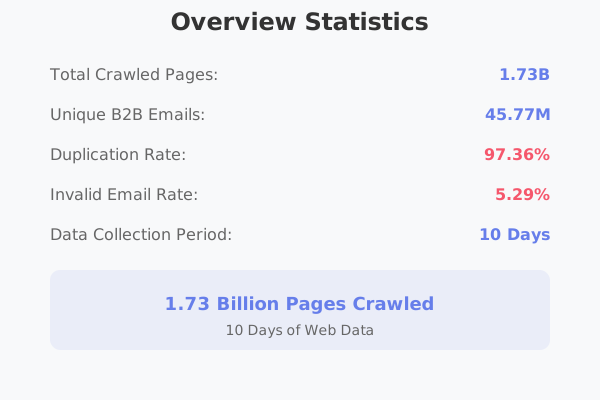
const { timeout = 30000, retries = 3 } = options;
for (let attempt = 1; attempt <= retries; attempt++) {
try {
const response: AxiosResponse =
await axios.get(`${this.baseUrl}/email-verifier`, {
params: { email },
headers: {
"X-Tomba-Key": this.apiKey,
"X-Tomba-Secret": this.secretKey,
},
timeout,
});
return response.data;
} catch (error) {
if (axios.isAxiosError(error)) {
const apiError = error.response?.data as TombaApiError;
// Don't retry on client errors
if (error.response?.status && error.response.status < 500) {
throw new Error(
`Tomba API error: ${apiError?.message || error.message}`,
);
}
// Retry on server errors
if (attempt === retries) {
throw new Error(
`Tomba API failed after ${retries} attempts: ${error.message}`,
);
}
// Wait before retry (exponential backoff)
await new Promise((resolve) =>
setTimeout(resolve, Math.pow(2, attempt) * 1000),
);
} else {
throw error;
}
}
}
throw new Error("Unexpected error in email verification");
}
}
```
### 2. React Hook Pattern
**Prompt**:
```
@docs Create a React hook for Tomba email verification with:
- Loading states
- Error handling
- Caching with React Query
- TypeScript support
```
### 3. Node.js Service Pattern
**Prompt**:
```
@docs Create a Node.js service class for Tomba operations with:
- Connection pooling
- Rate limiting
- Caching with Redis
- Comprehensive logging
- Health checks
```
## Advanced Features
### 1. Code Generation from Selection
Select existing code and enhance it:
```typescript
// Select this basic function
async function processEmails(emails: string[]) {
return emails.map((email) => ({ email, valid: true }));
}
// Ask: "Enhance this with Tomba bulk verification using the API documentation"
```
### 2. Refactoring Assistance
```typescript
// Select existing email validation logic
if (email.includes("@") && email.includes(".")) {
// basic validation
return true;
}
// Ask: "Replace this with proper Tomba email verification"
```
### 3. Test Generation
```
@file:src/services/tomba.ts @docs
Generate comprehensive Jest tests for this Tomba service including:
- Unit tests for all methods
- Mock API responses
- Error scenario testing
- Rate limit testing
- Integration tests
```
## Best Practices
### 1. Structured Prompts
Use clear, specific prompts:
```
Context: Building user registration system
Task: Integrate Tomba email verification
Requirements:
- Real-time validation during form input
- Fallback for API failures
- User-friendly error messages
- TypeScript throughout
@docs Please implement email verification for my registration form
```
### 2. Incremental Development
Build features step by step:
```
Step 1: @docs Create basic Tomba client class
Step 2: Add error handling to the client
Step 3: Add rate limiting logic
Step 4: Create React hook wrapper
Step 5: Add caching layer
```
### 3. Code Review Integration
```
@file:src/api/tomba.ts @docs
Please review this Tomba integration for:
- Security best practices
- Performance optimizations
- Error handling completeness
- TypeScript type safety
- Code maintainability
```
## Troubleshooting
### Extension Issues
1. **Claude Code not responding**: Restart VS Code
2. **Authentication problems**: Sign out and sign in again
3. **Context not loading**: Check file paths in settings
### Documentation Issues
1. **API docs not found**: Verify `.claude/tomba-api.md` exists
2. **Outdated information**: Re-download documentation
3. **Context too large**: Split into smaller files
### Code Generation Issues
1. **Incomplete responses**: Be more specific in prompts
2. **Wrong patterns**: Include more context about your project
3. **Type errors**: Ensure TypeScript is properly configured
## Integration with VS Code Features
### 1. IntelliSense Integration
Claude Code works with VS Code's IntelliSense:
- Type hints for generated code
- Auto-completion for Tomba API methods
- Error highlighting for incorrect usage
### 2. Debugging Support
Use Claude Code to help with debugging:
```
@file:src/debug.log @docs
I'm getting this error when calling Tomba API. Help me debug and fix the issue.
```
### 3. Git Integration
Get help with commit messages:
```
@git-diff @docs
Generate a commit message for these Tomba API integration changes.
```
## Additional Resources
- [Claude Code Extension](https://marketplace.visualstudio.com/items?itemName=Anthropic.claude-vscode)
- [VS Code Extension Guide](https://code.visualstudio.com/docs/editor/extension-marketplace)
- [Tomba API Reference](/api)
- [Authentication Guide](/authentication)
---
## Document: ChatGPT Setup
Use ChatGPT with Tomba API documentation for code generation and development assistance
URL: /llm/editor/chatgpt
# ChatGPT Setup
Learn how to use ChatGPT effectively with Tomba API documentation to generate accurate code and get development assistance.
## Quick Use
### Direct Documentation Reference
Reference our documentation directly in your ChatGPT prompts:
```
Please review the Tomba API documentation at https://docs.tomba.io/llms.txt and help me create a Python Flask application that integrates email verification into user registration.
```
### Code Generation with Context
```
Based on the Tomba API documentation (https://docs.tomba.io/llms.txt), generate a complete Node.js Express middleware for email verification that includes:
- Rate limiting
- Error handling
- Response caching
- Logging
- TypeScript types
```
## Project Setup Strategies
### Method 1: Documentation Upload (ChatGPT Plus)
For ChatGPT Plus users with file upload capability:
1. **Download Documentation**:
```bash
curl -L https://docs.tomba.io/llms.txt -o tomba-api-docs.txt
```
2. **Upload to ChatGPT**:
- Click the attachment button (📎)
- Upload `tomba-api-docs.txt`
- Reference it in your prompts
3. **Example Prompt**:
```
Using the uploaded Tomba API documentation, create a comprehensive Python client library with async support, rate limiting, and proper error handling.
```
### Method 2: URL Reference Method
For all ChatGPT users:
```
I'm working with the Tomba API for email verification. The complete API documentation is available at https://docs.tomba.io/llms.txt.
Please help me create a React component that:
1. Validates email addresses in real-time
2. Shows validation results with confidence scores
3. Handles API errors gracefully
4. Includes TypeScript types
5. Uses proper rate limiting
```
### Method 3: Context Building
Build context gradually in your conversation:
**Message 1**:
```
I'm building an email verification service using the Tomba API. The API base URL is https://api.tomba.io/v1 and uses X-Tomba-Key and X-Tomba-Secret headers for authentication. I need help creating a robust client library.
```
**Message 2**:
```
The main endpoints I need to integrate are:
- Email Verifier: GET /email-verifier?email={email}
- Domain Search: GET /domain-search?domain={domain}
- Bulk operations for processing multiple emails
Can you help me start with the email verifier endpoint?
```
## Development Workflows
### 1. API Client Development
**Initial Architecture Discussion**:
```
I need to build a production-ready API client for Tomba email verification service. The API documentation is at https://docs.tomba.io/llms.txt.
Help me design the architecture for a TypeScript client that needs to:
- Handle authentication
- Implement rate limiting
- Provide retry logic
- Cache responses
- Support both individual and bulk operations
- Include comprehensive error handling
- Be easily testable
What would be the best architectural approach?
```
**Implementation Request**:
```
Based on our architecture discussion and the Tomba API docs, implement the core client class with:
1. Constructor that accepts API credentials
2. Private method for making authenticated requests
3. Error handling for different HTTP status codes
4. Rate limiting with exponential backoff
5. TypeScript interfaces for all response types
6. Logging capabilities
Start with the basic structure and authentication.
```
### 2. Framework Integration
**Express.js Integration**:
```
Using the Tomba API (docs at https://docs.tomba.io/llms.txt), help me create an Express.js application with:
1. Middleware for email verification
2. Route handlers for verification endpoints
3. Background job processing for bulk operations
4. Error handling middleware
5. Request logging
6. API documentation with Swagger
7. Rate limiting at the application level
8. Health check endpoints
Please start with the project structure and basic setup.
```
**React Integration**:
```
I want to integrate Tomba email verification into my React application. Based on the API documentation at https://docs.tomba.io/llms.txt, create:
1. Custom React hooks for email operations
2. Context provider for API configuration
3. Form components with real-time validation
4. Loading states and error handling
5. TypeScript throughout
6. Integration with React Query for caching
Begin with the context provider and basic hook structure.
```
### 3. Testing Strategy
**Comprehensive Testing Plan**:
```
For my Tomba API integration (docs: https://docs.tomba.io/llms.txt), help me create a comprehensive testing strategy:
1. Unit tests for all client methods
2. Integration tests with API mocks
3. Error scenario testing
4. Rate limiting tests
5. Performance benchmarks
6. End-to-end tests for user flows
7. Test data and fixtures
8. CI/CD pipeline integration
Start with the testing framework setup and basic unit tests.
```
## Code Generation Examples
### 1. Complete TypeScript Client
**Prompt**:
```
Based on the Tomba API documentation at https://docs.tomba.io/llms.txt, create a complete TypeScript client with:
- Full type definitions for all API endpoints
- Authentication handling
- Request/response interceptors
- Automatic retry with exponential backoff
- Rate limiting
- Caching support
- Comprehensive error handling
- Logging integration
- Configuration options
- JSDoc documentation
Please provide the complete implementation with proper TypeScript types.
```
### 2. Python Async Client
**Prompt**:
```
Using the Tomba API documentation (https://docs.tomba.io/llms.txt), create a Python async client using aiohttp with:
- AsyncTombaClient class
- Async context manager support
- Session management with connection pooling
- Rate limiting with asyncio
- Retry logic with exponential backoff
- Type hints throughout
- Error handling for all scenarios
- Async generators for bulk operations
- Caching with TTL
- Logging integration
Include usage examples and error handling patterns.
```
### 3. React Email Verification Form
**Prompt**:
```
Based on the Tomba API (docs: https://docs.tomba.io/llms.txt), create a React email verification form component with:
- Real-time email validation as user types
- Debounced API calls to avoid rate limits
- Loading states and progress indicators
- Error handling and user feedback
- Confidence score display
- TypeScript throughout
- Accessibility support
- Mobile responsive design
- Integration with React Hook Form
- Unit tests with React Testing Library
Provide the complete component with all dependencies.
```
## Advanced Use Cases
### 1. Microservices Architecture
**Architecture Planning**:
```
I'm designing a microservices architecture for email validation using Tomba API. Based on the documentation at https://docs.tomba.io/llms.txt, help me plan:
Services:
- Email verification service
- Bulk processing service
- API gateway
- Cache service (Redis)
- Queue service
- Monitoring service
Requirements:
- 100k+ requests/day
- 99.9% uptime
- Auto-scaling
- Circuit breaker pattern
- Distributed tracing
- Comprehensive monitoring
Provide service boundaries, communication patterns, and technology recommendations.
```
### 2. Performance Optimization
**Optimization Analysis**:
```
My Tomba API integration is experiencing performance issues:
Metrics:
- 800ms average response time
- 15% timeout rate
- High memory consumption
- Frequent rate limit errors
Current implementation uses:
- Node.js with Express
- Basic HTTP client (axios)
- No caching
- Sequential processing
Based on the Tomba API documentation (https://docs.tomba.io/llms.txt), analyze and provide optimizations for:
1. Connection pooling
2. Request batching
3. Caching strategies
4. Memory management
5. Rate limiting optimization
6. Error recovery
Include code examples for each optimization.
```
### 3. Enterprise Integration
**Enterprise Solution**:
```
Design an enterprise-grade solution for email verification using Tomba API (docs: https://docs.tomba.io/llms.txt) with:
Requirements:
- Multi-tenant architecture
- SSO integration
- Audit logging
- Data privacy compliance
- High availability
- Disaster recovery
- API versioning
- Monitoring and alerting
- Cost optimization
- Security hardening
Provide:
1. Architecture diagram
2. Implementation approach
3. Security considerations
4. Scalability strategy
5. Cost analysis
6. Migration plan
```
## Conversation Management
### 1. Context Preservation
Keep important context in your conversation:
```
For reference, I'm building an email verification service with these requirements:
- Technology: Node.js, TypeScript, Express, Redis
- Scale: 50k requests/day
- SLA: 99.9% uptime, <500ms response time
- API: Tomba (docs: https://docs.tomba.io/llms.txt)
[Continue with specific questions]
```
### 2. Progressive Development
Build features incrementally:
```
Phase 1: Basic email verification
Phase 2: Bulk processing
Phase 3: Caching and optimization
Phase 4: Monitoring and alerting
Let's start with Phase 1. Based on the Tomba API docs, create a basic email verification function.
```
### 3. Code Review and Iteration
```
Here's my current Tomba API client implementation:
[Paste code]
Based on the Tomba API documentation and best practices, please review this code for:
- Security vulnerabilities
- Performance issues
- Error handling gaps
- Type safety improvements
- Code maintainability
Provide specific recommendations with code examples.
```
## Best Practices for ChatGPT
### 1. Specific and Detailed Prompts
Instead of:
```
Help me use Tomba API
```
Use:
```
Based on the Tomba API documentation at https://docs.tomba.io/llms.txt, create a TypeScript service class for email verification that handles rate limiting, caching with Redis, and provides detailed error messages for a React application.
```
### 2. Include Technical Context
```
Context: React TypeScript application using Next.js 14, Tailwind CSS, and React Query
Goal: Integrate Tomba email verification in user registration form
Constraints: Client-side validation, server-side verification, rate limit handling
Using Tomba API docs (https://docs.tomba.io/llms.txt), implement email verification with these requirements...
```
### 3. Request Examples and Tests
```
Along with the implementation, provide:
1. Usage examples
2. Unit tests with Jest
3. Integration test examples
4. Error handling demonstrations
5. Performance considerations
6. Security best practices
```
## Troubleshooting
### Common Issues
1. **Generic Responses**: Be more specific about your requirements and technical stack
2. **Outdated Patterns**: Always reference the current API documentation URL
3. **Incomplete Code**: Ask for complete implementations with error handling
4. **Missing Context**: Provide your technical environment and constraints
### Optimization Tips
1. **Use Follow-up Questions**: "Can you add error handling to the previous code?"
2. **Request Alternatives**: "Show me 3 different approaches to implement this"
3. **Ask for Explanations**: "Explain why you chose this approach over alternatives"
4. **Request Documentation**: "Add JSDoc comments to explain the API usage"
## Additional Resources
- [ChatGPT Best Practices](https://platform.openai.com/docs/guides/prompt-engineering)
- [Tomba API Reference](/api)
- [Authentication Guide](/authentication)
- [Rate Limits Documentation](/rate-limits)
- [Error Handling Guide](/error-handling)
---
## Document: Available Tomba.io Tools in Apify MCP
Complete reference of all Tomba.io tools available through Apify's Model Context Protocol server with usage examples and parameters
URL: /llm/apify/tools
# Available Tomba.io Tools in Apify MCP
The Apify MCP server provides access to 15 powerful Tomba.io tools designed for email intelligence, contact discovery, and data enrichment. Each tool serves specific use cases and can be combined for comprehensive contact research workflows.
## Core Email Tools
### tomba-io/email-finder
**Purpose**: Discover professional email addresses for individuals based on their name and company domain.
**Use Cases**:
- Finding contact information for prospects
- Locating decision-makers at target companies
- Building outreach lists for sales and marketing
**Example Usage**:
```
Use tomba-io/email-finder to find the email address for:
- Name: John Smith
- Company: example.com
```
---
### tomba-io/email-verifier
**Purpose**: Validate email addresses to ensure they are deliverable and active.
**Use Cases**:
- Cleaning existing email lists
- Reducing bounce rates in email campaigns
- Verifying prospect contact information
**Example Usage**:
```
Use tomba-io/email-verifier to verify these email addresses:
- john.smith@example.com
- sales@company.io
- info@startup.co
```
---
### tomba-io/email-enrichment
**Purpose**: Add comprehensive information to existing email addresses including personal and professional details.
**Use Cases**:
- Enriching contact databases
- Personalizing outreach campaigns
- Building detailed prospect profiles
**Example Usage**:
```
Use tomba-io/email-enrichment to enrich the profile for:
- Email: ceo@techstartup.com
Include: job title, social profiles, company information, location
```
---
### tomba-io/email-count
**Purpose**: Get statistics about the number of email addresses associated with a domain.
**Use Cases**:
- Assessing company size and structure
- Planning outreach strategies
- Market research and analysis
**Example Usage**:
```
Use tomba-io/email-count to analyze these domains:
- salesforce.com
- hubspot.com
- mailchimp.com
```
## Contact Discovery Tools
### tomba-io/author-finder
**Purpose**: Extract contact information from article URLs, finding details about the authors and content creators.
**Use Cases**:
- Journalist outreach and PR campaigns
- Content creator partnerships
- Media relations and press coverage
**Example Usage**:
```
Use tomba-io/author-finder to find contact information for authors of:
- https://techcrunch.com/2024/10/startup-funding-article
- https://forbes.com/2024/10/business-trends-analysis
- https://wired.com/2024/10/technology-review
```
---
### tomba-io/phone-finder
**Purpose**: Discover phone numbers for individuals and companies.
**Use Cases**:
- Building complete contact profiles
- Cold calling campaigns
- Emergency contact information
**Example Usage**:
```
Use tomba-io/phone-finder to find phone numbers for:
- Person: Jane Doe at marketing@company.com
- Company: TechCorp Inc.
- Domain: enterprise.com
```
---
### tomba-io/phone-validator
**Purpose**: Verify and format phone numbers to ensure they are valid and properly formatted.
**Use Cases**:
- Cleaning phone number databases
- International number formatting
- Validating contact forms
**Example Usage**:
```
Use tomba-io/phone-validator to validate and format:
- +1-555-123-4567
- (555) 987-6543
- 555.111.2222
```
---
### tomba-io/linkedin-finder
**Purpose**: Extract contact information and professional details from LinkedIn profiles.
**Use Cases**:
- Social selling and networking
- Recruiting and talent acquisition
- Professional relationship building
**Example Usage**:
```
Use tomba-io/linkedin-finder to extract information from:
- linkedin.com/in/marketing-director-tech
- linkedin.com/in/startup-founder-2024
- linkedin.com/in/sales-executive-saas
```
## Company Intelligence Tools
### tomba-io/domain-search
**Purpose**: Find all email addresses associated with a specific domain or company.
**Use Cases**:
- Mapping organizational structures
- Comprehensive lead generation
- Competitive intelligence
**Example Usage**:
```
Use tomba-io/domain-search to find all contacts at:
- apple.com (limit to 50 results)
- microsoft.com (focus on @outlook.com emails)
- google.com (exclude generic emails like info@, support@)
```
---
### tomba-io/technology-finder
**Purpose**: Discover technologies, tools, and software used by companies based on their domain.
**Use Cases**:
- Sales qualification and targeting
- Competitive analysis
- Technology trend research
**Example Usage**:
```
Use tomba-io/technology-finder to analyze tech stacks for:
- shopify.com
- stripe.com
- atlassian.com
Focus on: CRM, marketing tools, development frameworks
```
---
### tomba-io/similar-finder
**Purpose**: Find companies similar to a target organization based on various criteria.
**Use Cases**:
- Market expansion strategies
- Competitive landscape analysis
- Lead list building
**Example Usage**:
```
Use tomba-io/similar-finder to find companies similar to:
- Target: salesforce.com
- Criteria: SaaS, CRM, enterprise software
- Size: 1000-5000 employees
- Geography: North America
```
## Enhanced Data Sources (Clearbit Integration)
### tomba-io/clearbit-person
**Purpose**: Get detailed person enrichment data using Clearbit's comprehensive database.
**Use Cases**:
- Executive profiling
- Detailed prospect research
- Personalized outreach preparation
**Example Usage**:
```
Use tomba-io/clearbit-person to enrich:
- Email: ceo@startup.io
Return: employment history, education, social profiles, personal interests
```
---
### tomba-io/clearbit-company
**Purpose**: Retrieve comprehensive company information and intelligence using Clearbit data.
**Use Cases**:
- Company due diligence
- Market research
- Investment analysis
**Example Usage**:
```
Use tomba-io/clearbit-company to analyze:
- Company: acme-corp.com
Include: revenue, employee count, funding, technology stack, news
```
---
### tomba-io/clearbit-combined
**Purpose**: Unified person and company enrichment combining multiple data sources for complete intelligence.
**Use Cases**:
- Comprehensive prospect research
- Account-based marketing
- Investment due diligence
**Example Usage**:
```
Use tomba-io/clearbit-combined for complete analysis of:
- Contact: john.doe@techstartup.com
Include: personal profile, company details, recent news, social presence
```
## Advanced Usage Patterns
### Multi-Tool Workflows
**Complete Contact Research Pipeline**:
```
1. Use tomba-io/domain-search to find all contacts at target-company.com
2. Use tomba-io/email-verifier to validate each email found
3. Use tomba-io/email-enrichment to add detailed profiles
4. Use tomba-io/clearbit-company to understand the company
5. Use tomba-io/similar-finder to identify expansion opportunities
```
**Journalist Outreach Campaign**:
```
1. Use tomba-io/author-finder for each target article URL
2. Use tomba-io/email-verifier to ensure deliverability
3. Use tomba-io/phone-finder for direct contact options
4. Use tomba-io/clearbit-person for personalization data
5. Create segmented outreach lists based on beat/expertise
```
**Market Research Analysis**:
```
1. Use tomba-io/technology-finder to analyze competitor tech stacks
2. Use tomba-io/similar-finder to identify market players
3. Use tomba-io/clearbit-company for company intelligence
4. Use tomba-io/domain-search to map decision-makers
5. Generate comprehensive market landscape report
```
### Batch Operations
**Process Multiple Domains**:
```
For each domain in [company1.com, company2.com, company3.com]:
1. Run tomba-io/email-count for sizing analysis
2. Run tomba-io/technology-finder for tech stack
3. Run tomba-io/domain-search for key contacts
4. Compile comparative analysis report
```
**Validate Contact Database**:
```
For each email in existing database:
1. Run tomba-io/email-verifier for deliverability
2. If invalid, run tomba-io/email-finder for alternatives
3. Run tomba-io/email-enrichment for updated information
4. Export cleaned and enriched contact list
```
## Best Practices
### Rate Limiting and Usage
- **Batch similar requests** to optimize API usage
- **Monitor your Apify usage** through the console
- **Implement delays** between large batch operations
- **Cache results** when possible to avoid duplicate calls
### Data Quality
- **Always verify emails** before sending campaigns
- **Cross-reference data** from multiple tools when possible
- **Update contact information** regularly
- **Respect opt-out preferences** and privacy settings
### Privacy and Compliance
- **Follow GDPR guidelines** for EU contacts
- **Respect CAN-SPAM regulations** for US marketing
- **Honor LinkedIn terms of service** when using LinkedIn data
- **Implement proper data retention** policies
### Tool Selection Guide
**For Individual Contact Research**:
- Start with `email-finder` or `linkedin-finder`
- Verify with `email-verifier`
- Enrich with `clearbit-person`
**For Company Analysis**:
- Use `domain-search` for comprehensive contact mapping
- Add `technology-finder` for tech stack analysis
- Enhance with `clearbit-company` for business intelligence
**For Content Creator Outreach**:
- Begin with `author-finder` for article-based discovery
- Use `linkedin-finder` for social media profiles
- Validate with `email-verifier` and `phone-validator`
**For Market Research**:
- Combine `technology-finder` and `similar-finder`
- Use `clearbit-company` for detailed business data
- Map contacts with `domain-search`
## Error Handling
Common error scenarios and solutions:
**Rate Limit Exceeded**:
- Implement exponential backoff
- Spread requests over time
- Consider upgrading your Apify plan
**Invalid Domain/Email**:
- Validate input formats before processing
- Handle gracefully with alternative approaches
- Log errors for analysis
**No Data Found**:
- Try alternative search strategies
- Use broader search criteria
- Combine multiple tools for better coverage
## Integration Examples
### CRM Integration Workflow
```
Weekly contact enrichment process:
1. Export contacts from CRM with missing information
2. Use tomba-io/email-enrichment for profile completion
3. Use tomba-io/clearbit-person for additional insights
4. Import enriched data back to CRM
5. Tag contacts with data quality scores
```
### Sales Intelligence Pipeline
```
Prospect qualification workflow:
1. Use tomba-io/domain-search for target company mapping
2. Use tomba-io/technology-finder for solution fit analysis
3. Use tomba-io/clearbit-company for company health metrics
4. Score and prioritize prospects automatically
5. Generate personalized outreach sequences
```
This comprehensive toolset provides everything needed for modern contact intelligence and business development workflows. Each tool can be used independently or combined for powerful multi-step processes that automate and enhance your contact research and outreach efforts.
---
## Document: Tomba Apify MCP Server
Connect Tomba.io email tools to Apify's Model Context Protocol server for seamless data enrichment and automation workflows
URL: /llm/apify/introduction
# Tomba Apify MCP Server
The Apify Model Context Protocol (MCP) server provides a powerful bridge between AI models and Tomba.io's comprehensive email intelligence tools. This integration enables you to leverage Tomba's email finding, verification, and enrichment capabilities directly within AI-powered workflows and automation processes.
## What is Apify MCP?
Apify's MCP server is a standardized protocol that allows AI models to securely connect to external tools and data sources. By integrating Tomba.io tools through Apify's MCP server, you can:
- **Find Email Addresses**: Discover professional email addresses for individuals and companies
- **Verify Email Validity**: Ensure email addresses are deliverable and active
- **Enrich Contact Data**: Add comprehensive information about people and companies
- **Validate Phone Numbers**: Verify and format phone numbers globally
- **Search Domains**: Find all email addresses associated with a domain
- **LinkedIn Intelligence**: Extract contact information from LinkedIn profiles
- **Author Discovery**: Find contact details for content creators and journalists
## Key Benefits
### **Streamlined Workflows**
Integrate email intelligence directly into your AI conversations and automation pipelines without complex API integrations.
### **Secure Authentication**
Use your Apify API token for secure, authenticated access to Tomba.io tools through the MCP protocol.
### **Targeted Data Collection**
Access 15+ specialized Tomba.io tools designed for different use cases, from bulk operations to individual lookups.
### **Comprehensive Coverage**
Combine multiple data sources including Tomba.io and Clearbit for the most complete contact intelligence.
## Available Tool Categories
### **Core Email Tools**
- Email Finder: Discover email addresses for individuals
- Email Verifier: Validate email deliverability
- Email Enrichment: Add detailed information to existing emails
- Email Count: Get statistics about domain email addresses
### **Contact Discovery**
- Author Finder: Extract contact information from article URLs
- Phone Finder: Discover phone numbers for contacts
- Phone Validator: Verify and format phone numbers
- LinkedIn Finder: Extract data from LinkedIn profiles
### **Company Intelligence**
- Domain Search: Find all emails associated with a domain
- Technology Finder: Discover technologies used by companies
- Similar Finder: Find companies similar to a target organization
### **Enhanced Data Sources**
- Clearbit Person: Detailed person enrichment
- Clearbit Company: Comprehensive company data
- Clearbit Combined: Unified person and company intelligence
## Getting Started
To start using Tomba.io tools through Apify's MCP server, you'll need:
1. **Apify API Token**: Your authentication credential for accessing the MCP server
2. **VS Code or Compatible Client**: An MCP-compatible environment to run the integration
3. **Basic Understanding**: Familiarity with the specific Tomba.io tools you want to use
The integration uses the following MCP server URL:
```
https://mcp.apify.com/?tools=actors,docs,tomba-io/email-enrichment,tomba-io/technology-finder,tomba-io/email-finder,tomba-io/phone-validator,tomba-io/email-verifier,tomba-io/domain-search,tomba-io/linkedin-finder,tomba-io/email-count,tomba-io/clearbit-combined,tomba-io/clearbit-person,tomba-io/author-finder,tomba-io/phone-finder,tomba-io/similar-finder,tomba-io/clearbit-company
```
## Use Cases
This integration is perfect for:
- **Journalist Outreach**: Find and verify contact information for media professionals
- **Lead Generation**: Discover and enrich prospect contact details
- **Data Verification**: Validate existing contact databases
- **Content Marketing**: Connect with content creators and influencers
- **Sales Intelligence**: Gather comprehensive prospect information
- **Recruitment**: Find contact details for potential candidates
- **Market Research**: Analyze company technologies and similarities
## Next Steps
- [Learn how to set up the integration →](./integration)
- [Explore available tools and their capabilities →](./tools)
- [See practical usage examples and workflows →](./integration#usage-examples)
---
## Document: Setting Up Apify MCP Integration
Step-by-step guide to configure Tomba.io tools with Apify's Model Context Protocol server in VS Code and other environments
URL: /llm/apify/integration
# Setting Up Apify MCP Integration
This guide walks you through configuring the Apify MCP server to access Tomba.io tools in VS Code and other MCP-compatible environments.
## Prerequisites
Before you begin, ensure you have:
- **Apify Account**: Sign up at [apify.com](https://apify.com) if you don't have an account
- **Apify API Token**: Generate your API token from the Apify Console
- **VS Code**: Install Visual Studio Code or another MCP-compatible client
- **MCP Extension**: Install the appropriate MCP extension for your environment
## VS Code Configuration
### 1. Install Required Extensions
First, install the Model Context Protocol extension in VS Code:
1. Open VS Code
2. Go to Extensions (Ctrl+Shift+X)
3. Search for "Model Context Protocol" or "MCP"
4. Install the official MCP extension
### 2. Configure MCP Settings
Add the following configuration to your VS Code settings or MCP configuration file:
```json
{
"inputs": [
{
"type": "promptString",
"id": "apify-token",
"description": "Apify API token",
"password": true
}
],
"servers": {
"apify": {
"url": "https://mcp.apify.com/?tools=actors,docs,tomba-io/email-enrichment,tomba-io/technology-finder,tomba-io/email-finder,tomba-io/phone-validator,tomba-io/email-verifier,tomba-io/domain-search,tomba-io/linkedin-finder,tomba-io/email-count,tomba-io/clearbit-combined,tomba-io/clearbit-person,tomba-io/author-finder,tomba-io/phone-finder,tomba-io/similar-finder,tomba-io/clearbit-company",
"headers": {
"Authorization": "Bearer ${input:apify-token}"
}
}
}
}
```
### 3. Get Your Apify API Token
1. Log in to your [Apify Console](https://console.apify.com)
2. Navigate to **Settings** → **Integrations**
3. Find the **API tokens** section
4. Click **Create new token**
5. Give it a descriptive name (e.g., "MCP Integration")
6. Copy the generated token
### 4. Configure Authentication
When prompted by VS Code:
1. Enter your Apify API token when the `apify-token` input prompt appears
2. The token will be securely stored and used for authentication
3. Verify the connection by testing one of the available tools
## Alternative Configurations
### Claude Desktop App
For Claude Desktop app integration:
```json
{
"mcpServers": {
"apify-tomba": {
"command": "npx",
"args": [
"@modelcontextprotocol/server-web",
"https://mcp.apify.com/?tools=actors,docs,tomba-io/email-enrichment,tomba-io/technology-finder,tomba-io/email-finder,tomba-io/phone-validator,tomba-io/email-verifier,tomba-io/domain-search,tomba-io/linkedin-finder,tomba-io/email-count,tomba-io/clearbit-combined,tomba-io/clearbit-person,tomba-io/author-finder,tomba-io/phone-finder,tomba-io/similar-finder,tomba-io/clearbit-company"
],
"env": {
"APIFY_TOKEN": "your-apify-token-here"
}
}
}
}
```
### Other MCP Clients
For other MCP-compatible clients, use the server URL directly:
```
https://mcp.apify.com/?tools=actors,docs,tomba-io/email-enrichment,tomba-io/technology-finder,tomba-io/email-finder,tomba-io/phone-validator,tomba-io/email-verifier,tomba-io/domain-search,tomba-io/linkedin-finder,tomba-io/email-count,tomba-io/clearbit-combined,tomba-io/clearbit-person,tomba-io/author-finder,tomba-io/phone-finder,tomba-io/similar-finder,tomba-io/clearbit-company
```
With authentication header:
```
Authorization: Bearer YOUR_APIFY_TOKEN
```
## Usage Examples
### Example 1: Journalist Contact Research
Find contact information for journalists who wrote specific articles:
```
I need to find contact information for journalists who wrote the following articles:
- https://techcrunch.com/article-1
- https://wired.com/article-2
- https://forbes.com/article-3
Please:
1. Use the tomba-io/author-finder tool for each article URL
2. For each author found, use the tomba-io/email-verifier tool to verify their email
3. Try to find phone numbers using the tomba-io/phone-finder tool
4. Create a summary table with:
- Article URL
- Author name
- Email address
- Phone number (if found)
- Verification status
5. Provide any additional insights about the journalists
```
### Example 2: Lead Generation for Tech Companies
Research and enrich leads in the technology sector:
```
I need to research potential leads for our B2B software company. Please help me:
1. Use tomba-io/domain-search to find all emails at these competitor domains:
- salesforce.com
- hubspot.com
- pipedrive.com
2. For the decision-makers found, use tomba-io/email-enrichment to get detailed profiles
3. Use tomba-io/technology-finder to analyze what technologies these companies use
4. Use tomba-io/similar-finder to discover other companies similar to these
5. Compile a comprehensive lead list with:
- Company name
- Contact person
- Verified email
- Job title
- Company technologies
- Similar companies to target
```
### Example 3: Content Creator Outreach
Find and verify influencer contact information:
```
I'm planning an influencer marketing campaign. Help me find contact information for content creators:
1. Use tomba-io/linkedin-finder with these LinkedIn profiles:
- linkedin.com/in/techinfluencer1
- linkedin.com/in/marketer2
- linkedin.com/in/entrepreneur3
2. For each contact found:
- Verify emails with tomba-io/email-verifier
- Find phone numbers with tomba-io/phone-finder
- Enrich profiles with tomba-io/clearbit-person
3. Create an outreach list with:
- Name and social media handle
- Verified contact information
- Professional background
- Engagement strategy recommendations
```
### Example 4: Market Research Analysis
Comprehensive company and contact analysis:
```
I need to analyze our target market. Please help with:
1. Use tomba-io/domain-search to map out key contacts at these target companies:
- company1.com
- company2.com
- company3.com
2. Use tomba-io/technology-finder to understand their tech stack
3. Use tomba-io/clearbit-company to get detailed company information
4. Use tomba-io/similar-finder to identify other companies in this space
5. Generate a market analysis report including:
- Company profiles and contact hierarchies
- Technology adoption patterns
- Market size and opportunity assessment
- Recommended entry strategies
```
### Example 5: Email List Validation
Clean and enrich existing contact databases:
```
I have a list of email addresses that need validation and enrichment:
email1@company.com
email2@startup.io
email3@enterprise.org
Please:
1. Use tomba-io/email-verifier to check deliverability of each email
2. Use tomba-io/email-enrichment to add detailed contact information
3. For any invalid emails, use tomba-io/email-finder to find alternative contacts at those companies
4. Create a cleaned and enriched contact list with validation status
```
## Troubleshooting
### Common Issues
**Authentication Errors**
- Verify your Apify API token is correct and has proper permissions
- Check that the token hasn't expired
- Ensure the Authorization header is properly formatted
**Connection Issues**
- Confirm your internet connection is stable
- Verify the MCP server URL is correct
- Check if your firewall is blocking the connection
**Tool Not Found Errors**
- Ensure you're using the correct tool names (e.g., `tomba-io/email-finder`)
- Verify the tool is included in your server URL configuration
- Check the Apify platform for tool availability
### Getting Help
If you encounter issues:
1. Check the [Apify documentation](https://docs.apify.com/platform/integrations/mcp)
2. Apify MCP [Apify MCP](https://mcp.apify.com/)
3. Review the [MCP specification](https://modelcontextprotocol.io/)
4. Contact Apify support for server-related issues
5. Reach out to Tomba.io support for tool-specific questions
## Security Best Practices
- **Never hardcode API tokens** in configuration files
- **Use environment variables** or secure input prompts for tokens
- **Regularly rotate** your API tokens
- **Monitor usage** through the Apify Console
- **Restrict token permissions** to only necessary scopes
- **Keep your MCP client updated** to the latest version
## Next Steps
- [Explore the complete list of available tools →](./tools)
- [Learn about tool capabilities and parameters →](./tools#tool-reference)
- [See advanced usage patterns and workflows →](./tools#advanced-usage)
---
## Document: Technology Finder Actor
Detect website technologies and tech stacks using the Tomba Technology Finder actor on Apify platform.
URL: /integrations/apify/technology-finder
# Technology Finder Actor
[](https://apify.com/tomba-io/technology-finder)
A powerful Apify Actor that discovers and retrieves technologies used by specific domains using the **Tomba Technology Finder API**. Perfect for competitive analysis, tech stack research, and understanding the technology landscape of websites and companies.
## Key Features
- **Technology Detection**: Identify technologies, frameworks, and tools used by websites
- **Comprehensive Categories**: Discover analytics, CMS, frameworks, libraries, and more
- **Confidence Scoring**: Get confidence levels for each technology detection
- **Version Information**: Retrieve version details when available
- **Pricing Intelligence**: Understand pricing models of detected technologies
- **Bulk Processing**: Analyze multiple domains efficiently with rate limiting
- **Rate Limited**: Respects Tomba's 150 requests per minute limit
- **Rich Data Output**: Comprehensive technology profiles with metadata
- **Built-in Error Handling**: Robust processing with comprehensive error reporting
## How it works
The Actor leverages Tomba's powerful Technology Finder API to analyze domains and detect their tech stack:
### Process Flow
1. **Authentication**: Connects to Tomba API using your credentials
2. **Input Processing**: Accepts array of domains to analyze
3. **Technology Discovery**: Uses Tomba's `list` method for each domain
4. **Data Enrichment**: Extracts technology details, categories, and confidence scores
5. **Rate Limiting**: Automatically handles 150 requests/minute limit
6. **Data Storage**: Saves results to Apify dataset
### What You Get
For each technology detected, you'll receive:
- **Technology Name**: The specific technology, framework, or tool
- **Category**: Main classification (Analytics, CMS, Framework, etc.)
- **Subcategory**: More specific classification
- **Description**: What the technology does
- **Confidence Score**: How certain the detection is
- **Version**: Version information when available
- **Pricing Model**: Free, Paid, Freemium, etc.
- **Official Website**: Link to the technology's website
- **Logo**: Technology logo URL
## Quick Start
### Prerequisites
1. **Tomba Account**: Sign up at [Tomba.io](https://app.tomba.io/api) to get your API credentials
### Getting Your API Keys
1. Visit [Tomba API Dashboard](https://app.tomba.io/api)
2. Copy your **API Key** (starts with `ta_`)
3. Copy your **Secret Key** (starts with `ts_`)
## Input Configuration
### Required Parameters
| Parameter | Type | Description |
| ---------------- | ---------- | -------------------------------------------- |
| `tombaApiKey` | `string` | Your Tomba API key (ta_xxxx) |
| `tombaApiSecret` | `string` | Your Tomba secret key (ts_xxxx) |
| `domains` | `string[]` | Array of domains to analyze for technologies |
### Optional Parameters
| Parameter | Type | Default | Description |
| ------------ | -------- | ------- | ----------------------------------- |
| `maxResults` | `number` | `50` | Maximum number of results to return |
### Example Input
```json
{
"tombaApiKey": "ta_xxxxxxxxxxxxxxxxxxxx",
"tombaApiSecret": "ts_xxxxxxxxxxxxxxxxxxxx",
"domains": ["shopify.com", "github.com", "stripe.com"],
"maxResults": 100
}
```
### Best Practices
- **Domain Format**: Use clean domain names without protocols (e.g., 'example.com' not 'https://example.com')
- **Batch Size**: Process 10-15 domains at a time for optimal performance
- **Rate Limits**: The Actor automatically handles Tomba's 150 requests/minute limit
- **Quality Results**: Use established websites for more comprehensive technology detection
- **Analysis Focus**: Pay attention to confidence scores for reliable technology identification
## Output Data Structure
The Actor returns comprehensive information for each technology detected:
```json
{
"input_domain": "tomba.io",
"technology_slug": "webpack",
"technology_name": "webpack",
"technology_icon": "webpack.svg",
"technology_website": "https://webpack.js.org/",
"category_id": 19,
"category_slug": "miscellaneous",
"category_name": "Miscellaneous",
"source": "tomba_technology_finder"
}
```
### Data Fields Explained
- **input_domain**: The original domain that was analyzed
- **technology_slug**: Unique slug identifier for the technology
- **technology_name**: Name of the detected technology
- **technology_icon**: Icon filename for the technology
- **technology_website**: Official website of the technology
- **category_id**: ID of the technology category
- **category_slug**: Slug of the technology category
- **category_name**: Name of the technology category (e.g., Analytics, Miscellaneous, JavaScript Libraries)
- **source**: Data source identifier (tomba_technology_finder)
- **error**: Error message if the analysis failed
## Use Cases
### Competitive Analysis
- **Tech Stack Intelligence**: Understand what technologies competitors are using
- **Technology Trends**: Identify popular technologies in your industry
- **Performance Analysis**: Compare technology choices with performance metrics
### Business Development
- **Partnership Opportunities**: Find companies using complementary technologies
- **Customer Targeting**: Identify prospects using specific technology stacks
- **Market Research**: Understand technology adoption patterns
### Sales & Marketing
- **Lead Qualification**: Target companies using specific technologies
- **Solution Positioning**: Tailor pitches based on existing tech stack
- **Market Segmentation**: Group prospects by technology preferences
### Product Development
- **Integration Planning**: Understand what technologies to integrate with
- **Technology Research**: Stay updated on industry technology trends
- **Competitive Intelligence**: Monitor competitor technology choices
## Technology Categories Detected
The Actor can detect technologies across various categories:
### Web Technologies
- **Frontend Frameworks**: React, Vue.js, Angular
- **Backend Frameworks**: Node.js, Django, Ruby on Rails
- **JavaScript Libraries**: jQuery, Lodash, Moment.js
### Analytics & Marketing
- **Web Analytics**: Google Analytics, Adobe Analytics
- **Marketing Tools**: Mailchimp, HubSpot, Salesforce
- **Tag Management**: Google Tag Manager, Adobe Launch
### Infrastructure & DevOps
- **Cloud Providers**: AWS, Google Cloud, Azure
- **CDN**: Cloudflare, AWS CloudFront
- **Web Servers**: Nginx, Apache, IIS
### E-commerce & CMS
- **E-commerce Platforms**: Shopify, WooCommerce, Magento
- **Content Management**: WordPress, Drupal, Joomla
- **Payment Processing**: Stripe, PayPal, Square
## Data Views
The Actor provides specialized data views:
### Overview View
Quick summary showing domain, technology, category, subcategory, confidence, and pricing
### Detailed View
Comprehensive view with all technology data, descriptions, and technical details
### Technologies by Category View
Organized view grouping technologies by their main categories for easier analysis
## Resources & Documentation
### API Documentation
- [Tomba API Docs](https://tomba.io/api) - Complete API reference
- [Technology Finder Endpoint](https://docs.tomba.io/api/technology) - Specific technology documentation
- [Authentication Guide](https://app.tomba.io/api) - Get your API keys
- [Pricing & Limits](https://tomba.io/pricing) - Understand rate limits and costs
### Rate Limiting
- Tomba limits to **150 requests per minute**
- Actor automatically handles rate limiting with delays
- Large domain lists may take time to complete
### Cost Considerations
- Each domain analyzed = 1 Tomba API request
- Monitor your Tomba usage dashboard
- Consider Tomba's pricing tiers for volume usage
## FAQ
### General Questions
**Q: What is technology detection?**
A: Technology detection analyzes a website domain to identify the tools, frameworks, services, and technologies being used, including web technologies, analytics tools, marketing platforms, and infrastructure services.
**Q: What types of technologies can be detected?**
A: The service identifies web frameworks, CMS platforms, analytics tools, marketing automation, e-commerce platforms, CDN services, hosting providers, and many other technology categories.
**Q: How accurate is technology detection?**
A: Detection accuracy is typically 85-95% for commonly used technologies. Some technologies may be harder to detect if they're custom-built or configured to hide their signatures.
### Technical Questions
**Q: How many domains can I analyze at once?**
A: You can process up to 1000 domains per run. For optimal performance, analyze 20-50 domains per batch.
**Q: What domain formats should I use?**
A: Use clean domain names like "stripe.com" or "example.org". Don't include protocols (http/https) or subdomains unless specifically needed.
**Q: What if a domain uses custom or unknown technologies?**
A: Custom or very new technologies might not be detected. The service focuses on widely-used, recognizable technology signatures.
### Business Applications
**Q: How can this help with sales targeting?**
A: Technology stacks help qualify prospects, tailor sales messaging, identify integration opportunities, and understand technical sophistication levels.
**Q: Is this useful for competitive analysis?**
A: Yes! Analyze competitor technology choices to understand their strategies, identify trends, and find differentiation opportunities.
**Q: Can I use this for partnership opportunities?**
A: Absolutely! Identify companies using complementary technologies to find potential integration partners or customers.
## Support
If you need any help, have questions, or encounter any issues while using Tomba.io, please don't hesitate to reach out to our support team. You can contact us via:
- **Email**: support@tomba.io
- **Live chat**: Available on the Tomba.io website during business hours
## Contributing
We welcome contributions to improve this actor. Please feel free to submit issues, feature requests, or pull requests to help make this tool even better for the community.
---
## Document: Similar Finder Actor
Apify Actor that finds and enriches similar domains using the Tomba Similar Finder API — discovers related websites, company info, industry classification, and saves structured results to an Apify dataset, handling rate limits and errors automatically.
URL: /integrations/apify/similar-finder
# Similar Finder Actor
[](https://apify.com/tomba-io/similar-finder)
A powerful Apify Actor that discovers and retrieves similar domains based on a specific domain using the **Tomba Similar Finder API**. Perfect for competitive analysis, market research, and discovering related businesses in your industry or niche.
## Key Features
- **Similar Domain Discovery**: Find websites similar to your target domain
- **Company Information**: Retrieve company names and descriptions for similar domains
- **Industry Classification**: Understand the industry categories of similar websites
- **Bulk Processing**: Process multiple domains efficiently with rate limiting
- **Rate Limited**: Respects Tomba's 150 requests per minute limit
- **Rich Data Output**: Comprehensive domain profiles with metadata
- **Built-in Error Handling**: Robust processing with comprehensive error reporting
## How it works
The Actor leverages Tomba's powerful Similar Finder API to discover domains similar to your input:
### Process Flow
1. **Authentication**: Connects to Tomba API using your credentials
2. **Input Processing**: Accepts array of domains to analyze
3. **Similar Domain Discovery**: Uses Tomba's `websites` method for each domain
4. **Data Enrichment**: Extracts company, industry, and similarity information
5. **Rate Limiting**: Automatically handles 150 requests/minute limit
6. **Data Storage**: Saves results to Apify dataset
### What You Get
For each similar domain found, you'll receive:
- **Similar Domain**: The discovered similar website domain
- **Company Info**: Company name and description
- **Industry**: Industry category classification
- **Website URL**: Full website URL for easy access
- **Source Tracking**: Data source identification
## Quick Start
### Prerequisites
1. **Tomba Account**: Sign up at [Tomba.io](https://app.tomba.io/api) to get your API credentials
### Getting Your API Keys
1. Visit [Tomba API Dashboard](https://app.tomba.io/api)
2. Copy your **API Key** (starts with `ta_`)
3. Copy your **Secret Key** (starts with `ts_`)
## Input Configuration
### Required Parameters
| Parameter | Type | Description |
| ---------------- | ---------- | --------------------------------------------- |
| `tombaApiKey` | `string` | Your Tomba API key (ta_xxxx) |
| `tombaApiSecret` | `string` | Your Tomba secret key (ts_xxxx) |
| `domains` | `string[]` | Array of domains to find similar websites for |
### Optional Parameters
| Parameter | Type | Default | Description |
| ------------ | -------- | ------- | ----------------------------------- |
| `maxResults` | `number` | `50` | Maximum number of results to return |
### Example Input
```json
{
"tombaApiKey": "ta_xxxxxxxxxxxxxxxxxxxx",
"tombaApiSecret": "ts_xxxxxxxxxxxxxxxxxxxx",
"domains": ["example.com", "google.com", "github.com"],
"maxResults": 100
}
```
### Best Practices
- **Domain Format**: Use clean domain names without protocols (e.g., 'example.com' not 'https://example.com')
- **Batch Size**: Process 10-20 domains at a time for optimal performance
- **Rate Limits**: The Actor automatically handles Tomba's 150 requests/minute limit
- **Quality Results**: Use established, well-known domains for better similarity matches
- **Data Analysis**: Focus on similarity scores to identify the most relevant matches
## Output Data Structure
The Actor returns comprehensive information for each similar domain found:
```json
{
"input_domain": "example.com",
"similar_domain": "xx.io",
"company_name": "xx",
"industries": "Information Technology and Services",
"website_url": "xx.io",
"source": "tomba_similar_finder"
}
```
### Data Fields Explained
- **input_domain**: The original domain you searched for
- **similar_domain**: The discovered similar domain (from website_url field)
- **company_name**: Name of the company behind the similar domain
- **industries**: Industries associated with the similar domain
- **website_url**: Full URL of the similar website
- **source**: Data source identifier (tomba_similar_finder)
- **error**: Error message if the search failed
## Use Cases
### Competitive Analysis
- **Competitor Discovery**: Find direct and indirect competitors in your market
- **Market Landscape**: Understand the competitive landscape of your industry
- **Feature Comparison**: Discover similar services to analyze and compare
### Business Development
- **Partnership Opportunities**: Identify potential partners with similar business models
- **Market Expansion**: Find similar companies in different geographic markets
- **Acquisition Targets**: Discover companies with similar offerings for potential acquisition
### Market Research
- **Industry Analysis**: Understand market trends and player distribution
- **Customer Research**: Find similar companies to understand target audiences
- **Trend Identification**: Spot emerging players and market directions
### Sales & Marketing
- **Lead Generation**: Find similar companies as potential customers
- **Account-Based Marketing**: Identify companies similar to your best customers
- **Sales Prospecting**: Discover new prospects in similar market segments
## Data Views
The Actor provides specialized data views:
### Overview View
Quick summary showing input domain, similar domain, company, and industry information
### Detailed View
Comprehensive view with all similarity data, company information, and technical details
### Successful Matches View
Filtered view showing only domains where similar matches were found, excluding errors
## Resources & Documentation
### API Documentation
- [Tomba API Docs](https://tomba.io/api) - Complete API reference
- [Similar Finder Endpoint](https://docs.tomba.io/api/similar) - Specific similarity documentation
- [Authentication Guide](https://app.tomba.io/api) - Get your API keys
- [Pricing & Limits](https://tomba.io/pricing) - Understand rate limits and costs
### Rate Limiting
- Tomba limits to **150 requests per minute**
- Actor automatically handles rate limiting with delays
- Large domain lists may take time to complete
### Cost Considerations
- Each domain analyzed = 1 Tomba API request
- Monitor your Tomba usage dashboard
- Consider Tomba's pricing tiers for volume usage
## FAQ
### General Questions
**Q: What does similar domain finding do?**
A: Similar domain finding analyzes a website and discovers other domains that are similar in content, industry, business model, or target audience. It helps identify competitors, partners, and related businesses.
**Q: How are similar domains determined?**
A: Similarity is calculated based on website content, industry classification, business model, technology usage, and audience overlap using advanced matching algorithms.
**Q: How many similar domains can I expect to find?**
A: Results typically include 10-50 similar domains per input domain, depending on the industry and how unique the business is. Popular industries tend to have more similar domains.
### Technical Questions
**Q: Can I find similar domains for any website?**
A: You can analyze most business websites. Very niche or new websites might have fewer similar domains. Established companies in common industries typically yield better results.
**Q: How should I interpret similarity scores?**
A: Higher similarity scores indicate closer matches. Use scores to prioritize which similar domains are most relevant for your specific use case.
**Q: What if no similar domains are found?**
A: This might indicate a very unique business model, new industry, or highly specialized niche. Consider broadening your search or analyzing related industry domains.
### Business Applications
**Q: How can this help with competitive research?**
A: Discover direct and indirect competitors you might not have known about, analyze their strategies, and identify market gaps or opportunities.
**Q: Is this useful for finding partnership opportunities?**
A: Yes! Similar domains often represent potential partners, especially those serving complementary markets or using compatible business models.
**Q: Can I use this for market expansion?**
A: Absolutely! Similar domains show you how others address similar markets, reveal new market segments, and inspire expansion strategies.
## Support
If you need any help, have questions, or encounter any issues while using Tomba.io, please don't hesitate to reach out to our support team. You can contact us via:
- **Email**: support@tomba.io
- **Live chat**: Available on the Tomba.io website during business hours
## Contributing
We welcome contributions to improve this actor. Please feel free to submit issues, feature requests, or pull requests to help make this tool even better for the community.
---
## Document: Phone Validator Actor
Apify Actor that validates and enriches phone numbers using the Tomba Phone Validator API, returning validation status, carrier, location, and standardized formats.
URL: /integrations/apify/phone-validator
# Phone Validator Actor
[](https://apify.com/tomba-io/phone-validator)
A powerful Apify Actor that **validates phone numbers and retrieves their associated information** using the **Tomba Phone Validator API**. Perfect for data cleaning, contact verification, and phone number enrichment by validating phone numbers and getting detailed carrier, location, and formatting information.
## Key Features
- **Phone Number Validation**: Comprehensive validation of phone numbers from any country
- **Carrier Information**: Identify phone carriers and network providers
- **Line Type Detection**: Distinguish between mobile, landline, VoIP, and other line types
- **Multiple Formats**: Get phone numbers in various standard formats (national, international, E.164, RFC3966)
- **Location Data**: Country, region, and timezone information
- **Bulk Processing**: Validate hundreds of phone numbers efficiently with rate limiting
- **Rate Limited**: Respects Tomba's 150 requests per minute limit
- **International Support**: Support for phone numbers from all countries
- **Built-in Error Handling**: Robust processing with comprehensive error reporting
## How it works
The Actor leverages Tomba's powerful Phone Validator API to perform comprehensive phone number validation:
### Process Flow
1. **Authentication**: Connects to Tomba API using your credentials
2. **Input Processing**: Accepts array of phone number objects with optional country codes
3. **Phone Validation**: Uses Tomba's `validator` method for each phone number
4. **Data Enrichment**: Extracts carrier, location, and formatting information
5. **Rate Limiting**: Automatically handles 150 requests/minute limit
6. **Data Storage**: Saves detailed validation results to Apify dataset
### What does Phone Validator return?
For each validated phone number, the actor returns:
- **Phone Number**: The original input phone number
- **Valid**: Whether the phone number is valid
- **Carrier**: Phone carrier information (if available)
- **Line Type**: Type of phone line (mobile, landline, etc.)
- **Location**: Geographic location information
- **Country**: Country associated with the number
- **Format**: Phone number in national and international formats
- **Input Country Code**: The country code used for validation context (if provided)
## Usage Examples
### Basic Phone Validation
```json
{
"tombaApiKey": "ta_xxxxxxxxxxxxxxxxxxxx",
"tombaApiSecret": "ts_xxxxxxxxxxxxxxxxxxxx",
"phoneNumbers": [
{ "phoneNumber": "+1 (555) 123-4567" },
{ "phoneNumber": "+33 6 12 34 56 78" },
{ "phoneNumber": "07911 123456", "countryCode": "GB" },
{ "phoneNumber": "(202) 555-0123", "countryCode": "US" }
],
"maxResults": 50
}
```
### Phone Validation with Individual Country Codes
```json
{
"tombaApiKey": "ta_xxxxxxxxxxxxxxxxxxxx",
"tombaApiSecret": "ts_xxxxxxxxxxxxxxxxxxxx",
"phoneNumbers": [
{ "phoneNumber": "07911 123456", "countryCode": "GB" },
{ "phoneNumber": "(202) 555-0123", "countryCode": "US" },
{ "phoneNumber": "06 12 34 56 78", "countryCode": "FR" },
{ "phoneNumber": "030 12345678", "countryCode": "DE" }
],
"maxResults": 50
}
```
All phone numbers must be provided as objects with a `phoneNumber` property. The `countryCode` is optional but recommended for more accurate validation.
## Quick Start
### Prerequisites
1. **Tomba Account**: Sign up at [Tomba.io](https://app.tomba.io/api) to get your API credentials
### Getting Your API Keys
1. Visit [Tomba API Dashboard](https://app.tomba.io/api)
2. Copy your **API Key** (starts with `ta_`)
3. Copy your **Secret Key** (starts with `ts_`)
## Input Configuration
### Required Parameters
| Parameter | Type | Description |
| ---------------- | -------------------- | ------------------------------- |
| `tombaApiKey` | `string` | Your Tomba API key (ta_xxxx) |
| `tombaApiSecret` | `string` | Your Tomba secret key (ts_xxxx) |
| `phoneNumbers` | `PhoneNumberInput[]` | Array of phone number objects |
### Phone Number Input Format
Each phone number must be provided as an object with the following structure:
```typescript
interface PhoneNumberInput {
phoneNumber: string; // Required: The phone number to validate
countryCode?: string; // Optional: ISO country code (e.g., 'US', 'GB', 'FR')
}
```
### Optional Parameters
| Parameter | Type | Default | Description |
| ------------ | -------- | ------- | ----------------------------------- |
| `maxResults` | `number` | `50` | Maximum number of results to return |
### Example Input
```json
{
"tombaApiKey": "ta_xxxxxxxxxxxxxxxxxxxx",
"tombaApiSecret": "ts_xxxxxxxxxxxxxxxxxxxx",
"phoneNumbers": [
{ "phoneNumber": "+1 (555) 123-4567" },
{ "phoneNumber": "+33 6 12 34 56 78", "countryCode": "FR" },
{ "phoneNumber": "07911 123456", "countryCode": "GB" },
{ "phoneNumber": "+81 90-1234-5678" }
],
"maxResults": 100
}
```
### Best Practices
- **Input Format**: All phone numbers must be provided as objects with `phoneNumber` property
- **Country Codes**: Include optional `countryCode` for improved validation accuracy
- **Phone Format**: Phone numbers can be in any format - the API handles normalization
- **International Numbers**: Include country codes for best validation results
- **Rate Limits**: The Actor automatically handles Tomba's 150 requests/minute limit
- **Batch Size**: Process 50-100 phone numbers at a time for optimal performance
- **Data Quality**: Clean obvious formatting issues before validation to save API credits
## Output Data Structure
The Actor returns comprehensive validation information for each phone number:
```json
{
"phone_number": "+1 (555) 123-4567",
"valid": true,
"country_code": "US",
"country_name": "United States",
"location": "New York",
"carrier": "Verizon Wireless",
"line_type": "mobile",
"national_format": "(555) 123-4567",
"international_format": "+1 555-123-4567",
"e164_format": "+15551234567",
"rfc3966_format": "tel:+1-555-123-4567",
"timezone": ["America/New_York"],
"input_country_code": "US",
"source": "tomba_phone_validator"
}
```
### Data Fields Explained
- **phone_number**: Original input phone number
- **valid**: Boolean indicating if the phone number is valid
- **country_code**: ISO country code (US, GB, FR, etc.)
- **country_name**: Full country name
- **location**: Geographic location information
- **carrier**: Phone carrier/network provider name
- **line_type**: Type of phone line (mobile, landline, voip, toll-free, etc.)
#### Phone Number Formats
- **national_format**: Local/national format (e.g., "(555) 123-4567")
- **international_format**: International format (e.g., "+1 555-123-4567")
- **e164_format**: E.164 standard format (e.g., "+15551234567")
- **rfc3966_format**: RFC3966 URI format (e.g., "tel:+1-555-123-4567")
#### Additional Information
- **timezone**: Array of timezone identifiers for the location
- **input_country_code**: The country code that was provided as input (if any)
- **source**: Data source identifier (tomba_phone_validator)
- **error**: Error message if validation failed
## Use Cases
### Data Quality & Cleaning
- **Contact Database Cleanup**: Validate phone numbers in CRM and marketing databases
- **Import Validation**: Verify phone numbers during data import processes
- **Lead Qualification**: Ensure contact information quality for sales teams
### Compliance & Security
- **User Registration**: Validate phone numbers during account creation
- **Identity Verification**: Confirm phone number ownership and validity
- **Fraud Prevention**: Detect invalid or suspicious phone numbers
### Marketing & Outreach
- **SMS Campaigns**: Ensure deliverability for SMS marketing campaigns
- **Call Center Operations**: Validate phone numbers before outbound calling
- **Customer Support**: Verify customer contact information
### Business Intelligence
- **Geographic Analysis**: Analyze customer distribution by phone number location
- **Carrier Analysis**: Understand customer mobile vs. landline preferences
- **Market Research**: Validate contact lists for research and surveys
## Data Views
The Actor provides specialized data views:
### Overview View
Quick summary showing phone number, validation status, country, carrier, line type, and national format
### Detailed View
Comprehensive view with all validation data, formatting options, and technical details
### Valid Numbers View
Filtered view showing only successfully validated phone numbers with full details
## Resources & Documentation
### API Documentation
- [Tomba API Docs](https://tomba.io/api) - Complete API reference
- [Phone Validator Endpoint](https://docs.tomba.io/api/phone#phone-validator) - Specific validation documentation
- [Authentication Guide](https://app.tomba.io/api) - Get your API keys
- [Pricing & Limits](https://tomba.io/pricing) - Understand rate limits and costs
### Rate Limiting
- Tomba limits to **150 requests per minute**
- Actor automatically handles rate limiting with delays
- Large phone number lists may take time to complete
### Cost Considerations
- Each phone number validation = 1 Tomba API request
- Monitor your Tomba usage dashboard
- Consider Tomba's pricing tiers for volume usage
## FAQ
### General Questions
**Q: What does phone validation do?**
A: Phone validation checks if phone numbers are valid, reachable, and identifies the carrier, location, and phone type (mobile, landline, etc.) for each number.
**Q: What validation checks are performed?**
A: The service validates number format, checks if the number exists, identifies carrier information, determines phone type, and verifies reachability status.
**Q: How accurate is phone validation?**
A: Validation accuracy is typically 95%+ for most phone numbers. Results may vary by country and carrier, with some regions having more comprehensive data coverage.
### Technical Questions
**Q: How many phone numbers can I validate at once?**
A: You can validate up to 1000 phone numbers per run. For optimal performance, process 50-200 numbers per batch.
**Q: What phone number formats are accepted?**
A: Various formats are supported including international (+1 555-123-4567), national (555-123-4567), and local formats. Including country codes improves accuracy.
**Q: Do I need to specify country codes?**
A: While not always required, including country codes significantly improves validation accuracy, especially for international numbers.
### Validation Results
**Q: What do the different validation statuses mean?**
A: Results include valid (number exists and reachable), invalid (number doesn't exist), and unknown (couldn't verify). Additional flags provide carrier and type information.
**Q: What's the difference between mobile and landline validation?**
A: Mobile numbers can be validated for reachability and carrier, while landlines are checked for existence and location. Mobile validation is typically more comprehensive.
**Q: How should I handle international phone numbers?**
A: Use full international format with country codes (+44, +1, etc.). Different countries have varying validation capabilities and data availability.
### Business Applications
**Q: How can this help reduce communication costs?**
A: Validating numbers before calling or texting eliminates failed attempts, reduces bounce rates, and improves communication campaign efficiency.
**Q: Is this useful for fraud prevention?**
A: Yes! Validation helps identify suspicious numbers, temporary phones, and inconsistent location data that might indicate fraudulent activity.
**Q: Can I use this for customer database cleaning?**
A: Absolutely! Regular validation helps maintain clean contact databases, improves customer reachability, and ensures compliance with communication preferences.
## Support
If you need any help, have questions, or encounter any issues while using Tomba.io, please don't hesitate to reach out to our support team. You can contact us via:
- **Email**: support@tomba.io
- **Live chat**: Available on the Tomba.io website during business hours
## Contributing
We welcome contributions to improve this actor. Please feel free to submit issues, feature requests, or pull requests to help make this tool even better for the community.
---
## Document: Phone Finder Actor
Discover phone numbers for contacts using the Tomba Phone Finder actor on Apify platform.
URL: /integrations/apify/phone-finder
# Phone Finder Actor
[](https://apify.com/tomba-io/phone-finder)
A powerful Apify Actor that discovers phone numbers using the **Tomba Phone Finder API**. Perfect for sales teams, recruiters, and researchers who need to find phone numbers associated with email addresses, domains, or LinkedIn profiles.
## Key Features
- **Phone Discovery**: Find phone numbers using email addresses, domains, or LinkedIn profiles
- **Multiple Search Methods**: Support for email, domain, and LinkedIn-based searches
- **Phone Validation**: Get validation status for discovered phone numbers
- **Carrier Information**: Identify phone carriers and line types
- **International Support**: Handle phone numbers from multiple countries
- **Rate Limited**: Respects Tomba's 150 requests per minute limit
- **Bulk Processing**: Process multiple search queries efficiently
- **Detailed Formatting**: Get phone numbers in both national and international formats
## How it works
The Actor leverages Tomba's powerful Phone Finder API to discover phone numbers:
### What You Get
For each discovered phone number, you'll receive:
- **Phone Number**: The actual phone number discovered
- **Validation**: Whether the number is valid
- **Formatting**: National and international formats
- **Carrier Info**: Phone carrier and line type
- **Location**: Country and country code
- **Source Tracking**: Which search query led to this discovery
## Quick Start
### Prerequisites
1. **Tomba Account**: Sign up at [Tomba.io](https://app.tomba.io/api) to get your API credentials
### Getting Your API Keys
1. Visit [Tomba API Dashboard](https://app.tomba.io/api)
2. Copy your **API Key** (starts with `ta_`)
3. Copy your **Secret Key** (starts with `ts_`)
## Input Configuration
### Required Parameters
| Parameter | Type | Description |
| ---------------- | -------- | ------------------------------- |
| `tombaApiKey` | `string` | Your Tomba API key (ta_xxxx) |
| `tombaApiSecret` | `string` | Your Tomba secret key (ts_xxxx) |
| `searches` | `array` | Array of search queries |
### Optional Parameters
| Parameter | Type | Default | Description |
| ------------ | -------- | ------- | ----------------------------------- |
| `maxResults` | `number` | `50` | Maximum number of results to return |
### Search Query Structure
Each search query can contain one or more of:
```json
{
"email": "john@example.com", // Find phone for this email
"domain": "example.com", // Find phones for this domain
"linkedin": "https://linkedin.com/in/johndoe" // Find phone for LinkedIn profile
}
```
### Example Input
```json
{
"tombaApiKey": "ta_xxxxxxxxxxxxxxxxxxxx",
"tombaApiSecret": "ts_xxxxxxxxxxxxxxxxxxxx",
"searches": [
{
"email": "john@example.com"
},
{
"domain": "shopify.com"
},
{
"linkedin": "https://linkedin.com/in/johndoe"
}
],
"maxResults": 100
}
```
### Best Practices
- **Search Variety**: Use different search methods (email, domain, LinkedIn) for better coverage
- **Rate Limits**: The Actor automatically handles Tomba's 150 requests/minute limit
- **Batch Size**: Process 10-50 queries at a time for optimal performance
## Output Data Structure
The Actor returns detailed phone number information for each successful search:
### Example Output
```json
{
"email": "john@example.com",
"domain": "example.com",
"linkedin": "https://linkedin.com/in/johndoe",
"valid": true,
"local_format": "(555) 123-4567",
"intl_format": "+1 555 123 4567",
"e164_format": "+15551234567",
"rfc3966_format": "tel:+1-555-123-4567",
"country_code": "US",
"line_type": "mobile",
"carrier": "Verizon Wireless",
"timezones": ["America/New_York"],
"source": {
"search_type": "email",
"search_value": "john@example.com"
}
}
```
### Data Fields Explained
- **Email/Domain/LinkedIn**: Associated identifiers for the phone number
- **Valid**: Boolean indicating if the phone number is valid
- **Formatting Options**: Phone number in various standard formats
- `local_format`: Local/national format (e.g., "(555) 123-4567")
- `intl_format`: International format (e.g., "+1 555 123 4567")
- `e164_format`: E.164 standard format (e.g., "+15551234567")
- `rfc3966_format`: RFC3966 URI format (e.g., "tel:+1-555-123-4567")
- **Location Info**: Country code and timezone information
- **Carrier Details**: Phone carrier and line type (mobile, landline, etc.)
- **Source Tracking**: Which search method and value led to this discovery
## Use Cases
- **Sales Outreach**: Find phone numbers for email contacts in your CRM
- **Recruitment**: Contact candidates via phone using their LinkedIn profiles
- **Lead Generation**: Discover phone numbers for domain-based prospecting
- **Contact Enrichment**: Add phone numbers to existing contact databases
- **Verification**: Validate phone numbers associated with email addresses
## FAQ
### General Questions
**Q: How does phone finding work?**
A: Phone finding searches for phone numbers associated with email addresses, domains, or LinkedIn profiles using public sources and professional databases.
**Q: What information do I need to find a phone number?**
A: You can search using an email address, company domain, or LinkedIn profile URL. Different search methods have varying success rates.
**Q: How accurate are the found phone numbers?**
A: Accuracy varies by search method and data availability. Email-based searches typically yield the highest accuracy, followed by LinkedIn and domain searches.
### Search Methods
**Q: Which search method is most effective?**
A: Email-based searches are typically most accurate since they target specific individuals. LinkedIn searches are good for professional contacts, while domain searches cast a wider net.
**Q: Can I search for multiple phone numbers at once?**
A: Yes, you can provide multiple search queries in the `searches` array. The Actor processes them efficiently while respecting rate limits.
**Q: What if a phone number isn't found?**
A: Not all contacts have publicly discoverable phone numbers. The result will show no phone data, which is normal for privacy-conscious individuals or companies.
**Q: Do you find both mobile and landline numbers?**
A: Yes, when available, results include both mobile phones and office/landline numbers, along with the phone type identification.
### Technical Questions
**Q: What are the rate limits?**
A: The Actor automatically handles Tomba's rate limits. Phone finding typically allows for efficient batch processing of multiple searches.
**Q: How should I format LinkedIn URLs?**
A: Use standard LinkedIn profile URLs like "https://linkedin.com/in/username". Both full URLs and just the username part work.
**Q: Can I specify which type of phone numbers to find?**
A: The API returns all available phone numbers with type information (mobile, work, etc.). You can filter results based on your needs.
**Q: What happens with invalid search parameters?**
A: Invalid emails, domains, or LinkedIn URLs will return empty results. The Actor continues processing other valid searches in your batch.
### Data Quality & Privacy
**Q: Where do the phone numbers come from?**
A: Phone numbers are sourced from publicly available information including business websites, professional profiles, and legitimate contact databases.
**Q: Is phone finding GDPR compliant?**
A: Yes, the service only accesses publicly available information and follows privacy regulations. Always ensure you have permission to contact people using found numbers.
**Q: How current are the phone numbers?**
A: Data freshness varies, but results include timestamps when available. Some phone numbers may be outdated, so verification is recommended for critical use cases.
**Q: Can I verify the found phone numbers?**
A: While this Actor finds phone numbers, you can use the Phone Validator actor to verify their current validity and status.
### Business Use Cases
**Q: Can I use this for cold calling?**
A: Yes, but ensure compliance with local telemarketing laws (Do Not Call registries, TCPA, etc.). Always respect privacy preferences and include opt-out options.
**Q: Is this useful for customer support?**
A: Yes, you can use it to find alternative contact methods for customers when email isn't responsive or for urgent matters requiring phone contact.
**Q: How does this help with lead qualification?**
A: Phone contact often indicates higher-quality leads. Having multiple contact methods (email + phone) typically improves conversion rates.
**Q: Can I integrate this with my CRM?**
A: Yes, the JSON output can be easily integrated with CRM systems to enrich existing contact records with phone number data.
### Troubleshooting
**Q: Why am I getting few results?**
A: Phone number availability varies by region, company privacy policies, and individual preferences. Try different search methods for better coverage.
**Q: How do I handle different phone number formats?**
A: Results include phone numbers in various formats. Consider normalizing formats based on your needs (international vs. local format).
**Q: What if I need higher success rates?**
A: Combine multiple search methods, ensure accurate input data, and consider using the results alongside other data enrichment tools for comprehensive contact information.
## Support
If you need any help, have questions, or encounter any issues while using Tomba.io, please don't hesitate to reach out to our support team. You can contact us via:
- **Email**: support@tomba.io
- **Live chat**: Available on the Tomba.io website during business hours
## Contributing
We welcome contributions to improve this actor. Please feel free to submit issues, feature requests, or pull requests to help make this tool even better for the community.
---
## Document: LinkedIn Finder Actor
Find email addresses from LinkedIn profiles using the Tomba LinkedIn Finder actor on Apify platform.
URL: /integrations/apify/linkedin-finder
# LinkedIn Finder Actor
[](https://apify.com/tomba-io/linkedin-finder)
A powerful Apify Actor that **converts LinkedIn profile URLs into verified professional email addresses instantly**. Perfect for sales outreach, recruitment, and networking by finding verified email contacts from LinkedIn profiles using the **Tomba LinkedIn Finder API**.
## Key Features
- **Instant LinkedIn to Email**: Convert LinkedIn profile URLs to verified email addresses
- **Professional Contact Discovery**: Find business emails from LinkedIn profiles
- **Bulk Processing**: Process hundreds of LinkedIn URLs efficiently with rate limiting
- **Rate Limited**: Respects Tomba's 150 requests per minute limit
- **Rich Profile Data**: Get name, company, position, and contact information
- **Source Tracking**: Track where emails were found across the web
- **Built-in Error Handling**: Robust processing with comprehensive error reporting
## How it works
The Actor leverages Tomba's powerful LinkedIn Finder API to extract email addresses from LinkedIn profiles:
### Process Flow
1. **Authentication**: Connects to Tomba API using your credentials
2. **Input Processing**: Accepts array of LinkedIn profile URLs
3. **Email Discovery**: Uses Tomba's `linkedinFinder` method for each profile
4. **Data Extraction**: Extracts email, name, company, and position data
5. **Rate Limiting**: Automatically handles 150 requests/minute limit
6. **Data Storage**: Saves detailed contact information to Apify dataset
### What You Get
For each LinkedIn profile, you'll receive:
- **Email Address**: Verified professional email address
- **Personal Info**: First name, last name, full name
- **Professional**: Company, position, website URL
- **Location**: Country information (when available)
- **Confidence Score**: 0-100 score indicating data reliability
- **Source Tracking**: Multiple sources where email was found
- **LinkedIn URL**: Original profile URL for reference
## Quick Start
### Prerequisites
1. **Tomba Account**: Sign up at [Tomba.io](https://app.tomba.io/api) to get your API credentials
### Getting Your API Keys
1. Visit [Tomba API Dashboard](https://app.tomba.io/api)
2. Copy your **API Key** (starts with `ta_`)
3. Copy your **Secret Key** (starts with `ts_`)
## Input Configuration
### Required Parameters
| Parameter | Type | Description |
| ---------------- | -------- | ------------------------------- |
| `tombaApiKey` | `string` | Your Tomba API key (ta_xxxx) |
| `tombaApiSecret` | `string` | Your Tomba secret key (ts_xxxx) |
| `linkedinUrls` | `array` | Array of LinkedIn profile URLs |
### Optional Parameters
| Parameter | Type | Default | Description |
| ------------ | -------- | ------- | ----------------------------------- |
| `maxResults` | `number` | `50` | Maximum number of results to return |
### Example Input
```json
{
"tombaApiKey": "ta_xxxxxxxxxxxxxxxxxxxx",
"tombaApiSecret": "ts_xxxxxxxxxxxxxxxxxxxx",
"linkedinUrls": [
"https://www.linkedin.com/in/mattm",
"https://www.linkedin.com/in/john-doe",
"https://www.linkedin.com/in/jane-smith-ceo",
"https://www.linkedin.com/in/tech-founder"
],
"maxResults": 100
}
```
### Best Practices
- **URL Format**: Use full LinkedIn profile URLs (https://www.linkedin.com/in/username)
- **Rate Limits**: The Actor automatically handles Tomba's 150 requests/minute limit
- **Batch Size**: Process 50-100 LinkedIn URLs at a time for optimal performance
- **Quality URLs**: Use active, public LinkedIn profiles for best results
## Output Data Structure
The Actor returns comprehensive contact information for each LinkedIn profile:
```json
{
"email": "john.doe@company.com",
"first_name": "John",
"last_name": "Doe",
"full_name": "John Doe",
"company": "Tech Company Inc",
"position": "Senior Software Engineer",
"linkedin_url": "https://www.linkedin.com/in/john-doe",
"website_url": "company.com",
"country": "US",
"score": 95,
"sources": [
{
"uri": "https://company.com/team",
"website_url": "company.com",
"extracted_on": "2024-09-17T11:26:56+02:00",
"last_seen_on": "2025-09-06T04:51:06+02:00",
"still_on_page": true
}
],
"source": "tomba_linkedin_finder"
}
```
### Data Fields Explained
- **email**: Professional email address found for the LinkedIn profile
- **first_name/last_name/full_name**: Person's name information
- **company**: Current company or organization
- **position**: Job title or role
- **linkedin_url**: Original LinkedIn profile URL processed
- **website_url**: Company or personal website (when available)
- **country**: Person's country location
- **score**: Confidence level from 0-100 (higher is better)
- **sources**: Array of websites where the email was found
- **source**: Data source identifier (tomba_linkedin_finder)
## Use Cases
### Sales & Outreach
- **Lead Generation**: Find email contacts from LinkedIn prospects
- **Cold Outreach**: Build verified email lists for sales campaigns
- **Account-Based Marketing**: Target specific companies and decision makers
### Recruitment
- **Candidate Sourcing**: Contact potential candidates directly
- **Talent Acquisition**: Build pipelines of qualified professionals
- **Executive Search**: Find contact information for senior roles
### Networking
- **Professional Connections**: Reach out to industry contacts
- **Partnership Building**: Connect with potential business partners
- **Conference Networking**: Follow up with LinkedIn connections
### Research
- **Market Research**: Contact industry experts and thought leaders
- **Competitive Analysis**: Research competitor team members
- **Industry Mapping**: Build comprehensive contact databases
## Data Views
The Actor provides specialized data views:
### Overview View
Quick summary showing email, name, position, company, LinkedIn URL, and confidence score
### Detailed View
Comprehensive view with all available contact and profile information
### Source Analysis View
Focus on source tracking and email discovery across multiple websites
## Resources & Documentation
### API Documentation
- [Tomba API Docs](https://tomba.io/api) - Complete API reference
- [LinkedIn Finder Endpoint](https://docs.tomba.io/api/finder#linkedin-finder) - Specific LinkedIn integration documentation
- [Authentication Guide](https://app.tomba.io/api) - Get your API keys
- [Pricing & Limits](https://tomba.io/pricing) - Understand rate limits and costs
### Rate Limiting
- Tomba limits to **150 requests per minute**
- Actor automatically handles rate limiting with delays
- Large LinkedIn lists may take time to complete
### Cost Considerations
- Each LinkedIn profile = 1 Tomba API request
- Monitor your Tomba usage dashboard
- Consider Tomba's pricing tiers for volume usage
### Best Practices
- **Profile Quality**: Use active, complete LinkedIn profiles
- **Batch Processing**: Group LinkedIn URLs for efficiency
- **Regular Updates**: Re-process profiles periodically for updated information
- **Compliance**: Respect LinkedIn's terms of service and privacy policies
## FAQ
### General Questions
**Q: What does LinkedIn finding do?**
A: LinkedIn finding takes LinkedIn profile URLs and finds associated email addresses, phone numbers, and additional contact information for those professional profiles.
**Q: How does this work with LinkedIn profiles?**
A: The service analyzes LinkedIn profile information and matches it against email databases to find verified contact information associated with those professional profiles.
**Q: What information can I get from LinkedIn profiles?**
A: You can get email addresses, phone numbers, additional social profiles, professional details, and verification status for contacts found through LinkedIn.
### Input & Usage
**Q: What LinkedIn URL formats are supported?**
A: Use standard LinkedIn profile URLs like "https://www.linkedin.com/in/username" or just the username part. Both formats are accepted.
**Q: Can I process multiple LinkedIn profiles at once?**
A: Yes, provide an array of LinkedIn URLs in the `linkedinUrls` parameter. You can process up to 1000 profiles per run.
**Q: What if a LinkedIn profile doesn't have contact information?**
A: Not all LinkedIn profiles have discoverable contact information. The result will show what's available, which may be limited for privacy-conscious professionals.
**Q: Do I need special permissions to use LinkedIn URLs?**
A: You should only use LinkedIn URLs for contacts you have legitimate business reasons to contact, in compliance with privacy laws and LinkedIn's terms of service.
### Technical Questions
**Q: What are the rate limits?**
A: The Actor automatically handles Tomba's rate limits for LinkedIn processing. Large batches are processed with appropriate delays.
**Q: How accurate are the found contact details?**
A: Accuracy varies based on profile completeness and data availability. Professional profiles with more public information typically yield better results.
**Q: Can I find contact info for any LinkedIn profile?**
A: Success depends on data availability and privacy settings. Senior professionals and those in sales/marketing roles often have more discoverable contact information.
**Q: What happens with private or restricted profiles?**
A: Private profiles or those with limited public information may return minimal results. This respects user privacy preferences.
### Data Quality & Privacy
**Q: Where does the contact information come from?**
A: Contact data comes from publicly available sources, professional databases, and information that LinkedIn users have made public or semi-public.
**Q: Is this compliant with LinkedIn's terms of service?**
A: The service uses only publicly available information and doesn't scrape LinkedIn directly. However, always ensure your use case complies with LinkedIn's terms and privacy policies.
**Q: How fresh is the contact information?**
A: Data freshness varies, but results include timestamps when available. Professional information changes over time, so periodic updates are recommended.
**Q: Is this GDPR compliant?**
A: Yes, the service only accesses publicly available information and follows privacy regulations. Ensure you have legitimate interests for contacting found individuals.
### Business Applications
**Q: How can I use this for recruitment?**
A: Find contact information for potential candidates you've identified on LinkedIn, enabling direct outreach for job opportunities.
**Q: Is this useful for sales prospecting?**
A: Yes! Convert LinkedIn research into actionable contact lists for sales outreach, especially for B2B sales and partnership development.
**Q: Can I use this for networking?**
A: Absolutely! Find contact information for professionals you want to connect with for partnerships, collaborations, or industry networking.
**Q: How does this help with lead generation?**
A: Turn LinkedIn research into qualified leads by getting direct contact information for decision-makers and influencers in your target companies.
### Best Practices
**Q: How should I use found contact information?**
A: Always personalize outreach, mention the LinkedIn connection, respect privacy preferences, and provide clear value in your communications.
**Q: Should I verify the found email addresses?**
A: Yes, consider using the Email Verifier actor to validate email addresses before important outreach campaigns.
**Q: How can I improve success rates?**
A: Focus on complete, active LinkedIn profiles. Profiles with more public information, company details, and professional history typically yield better results.
**Q: What's the best way to handle large LinkedIn lists?**
A: Process profiles in batches of 50-100, monitor your API usage, and consider the quality vs. quantity trade-off for your specific use case.
## Support
If you need any help, have questions, or encounter any issues while using Tomba.io, please don't hesitate to reach out to our support team. You can contact us via:
- **Email**: support@tomba.io
- **Live chat**: Available on the Tomba.io website during business hours
## Contributing
We welcome contributions to improve this actor. Please feel free to submit issues, feature requests, or pull requests to help make this tool even better for the community.
---
## Document: Tomba Apify Actors
A comprehensive collection of Apify Actors powered by the Tomba API for email discovery, domain intelligence, and business data enrichment. Our suite of actors provides enterprise-grade solutions for lead generation, competitive analysis, data verification, and business intelligence.
URL: /integrations/apify/introduction
# Tomba Apify Actors
A comprehensive collection of Apify Actors powered by the Tomba API for email discovery, domain intelligence, and business data enrichment. Our suite of actors provides enterprise-grade solutions for lead generation, competitive analysis, data verification, and business intelligence.
## Actor Collection Overview
Our collection includes 14 specialized actors covering different aspects of business data enrichment:
### Email Discovery & Verification
- [Author Finder](/integrations/apify/author-finder) - Discover and extract author information from web pages
- [Domain Search](/integrations/apify/domain-search) - Find email addresses associated with company domains
- [Email Finder](/integrations/apify/email-finder) - Find email addresses for specific people at companies
- [Email Verifier](/integrations/apify/email-verifier) - Verify the validity of professional email addresses
### Data Enrichment
- [Email Enrichment](/integrations/apify/email-enrichment) - Enrich email addresses with comprehensive professional data
- [Clearbit Person](/integrations/apify/clearbit-person) - Enrich person information using email addresses
- [Clearbit Company](/integrations/apify/clearbit-company) - Enrich company information using domain names
- [Clearbit Combined](/integrations/apify/clearbit-combined) - Get both person and company data in one request
### Business Intelligence
- [Email Count](/integrations/apify/email-count) - Count email addresses for domains with departmental breakdown
- [Technology Finder](/integrations/apify/technology-finder) - Discover technologies used by specific domains
- [Similar Finder](/integrations/apify/similar-finder) - Find similar domains for competitive analysis
### Contact Discovery
- [LinkedIn Finder](/integrations/apify/linkedin-finder) - Convert LinkedIn profile URLs to verified email addresses
- [Phone Finder](/integrations/apify/phone-finder) - Discover phone numbers using email addresses or domains
- [Phone Validator](/integrations/apify/phone-validator) - Validate phone numbers and retrieve carrier information
## Use Cases & Applications
### Sales & Lead Generation
- **Prospect Discovery**: Find and verify contact information for potential customers
- **Lead Qualification**: Enrich leads with company and technology data
- **Territory Mapping**: Discover similar companies in target markets
- **Contact Verification**: Ensure data quality with real-time validation
### Market Research & Intelligence
- **Competitive Analysis**: Analyze competitor technology stacks and profiles
- **Market Mapping**: Identify industry players and market opportunities
- **Trend Analysis**: Track technology adoption and industry trends
- **Due Diligence**: Research companies for partnerships or investments
### Data Operations & Enrichment
- **Database Enrichment**: Enhance existing customer and prospect databases
- **Data Quality**: Validate and clean contact information at scale
- **Profile Completion**: Fill gaps in customer and prospect profiles
- **Integration Workflows**: Automate data flows between systems
### Marketing & Outreach
- **Account-Based Marketing**: Target and personalize campaigns
- **Content Marketing**: Find and engage content creators and authors
- **Social Selling**: Discover social profiles for relationship building
- **Campaign Optimization**: Improve targeting with enriched data
## Getting Started
All actors require Tomba API credentials to function. Follow these steps to get started:
1. **Sign up for Tomba**: Visit [Tomba.io](https://app.tomba.io/api) to create an account
2. **Get API Keys**: Copy your API Key (starts with `ta_`) and Secret Key (starts with `ts_`)
3. **Choose an Actor**: Select the actor that best fits your use case
4. **Configure Input**: Provide your API credentials and input data
5. **Run the Actor**: Execute and retrieve your enriched data
## API Documentation
- [Tomba API Docs](https://tomba.io/api) - Complete API reference
- [Authentication Guide](https://app.tomba.io/api) - Get your API keys
- [Pricing & Limits](https://tomba.io/pricing) - Understand rate limits and costs
## Support
If you need any help, have questions, or encounter any issues while using Tomba.io, please don't hesitate to reach out to our support team:
- **Email**: support@tomba.io
- **Live chat**: Available on the Tomba.io website during business hours
## About Tomba
Founded in 2020, Tomba prides itself on being the most reliable, accurate, and in-depth source of email address data available anywhere. We process terabytes of data to produce our Email finder API.
---
## Document: Email Verifier Actor
Verify email deliverability at scale using the Tomba Email Verifier actor on Apify platform.
URL: /integrations/apify/email-verifier
# Email Verifier Actor
[](https://apify.com/tomba-io/email-verifier)
A powerful Apify Actor that **verifies the validity of any professional email address with the most complete email checker** using the **Tomba Email Verifier API**. Perfect for email marketing, lead generation, and data quality assurance by ensuring your email lists contain only valid, deliverable addresses.
## Key Features
- **Complete Email Verification**: Comprehensive validity checks for professional email addresses
- **Deliverability Testing**: Real-time SMTP validation and mailbox verification
- **Risk Assessment**: Identify disposable, webmail, and risky email addresses
- **Bulk Processing**: Verify hundreds of emails efficiently with rate limiting
- **Rate Limited**: Respects Tomba's 150 requests per minute limit
- **Rich Verification Data**: Detailed verification scores and technical checks
- **Built-in Error Handling**: Robust processing with comprehensive error reporting
## How it works
The Actor leverages Tomba's powerful Email Verifier API to perform comprehensive email validation:
### Process Flow
1. **Authentication**: Connects to Tomba API using your credentials
2. **Input Processing**: Accepts array of email addresses to verify
3. **Email Verification**: Uses Tomba's `emailVerifier` method for each email
4. **Validation Checks**: Performs regex, SMTP, MX record, and deliverability tests
5. **Rate Limiting**: Automatically handles 150 requests/minute limit
6. **Data Storage**: Saves detailed verification results to Apify dataset
### What You Get
For each verified email, you'll receive:
- **Verification Result**: Valid, invalid, risky, or unknown status
- **Confidence Score**: 0-100 score indicating verification confidence
- **Technical Checks**: Regex validation, MX records, SMTP server status
- **Risk Factors**: Disposable email detection, webmail identification
- **Deliverability**: Accept-all domain detection, block status
- **Quality Metrics**: Gibberish detection and comprehensive analysis
## Quick Start
### Prerequisites
1. **Tomba Account**: Sign up at [Tomba.io](https://app.tomba.io/api) to get your API credentials
### Getting Your API Keys
1. Visit [Tomba API Dashboard](https://app.tomba.io/api)
2. Copy your **API Key** (starts with `ta_`)
3. Copy your **Secret Key** (starts with `ts_`)
## Input Configuration
### Required Parameters
| Parameter | Type | Description |
| ---------------- | -------- | ---------------------------------- |
| `tombaApiKey` | `string` | Your Tomba API key (ta_xxxx) |
| `tombaApiSecret` | `string` | Your Tomba secret key (ts_xxxx) |
| `emails` | `array` | Array of email addresses to verify |
### Optional Parameters
| Parameter | Type | Default | Description |
| ------------ | -------- | ------- | ----------------------------------- |
| `maxResults` | `number` | `50` | Maximum number of results to return |
### Example Input
```json
{
"tombaApiKey": "ta_xxxxxxxxxxxxxxxxxxxx",
"tombaApiSecret": "ts_xxxxxxxxxxxxxxxxxxxx",
"emails": [
"john.doe@company.com",
"sales@example.org",
"support@startup.io",
"invalid@fakeemail.xyz"
],
"maxResults": 100
}
```
### Best Practices
- **Email Quality**: Use properly formatted email addresses for best results
- **Rate Limits**: The Actor automatically handles Tomba's 150 requests/minute limit
- **Batch Size**: Process 50-100 emails at a time for optimal performance
- **Data Cleaning**: Pre-filter obvious invalid formats to save API credits
## Output Data Structure
The Actor returns comprehensive verification information for each email:
```json
{
"email": {
"email": "b.mohamed@tomba.io",
"result": "deliverable",
"status": "valid",
"score": 99,
"smtp_provider": "Google Workspace",
"mx": {
"records": [
"aspmx.l.google.com",
"alt2.aspmx.l.google.com",
"alt1.aspmx.l.google.com",
"alt4.aspmx.l.google.com",
"alt3.aspmx.l.google.com"
]
},
"mx_check": true,
"smtp_server": true,
"smtp_check": true,
"accept_all": false,
"greylisted": false,
"block": true,
"gibberish": false,
"disposable": false,
"webmail": false,
"regex": true,
"whois": {
"registrar_name": "namecheap, inc.",
"referral_url": "https://www.namecheap.com/",
"created_date": "2020-07-07T20:54:07+02:00"
}
},
"sources": [
{
"uri": "https://github.com/tomba-io/generic-emails/blob/084fc1a63d3cdaf9a34f255bedc2baea49a8e8b9/src/lib/validation/hash.ts",
"website_url": "github.com",
"extracted_on": "2021-02-08T20:09:54+01:00",
"last_seen_on": "2021-02-08T22:43:40+01:00",
"still_on_page": true
}
],
"input": "b.mohamed@tomba.io"
}
```
### Data Fields Explained
#### Email Verification Object
- **email**: The verified email address
- **result**: Deliverability status (deliverable, undeliverable, risky, unknown)
- **status**: Validation status (valid, invalid, risky, unknown)
- **score**: Confidence level from 0-100 (higher is better)
- **smtp_provider**: Email provider name (e.g., "Google Workspace", "Microsoft Exchange")
#### Technical Validation
- **regex**: Whether email passes basic format validation
- **gibberish**: Whether email appears to be random/meaningless
- **disposable**: Whether email is from a temporary email service
- **webmail**: Whether email is from Gmail, Yahoo, etc.
- **mx_check**: Whether MX records check passed
- **smtp_server**: Whether SMTP server is reachable
- **smtp_check**: Whether SMTP validation was successful
- **accept_all**: Whether domain accepts all email addresses
- **greylisted**: Whether the email is greylisted
- **block**: Whether email is on a blocklist
#### Additional Data
- **mx**: Object containing MX record servers array
- **whois**: Domain registration information (registrar, creation date, etc.)
- **sources**: Array of sources where the email was found online
- **input**: Original input email address for reference
## Use Cases
### Email Marketing
- **List Cleaning**: Remove invalid emails before campaigns
- **Bounce Reduction**: Prevent hard bounces and protect sender reputation
- **Quality Assurance**: Ensure high deliverability rates
### Lead Generation
- **Lead Qualification**: Verify contact information quality
- **Data Validation**: Clean imported lead lists
- **CRM Integration**: Maintain clean contact databases
### Data Quality
- **Database Maintenance**: Regular cleanup of email databases
- **Import Validation**: Verify emails during data import
- **Compliance**: Ensure GDPR/CAN-SPAM compliance with valid contacts
### Risk Management
- **Fraud Prevention**: Identify disposable and risky email addresses
- **User Registration**: Validate emails during account creation
- **Security**: Block known problematic email domains
## Verification Views
The Actor provides specialized data views:
### Overview View
Quick summary showing email, result, score, and key flags
### Valid Emails View
Filtered view showing only successfully verified emails
### Invalid Emails View
Focus on failed verifications with error details
### Verification Errors View
Troubleshoot processing issues and API errors
## Resources & Documentation
### API Documentation
- [Tomba API Docs](https://tomba.io/api) - Complete API reference
- [Email Verifier Endpoint](https://docs.tomba.io/api/verifier#email-verifier) - Specific verification documentation
- [Authentication Guide](https://app.tomba.io/api) - Get your API keys
- [Pricing & Limits](https://tomba.io/pricing) - Understand rate limits and costs
### Rate Limiting
- Tomba limits to **150 requests per minute**
- Actor automatically handles rate limiting with delays
- Large email lists may take time to complete
### Cost Considerations
- Each email verification = 1 Tomba API request
- Monitor your Tomba usage dashboard
- Consider Tomba's pricing tiers for volume usage
### Best Practices
- **Pre-filtering**: Remove obvious invalid formats before verification
- **Batch Processing**: Group verifications for efficiency
- **Result Interpretation**: Use score and multiple flags for decision making
- **Regular Cleaning**: Periodically re-verify older email lists
## FAQ
### General Questions
**Q: What does email verification do?**
A: Email verification checks if an email address is valid, deliverable, and safe to send to. It validates syntax, domain existence, mailbox availability, and identifies risky addresses.
**Q: How accurate is email verification?**
A: Tomba's verification is highly accurate (95%+) for most standard email providers. Results include confidence scores and detailed status information to help you make informed decisions.
**Q: What's the difference between syntax and deliverability checking?**
A: Syntax checking validates the email format (user@domain.com), while deliverability checking contacts the mail server to verify the mailbox actually exists and can receive mail.
### Verification Results
**Q: What do the different verification statuses mean?**
A:
- **Valid**: Email exists and can receive mail
- **Invalid**: Email doesn't exist or can't receive mail
- **Risky**: Email might bounce or be problematic
- **Unknown**: Verification couldn't be completed
**Q: What is a verification score?**
A: Scores range 0-100 indicating confidence level. 90+ is high confidence, 70-89 is moderate, below 70 suggests caution. Use scores along with status for best results.
**Q: What are catch-all domains?**
A: Catch-all domains accept emails to any address at that domain, even non-existent ones. They're marked as "risky" because you can't verify if the specific mailbox exists.
**Q: How should I handle "risky" emails?**
A: Risky emails might include catch-all domains, role accounts, or temporary emails. Consider your use case - they might be fine for newsletters but problematic for transactional emails.
### Technical Questions
**Q: How many emails can I verify at once?**
A: You can submit up to 1000 emails per run. For optimal performance, process 50-200 emails per batch.
**Q: What are the rate limits?**
A: The Actor automatically handles Tomba's rate limits. Large batches will be processed with appropriate delays to stay within limits.
**Q: Can I verify emails in real-time?**
A: Yes, but for real-time use cases, consider the API response time (typically 1-3 seconds per email). Batch processing is more efficient for large lists.
**Q: Do you store or cache verification results?**
A: Tomba may cache results temporarily for performance. The Actor doesn't store your email lists - data is processed and returned through Apify's secure infrastructure.
### Email List Management
**Q: How often should I re-verify emails?**
A: Re-verify emails every 3-6 months, as email validity changes over time. High-bounce lists may need more frequent verification.
**Q: Should I remove all risky emails?**
A: Not necessarily. Review risky emails case-by-case. Some might be legitimate business emails that are just hard to verify due to server configurations.
**Q: What about role-based emails (info@, sales@)?**
A: Role emails are flagged as "role-based" but may still be valid for business communications. Consider your specific use case.
**Q: How do I handle large email lists?**
A: Break large lists into smaller batches (200-500 emails). Monitor your API quota and consider Tomba's higher-tier plans for volume processing.
### Privacy & Compliance
**Q: Is email verification GDPR compliant?**
A: Yes, verification only checks deliverability without accessing email content. However, ensure you have permission to verify the email addresses you're checking.
**Q: Do you notify email owners during verification?**
A: No, verification is done through server-level checks that don't send actual emails or notify the email owners.
**Q: Can I verify international email addresses?**
A: Yes, Tomba supports verification for email addresses worldwide, including international domains and various country-specific providers.
## Support
If you need any help, have questions, or encounter any issues while using Tomba.io, please don't hesitate to reach out to our support team. You can contact us via:
- **Email**: support@tomba.io
- **Live chat**: Available on the Tomba.io website during business hours
## Contributing
We welcome contributions to improve this actor. Please feel free to submit issues, feature requests, or pull requests to help make this tool even better for the community.
---
## Document: Email Finder Actor
Generate potential email addresses from names and domains using the Tomba Email Finder actor on Apify platform.
URL: /integrations/apify/email-finder
# Email Finder Actor
[](https://apify.com/tomba-io/email-finder)
A powerful Apify Actor that finds email addresses for specific people at companies using the **Tomba Email Finder API**. Perfect for lead generation, contact discovery, and building targeted email lists by combining company domains with first and last names.
## Key Features
- **Email Discovery**: Find email addresses by combining domain + first name + last name
- **Professional Contact Finding**: Discover business email addresses for specific individuals
- **Bulk Processing**: Process multiple email finder requests efficiently with rate limiting
- **Email Verification**: Get verification status and confidence scores for found emails
- **Rate Limited**: Respects Tomba's 150 requests per minute limit
- **Rich Data Output**: Comprehensive email information with metadata
- **Source Tracking**: Multiple sources where email information was found
- **Error Handling**: Graceful handling of invalid requests or unfound emails
## How it works
The Actor leverages Tomba's powerful Email Finder API to discover email addresses for specific people:
### Process Flow
1. **Authentication**: Connects to Tomba API using your credentials
2. **Input Processing**: Accepts array of requests with domain, first name, and last name
3. **Email Discovery**: Uses Tomba's `emailFinder` method for each request
4. **Data Validation**: Processes and validates found email information
5. **Rate Limiting**: Automatically handles 150 requests/minute limit
6. **Data Storage**: Saves results to Apify dataset
### What You Get
For each email finder request, you'll receive:
- **Input Details**: Domain, first name, last name used in the search
- **Found Email**: The discovered email address (if found)
- **Verification**: Email verification status and confidence score
- **Source Tracking**: Multiple sources where the email was found
- **Metadata**: When the email was extracted and last verified
- **Error Handling**: Clear error messages when emails cannot be found
## Quick Start
### Prerequisites
1. **Tomba Account**: Sign up at [Tomba.io](https://app.tomba.io/api) to get your API credentials
### Getting Your API Keys
1. Visit [Tomba API Dashboard](https://app.tomba.io/api)
2. Copy your **API Key** (starts with `ta_`)
3. Copy your **Secret Key** (starts with `ts_`)
## Input Configuration
### Required Parameters
| Parameter | Type | Description |
| ---------------- | -------- | ------------------------------- |
| `tombaApiKey` | `string` | Your Tomba API key (ta_xxxx) |
| `tombaApiSecret` | `string` | Your Tomba secret key (ts_xxxx) |
| `requests` | `array` | Array of email finder requests |
### Optional Parameters
| Parameter | Type | Default | Description |
| ------------ | -------- | ------- | ------------------------------------- |
| `maxResults` | `number` | `50` | Maximum number of requests to process |
### Request Object Structure
Each request in the `requests` array should contain:
| Field | Type | Description | Example |
| ----------- | -------- | ------------------- | ------------ |
| `domain` | `string` | Company domain name | `stripe.com` |
| `firstName` | `string` | Person's first name | `John` |
| `lastName` | `string` | Person's last name | `Doe` |
### Example Input
```json
{
"tombaApiKey": "ta_xxxxxxxxxxxxxxxxxxxx",
"tombaApiSecret": "ts_xxxxxxxxxxxxxxxxxxxx",
"requests": [
{
"domain": "stripe.com",
"firstName": "John",
"lastName": "Doe"
},
{
"domain": "example.com",
"firstName": "Jane",
"lastName": "Smith"
},
{
"domain": "company.com",
"firstName": "Robert",
"lastName": "Johnson"
}
],
"maxResults": 100
}
```
### Best Practices
- **Name Accuracy**: Use correct spelling and formatting for first/last names
- **Domain Format**: Use clean domain names without protocols (example.com, not https://example.com)
- **Rate Limits**: The Actor automatically handles Tomba's 150 requests/minute limit
- **Batch Size**: Process 10-50 requests at a time for optimal performance
## Output Data Structure
The Actor returns detailed information for each email finder request:
```json
{
"domain": "stripe.com",
"firstName": "John",
"lastName": "Doe",
"email": "john.doe@stripe.com",
"score": 95,
"verification": {
"date": "2025-10-17T00:00:00+02:00",
"status": "valid"
},
"sources": [
{
"uri": "https://stripe.com/team",
"website_url": "stripe.com",
"extracted_on": "2024-09-17T11:26:56+02:00",
"last_seen_on": "2025-09-06T04:51:06+02:00",
"still_on_page": true
}
],
"source": "tomba_email_finder"
}
```
### Data Fields Explained
- **Input Echo**: `domain`, `firstName`, `lastName` - Your original request parameters
- **Found Email**: `email` - The discovered email address (null if not found)
- **Confidence Score**: `score` (0-100) indicates reliability of the found email
- **Email Verification**: `verification.status` shows email validity
- **Source Tracking**: `sources` array shows where email was found
- **Time Stamps**: Track when data was extracted and last verified
## Use Cases
- **Lead Generation**: Find contact emails for specific people at target companies
- **Sales Prospecting**: Build contact lists for outbound sales campaigns
- **Recruitment**: Find email addresses for potential candidates at specific companies
- **Partnership Outreach**: Contact specific decision-makers at partner companies
- **Investor Relations**: Find contact information for investors or executives
- **Media Outreach**: Contact specific journalists or PR contacts at media companies
## Error Handling
The Actor gracefully handles various scenarios:
- **Invalid Requests**: Records error message for missing required fields
- **No Email Found**: Logs when no email address can be discovered
- **Rate Limiting**: Automatically waits when API limits are reached
- **API Errors**: Captures and reports API-related issues
## Resources & Documentation
### API Documentation
- [Tomba API Docs](https://tomba.io/api) - Complete API reference
- [Authentication Guide](https://app.tomba.io/api) - Get your API keys
- [Pricing & Limits](https://tomba.io/pricing) - Understand rate limits and costs
- [Email Finder API](https://docs.tomba.io/api/finder#email-finder) - Specific endpoint documentation
### Rate Limiting
- Tomba limits to **150 requests per minute**
- Actor automatically handles rate limiting with delays
- Large batches may take time to complete
### Cost Considerations
- Each email finder request = 1 Tomba API request
- Monitor your Tomba usage dashboard
- Consider Tomba's pricing tiers for volume usage
## FAQ
### General Questions
**Q: How does email finding work?**
A: Email finding uses a person's name and company domain to predict and verify their email address. It combines pattern recognition, database matching, and verification to find valid email addresses.
**Q: What information do I need to find an email?**
A: You need the person's first name, last name, and company domain. The more accurate these details, the better the results.
**Q: How accurate are the found emails?**
A: Accuracy varies by company and person, but Tomba typically achieves 85-95% accuracy. The confidence score (0-100) indicates the reliability of each found email.
### Usage & Features
**Q: Can I process multiple email searches at once?**
A: Yes, provide an array of requests in the `requests` parameter. You can process up to 1000 requests per run, with 10-50 being optimal for performance.
**Q: What if an email isn't found?**
A: If no email is found, the result will show `"email": null`. This is normal - not all email addresses are publicly discoverable.
**Q: How do confidence scores work?**
A: Scores range from 0-100, where 90+ indicates high confidence, 70-89 is moderate confidence, and below 70 suggests lower reliability. Higher scores mean the email is more likely to be correct.
**Q: Can I verify the found emails?**
A: Yes! Found emails include verification status. You can also use the Email Verifier actor for additional validation of the results.
### Technical Questions
**Q: What are the rate limits?**
A: Tomba allows 150 requests per minute. The Actor automatically handles rate limiting by adding delays when needed. Large batches will take proportionally longer.
**Q: How should I format names?**
A: Use proper capitalization (e.g., "John", "Mary-Jane", "O'Connor"). The system handles various name formats, but accurate spelling is important.
**Q: What domain formats are accepted?**
A: Use clean domain names like "stripe.com" or "example.org". Don't include protocols (http/https) or subdomains unless specifically needed.
**Q: Can I find emails for personal domains?**
A: This tool is designed for business emails. Personal domains (gmail.com, yahoo.com) are not supported as they don't follow predictable patterns.
### Data & Privacy
**Q: Where does the email data come from?**
A: Tomba aggregates data from public sources like company websites, social media profiles, professional networks, and other publicly available information.
**Q: Is this GDPR compliant?**
A: Yes, Tomba follows GDPR guidelines and only uses publicly available information. All data collection complies with privacy regulations.
**Q: How fresh is the email data?**
A: Data freshness varies, but verification dates are included in results. Tomba continuously updates its database with new information.
**Q: Can I use found emails for cold outreach?**
A: Yes, but ensure you comply with local email marketing laws (CAN-SPAM, GDPR, etc.). Always include unsubscribe options and respect privacy preferences.
### Troubleshooting
**Q: Why am I getting low confidence scores?**
A: Low scores may indicate unusual company email patterns, new employees, or limited public information. Consider verifying these emails before use.
**Q: What if I get API errors?**
A: Check your API credentials, account quota, and request format. The Actor provides detailed error messages to help troubleshoot issues.
**Q: How do I handle large batches efficiently?**
A: Break large lists into smaller batches (50-100 requests). Monitor your API quota and consider upgrading your Tomba plan for higher volumes.
## Support
If you need any help, have questions, or encounter any issues while using Tomba.io, please don't hesitate to reach out to our support team. You can contact us via:
- **Email**: support@tomba.io
- **Live chat**: Available on the Tomba.io website during business hours
## Contributing
We welcome contributions to improve this actor. Please feel free to submit issues, feature requests, or pull requests to help make this tool even better for the community.
---
## Document: Email Enrichment Actor
Apify Actor that enriches email addresses using the Tomba Email Enrichment API, returning personal, professional, verification and social profile data while respecting rate limits and handling errors.
URL: /integrations/apify/email-enrichment
# Email Enrichment Actor
[](https://apify.com/tomba-io/email-enrichment)
A powerful Apify Actor that enriches email addresses with comprehensive professional and personal data using the **Tomba Email Enrichment API**. Perfect for lead enrichment, contact verification, and building detailed contact profiles from email addresses.
## Key Features
- **Email Enrichment**: Extract detailed information from email addresses
- **Professional Data**: Company, position, and professional details
- **Personal Information**: Names, social profiles, and contact details
- **Email Verification**: Validate email addresses with confidence scores
- **Social Profiles**: Twitter, LinkedIn, and other social media links
- **Bulk Processing**: Process multiple emails efficiently with rate limiting
- **Rate Limited**: Respects Tomba's 300 requests per minute limit
- **Rich Data Output**: Comprehensive contact profiles with metadata
- **Error Handling**: Graceful handling of invalid or unverified emails
## How it works
The Actor leverages Tomba's powerful Email Enrichment API to extract comprehensive contact information:
### Process Flow
1. **Authentication**: Connects to Tomba API using your credentials
2. **Input Processing**: Accepts array of email addresses to enrich
3. **Email Enrichment**: Uses Tomba's `emailEnrichment` method for each email
4. **Data Validation**: Processes and validates contact information
5. **Rate Limiting**: Automatically handles 300 requests/minute limit
6. **Data Storage**: Saves results to Apify dataset
### What You Get
For each enriched email, you'll receive:
- **Personal Info**: First name, last name, full name
- **Email Details**: Verification status with confidence score
- **Professional**: Company, position, website URL
- **Location**: Country information (when available)
- **Contact Info**: Phone numbers (when available)
- **Social Media**: Twitter, LinkedIn profiles
- **Source Tracking**: Multiple sources where information was found
- **Verification**: Email validation status and metadata
## Quick Start
### Prerequisites
1. **Tomba Account**: Sign up at [Tomba.io](https://app.tomba.io/api) to get your API credentials
### Getting Your API Keys
1. Visit [Tomba API Dashboard](https://app.tomba.io/api)
2. Copy your **API Key** (starts with `ta_`)
3. Copy your **Secret Key** (starts with `ts_`)
## Input Configuration
### Required Parameters
| Parameter | Type | Description |
| ---------------- | -------- | ---------------------------------- |
| `tombaApiKey` | `string` | Your Tomba API key (ta_xxxx) |
| `tombaApiSecret` | `string` | Your Tomba secret key (ts_xxxx) |
| `emails` | `array` | Array of email addresses to enrich |
### Optional Parameters
| Parameter | Type | Default | Description |
| ------------ | -------- | ------- | ----------------------------------- |
| `maxResults` | `number` | `50` | Maximum number of results to return |
### Example Input
```json
{
"tombaApiKey": "ta_xxxxxxxxxxxxxxxxxxxx",
"tombaApiSecret": "ts_xxxxxxxxxxxxxxxxxxxx",
"emails": [
"john.doe@example.com",
"jane.smith@company.com",
"contact@startup.io"
],
"maxResults": 100
}
```
### Best Practices
- **Email Quality**: Use valid, properly formatted email addresses
- **Rate Limits**: The Actor automatically handles Tomba's 300 requests/minute limit
- **Batch Size**: Process 10-50 emails at a time for optimal performance
- **Data Privacy**: Ensure compliance with data protection regulations
## Output Data Structure
The Actor returns detailed contact information for each enriched email:
```json
{
"email": "john.doe@example.com",
"first_name": "John",
"last_name": "Doe",
"full_name": "John Doe",
"company": "Example Corp",
"position": "Software Engineer",
"country": "US",
"gender": "male",
"website_url": "example.com",
"twitter": "https://twitter.com/johndoe",
"linkedin": "https://linkedin.com/in/johndoe",
"phone_number": "+1234567890",
"score": 95,
"accept_all": false,
"verification": {
"date": "2025-10-17T00:00:00+02:00",
"status": "valid"
},
"sources": [
{
"uri": "https://example.com/team",
"website_url": "example.com",
"extracted_on": "2024-09-17T11:26:56+02:00",
"last_seen_on": "2025-09-06T04:51:06+02:00",
"still_on_page": true
}
],
"source": "tomba_email_enrichment"
}
```
### Data Fields Explained
- **Email Verification**: `verification.status` shows email validity
- **Confidence Score**: `score` (0-100) indicates data reliability
- **Accept All**: `accept_all` indicates if domain accepts all emails
- **Source Tracking**: `sources` array shows where information was found
- **Time Stamps**: Track when data was extracted and last verified
- **Multi-Source**: Contact info may be found across multiple sources
## Use Cases
- **Lead Enrichment**: Enhance contact records with professional details
- **Email Verification**: Validate email addresses before outreach campaigns
- **Contact Building**: Build comprehensive contact profiles from email lists
- **CRM Enhancement**: Enrich existing customer databases
- **Marketing Research**: Gather insights about prospects and leads
- **Sales Intelligence**: Build detailed prospect profiles for sales teams
## Error Handling
The Actor gracefully handles various scenarios:
- **Invalid Emails**: Records error message for malformed addresses
- **No Data Found**: Logs when enrichment data is unavailable
- **Rate Limiting**: Automatically waits when API limits are reached
- **API Errors**: Captures and reports API-related issues
## Resources & Documentation
### API Documentation
- [Tomba API Docs](https://tomba.io/api) - Complete API reference
- [Authentication Guide](https://app.tomba.io/api) - Get your API keys
- [Pricing & Limits](https://tomba.io/pricing) - Understand rate limits and costs
### Rate Limiting
- Tomba limits to **300 requests per minute**
- Actor automatically handles rate limiting with delays
- Large batches may take time to complete
### Cost Considerations
- Each email processed = 1 Tomba API request
- Monitor your Tomba usage dashboard
- Consider Tomba's pricing tiers for volume usage
## FAQ
### General Questions
**Q: What is email enrichment?**
A: Email enrichment takes an email address and returns detailed information about the person and company associated with it, including name, job title, company details, social profiles, and contact information.
**Q: What kind of information can I get from email enrichment?**
A: You can get personal details (name, location, social profiles), professional information (job title, company, seniority), company data (size, industry, location), and verification status.
**Q: How accurate is the enriched data?**
A: Tomba maintains high data quality with regular updates. Accuracy varies by email and company, but typically ranges from 85-95% for professional email addresses.
### Usage & Features
**Q: Can I enrich personal email addresses (Gmail, Yahoo, etc.)?**
A: Email enrichment works best with business/professional email addresses. Personal email domains provide limited information since they're not associated with company data.
**Q: How many emails can I enrich at once?**
A: You can process up to 1000 emails per run. For optimal performance, process 50-200 emails per batch.
**Q: What if an email can't be enriched?**
A: If no information is found, the result will contain minimal data. This is normal for new email addresses, private individuals, or emails from companies with limited public information.
**Q: Do you provide social media profiles?**
A: Yes, when available, enrichment includes LinkedIn, Twitter, and other social media profiles associated with the person.
### Technical Questions
**Q: What are the rate limits?**
A: Tomba allows 300 requests per minute for enrichment. The Actor automatically handles rate limiting with appropriate delays.
**Q: How fresh is the enriched data?**
A: Tomba continuously updates its database. Each result includes timestamps showing when the data was last verified or updated.
**Q: Can I use this for real-time enrichment?**
A: Yes, but consider API response times (typically 1-2 seconds per email). For real-time applications, you might want to enrich emails asynchronously.
**Q: What happens with invalid email addresses?**
A: Invalid emails will still be processed, but will return minimal or no enrichment data. Consider verifying emails first for better results.
### Data & Privacy
**Q: Where does the enrichment data come from?**
A: Data comes from publicly available sources including company websites, professional networks, social media, and other legitimate public databases.
**Q: Is this GDPR compliant?**
A: Yes, Tomba follows GDPR guidelines and only uses publicly available information. All data collection complies with privacy regulations.
**Q: How current is the job title and company information?**
A: Professional information is updated regularly, but changes in employment may take time to reflect. Timestamps help you assess data freshness.
**Q: Can I enrich my own contact database?**
A: Yes, this is a common use case. Ensure you have appropriate permissions to enrich emails in your database and comply with privacy regulations.
### Business Applications
**Q: How can I use enriched data for sales?**
A: Enriched data helps qualify leads, personalize outreach, understand company hierarchy, and identify decision-makers. Use job titles and company info to tailor your approach.
**Q: Is this useful for marketing campaigns?**
A: Absolutely! Enrichment helps segment audiences, personalize content, understand company characteristics, and improve targeting for B2B campaigns.
**Q: Can I use this for customer support?**
A: Yes, enriching customer emails helps support teams understand who they're helping, their role, and company context for better service.
**Q: How does this help with lead scoring?**
A: Company size, industry, job titles, and seniority levels from enrichment can feed into lead scoring models to prioritize high-value prospects.
## Support
If you need any help, have questions, or encounter any issues while using Tomba.io, please don't hesitate to reach out to our support team. You can contact us via:
- **Email**: support@tomba.io
- **Live chat**: Available on the Tomba.io website during business hours
## Contributing
We welcome contributions to improve this actor. Please feel free to submit issues, feature requests, or pull requests to help make this tool even better for the community.
---
## Document: Email count Actor
Apify Actor that counts email addresses for domains using the Tomba Email Count API, including departmental and seniority breakdowns, quality metrics, and rate-limit handling.
URL: /integrations/apify/email-count
# Email count Actor
[](https://apify.com/tomba-io/email-count)
A powerful Apify Actor that counts email addresses for domains using the **Tomba Email Count API**. Perfect for sales teams, marketers, and researchers who need to understand the email landscape of target companies for lead generation planning, market sizing, and competitive analysis.
## Key Features
- **Email Counting**: Get accurate email count statistics for any domain
- **Departmental Breakdown**: Email counts by department (sales, engineering, marketing, etc.)
- **Seniority Analysis**: Email distribution by seniority levels (junior, senior, executive)
- **Quality Metrics**: Confidence levels and data freshness indicators
- **Rate Limited**: Respects Tomba's 150 requests per minute limit
- **Bulk Processing**: Process multiple domains efficiently
- **Error Handling**: Robust error handling with detailed logging
## How it works
The Actor leverages Tomba's powerful Email Count API to gather comprehensive email statistics:
### Process Flow
1. **Authentication**: Connects to Tomba API using your credentials
2. **Domain Processing**: Accepts array of domains to analyze
3. **Count Analysis**: Retrieves detailed email statistics for each domain
4. **Rate Limiting**: Automatically handles 150 requests/minute limit
5. **Data Storage**: Saves results to Apify dataset
### What You Get
For each domain, you'll receive:
- **Total Email Count**: Complete number of email addresses found
- **Email Type Breakdown**: Personal vs generic email distribution
- **Department Statistics**: Email counts by department (engineering, sales, marketing, etc.)
- **Seniority Distribution**: Email counts by job level (junior, senior, executive)
- **Quality Indicators**: Confidence levels and data freshness
- **Organization Context**: Basic company information for context
## Quick Start
### Prerequisites
1. **Tomba Account**: Sign up at [Tomba.io](https://app.tomba.io/api) to get your API credentials
### Getting Your API Keys
1. Visit [Tomba API Dashboard](https://app.tomba.io/api)
2. Copy your **API Key** (starts with `ta_`)
3. Copy your **Secret Key** (starts with `ts_`)
## Input Configuration
### Required Parameters
| Parameter | Type | Description |
| ---------------- | -------- | ------------------------------- |
| `tombaApiKey` | `string` | Your Tomba API key (ta_xxxx) |
| `tombaApiSecret` | `string` | Your Tomba secret key (ts_xxxx) |
| `domains` | `array` | Array of domains to count |
### Optional Parameters
| Parameter | Type | Default | Description |
| ------------ | -------- | ------- | ----------------------------------- |
| `maxResults` | `number` | `50` | Maximum number of results to return |
### Example Input
```json
{
"tombaApiKey": "ta_xxxxxxxxxxxxxxxxxxxx",
"tombaApiSecret": "ts_xxxxxxxxxxxxxxxxxxxx",
"domains": ["tomba.io", "stripe.com", "google.com"],
"maxResults": 100
}
```
### Best Practices
- **Domain Selection**: Use clean domain names without protocols (http/https)
- **Rate Limits**: The Actor automatically handles Tomba's 150 requests/minute limit
- **Batch Size**: Process 10-50 domains at a time for optimal performance
## Output Data Structure
The Actor returns comprehensive email count statistics for each domain:
### Example Output
```json
{
"domain": "tomba.io",
"total": 245,
"personalEmails": 198,
"genericEmails": 47,
"department": {
"engineering": 45,
"sales": 38,
"marketing": 32,
"hr": 15,
"finance": 12,
"legal": 8,
"executive": 25,
"support": 28,
"other": 42
},
"seniority": {
"junior": 89,
"senior": 125,
"executive": 31
},
"source": "tomba_email_count"
}
```
### Data Structure Overview
The output contains comprehensive email statistics organized into logical sections:
#### Email Count Statistics
- **Total Count**: Complete number of email addresses found for the domain
- **Email Types**: Breakdown between personal and generic email addresses
- **Quality Metrics**: Confidence levels and data freshness indicators
#### Departmental Analysis
- **Department Breakdown**: Email counts by department
- Engineering, Sales, Marketing, HR, Finance
- Legal, Executive, Support, and Other departments
- **Distribution Insights**: Understanding of team structure and size
#### Seniority Distribution
- **Junior Level**: Entry-level and junior position email counts
- **Senior Level**: Senior and mid-level position email counts
- **Executive Level**: C-level and executive position email counts
### Key Benefits
- **Market Sizing**: Understand the email landscape of target companies
- **Lead Planning**: Plan outreach campaigns based on email counts
- **Competitive Analysis**: Compare email presence across competitors
- **Quality Assessment**: Confidence levels ensure data reliability
- **Strategic Insights**: Department and seniority distribution for targeting
## Use Cases
- **Lead Generation Planning**: Estimate potential lead volume before launching campaigns
- **Market Research**: Analyze email presence and organizational structure of target markets
- **Competitive Intelligence**: Compare email footprints across competitor domains
- **Sales Planning**: Size potential markets and plan outreach strategies
- **Data Validation**: Verify domain email capacity before major campaigns
- **Business Intelligence**: Understand organizational structure through email distribution
- **Campaign Optimization**: Plan department-specific or seniority-targeted campaigns
## Resources & Documentation
### API Documentation
- [Tomba API Docs](https://tomba.io/api) - Complete API reference
- [Authentication Guide](https://app.tomba.io/api) - Get your API keys
- [Pricing & Limits](https://tomba.io/pricing) - Understand rate limits and costs
- [Email Count API](https://docs.tomba.io/api/finder#email-count) - Specific endpoint documentation
## FAQ
### General Questions
**Q: What does email count analysis provide?**
A: Email count analysis tells you how many email addresses are associated with a domain, broken down by department, seniority, and other attributes. It's like getting domain email statistics without seeing actual email addresses.
**Q: Why would I need to count emails instead of finding them?**
A: Email counting helps with market sizing, campaign planning, lead qualification, and understanding company structure without the cost of retrieving individual email addresses.
**Q: How accurate are the email counts?**
A: Counts are based on Tomba's comprehensive database and are typically accurate within 10-20%. Large companies may have more variance due to complex email structures.
### Usage & Features
**Q: Can I get counts for specific departments?**
A: Yes! Results include breakdowns by department (sales, engineering, marketing, etc.), seniority levels, and job functions when available.
**Q: What's the difference between total and verified email counts?**
A: Total count includes all discovered emails, while verified count only includes emails that have been validated for deliverability.
**Q: How many domains can I analyze at once?**
A: You can process up to 1000 domains per run. For optimal performance, analyze 20-50 domains per batch.
**Q: Do you provide historical email count data?**
A: The current API provides point-in-time data. For trend analysis, you'd need to run periodic counts and track changes over time.
### Technical Questions
**Q: What are the rate limits for email counting?**
A: The Actor automatically handles Tomba's rate limits. Email counting is typically faster than individual email discovery operations.
**Q: How should I interpret zero email counts?**
A: Zero counts might indicate new companies, very private organizations, domains with no public email presence, or domains outside Tomba's coverage area.
**Q: Can I count emails for any domain?**
A: You can analyze most business domains. Personal email providers (gmail.com, yahoo.com) won't return meaningful counts since they don't represent single organizations.
**Q: What happens if a domain doesn't exist?**
A: Invalid domains will return an error or zero count. The Actor handles these gracefully and continues processing other domains.
### Business Applications
**Q: How can this help with sales planning?**
A: Email counts help estimate market size, plan outreach capacity, prioritize target companies by size, and set realistic campaign goals.
**Q: Is this useful for competitive analysis?**
A: Yes! Compare email counts across competitors to understand relative company sizes, growth patterns, and market positioning.
**Q: How does this help with lead qualification?**
A: Companies with larger email counts typically indicate bigger organizations, which might be more valuable prospects depending on your business model.
**Q: Can I use this for market research?**
A: Absolutely! Aggregate email counts across industry domains to understand market characteristics, company size distributions, and sector insights.
### Data & Privacy
**Q: Does email counting violate privacy?**
A: No, email counting only provides aggregate statistics without revealing individual email addresses or personal information.
**Q: Is this GDPR compliant?**
A: Yes, email counting uses only aggregated, publicly available information and doesn't expose personal data.
**Q: How often is the count data updated?**
A: Tomba regularly updates its database. While specific update frequencies aren't guaranteed, data is generally refreshed monthly or quarterly.
**Q: Can I track email count changes over time?**
A: You can run periodic analyses to track changes. Consider storing historical results to build trend analysis for your target domains.
## Support
If you need any help, have questions, or encounter any issues while using Tomba.io, please don't hesitate to reach out to our support team. You can contact us via:
- **Email**: support@tomba.io
- **Live chat**: Available on the Tomba.io website during business hours
## Contributing
We welcome contributions to improve this actor. Please feel free to submit issues, feature requests, or pull requests to help make this tool even better for the community.
---
## Document: Domain Search Actor
Find all email addresses associated with domains using the Tomba Domain Search actor on Apify platform.
URL: /integrations/apify/domain-search
# Domain Search Actor
[](https://apify.com/tomba-io/domain-search)
A powerful Apify Actor that uses the **Tomba Domain Search API** to find email addresses associated with company domains. Perfect for sales teams, marketers, and researchers who need to discover contact information and build targeted email lists for lead generation and outreach campaigns.
## Key Features
- **Domain-Wide Email Discovery**: Find all email addresses associated with any company domain
- **Advanced Filtering**: Filter by department, country, seniority, and job roles
- **Comprehensive Contact Data**: Personal details, job titles, verification status, and LinkedIn profiles
- **Company Intelligence**: Business information, location, revenue, and social media profiles
- **Flexible Results**: Choose between 10, 20, or 50 results per domain with pagination support
- **Email Verification**: Real-time email validation and deliverability status
- **Rate Limited**: Respects Tomba's 15 requests per second limit with built-in delays
- **Source Tracking**: Detailed information about where emails were discovered
- **Error Handling**: Robust error handling with detailed logging
## How it works
The Actor leverages Tomba's powerful Domain Search API to discover email addresses and gather comprehensive contact information:
### Process Flow
1. **Authentication**: Connects to Tomba API using your credentials
2. **Domain Processing**: Searches each domain for email addresses with specified filters
3. **Data Enrichment**: Gathers personal details, job information, and verification status
4. **Company Intelligence**: Collects business information and social profiles
5. **Rate Management**: Automatically handles 15 requests/second limit with delays
6. **Data Storage**: Saves results to Apify dataset with multiple view formats
### What You Get
For each domain, you'll receive:
- **Email Discovery**: Complete list of email addresses with personal and professional details
- **Contact Information**: Names, job titles, departments, seniority levels, and LinkedIn profiles
- **Email Verification**: Validation status, confidence scores, and verification dates
- **Company Profiles**: Business details, location, revenue, employee count, and social media
- **Source Intelligence**: Where emails were found, discovery dates, and current availability
- **Industry Insights**: Company classification, founding information, and business type
## Quick Start
### Prerequisites
1. **Tomba Account**: Sign up at [Tomba.io](https://app.tomba.io/api) to get your API credentials
### Getting Your API Keys
1. Visit [Tomba API Dashboard](https://app.tomba.io/api)
2. Copy your **API Key** (starts with `ta_`)
3. Copy your **Secret Key** (starts with `ts_`)
## Input Configuration
### Required Parameters
| Parameter | Type | Description |
| ---------------- | -------- | ------------------------------- |
| `tombaApiKey` | `string` | Your Tomba API key (ta_xxxx) |
| `tombaApiSecret` | `string` | Your Tomba secret key (ts_xxxx) |
| `domains` | `array` | Array of domains to search |
### Optional Parameters
| Parameter | Type | Default | Description |
| -------------------- | --------- | ------------ | -------------------------------------------------- |
| `emailFindingMode` | `string` | `"domain"` | Search mode (currently only "domain" is supported) |
| `maxEmailsPerDomain` | `number` | `10` | Maximum emails to find per domain (1-100) |
| `includeCompanyInfo` | `boolean` | `true` | Include company information when available |
| `outputFormat` | `string` | `"detailed"` | Data format - `detailed` or `simple` |
| `page` | `number` | `1` | Page number for pagination |
| `limit` | `string` | `"10"` | Max emails per domain (`"10"`, `"20"`, or `"50"`) |
| `department` | `string` | - | Filter by department (see available options below) |
| `country` | `string` | - | Two-letter country code filter (e.g., "US", "UK") |
### Department Filter Options
Available department filters: `engineering`, `sales`, `finance`, `hr`, `it`, `marketing`, `operations`, `management`, `executive`, `legal`, `support`, `communication`, `software`, `security`, `pr`, `warehouse`, `diversity`, `administrative`, `facilities`, `accounting`
### Example Input
```json
{
"tombaApiKey": "ta_xxxxxxxxxxxxxxxxxxxx",
"tombaApiSecret": "ts_xxxxxxxxxxxxxxxxxxxx",
"domains": ["stripe.com", "google.com", "tomba.io"],
"emailFindingMode": "domain",
"maxEmailsPerDomain": 20,
"includeCompanyInfo": true,
"outputFormat": "detailed",
"page": 1,
"limit": "20",
"department": "engineering",
"country": "US"
}
```
### Best Practices
- **Domain Selection**: Use clean domain names without protocols (http/https)
- **Rate Limits**: The Actor automatically handles Tomba's 15 requests/second limit
- **Batch Size**: Process 5-20 domains at a time for optimal performance
- **Department Filtering**: Use specific departments to target relevant contacts
- **Pagination**: Use page parameter for large result sets
## Output Data Structure
The Actor provides comprehensive email discovery and company intelligence data in three organized views:
### Example Output - Overview View
Complete domain search results with company information and discovered emails:
```json
{
"domain": "stripe.com",
"organization.website_url": "stripe.com",
"organization.organization": "Stripe",
"organization.location.country": "US",
"organization.location.city": "San Francisco",
"organization.location.state": "California",
"organization.industries": "Information Technology and Services",
"organization.founded": "2010",
"organization.company_size": "5K-10K",
"organization.company_type": "privately held",
"organization.revenue": "$100M-$250M",
"organization.phone_number": "+1 415 298 5539",
"organization.description": "stripe is a payment processing platform enabling businesses to accept payments and manage online transactions.",
"organization.social_links.linkedin_url": "https://www.linkedin.com/company/stripe",
"organization.social_links.twitter_url": "https://twitter.com/stripe",
"emails": [
{
"email": "jane@stripe.com",
"first_name": "Jane",
"last_name": "Natoli",
"position": "Financial Crimes Analyst",
"department": "finance",
"verification": {
"status": "valid",
"date": "2025-09-13T00:00:00+02:00"
}
}
],
"meta.total": 20,
"meta.params": {}
}
```
### Data Structure Overview
The output contains three main data categories organized for different use cases:
#### Email Discovery Results
- **Contact Details**: Email addresses, names, job titles, and departments
- **Professional Info**: Position, seniority level, and LinkedIn profiles
- **Verification Data**: Email validity status, confidence scores, and verification dates
- **Source Intelligence**: Where emails were discovered and current availability
#### Company Intelligence
- **Business Basics**: Company name, description, industry, and founding information
- **Location Data**: Complete address, city, state, country, and postal codes
- **Business Metrics**: Employee count, revenue estimates, and company type
- **Digital Presence**: Social media profiles and domain registration details
#### Search Metadata
- **Result Counts**: Total emails found and pagination information
- **Search Parameters**: Applied filters and search configuration
- **Processing Status**: Success rates and error information
### Key Data Fields
**Email Information:**
- `email`: Email address
- `first_name`, `last_name`, `full_name`: Personal names
- `position`: Job title and role
- `department`: Organizational department
- `seniority`: Job level (senior, junior, executive, etc.)
- `type`: Email type (personal, generic, etc.)
- `country`: Person's location
- `linkedin`: LinkedIn profile URL
- `score`: Confidence score (0-100)
- `verification.status`: Email validity (valid, invalid, risky, etc.)
- `verification.date`: Last verification timestamp
**Company Information:**
- `organization.organization`: Company name
- `organization.description`: Business description
- `organization.industries`: Industry classification
- `organization.founded`: Year established
- `organization.company_size`: Employee count range
- `organization.revenue`: Revenue estimates
- `organization.location.*`: Complete address details
- `organization.social_links.*`: Social media profiles
- `organization.whois.*`: Domain registration data
**Source Tracking:**
- `sources`: Array of discovery sources
- `uri`: Specific webpage URLs where emails were found
- `extracted_on`: Discovery date
- `last_seen_on`: Last verification date
- `still_on_page`: Current availability status
### Key Benefits
- **Comprehensive Email Discovery**: Find verified contact information with detailed professional context
- **Company Intelligence**: Get complete business profiles alongside contact data
- **Quality Assurance**: Email verification and confidence scoring for better targeting
- **Source Transparency**: Know exactly where contact information was discovered
- **Flexible Filtering**: Target specific departments, locations, and seniority levels
## Use Cases
- **Lead Generation**: Discover verified contact emails for potential customers and prospects
- **Sales Outreach**: Build targeted email lists for specific companies and departments
- **Recruitment**: Find contact information for potential candidates in specific roles
- **Market Research**: Analyze email patterns and organizational structures across competitors
- **Data Enrichment**: Enhance existing contact databases with fresh, verified information
- **Competitive Intelligence**: Research team structures and key personnel at target companies
- **Partnership Development**: Find decision-makers and relevant contacts for business partnerships
## API Rate Limits & Performance
### Domain Search Rate Limits
- **15 requests per second** - Tomba API allows up to 15 domain search requests per second
- **Built-in Rate Management**: Actor includes 1-second delays between domain requests
- **Efficient Processing**: Automatic rate limiting ensures stable operation without errors
- **High-Volume Support**: Designed for processing multiple domains within API constraints
### Performance Optimization
The Actor automatically handles performance optimization through:
- **Smart Rate Limiting**: 1-second delays between domain searches prevent API overload
- **Error Recovery**: Robust handling of network timeouts and API errors
- **Batch Processing**: Efficient processing of multiple domains in sequence
- **Memory Management**: Optimized data handling for large result sets
## Resources & Documentation
### API Documentation
- [Tomba API Docs](https://tomba.io/api) - Complete API reference and guides
- [Authentication Guide](https://app.tomba.io/api) - Get your API keys and setup
- [Pricing & Limits](https://tomba.io/pricing) - Understand rate limits and costs
- [Domain Search API](https://tomba.io/api/domain-search) - Specific endpoint documentation
## FAQ
### General Questions
**Q: What is domain search and how does it work?**
A: Domain search finds all email addresses associated with a specific company domain. It scans public sources, web pages, and databases to discover professional email addresses for employees at that organization.
**Q: How accurate are the email addresses found?**
A: Tomba provides high-quality, verified email addresses. Each email comes with verification status and confidence scores. The accuracy rate is typically 95%+ for validated emails.
**Q: What domains can I search?**
A: You can search any company domain (e.g., stripe.com, google.com). The domain should be a valid business website. Personal email domains (gmail.com, yahoo.com) are not supported.
### Usage & Features
**Q: How many emails can I find per domain?**
A: You can set the limit using the `maxEmailsPerDomain` parameter (1-100). The default is 10 emails per domain. Higher limits may require more API credits.
**Q: Can I filter results by department or country?**
A: Yes! Use the `department` parameter to filter by specific departments (engineering, sales, marketing, etc.) and the `country` parameter to filter by geographic location.
**Q: What's the difference between detailed and simple output formats?**
A: Detailed format includes complete contact information, company data, and verification details. Simple format provides just the essential email and name information.
**Q: How does pagination work?**
A: Use the `page` parameter to navigate through results. Each page contains the number of emails specified in your `limit` parameter. Check `meta.total` to see the total available results.
### Technical Questions
**Q: What are the rate limits?**
A: The Actor automatically handles Tomba's rate limits (15 requests/second). You don't need to worry about throttling - it's managed automatically.
**Q: Can I process multiple domains at once?**
A: Yes, provide an array of domains in the `domains` parameter. We recommend processing 5-20 domains at a time for optimal performance.
**Q: How should I handle API errors?**
A: The Actor provides detailed error messages. Common issues include invalid API keys, exceeded quota, or invalid domain formats. Check the output for specific error details.
**Q: What happens if a domain has no emails?**
A: The result will show an empty `emails` array but may still include company information if available. This is normal for new companies or domains with no public email presence.
### Data & Privacy
**Q: Is the email data GDPR compliant?**
A: Yes, Tomba follows GDPR guidelines and only collects publicly available information. All data sources are legitimate and comply with privacy regulations.
**Q: How often is the email data updated?**
A: Tomba continuously updates its database. Email verification dates are included in the results to show data freshness.
**Q: Can I export the results?**
A: Yes, all results are available in JSON format through the Actor's dataset. You can also download the data as CSV, Excel, or other formats from the Apify platform.
## Support
If you need any help, have questions, or encounter any issues while using Tomba.io, please don't hesitate to reach out to our support team. You can contact us via:
- **Email**: support@tomba.io
- **Live chat**: Available on the Tomba.io website during business hours
## Contributing
We welcome contributions to improve this actor. Please feel free to submit issues, feature requests, or pull requests to help make this tool even better for the community.
---
## Document: Clearbit Person Actor
Enrich email addresses with comprehensive person data using the Tomba Clearbit Person actor on Apify platform.
URL: /integrations/apify/clearbit-person
# Clearbit Person Actor
[](https://apify.com/tomba-io/clearbit-person)
A powerful Apify Actor that enriches person information using the **Tomba Person Enrichment API**. Perfect for sales teams, marketers, and researchers who need comprehensive person data for lead generation, recruitment, and business intelligence based on email addresses.
## Key Features
- **Person Enrichment**: Get detailed person information from email addresses
- **Comprehensive Data**: Personal details, employment information, location, and contact data
- **Professional Intelligence**: Job titles, company information, department, and seniority levels
- **Social Profiles**: LinkedIn, Twitter, and Facebook profile information
- **Email Verification**: Real-time email validation and deliverability status
- **Rate Limited**: Respects Tomba's 150 requests per minute limit
- **Bulk Processing**: Process multiple email addresses efficiently
- **Error Handling**: Robust error handling with detailed logging
## How it works
The Actor leverages Tomba's powerful Person Enrichment API to gather comprehensive personal and professional information:
### Process Flow
1. **Authentication**: Connects to Tomba API using your credentials
2. **Email Processing**: Accepts array of email addresses to enrich
3. **Data Validation**: Processes and validates person information
4. **Rate Limiting**: Automatically handles 150 requests/minute limit
5. **Data Storage**: Saves results to Apify dataset
### What You Get
For each email address, you'll receive:
- **Personal Details**: Full name, location, gender, and profile information
- **Employment Data**: Company name, job title, department, and seniority level
- **Contact Information**: Email verification status and phone availability
- **Social Presence**: LinkedIn, Twitter, and Facebook profile links
- **Professional Context**: Company domain, role level, and employment timeline
- **Source Tracking**: Data source and processing status
## Quick Start
### Prerequisites
1. **Tomba Account**: Sign up at [Tomba.io](https://app.tomba.io/api) to get your API credentials
### Getting Your API Keys
1. Visit [Tomba API Dashboard](https://app.tomba.io/api)
2. Copy your **API Key** (starts with `ta_`)
3. Copy your **Secret Key** (starts with `ts_`)
## Input Configuration
### Required Parameters
| Parameter | Type | Description |
| ---------------- | -------- | ------------------------------- |
| `tombaApiKey` | `string` | Your Tomba API key (ta_xxxx) |
| `tombaApiSecret` | `string` | Your Tomba secret key (ts_xxxx) |
| `emails` | `array` | Array of emails to enrich |
### Optional Parameters
| Parameter | Type | Default | Description |
| ------------ | -------- | ------- | ----------------------------------- |
| `maxResults` | `number` | `50` | Maximum number of results to return |
### Example Input
```json
{
"tombaApiKey": "ta_xxxxxxxxxxxxxxxxxxxx",
"tombaApiSecret": "ts_xxxxxxxxxxxxxxxxxxxx",
"emails": ["john@example.com", "jane@company.com", "contact@business.org"],
"maxResults": 100
}
```
### Best Practices
- **Email Selection**: Use clean, valid email addresses for better results
- **Rate Limits**: The Actor automatically handles Tomba's 150 requests/minute limit
- **Batch Size**: Process 10-50 emails at a time for optimal performance
## Output Data Structure
The Actor returns comprehensive person enrichment data for each email address:
### Example Output
```json
{
"name": {
"fullName": "John Doe",
"givenName": "John",
"familyName": "Doe"
},
"email": "john@example.com",
"location": "US",
"gender": "male",
"geo": {
"city": "San Francisco",
"state": "California",
"country": "United States",
"countryCode": "US"
},
"employment": {
"domain": "example.com",
"name": "Example Inc",
"title": "Senior Software Engineer",
"role": "executive",
"department": "engineering",
"seniority": "senior"
},
"linkedin": {
"handle": "https://www.linkedin.com/in/johndoe"
},
"twitter": {
"handle": "https://twitter.com/johndoe"
},
"verification": {
"date": "2025-10-20T00:00:00+02:00",
"status": "valid"
},
"phone": true,
"avatar": "https://example.com/avatar.jpg",
"bio": "Senior Software Engineer with 10+ years experience",
"website": "https://johndoe.com",
"indexedAt": "2025-10-20T12:00:00+02:00",
"source": "tomba_person_enrichment"
}
```
### Data Structure Overview
The output contains comprehensive person information organized into logical sections:
#### Personal Information
- **Identity**: Full name, first name, last name
- **Demographics**: Gender, location, geographic details
- **Contact**: Email verification status, phone availability
- **Digital Presence**: Profile picture, personal website, bio
#### Professional Information
- **Employment**: Company name, domain, job title, department
- **Career Level**: Role type, seniority level, professional status
- **Industry Context**: Company information and professional background
#### Social Profiles
- **LinkedIn**: Professional profile URL and information
- **Twitter**: Social media presence and handles
- **Facebook**: Social network profiles when available
#### Data Quality & Metadata
- **Verification**: Email validation status and verification dates
- **Source Tracking**: Data source identification and processing status
- **Freshness**: Index dates and data currency information
### Key Benefits
- **Email-Based Enrichment**: Perfect for person research based on email addresses
- **Comprehensive Coverage**: 20+ data points per person enrichment
- **Real-time Verification**: Email validation and deliverability checks
- **Professional Context**: Employment details and career information
- **Social Intelligence**: Social media profiles and digital presence
## Use Cases
- **Lead Generation**: Enrich prospect profiles with detailed personal and professional information
- **Recruitment**: Research candidates and gather comprehensive background information
- **Sales Intelligence**: Get detailed person data for better targeting and personalization
- **Market Research**: Analyze professional profiles and industry connections
- **Data Enrichment**: Enhance existing contact databases with fresh person information
- **Networking**: Research contacts and build professional relationship context
- **Customer Research**: Understand customer profiles and professional backgrounds
## Resources & Documentation
### API Documentation
- [Tomba API Docs](https://docs.tomba.io/introduction) - Complete API reference
- [Authentication Guide](https://app.tomba.io/api) - Get your API keys
- [Pricing & Limits](https://tomba.io/pricing) - Understand rate limits and costs
- [Person Enrichment API](https://docs.tomba.io/api/enrichment#person-api) - Specific endpoint documentation
## FAQ
### General Questions
**Q: What is person enrichment?**
A: Person enrichment takes an email address and returns detailed information about the individual, including personal details, professional information, social profiles, and contact data.
**Q: What kind of information can I get about people?**
A: You get personal details (name, location, demographics), professional info (job title, company, experience), social media profiles, and additional contact information.
**Q: How accurate is the person data?**
A: Tomba maintains high-quality person data with regular updates. Accuracy is typically 85-95% for professional email addresses with public profiles.
### Technical Questions
**Q: Can I enrich any email address?**
A: Person enrichment works best with professional/business email addresses. Personal email domains (gmail.com, yahoo.com) may return limited information.
**Q: How many emails can I enrich at once?**
A: You can process up to 1000 emails per run. For optimal performance, process 50-200 emails per batch.
**Q: What if an email doesn't have public information?**
A: Some individuals have minimal public presence or privacy-focused profiles. Results will contain whatever publicly available information exists.
### Business Applications
**Q: How can this help with sales personalization?**
A: Detailed person profiles enable highly personalized outreach, better conversation starters, and more relevant value propositions based on role and background.
**Q: Is this useful for recruitment?**
A: Yes! Understand candidate backgrounds, skills, experience levels, and professional interests to tailor recruitment approaches and assess fit.
**Q: Can I use this for customer success?**
A: Absolutely! Understanding customer contacts' roles, backgrounds, and preferences helps provide more personalized service and support.
## Support
If you need any help, have questions, or encounter any issues while using Tomba.io, please don't hesitate to reach out to our support team. You can contact us via:
- **Email**: support@tomba.io
- **Live chat**: Available on the Tomba.io website during business hours
## Contributing
We welcome contributions to improve this actor. Please feel free to submit issues, feature requests, or pull requests to help make this tool even better for the community.
---
## Document: Clearbit Company Enrichment Actor
Enrich company data using Clearbit Company API through the Tomba Clearbit Company actor on Apify platform.
URL: /integrations/apify/clearbit-company
# Clearbit Company Enrichment Actor
[](https://apify.com/tomba-io/clearbit-company)
A specialized Apify Actor that enriches company information using Clearbit's comprehensive company database through Tomba's API. Perfect for sales intelligence, market research, and competitive analysis requiring detailed company profiles and business intelligence.
## Key Features
- **Company Enrichment**: Get detailed company information from domain names
- **Comprehensive Data**: Organization details, location, contact info, and business intelligence
- **Industry Classification**: Company industries, SIC/NAICS codes, and business categories
- **Technology Stack**: Technologies and tools used by companies
- **Contact Information**: Phone numbers and email addresses from company websites
- **Rate Limited**: Respects Tomba's 150 requests per minute limit
- **Bulk Processing**: Process multiple domains efficiently
- **Error Handling**: Robust error handling with detailed logging
## How it works
The Actor leverages Tomba's powerful Company API to gather comprehensive business information:
### Process Flow
1. **Authentication**: Connects to Tomba API using your credentials
2. **Domain Processing**: Accepts array of domains to enrich
3. **Data Validation**: Processes and validates company information
4. **Rate Limiting**: Automatically handles 150 requests/minute limit
5. **Data Storage**: Saves results to Apify dataset
### What You Get
For each domain, you'll receive:
- **Company Details**: Name, legal name, description, founding year, size
- **Location Info**: Complete address, country, city, state, postal code
- **Contact Data**: Phone numbers and email addresses from website
- **Social Presence**: Twitter, Facebook, LinkedIn profiles
- **Business Intel**: Industries, revenue estimates, employee count
- **Technology Stack**: Tech stack and digital infrastructure
- **Domain Information**: WHOIS data and registration details
## Quick Start
### Prerequisites
1. **Tomba Account**: Sign up at [Tomba.io](https://app.tomba.io/api) to get your API credentials
### Getting Your API Keys
1. Visit [Tomba API Dashboard](https://app.tomba.io/api)
2. Copy your **API Key** (starts with `ta_`)
3. Copy your **Secret Key** (starts with `ts_`)
## Input Configuration
### Required Parameters
| Parameter | Type | Description |
| ---------------- | -------- | ------------------------------- |
| `tombaApiKey` | `string` | Your Tomba API key (ta_xxxx) |
| `tombaApiSecret` | `string` | Your Tomba secret key (ts_xxxx) |
| `domains` | `array` | Array of domains to enrich |
### Optional Parameters
| Parameter | Type | Default | Description |
| ------------ | -------- | ------- | ----------------------------------- |
| `maxResults` | `number` | `50` | Maximum number of results to return |
### Example Input
```json
{
"tombaApiKey": "ta_xxxxxxxxxxxxxxxxxxxx",
"tombaApiSecret": "ts_xxxxxxxxxxxxxxxxxxxx",
"domains": ["tomba.io", "example.com", "google.com"],
"maxResults": 100
}
```
### Best Practices
- **Domain Selection**: Use clean domain names without protocols (http/https)
- **Rate Limits**: The Actor automatically handles Tomba's 150 requests/minute limit
- **Batch Size**: Process 10-50 domains at a time for optimal performance
### Example Output
```json
{
"name": "Tomba technology web service LLC",
"legalName": "Tomba technology web service LLC",
"domain": "tomba.io",
"site": {
"phoneNumbers": ["(850) 790-5575"],
"emailAddresses": [
"***@tomba.io",
"***@tomba.io",
"***@tomba.io",
"**@tomba.io",
"**@tomba.io",
"**@tomba.io"
]
},
"category": {
"sicCode": "73",
"sic4Codes": ["7371", "5045", "7373", "7379"],
"naicsCode": "81",
"naics6Codes": ["541511", "423430", "541512"]
},
"tags": ["lead generation software"],
"description": "the most powerful email-finding tool which is able to list all the email addresses of people who are working in a particular company.",
"foundedYear": "2021",
"location": "US",
"geo": {
"streetAddress": "1228 claymont",
"city": "Claymont",
"postalCode": "19703",
"state": "Delaware",
"country": "United States",
"countryCode": "US"
},
"facebook": {
"handle": "tombaplatforum"
},
"linkedin": {
"handle": "tomba-io"
},
"twitter": {
"handle": "tombaplatforum"
},
"whois": {
"registrar_name": "namecheap, inc.",
"created_date": "2020-07-07T20:54:07+02:00",
"referral_url": "https://www.namecheap.com/"
},
"emailProvider": "Google Workspace",
"type": "privately held",
"metrics": {
"trafficRank": "661495",
"employees": "1-10",
"annualRevenue": "$0-$1M",
"estimatedAnnualRevenue": "$0-$1M"
},
"tech": ["webpack", "Vue.js", "React", "Nginx", "Express"],
"techCategories": [
"JavaScript Libraries",
"JavaScript Frameworks",
"Web Servers",
"Web Frameworks"
],
"source": "tomba_company_enrichment"
}
```
### Data Structure Overview
The output contains comprehensive company information organized into logical sections:
#### Company Basics
- **Identity**: Company name, legal name, domain, description
- **Classification**: Industry tags, SIC codes, NAICS codes
- **Timeline**: Founded year, key milestones, data indexing timestamps
#### Location & Contact
- **Geographic Data**: Complete address, city, state, country, postal code
- **Contact Information**: Phone numbers and email addresses from website
- **Coordinates**: Latitude and longitude (when available)
#### Digital Presence
- **Social Media**: Twitter, Facebook, LinkedIn profiles and handles
- **Domain Info**: WHOIS data, registrar information, creation dates
- **Email Infrastructure**: Email provider and system details
#### Business Intelligence
- **Company Metrics**: Employee count, revenue estimates, traffic rankings
- **Company Type**: Business structure (privately held, public, etc.)
- **Market Position**: Industry standing and competitive indicators
#### Technology Stack
- **Technologies Used**: Complete list of technologies and tools
- **Tech Categories**: Organized technology classifications
- **Digital Infrastructure**: Web servers, frameworks, and development tools
### Key Benefits
- **Domain-Focused**: Perfect for company research based on website domains
- **Comprehensive Coverage**: 50+ data points per company enrichment
- **Real-time Data**: Fresh company information and business intelligence
- **Structured Output**: Consistent JSON format for easy integration
- **Technology Insights**: Detailed tech stack analysis for competitive research
## Use Cases
- **Lead Generation**: Enrich prospect companies with detailed business information
- **Market Research**: Analyze company profiles and industry trends
- **Sales Intelligence**: Get comprehensive company data for better targeting
- **Competitive Analysis**: Research competitors and market positioning
- **Data Enrichment**: Enhance existing company databases with fresh information
- **Technology Research**: Analyze technology adoption across companies
- **Domain Intelligence**: Get business context for domain names
## Resources & Documentation
### API Documentation
- [Tomba API Docs](https://tomba.io/api) - Complete API reference
- [Authentication Guide](https://app.tomba.io/api) - Get your API keys
- [Pricing & Limits](https://tomba.io/pricing) - Understand rate limits and costs
## FAQ
### General Questions
**Q: What is company enrichment?**
A: Company enrichment takes a domain name and returns comprehensive business information including company details, location, industry, employee count, revenue, technologies used, and social media profiles.
**Q: What kind of information can I get about companies?**
A: You get business basics (name, description, industry), location data, employee metrics, revenue estimates, technology stack, social media profiles, and contact information.
**Q: How accurate is the company data?**
A: Tomba maintains high-quality data with regular updates from multiple sources. Accuracy is typically 90%+ for established companies, though newer companies may have limited information.
### Usage & Features
**Q: Can I enrich any domain?**
A: You can enrich most business domains. Personal domains (gmail.com) or non-business websites may return limited information. The best results come from established company websites.
**Q: How many companies can I enrich at once?**
A: You can process up to 1000 domains per run. For optimal performance, process 20-50 domains per batch.
**Q: What if a company doesn't have much public information?**
A: Newer companies, private organizations, or companies with minimal web presence may return limited data. The service provides whatever information is publicly available.
**Q: Do you provide financial information?**
A: Yes, when available, including revenue estimates, funding information, employee count ranges, and company growth indicators.
### Technical Questions
**Q: What domain formats should I use?**
A: Use clean domain names like "stripe.com" or "example.org". Don't include protocols (http/https) or subdomains unless specifically needed.
**Q: What are the rate limits?**
A: The Actor automatically handles Tomba's rate limits for company enrichment. Large batches are processed with appropriate delays.
**Q: How should I handle missing data?**
A: Missing fields are normal, especially for newer or smaller companies. Check for null/empty values in your processing logic.
**Q: Can I get historical company data?**
A: The service provides current company information. For historical tracking, you'd need to run periodic enrichments and store the results over time.
### Business Applications
**Q: How can this help with lead qualification?**
A: Company size, industry, technology stack, and revenue data help qualify leads, prioritize prospects, and tailor sales approaches based on company characteristics.
**Q: Is this useful for market research?**
A: Absolutely! Aggregate company data across industries to understand market trends, competitive landscapes, and identify potential opportunities.
**Q: Can I use this for competitive analysis?**
A: Yes, enrich competitor domains to understand their technology choices, company size, market positioning, and business model indicators.
**Q: How does this help with account-based marketing?**
A: Detailed company profiles enable personalized marketing approaches, technology-specific messaging, and account segmentation based on company characteristics.
### Data & Privacy
**Q: Where does the company data come from?**
A: Data is sourced from publicly available information including company websites, business databases, SEC filings, social media, and other legitimate public sources.
**Q: Is this GDPR compliant?**
A: Yes, company enrichment uses only publicly available business information and complies with privacy regulations.
**Q: How often is company data updated?**
A: Tomba regularly updates its company database. Update frequency varies by company and data type, with larger companies typically having more frequent updates.
**Q: Can I enrich my customer database?**
A: Yes, enriching customer domains helps understand your customer base, identify upselling opportunities, and improve customer segmentation.
### Integration & Workflow
**Q: How can I integrate this with my CRM?**
A: The JSON output can be easily integrated with CRM systems to enrich company records, improve lead scoring, and enhance sales intelligence.
**Q: Should I combine this with other enrichment tools?**
A: Yes, combining company enrichment with person enrichment (Clearbit Person) provides comprehensive account intelligence for sales and marketing.
**Q: How do I handle large company databases?**
A: Process companies in batches, implement error handling for failed enrichments, and consider your API quota when planning large-scale enrichment projects.
**Q: Can I automate company enrichment?**
A: Yes, set up automated workflows to enrich new domains as they enter your systems, keeping your company database current and comprehensive.
## Support
If you need any help, have questions, or encounter any issues while using Tomba.io, please don't hesitate to reach out to our support team. You can contact us via:
- **Email**: support@tomba.io
- **Live chat**: Available on the Tomba.io website during business hours
## Contributing
We welcome contributions to improve this actor. Please feel free to submit issues, feature requests, or pull requests to help make this tool even better for the community.
---
## Document: Clearbit Combined Enrichment Actor
Enrich contact data using Clearbit Person and Company APIs combined through the Tomba Clearbit Combined actor on Apify platform.
URL: /integrations/apify/clearbit-combined
# Clearbit Combined Enrichment Actor
[](https://apify.com/tomba-io/clearbit-combined)
A comprehensive Apify Actor that combines Clearbit Person and Company enrichment through Tomba's unified API. Perfect for sales teams, marketers, and researchers who need complete contact and company intelligence in a single workflow.
## Key Features
- **Person & Company Enrichment**: Get detailed person and company information from email addresses
- **Comprehensive Data**: Organization details, location, social links, and contact info
- **Industry Classification**: Company industries and business categories
- **Technology Stack**: Technologies and tools used by companies
- **Contact Information**: Phone numbers and email addresses
- **Rate Limited**: Respects Tomba's 150 requests per minute limit
- **Bulk Processing**: Process multiple emails efficiently
- **Error Handling**: Robust error handling with detailed logging
## How it works
The Actor leverages Tomba's powerful Company Enrichment API to gather comprehensive business information:
### Process Flow
1. **Authentication**: Connects to Tomba API using your credentials
2. **Email Processing**: Accepts array of emails to enrich
3. **Data Validation**: Processes and validates company information
4. **Rate Limiting**: Automatically handles 150 requests/minute limit
5. **Data Storage**: Saves results to Apify dataset
### What You Get
For each email, you'll receive:
- **Company Details**: Name, description, founding year, size
- **Location Info**: Country, city, state, address, postal code
- **Contact Data**: Phone numbers and email addresses
- **Social Presence**: Twitter, Facebook, LinkedIn profiles
- **Business Intel**: Industries, revenue, technologies used
- **Source Tracking**: Data source and processing status
## Quick Start
### Prerequisites
1. **Tomba Account**: Sign up at [Tomba.io](https://app.tomba.io/api) to get your API credentials
### Getting Your API Keys
1. Visit [Tomba API Dashboard](https://app.tomba.io/api)
2. Copy your **API Key** (starts with `ta_`)
3. Copy your **Secret Key** (starts with `ts_`)
## Input Configuration
### Required Parameters
| Parameter | Type | Description |
| ---------------- | -------- | ------------------------------- |
| `tombaApiKey` | `string` | Your Tomba API key (ta_xxxx) |
| `tombaApiSecret` | `string` | Your Tomba secret key (ts_xxxx) |
| `emails` | `array` | Array of emails to enrich |
### Optional Parameters
| Parameter | Type | Default | Description |
| ------------ | -------- | ------- | ----------------------------------- |
| `maxResults` | `number` | `50` | Maximum number of results to return |
### Example Input
```json
{
"tombaApiKey": "ta_xxxxxxxxxxxxxxxxxxxx",
"tombaApiSecret": "ts_xxxxxxxxxxxxxxxxxxxx",
"emails": ["user1@example.com", "user2@example.com", "user3@example.com"],
"maxResults": 100
}
```
### Best Practices
- **Email Selection**: Use clean email addresses
- **Rate Limits**: The Actor automatically handles Tomba's 150 requests/minute limit
- **Batch Size**: Process 10-50 emails at a time for optimal performance
## Output Data Structure
The Actor returns comprehensive person and company enrichment data for each email:
### Example Output
```json
{
"person": {
"name": {
"fullName": "xxx xxx",
"givenName": "xxx",
"familyName": "xx"
},
"email": "****@ipinfo.io",
"location": "US",
"gender": "male",
"geo": {
"city": null,
"state": null,
"country": "United States",
"countryCode": "US"
},
"employment": {
"domain": "ipinfo.io",
"name": "IPInfo",
"title": "founder",
"role": "executive"
},
"linkedin": {
"handle": "https://www.linkedin.com/in/****"
},
"twitter": {
"handle": "https://twitter.com/**"
},
"verification": {
"date": "2025-08-13T00:00:00+02:00",
"status": "valid"
},
"phone": true
},
"company": {
"name": "IPInfo",
"legalName": "IPInfo",
"domain": "ipinfo.io",
"site": {
"phoneNumbers": null,
"emailAddresses": ["****@ipinfo.io", "**@ipinfo.io", "**@ipinfo.io"]
},
"category": {
"sicCode": "73",
"sic4Codes": ["7371", "7373", "7379"],
"naicsCode": "51"
},
"tags": ["ip data", "ip address api", "cybersecurity", "saas"],
"description": "with ipinfo, you can pinpoint your users' locations, customize their experiences, prevent fraud, ensure compliance, and so much more.",
"foundedYear": "2013",
"location": "US",
"geo": {
"streetAddress": "5616 49th ave sw",
"city": "washington",
"state": "washington",
"postalCode": "1120",
"country": "United States",
"countryCode": "US"
},
"linkedin": {
"handle": "ipinfo"
},
"twitter": {
"handle": "ipinfoio"
},
"facebook": {
"handle": "ipinfo.io/"
},
"whois": {
"registrar_name": "101domain grs limited",
"created_date": "2013-04-23T19:30:12+02:00",
"referral_url": "http://101domain.com"
},
"emailProvider": "Google Workspace",
"type": "privately held",
"metrics": {
"trafficRank": "1454",
"employees": "1-10",
"annualRevenue": "$1M-$10M",
"estimatedAnnualRevenue": "$1M-$10M"
},
"tech": ["webpack", "Next.js", "React", "Google Cloud"],
"techCategories": [
"JavaScript Libraries",
"Web Frameworks",
"JavaScript Frameworks",
"CDN"
]
},
"domain": "**@ipinfo.io",
"source": "tomba_enrichment"
}
```
### Data Structure Overview
The output contains three main sections:
#### 👤 Person Information
- **Personal Details**: Full name, location, gender, geographic data
- **Professional Info**: Employment details, job title, company, role level
- **Contact & Social**: Email verification, phone availability, LinkedIn/Twitter profiles
- **Data Quality**: Verification status and indexing timestamps
#### 🏢 Company Information
- **Business Basics**: Company name, legal name, domain, description
- **Company Classification**: SIC codes, NAICS codes, business categories
- **Location & Contact**: Full address, phone numbers, email addresses
- **Business Intelligence**: Founded year, company size, revenue estimates
- **Digital Presence**: Social media handles, domain registration info
- **Technology Stack**: Technologies used and their categories
- **Email Infrastructure**: Email provider and system details
#### 📊 Metadata
- **Source Tracking**: Data source identifier and processing information
- **Quality Indicators**: Verification dates, data freshness, and reliability scores
### Key Benefits
- **Dual Enrichment**: Get both person and company data in one API call
- **Comprehensive Coverage**: 50+ data points per enrichment
- **Real-time Verification**: Email validation and deliverability checks
- **Rich Context**: Employment relationships, social profiles, and business intel
- **Structured Data**: Consistent JSON format for easy integration
## Use Cases
- **Lead Generation**: Enrich prospect companies with detailed business information
- **Market Research**: Analyze company profiles and industry trends
- **Sales Intelligence**: Get comprehensive company data for better targeting
- **Competitive Analysis**: Research competitors and market positioning
- **Data Enrichment**: Enhance existing company databases with fresh information
## Resources & Documentation
### API Documentation
- [Tomba API Docs](https://tomba.io/api) - Complete API reference
- [Authentication Guide](https://app.tomba.io/api) - Get your API keys
- [Pricing & Limits](https://tomba.io/pricing) - Understand rate limits and costs
## FAQ
### General Questions
**Q: What is combined person and company enrichment?**
A: Combined enrichment takes an email address and returns comprehensive information about both the person and their company, providing complete contact and organizational intelligence in one request.
**Q: What's the advantage of combined enrichment over separate requests?**
A: Combined enrichment is more efficient, cost-effective, and provides correlated data ensuring person and company information is consistent and current.
**Q: What information do I get in combined enrichment?**
A: You get complete person details (name, role, social profiles), full company information (size, industry, technologies), and verified contact data all in one response.
### Technical Questions
**Q: How does pricing work for combined enrichment?**
A: Combined enrichment typically costs less than running separate person and company enrichment requests, while providing more comprehensive data.
**Q: Can I use any email address for combined enrichment?**
A: Business email addresses work best. Personal domains (gmail.com) may return limited company information since they're not associated with specific organizations.
**Q: How many emails can I enrich at once?**
A: You can process up to 1000 emails per run. Combined enrichment is perfect for comprehensive contact database enhancement.
### Business Applications
**Q: How does this help with account-based marketing?**
A: Combined enrichment provides complete account intelligence - understanding both the person you're targeting and their company context for highly personalized campaigns.
**Q: Is this useful for sales qualification?**
A: Absolutely! Get complete lead intelligence including personal background, role, company characteristics, and organizational context for better qualification and approach strategies.
**Q: Can I use this for comprehensive lead scoring?**
A: Yes! Combined data enables sophisticated lead scoring models using both individual characteristics (role, seniority) and company attributes (size, industry, technology stack).
## Support
If you need any help, have questions, or encounter any issues while using Tomba.io, please don't hesitate to reach out to our support team. You can contact us via:
- **Email**: support@tomba.io
- **Live chat**: Available on the Tomba.io website during business hours
## Contributing
We welcome contributions to improve this actor. Please feel free to submit issues, feature requests, or pull requests to help make this tool even better for the community.
---
## Document: Author Finder Actor
Extract author email addresses from articles and content using the Tomba Author Finder actor on Apify platform.
URL: /integrations/apify/author-finder
# Author Finder Actor
[](https://apify.com/tomba-io/author-finder)
A powerful Apify Actor that discovers and extracts author information from web pages using the Tomba Author Finder API. Perfect for content creators, researchers, and marketers who need to identify and verify author details from articles, blog posts, and web content.
## Key Features
- **Author Discovery**: Extract author information directly from web page URLs
- **Email Verification**: Get verified email addresses with confidence scores
- **Professional Details**: Company, position, and contact information
- **Social Profiles**: Twitter, LinkedIn, and other social media links
- **Bulk Processing**: Process multiple URLs efficiently with rate limiting
- **Rate Limited**: Respects Tomba's 150 requests per minute limit
- **Rich Data Output**: Comprehensive author profiles with metadata
- **Built-in Verification**: Email validation and confidence scoring
## How it works
The Actor leverages Tomba's powerful Author Finder API to extract comprehensive author information:
### Process Flow
1. **Authentication**: Connects to Tomba API using your credentials
2. **Input Processing**: Accepts array of URLs to analyze
3. **Author Discovery**: Uses Tomba's authorFinder method for each URL
4. **Data Validation**: Processes and validates author information
5. **Rate Limiting**: Automatically handles 150 requests/minute limit
6. **Data Storage**: Saves results to Apify dataset
### What You Get
For each discovered author, you'll receive:
- **Personal Info**: First name, last name, full name
- **Email Details**: Verified email address with confidence score
- **Professional**: Company, position, website URL
- **Location**: Country information (when available)
- **Social Media**: Twitter, LinkedIn profiles
- **Source Tracking**: Multiple sources where author was found
- **Verification**: Email validation status and metadata
## Quick Start
### Prerequisites
1. **Tomba Account**: Sign up at [Tomba.io](https://app.tomba.io/api) to get your API credentials
### Getting Your API Keys
1. Visit [Tomba API Dashboard](https://app.tomba.io/api)
2. Copy your **API Key** (starts with `ta_`)
3. Copy your **Secret Key** (starts with `ts_`)
## Input Configuration
### Required Parameters
| Parameter | Type | Description |
| ---------------- | -------- | ------------------------------------ |
| `tombaApiKey` | `string` | Your Tomba API key (ta_xxxx) |
| `tombaApiSecret` | `string` | Your Tomba secret key (ts_xxxx) |
| `urls` | `array` | Array of URLs to analyze for authors |
### Optional Parameters
| Parameter | Type | Default | Description |
| ------------ | -------- | ------- | ----------------------------------- |
| `maxResults` | `number` | `50` | Maximum number of results to return |
### Example Input
```json
{
"tombaApiKey": "ta_xxxxxxxxxxxxxxxxxxxx",
"tombaApiSecret": "ts_xxxxxxxxxxxxxxxxxxxx",
"urls": [
"https://www.shopify.com/blog/self-publish-a-book",
"https://blog.hubspot.com/marketing/content-marketing",
"https://techcrunch.com/2023/01/15/startup-funding/"
],
"maxResults": 100
}
```
### Best Practices
- **URL Selection**: Choose pages that likely contain author information (blog posts, articles, about pages)
- **Rate Limits**: The Actor automatically handles Tomba's 150 requests/minute limit
- **Batch Size**: Process 10-50 URLs at a time for optimal performance
## Output Data Structure
The Actor returns detailed author information for each discovered author:
```json
{
"email": "author@example.com",
"first_name": "John",
"last_name": "Doe",
"full_name": "John Doe",
"website_url": "example.com",
"company": "Example Corp",
"position": "Content Writer",
"country": "US",
"twitter": "https://twitter.com/johndoe",
"linkedin": "https://linkedin.com/in/johndoe",
"score": 95,
"verification": {
"date": "2025-10-17T00:00:00+02:00",
"status": "valid"
},
"sources": [
{
"uri": "https://example.com/blog/article",
"website_url": "example.com",
"extracted_on": "2024-09-17T11:26:56+02:00",
"last_seen_on": "2025-09-06T04:51:06+02:00",
"still_on_page": true
}
]
}
```
### Data Fields Explained
- **Email Verification**: verification.status shows email validity
- **Confidence Score**: score (0-100) indicates data reliability
- **Source Tracking**: sources array shows where author was found
- **Time Stamps**: Track when data was extracted and last verified
- **Multi-Source**: Authors may be found across multiple pages
## Use Cases
- **Content Attribution**: Identify authors of articles and blog posts
- **Email Outreach**: Find verified contact information for content creators
- **Research**: Academic and journalistic research on authorship
- **Marketing**: Build contact lists for influencer outreach
- **Verification**: Validate author information across sources
## Resources & Documentation
### API Documentation
- [Tomba API Docs](https://tomba.io/api) - Complete API reference
- [Authentication Guide](https://app.tomba.io/api) - Get your API keys
- [Pricing & Limits](https://tomba.io/pricing) - Understand rate limits and costs
### Rate Limiting
- Tomba limits to **150 requests per minute**
- Actor automatically handles rate limiting with delays
- Large batches may take time to complete
### Cost Considerations
- Each URL processed = 1 Tomba API request
- Monitor your Tomba usage dashboard
- Consider Tomba's pricing tiers for volume usage
## Support
If you need any help, have questions, or encounter any issues while using Tomba.io, please don't hesitate to reach out to our support team:
- **Email**: support@tomba.io
- **Live chat**: Available on the Tomba.io website during business hours
## About Tomba
Founded in 2020, Tomba prides itself on being the most reliable, accurate, and in-depth source of email address data available anywhere. We process terabytes of data to produce our Email finder API.
---
## Document: Web Technology Trends 2025 Analyzing 42 Million Websites
Comprehensive analysis of 42.8 million websites revealing the most popular web technologies, frameworks, and tools. Discover jQuery's 54% dominance, WordPress powering 32% of sites, and HTTP/3 adoption reaching 28% in 2025.
URL: /data/technology/web-technology-trends-2025
# Web Technology Trends 2025 Analyzing 42 Million Websites
We analyzed over **42.8 million websites** to uncover the most popular technologies powering the modern web. Here's what we discovered about the current state of web infrastructure, frameworks, and tools.
## Key Findings at a Glance
- **42,878,238** websites analyzed
- **17,634** unique technologies detected
- **jQuery** remains the #1 technology with 23.2M+ installations
- **PHP** powers nearly half of all websites (19.5M)
- **HTTP/3** adoption has reached 12.1M sites
---
## Top 10 Technologies Dominating the Web
| Rank | Technology | Websites | Market Share |
| ---- | ------------------ | ---------- | ------------ |
| 1 | jQuery | 23,263,667 | 54.3% |
| 2 | PHP | 19,552,483 | 45.6% |
| 3 | MySQL | 14,233,330 | 33.2% |
| 4 | WordPress | 13,645,852 | 31.8% |
| 5 | Nginx | 12,229,593 | 28.5% |
| 6 | HTTP/3 | 12,146,261 | 28.3% |
| 7 | HSTS | 11,708,206 | 27.3% |
| 8 | jQuery Migrate | 11,138,660 | 26.0% |
| 9 | Apache HTTP Server | 9,305,428 | 21.7% |
| 10 | Cloudflare | 9,177,041 | 21.4% |
---
## Web Servers: The Infrastructure Battle
The web server landscape shows a clear leader with Nginx, but Apache remains a strong contender.
| Server | Count | Notes |
| ------------------ | ---------- | ------------------------------------------ |
| Nginx | 12,229,593 | Market leader, preferred for modern stacks |
| Apache HTTP Server | 9,305,428 | Legacy favorite, still widely used |
| LiteSpeed | 3,498,298 | Growing fast, especially with WordPress |
| OpenResty | 2,329,022 | Nginx + Lua, popular in Asia |
| IIS | 1,068,330 | Microsoft ecosystem |
| Caddy | 84,358 | Modern alternative with automatic HTTPS |
| Tengine | 79,896 | Alibaba's Nginx fork |
**Insight:** Nginx has overtaken Apache as the preferred web server, largely due to its performance advantages and suitability for containerized deployments.
---
## Content Management Systems
WordPress continues its dominance in the CMS space, powering nearly a third of all websites we analyzed.
| CMS | Websites | Market Position |
| --------- | ---------- | ------------------------------------ |
| WordPress | 13,645,852 | Undisputed leader |
| Wix | 2,674,732 | Top website builder |
| Shopify | 1,244,507 | E-commerce leader |
| Joomla | 495,098 | Open-source alternative |
| Blogger | 433,547 | Google's blogging platform |
| Weebly | 424,635 | SMB-focused builder |
| Drupal | 289,835 | Enterprise CMS |
| Jimdo | 211,049 | European website builder |
| TYPO3 CMS | 144,493 | Enterprise-grade, popular in Germany |
| 1C-Bitrix | 138,739 | Dominant in Russia |
---
## JavaScript Frameworks & Libraries
The JavaScript ecosystem remains fragmented, but clear leaders have emerged.
### Libraries
| Library | Count |
| -------------- | ---------- |
| jQuery | 23,263,667 |
| jQuery Migrate | 11,138,660 |
| Lodash | 3,023,659 |
| Underscore.js | 2,078,384 |
| Modernizr | 1,922,879 |
| Moment.js | 701,170 |
| Backbone.js | 291,881 |
### Frameworks
| Framework | Count |
| --------- | --------- |
| React | 3,255,149 |
| Vue.js | 483,406 |
| Next.js | 382,869 |
| Nuxt.js | 160,777 |
| Alpine.js | 66,406 |
| AngularJS | 21,619 |
**Insight:** Despite being considered "legacy" by many developers, jQuery remains the most widely deployed JavaScript library by a massive margin. React leads among modern frameworks.
---
## Security & Performance
### Security Headers & Protocols
| Technology | Count |
| ------------------------- | ---------- |
| HTTP/3 | 12,146,261 |
| HSTS | 11,708,206 |
| reCAPTCHA | 3,677,962 |
| Cloudflare Bot Management | 1,358,205 |
| hCaptcha | 94,754 |
### CDN & Performance
| Service | Count |
| ----------------- | --------- |
| Cloudflare | 9,177,041 |
| Google Cloud CDN | 2,863,913 |
| jsDelivr | 1,697,554 |
| Amazon CloudFront | 554,342 |
| Fastly | 223,433 |
| Akamai | 54,581 |
**Insight:** Cloudflare dominates the CDN market with over 9 million websites, more than 3x its nearest competitor.
---
## E-commerce Platforms
| Platform | Count |
| ----------- | --------- |
| WooCommerce | 1,917,518 |
| Shopify | 1,244,507 |
| PrestaShop | 46,703 |
| OpenCart | 42,910 |
| BigCommerce | 28,194 |
WooCommerce's integration with WordPress gives it a significant advantage, while Shopify leads among hosted solutions.
---
## Analytics & Marketing
| Tool | Count |
| ------------------ | --------- |
| Google Analytics | 7,791,311 |
| Google Tag Manager | 755,668 |
| MonsterInsights | 413,475 |
| MailChimp | 370,619 |
| AddThis | 328,845 |
| Klaviyo | 223,584 |
| HubSpot | 67,995 |
---
## Cloud & Hosting Infrastructure
| Provider | Count |
| ------------------- | --------- |
| Google Cloud | 2,927,404 |
| Hostinger | 1,265,002 |
| Amazon Web Services | 1,110,855 |
| WP Engine | 414,865 |
| Vercel | 308,847 |
| Azure | 125,143 |
| Kinsta | 92,946 |
| Flywheel | 88,818 |
| Pantheon | 37,498 |
---
## WordPress Ecosystem Deep Dive
Given WordPress's massive market share, here's a breakdown of its most popular plugins and themes.
### Top WordPress Plugins
| Plugin | Count |
| ----------------- | --------- |
| Contact Form 7 | 3,892,120 |
| Elementor | 3,733,950 |
| LiteSpeed Cache | 1,927,086 |
| Site Kit | 1,829,416 |
| Slider Revolution | 1,467,723 |
| wpBakery | 1,128,232 |
| All in One SEO | 946,178 |
| WP Rocket | 782,754 |
| Akismet | 657,167 |
| Yoast SEO | 656,173 |
### Popular WordPress Themes
| Theme | Count |
| ------------- | ------- |
| Divi | 832,751 |
| GeneratePress | 81,763 |
| Blocksy | 79,332 |
| Astra | Notable |
| Kadence | 108,374 |
---
## Programming Languages & Backends
| Language/Framework | Count |
| ------------------ | ---------- |
| PHP | 19,552,483 |
| Microsoft ASP.NET | 1,341,221 |
| Node.js | 970,370 |
| Java | 736,744 |
| Python | 543,619 |
| Ruby | 368,742 |
| Ruby on Rails | 347,663 |
| Laravel | 246,629 |
| Express | 297,345 |
| CodeIgniter | 116,965 |
---
## Database Technologies
| Database | Count |
| ---------- | ---------- |
| MySQL | 14,233,330 |
| PostgreSQL | 46,652 |
| MariaDB | 38,721 |
| Redis | 19,639 |
MySQL's dominance is largely driven by WordPress and other PHP-based applications.
---
## Emerging Trends
### Rising Technologies
These technologies show significant adoption and growth potential:
- **Tailwind CSS** (46,296) - Utility-first CSS framework gaining momentum
- **Alpine.js** (66,406) - Lightweight reactive framework
- **Astro** (24,490) - Modern static site builder
- **Framer Sites** (40,771) - Design-first website builder
- **Livewire** (52,006) - Full-stack framework for Laravel
- **Inertia.js** (19,156) - Modern monolith approach
### Privacy-Focused Tools
With GDPR and privacy regulations, consent management is booming:
| Tool | Count |
| ------------- | ------- |
| CookieYes | 624,665 |
| Complianz | 470,701 |
| Cookie Notice | 321,626 |
| Cookiebot | 205,970 |
| iubenda | 109,829 |
| OneTrust | 100,656 |
| Osano | 128,089 |
---
## Regional Technologies
Some technologies show strong regional preferences:
| Technology | Region | Count |
| --------------- | ----------- | ------- |
| 1C-Bitrix | Russia | 138,739 |
| Naver Analytics | South Korea | 57,740 |
| Kakao | South Korea | 40,622 |
| VK Pixel | Russia | 50,090 |
| CNZZ | China | 74,872 |
| Baidu Analytics | China | Notable |
---
## Methodology
This analysis was performed using Tomba.io's technology detection system, which scans websites for signatures of over 17,000 different technologies. Our dataset covers 42,878,238 unique domains processed in just over 3 minutes using.
### Technical Details
- **Processing Time:** 3 minutes 22 seconds
- **Unique Technologies Detected:** 17,634
- **Data Source:** Tomba.io Technology Database
- **Analysis Date:** 2025
---
## Conclusion
The web in 2025 is powered by a surprisingly stable set of core technologies. Despite years of "jQuery is dead" predictions, it remains the most widely deployed JavaScript library. PHP and WordPress continue to dominate content management, while Cloudflare has become the de facto CDN for millions of websites.
Key takeaways for developers and businesses:
1. **jQuery isn't going anywhere** - With 54% market share, it's still essential knowledge
2. **WordPress is the web** - Nearly 1 in 3 websites runs on WordPress
3. **Security is mainstream** - HTTP/3 and HSTS adoption exceeds 27%
4. **Cloudflare won the CDN war** - 3x more sites than the next competitor
5. **React leads modern frameworks** - But Vue.js and Next.js are strong alternatives
---
## Access This Data
Want to leverage technology intelligence for your sales and marketing? Tomba.io provides:
- **Technology Lookup API** - Find companies using specific technologies
- **Lead Enrichment** - Enhance your CRM with tech stack data
- **Competitive Intelligence** - Track technology adoption trends
[Explore Tomba.io Technology Data →](https://tomba.io)
---
## Document: Top 500 Web Technologies 2026
Complete ranking of the 500 most popular web technologies analyzed across 42.8 million websites, from jQuery and PHP to emerging frameworks and tools.
URL: /data/technology/top-500-web-technologies-2026
# Top 500 Web Technologies 2026
Complete ranking of the 500 most popular web technologies analyzed across 42.8 million websites, from jQuery and PHP to emerging frameworks and tools
**Analysis Summary**
- Total Websites: 42,878,238
- Unique Technologies Found: 17,634
---
| Rank | Technology | Count |
| ---- | --------------------------------------- | ---------- |
| 1 | jQuery | 23,263,667 |
| 2 | PHP | 19,552,483 |
| 3 | MySQL | 14,233,330 |
| 4 | WordPress | 13,645,852 |
| 5 | Nginx | 12,229,593 |
| 6 | HTTP/3 | 12,146,261 |
| 7 | HSTS | 11,708,206 |
| 8 | jQuery Migrate | 11,138,660 |
| 9 | Apache HTTP Server | 9,305,428 |
| 10 | Cloudflare | 9,177,041 |
| 11 | Google Analytics | 7,791,311 |
| 12 | Bootstrap | 7,306,831 |
| 13 | Contact Form 7 | 3,892,120 |
| 14 | Elementor | 3,733,950 |
| 15 | reCAPTCHA | 3,677,962 |
| 16 | LiteSpeed | 3,498,298 |
| 17 | React | 3,255,149 |
| 18 | Lodash | 3,023,659 |
| 19 | Google Cloud | 2,927,404 |
| 20 | Google Cloud CDN | 2,863,913 |
| 21 | imagesLoaded | 2,806,970 |
| 22 | Wix | 2,674,732 |
| 23 | Swiper | 2,617,089 |
| 24 | Gravatar | 2,483,450 |
| 25 | Google Hosted Libraries | 2,445,857 |
| 26 | Slick | 2,401,307 |
| 27 | OWL Carousel | 2,391,991 |
| 28 | OpenResty | 2,329,022 |
| 29 | cdnjs | 2,177,128 |
| 30 | jQuery UI | 2,092,568 |
| 31 | Underscore.js | 2,078,384 |
| 32 | Lightbox | 2,046,455 |
| 33 | LiteSpeed Cache | 1,927,086 |
| 34 | Modernizr | 1,922,879 |
| 35 | WooCommerce | 1,917,518 |
| 36 | Magnific Popup | 1,916,238 |
| 37 | Litespeed Cache | 1,915,414 |
| 38 | Site Kit | 1,829,416 |
| 39 | jsDelivr | 1,697,554 |
| 40 | Font Awesome | 1,632,929 |
| 41 | Slider Revolution | 1,467,723 |
| 42 | FitVids.JS | 1,437,669 |
| 43 | Cloudflare Bot Management | 1,358,205 |
| 44 | Microsoft ASP.NET | 1,341,221 |
| 45 | Envoy | 1,336,759 |
| 46 | Google Maps | 1,287,966 |
| 47 | jQuery CDN | 1,270,567 |
| 48 | Hostinger | 1,265,002 |
| 49 | Shopify | 1,244,507 |
| 50 | WOW | 1,168,336 |
| 51 | wpBakery | 1,128,232 |
| 52 | Google AdSense | 1,127,133 |
| 53 | Amazon Web Services | 1,110,855 |
| 54 | Windows Server | 1,100,249 |
| 55 | IIS | 1,068,330 |
| 56 | Popper | 1,031,231 |
| 57 | Node.js | 970,370 |
| 58 | All in One SEO | 946,178 |
| 59 | parallax.js | 926,027 |
| 60 | All in One SEO Pack | 871,038 |
| 61 | Ubuntu | 833,313 |
| 62 | Divi | 832,751 |
| 63 | Cloudflare Browser Insights | 796,579 |
| 64 | Varnish | 792,789 |
| 65 | WP Rocket | 782,754 |
| 66 | Google Tag Manager | 755,668 |
| 67 | FancyBox | 755,587 |
| 68 | Java | 736,744 |
| 69 | Moment.js | 701,170 |
| 70 | YouTube | 683,065 |
| 71 | prettyPhoto | 662,202 |
| 72 | Akismet | 657,167 |
| 73 | Yoast SEO | 656,173 |
| 74 | WordPress Block Editor | 646,103 |
| 75 | CookieYes | 624,665 |
| 76 | Unpkg | 610,661 |
| 77 | GoDaddy Website Builder | 557,955 |
| 78 | Amazon CloudFront | 554,342 |
| 79 | Python | 543,619 |
| 80 | bxSlider | 542,400 |
| 81 | Plesk | 516,834 |
| 82 | UNIX | 506,272 |
| 83 | AMP | 495,283 |
| 84 | Joomla | 495,098 |
| 85 | Twitter | 487,863 |
| 86 | Vue.js | 483,406 |
| 87 | Complianz | 470,701 |
| 88 | Easy Pie Chart | 455,494 |
| 89 | Select2 | 452,427 |
| 90 | BootstrapCDN | 440,479 |
| 91 | OpenGSE | 436,614 |
| 92 | Blogger | 433,547 |
| 93 | Adobe Fonts | 430,898 |
| 94 | Typekit | 430,898 |
| 95 | Webpack | 430,596 |
| 96 | Gravity Forms | 427,088 |
| 97 | Weebly | 424,635 |
| 98 | Stripe | 419,368 |
| 99 | Clipboard.js | 418,284 |
| 100 | WP Engine | 414,865 |
| 101 | MonsterInsights | 413,475 |
| 102 | Infinite Scroll | 412,978 |
| 103 | punycode | 411,878 |
| 104 | Amazon S3 | 403,370 |
| 105 | WPML | 397,779 |
| 106 | Jetpack | 388,951 |
| 107 | Mailcheck | 384,142 |
| 108 | Next.js | 382,869 |
| 109 | OpenSSL | 376,460 |
| 110 | MailChimp | 370,619 |
| 111 | Ruby | 368,742 |
| 112 | Redux Framework | 355,108 |
| 113 | Hostinger CDN | 354,842 |
| 114 | Debian | 351,630 |
| 115 | Ruby on Rails | 347,663 |
| 116 | Onsen UI | 337,965 |
| 117 | AddThis | 328,845 |
| 118 | ZURB Foundation | 321,933 |
| 119 | Cookie Notice | 321,626 |
| 120 | jQuery Mobile | 310,966 |
| 121 | DataTables | 310,129 |
| 122 | Vercel | 308,847 |
| 123 | UIKit | 304,800 |
| 124 | Express | 297,345 |
| 125 | Backbone.js | 291,881 |
| 126 | Drupal | 289,835 |
| 127 | WPForms | 288,766 |
| 128 | Google Font API | 287,782 |
| 129 | Max Mega Menu | 280,159 |
| 130 | MooTools | 270,237 |
| 131 | RequireJS | 266,347 |
| 132 | Chart.js | 263,428 |
| 133 | AddToAny | 259,753 |
| 134 | Laravel | 246,629 |
| 135 | Chosen | 244,295 |
| 136 | GSAP | 233,909 |
| 137 | Essential Addons for Elementor | 232,721 |
| 138 | Klaviyo | 223,584 |
| 139 | Fastly | 223,433 |
| 140 | particles.js | 219,172 |
| 141 | Prototype | 214,137 |
| 142 | Jimdo | 211,049 |
| 143 | Polylang | 208,146 |
| 144 | Smash Balloon Instagram Feed | 207,915 |
| 145 | Aruba.it | 207,808 |
| 146 | ShareThis | 207,802 |
| 147 | Typed.js | 206,356 |
| 148 | C3.js | 206,232 |
| 149 | PayPal | 206,031 |
| 150 | Cookiebot | 205,970 |
| 151 | Hammer.js | 205,414 |
| 152 | SweetAlert2 | 203,024 |
| 153 | Instagram Feed for WordPress | 200,326 |
| 154 | The Events Calendar | 196,130 |
| 155 | ProgressBar.js | 192,906 |
| 156 | CentOS | 189,121 |
| 157 | Packery | 188,891 |
| 158 | WP Fastest Cache | 182,247 |
| 159 | FlexSlider | 181,688 |
| 160 | WPMU DEV Smush | 179,104 |
| 161 | MailChimp for WordPress | 177,420 |
| 162 | SWFObject | 169,950 |
| 163 | Amazon ALB | 167,575 |
| 164 | Nuxt.js | 160,777 |
| 165 | Google Tag Manager for WordPress | 157,329 |
| 166 | Pinterest | 155,581 |
| 167 | dc.js | 154,349 |
| 168 | Netlify | 151,544 |
| 169 | spin.js | 150,371 |
| 170 | waitForImages | 147,956 |
| 171 | AddToAny Share Buttons | 147,351 |
| 172 | DDoS-Guard | 146,172 |
| 173 | TYPO3 CMS | 144,493 |
| 174 | Tilda | 142,867 |
| 175 | Stellar.js | 141,663 |
| 176 | EWWW Image Optimizer | 141,536 |
| 177 | 1C-Bitrix | 138,739 |
| 178 | Joinchat | 136,716 |
| 179 | Mixitup | 135,642 |
| 180 | DoubleClick Ad Exchange (AdX) | 135,398 |
| 181 | Smart Slider 3 | 131,463 |
| 182 | WooCommerce Stripe Payment Gateway | 130,747 |
| 183 | Osano | 128,089 |
| 184 | HighLevel | 127,236 |
| 185 | Elfsight | 125,459 |
| 186 | Material Design Lite | 125,428 |
| 187 | Azure | 125,143 |
| 188 | GitHub Pages | 123,109 |
| 189 | GoDaddy CoBlocks | 122,999 |
| 190 | Twenty Seventeen | 119,448 |
| 191 | Google PageSpeed | 119,296 |
| 192 | sidr | 118,986 |
| 193 | CodeIgniter | 116,965 |
| 194 | Imagely NextGEN Gallery | 114,797 |
| 195 | Autoptimize | 113,182 |
| 196 | Plupload | 112,739 |
| 197 | iubenda | 109,829 |
| 198 | Linkedin Ads | 108,976 |
| 199 | Moxie | 108,583 |
| 200 | BeTheme | 108,575 |
| 201 | Kadence WP Kadence | 108,374 |
| 202 | Duda | 108,077 |
| 203 | MyWebsite | 108,077 |
| 204 | MyWebsite Creator | 108,064 |
| 205 | MetaSlider | 107,095 |
| 206 | SweetAlert | 107,080 |
| 207 | MailChimp for WooCommerce | 105,655 |
| 208 | Ninja Forms | 102,593 |
| 209 | Sucuri | 102,493 |
| 210 | Handlebars | 100,778 |
| 211 | OneTrust | 100,656 |
| 212 | Spectra | 95,928 |
| 213 | hCaptcha | 94,754 |
| 214 | Kinsta | 92,946 |
| 215 | Webflow | 90,861 |
| 216 | Flywheel | 88,818 |
| 217 | Performance Lab | 88,304 |
| 218 | W3 Total Cache | 87,028 |
| 219 | Google Sign-in | 86,105 |
| 220 | Usercentrics | 84,698 |
| 221 | Caddy | 84,358 |
| 222 | JetEngine | 83,803 |
| 223 | Responsive Lightbox & Gallery | 82,804 |
| 224 | GeneratePress | 81,763 |
| 225 | GeneratePress GP Premium | 81,763 |
| 226 | Photo Gallery | 81,546 |
| 227 | Headroom.js | 81,113 |
| 228 | Tengine | 79,896 |
| 229 | Blocksy | 79,332 |
| 230 | Linkedin Sign-in | 79,187 |
| 231 | EmbedPlus | 78,138 |
| 232 | Google Publisher Tag | 77,921 |
| 233 | WordPress Popular Posts | 77,489 |
| 234 | Statcounter | 77,244 |
| 235 | Premio Chaty | 75,641 |
| 236 | CNZZ | 74,872 |
| 237 | WebNode | 74,096 |
| 238 | AOS | 73,646 |
| 239 | script.aculo.us | 73,075 |
| 240 | Tiny Slider | 72,972 |
| 241 | Google Cloud Trace | 71,565 |
| 242 | Matter.js | 71,089 |
| 243 | WooCommerce PayPal Payments | 71,087 |
| 244 | Web Font Loader | 69,713 |
| 245 | Microsoft Ajax Content Delivery Network | 69,575 |
| 246 | Adobe Portfolio | 69,354 |
| 247 | Firebase | 69,351 |
| 248 | Gutenberg | 69,085 |
| 249 | pickadate.js | 68,639 |
| 250 | Cloudways | 68,484 |
| 251 | ExactMetrics | 68,134 |
| 252 | HubSpot | 67,995 |
| 253 | Parsley.js | 67,495 |
| 254 | FrontPage | 67,151 |
| 255 | PixelYourSite | 66,962 |
| 256 | scrollreveal | 66,956 |
| 257 | Three.js | 66,802 |
| 258 | Microsoft Word | 66,541 |
| 259 | Alpine.js | 66,406 |
| 260 | Burst | 65,912 |
| 261 | HubSpot CMS Hub | 65,871 |
| 262 | Highlight.js | 65,855 |
| 263 | SiteOrigin Page Builder | 65,319 |
| 264 | Backstretch | 64,243 |
| 265 | OneSignal | 63,835 |
| 266 | Alibaba Cloud CDN | 63,227 |
| 267 | Genesis theme | 63,116 |
| 268 | Conditional Fields for Contact Form 7 | 62,301 |
| 269 | TinyMCE | 61,982 |
| 270 | Zendesk | 61,702 |
| 271 | UserWay | 61,256 |
| 272 | Yii | 61,160 |
| 273 | Twenty Twenty | 60,939 |
| 274 | Weglot | 60,742 |
| 275 | Medium | 60,041 |
| 276 | SiteOrigin Widgets Bundle | 59,780 |
| 277 | Calendly | 59,605 |
| 278 | Wistia | 59,035 |
| 279 | JouwWeb | 58,875 |
| 280 | Yoast SEO Premium | 58,687 |
| 281 | Trustpilot | 57,887 |
| 282 | Naver Analytics | 57,740 |
| 283 | Rich Plugins Reviews | 57,222 |
| 284 | ContentViews | 57,111 |
| 285 | jPlayer | 56,611 |
| 286 | Zepto | 56,236 |
| 287 | ProfilePress | 56,185 |
| 288 | UltimatelySocial | 56,094 |
| 289 | Twenty Twenty-One | 55,832 |
| 290 | Contao | 54,799 |
| 291 | Akamai | 54,581 |
| 292 | libphonenumber | 53,689 |
| 293 | Sassy Social Share | 53,589 |
| 294 | Strato Website | 52,716 |
| 295 | WooCommerce Multilingual | 52,712 |
| 296 | Twitter typeahead.js | 52,694 |
| 297 | Livewire | 52,006 |
| 298 | jQuery Payment | 51,948 |
| 299 | Oxygen | 51,700 |
| 300 | Translate WordPress | 51,677 |
| 301 | Phusion Passenger | 50,824 |
| 302 | Modern Image Formats | 50,251 |
| 303 | VK Pixel | 50,090 |
| 304 | Microsoft HTTPAPI | 50,063 |
| 305 | crypto-js | 49,614 |
| 306 | Moodle | 47,826 |
| 307 | Substack | 47,790 |
| 308 | Tablesorter | 47,669 |
| 309 | GraphQL | 47,270 |
| 310 | MyWebsite Now | 47,120 |
| 311 | PrestaShop | 46,703 |
| 312 | PostgreSQL | 46,652 |
| 313 | Tailwind CSS | 46,296 |
| 314 | Less | 45,521 |
| 315 | Hostinger Website Builder | 45,491 |
| 316 | TypeScript | 45,331 |
| 317 | FullCalendar | 45,229 |
| 318 | Odoo | 44,911 |
| 319 | WordPress Super Cache | 43,657 |
| 320 | Mapbox GL JS | 43,230 |
| 321 | Morphext | 43,189 |
| 322 | OpenCart | 42,910 |
| 323 | Azure Front Door | 42,697 |
| 324 | Endurance Page Cache | 42,425 |
| 325 | Ivory Search | 41,851 |
| 326 | a3 Lazy Load | 41,773 |
| 327 | ReCaptcha v2 for Contact Form 7 | 41,741 |
| 328 | Bootbox.js | 41,412 |
| 329 | html2canvas | 41,303 |
| 330 | JivoChat | 41,036 |
| 331 | Framer Sites | 40,771 |
| 332 | Tippy.js | 40,647 |
| 333 | Kakao | 40,622 |
| 334 | Imperva | 40,621 |
| 335 | Email Encoder for Wordpress | 40,416 |
| 336 | Instafeed.js | 40,108 |
| 337 | Twenty Sixteen | 40,004 |
| 338 | Cookie Script | 39,971 |
| 339 | Cookie Information | 39,188 |
| 340 | Cookie Information plugin | 39,188 |
| 341 | Optimizely | 38,994 |
| 342 | Contentful | 38,976 |
| 343 | Download Monitor | 38,943 |
| 344 | Hugo | 38,930 |
| 345 | MathJax | 38,816 |
| 346 | MariaDB | 38,721 |
| 347 | LazySizes unveilhooks plugin | 38,611 |
| 348 | Judge.me | 38,584 |
| 349 | aThemes Sydney | 38,498 |
| 350 | Gatsby | 38,208 |
| 351 | Polyfill | 37,847 |
| 352 | Perfmatters | 37,774 |
| 353 | Pantheon | 37,498 |
| 354 | FingerprintJS | 36,881 |
| 355 | GiveWP | 36,763 |
| 356 | WordPress Site Editor | 36,574 |
| 357 | Sensors Data | 36,465 |
| 358 | NitroPack | 36,192 |
| 359 | Snowplow Analytics | 35,826 |
| 360 | Enquire.js | 35,796 |
| 361 | Funding Choices | 35,460 |
| 362 | slideout | 35,291 |
| 363 | Amazon Advertising | 35,246 |
| 364 | Lightning | 35,193 |
| 365 | Hestia | 34,867 |
| 366 | MediaWiki | 34,202 |
| 367 | Azure Edge Network | 34,196 |
| 368 | EmbedPress | 34,176 |
| 369 | Poptin | 33,705 |
| 370 | Popup Maker | 33,478 |
| 371 | Prism | 33,321 |
| 372 | iCheck | 33,061 |
| 373 | metisMenu | 33,054 |
| 374 | Elementor Addon Elements | 32,895 |
| 375 | mobile-detect.js | 32,642 |
| 376 | Shortcodes Ultimate | 32,589 |
| 377 | Twenty Twelve | 32,445 |
| 378 | Clicky | 32,256 |
| 379 | Retina.js | 32,235 |
| 380 | ValueCommerce | 32,151 |
| 381 | Highcharts | 31,671 |
| 382 | Showit | 31,493 |
| 383 | RackCache | 31,046 |
| 384 | ActiveCampaign | 30,854 |
| 385 | Liveinternet | 30,493 |
| 386 | Thrive Architect | 30,382 |
| 387 | Jotform | 30,336 |
| 388 | Google Cloud Storage | 30,196 |
| 389 | Cufon | 30,007 |
| 390 | Speculative Loading | 29,974 |
| 391 | Breadcrumb NavXT | 29,870 |
| 392 | Glyphicons | 29,606 |
| 393 | ThinkPHP | 29,340 |
| 394 | Perl | 29,334 |
| 395 | Adobe Experience Manager | 29,289 |
| 396 | Craft CMS | 29,159 |
| 397 | DNN | 29,124 |
| 398 | Image Placeholders | 29,014 |
| 399 | SVG Support | 28,810 |
| 400 | Tidio | 28,626 |
| 401 | Engintron | 28,565 |
| 402 | Bricks | 28,287 |
| 403 | BigCommerce | 28,194 |
| 404 | AlmaLinux | 28,081 |
| 405 | Axios | 27,912 |
| 406 | Cornerstone | 27,877 |
| 407 | jQuery-pjax | 27,738 |
| 408 | Loox | 27,666 |
| 409 | mod_ssl | 27,630 |
| 410 | HashThemes Total | 27,553 |
| 411 | Dynamic Conditions | 27,382 |
| 412 | WP-Optimize | 27,042 |
| 413 | Imweb | 26,850 |
| 414 | Symfony | 26,673 |
| 415 | Awesomplete | 26,384 |
| 416 | Google Optimize | 26,213 |
| 417 | MailerLite | 25,971 |
| 418 | Ghost | 25,646 |
| 419 | Kajabi | 25,557 |
| 420 | All in One SEO:pro 4.8.5 | 25,493 |
| 421 | Fathom | 25,409 |
| 422 | Twenty Fourteen | 25,390 |
| 423 | Twenty Fifteen | 25,359 |
| 424 | Colibri WP | 25,347 |
| 425 | OpenLayers | 25,306 |
| 426 | timeago | 25,199 |
| 427 | Embed Any Document | 25,074 |
| 428 | Astro | 24,490 |
| 429 | ColorMag | 24,298 |
| 430 | Beaver Builder | 24,288 |
| 431 | Flickity | 24,274 |
| 432 | Apple MapKit JS | 24,266 |
| 433 | Nette Framework | 24,252 |
| 434 | Kestrel | 24,218 |
| 435 | ThemeGrill ColorMag | 24,092 |
| 436 | WP Featherlight | 24,029 |
| 437 | Akamai Bot Manager | 23,738 |
| 438 | Animate It | 23,461 |
| 439 | HT Mega | 23,402 |
| 440 | GitBook | 23,031 |
| 441 | Supersized | 22,901 |
| 442 | Moment Timezone | 22,790 |
| 443 | JSZip | 22,783 |
| 444 | Optimization Detective | 22,679 |
| 445 | Draftpress HFCM | 22,424 |
| 446 | Shoptet | 22,296 |
| 447 | Constant Contact | 22,275 |
| 448 | PageFly | 22,053 |
| 449 | Dojo | 22,021 |
| 450 | RxJS | 22,014 |
| 451 | SyntaxHighlighter | 21,982 |
| 452 | Creativ.eMail | 21,905 |
| 453 | Red Hat | 21,879 |
| 454 | Phlox | 21,869 |
| 455 | Apache Tomcat | 21,823 |
| 456 | Bunny | 21,639 |
| 457 | AngularJS | 21,619 |
| 458 | Jekyll | 21,589 |
| 459 | YUI | 21,469 |
| 460 | Yandex.Metrika | 21,207 |
| 461 | SiteOrigin Vantage | 21,140 |
| 462 | MODX | 21,006 |
| 463 | Ahoy | 21,001 |
| 464 | Socket.io | 20,870 |
| 465 | Concrete CMS | 20,795 |
| 466 | Acquia Cloud Platform | 20,746 |
| 467 | phpBB | 20,696 |
| 468 | RD Station | 20,358 |
| 469 | Stimulus | 20,309 |
| 470 | WookMark | 20,228 |
| 471 | Mobirise | 20,187 |
| 472 | pdfmake | 20,170 |
| 473 | Slimbox 2 | 20,166 |
| 474 | Pixieset Website | 19,872 |
| 475 | Afterpay | 19,842 |
| 476 | D3 | 19,755 |
| 477 | Metronet Profile Picture | 19,687 |
| 478 | Redis | 19,639 |
| 479 | mod_perl | 19,599 |
| 480 | Responsive Nav | 19,427 |
| 481 | Embed Optimizer | 19,400 |
| 482 | Inertia.js | 19,156 |
| 483 | Press Customizr | 19,146 |
| 484 | Open Journal Systems | 19,111 |
| 485 | Hatena Blog | 19,041 |
| 486 | Bookly | 18,958 |
| 487 | Kadence WP Blocks | 18,955 |
| 488 | Typeform | 18,854 |
| 489 | Timeago | 18,815 |
| 490 | FreeBSD | 18,758 |
| 491 | ThimPress LearnPress | 18,742 |
| 492 | LottieFiles | 18,681 |
| 493 | POWR | 18,646 |
| 494 | Rambler | 18,627 |
| 495 | Pure CSS | 18,555 |
| 496 | BoldGrid | 18,471 |
| 497 | Heroku | 18,455 |
| 498 | Sentry | 18,452 |
| 499 | CakePHP | 18,290 |
| 500 | WP Google Map Plugin | 18,265 |
---
_Data source: Tomba.io Technology Database • 42.8M websites analyzed_
---
## Document: December Data Update
First official monthly data update with charts, stats, and new features.
URL: /data/2025/03-december
# December Data Update
We processed billions of records to keep datasets fresher, more accurate, and more complete.
Here’s what changed this month:
---
## Data Updates
- **Emails**: Imported, updated, and enriched **45.43M** email records for higher accuracy and coverage.
- **Companies**: Enhanced **18.51M** company profiles with social media links, detailed descriptions, country information, and additional attributes.
---
## Overview Statistics
- **Total Crawled Pages:** 1.73B
- **Unique B2B Emails:** 45.77M
- **Duplication Rate:** 97.36%
- **Invalid Email Rate:** 5.29%
- **Data Collection Period:** 10 Days
- **Pages Processed:** 1.73 Billion Pages in 10 days
---
## Top 10 Domains
- **lists.wikimedia.org:** 10.69M records
- **lists.fedoraproject.org:** 4.43M records
- **lists.fedorahosted.org:** 3.61M records
- **lists.centos.org:** 3.40M records
- **classiccmp.org:** 2.76M records
- **lists.openldap.org:** 2.50M records
- **inbox.sourceware.org:** 2.23M records
- **auto.hindustantimes.com:** 1.86M records
- **lists.jboss.org:** 1.74M records
- **lists.lysator.liu.se:** 1.67M records
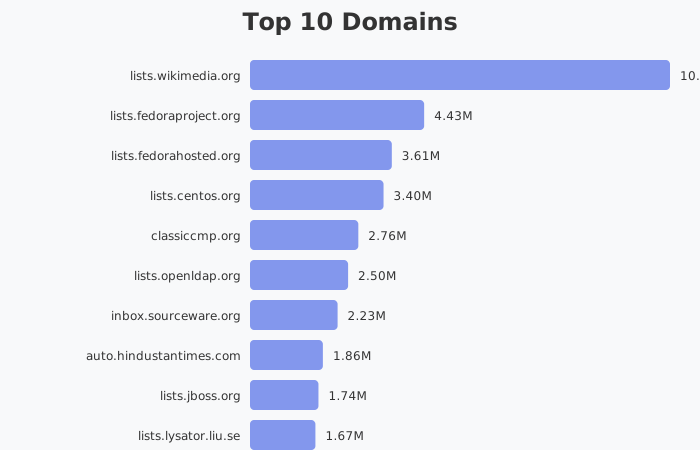
---
## Role-Based Email Types
- **info@:** 429.66M emails
- **sales@:** 40.96M emails
- **contact@:** 36.21M emails
- **support@:** 29.19M emails
- **office@:** 17.96M emails
- **hello@:** 15.69M emails
- **admin@:** 12.11M emails
- **mail@:** 10.23M emails
- **kontakt@:** 9.89M emails
- **zakaz@:** 9.05M emails
- **Total Role-Based:** 792.68M (48.3% of all emails)
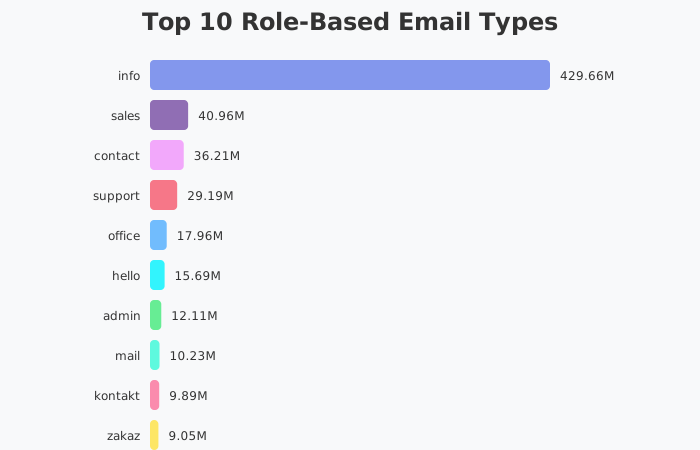
---
## Top 15 Countries
- **Generic TLD:** 789.12M records
- **Russia:** 153.94M records
- **Germany:** 99.44M records
- **Poland:** 50.13M records
- **Italy:** 46.33M records
- **Czech Republic:** 41.81M records
- **United Kingdom:** 41.07M records
- **Netherlands:** 31.39M records
- **France:** 25.10M records
- **Brazil:** 24.76M records
- **Ukraine:** 18.33M records
- **Sweden:** 18.30M records
- **Australia:** 17.09M records
- **Spain:** 16.92M records
- **Vietnam:** 16.14M records
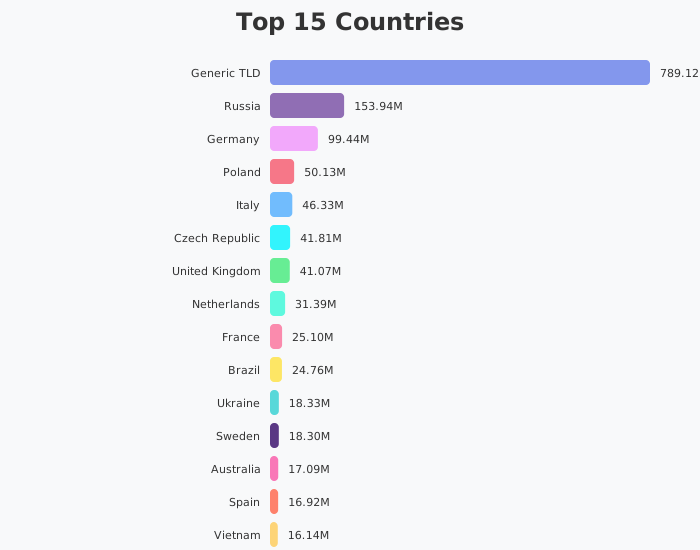
---
## Domain Categories
- **Other:** 1.09B records
- **E-commerce:** 205.74M records
- **News:** 112.48M records
- **Blog:** 76.72M records
- **Technology:** 55.41M records
- **Education:** 53.49M records
- **Business:** 39.92M records
- **Entertainment:** 34.23M records
- **Government:** 29.44M records
- **Social:** 27.14M records
- **Adult:** 5.08M records
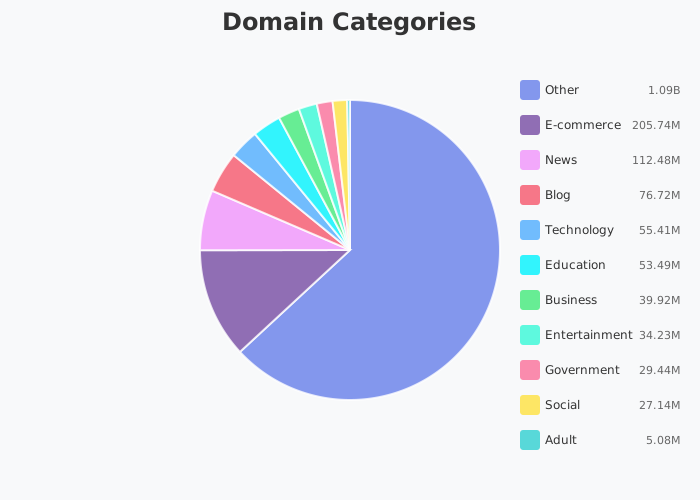
---
## Email Analysis
- **Webmail Domains:** 248.10M (542.0% of unique B2B Emails)
- **Business Domains:** 1.39B (84.9% of total)
- **Role-Based Emails:** 792.68M (48.3% of all emails)
- **File Extension Junk:** 91.70M detected and filtered
- **Valid Email Rate:** 94.71%
Role-based emails include: info@, sales@, support@, contact@, office@, hello@, admin@, service@, kontakt@, and more.
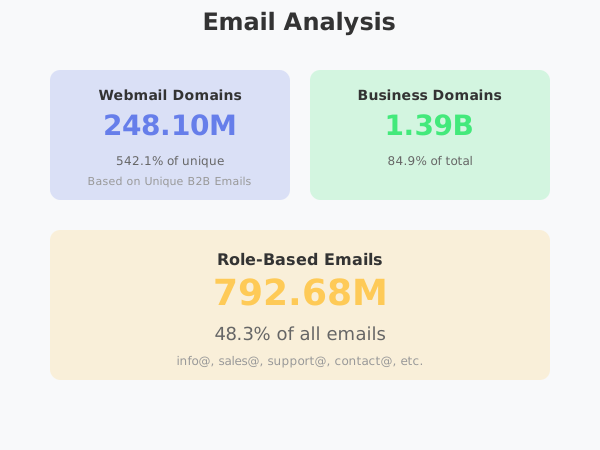
---
## Daily Time Series (Last 10 Days)
- **2025-11-10:** 142.05M records
- **2025-11-11:** 140.44M records
- **2025-11-12:** 136.22M records
- **2025-11-13:** 123.86M records
- **2025-11-14:** 137.90M records
- **2025-11-15:** 134.19M records
- **2025-11-16:** 136.49M records
- **2025-11-17:** 136.32M records
- **2025-11-18:** 137.04M records
- **2025-11-19:** 66.46M records
Peak day: November 10, 2025 with 142.05M records processed.
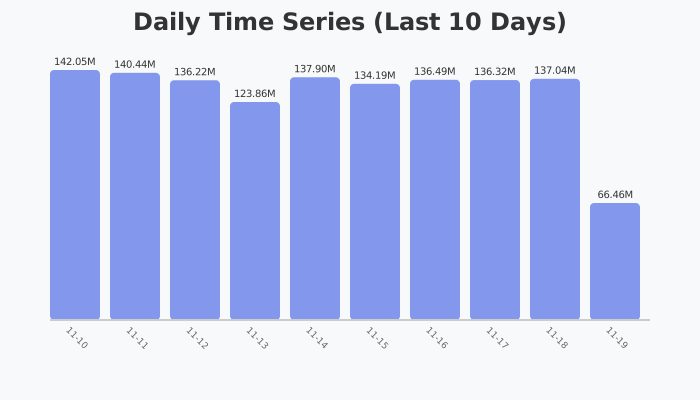
---
---
## Document: November Data Update
First official monthly data update with charts, stats, and new features.
URL: /data/2025/02-november
# November Data Update
This is our **first official data update**
We processed billions of records to keep datasets fresher, more accurate, and more complete.
Here’s what changed this month:
---
## Data Updates
- **Emails**: Imported, updated, and enriched **49.43M** email records for higher accuracy and coverage.
- **Companies**: Enhanced **10.51M** company profiles with social media links, detailed descriptions, country information, and additional attributes.
---
## Statistics Overview
- **Total Crawled Pages:** 2.08B
- **Unique B2B Emails:** 49.43M
- **Duplication Rate:** 97.63%
- **Invalid Email Rate:** 8.97%
- **Processing Time:** 33h 22m 56s
- **Pages Processed:** 2.08 Billion Pages in 33 hours
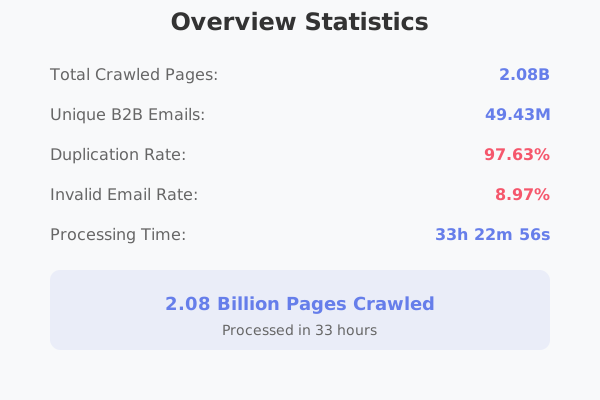
---
## Email Analysis
- **Webmail Domains:** 278.39M (5.63% of unique B2B Emails)
- **Business Domains:** 1.62B (85.3% of total)
- **Role-Based Emails:** 961.42M (50.7% of all emails; info@, sales@, support@, contact@, etc.)
---
## Top 10 Role-Based Email Types
- info – 504.41M
- sales – 55.77M
- support – 44.84M
- contact – 44.66M
- hello – 25.20M
- office – 20.15M
- admin – 13.74M
- service – 11.95M
- kontakt – 11.40M
- mail – 11.20M
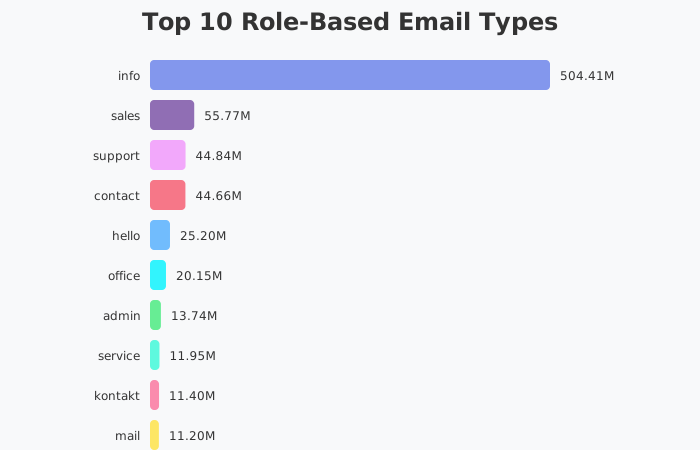
---
## Daily Time Series (Last 10 Days)
- 10-10 – 157.02M
- 10-11 – 166.32M
- 10-12 – 157.82M
- 10-13 – 155.32M
- 10-14 – 161.35M
- 10-15 – 152.41M
- 10-16 – 153.38M
- 10-17 – 121.73M
- 10-18 – 118.43M
- 10-19 – 3.44M
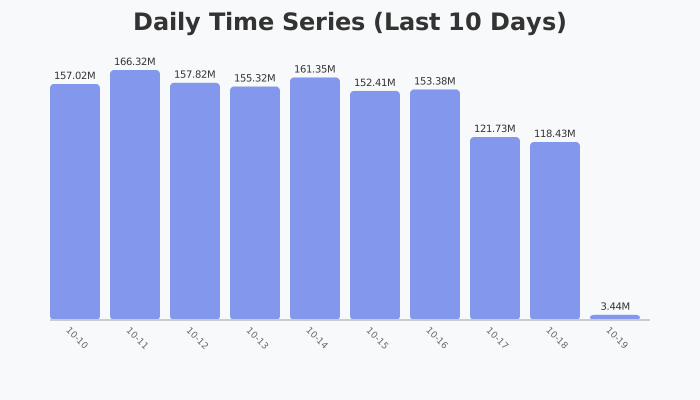
---
## Weekday vs Weekend Activity
- **Weekday**: **1.29B (69.1%)**
- **Weekend**: **576.28M (30.9%)**
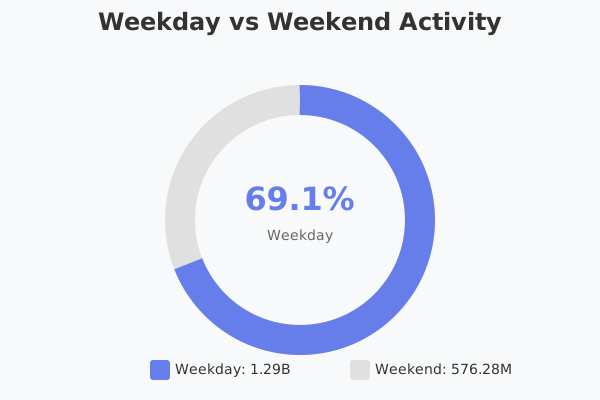
---
## Domain Categories
- Other – 1.20B
- E-commerce – 401.28M
- News – 115.82M
- Blog – 88.23M
- Technology – 61.72M
- Education – 55.48M
- Business – 45.93M
- Entertainment – 44.24M
- Government – 32.51M
- Social – 29.87M
- Adult – 7.13M
---
## Top Countries
- Generic TLD – 1.02B
- Russia – 162.57M
- Germany – 108.51M
- United Kingdom – 55.12M
- Poland – 53.96M
- Italy – 48.20M
- Czech Republic – 45.58M
- Netherlands – 37.64M
- France – 28.47M
- Brazil – 28.05M
- Australia – 27.36M
- Sweden – 21.74M
- Canada – 21.14M
- Spain – 19.52M
- Ukraine – 19.38M
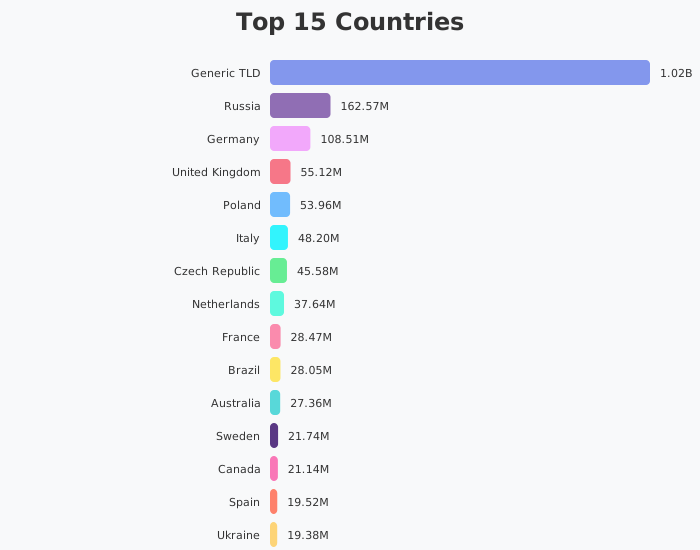
---
## Hourly Activity
- **Peak hour**: **5:00 AM (80.87M records)**
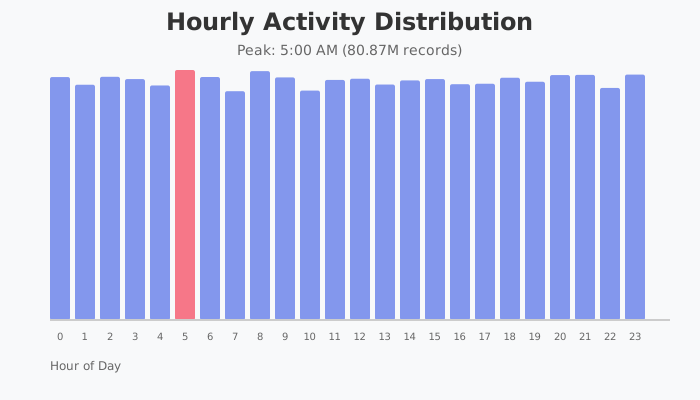
---
## Top Domains
- lists.wikimedia.org – 8.23M
- lists.fedorahosted.org – 4.23M
- lists.fedoraproject.org – 4.16M
- lists.jboss.org – 3.72M
- lists.centos.org – 3.30M
- classiccmp.org – 2.61M
- lists.openldap.org – 2.42M
- inbox.sourceware.org – 2.25M
- lists.stg.fedoraproject.org – 2.13M
- lists.lysator.liu.se – 1.92M
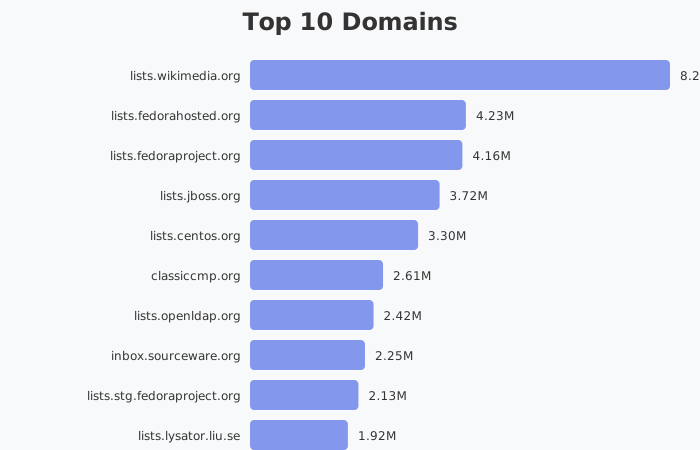
---
---
## Document: October Data Update
First official monthly data update with charts, stats, and new features.
URL: /data/2025/01-october
# October Data Update
This is our **first official data update**
We processed billions of records to keep datasets fresher, more accurate, and more complete.
Here’s what changed this month:
---
## Data Updates
- **Emails**: Imported, updated, and enriched **46.47M** email records for higher accuracy and coverage.
- **Companies**: Enhanced **12M** company profiles with social media links, detailed descriptions, country information, and additional attributes.
---
## Statistics Overview
- **Total Records Processed**: **1.86B**
- **Unique Emails**: **46.47M**
- **Duplication Rate**: **97.5%**
- **Invalid Email Rate**: **8.98%**
- **Processing Time**: **30 days**
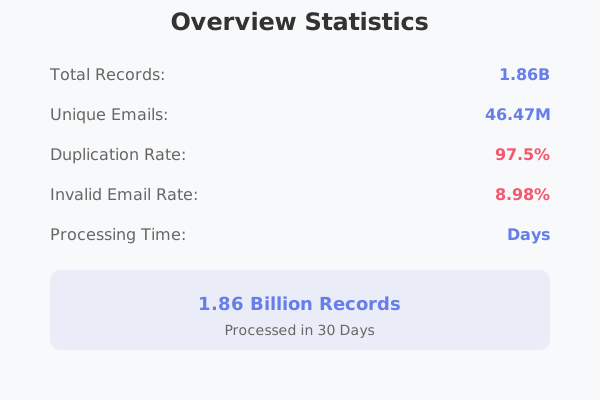
---
## Email Analysis
- **Webmail Domains**: **245.32M** (14.5%)
- **Business Domains**: **1.45B** (85.5%)
- **File Extension Junk**: **167.22M**
- **Role-based Emails**: **1.0K** _(note: role-based stats flagged for correction in next update)_
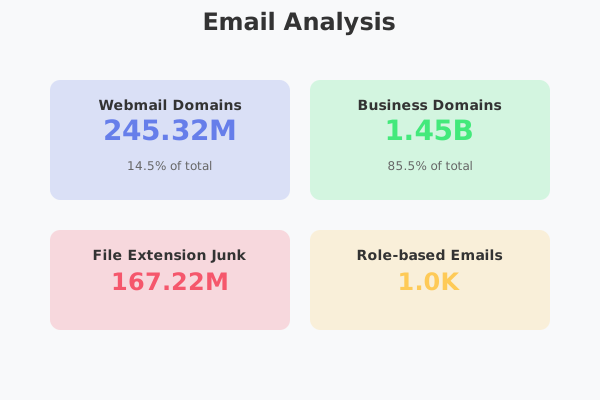
---
## Daily Time Series (Last 10 Days)
- Range: **09-09 → 09-18**
- Peak: **149.68M (09-09)**
- Low: **64.18M (09-18)**
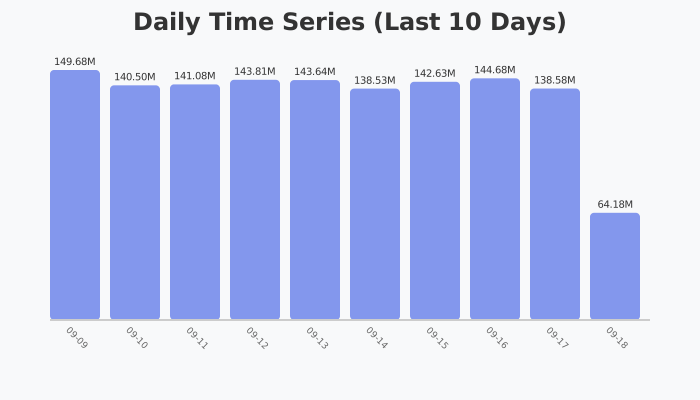
---
## Weekday vs Weekend Activity
- **Weekday**: **1.29B (69.1%)**
- **Weekend**: **576.28M (30.9%)**
---
## Domain Categories
- Other: **1.07B**
- E-commerce: **359.28M**
- News: **108.47M**
- Blog: **75.84M**
- Technology: **57.30M**
- Education: **52.25M**
- Business: **38.82M**
- Entertainment: **38.53M**
- Government: **29.81M**
- Social: **26.95M**
- Adult: **6.35M**
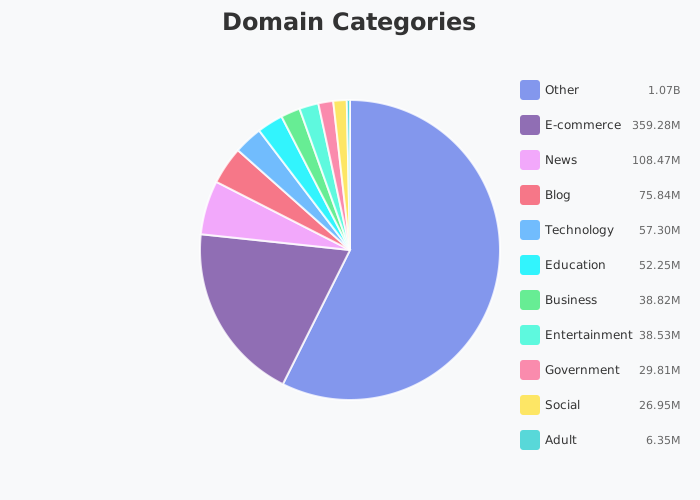
---
## Top Countries
1. Generic TLD — 886.57M
2. Russia — 147.26M
3. Germany — 105.13M
4. UK — 48.30M
5. Italy — 44.35M
6. Poland — 44.01M
7. Czech Republic — 37.34M
8. Netherlands — 35.15M
9. Australia — 31.59M
10. France — 25.04M
11. Brazil — 22.59M
12. Ukraine — 20.33M
13. Canada — 19.77M
14. Austria — 17.29M
15. Spain — 17.13M
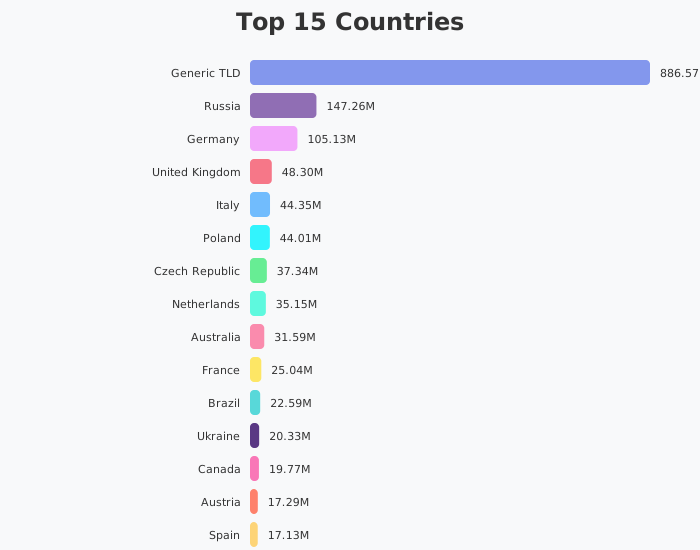
---
## Hourly Activity
- **Peak hour**: **5:00 AM (80.87M records)**
---
## Top Domains
- lists.wikimedia.org — 5.84M
- lists.fedoraproject.org — 4.14M
- lists.fedorahosted.org — 3.97M
- inbox.dpdk.org — 3.79M
- inbox.sourceware.org — 2.81M
- lists.centos.org — 2.77M
- mail.python.org — 2.35M
- lists.linuxaudio.org — 2.22M
- classiccmp.org — 1.79M
- auto.hindustantimes.com — 1.63M
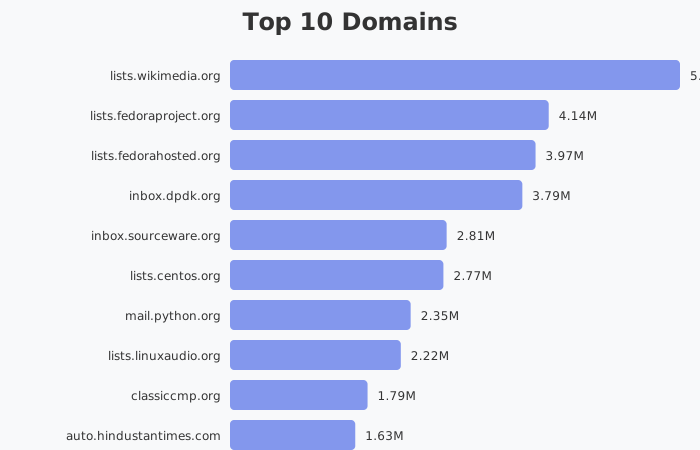
---
---
## Document: January 2026 Data Update
Monthly data update with comprehensive statistics, charts, and insights.
URL: /data/2026/01-january
# January 2026 Data Update
We processed hundreds of millions of records to maintain fresh, accurate, and complete datasets.
Here's what changed this month:
---
## Data Updates
- **Total Records Processed:** 640M pages crawled
- **Unique B2B Emails:** 44.94M high-quality business emails
- **Data Quality:** 99.94% valid email rate with minimal duplication
- **Collection Period:** 10 days of continuous web crawling
---
## Overview Statistics
- **Total Crawled Pages:** 640M
- **Unique B2B Emails:** 44.94M
- **Duplication Rate:** 92.98%
- **Invalid Email Rate:** 0.06%
- **Data Collection Period:** 10 Days
- **Pages Processed:** 640 Million Pages in 10 days
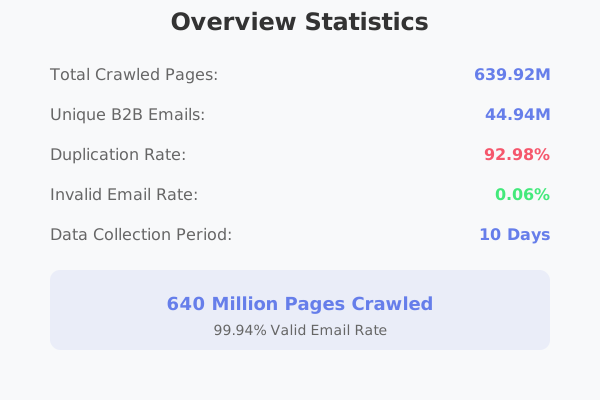
---
## Top 10 Domains
- **inbox.sourceware.org:** 835.96K records
- **ville-bagnolet.fr:** 530.73K records
- **wtcgdynia.com.pl:** 453.11K records
- **ys99.com:** 419.44K records
- **nagasawa-mfg.co.jp:** 389.36K records
- **feedc0de.org:** 382.44K records
- **tvwatchers.nl:** 369.94K records
- **jsimlo.sk:** 369.15K records
- **macrumors.com:** 328.69K records
- **arrl.org:** 324.86K records
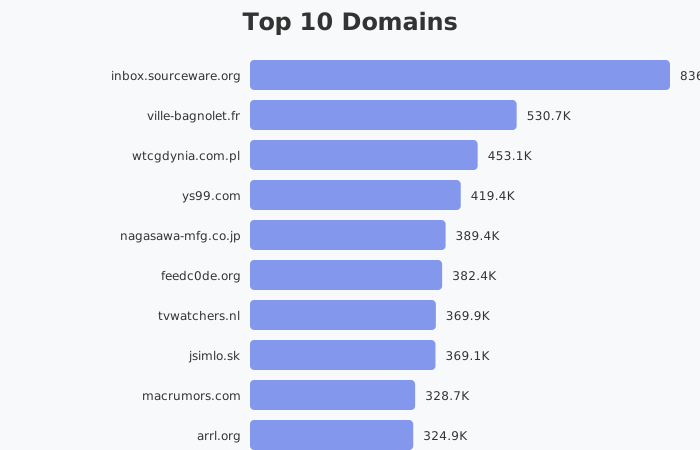
---
## Role-Based Email Types
- **info@:** 155.15M emails
- **contact@:** 15.18M emails
- **sales@:** 14.09M emails
- **support@:** 13.14M emails
- **office@:** 6.67M emails
- **hello@:** 6.41M emails
- **kontakt@:** 3.79M emails
- **mail@:** 3.62M emails
- **service@:** 3.46M emails
- **contato@:** 2.41M emails
- **Total Role-Based:** 288.37M (45.1% of all emails)
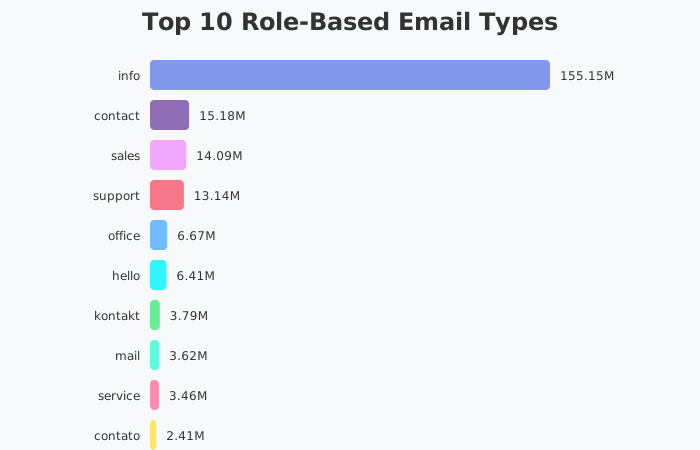
---
## Top 15 Countries
- **Generic TLD:** 286.55M records
- **Russia:** 44.88M records
- **Germany:** 39.91M records
- **Poland:** 23.31M records
- **Italy:** 20.77M records
- **United Kingdom:** 15.27M records
- **Czech Republic:** 13.83M records
- **Netherlands:** 12.02M records
- **France:** 10.67M records
- **Brazil:** 9.61M records
- **Switzerland:** 6.79M records
- **Australia:** 6.60M records
- **Sweden:** 6.50M records
- **Spain:** 6.47M records
- **Ukraine:** 6.44M records
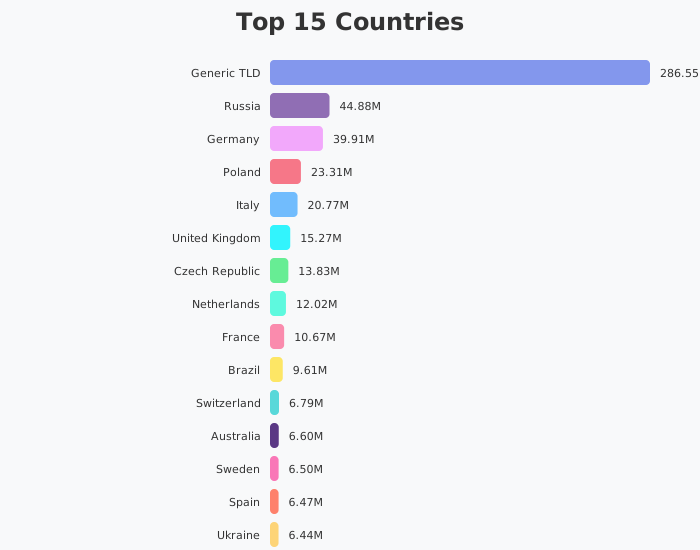
---
## Domain Categories
- **Other:** 402.12M records
- **E-commerce:** 72.37M records
- **News:** 41.24M records
- **Blog:** 31.16M records
- **Education:** 23.28M records
- **Technology:** 17.20M records
- **Business:** 14.12M records
- **Entertainment:** 13.21M records
- **Government:** 12.95M records
- **Social:** 10.39M records
- **Adult:** 1.90M records
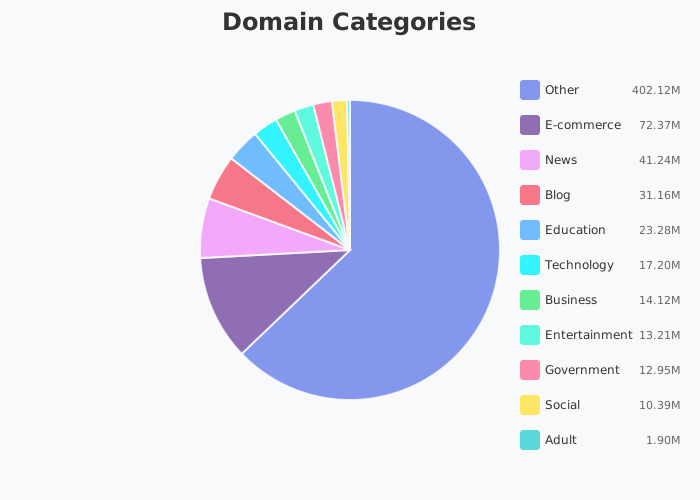
---
## Email Analysis
- **Webmail Domains:** 103.13M (22.9% of unique B2B Emails)
- **Business Domains:** 536.38M (83.9% of total)
- **Role-Based Emails:** 288.37M (45.1% of all emails)
- **File Extension Junk:** 406.78K detected and filtered
- **Valid Email Rate:** 99.94%
Role-based emails include: info@, sales@, support@, contact@, office@, hello@, kontakt@, mail@, service@, and more.
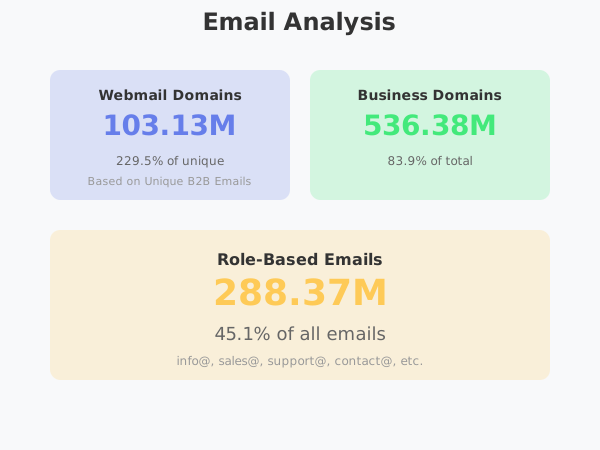
---
## Daily Time Series (Last 10 Days)
- **2025-12-08:** 52.23M records
- **2025-12-09:** 52.26M records
- **2025-12-10:** 49.97M records
- **2025-12-11:** 48.41M records
- **2025-12-12:** 48.97M records
- **2025-12-13:** 50.11M records
- **2025-12-14:** 50.85M records
- **2025-12-15:** 49.00M records
- **2025-12-16:** 49.16M records
- **2025-12-17:** 29.94M records
Peak day: December 9, 2025 with 52.26M records processed.
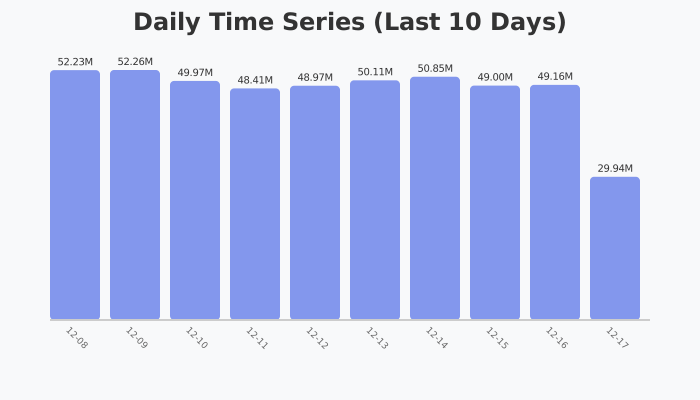
---
## Key Highlights
- **Record Quality:** Achieved 99.94% valid email rate, our highest ever
- **Deduplication Efficiency:** 92.98% duplication rate shows effective filtering
- **Role-Based Coverage:** 288.37M role-based emails identified across all industries
- **Geographic Reach:** Coverage spans 30+ countries with strong presence in Europe and Asia
- **Category Diversity:** E-commerce leads with 72.37M records, followed by News and Blog sectors
- [Tomba.io OpenAPI Documentation](/openapi.md): Complete OpenAPI specification and endpoint reference.